In today's tech-savvy business environment, automation is a game-changer. Zapier has been a go-to tool for streamlining workflows and connecting different apps. However, as technology evolves, businesses are on the lookout for alternatives that offer a perfect blend of features, ease of use, and scalability. Let's take a closer look at some zapier competitors and how they can level up the efficiency of your business processes.
To start, let's break down what Zapier does and why it's so essential for many businesses. We'll explore what makes Zapier unique and whether there are other alternatives to zapier that can outperform Zapier in terms of functionality.
Optimize your Business Process on Latenode – the best Zapier Alternative
What is Zapier?

Zapier acts as an efficient bridge between diverse web applications, offering a user-friendly platform for task automation and software integration. Through "Zaps," users can establish automated workflows, triggering actions in various applications based on specific events. Its versatility spans a wide range of applications, from social networks to CRM, enabling the creation of flexible and personalized workflows to meet user needs.
Despite its numerous advantages, using Zapier may encounter certain challenges. For instance, delays between triggers and actions may arise due to server loads, but their impact is generally minimal. Limits on the number of launches on zapier can be addressed by upgrading to a paid version or optimizing processes.
Additionally, some applications may require additional configurations, but careful examination of documentation and utilization of supported triggers can resolve this issue. And, of course, security concerns can be addressed by employing secure authentication methods.
Zapier Pricing
| Plan | Price | Tasks per Month | Zaps | Update Time |
|---|---|---|---|---|
| Free | $0.00 | 100 | 5 | 15 minutes |
| Starter | $19.99 per month | 750 | 20 | 15 minutes |
| Professional | $49 per month | 2,000 | Unlimited | 2 minutes |
| Team | $289 per month | 50,000 | Unlimited | 1 minute |
| Company | $750 per month | 100,000 | Unlimited | 1 minute |
Given this information, let's present a list of alternative applications to Zapier:
- Latenode
- Make
- IFTTT
- Albato
- Microsoft Power Automate
When deciding which best zapier alternative to choose for automating business processes, it's essential to adhere to clear criteria that align with the unique needs of your specific company. We've compiled a list of the most important criteria that we will be relying on when selecting not only free alternatives to zapier.
What Makes a Task Automation Tool Good
Choosing a task automation tool is a strategic decision that significantly impacts the efficiency of your work and organizational processes. To make an informed decision, it's crucial to consider several key criteria that align with your specific needs. Let's explore the factors to prioritize:
- Application Integrations and Support
- Flexibility and Versatility
- Performance and Speed
- Security and Confidentiality
- Pricing and Flexible Plans
- Support and Training
- User Reviews and Ratings
- Functionality and Features
Optimize your Business Process on Latenode – the best automation platform for you
It's important to note that not every product suits everyone, and these criteria are ranked to help each individual choose a Zappier alternative based on specific objectives and business requirements. Thorough research and comparison of options will aid in making an informed choice that meets your needs.
1. Latenode

In the modern business world, where every minute is precious, automation emerges as the key to enhancing efficiency and responsiveness. Among the myriad alternatives to zapier, Latenode**( $0-249 for full version)** stands out, rightfully claiming the top spot and even surpassing the likes of Zapier. Let's delve into the realm of comparative analysis to understand why Latenode takes the lead, providing unique capabilities and setting a new standard in the world of automation.
If you're exploring alternatives to Zapier, Latenode stands out as a superior choice, offering enhanced flexibility and cost-effectiveness. Let's dive into the reasons why Latenode takes the lead, making it the ultimate Zapier alternative for your automation needs.
Key Features of Latenode
Affordability and Power. Latenode presents an affordable and powerful alternative to Zapier. Forget about the pricing constraints and focus on unleashing your creativity in building workflows. Getting started with Latenode is not only cost-effective but also allows you to implement your automation ideas without worrying about additional charges for each step.
Advanced workflow management. Latenode is an intuitive and non-linear workflow automation platform, excelling in the hands of tech-savvy individuals. The architecture allows for connecting nodes, executing custom HTTP requests, and adding multiple triggers without incurring charges for each module, setting it apart from Zapier.
Code & AI capabilities. With Latenode, you can overcome limitations by using JavaScript custom code and an AI Assistant, capable of creating integrations with any application from scratch in minutes.
Zapier vs Latenode Pricing Comparison
In terms of pricing, Latenode proves to be a cost-effective solution. It offers a unique and comprehensive free monthly package, including 500 execution credits. The Starter Package, priced at only $19, enhances the execution credits to 10,000. Unlike Zapier, Latenode, the best zapier competitor, doesn't impose additional charges for executing complex workflows, making it significantly more budget-friendly.
| Feature | Latenode | Zapier |
|---|---|---|
| Pricing for generating 2,000 GPT texts | $1.38 | $123.84 |
| Pricing Model | Time based | Task based |
| JavaScript run | 2 min | 30 sec |
| NPM Packages | ✅ | ❌ |
| Time-consumption for building new integration | 15 min | 2 weeks |
| Flexibility | High | Limited |
Unique AI Features and Code Capabilities
Latenode offers a range of unique features and capabilities, including multi-step workflows, instant webhook execution, unlimited access to JavaScript code with an AI Assistant, and headless browser capabilities. It provides advanced error handling, the option to re-run failed scenarios with historical data, and the flexibility to rearrange workflows as needed.
Customer Support
When it comes to customer support, Latenode's Forum community provides a social network of low-code experts, offering quick responses and assistance with scenarios and platform functionality. This goes beyond traditional support, creating a collaborative environment for users which can't be said for zapier customer service.
Effortless Migration from Zapier
Considering Latenode's ongoing expansion and Zapier's pricing model, migrating to Latenode makes sense for many users. Zapier charges per transaction, while Latenode bases costs on time. As a result, Latenode is significantly cheaper, offering a great chance to explore its features.
Why Latenode is One of the Best Zapier Alternatives
- Cost Efficiency: Latenode is much cheaper on massive task automations, offering up to 89.7 times cost efficiency compared to zapier.
- Enhanced JavaScript Support: Latenode provides full JavaScript support, including NPM packages, allowing for greater flexibility in custom data processing.
- Synergy with Zapier: Latenode and Zapier each have their advantages. Using Latenode as a powerful enhancement to your Zaps adds strategic value.
2. Make

Why did the Make user feel proud of coming in second place?
Because they knew they had the power to "make" improvements and "make" it to the top next time!
Make**($0-343 for 150 000 tasks)**, initially known as Integromat and one of the best zapier alternative, distinguishes itself as a powerful command-line utility primarily used in software development to automate project build processes. Its flexibility and robust customization capabilities make it an appealing choice for companies like zapier requiring intricate and specialized automation. However, Make comes with a learning curve, demanding familiarity with the command line and the creation of Makefiles. Additionally, its range of integrations may be more limited compared to more universal sites like Zapier.
Detailed Comparison
Let's delve into a more structured comparison to highlight the key features and drawbacks of each tool.
Make:
- Command-Line Utility: Make operates as a command-line utility predominantly used in software development for project build automation.
- Flexibility and Customizability: Exhibits high flexibility and potent customization capabilities, enabling the creation of intricate and tailored automated processes.
- Requirements: Requires command-line knowledge and the creation of Makefiles, which may pose a challenge for newcomers and non-programmers.
Zapier:
- Web Integration Platform: open source zapier functions as a web-based platform for integrating various applications and automating business processes without the need for programming.
- Ease of Use: Known for its user-friendly web interface and a wide array of integrations, making it accessible to a broad user base.
- Limited Customization: Despite its extensive integration options, Zapier's customization capabilities are comparatively limited, potentially hindering more complex business logic.
| Criteria | Make | Zapier |
|---|---|---|
| Purpose | Automating project builds. | Integrating apps, automating tasks. |
| Flexibility | Highly flexible and customizable. | User-friendly, limited complexity. |
| Requirements | Requires command line, Makefile. | Simple, no programming needed. |
| Interface | Command line, needs Makefile. | Web-based, no coding required. |
| Ease of Use | Tech skills needed, steeper curve. | Simple web interface for all users. |
| Applications | ~1000 integrations available. | ~3000 integrations available. |
| Approach | Visual interface, like a mind-map. | List-based, traditional approach. |
| Pricing | $0-343 per month for 150,000 tasks. | $0-750 per month for 100,000 tasks. |
| Advantages/Disadvantages | - Great flexibility- Suited for complex tasks.- Requires tech skills.- Limited customization.- More integrations available. | - Easy to use- User-friendly for all.- Diverse integrations.- Limited customization.- More integrations available. |
Choosing between zapier and make hinges on the specific needs and characteristics of your business:
- Make shines in scenarios demanding high flexibility and specialized automated processes, particularly in the realm of software development.
- Zapier excels when simplicity of use and basic automated processes are the priority, catering to a wider audience.
The choice of best zapier competitor depends on the specific needs and characteristics of your business. Make excels in flexibility and customization but requires more technical knowledge, making it ideal for complex automation tasks, especially in software development. On the other hand, Zapier offers simplicity and a wide range of integrations, making it suitable for basic automation needs and users without programming expertise.
Ultimately, the decision on who is better depends on your business's unique requirements and characteristics
Optimize your Business Process on Latenode – the best automation platform for you
3. Microsoft power automate

In the world of business processes, Microsoft Power Automate ($15 per user/month) emerges as a powerful tool for automation, operational efficiency enhancement and great zapier competitor. Let's delve into the key features that make Power Automate a preferred choice for businesses.
Here are the key features
Integrations
- Impressive range within Microsoft and third-party apps, facilitating universal workflows.
Flexibility in Data Handling
- Offers flexible tools for intricate business logics, catering to various tasks.
Ease of Use
- Intuitive interface, particularly beneficial for Microsoft users.
Security and Access Management
- Integrates with Azure Active Directory for high security and access control.
Platform for Various Tasks
- Power Automate: Adaptable to diverse business needs, from notifications to complex scenarios.
Future of Automation
- Continuous updates and an active community keep Power Automate at the forefront of development.
Zapier and Power Automate Comparison
Integrations and Ecosystem
- Power Automate: Deep Microsoft integration and broad third-party support.
- Zapier: Supports 3,000+ applications from various sources.
Flexibility and Complexity of Workflows
- Power Automate: More advanced tools compared to zapier tools.
- Zapier: Intuitive but less powerful in creating complex business processes.
Ease of Use
- Power Automate: Intuitive, especially for Microsoft users.
- Zapier: Simple but less intuitive for automation novices.
Security and Access Management
- Power Automate: High security with Azure Active Directory.
- Zapier: Basic security measures, may be less suitable for enterprises.
Pricing and Plans
- Power Automate: Built into Microsoft 365, with paid plans for advanced features.
- Zapier: Offers a free zapier plan and paid plans with additional features.
Support and User Community
- Power Automate: Supported by Microsoft and an active user community.
- Zapier: Active community, with support potentially more limited than Microsoft.
In the realm of business process automation, both Microsoft Power Automate and zapier app offer unique capabilities. Power Automate stands out with its flexibility, deep integration with Microsoft, and advanced tools suited for experienced users. On the other hand, Zappier provides simplicity and a wide range of integrations, making it ideal for those embarking on their automation journey.
If you require deep integrations within the Microsoft ecosystem, high security levels, and good zapier alternative, Power Automate is the solution for you. However, if you seek ease of use, a broad choice of integrations, and more accessible pricing, zapier is also an excellent option.
Ultimately, the right choice depends on your specific needs, level of expertise, and preferences. Both services offer opportunities for streamlining business processes, and your decision will be shaped by your goals and requirements.
4. A_lbato_

Albato ($0-162 per month) emerges as a compelling zapier alternative, offering a no-code automation platform that stands as a robust alternative to the widely adopted zapier software. Below, we embark on a comprehensive exploration of Albato, unraveling its key features, conducting hands-on comparisons with zapier automation and providing valuable insights into its strengths, weaknesses, and overall user experience.
At the heart of Albato's appeal is its capacity to streamline data collection from one application and seamlessly execute actions in another. Boasting an extensive library of over 400 integrations, spanning from everyday tools like Gmail and Google Sheets to more specialized platforms such as WordPress, Albato opens up a world of possibilities for users aiming to enhance their automation workflows and look for a good alternative to Zapier.
Albato pricing
| Feature | Free | Basic | Standard | Pro | Enterprise |
|---|---|---|---|---|---|
| PRICE | $0 per month | $15 per month | $42 per month | $104 per month | $162 per month |
| Automation update time | 15 min | 15 min | 5 min | 5 min | 1 min |
| Active automations | 5 | 20 | ∞ | ∞ | ∞ |
| Steps per automation | 2 | ∞ | ∞ | ∞ | ∞ |
| Transactions | 100 | 1,000 | 5,000 | 15,000 | 30,000 |
| Additional transactions | ❌ | ❌ | ✅ (Included) | ✅ (Included) | ✅ (Included) |
| Price per additional transaction | ❌ | ❌ | $0.02 | $0.02 | $0.01 |
After exploring zapier competitor features and demonstrating its capabilities, we move on to comparing it with the industry leader, Zapier. Both platforms offer similar capabilities, but there are key differences in their approaches. Albato's interface is more attractive and intuitive, simplifying the process of connecting applications.
On the other hand, zapier app is simpler to use but less powerful for creating complex business processes. So, let's move on to the list of the features of the platform:
- Albato Integrations. Albato's set of integrations includes well-known applications such as Slack and Trello, as well as Mailchimp and HubSpot. Albato also offers a white-label solution for integrating connections into a custom interface.
- Albato Flow Builder. To fully understand Albato's capabilities, let's explore its Flow Builder. Users can create complex workflows with an intuitive drag-and-drop interface and extensive customization options.
- App Integrator and White Label Albato. In addition to Albato's integrations, users can create their own integrations using the App Integrator. The white-label solution allows integrating Albato connections into a custom interface.
Albato offers a powerful alternative to Zapier with a broad set of integrations and a flexible Flow Builder. Despite having a low entry barrier, Albato provides extensive customization options and an appealing interface. Whether as an alternative to Zapier or a tool for automating workflows, Albato is a platform worth considering.
**4. IFTTT
**
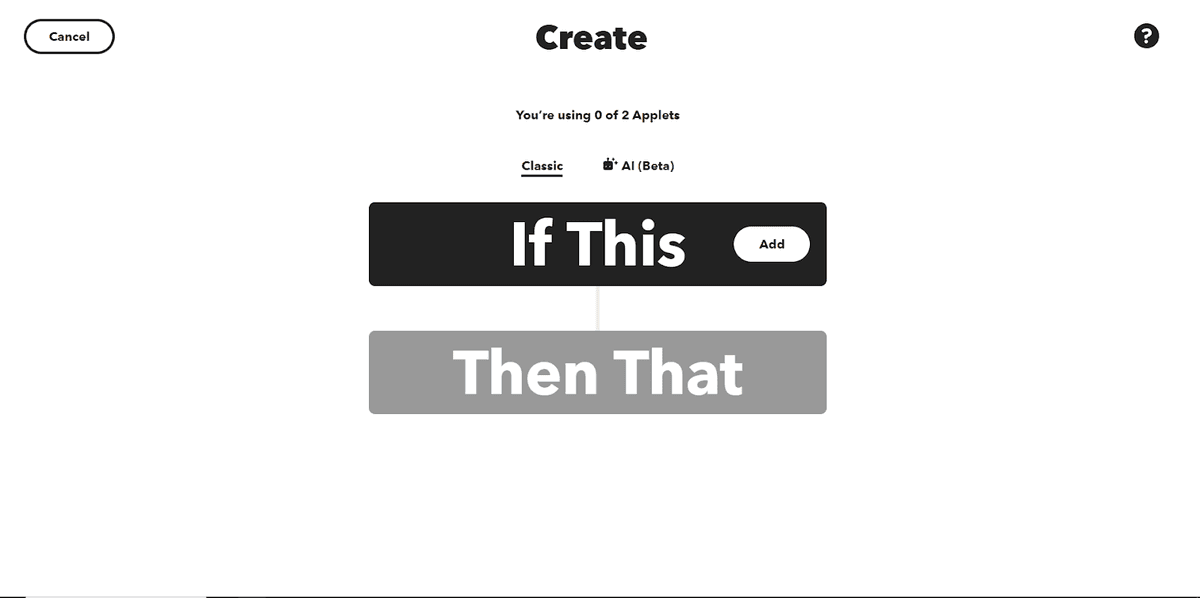
IFTTT, or If This Then That ($0-14.99 per month) , stands out as an innovative platform for task automation, distinguished by its user-friendly interface and remarkable flexibility. This zapier competitor is gaining increasing popularity due to its ability to integrate various applications and devices, enabling users to create personalized automation scenarios. Let's explore the key features of IFTTT and what makes it so appealing to a wide range of users.
Key Features of IFTTT:
User-Friendly Interface and Broad Compatibility. IFTTT stands out with its convenient interface and extensive compatibility with diverse applications and devices.
Free Access with Premium Subscription. In addition to a free plan, IFTTT offers a premium subscription for advanced capabilities.
Ease of Use. IFTTT is renowned for its simplicity and intuitiveness, allowing users to easily create applets – mini-programs that combine conditions and actions for task automation.
Wide Range of Integrations. IFTTT supports numerous applications and devices, including social networks, smart homes, cloud storage services, and more.
"If-Then" Concept. The core concept of this zapier competitor revolves around creating "If-Then" rules, allowing users to define conditions under which specific actions will be executed.
Customizable Recipes. IFTTT offers ready-made recipes that can be easily customized to suit individual needs or create unique automation scenarios.
Features and Nuances of IFTTT
IFTTT
Interface Simplicity. IFTTT, similar to zapier, stands out with a straightforward interface, making it an ideal choice for beginners and those who prefer quick and simple setups.
Limited Flexibility. The "If This, Then That" approach limits the complexity of automated processes. IFTTT is excellent for basic tasks but may fall short for more intricate scenarios.
Free and Premium Plans. IFTTT provides a free plan with limited functionality and a premium subscription for access to additional features.
In conclusion, ranking 5th in our review, IFTTT is good zapier competitor and proves to be a powerful tool for those who value ease of use and readiness to utilize zapier free alternatives. Its flexibility and a wide range of integrations make it an attractive option for various automation tasks.
Optimize your Business Process on Latenode – the best automation platform for you