



Most teams I talk to know what BPM stands for. They've read the Wikipedia entry, sat through a vendor demo, maybe sketched a process diagram on a whiteboard after a frustrating quarter. They understand the concept.
Then they go shopping for a BPMS and discover the gap between knowing what process management means and understanding what a Business Process Management System actually does when it's running in production. Those are two different problems. This article is about the second one.
The central claim here is falsifiable and worth stating plainly: a BPMS is not a documentation tool or a one-time implementation project. It's the execution layer that makes BPM a live, measurable discipline across people, systems, and data. If your BPMS is just drawing process maps that nobody monitors, you've bought the container but left it empty.
Where most teams go wrong first
- BPMS stands for Business Process Management System - the software that executes BPM, not just documents it.
- A real BPMS covers the full lifecycle: design, automation, monitoring, and optimization in one environment.
- The biggest misconception: treating BPMS as process mapping software instead of an operational execution layer.
- Operations teams, IT leads, and line-of-business managers in BFSI, healthcare, and HR are the primary adopters - not just enterprise architects.

What Is a Business Process Management System?
A BPMS is a software solution that enables organizations to design, analyze, execute, and continuously improve business processes across people, systems, and data. That definition comes from BOC Group's comprehensive BPM guide, and it's more precise than most vendor descriptions because it captures all four verbs. Most tools on the market cover two of them.
The acronym itself appears in two forms: Business Process Management System and Business Process Management Software. As Creatio notes, both terms describe the same category. You'll also see BPMS referred to as a business process management suite, which emphasizes the breadth of capabilities rather than a single tool. For practical purposes, treat all three as interchangeable.
Where BPMS gets specific is in what it replaces. Before a BPMS, most organizations coordinate their processes through scattered tools: email chains for approvals, spreadsheets for tracking, individual apps that don't talk to each other, and institutional memory held by whoever set up the current workaround in 2021. A BPMS is the operational layer that consolidates that coordination into one governed environment.
BPM is the management discipline - the philosophy and method of thinking about processes systematically. BPMS is the software platform that makes that discipline executable. One is a way of thinking. The other is what actually runs the work.
How the BPM Lifecycle Actually Maps to a BPMS
Here's the thing about the BPM lifecycle that most introductions undersell: it only makes sense as a loop, not a project. Design leads to automation. Automation generates data. Data informs optimization. Optimization feeds back into design. If any one of those phases runs in a separate tool with no connection to the others, the loop breaks and you're back to coordinating by email.
As HEFLO describes it, a BPMS functions as a central nervous system for operations. That framing is useful because it captures the integration requirement. A nervous system doesn't work if the sensory input (monitoring) is disconnected from the motor output (execution). Most teams underestimate how much of the lifecycle their current stack doesn't cover. They have design tools that can't execute, and execution tools that can't analyze.
The four phases of the lifecycle map to a BPMS like this:
| Lifecycle Phase | What it does in a BPMS | What breaks without it |
|---|---|---|
| Design & Modeling | Visual process maps, roles, rules, and documentation | Processes exist only in someone's head |
| Automation & Execution | Workflow routing, triggering integrations, enforcing rules | Manual handoffs create bottlenecks and errors |
| Monitoring & Analytics | Real-time performance data, SLA tracking, audit trails | Nobody knows where processes are failing |
| Optimization | Process mining, gap analysis, iterative improvement | Processes stay frozen even as conditions change |
The table is straightforward. The failure mode isn't. The teams I see in support queues most often aren't missing one phase - they've built a partial BPMS from separate tools that don't share data. The design lives in Visio. The execution lives in a Zapier account. The monitoring lives in a spreadsheet someone updates on Fridays, if they remember. That's not a lifecycle. That's four separate projects that happen to be about the same process.
Process Design and Modeling: Where Most Teams Start
Process design is the entry point of the BPM lifecycle within a BPMS, and it's also where the most common misconception takes hold. Teams build their first process diagram, add some swim lanes, document the steps, and conclude they've implemented BPMS. They haven't. They've completed the first phase of it.
A modeling environment inside a BPMS lets you create a visual process model that isn't static documentation - it's the blueprint the execution engine reads. The process diagram becomes the logic that routes tasks, triggers integrations, and enforces business rules. When you update the model, the behavior changes. That's the difference between process modeling and documentation as a living automation layer versus PowerPoint slides about how things should work.
Process modeling and documentation matter. They're the prerequisite for everything else. But treating them as the destination is the mistake I see most often when teams evaluate whether they need a BPMS at all.
Workflow Automation and Execution Inside a BPMS
This is the phase that earns the system its keep. Workflow automation inside a BPMS moves beyond documented design into actual process execution: routing tasks to the right person at the right time, triggering integrations when conditions are met, and enforcing business rules without requiring a human to remember them.
An operations team trying to standardize cross-functional processes typically diagnoses the bottleneck as a communication problem. Usually, on closer inspection, it's an execution problem. The handoff from sales to onboarding fails not because people don't know what to do - the process is documented - but because there's no system to execute and track that handoff automatically. A BPMS flips that: the workflow triggers the handoff, routes the task, sets the deadline, and escalates if the deadline passes. The human work shifts from remembering to decide.
That's where cycle time reductions actually come from. Not from better documentation. From removing the waiting time between steps that only moved when someone remembered to push them.
Process Mining, Analytics, and Continuous Optimization
Process mining is the part of BPMS that most organizations never get to - and it's where the continuous improvement value accumulates over time. Process mining analyzes execution data to show you what actually happens in a process versus what the model says should happen. Those two things are rarely identical, and the gap between them is where waste lives.
The analytics layer tracks process performance over time: cycle times, error rates, SLA compliance, step-level bottlenecks. Executive teams that use BPMS analytics effectively can align operational metrics with strategic goals because they're looking at real execution data, not survey results or quarterly estimates. They can see which processes are performing and which ones need redesign before the problem reaches them as a budget conversation.
The optimization phase closes the loop. Monitoring reveals the bottleneck. Analytics identifies whether it's a design problem, a resource problem, or an exception case. The team adjusts the process model. The execution engine picks up the change. The loop runs again. That's continuous improvement as an operating discipline, not as a project.

Key Features of a BPMS That Separate It from Generic Workflow Tools
This is the practical audit test. Run a tool you're evaluating against each of these. If it misses two or more, you're looking at a workflow tool, not a BPMS.
- Visual modeling environment with execution capability.
A BPMS provides a modeling environment where process diagrams aren't documentation artifacts - they're the logic the system actually executes. Generic workflow tools let you draw boxes and arrows. A BPMS reads those boxes and arrows as runnable business rules. If updating the model doesn't change the behavior, it's a documentation tool wearing automation clothing.
- Automation engine that handles business rules, not just task routing.
Task routing (send this to that person) is a feature. An automation engine enforces conditional business rules, handles exceptions, manages parallel branches, and executes without manual intervention across end-to-end process flows. Generic tools handle the simple linear case. BPMS handles what happens when the process forks, fails, or hits an edge case.
- Process mining or execution analytics built in.
BPMS tools include analytics that read execution logs and surface performance data: cycle times, bottleneck locations, SLA compliance, and deviation from the intended process flows. Generic workflow tools tell you whether the task completed. A BPMS tells you whether the process performed.
- Integration layer, not just app connectors.
BPMS tools connect to systems of record - ERP, CRM, HRIS, document management - using a governed integration layer with data mapping, error handling, and retry logic. Generic connectors trigger actions between apps. BPMS orchestrates data movement across those apps as part of a managed process lifecycle.
- Simulation support before go-live.
Mature BPMS platforms let you simulate process execution against historical or projected data before deploying a new process design. This is how organizations check that a redesigned order-to-cash process doesn't introduce new bottlenecks before they're running at volume. Generic tools skip this entirely.
- User interfaces for human task management.
Task management inside a BPMS includes role-specific dashboards, prioritized inboxes, deadline visibility, and delegation logic - not just a notification that something is waiting. The human layer of the process is first-class, not bolted on.
A tool that covers five of these is worth evaluating seriously. A tool that covers two and markets itself as BPMS is worth scrutinizing the demo very carefully.
Where Organizations Actually Use BPMS: Use Cases by Role and Industry
The use cases worth paying attention to aren't the vendor case study examples - they're the patterns that keep showing up in specific roles when the actual pain is described.
Operations teams are the most frequent adopters in mid-size organizations, and the use case is almost always the same: standardizing cross-functional workflows that currently live in email and tribal knowledge. The onboarding process that requires fourteen manual steps coordinated across three departments. The procurement approval that wanders through four inboxes over two weeks. BPMS gives operations the execution layer to enforce the standard without requiring everyone to remember what the standard is.
IT leaders use BPMS to orchestrate multi-system integrations where process logic, not just data movement, needs to be governed. The difference between a point-to-point integration and a BPM-orchestrated one shows up when the process has exceptions, escalations, or compliance requirements. IT owns the technical layer; BPMS gives them a way to expose that layer to business users without every change requiring an engineering ticket.
By industry, the concentration is heaviest in BFSI (loan origination, compliance review, claims processing), healthcare (patient intake, prior authorization, discharge coordination), manufacturing (production planning, quality control routing, supplier onboarding), and HR (hiring workflows, employee onboarding, performance review cycles). What these verticals share: high process volume, regulatory requirements for auditability, and significant cost from manual errors or cycle time delays.
Line-of-business managers in these areas use BPMS for organizational process governance - not to manage the technical stack, but to get visibility into whether their processes are performing the way they were designed to. The analytics layer gives them data they can act on without waiting for a reporting cycle.
Executive teams see BPMS value last and feel it most. When the BPM lifecycle is running properly, examples of BPM success show up as cycle time reductions and error rate data in operational reviews, not just as anecdotes about what got automated last quarter. That's the shift from digital transformation as a project to digital transformation as an operating model.
Where this gets concrete in practice: a revenue operations manager at a 60-person SaaS company spends hours each week chasing status across CRM, support, and billing to keep onboarding on track. A workflow in Latenode - connecting those systems via its 5,500+ integrations - triggers automatically when a deal closes, populates onboarding fields from the signed contract using an AI model, and routes tasks to the relevant team without the manager acting as a human router. The manual reconciliation step disappears. The process workflow stays auditable. That's the BPMS idea applied at a scale that doesn't require an enterprise procurement process.
📊 By the numbers:
The global BPM market was estimated at USD 26.66 billion in 2026 and is projected to reach USD 64.29 billion by 2033 at a 13.4% CAGR, according to Coherent Market Insights. A separate forecast from Research Nester puts the market at USD 40.9 billion by 2035. The range reflects different methodologies, but the direction is consistent: business process automation investment is accelerating, not stabilizing.
Benefits of BPMS That Show Up After Go-Live, Not Just in the Demo
The demo always looks clean. One trigger, one approval, one notification. Twenty seconds from start to finish. The slide decks are full of benefits of BPM that sound compelling and, frankly, are.
The benefits that actually matter show up three months later, when the system is handling real volume, real exceptions, and real humans who don't always follow the intended path. Those are the ones worth knowing before you commit.
Efficiency and Automation Gains Across Business Processes
Workflow automation inside a BPMS removes the repeated manual steps that are the actual source of cycle time. Not the work itself - the waiting, the chasing, the re-entering of data that already exists somewhere else. An invoice approval that takes four days in a manual process typically spends three of those days sitting in someone's inbox. A BPMS routes it, sets a deadline, escalates if it's ignored, and records the outcome. The work takes the same amount of time. The waiting disappears.
The cross-functional benefit is harder to see in a demo and easier to feel after go-live: when business processes span multiple teams, manual handoffs are where errors accumulate. A field gets interpreted differently by two departments. An approval gets forwarded to the wrong person. A step gets skipped because nobody was sure if it was required. The automation layer enforces the standard and removes the ambiguity. The efficiency and process improvement compounds as volume increases.
Automate the bottleneck, not just the easy step. That's the principle. The easy steps were already fast. The bottleneck is where the time was.
Visibility and Analytics: What BPMS Gives You That Spreadsheets Don't
A Friday afternoon spreadsheet that summarizes how many cases closed this week is not process visibility. It's a snapshot with a 48-hour lag, assembled manually, based on whatever data someone thought to include.
Process performance in real time inside a BPMS means something specific: you can see where active process instances are right now, which steps are overdue, which exceptions are open, and how this week's cycle time compares to last month's. Every metric is derived from execution data, not from asking people to fill in a form.
For stakeholders who need to make operational decisions, the analytics layer is where BPMS justifies its cost. Not because the dashboards are better-looking than spreadsheets, but because the data is current, auditable, and tied to actual process behavior. When a manager asks "why did this take three weeks," the answer is in the execution log - which step waited, for how long, and who was responsible for moving it. That's a different conversation than "we'll look into it."

Three BPMS Misconceptions That Keep Showing Up in My Support Queue
These three come up consistently, in different forms, across onboarding calls, implementation reviews, and the kind of support tickets where someone explains that the tool isn't doing what they expected - and it turns out what they expected wasn't what the tool does.
Misconception 1: BPMS is documentation software.
This is the most common one and the most expensive. A team buys a modern BPMS, spends the first month building beautiful process models, deploys them as PDFs and intranet pages, and then wonders why nothing changed operationally. The confusion is understandable - process modeling is the visible front end of a BPMS and it looks like a diagramming tool. But the diagram is the configuration, not the output. A BPMS that's only used for modeling is like buying a car and using it as a very heavy driveway decoration.
Misconception 2: BPMS is only for large enterprises.
The systems that originally dominated this space were genuinely enterprise-only - expensive, complex to configure, and dependent on dedicated BPM teams to maintain. A basic BPMS today includes cloud-based platforms and SaaS-delivered software platforms that mid-size operations in healthcare, HR, and finance are running at volume. The procurement process is different. The implementation timeline is different. The core capability is the same.
Misconception 3: BPMS implementation is a one-time project.
This is the one that causes the most long-term damage. A team scopes a BPMS implementation as a project with a start date, an end date, and a go-live milestone. They deploy, close the project, and move on. Six months later, the process models are stale, the analytics aren't being reviewed, and nobody has updated the workflow since the org changed. The system is technically running. The continuous process discipline isn't.
That last one is where I most often see platforms get abandoned or blamed for problems that are actually ownership problems.
🤔 Think about this:
Teams that treat BPMS as a project end up with static process maps and no monitoring loop - which defeats the core purpose of the system. The BOC Group lifecycle framing makes this explicit: BPM is a continuous discipline, not a deployment milestone. A BPMS without an ongoing owner isn't a management system. It's a very expensive diagram.
How to Choose a BPMS Solution That Fits Your Operations
Selection criteria that matter aren't the ones on the vendor comparison checklist.
They're the ones that reveal what the system will actually cost you to own twelve months after go-live.
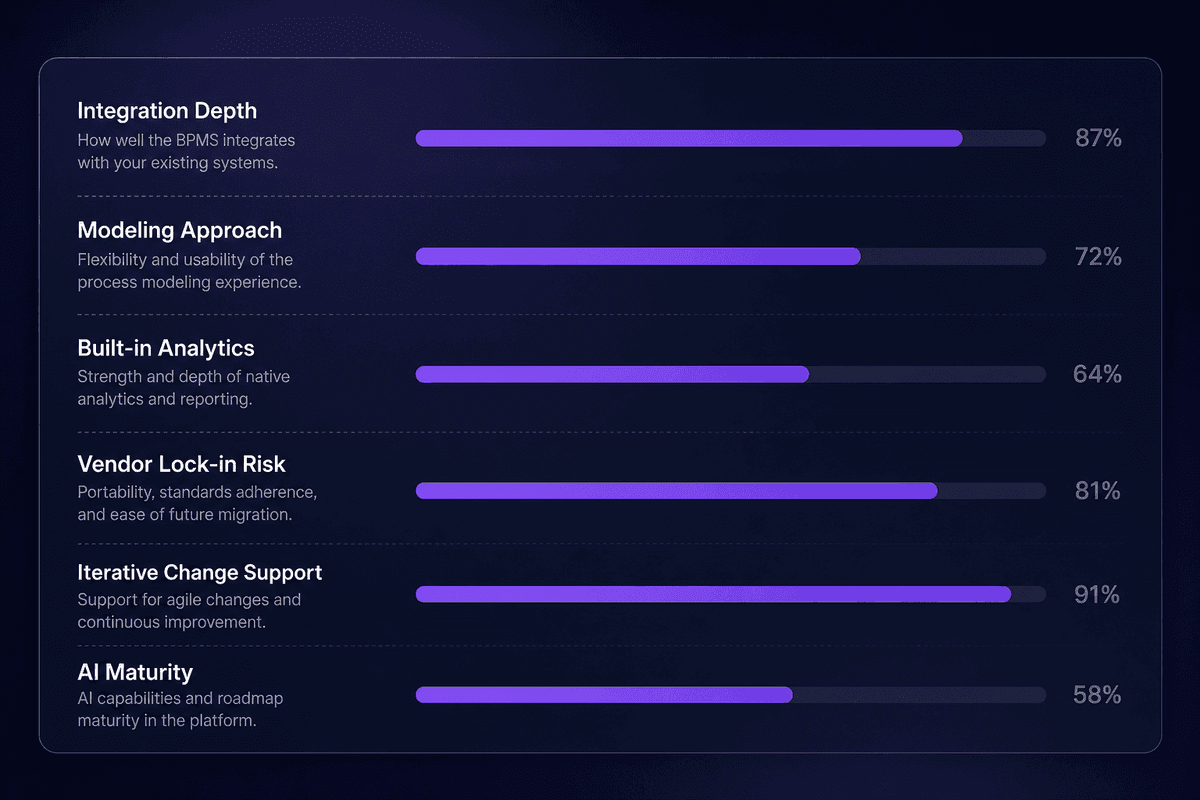
- Integration depth with your existing systems - not just connector count. Ask whether the BPMS connects to your specific ERP, CRM, or HRIS with native data mapping, error handling, and retry logic - or whether "integration" means a webhook you configure yourself. The difference between a 5,500-connector library and a point-to-point HTTP call is governance and maintainability. Check the integration layer before evaluating the process model.
- Modeling approach: human-centric or code-heavy? Some BPM software platforms require a trained developer to create or modify a process model. Others let a business analyst update the model without filing an IT ticket. Neither is universally right, but if your use case involves business users owning process changes, a code-heavy platform creates a bottleneck every time a rule needs updating. Test how long it takes to change one approval condition. That's your governance reality.
- Monitoring and analytics: built-in or bolt-on? A BPMS whose analytics require a separate BI tool, a data export, or a manual reporting layer is not giving you the process performance visibility the demo promised. Verify that execution data is queryable inside the platform, that dashboards refresh from live data, and that audit trails are native - not dependent on a nightly sync to a warehouse.
- Vendor lock-in risk. How are process models stored? Are they exportable in a standard format (BPMN 2.0 is the standard worth asking about)? Can you migrate your process definitions if you change platforms in three years? Some BPM solutions use proprietary model formats that make migration prohibitively expensive. That's a pricing decision disguised as a technical one. Ask early.
- Iterative change vs. full redesign requirement. Some BPM systems require you to deprecate and redeploy a process to change a single routing rule. Mature platforms support hotfix changes to live processes without restarting active instances. In a production environment where processes are running 24/7, that's the difference between a five-minute update and a planned maintenance window with a change advisory board.
- AI and automation maturity inside the platform. AI is being added to every BPM suite right now, with varying degrees of integration. The meaningful question isn't whether the platform has AI - it's whether the AI capabilities are built into the execution engine or appear as a separate add-on. Automate processes that involve document parsing, exception classification, or dynamic routing require AI that has access to process context, not a chatbot bolted to the side of the dashboard.
- Case management and content management support. Structured workflows handle well-defined processes. Real operations also have unstructured work - a case that doesn't follow the standard path, a document that needs review by two different people depending on its content. A BPM suite that handles both case management and structured workflows from one process model avoids the two-tool problem that creates the scattered-stack situation most teams are trying to escape. Software as a service delivery models have made this combination accessible below enterprise price points.
- Best practices for implementation support. A platform is only as useful as the implementation. Ask about onboarding resources, whether the vendor offers process consulting, what the process automation maturity model looks like, and how teams that optimize business processes typically get there. The vendor's answer tells you whether they've seen real implementations or only polished demos.




