
Custom AI chatbot builder grounded in your data
Build a custom AI chatbot that answers from your own documents, remembers each conversation and takes action in your apps, from opening a ticket to updating a CRM record. You set it up on a visual canvas without code and connect it to your website chat, Telegram, WhatsApp or Slack.
Custom chatbot examples for support, sales and online stores
Each example is a Latenode scenario: the chatbot answers in the chat, then runs the next step in your tools. Pick one to build yourself, or send it to our team.
Support chatbot
Resolve routine questions before they become tickets.
Build chatbots that understand support intent, answer questions from your knowledge base, collect missing details, and help visitors reach a human when needed.
Knowledge base bot
Turn frequently asked questions into instant self-service.
Use your help docs, product pages, and policies to power a conversational bot that gives accurate answers and points visitors to the next step.
Lead capture assistant
Convert website visitors into qualified sales conversations.
Ask qualifying questions, capture contact details, score intent, and route high-value leads to the right sales process.
Storefront bot
Help shoppers find products and get order answers faster.
Handle product questions, order status, returns, discount requests, and post-purchase messages from one connected process.
Agent handoff
Move from conversation to action across your tools.
Extend chatbots into AI agents that call endpoints, update records, trigger approvals, and pass the full conversation to a human when needed.
How to build a custom AI chatbot in four steps
A chatbot in Latenode is a scenario with an AI Agent node at its center. The quickstart in the Latenode docs takes about 30 minutes from an empty canvas to a working Telegram bot.
Choose where it talks
Start the scenario from a new message in Telegram, WhatsApp, Slack or a website chat app such as Chatwoot, or from a webhook your own chat widget calls. Webhook triggers fire instantly on every plan.
Give it your knowledge
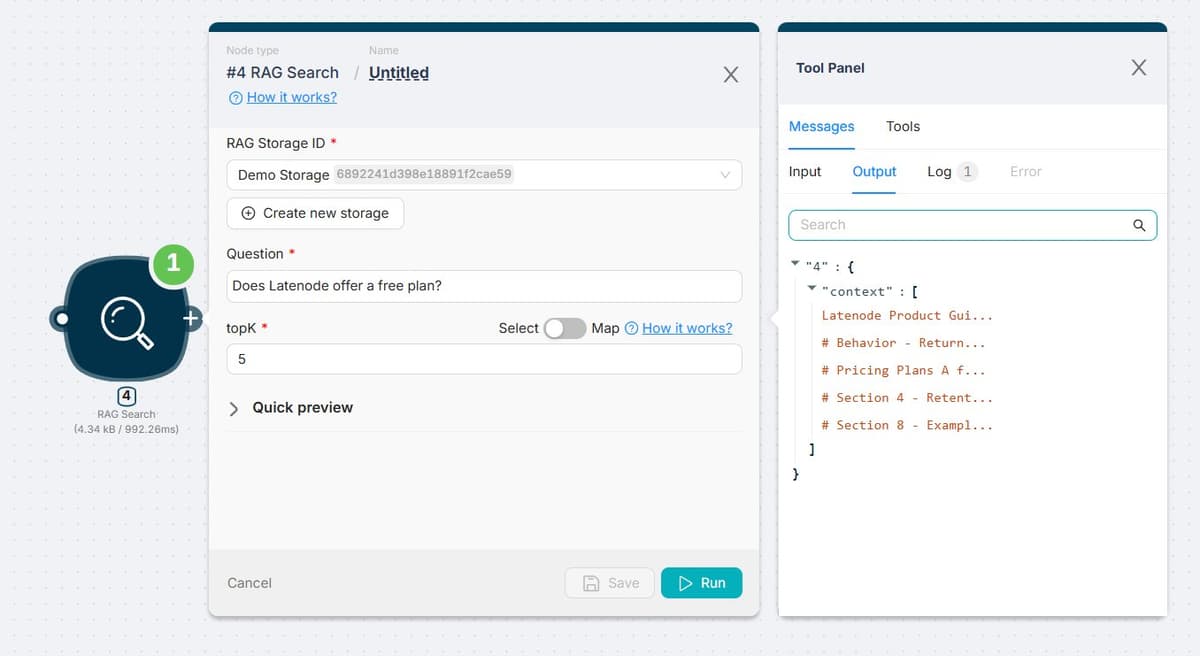
Upload PDFs, help articles and FAQs to AI Data Storage (RAG) and connect the RAG Search tool, so the agent looks up the answer before it replies.
Write the rules and add actions
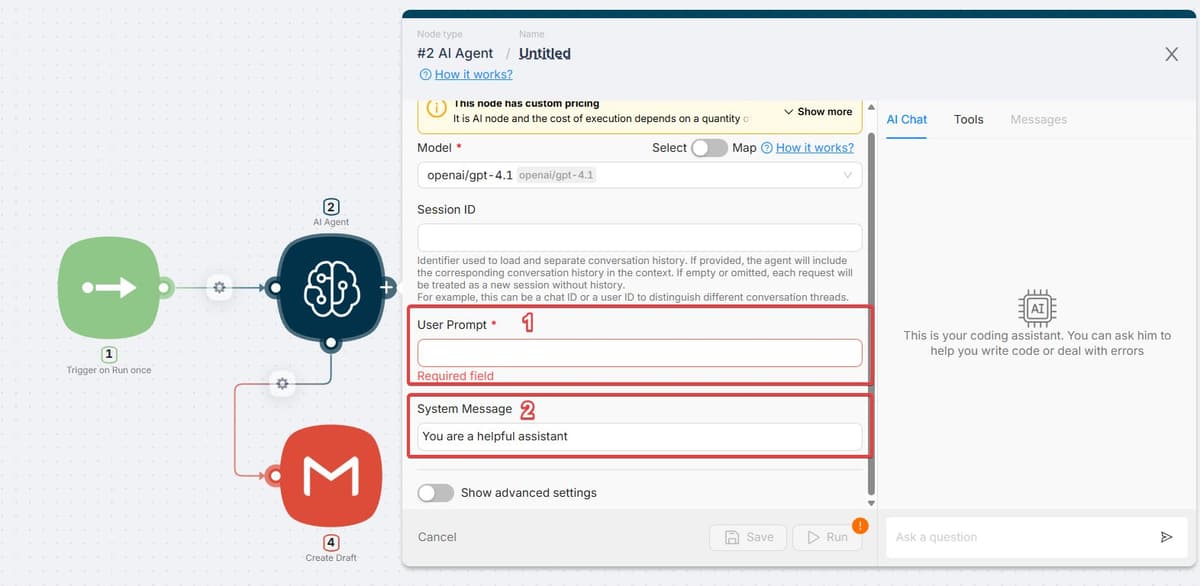
In the AI Agent node, the system message sets the tone and the limits, and the Session ID gives each person their own conversation memory. Every node you connect becomes a tool the agent can call.
Test it, then deploy
Try the agent in the built-in chat window, then activate and deploy the scenario. The live version keeps running while you edit the next one.
Ground every answer in your own documents
Create a knowledge base in AI Data Storage and upload PDFs, text, Markdown, JSON or images with text. Latenode splits each file into chunks and indexes it. The RAG Search tool returns the passages that match the question, so the chatbot answers from your content rather than from model memory alone. One knowledge base is included on both plans. RAG storage is in beta.
A no-code chatbot builder, with code when you need it
Drag nodes onto a visual canvas and connect them: the trigger, the AI Agent, its tools and the reply. Add a JavaScript code node only where custom logic helps. AI Copilot, the AI assistant built into every workflow, helps you while you build.
Turn conversations into actions
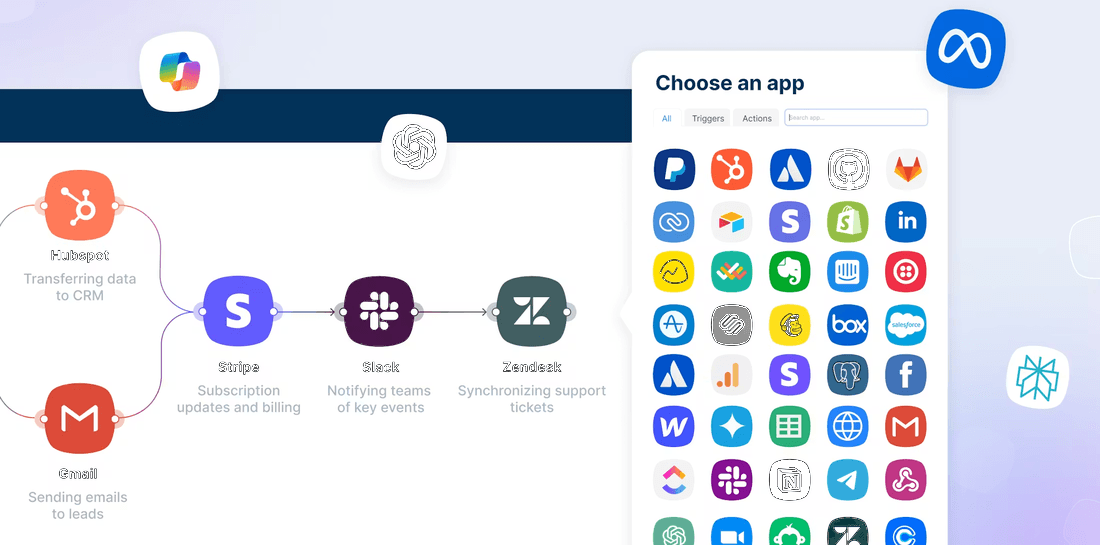
Connect a node to the AI Agent and it becomes a tool: the chatbot can open a ticket, update a CRM record, book a meeting or post to Slack when the conversation calls for it. Latenode offers 5,500+ integrations across 1,200+ apps and LLMs, and the HTTP request node reaches any app with an API.
Choose the model and set the rules
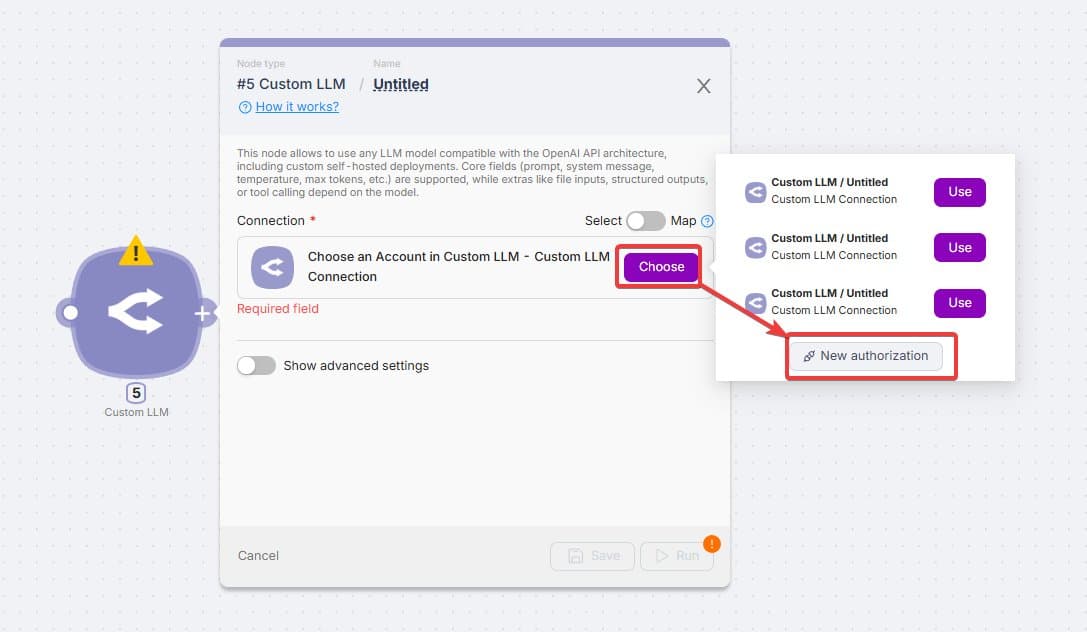
Pick a model for the agent from 335+ AI models (LLMs) in one subscription, or connect your own OpenAI-compatible API key. Clear instructions, a cap on tool calls for each reply and a JSON output schema keep the answers on task.
Chatbot templates to start from
Open a template, connect your accounts, then change the prompt and the knowledge source.
Custom AI chatbot pricing: start free, pay for usage
Runtime is billed in CPU seconds, not per step, so a chatbot with many steps does not multiply the bill. Calls to built-in AI models use Plug-n-Play tokens, charged by actual provider usage on top of runtime, or you connect your own API key instead.
Prefer us to build it? Our team scopes, builds and runs your automations on Latenode.
What is a custom AI chatbot?
A custom AI chatbot is one you configure for your own business: it answers from your documents, follows your instructions and connects to your tools. In Latenode, it is a scenario where an AI Agent node reads the message, searches your knowledge base and replies in the channel the question came from.
Can I create an AI chatbot for free?
Yes. You can use Latenode as a free AI chatbot builder: the Free plan needs no credit card, includes all apps and AI models, and gives you free runtime every month. Calls to built-in AI models are charged in Plug-n-Play tokens by actual usage, and every new account gets one token at registration.
Can I add the chatbot to my website?
Yes, in two ways. Connect a website chat app that Latenode integrates with, such as Chatwoot, and let the scenario reply there. Or have your own chat widget send each message to a Latenode webhook and return the agent's answer with the Webhook Response node. See the Chatwoot website chat template
How do I keep the chatbot's answers up to date?
Upload the new version of a file to the knowledge base and remove the old one. Files can't be edited in place, so a changed document is replaced with a new upload. A scheduled scenario can list the files and delete outdated ones with the List Files from RAG and Delete from RAG nodes.
Can the chatbot hand a conversation to a person?
Yes. Say in the instructions when the agent should stop, and connect a tool that opens a ticket in your help desk or posts the conversation to a Slack channel. The agent calls it when a case needs a person, and your team picks it up there with the full context.
Is my chatbot's data secure?
Latenode protects data with encryption at rest and in transit, granular access control and full auditability. App credentials are stored encrypted, and third parties scan the production environment for vulnerabilities at least every 90 days. The agent can call only the tools you connect to it. Read about Latenode security
What is the difference between an AI chatbot and an AI agent?
A chatbot answers questions in a conversation. An AI agent also decides which tools to call and acts in other systems. In Latenode the same AI Agent node does both: with no tools connected it only replies, and with tools it can update records and start workflows. AI agent vs chatbot, explained
How do I choose an AI chatbot builder?
Check five things: whether the bot answers from your own documents, which channels it supports, whether it can act in your CRM and help desk, how AI usage is priced, and whether you can switch models. Then run the same test questions on each builder you shortlist.
About Latenode
Latenode is an AI automation platform that helps teams build, connect, and deploy workflows across their entire business stack. From simple automations to production-ready AI agents, Latenode brings integrations, AI models, custom logic, and deployment controls into one visual workspace.

Overviews and webinars
Related chatbot guides
Guides on support chatbots, website chatbots, AI agents and WhatsApp bots.
Customer Support Chatbot: A Guide, Examples, and A Scenario Showcase for Beginners
Explore how AI customer service chatbots streamline support operations while cutting costs, with examples and a no-code support automation walkthrough.
GuideAI Agent Examples: Common Use Cases
See how agents handle customer questions, manage data and automate marketing tasks.
ComparisonAI Agent vs Chatbot: Key Differences Explained + 7 Decision Criteria for 2025
Explore the distinct roles of AI agents and chatbots, their functionalities, and how to choose the right automation tool for your business needs.
TutorialHow to Design and Build a WhatsApp Chatbot using API
Learn how to create an efficient WhatsApp chatbot using APIs and low-code platforms, enhancing customer service and automating interactions.
GuideAgentic Workflows: Transforming Automation with Autonomous AI Agents
Build an agent with tools and memory that can choose its next action and check its work.
Ready to start?
Get it built for you
Book a 15-minute discovery call and we'll help you find the right setup.
Book a discovery call →