




La "automatización de procesos empresariales con IA" es actualmente una de esas frases que aparecen en todas las presentaciones estratégicas, propuestas de proveedores e informes ejecutivos, a veces tres veces en la misma diapositiva. La mayoría de las personas que la escuchan no sabe explicar bien qué la diferencia de la automatización de flujos que su equipo ya utiliza, ni si esa diferencia justifica la inversión. Esa confusión es razonable. El marketing en torno a la inteligencia artificial y la automatización lleva dos años a todo volumen, y la relación señal-ruido no es precisamente buena.

Aquí está la versión práctica. La automatización de procesos empresariales con IA utiliza inteligencia artificial para gestionar procesos que requieren criterio, adaptarse a entradas variables y tomar decisiones que las reglas fijas no pueden cubrir. Es significativamente diferente de la automatización tradicional, y la mayoría de las organizaciones ya tiene al menos un proceso que encaja en esta definición, normalmente uno que lleva meses causando un problema discreto pero constante. La pregunta no es si esto se aplica a usted. Es con qué proceso empezar.
Lo que los equipos suelen hacer mal antes de la primera implementación
- La automatización de procesos empresariales con IA gestiona tareas que dependen del criterio; aplicarla a procesos deterministas desperdicia la IA y no resuelve el problema real.
- El primer fallo de automatización suele revelar una brecha de responsabilidad sobre el proceso, no una brecha de herramientas.
- La mayoría de los equipos quiere automatizar primero su proceso más desordenado; ese es precisamente el que falla sin datos limpios.
- Un panel de ejecuciones en verde no confirma que los datos se hayan transferido correctamente a los sistemas posteriores.
- La escalabilidad de la IA agéntica alcanza aproximadamente al 23% de las empresas; la capacidad ya existe, pero la orquestación autónoma de extremo a extremo sigue siendo temprana para la mayoría de los equipos.
Qué significa realmente la automatización de procesos empresariales con IA
La automatización de procesos empresariales, en su forma original, consiste en utilizar software para ejecutar automáticamente una secuencia definida de pasos: si sucede esto, haga aquello. Mueva este archivo. Envíe ese correo electrónico. Cree este registro. La lógica es explícita y fija. Si el formato de entrada cambia inesperadamente, todo se interrumpe.
La automatización de procesos empresariales con IA amplía esta idea a ámbitos donde la lógica no puede escribirse de antemano. En lugar de "si el campo es igual a X, enrutar a Y", se obtienen sistemas que pueden leer un correo electrónico no estructurado, determinar qué tipo de solicitud es, evaluar la respuesta adecuada según el contexto y actuar sin intervención humana. La distinción clave es el criterio. La automatización tradicional ejecuta. La automatización con IA decide y ejecuta.
La inteligencia artificial aquí no es una metáfora de un "software más inteligente". Se refiere a modelos de aprendizaje automático, procesamiento del lenguaje natural y, cada vez más, capas de IA generativa que pueden interpretar, clasificar y generar resultados para entradas variables. Automatización inteligente es el término general que utilizan la mayoría de los analistas para referirse a sistemas que combinan IA con orquestación de procesos: ambas cosas trabajando juntas, en lugar de operar por separado.
La importancia práctica es esta: existe una gran categoría de procesos empresariales que se han gestionado manualmente no porque la automatización fuera imposible, sino porque las entradas eran demasiado desordenadas, el criterio demasiado sutil o las excepciones demasiado frecuentes para que los sistemas basados en reglas pudieran gestionarlos de forma fiable. La automatización de procesos empresariales con IA es lo que hace que esos procesos puedan automatizarse.
En qué se diferencia de la automatización tradicional
La línea es más clara de lo que sugiere el marketing. La automatización basada en reglas sigue un guion. Cada entrada debe coincidir con un patrón esperado. Cada ramificación debe anticiparse. Esto funciona extremadamente bien para procesos estructurados, repetitivos y de gran volumen, donde las entradas son limpias y coherentes. Números de factura en el campo correcto, códigos de estado asociados a acciones, formatos de archivo que nunca cambian. Las soluciones de automatización basadas en reglas gestionan estos casos de forma fiable y económica.
El problema es que la mayoría de los procesos empresariales reales tienen límites desordenados. Correos electrónicos que no encajan en la plantilla. PDFs donde el proveedor coloca el total en una posición distinta a la habitual. Solicitudes de clientes que pueden significar tres cosas diferentes según el contexto. Cuando aplica automatización basada en reglas a estos casos, obtiene fallos, excepciones y una cola creciente de elementos que "requieren revisión humana", lo que normalmente significa la bandeja de entrada de alguien.
La automatización impulsada por IA gestiona la variabilidad. La toma de decisiones ocurre en el momento de la inferencia, adaptándose a lo que contiene la entrada real, no a lo que esperaba el guion. No siempre es la herramienta adecuada. Para procesos verdaderamente deterministas, la automatización basada en reglas es más sencilla, económica y fácil de mantener. El error consiste en aplicar lógica basada en reglas a procesos con una gran carga de criterio y preguntarse por qué la cola de excepciones nunca disminuye.
El ciclo de vida de la automatización de procesos empresariales con IA: del descubrimiento a la mejora
Una de las ideas erróneas más persistentes es que la automatización de procesos empresariales con IA es una "capa de bots" que se añade sobre procesos existentes. Cree el flujo, añada un paso de IA para gestionar la parte complicada y listo. Este enfoque ignora gran parte de lo que hace que la automatización de procesos empresariales con IA sea realmente útil, y explica por qué muchos proyectos tempranos de automatización se ven bien en la demostración pero decepcionan en producción.
El valor real de la IA en la gestión de procesos empresariales abarca todo el ciclo de vida del proceso, no solo la ejecución. Empieza antes de crear nada, determina qué se construye, guía la monitorización tras el despliegue e impulsa mejoras según lo que muestran los datos. Omitir las fases iniciales es el error de preparación que veo con más frecuencia, y es el que provoca el retrabajo más costoso.
Una forma útil de verlo: los ciclos de retroalimentación analítica son lo que distingue la automatización de procesos empresariales con IA de una automatización que le obliga a gestionar manualmente casos límite para siempre. Sin ellos, automatiza un proceso en un momento concreto y luego observa lentamente cómo se degrada a medida que el mundo cambia a su alrededor.
Descubrimiento de procesos y mapeo de flujos con IA
Antes de crear cualquier flujo, alguien debe comprender qué hace realmente el proceso: no lo que dice la documentación que hace, sino lo que los registros de eventos, los registros de transacciones y los patrones de transferencia revelan sobre cómo se mueve realmente el trabajo por el sistema. Esto es el descubrimiento de procesos, y la IA lo hace considerablemente mejor que la observación manual.
Las herramientas de IA pueden extraer datos de registros de eventos de sistemas existentes, identificar patrones sobre cómo fluyen las tareas entre personas y aplicaciones, detectar cuellos de botella que no aparecen en la documentación de procesos y señalar riesgos de cumplimiento antes de que se conviertan en incidentes. El resultado es un mapa de flujo basado en lo que el proceso realmente hace, no en lo que se diseñó para hacer hace tres años.
Los equipos que omiten este paso y pasan directamente a crear automatizaciones descubren con frecuencia, tras dos o tres flujos, que automatizaron primero lo equivocado o que automatizaron una solución temporal en lugar del proceso en sí. Los datos de procesos no mienten. La documentación a menudo sí.
Monitorización en tiempo real y optimización predictiva
Después de que un flujo esté activo, el trabajo no ha terminado. Aquí es donde la idea errónea de "configúrelo y olvídese" genera más daños. La automatización impulsada por IA en producción requiere monitorización de KPI, seguimiento de patrones de error y el tipo de análisis predictivo que detecta un flujo deteriorado antes de que falle por completo.
Las señales predictivas pueden incluir tasas de error crecientes en un nodo específico, tiempos de procesamiento cada vez mayores, colas de excepciones en aumento o puntuaciones de calidad de datos con tendencia descendente. Estas son las alertas tempranas de que el flujo necesita atención. Sin ellas, la primera señal que recibe es una queja de un usuario o una acumulación de ejecuciones fallidas el lunes por la mañana.
El objetivo es optimizar antes del fallo, no recuperarse después. La monitorización predictiva también permite la mejora continua: el análisis de datos de las ejecuciones activas se incorpora de nuevo al modelo, la lógica de enrutamiento o las reglas de gestión de excepciones. Un flujo que solo funciona tan bien como el día de su lanzamiento ya se está quedando atrás.
Automatización impulsada por IA frente a automatización tradicional
La comparación no trata de cuál enfoque es mejor en términos absolutos. Trata de cuál encaja con el proceso que intenta automatizar. Usar IA donde las reglas funcionarían es un desperdicio. Usar reglas donde se requiere criterio produce una cola de excepciones con fugas y un ticket de soporte sobre por qué la automatización "no funciona".
| Dimensión | Automatización tradicional | Automatización impulsada por IA |
|---|---|---|
| Tipo de tarea gestionada | Tareas estructuradas, deterministas y rutinarias con entradas predecibles | Entradas variables, datos no estructurados y tareas complejas que requieren interpretación |
| Capacidad de toma de decisiones | Sigue reglas predefinidas; falla ante entradas inesperadas | Infiere decisiones según el contexto; se adapta a la variabilidad de las entradas |
| Adaptabilidad al cambio | Requiere actualizaciones manuales de reglas cuando cambia el proceso o los datos | Puede aprender de nuevos datos; los modelos pueden reentrenarse o actualizarse mediante instrucciones |
| Carga de mantenimiento | Menor cuando el proceso es estable; alta cuando las entradas varían con frecuencia | Requiere supervisión de la calidad de los datos y revisión humana de casos límite |
| Intervención humana | Alta para excepciones; casi nula para entradas dentro del alcance | Menor en general; centrada en valores atípicos y umbrales de confianza del modelo |
| Caso de uso más adecuado | Entrada de datos, enrutamiento de archivos, actualizaciones de estado, informes programados | Procesamiento de documentos, clasificación de tickets, previsiones, intención del cliente |
Los sistemas de automatización que mejor funcionan en la práctica suelen combinar ambos enfoques. Las reglas fijas gestionan las rutas estructuradas y de alta confianza. La IA gestiona las decisiones que requieren criterio y la variabilidad. Considerarlos enfoques competidores es un problema de enfoque. Son capas complementarias dentro de la misma arquitectura.
Dónde se utiliza realmente la automatización con IA: casos de uso reales en procesos empresariales

La pregunta que escucho con más frecuencia de los equipos al inicio de su recorrido con la automatización de procesos empresariales con IA no es "qué es esto"; ya han leído los artículos. Es "¿por dónde empezamos realmente?". La respuesta honesta es que los casos de uso útiles se agrupan en unas pocas funciones empresariales, y la mayoría de las organizaciones reconocerá al menos una inmediatamente.
Cuando los equipos preguntan dónde usar IA en sus operaciones empresariales, normalmente les digo que observen los lugares donde alguien clasifica manualmente elementos que no deberían requerir a una persona: facturas que deben leerse, tickets que deben enrutarse, datos que deben clasificarse antes de poder avanzar. Estos son los procesos donde la automatización de procesos empresariales con IA demuestra su valor en todos los sectores.
Finanzas y back office: tareas repetitivas de gran volumen
El procesamiento de facturas es el caso de uso arquetípico de la automatización de procesos empresariales con IA, y con razón. Los equipos de cuentas por pagar gestionan tareas repetitivas que son al mismo tiempo de alto riesgo y gran volumen: facturas de proveedores que llegan en distintos formatos, desde diferentes sistemas y con diseños de campos inconsistentes. Los procesos manuales implican errores humanos, ciclos lentos y tiempo del personal dedicado a trabajo que no aporta valor analítico.
El Shared Services Center de la Universidad de Michigan implementó un sistema de procesamiento de facturas basado en IA mediante un kit de herramientas GPT que lee cada factura, extrae campos clave —nombre del proveedor, fechas, importes, números de orden de compra— y los valida frente a registros existentes antes de enviar datos estructurados al sistema financiero. El personal recibe notificaciones únicamente sobre excepciones. Los procesos manuales que antes requerían abrir cada PDF ahora, en su mayoría, no requieren intervención humana en absoluto.
Los benchmarks de procesamiento de facturas con IA de Parseur muestran reducciones medibles en los costes por factura y los tiempos de procesamiento en comparación con la gestión manual. Para los equipos financieros, este es el cálculo de ROI más claro dentro de la categoría de automatización de procesos empresariales con IA: volumen conocido, coste conocido por transacción manual y una base clara de tasa de errores.
Equipos de atención al cliente y flujos de IA conversacional
Las operaciones de soporte al cliente gestionan una mezcla de consultas sencillas y repetitivas, junto con problemas complejos y emocionalmente sensibles que requieren criterio real. El problema es que ambos tipos llegan a la misma cola, gestionados por el mismo equipo, sin diferenciación automática. Ahí es donde la automatización con IA cambia la economía.
La automatización con IA en atención al cliente suele cubrir tres aspectos: chatbots que gestionan tipos de consulta habituales a cualquier hora, enrutamiento inteligente de tickets que clasifica las solicitudes entrantes y las envía a la cola adecuada, y respuestas automatizadas a preguntas frecuentes y de baja complejidad que no requieren respuesta humana. El resultado son tiempos de respuesta más rápidos para los clientes y un equipo de soporte centrado en el trabajo que realmente requiere a una persona.
Los datos de clientes que fluyen a través de estas interacciones también se convierten en material de entrenamiento: mejora la precisión de clasificación, se ajusta la lógica de enrutamiento y los patrones que surgen del análisis con IA del volumen de soporte vuelven a alimentar las decisiones de producto y procesos. Ese ciclo es lo que convierte la automatización de procesos empresariales con IA para atención al cliente en algo más que una herramienta de desvío de consultas.
TI y transformación digital: orquestación de flujos de extremo a extremo
Los líderes de TI y transformación utilizan la automatización de procesos empresariales con IA de forma distinta a los equipos financieros o de soporte. Aquí el enfoque es la orquestación: conectar componentes de RPA, sistemas BPM y API en flujos coherentes de extremo a extremo que puedan gestionar requisitos de gobernanza, generación de trazabilidad de auditoría y monitorización del cumplimiento a escala. Esta es la automatización inteligente de procesos en su forma más compleja.
Un ejemplo útil es la incorporación de personal de TI: un nuevo empleado añadido a un sistema de RR. HH. activa una cadena de automatización de flujos que crea cuentas en Slack, asigna permisos en herramientas de proyectos, programa secuencias de incorporación y genera registros de cumplimiento, todo sin una secuencia de tickets manuales de TI. La capa de IA en este tipo de flujo gestiona los puntos de decisión: qué nivel de permisos, qué equipo, qué excepciones requieren escalado.
Para los equipos que crean este tipo de flujos de orquestación, la herramienta de automatización importa. AI Agent Builder de Latenode gestiona patrones de orquestación multiagente en los que distintos agentes administran la clasificación, el enrutamiento y la ejecución de acciones en un único flujo, sin requerir la configuración de Python que suelen necesitar los patrones equivalentes de LangChain. Cuando alguien me pregunta qué hace bien la plataforma específicamente para la orquestación de TI, esa es la respuesta honesta: la capa visual, el creador de agentes y más de 5.500 integraciones con OAuth automático, todo en un solo lugar en vez de tres.
Los beneficios reales de la IA en los negocios y lo que los números muestran realmente
El argumento de los beneficios de la IA en los procesos empresariales es real, pero las cifras que circulan en los materiales de los proveedores a menudo mezclan cosas distintas: resultados de pilotos, resultados proyectados y datos medidos después del despliegue. Conviene saber qué dicen los datos realmente fiables.
Según el informe de 2025 del Foro Económico Mundial sobre IA y talento, las herramientas de IA han facilitado reducciones de hasta el 80% en el tiempo de finalización para determinadas tareas administrativas, estandarizadas y analíticas básicas. Esa cifra procede de una síntesis basada en escenarios de investigaciones previas sobre productividad, por lo que representa un máximo bajo condiciones favorables, no una media de todos los despliegues. Sin embargo, la señal direccional es clara: los flujos rutinarios de back office son donde aparecen los mayores ahorros de tiempo, y aparecen de manera consistente.
Los mismos datos del WEF muestran que el 45% de los ejecutivos encuestados espera que la IA aumente los márgenes de beneficio en todos los sectores. La principal vía es la eficiencia operativa: menos pasos manuales, menores tasas de error y ciclos más rápidos. Las ganancias de productividad a nivel de proceso se traducen en margen cuando no es necesario reemplazar, al mismo volumen, la plantilla liberada por la automatización para gestionar el crecimiento.
Para la eficiencia operativa en concreto, la métrica más útil no es "¿con qué rapidez puede la IA procesar esto?", sino "¿con qué rapidez disminuye la cola de excepciones?". Ahí es donde la automatización impulsa el crecimiento empresarial: no en los casos limpios, que ya eran manejables, sino en los casos variables y desordenados que antes bloqueaban el flujo y requerían clasificación humana constante.
En la práctica, lo que ofrece la automatización tiende a ser más limitado y específico que las proyecciones de los proveedores. Un proceso bien automatizado, con buena monitorización, se amortiza más rápido que una iniciativa amplia de transformación que afecta a seis departamentos simultáneamente.
📊 En cifras:
El Foro Económico Mundial descubrió que la adopción de IA en al menos una función empresarial aumentó considerablemente entre las organizaciones encuestadas, y que solo el 23% había escalado IA agéntica —totalmente autónoma y de varios pasos— según la referencia de 2030. La mayoría de las organizaciones ejecuta despliegues más acotados de automatización de procesos empresariales con IA, no orquestación autónoma de extremo a extremo. En esa brecha es donde se encuentra la conversación realista sobre el ROI.
Tres ideas erróneas sobre la automatización impulsada por IA que bloquean a los equipos
No son malentendidos marginales. Aparecen regularmente: en colas de soporte, evaluaciones de proveedores y justificaciones que los equipos utilizan tanto para invertir en exceso en algo para lo que no están preparados como para evitar algo que realmente les ayudaría. Abordarlos pronto ahorra mucho retrabajo.
- Idea errónea 1: la automatización de procesos empresariales con IA reemplazará a la mayor parte del equipo. La realidad actual de la automatización impulsada por IA es el aumento de capacidades, no el reemplazo, al menos a corto plazo. Los datos del WEF sí muestran que el 54% de los ejecutivos encuestados espera que la IA desplace un número significativo de puestos de trabajo con el tiempo, por lo que no se trata de una simple tranquilidad. Pero para los equipos que adoptan automatización de procesos empresariales con IA hoy, el resultado práctico es que las personas cambian su foco: se alejan de tareas repetitivas como la entrada de datos, la clasificación y la categorización manual, y se orientan al trabajo que requiere mucho criterio y que la IA maneja mal: gestión de relaciones, excepciones complejas y decisiones estratégicas. Adoptar IA implica rediseñar roles, no eliminarlos de forma masiva a corto plazo. Los equipos que gestionan mal esto son los que automatizan sin pensar qué se supone que debe hacer la capacidad liberada.
- Idea errónea 2: la automatización de procesos empresariales con IA solo es viable para grandes empresas. Esta afirmación se ha vuelto cada vez más incorrecta durante los últimos dos años. Las plataformas modernas no-code y low-code han hecho que la automatización inteligente sea accesible para pymes y equipos no técnicos de maneras que no eran realistas cuando la automatización de procesos empresariales con IA significaba una infraestructura personalizada de ML costosa. Una empresa de 20 personas puede ejecutar un flujo funcional de extracción de facturas o una canalización de clasificación de tickets sin un equipo de ingeniería. La complejidad de configuración ha disminuido significativamente. Lo que no ha disminuido es la necesidad de documentación clara de procesos y de alguien responsable de mantener el flujo, pero eso es cierto independientemente del tamaño de la empresa. Las herramientas de IA potentes ya no están restringidas por presupuestos de compras empresariales.
- Idea errónea 3: una vez configurado, funciona por sí solo. Esta es la que genera más tickets de soporte a largo plazo. Los flujos avanzados de IA requieren mantenimiento continuo de la calidad de los datos, monitorización del rendimiento del modelo y supervisión humana de casos límite. La IA gestiona las decisiones según el criterio, pero solo tan bien como los datos con los que trabaja. Si los datos subyacentes se degradan, si cambian los nombres de los campos del sistema de origen o si los patrones de volumen cambian significativamente, el flujo se desvía. La IA gestiona bien tareas como la clasificación y la extracción cuando las entradas se mantienen razonablemente coherentes. Cuando no es así, el sistema necesita a una persona que supervise la tasa de excepciones y las puntuaciones de confianza, no solo el panel de ejecuciones en verde. Configurarlo y olvidarse no es un modelo operativo válido para la automatización de procesos empresariales con IA.
Cómo decidir si un proceso está preparado para la automatización con IA
Esta es la pregunta práctica que la mayoría de los artículos sobre automatización de procesos empresariales con IA pasan por alto con demasiada rapidez. El consejo habitual es "empiece con procesos repetitivos", lo cual es cierto, pero no es lo suficientemente específico como para actuar. Repetitivo describe la mitad de la carga de trabajo de cualquier persona. El filtro útil es más preciso que eso.
El objetivo es contar con un marco de decisión que pueda aplicar a su propia lista de procesos sin necesitar un consultor. Dos preguntas hacen la mayor parte del filtrado: ¿este proceso está causando actualmente un problema relevante en términos de volumen, errores o tiempo de ciclo? ¿Y el proceso incluye entradas o decisiones que varían de maneras que un conjunto simple de reglas no puede gestionar?
Si ambas respuestas son sí, tiene un candidato. Si solo la primera es sí, la automatización tradicional basada en reglas es más económica y rápida de mantener. Si ninguna es sí, probablemente el proceso todavía no merece automatizarse, lo cual también es información útil.
Señales de que un proceso encaja bien con la automatización con IA
El gran volumen es la primera señal. Los procesos que se ejecutan cientos o miles de veces por semana generan suficiente volumen como para que incluso pequeños errores o retrasos por instancia se acumulen en un coste operativo real. La automatización con IA se amortiza más rápido cuando el número de ejecuciones es alto.
Una tasa significativa de errores en la gestión manual es la segunda. Si su equipo detecta errores regularmente o devuelve elementos para retrabajo, es una señal de que el proceso tiene requisitos de criterio que las personas gestionan de manera inconsistente, que es exactamente el problema para el que la IA resulta adecuada.
Los datos históricos disponibles son la tercera señal, y los equipos subestiman cuánto importa. Los modelos de IA necesitan datos con los que trabajar, ya sean facturas históricas, clasificaciones anteriores de tickets o decisiones previas sobre casos similares. Los procesos con historial documentado son más fáciles de automatizar en una mayor parte de su alcance. Los procesos sin historial de datos le obligan a empezar de forma limitada y avanzar lentamente.
La capacidad de tomar decisiones basadas en contexto y patrones, en lugar de reglas explícitas, es la cuarta señal. Si su equipo actualmente gestiona este proceso leyendo la entrada y aplicando criterio, no simplemente comparando un valor con una tabla, la automatización con IA puede aproximar ese criterio a escala. La tecnología para automatizar la clasificación humana repetitiva ha madurado lo suficiente como para que "necesitamos que una persona lo lea primero" ya no sea automáticamente cierto.
Un filtro práctico para empezar: identifique cualquier proceso en el que alguien de su equipo diga regularmente "depende" cuando se le pregunta cómo se toman las decisiones. Ahí es donde la automatización de procesos empresariales con IA demuestra su valor. La automatización de todos sus procesos estructurados y deterministas es un requisito básico. Los procesos de "depende" son la oportunidad.
Qué debe hacer bien antes de empezar a adoptar herramientas de IA
Primero, la calidad de los datos. No la perfección de los datos, porque nunca llega, sino una calidad suficiente para que la IA pueda trabajar con ellos. Si las entradas de su flujo propuesto son inconsistentes, incompletas o están mal estructuradas, la IA tomará decisiones con confianza sobre entradas deficientes y los resultados serán discretamente incorrectos. He visto que esto sale mal suficientes veces como para considerarlo una comprobación previa, no una optimización para después.
Segundo, la documentación del proceso. No un diagrama de flujo de 40 páginas. Una descripción clara de qué hace el proceso, qué lo activa, cuáles son los resultados aceptables y cuáles son los casos límite que actualmente requieren criterio humano. Las nuevas herramientas de IA no pueden inferir un proceso que nunca se les ha mostrado. La documentación le obliga a hacer explícita la lógica implícita antes de automatizarla.
Gobernanza antes de crear el flujo. ¿Quién es responsable de este flujo después de que esté activo? ¿Cuál es la ruta de escalado cuando la puntuación de confianza de la IA cae por debajo del umbral? ¿Qué aplicaciones empresariales se ven afectadas por un fallo en este flujo? Estas preguntas parecen una carga adicional antes de empezar. Se convierten en preguntas de clasificación de emergencia si las omite y algo falla a las 2 de la madrugada.
Defina un alcance realista. El primer flujo debe ser lo bastante limitado como para comprenderse completamente y monitorizarse con facilidad. Las tecnologías de automatización de procesos funcionan mejor cuando el despliegue inicial es lo bastante pequeño como para verificar cada parte antes de pasar al siguiente. El impulso de automatizarlo todo a la vez es comprensible y produce sistemas frágiles de manera fiable.
🤔 Piense en esto:
La mayoría de los equipos quiere automatizar primero su proceso más caótico, el que causa el problema más visible. Pero la automatización de procesos empresariales con IA falla con mayor intensidad en procesos caóticos, porque el caos generalmente implica datos inconsistentes, casos límite sin definir y ningún resultado "correcto" claro del que el modelo pueda aprender. Los procesos que están preparados para automatizarse primero normalmente no son los que más duelen.
Las tecnologías de IA detrás de la automatización moderna de procesos empresariales
No necesita una formación técnica profunda para evaluar de forma inteligente herramientas o conversaciones sobre automatización de procesos empresariales con IA. Pero sí necesita suficiente vocabulario para entender qué quiere decir alguien cuando describe su arquitectura y para reconocer cuándo un proveedor utiliza "IA" como etiqueta para un motor de reglas simple con un logotipo de red neuronal.
La pila tecnológica real detrás de la mayoría de las implementaciones modernas de automatización de procesos empresariales con IA se asienta en tres capas que a menudo trabajan juntas, no de forma independiente.
El aprendizaje automático es la base. Los modelos de ML aprenden patrones de datos históricos y utilizan esos patrones para realizar predicciones o clasificaciones sobre nuevas entradas. En un contexto de procesos empresariales, el aprendizaje automático gestiona cuestiones como: si esta factura es legítima, a qué categoría pertenece este ticket de soporte o qué cliente probablemente cancelará. El modelo no sigue reglas, sino que infiere a partir de los datos. Cuando las personas dicen "la IA decide", normalmente se refieren a esto. Los modelos de aprendizaje automático entrenados con los datos de sus procesos también pueden detectar anomalías y señalar situaciones que quedan fuera del patrón normal, que es de donde proceden las capacidades de monitorización predictiva.
El procesamiento del lenguaje natural (NLP) es lo que permite a los sistemas de IA trabajar con texto no estructurado: correos electrónicos, contratos, tickets de soporte, transcripciones de chat y documentos. Sin NLP, la automatización de procesos empresariales con IA se limitaría a formatos de datos estructurados. Con él, el sistema puede leer un correo electrónico de un proveedor, extraer los campos relevantes, determinar la intención y enrutarlo sin que una persona tenga que interpretar el lenguaje. El NLP es la capa que gestiona el problema de las "entradas desordenadas" que rompe los sistemas tradicionales basados en reglas.
La automatización robótica de procesos proporciona la capa de ejecución para interactuar con aplicaciones como lo haría una persona: hacer clic en interfaces, introducir datos en formularios, leer pantallas y copiar información entre sistemas. La RPA como tecnología independiente está basada en reglas. Como componente dentro de un flujo orquestado por IA, se convierte en la capa de acción que ejecuta decisiones que los modelos de IA ya han tomado. Los modelos de IA sin RPA pueden decidir, pero no actuar. La RPA sin IA puede actuar, pero no decidir. La combinación es lo que permite que la automatización de procesos empresariales con IA de extremo a extremo funcione en la práctica.
Dónde encajan los agentes de IA en los procesos empresariales automatizados
Los agentes de IA son el componente sobre el que más preguntas recibo actualmente en soporte, en parte porque el término se utiliza con suficiente libertad como para significar cosas distintas en contextos distintos.
La definición precisa: los agentes de IA son ejecutores autónomos de tareas que operan dentro de un alcance definido, pueden tomar decisiones secuenciales, utilizar herramientas o API para actuar y gestionar procesos de varios pasos sin que una persona dirija cada paso individualmente. No son bots simples que siguen guiones. No son sistemas de IA que solo clasifican entradas. Se parecen más a un empleado autónomo limitado, con una descripción de puesto muy específica y límites claros sobre lo que puede y no puede decidir unilateralmente.
En un contexto de procesos empresariales, los agentes de IA automatizan el tipo de trabajo que requiere una secuencia de decisiones basadas en criterio: leer el formulario de entrada, decidir si se necesita más información, solicitarla, recibir la respuesta, clasificar el caso, enrutarlo a la acción adecuada y confirmar el resultado. Cada paso implica una decisión. El agente gestiona toda la cadena sin que una persona intervenga en cada paso.
Los sistemas de IA construidos en torno a agentes también plantean la cuestión de la supervisión de forma más marcada que la automatización más simple. Cuando las capacidades de IA incluyen toma de decisiones autónoma de varios pasos, los requisitos de monitorización son mayores, no menores. Los agentes que pueden actuar necesitan personas que puedan verificar que las acciones fueron correctas. No es una limitación de la tecnología: es un diseño de sistema adecuado.
IA generativa frente a IA predictiva en la automatización de procesos
Estas dos categorías de IA aportan valor en partes distintas de un proceso empresarial, y confundirlas genera expectativas equivocadas en ambas direcciones.
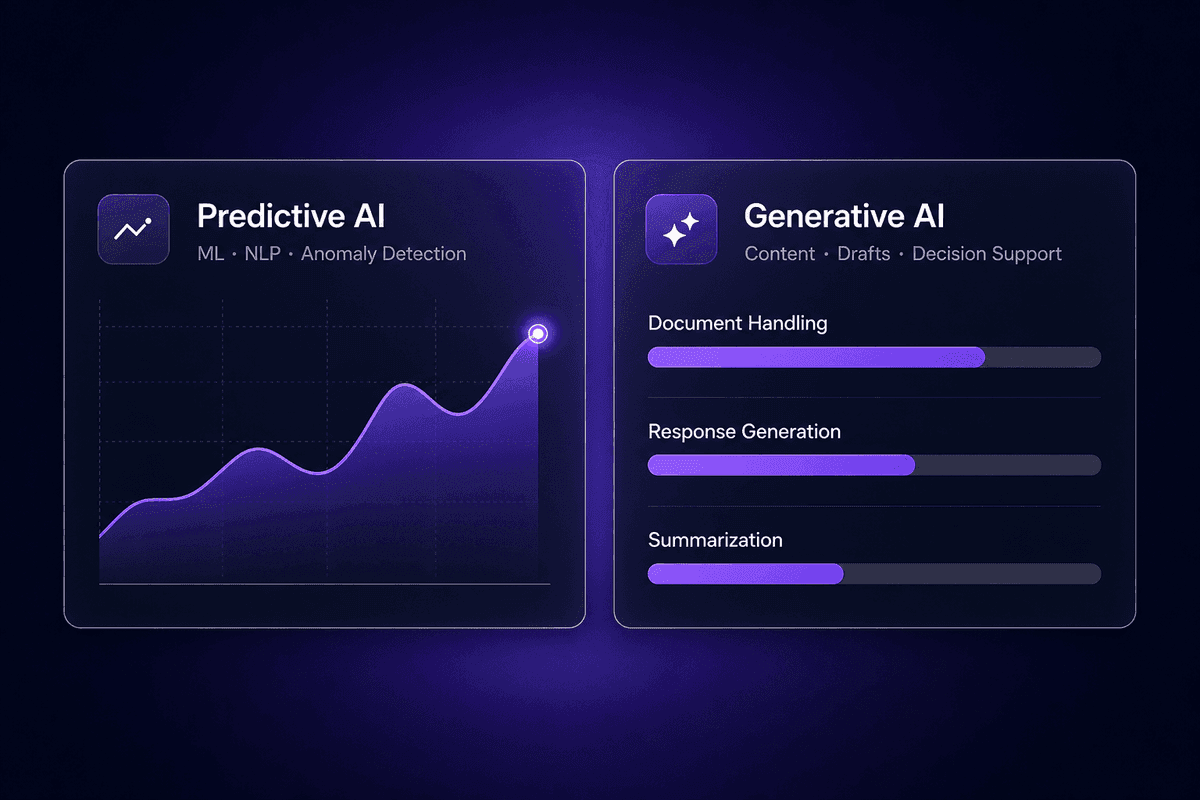
La IA predictiva utiliza patrones históricos para prever, clasificar y señalar. Detección de fraude, previsión de demanda, detección de anomalías, predicción de cancelación, puntuación de prioridad de tickets: todo ello es predictivo. El resultado es un número, una etiqueta o una señal. El modelo le indica qué es probable que ocurra o a qué categoría pertenece algo. Esta es la categoría de IA que integra IA en la monitorización de procesos y el enrutamiento de decisiones.
La IA generativa crea contenido nuevo: borradores, resúmenes, respuestas, completados de documentos y código. En un contexto de automatización de procesos, la IA generativa aporta valor cuando el resultado debe ser legible para una persona y adecuado al contexto: resumir un ticket de soporte para escalarlo, redactar una respuesta a un proveedor, generar una primera versión de una cláusula contractual o producir notas de reunión a partir de una transcripción. La IA generativa añade capacidades que la IA predictiva no puede abordar, pero también requiere una gobernanza cuidadosa sobre lo que se genera, revisa y envía sin aprobación humana.
La regla práctica: use IA predictiva cuando el resultado sea una decisión o clasificación, use IA generativa cuando el resultado sea contenido y asegúrese de que el límite entre "la IA genera, la persona aprueba" y "la IA genera, el flujo actúa" sea explícito y esté monitorizado.




