




Workflow automation has emerged as one of those phrases that means everything and nothing at the same time. Every software vendor uses it. Every ops article recommends it. And yet the teams I talk to in support end up with the same question, rephrased a hundred different ways: "We set up automation, so why is nothing actually better?"
The honest answer is that most automation projects solve the wrong problem first. They automate what's visible, what's annoying, what someone complained about last week. They don't start by asking whether the underlying process is stable enough to run without a human catching its mistakes. That question, skipped in week one, becomes the ticket in week six.
This article is for the person who wants to understand what workflow automation actually does before building it, and for the person who already built something and is wondering why the expected gains haven't shown up.
What they don't tell you before you start
- Workflow automation delivers value through consistency, not speed - every task follows the same path every time.
- Most implementations fail because the process was unclear before automation, not because the tool was wrong.
- Knowledge workers spend roughly 41% of their time on low-value, repetitive tasks - the real productivity gain is reclaiming that capacity for decision-making.
- Sales, HR, and IT teams gain the most, but only when they define trigger conditions and error states before touching any builder.
What Workflow Automation Actually Means (and What It Doesn't)
Workflow automation uses technology to execute sequences of tasks based on predefined rules, triggers, and logic, with minimal manual intervention between steps. That's the definition. The practical meaning is simpler: you describe what should happen when something occurs, and the system does it without waiting for a person to notice.
Workflow automation allows teams to offload the decision-execution gap - the space between "we know what should happen here" and "someone needs to go do it." When that gap fills with manual work, it fills with errors, delays, and the slow erosion of the person doing it. When it fills with automation, the work happens consistently, every time, regardless of whether it's 2pm Tuesday or 3am Sunday.
What automation doesn't do is think for you. It doesn't fix a broken process. It doesn't know that the CRM field names changed last month, or that the approval flow you built assumed a team structure that no longer exists. Workflow automation is exceptionally good at executing a well-defined business process at scale. It's exceptionally bad at adapting to a poorly defined one.
And here's the misconception I see most in support: teams treat automation as a replacement strategy. "Automate the manual tasks so we can cut headcount." That's not what it does well. What it does well is remove the repetitive task load from people who have better things to do. The staff are still there. They're just working on the problems that actually require a human in the loop.
The practical test: if you can write the rule in plain language without using the words "it depends" more than once, it's probably automatable. If every step comes with a judgment call, it probably isn't - not without an AI layer on top, which introduces its own complexity. More on that later.
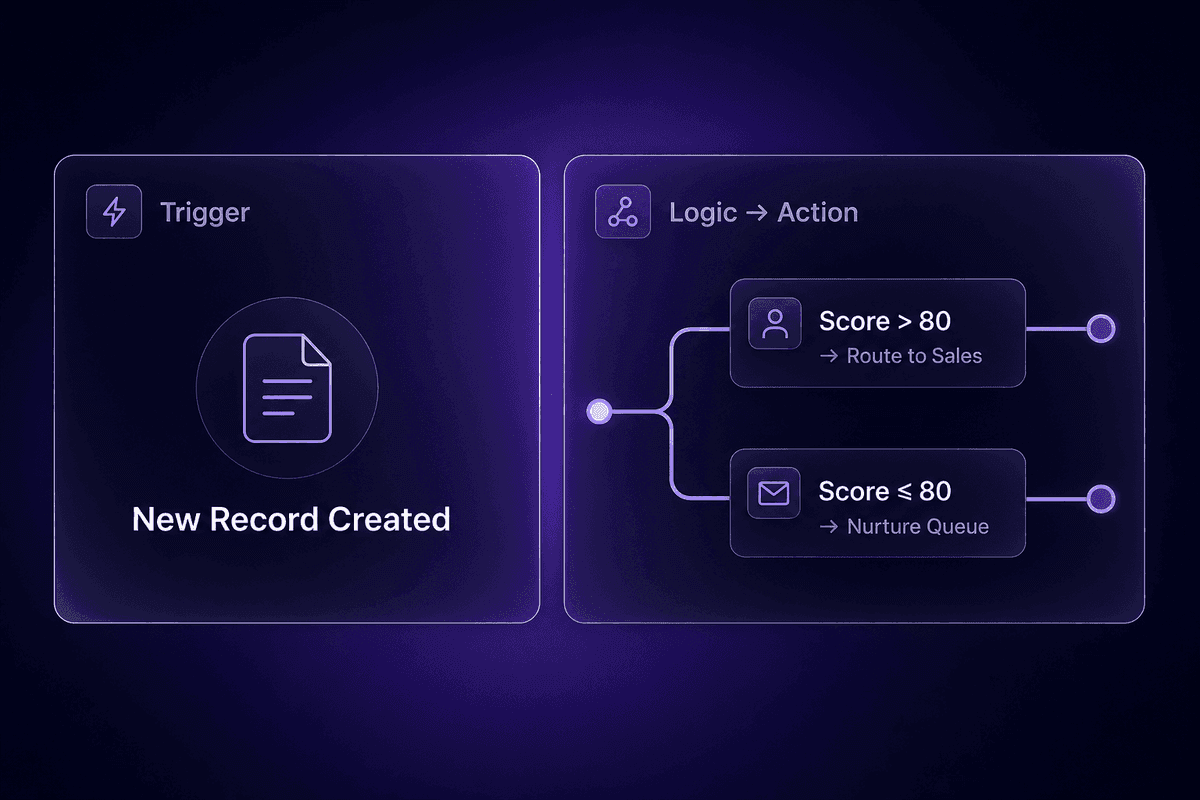
How Workflow Automation Works: Triggers, Logic, and System Actions
Workflow automation streamlines business processes by connecting three components: a trigger that starts execution, conditional logic that determines what happens next, and actions that the system carries out across connected tools. Understanding how these three things relate is the difference between building an automation that works and building one that works until it doesn't.
The automation engine sits in the middle. When a trigger fires, the engine evaluates the current state against whatever rules you defined, then executes one or more actions accordingly. The key word there is "defined." The engine is not creative. It does exactly what you told it to do, at the moment the trigger fires, with the data that's present at that moment. If the data is wrong, the action is wrong. If the rule doesn't cover the edge case, the edge case falls through.
That is where the ticket usually starts.
The Trigger-Logic-Action Model Most Teams Skip Past
The trigger is what starts the workflow. It might be an event ("a new record was created"), a schedule ("every Monday at 8am"), or a condition ("a field value changed to X"). Most beginners get this right. The trigger is the easy part.
The logic layer is where things get interesting. This is the conditional branching that decides what happens next: if the lead score is above 80, route to sales; if below, push to nurture. If the invoice total exceeds authority, escalate for approval; if not, process automatically. A flexible workflow can handle a dozen different branches. But automation reduces human error precisely because the branches are explicit, not assumed. Every path you don't define is a path your automation cannot handle gracefully.
The action is what the system actually does: update a record, send a message, create a task, write to a database, call an API. Single actions are straightforward. The complexity grows when actions span multiple tools, and when the success of step four depends on whether step two actually completed. Build your action chain with that dependency in mind, or your workflow will look complete in the logs while something downstream is quietly empty.
Where Low-Code Workflow Automation Changes the Setup Cost
Until fairly recently, connecting trigger-logic-action chains across multiple tools required code. Someone had to write and maintain it, which meant the automation backlog was also the engineering backlog, which meant nothing got built for ops unless it competed successfully with product features for developer attention.
Modern platforms changed this. Low-code workflow automation gives non-developers a workflow builder where triggers, conditions, and actions are visual objects on a canvas. Drag the trigger. Connect the logic node. Wire the action. The workflow creator handles the API layer underneath. Teams can now design workflows that route tasks, assign roles, and sync data without waiting for a sprint slot.
The practical benefit is that the people who understand the process can build the automation for it. An ops manager who knows exactly how invoice approvals should route no longer has to translate that knowledge into a developer ticket and hope the translation held. They can wire it themselves.
That said, "no-code" and "no technical thinking required" are not synonyms. The workflow still needs to express exact logic. The builder makes the syntax easier. Understanding what logic to express is still your job. I have data on how many support tickets come from the automation platform when the real issue is that nobody actually mapped the process before building it. The number is humbling.
Benefits of Workflow Automation That Actually Show Up in the Numbers
Workflow automation improves productivity in ways that are measurable, but the range is wide enough that you need to understand what determines where you land in it. Studies consistently show 30-40% productivity gains within the first year for teams that implement automation with clear intent. That figure comes from tracking where manual effort actually went and what people did with the recovered time. When the freed hours go to higher-value work, productivity gains show up. When they go to doing the same manual work for a different process, they don't.
The broader number, reported in frameworks where automation is applied comprehensively across processes rather than selectively to one or two obvious bottlenecks, is a 25-50% increase in productivity alongside 10-20% revenue growth. Automation increases output when it touches the recurring coordination work that silently drains capacity: report compilation, approval routing, data entry, status updates, handoff notifications. These are small individually. Together, McKinsey research summarized by Daigest suggests they account for roughly 20% of a knowledge worker's week - about one full working day, spent not on core tasks but on finding information and managing handoffs.
📊 By the numbers:
A 30-40% first-year productivity improvement sounds compelling. But Quixy's data also shows it requires intentional implementation across meaningful workflows - not just one automated email notification. Teams that see the top-end results typically applied automation to core process sequences, not convenience tasks. The tool you pick matters significantly less than the clarity of the process you hand it.
Workflow automation offers gains in quality, not just quantity. This is the benefit that's easiest to understate in a numbers conversation.
Where Consistency Outperforms Speed as a Workflow Automation Benefit
Speed is the benefit automation vendors lead with. It's also the easier headline. What workflow automation helps with more durably is consistency: every task following the same path every time, regardless of who's on shift, what day it is, or how much else is happening.
Human execution varies. Not because the people are careless, but because humans respond to context. Under pressure, steps get skipped. Late in the afternoon, the shortcut looks more reasonable. Over time, the process drifts from what was designed toward what's easiest in the moment. Automation doesn't drift. A rule-driven workflow executes the same sequence on Friday at 5pm as it does Monday at 9am.
That repetitive, unchanging execution is what makes automation valuable for compliance-sensitive workflows. Invoice approval chains, access provisioning, data retention handling - these matter not just because they're tedious, but because doing them incorrectly carries real organizational risk. Automation doesn't eliminate that risk. But it does stop it from depending on whether someone had a good day.
Cost, Error Reduction, and the Back-Office Case for Automating Workflows
Finance and operations teams often have the clearest ROI case because their workflows are the most rule-based. Invoice routing, purchase approvals, document processing, expense reconciliation - these are sequences where the rules are known, the data is structured, and the cost of getting it wrong is concrete.
When you automate workflows in these areas, error reduction is almost immediate. Data entry mistakes drop because humans stop re-typing the same field from one system into another. Approval delays drop because the workflow routes to the right person the moment the condition is met, rather than waiting for someone to notice and forward. The data security angle is real too: automated workflows reduce the number of humans who touch sensitive financial data in transit, which limits exposure.
The teams I've seen build the most durable back-office automation don't start by asking "what's slow." They start by asking "what breaks when someone is out of office." The answer usually reveals the process that most needs a machine in the loop.

Types of Workflow Automation Most Teams Are Actually Running
Workflow automation capabilities span every function, but the use cases that get real traction tend to cluster tightly. Here's what teams are actually running, where each type lives, and what it replaces.
- Operations and finance: approval routing
The finance team receives invoices. Someone in ops needs to approve them above a threshold. A manager needs to sign off above a higher one. Workflow automation replaces the chain of emails and forgotten follow-ups with a conditional routing sequence that assigns, tracks, and escalates automatically. Finance workflow automation at this level usually pays for the tooling within a single quarter just in recovered time and error reduction.
- Operations and finance: document processing
New vendor contracts, expense reports, compliance filings - all arrive as PDFs or emails and need to be logged, categorized, and routed. Automation handles the extraction and routing, leaving humans to review edge cases rather than process every document by hand. The automation lets teams handle volume that would otherwise require additional headcount.
- Sales: lead routing and CRM updates
A lead submits a form. The automation scores it, routes it to the right rep based on territory or account size, updates the CRM, and triggers the first outreach step. None of that requires a human to watch the queue. Workflow automation for marketing and sales shortens the time from inquiry to contact, which is where most sales cycle gains actually come from.
- Marketing: campaign sequencing and nurture flows
A new subscriber triggers a welcome sequence. A webinar registrant gets a follow-up series. An unengaged contact gets a re-engagement branch. Workflow automation for marketing at this level runs entirely in the background, pacing outreach based on behavior rather than batch schedules.
- HR: onboarding and offboarding
A new hire is added to the HR system. Automation provisions accounts, sends welcome materials, schedules the first check-in, and routes the equipment request. When someone leaves, the reverse runs: access is revoked, equipment is flagged, records are updated. HR onboarding automation is one of the highest-volume, most error-prone manual processes in mid-size companies. The cost of doing it wrong, both in lost time and in security exposure, is well-documented.
- IT: integrations and ticket lifecycle management
Customer service workflow automation in IT means tickets are created, categorized, acknowledged, and escalated without a human triaging the queue at each step. Cross-app integrations sync data between tools on schedule or on event. Error states trigger retry logic. When a retry fails three times, a human gets notified with context rather than a silent log entry. This is where teams most benefit from a workflow automation tool that could benefit from automation itself - one that handles retries, error routing, and state tracking without requiring a dedicated engineer to maintain it.
- Customer service: triage and routing
A new ticket arrives. The workflow classifies intent, routes to the right queue, sends an acknowledgment with an accurate SLA, and creates a task in whichever issue tracker the team uses. The agent who picks it up has context already. Customer service workflow automation done right means agents spend their time closing tickets, not sorting them.
Workflow Automation Examples by Department: Where It Fits and Where It Strains
Abstract descriptions of automation types only get you so far. What workflow automation software helps with in practice depends heavily on the specific handoff problem a team is trying to solve. The sections below show how automation fits into three common departmental contexts, and where it tends to create friction when the setup assumptions don't hold.
Sales and Marketing: Lead Routing, CRM Updates, and Follow-Up Sequences
The sales use case that shows up most consistently in the data: lead routing and follow-up consistency. When automation handles the hand-off from marketing to sales, lead response time drops and routing decisions become predictable. Automation can help compress the cycle from first touch to first human contact significantly - with well-designed sequences showing 15-30% reductions in sales cycle length when the routing logic is clean and the CRM data is accurate.
The critical word there is "clean." Automation routes a lead to the rep based on a field value. If the field is empty, blank, or formatted differently across 20% of records, the routing logic either defaults to a fallback (which might be a generic inbox nobody watches) or it errors silently. That's usually the first thing I check when a sales team reports their "automated" lead flow isn't working: what does the source data actually look like?
Teams that are ready to go further start layering AI workflow automation on top of rule-based routing. Instead of routing by territory alone, an AI-powered workflow can score inbound leads by fit signals, intent data, or engagement history, then route accordingly. This is where "ai workflow automation" starts to mean something real rather than something on a vendor slide. But it requires labeled historical data and a feedback loop to tune the model. Skipping those steps means the AI routing is worse than the rule-based routing it replaced, which is a support ticket I have seen more than once.
HR and Operations: Onboarding, Approvals, and High-Volume Document Workflows
HR workflow automation needs scale. The onboarding process for a single new hire involves a dozen discrete tasks: account provisioning, equipment ordering, system access, welcome communication, compliance acknowledgments, first-week scheduling. Done manually, each step requires someone to notice the previous one completed. Done with automation, the trigger is the new hire record appearing in the HR system, and the sequence runs from there.
The compliance angle matters here for reasons beyond convenience. Access provisioning accuracy, offboarding completeness, and document handling all carry audit implications. Operations teams that apply automation to these workflows gain consistency that is also, quietly, a compliance control. That's the Ricoh angle that gets underplayed in most automation ROI conversations: the value isn't only in hours saved, it's in the risk surface that shrinks when humans stop being the link between sensitive data and downstream systems.
For approval routing specifically, workflow management through automation means the chain is always visible. Who approved what, when, at what level - all of that is in the execution log rather than buried in email threads. Finance auditors tend to appreciate this. The finance team tends to appreciate this even more when it's 3pm on March 31st and someone needs to find a paper trail from October.
In a platform like Latenode, an HR onboarding workflow might look like this: new hire record in BambooHR triggers a multi-step sequence that provisions Slack and Notion access using built-in OAuth integrations, sends a welcome email sequence with personalized content, routes the equipment request to the appropriate Slack channel based on department, and schedules the first manager check-in. The whole sequence runs automatically. The HR lead sees it complete. The manual version of that same sequence, on a busy week, takes three to four hours and misses at least one step.
IT and Software Teams: Orchestrating Integrations, Retries, and Ticket Lifecycles
IT teams evaluating a workflow automation tool are usually asking a different question than sales or HR teams. They're not asking "can it connect these two apps." They're asking "what happens when the connection fails at midnight." Reliability is the evaluation criterion, not feature breadth.
A workflow automation tool built for IT use needs to handle error states explicitly. When an API call fails, the tool should retry with configurable backoff, log the failure with enough context to diagnose it, and notify the right person if retries are exhausted - not just mark the execution as failed and move on. Automation tools like that one exist. Many others don't reach that bar. The teams that learn this distinction usually learn it from a production incident.
Ticket lifecycle management is a strong use case at IT scale. A ticket is created, the workflow classifies it, assigns it based on category, sends acknowledgment with SLA context, escalates if it sits unassigned beyond threshold (say, 2 hours during business hours, 30 minutes for Tier 1 accounts), and closes the loop in the issue tracker when resolution is confirmed. That entire sequence, once built and maintained, runs without anyone watching the queue. The value is not just efficiency - it's that the process runs the same way for every ticket, without the judgment calls that vary by shift or mood.

What Makes an AI Workflow Automation System Different From Rule-Based Automation
Standard workflow automation is deterministic. You define the rule, the system applies it. Every time. Without variation. That predictability is the point. The limitation is that rule-based systems can only handle situations you anticipated when you wrote the rule. Anything outside those bounds either falls to a default action or errors out.
AI-augmented workflow automation adds a layer that can handle variability. Instead of routing based on a fixed field value, an AI-powered workflow can evaluate unstructured text and make a routing decision based on intent, sentiment, or inferred context. Instead of triggering on a threshold you set, it can detect anomalies from a distribution it learned from your own data. The "if/else" branch becomes, in specific places, "assess and decide."
That capability is genuinely useful. But it also introduces something that rule-based automation doesn't have: a system that can be wrong in ways that are hard to see in the logs. A broken rule produces an obvious error. An AI model that's routing leads incorrectly because its training data was skewed produces plausible-looking outputs that only reveal themselves as wrong in aggregate, weeks later, when someone notices conversion rates dropped.
AI-powered automation also has higher setup cost. Best ai workflow tools for serious use require labeled historical data, feedback mechanisms to improve the model over time, and governance policies to catch cases where the AI makes a decision a human would have flagged. Teams that "turn on AI" without those foundations don't achieve efficiency. They achieve a more confident version of the same bad process.
The ai features worth deploying first are the narrow ones: intent classification for support tickets, lead scoring in high-volume pipelines, document field extraction, anomaly alerting. AI tools applied at that scope, on well-defined inputs with human review on edge cases, produce reliable gains without the oversight overhead of fully autonomous AI agents. The fully autonomous version comes after you've validated the narrow version and built the feedback loop to catch drift.
Where AI Workflow Automation Adds Real Value Versus Where It Adds Complexity
AI routing makes sense when the decision logic is genuinely too variable for fixed rules. A support ticket classification that handles 40 different issue types with nuanced language variations is a reasonable AI workflow automation candidate. A lead routing rule that says "if deal value is over $5,000, route to enterprise team" is not. Adding AI to the second case is adding complexity to a problem that a dropdown solved.
Advanced workflow automation with AI components also demands more maintenance than rule-based equivalents. A rule doesn't drift. A model does, as the underlying data distribution changes. Teams that deploy AI routing workflows need someone who can monitor model performance, not just someone who can read a green execution log. If that person doesn't exist yet, the simpler rule-based version is the better answer for now. It won't win awards. It won't create workflow inefficiencies either.
My honest position on AI in workflows: it's genuinely useful for specific, well-scoped problems, and genuinely risky for everything else. The teams I see get value from it are the ones who identified a specific problem that rules couldn't solve, then applied AI to that problem with a human checkpoint on the edge cases. The teams that struggle are the ones who replaced working rule logic with an AI layer because it sounded modern.

Features of Workflow Automation Software Worth Actually Checking
When teams start evaluating workflow automation software, they usually open the comparison page and read down a feature matrix: integrations, connectors, AI support, pricing tiers. That exercise is useful for eliminating candidates. It's not useful for predicting whether the tool will still be running smoothly in six months with the person who built it no longer actively maintaining it.
Here's what actually matters for reliability, based on the patterns I see in support and in the evaluations where I've watched teams choose and then regret.
- Native error handling and retry logic
When an API call fails mid-workflow, the platform should retry with configurable backoff and log the failure with the full response, not just mark the step as "error." Workflow automation software that silently drops a failed step is the source of a specific, terrible support ticket category: "the automation ran, but the data is wrong." You want the failure to be loud, not quiet.
- Execution and payload visibility
Best workflow automation software shows you what data entered a step and what left it. Not just "the step ran" but "here's the payload that came in, here's what the step sent out, here's the response." Without that, debugging is archaeology. With it, debugging takes five minutes.
- Conditional branching that handles edge cases explicitly
The value of a workflow builder isn't the happy path - any tool can handle that. The value is how cleanly it handles the branch "none of the above." If your workflow has no explicit catch-all, edge cases fall through silently. Every serious automation needs a default path, even if the default is "notify a human and stop."
- Role-based access and ownership visibility
Who built this workflow? Who can edit it? Who gets notified when it fails? If the answer to all three is "whoever has admin," you have a maintenance problem waiting. Management software that assigns workflow ownership explicitly makes the "Marcus left and now nobody knows what runs on Monday mornings" conversation shorter.
- Integration coverage that extends beyond pre-built connectors
An automation platform with 5,000 pre-built connectors is impressive. But production workflows eventually need something not on the list. The best automation tools handle this with a custom HTTP request node or, better, a code node where you can write the integration yourself. The pre-built connector gets you started. The escape hatch keeps you from hitting a ceiling at the worst moment.
- Observable scheduling and trigger status
Scheduled workflows need a way to show their last successful run, last failed run, and current status. Not just "active." Active doesn't tell you the workflow hasn't fired in 10 days because the trigger condition has never been met since you deployed it. A workflow that looks healthy but never fires is a workflow that isn't working.
🤔 Think about this:
Most teams evaluate workflow automation tools by feature breadth. The Alltomate research conclusion is harsher: most automation failures trace back to poorly defined processes, not tool limitations. Before you compare platforms, write the workflow logic in plain language. If you can't express it without ambiguity, the tool can't either. The feature matrix is a distraction until the process is clear enough to hand to a machine.
What to Check Before Trusting a Workflow Automation Tool With a Live Process
There are teams that use workflow automation well and teams that use workflow software to automate their confusion at scale. The difference is not usually the tool. It's whether the process was actually defined before the automation was built.
Before building anything, answer these questions in writing:
- What exactly triggers this workflow? (Specific event, not "when something happens.")
- What data does the trigger carry, and what does the first step need that isn't in the trigger?
- What are the routing conditions? Write them as explicit if/then statements.
- What happens when none of the conditions match? (This is the answer many workflow automation tools are designed to handle, but most builders don't define.)
- What does a successful execution look like? How would you know it ran correctly without watching it?
- Who owns this workflow when something breaks at 6pm on a Friday?
If you can answer all six cleanly, the many workflow automation platforms available will serve you well. If any answer is "we'll figure it out as we go," you'll figure it out the hard way. I use workflow automation myself - my own content and internal ops workflows run in Latenode - and I've rebuilt two of them from scratch because I skipped the definition step the first time.
The tools are designed to execute rules reliably. They are not designed to infer rules from vague intent.
References
- Statista - Artificial intelligence in business - Statistics & Facts - 18/06/2024
- Statista - Daily AI adoption at work by industry U.S. 2025 - 16/02/2026
- TalentCulture - How Knowledge Workers Really Spend Their Time - 11/02/2019
- Daigest - 30% of a Knowledge Worker's Time Isn't Actual Work - 07/02/2026
- DevRev - AI support ticket triaging strategies: the enterprise playbook - 27/04/2026
- MyMobileLyfe - Automated Email Triage with AI: Boosting Efficiency in High-Volume Inboxes - 06/07/2025
- DevRev - AI support ticket triaging strategies: the enterprise playbook - 27/04/2026
- MyMobileLyfe - Automated Email Triage with AI: Boosting Efficiency in High-Volume Inboxes - 06/07/2025
- Daigest - 30% of a Knowledge Worker's Time Isn't Actual Work - 07/02/2026




