



Hello! This is Radzivon from Latenode. Today, I'm excited to introduce you to the OpenAI API - a powerful tool that allows developers and businesses to harness the potential of cutting-edge AI models.
OpenAI's API provides access to advanced language models like GPT-3 and GPT-4, which have revolutionized natural language processing. This API enables you to integrate sophisticated AI capabilities into your applications, from chatbots and content generation to data analysis and code completion.
Whether you're a developer looking to enhance your projects or a business aiming to innovate your services, the OpenAI API offers a gateway to the vast possibilities of artificial intelligence. In this guide, we'll explore how you can leverage this technology to create intelligent, responsive, and innovative solutions for your users or customers.
So, grab a cup of coffee, get comfortable, and let's explore the fascinating realm of OpenAI API together. Trust me, you're in for a treat!
Key Takeaways: OpenAI API provides developers and businesses access to advanced AI models like GPT-3, GPT-4, and ChatGPT-4o, enabling integration of sophisticated AI capabilities into various applications, from chatbots and content generation to language translation and image recognition. The API offers ease of integration, scalability, and cost-effectiveness, with a limited free tier for experimentation and a pay-as-you-go model for continued use. While it can be used for commercial purposes, users must adhere to OpenAI's terms, considering factors like data privacy, content moderation, and ethical use. Best practices include secure API key management, regular monitoring of usage and costs, and staying updated with OpenAI's latest offerings. Tools like Latenode offer seamless integration with OpenAI API, simplifying the process of incorporating AI capabilities into business automation workflows.
You can try OpenAI API For Free on Latenode - The Best Automation Platform for you 🚀
What is ChatGPT?
Here's a slightly shorter version that retains key information:
ChatGPT is a state-of-the-art conversational AI model developed by OpenAI. Built on the GPT architecture, it's designed to engage in human-like conversations with intelligent and coherent responses.
Some of the notable characteristics of ChatGPT include:
- Natural language understanding: ChatGPT can comprehend and interpret user inputs, even if they are phrased in different ways or contain colloquialisms or informal language. It can grasp the intent behind the message and provide appropriate responses.
- Contextual awareness: ChatGPT maintains a sense of context throughout the conversation. It can refer back to previous messages, understand the flow of the dialogue, and provide responses that are coherent and relevant to the ongoing discussion.
- Knowledge retrieval: ChatGPT has been trained on a vast amount of information spanning various domains. It can draw upon this knowledge to provide accurate and informative responses to user queries, making it a valuable resource for information seeking and learning.
- Personality and tone: ChatGPT can adapt its personality and tone based on the user's preferences or the context of the conversation. It can engage in friendly and casual conversations, provide professional and formal responses, or even exhibit a sense of humor when appropriate.
- Multi-turn conversations: Unlike simple question-answering systems, ChatGPT can handle multi-turn conversations. It can engage in back-and-forth exchanges, ask follow-up questions, and maintain a coherent dialogue flow over multiple interactions.
ChatGPT can answer questions, provide explanations, offer suggestions, and even engage in creative tasks. It's widely used in customer support, virtual assistance, education, and entertainment.
While highly advanced, ChatGPT isn't a complete replacement for human interaction. It may occasionally produce biased or inconsistent responses. Users should exercise critical thinking and verify important information.
The model continues to evolve, with OpenAI regularly updating and fine-tuning it based on user feedback and AI advancements, improving its sophistication and conversational abilities.
What is OpenAI API?
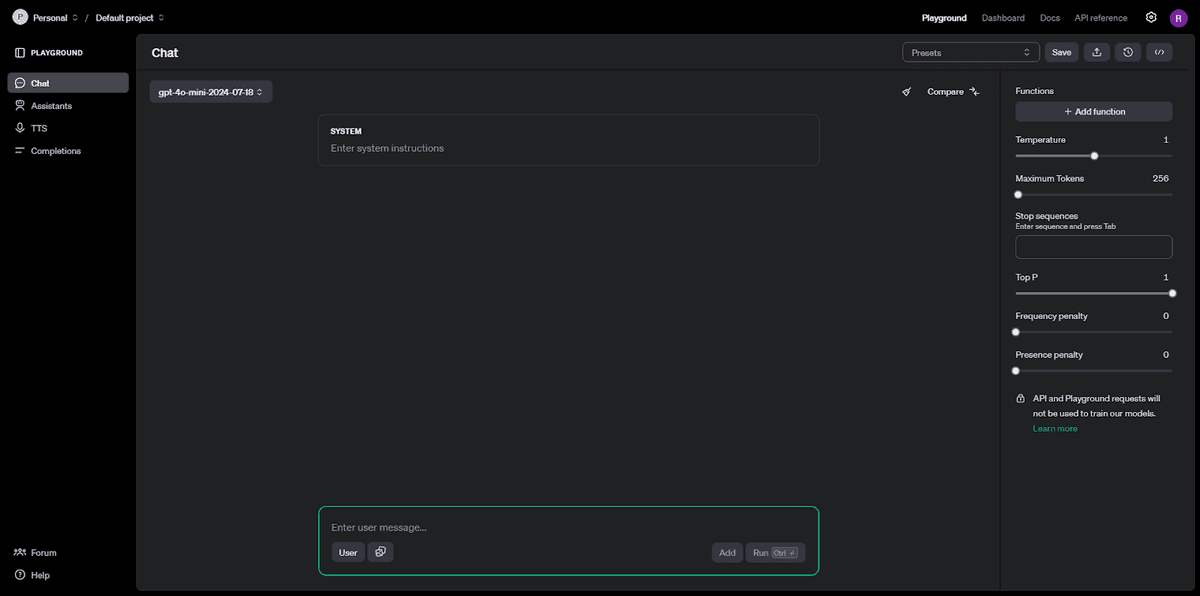
The OpenAI API is a versatile tool that allows developers to integrate advanced AI capabilities into their applications easily. By providing a straightforward "text in, text out" interface, it enables users to leverage OpenAI’s powerful machine learning models for a variety of tasks without needing deep technical knowledge. This API can be applied in many fields, including customer service, content creation, and data analysis, making it a valuable resource for enhancing projects with AI-driven solutions.
An Overview of OpenAI and its API
OpenAI's journey began in 2015 when a group of visionary entrepreneurs and researchers, including Elon Musk and Sam Altman, founded the company with a bold mission: to ensure that artificial general intelligence benefits all of humanity. Over the years, OpenAI has evolved from its non-profit roots into a hybrid model, forging strategic partnerships with tech titans like Microsoft to accelerate their progress in AI research and development.
At the heart of OpenAI's offerings lies the OpenAI API - a powerful bridge that connects developers with OpenAI's state-of-the-art machine learning models. This API acts as a conduit, enabling developers to seamlessly integrate cutting-edge AI capabilities into their projects without the need to delve into the intricate details of the underlying models. The beauty of the OpenAI API lies in its versatility - it provides a general-purpose "text in, text out" interface, making it adaptable to a wide array of applications across various domains.
Benefits and Applications of OpenAI's API: How It's Used
The OpenAI API offers remarkable versatility and numerous advantages for developers and businesses enhancing their applications with advanced AI. It provides access to powerful machine learning models, enabling a wide range of functionalities that transform user experiences, streamline operations, and drive innovation.
The API's versatility is evident in its diverse applications, from powering intelligent chatbots and virtual assistants to generating content, translating languages, analyzing sentiment, and even recognizing and generating images. Over 300 applications already demonstrate its flexibility and potential for innovative solutions.
Developers can easily integrate AI features without extensive machine learning expertise, while businesses of all sizes benefit from its scalability and cost-effectiveness. The API processes large volumes of data, providing valuable insights for strategic decisions. It also ensures applications stay current with the latest AI advancements, offering a future-proof solution for ongoing innovation.
- Ease of Integration: The API's user-friendly design allows developers to incorporate AI features into their applications quickly and efficiently, without needing extensive expertise in machine learning.
- Versatility: OpenAI's API is adaptable to various industries and use cases, from content generation and data analysis to customer service and educational tools.
- Scalability: The API supports scalable solutions, making it suitable for projects of all sizes, from small startups to large enterprises.
- Cost-Effectiveness: By leveraging OpenAI's pre-trained models, businesses can save on the significant time and resources required to develop AI capabilities from scratch.
- Enhanced User Experience: Applications integrated with OpenAI's API can provide more intuitive, responsive, and personalized user interactions, leading to higher user satisfaction and engagement.
- Data-Driven Insights: The API can process and analyze large volumes of text data, providing valuable insights that can inform strategic decisions and improve products or services.
- Continuous Improvement: With access to the latest advancements in AI research, the API ensures that applications remain up-to-date with cutting-edge technologies, offering a future-proof solution for ongoing innovation.
These benefits highlight how OpenAI's API can empower developers and businesses to create smarter, more efficient, and highly engaging applications:
AI Chatbots
One of the most promising applications of OpenAI's API lies in the realm of chatbots and virtual assistants. With the ability to understand and generate human-like text, models like GPT-3.5 and GPT-4o have revolutionized the way we interact with machines. By integrating the OpenAI API, developers can create chatbots that engage users in natural, fluid conversations, providing personalized assistance and support. These AI-powered chatbots can be deployed across various platforms, from websites and mobile apps to customer service portals, enhancing user engagement and streamlining customer support.
Analysis
The OpenAI API also shines in the domain of analysis, particularly sentiment analysis. By leveraging the API's capabilities, businesses can gain valuable insights from vast amounts of textual data, such as customer reviews, social media posts, and feedback. The API automates the process of understanding the underlying sentiment, whether positive, negative, or neutral, allowing businesses to gauge public opinion, monitor brand perception, and make data-driven decisions to improve their products or services.
Bleeding Edge Technology
Integrating OpenAI's API into your applications opens the door to the latest advancements in AI technology. As OpenAI continues to push the envelope with their research and development efforts, their API serves as a conduit to access these cutting-edge capabilities. By leveraging the API, your applications can benefit from the ongoing improvements and innovations in OpenAI's models, ensuring that you stay at the forefront of the AI revolution. This future-proofing aspect of the API allows you to continuously enhance your applications and provide your users with the most advanced AI-powered experiences.
OpenAI API Features
The OpenAI API is a powerful tool that provides developers with a range of advanced AI functionalities, designed to enhance their applications and streamline development processes. With a focus on accessibility, customization, and scalability, the OpenAI API stands out for its ability to deliver cutting-edge AI solutions across various domains. Below are some of the standout features of the OpenAI API:
- Pre-trained AI Models: Gain immediate access to sophisticated AI models, eliminating the need for extensive training and resource investment.
- Customizable AI Models: Tailor AI models to meet specific needs, enhancing relevance and performance through fine-tuning.
- Simple API Interface: Benefit from a user-friendly interface and comprehensive documentation, enabling quick and easy integration.
- Scalable Infrastructure: Ensure seamless scalability to support growing demands, backed by robust infrastructure and cloud partnerships.
These features collectively make the OpenAI API a versatile and valuable tool for developers aiming to leverage the latest advancements in AI technology.
Pre-trained AI models
One of the key strengths of the OpenAI API is the access it provides to a wide range of pre-trained AI models. These models, such as GPT-3.5, GPT-4, DALL·E, and Whisper, have been rigorously trained on vast amounts of diverse data, equipping them with the ability to perform a variety of tasks right out of the box. For developers, this means they can leverage the power of these models without the need for extensive training resources or computational infrastructure. By tapping into the OpenAI API, developers can benefit from the collective knowledge and capabilities embedded within these pre-trained models, accelerating their development process and achieving impressive results with minimal effort.
Customizable AI models
While the pre-trained models offered by OpenAI are incredibly powerful, there may be instances where a more tailored approach is required to meet specific business needs. This is where the concept of fine-tuning comes into play. OpenAI allows developers to take their pre-trained models and further refine them using their own domain-specific data. By fine-tuning the models, developers can adapt them to better understand and generate content that aligns with their particular use case, industry, or niche. This customization capability empowers businesses to create AI solutions that are highly relevant and optimized for their unique requirements, resulting in improved performance and more accurate outputs.
Simple API interface
One of the key aspects that sets the OpenAI API apart is its user-friendly and intuitive interface. OpenAI has made a concerted effort to provide developers with a seamless experience when integrating their API into applications. The API documentation is comprehensive and well-structured, offering clear guidelines and code examples to help developers get started quickly. With just a few lines of code, developers can begin harnessing the power of OpenAI's models, thanks to the straightforward API endpoints and the availability of SDKs in popular programming languages. This simplicity lowers the entry barrier for developers, making it accessible even to those who may not have extensive experience working with AI or complex APIs.
Scalable infrastructure
As businesses grow and their AI-powered applications gain traction, the ability to scale becomes critical. OpenAI understands this need and has invested heavily in building a robust and scalable infrastructure to support the demands of their API users. By leveraging cutting-edge technologies like Kubernetes and partnering with cloud providers like Microsoft Azure, OpenAI has created an infrastructure that can handle the scale and complexity of real-world AI applications. This scalable infrastructure ensures that as your user base expands and the usage of your AI-powered features increases, the OpenAI API can seamlessly accommodate that growth without compromising on performance or reliability.
How to Get Started with OpenAI API: A Beginner's Guide
Embarking on your journey with the OpenAI API can unlock a world of possibilities, from creating intelligent chatbots to performing sophisticated data analysis. This guide will walk you through the initial steps to get started with the OpenAI API, ensuring you have the foundational knowledge and tools to begin integrating advanced AI capabilities into your applications. Whether you're a seasoned developer or a beginner, these steps will help you harness the power of OpenAI's cutting-edge models to innovate and enhance your projects. Let's dive in!
Step 1. Create an OpenAI Account

To get started, visit platform.openai.com and click on the "Sign Up" button. You can create a new account using your email address or sign up using an existing Google or Microsoft account. Follow the prompts to complete the registration process.
Step 2. Verify Your Account
After signing up, OpenAI will send a confirmation email to the address you provided. Open the email and click on the verification link to confirm your account. This step is essential to ensure the security and integrity of your account.
Step 3. OpenAI login Into Your Account
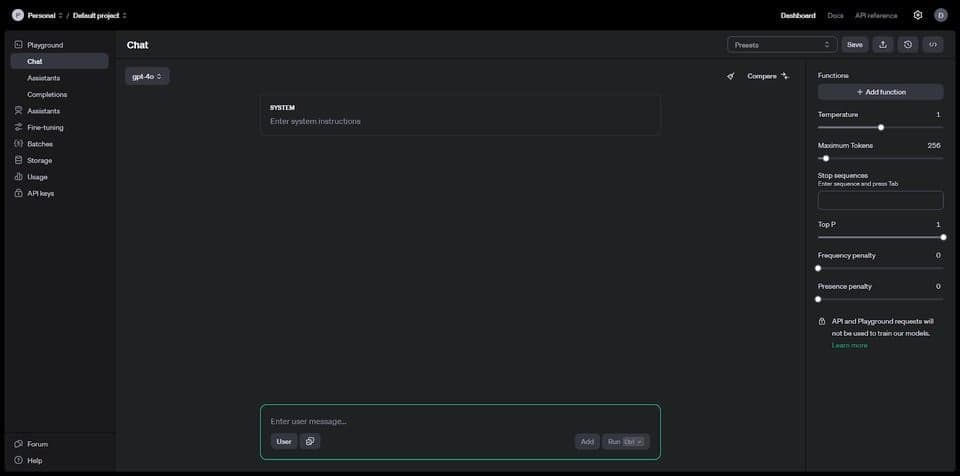
Once your account is verified, return to platform.openai.com and click on the "Log In" button. Enter the credentials you used during the signup process to access your account dashboard.
Step 4. Navigate to the API Section
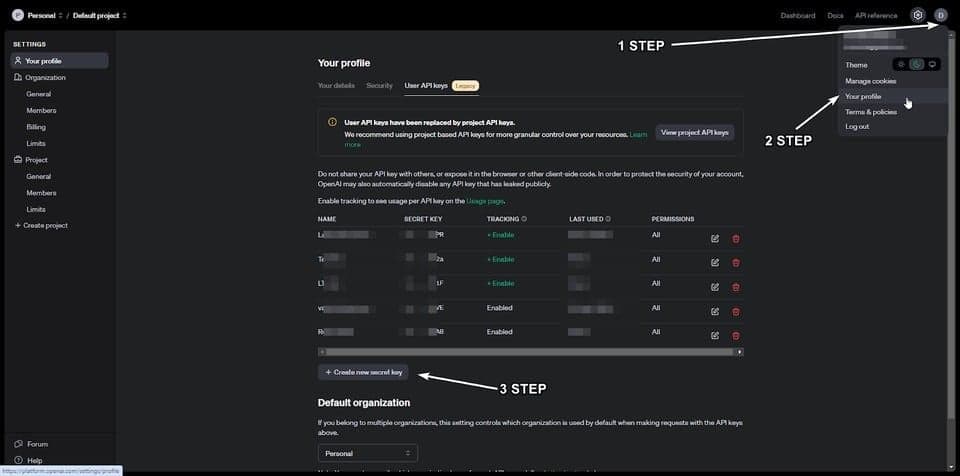
After logging in, locate your account icon in the top-right corner of the page. Click on it to reveal a dropdown menu, and select "View API keys." This will take you to the chat gpt API Keys section of your account dashboard.
Step 5. Generate a New API Key
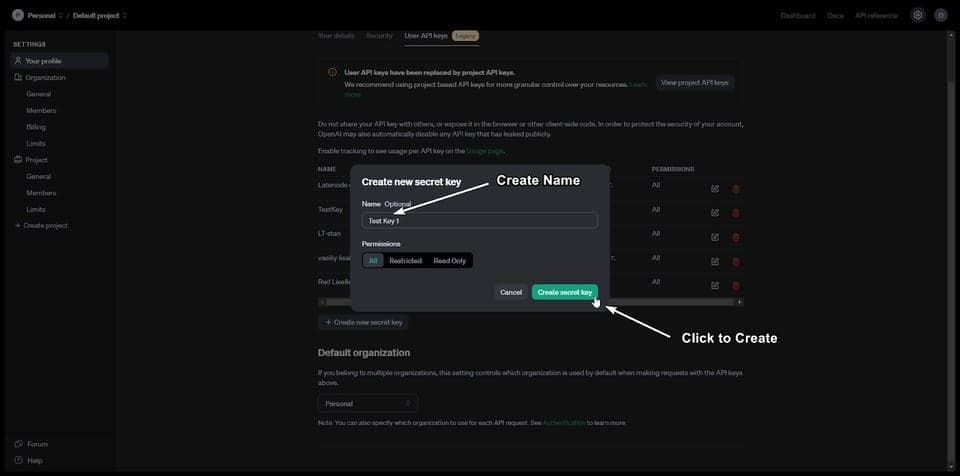
In the API Keys section, you'll find the option to create a new openAI secret key. Click on the "Create new secret key" button to proceed. You'll be prompted to provide a descriptive name for your key, which can help you identify its purpose later on. After entering a name, click "Create secret key" to generate your new API key.
Step 6. Save Your API Key
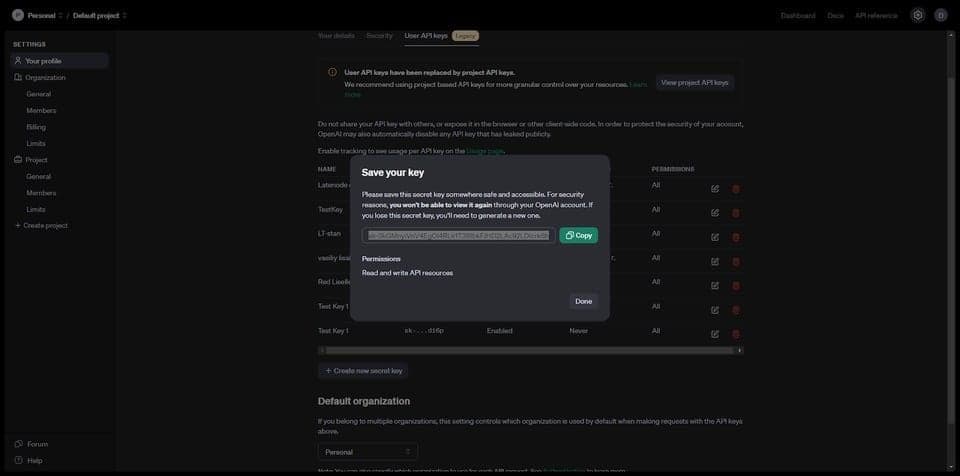
Once your new API key is generated, it will be displayed on the screen. It is crucial that you copy this key and store it in a secure location, such as a password manager or an encrypted file. Remember, OpenAI does not allow you to view your API key again after this point for security reasons.
Step 7: Install the OpenAI Python library
To interact with the OpenAI API programmatically, you'll need to install the OpenAI Python library. This library provides a convenient and intuitive interface for making API requests and handling responses. To install the library, open your terminal or command prompt and run the following command:
pip install openai
This command will download and install the latest version of the OpenAI Python library, along with its dependencies. Once the installation is complete, you're ready to start coding and exploring the capabilities of the OpenAI API.
Step 8: Making your first API call
Now that you have your API key and the OpenAI Python library installed, it's time to make your first API call and witness the power of OpenAI's models in action. Let's start with a simple example of using the ChatCompletion API to translate a sentence from English to Spanish. Here's the code snippet:
import openai

def get_chat_completion(prompt, model="gpt-3.5-turbo"):
    openai.api_key = "YOUR_API_KEY"  # Replace with your actual API key

    messages = [{"role": "user", "content": prompt}]
    response = openai.ChatCompletion.create(
        model=model,
        messages=messages,
        temperature=0,
    )
    return response.choices[0].message["content"]

prompt = "Translate into Spanish: As a beginner data scientist, I'm excited to learn about OpenAI API!"
response = get_chat_completion(prompt)
print(response)
In this code, we define a function called get_chat_completion that takes a prompt and a model as input parameters. Inside the function, we set the openai.api_key to your actual API key (replace "YOUR_API_KEY" with the key you obtained in step 2). We then create a messages list containing a single message object with the "user" role and the provided prompt. Next, we make a request to the ChatCompletion API using openai.ChatCompletion.create(), specifying the desired model, messages, and temperature. Finally, we extract the generated response from the API's output and return it.
To use this function, we provide a prompt asking to translate a sentence into Spanish and store the response in the response variable. When you run this code, you should see the translated sentence printed in the console.
Step 9. Exploring further
Congratulations on making your first API call with the OpenAI API! This is just the beginning of your journey into the world of AI-powered applications. From here, you can explore the various models and capabilities offered by OpenAI and experiment with different prompts and parameters to achieve your desired outcomes. Take some time to dive into the OpenAI documentation, which provides detailed information on each API endpoint, supported models, and best practices for using the API effectively.
As you become more familiar with the API, start thinking about how you can apply it to solve real-world problems or enhance existing applications. Whether you're building a chatbot, analyzing sentiment, generating content, or working on any other AI-related task, the OpenAI API offers a wide range of possibilities. Don't be afraid to experiment, iterate, and learn from your experiences. The OpenAI community is also a great resource to connect with other developers, share knowledge, and seek guidance when needed.
Remember, the field of AI is constantly evolving, and OpenAI is at the forefront of this exciting journey. By leveraging their API, you have access to state-of-the-art models and tools that can transform the way you build and interact with AI-powered applications. So, keep exploring, keep learning, and unleash the potential of the OpenAI API to create innovative and impactful solutions.
You can try OpenAI API For Free on Latenode - The Best Automation Platform for you 🚀
How you can Automate your business processes with ChatGPT-4o API and Latenode
Latenode's seamless integration of OpenAI's GPT-4o provides users with a powerful tool to harness the potential of conversational AI without the complexity of deploying the model on their own infrastructure. The platform's intuitive visual editor streamlines the process of integrating GPT-4o with other systems via APIs, allowing businesses to effortlessly incorporate the AI's sophisticated language understanding and generation capabilities into their automation processes. By using Latenode, users can conveniently access GPT-4o's features, including its powerful AI vision capabilities, task automation, research assistance, data analysis, and more. The integration also enables users to seamlessly switch between GPT-4o's different versions, depending on their specific needs and budget. An example of a simple script where we create a chatbot for telegram that will generate answers to your questions. Here's what the script looks like:
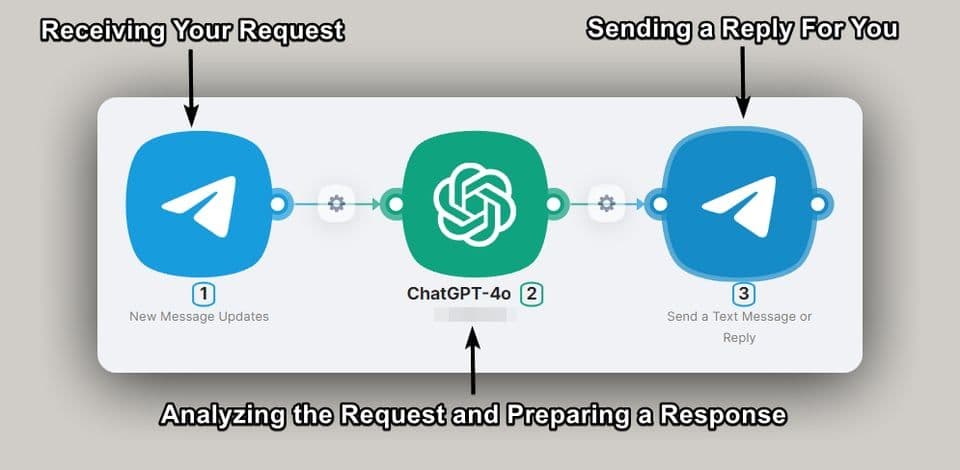
And here is the result of this scenario, where an already created chatbot using Latenode answers us to a given question:
You can learn more about this script and the integration with Latenode in this article. The integration with Latenode offers a few key benefits:
- Ease of use: Latenode's integration with GPT-4o simplifies the process of using AI, making it easier for non-technical users to access and understand the AI capabilities they need. This can help businesses to quickly and easily adopt AI solutions, without requiring extensive technical expertise.
- Flexible pricing: Latenode's integration allows users to choose between GPT-4's different versions, with varying costs and features, making it a more accessible and affordable option for businesses and individuals.
- Comprehensive AI solutions: Latenode's integration of GPT-4o provides users with access to a wide range of AI capabilities, from complex tasks to simple queries, making it a versatile and powerful AI platform.
- Customization: With Latenode's integration, users can customize GPT-4o to meet their specific needs, allowing them to create tailored AI solutions that are aligned with their business goals and objectives.
And here is the result of this scenario, where an already created chatbot using Latenode answers us to a given question:
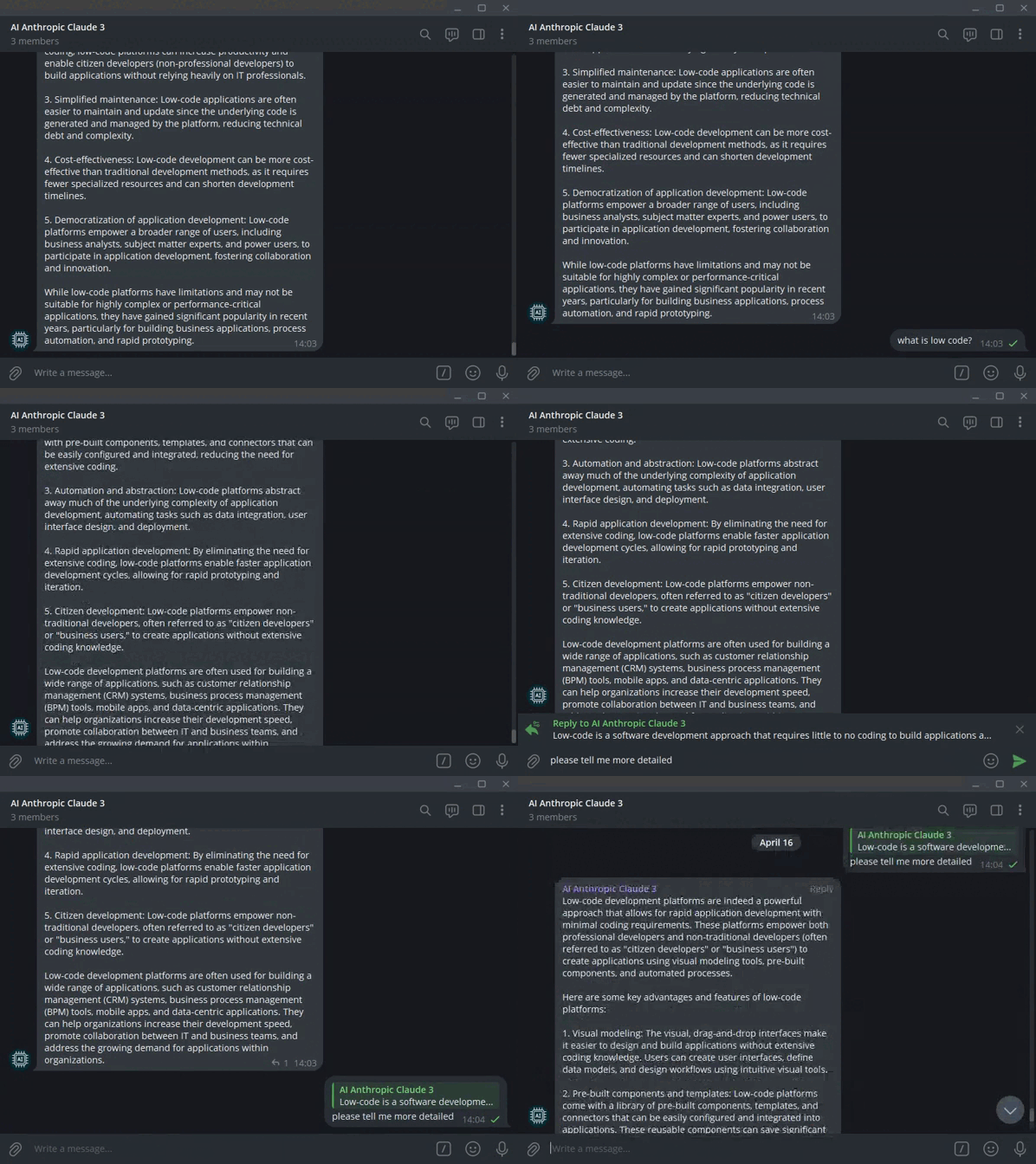
This is just one example of how Latenode can transform your approach to using the OpenAI API with powerful automation. The platform's capabilities are virtually limitless, allowing you to create any automation scenarios necessary to improve your business efficiency. Whether it’s automatic content generation, data analysis, sending notifications, or tracking key performance indicators, Latenode provides the tools to bring them to life.
By leveraging Latenode's visual workflow builder and seamless integration with the OpenAI API, you can easily design and implement complex automation scenarios, increasing data analysis efficiency and accelerating your workflows.
If you need help or advice on how to create your own script or if you want to replicate this one, contact our Discord community, where the low-code automation experts are located.
Industry Use-Cases of OpenAI API
OpenAI API has found widespread application across various industries, offering innovative solutions for a multitude of business challenges. Below are some key sectors where the use of this technology brings significant benefits:
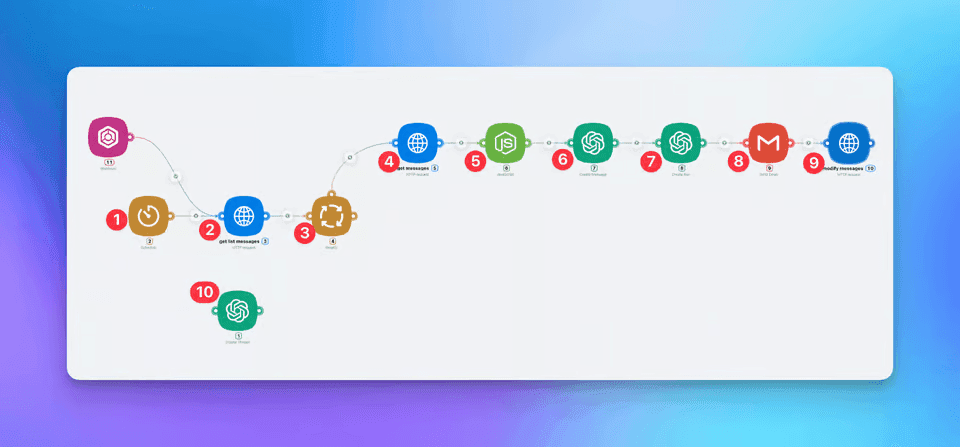
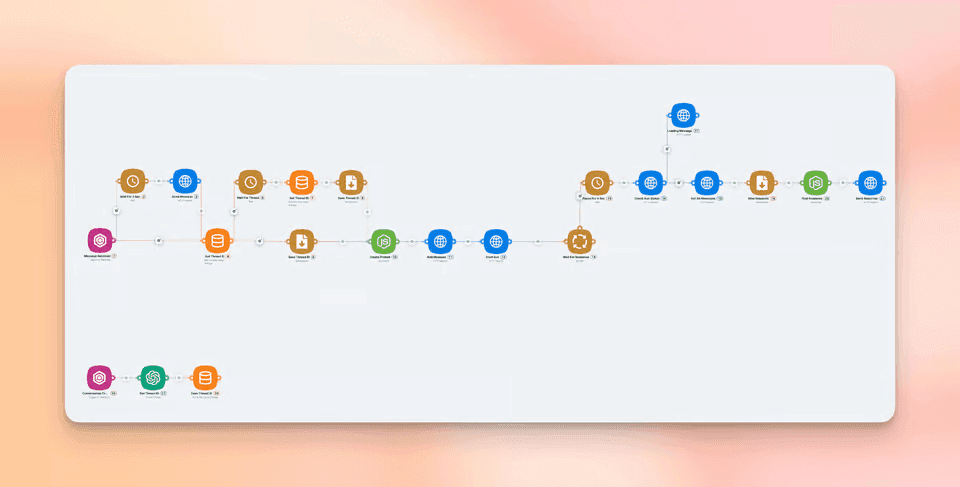
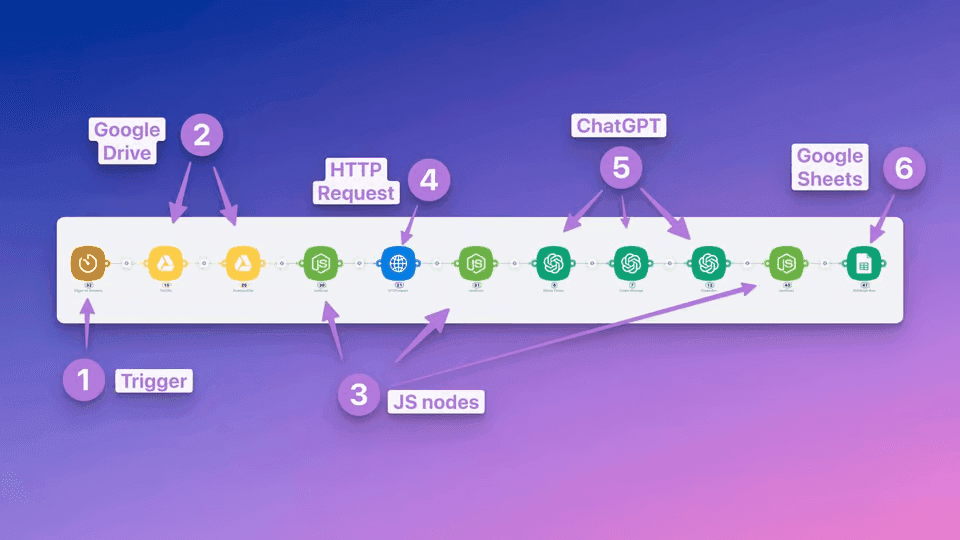
ChatGPT is already integrated into the Latenode platform. Start using it to automate your business processes right away!
Is the OpenAI API free?
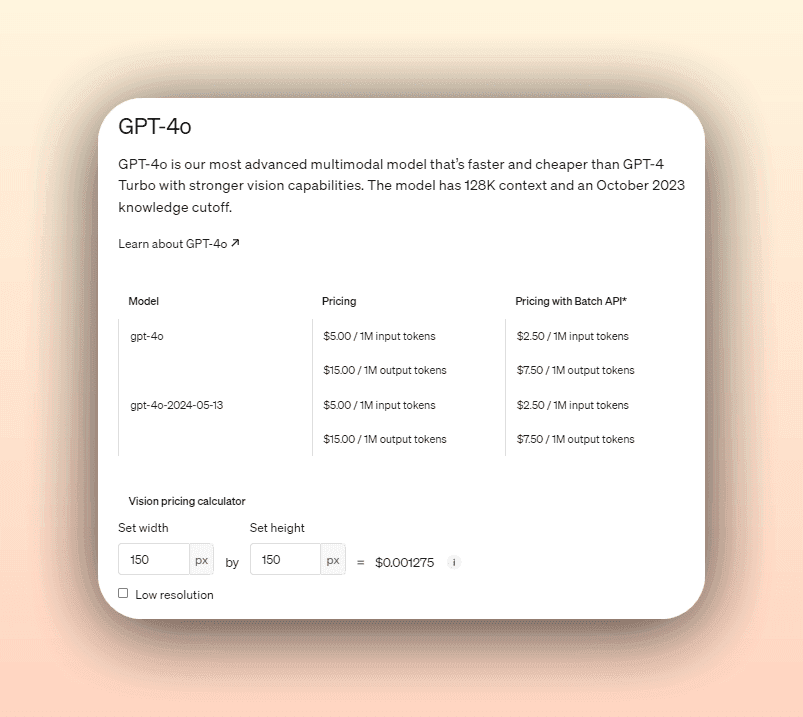
OpenAI offers a limited free tier for users to explore and experiment with their API. New users typically receive a starting credit of around $18, which can be used across different models. This allows developers to test the API's capabilities and assess its suitability for their projects.
However, the free tier is intended for exploration only. Once the initial credit is exhausted or after a certain period, users need to switch to a paid plan. OpenAI uses a pay-as-you-go pricing model based on the number of tokens processed, which varies depending on the model used.
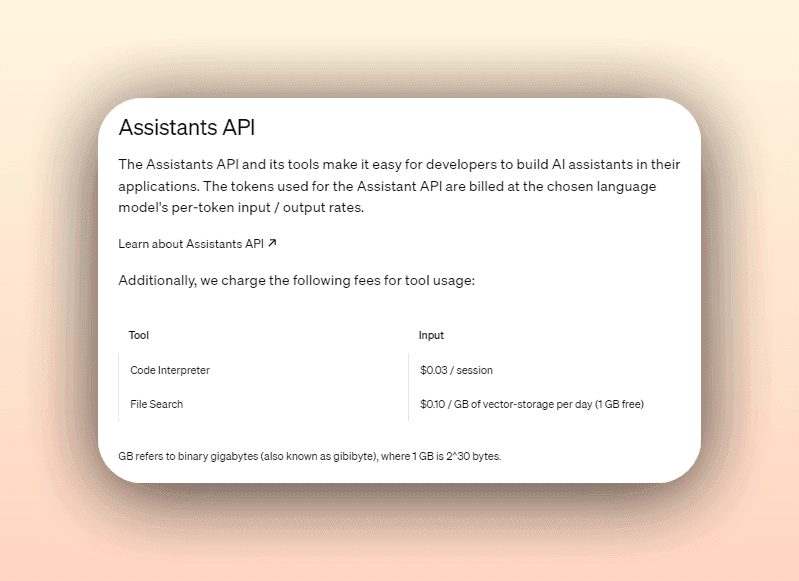
OpenAI occasionally offers additional free credits or promotions, usually announced through their official channels. While the free tier is great for getting started, it's important to plan for long-term costs as your application scales. OpenAI provides detailed pricing information and cost calculators to help estimate and manage expenses based on expected usage patterns.
Remember to check the OpenAI pricing page for the most up-to-date information on credit amounts and usage limits.
Types of OpenAI API models
OpenAI offers a diverse range of models through its API, each designed to excel at specific tasks and applications. Understanding the different types of models available can help you choose the most suitable one for your use case. Let's explore some of the key models provided by OpenAI:
GPT-4o API
ChatGPT-4o is the newest and most advanced version in the GPT-4 family, specifically optimized for conversational tasks. While GPT-4 excels in a wide range of language and code-related applications, ChatGPT-4o is fine-tuned to handle dialogue and provide more contextually aware and coherent responses in a conversational setting. This makes it particularly well-suited for building chatbots, virtual assistants, and other interactive applications where maintaining a natural and engaging conversation is essential. ChatGPT-4o leverages the same advanced capabilities of GPT-4 but is tailored to enhance user experience in dialogue-heavy applications, making it the most powerful model for conversational AI tasks.
GPT-4 API
GPT-4 represents one of the most advanced language models offered by OpenAI. It builds upon the success of its predecessor, GPT-3, and incorporates significant improvements in terms of performance, accuracy, and reasoning capabilities.
GPT-4 comes in two variants: GPT-4-8K and GPT-4-32K. The GPT-4-8K model can process up to 8,192 tokens in a single request, while GPT-4-32K can handle an impressive 32,768 tokens, equivalent to around 50 pages of text. This increased capacity allows for more complex and detailed tasks to be accomplished.
One of the key strengths of GPT-4 is its proficiency in code-related tasks. It has demonstrated remarkable abilities in code generation, understanding, and completion. As a result, GPT-4 is expected to replace the Codex models, which were specifically designed for code-related applications.
GPT-3 API
The GPT-3 (Generative Pre-trained Transformer 3) API is a family of language models that excel at understanding and generating human-like text. These models have been trained on a vast corpus of diverse data, enabling them to capture the nuances and intricacies of natural language.
Within the GPT-3 API, there are several models available, such as Davinci, Curie, Babbage, and Ada. Each model has its own strengths and characteristics. For example, Davinci is the most powerful and capable model, suitable for complex language tasks such as content generation, summarization, and translation. Curie, on the other hand, is well-suited for tasks like sentiment analysis and text classification.
The GPT-3 models can be used for a wide range of language-related applications, including chatbots, content creation, language translation, and more. They have the ability to understand context, generate coherent and fluent text, and even complete tasks with minimal prompting.
Codex
Codex is a specialized set of models developed by OpenAI to assist with code-related tasks. These models have been trained on a vast amount of source code from various programming languages, enabling them to understand and generate code snippets.
With Codex, you can accomplish tasks such as code completion, code explanation, and even code generation from natural language instructions. It supports a wide range of programming languages, including Python, JavaScript, Ruby, and more.
Codex models like code-davinci-002 and code-cushman-001 are particularly useful for developers looking to automate repetitive coding tasks, improve code quality, or generate code snippets based on specific requirements.
Whisper
Whisper is an automatic speech recognition (ASR) model developed by OpenAI. It specializes in transcribing audio input into written text. Whisper has been trained on a diverse dataset of audio samples, enabling it to accurately transcribe speech in multiple languages.
With Whisper, you can build applications that involve speech-to-text conversion, such as voice assistants, transcription services, or even real-time subtitling. The model supports various audio formats and provides accurate transcriptions, making it a powerful tool for speech-related tasks.
DALL-E
DALL-E is a groundbreaking model that combines natural language processing and computer vision to generate high-quality images from textual descriptions. It has the ability to create entirely new images or modify existing ones based on the provided prompts.
DALL-E opens up a world of possibilities for creative applications, such as generating product images, creating art, or visualizing concepts. By leveraging the power of language and visual understanding, DALL-E enables users to bring their ideas to life through realistic and imaginative image generation.
Embeddings
Embeddings are a special type of model that focuses on converting text into numerical representations called embeddings. These embeddings capture the semantic meaning and relationships between words or sentences, allowing for efficient similarity comparisons and information retrieval.
The text-embedding-ada-002 model is commonly used for tasks such as semantic search, recommendation systems, and clustering. By representing text as dense vectors, embeddings enable fast and accurate matching of similar content, making them valuable for various natural language processing applications.
These are just a few examples of the models available through the OpenAI API. OpenAI continuously expands and improves its model offerings, so it's worth exploring their documentation and staying updated on the latest releases to find the most suitable model for your specific use case.
Can I use OpenAI API for commercial purposes?
Yes, you can use the OpenAI API for commercial purposes, subject to their terms and conditions. The API is designed for a wide range of applications, including commercial projects, products, and services.
When using the API commercially, consider several key factors. Understand the pricing structure and estimate costs for your expected usage. Handle user data responsibly and comply with applicable laws and regulations. Implement content moderation mechanisms to prevent inappropriate content generation or distribution. Respect OpenAI's intellectual property rights and attribution requirements for API-generated content. Ensure your application aligns with ethical principles of fairness, transparency, and accountability.
OpenAI provides resources, documentation, and support for commercial use. Engaging with the OpenAI community and experienced developers can offer valuable guidance.
Remember to monitor API usage, track costs, and optimize implementation for long-term viability. As your business grows, you may need to adjust usage patterns or upgrade plans.
Conclusion
The OpenAI API represents a transformative tool for developers, data scientists, and businesses looking to harness the power of artificial intelligence. It provides access to a range of advanced AI models, enabling the creation of intelligent conversational agents, high-quality content generation, sentiment analysis, and much more.
We've explored the key aspects of the API, from getting started to best practices for effective use. We've discussed various models like GPT-3, GPT-4, Codex, Whisper, and DALL-E, each offering unique capabilities for different applications. Special attention was given to ChatGPT and its potential to revolutionize customer interactions.
The API can be used for commercial purposes, with important considerations around pricing, data privacy, content moderation, and ethical principles. OpenAI provides resources to help navigate these complexities.
As you embark on your AI journey with the OpenAI API, approach it with curiosity, creativity, and responsibility. Strive to create solutions that are not only technologically advanced but also ethically sound and beneficial to society.
The field of AI is constantly evolving, and by staying updated and collaborating with the OpenAI community, you can contribute significantly to this exciting frontier. With the OpenAI API as your tool and your imagination as your guide, the possibilities for innovation are limitless. Welcome to the world of AI and the OpenAI API!
You can try OpenAI API For Free on Latenode - The Best Automation Platform for you 🚀




