




Most teams picking a BPMN tool make the same mistake: they search for the most recognized name, find a comparison article that lists features, and pick whichever tool has the longest integration page. Three months later, half the team is fighting a tool that was built for a completely different job than the one they're doing.
The real decision isn't which BPMN tool has the most features. It's whether you need a tool that draws processes or a tool that runs them. Those are different products with different architectures, different pricing logic, and different maintenance costs. Brand recognition doesn't tell you which you need. Your job-to-be-done does.
The BPM market is heading toward $64 billion by 2033, per Coherent Market Insights, growing at 13.4% annually. That number reflects real organizational investment in process infrastructure, and it also explains why there are now dozens of tools competing for the same label. The category is crowded in a way that makes honest comparison harder, not easier.
This article ranks 10 tools for 2026, explains the documentation-vs-execution split that most comparison guides skip, and gives you the selection criteria that actually matter before you commit to a platform.
The split most teams learn too late
- BPMN 2.0 compliance means very different things for diagrammers vs. execution platforms.
- Buying a documentation tool expecting workflow automation is the most common tool mismatch I see.
- Free tiers on draw.io and bpmn.io are genuinely free; most other "free" plans hit ceilings fast.
- Collaboration features matter more than BPMN depth if your stakeholders are non-technical.
- The right BPMN tool is the one your team can still maintain six months after the person who built it moves on.
BPMN Tool Comparison at a Glance

Here's how the 10 tools stack up across the criteria that actually matter at selection time. Compliance depth here means whether the tool supports BPMN 2.0 for visual modeling only, or whether it generates executable models a workflow engine can run.
| Tool | Best-fit use case | BPMN 2.0 compliance depth | Collaboration support | Pricing tier | Weakest point |
|---|---|---|---|---|---|
| Camunda | Enterprise workflow automation | Executable modeling + orchestration engine | Team-level, developer-oriented | Self-hosted free; SaaS enterprise | Steep learning curve for non-developers |
| Bizagi Modeler | Business analyst documentation | Modeling only (free desktop); execution needs full suite | Limited in free tier | Free desktop modeler; paid automation suite | Free Modeler ≠ full automation - commonly confused |
| Signavio (SAP) | Enterprise process governance and transformation | Strong modeling; process mining included | Cloud collaboration, multi-stakeholder | Enterprise SaaS only | Cost barrier for smaller organizations |
| ARIS | Complex process architecture and compliance | Deep BPMN + EPC + UML multi-notation repository | Enterprise repository-based | Enterprise licensing only | Overkill for teams not doing governance-scale architecture |
| Lucidchart | Distributed team process documentation | BPMN-style diagramming, not execution semantics | Real-time browser collaboration | Freemium; team/enterprise plans | Not an executable BPMN platform |
| Microsoft Visio | Microsoft 365-native process documentation | BPMN stencils; documentation only | Microsoft 365 / Teams integration | Microsoft 365 subscription | No native workflow execution |
| draw.io / diagrams.net | Version-controlled BPMN diagrams, cost-sensitive teams | Standards-compliant diagramming, not executable | Confluence, Google Drive, Git integration | Free core; paid Confluence add-on | Execution not supported |
| bpmn.io | Embedding BPMN modeling into custom applications | BPMN 2.0 XML read/write; developer toolkit | Not an end-user collaboration tool | Open-source (free) | Requires developer integration to be useful |
| Visual Paradigm | Multi-notation architecture modeling | BPMN + UML + ArchiMate + DMN 1.3 + ERD | Team collaboration in desktop/cloud | Paid; tiered plans | Less accessible for BPMN-only use cases |
| Cardanit | Process analyst cloud BPMN modeling | BPMN 2.0 native; browser-based | Collaboration for business users | Freemium; subscription plans | Lower brand recognition vs. legacy tools |
Two cells worth flagging: Signavio pricing and Bizagi's full automation suite are enterprise-tier and not publicly disclosed in granular form. Treat those as "get a quote" rather than fixed figures.
What Separates a BPMN Diagram Tool from a Business Process Modeling Platform
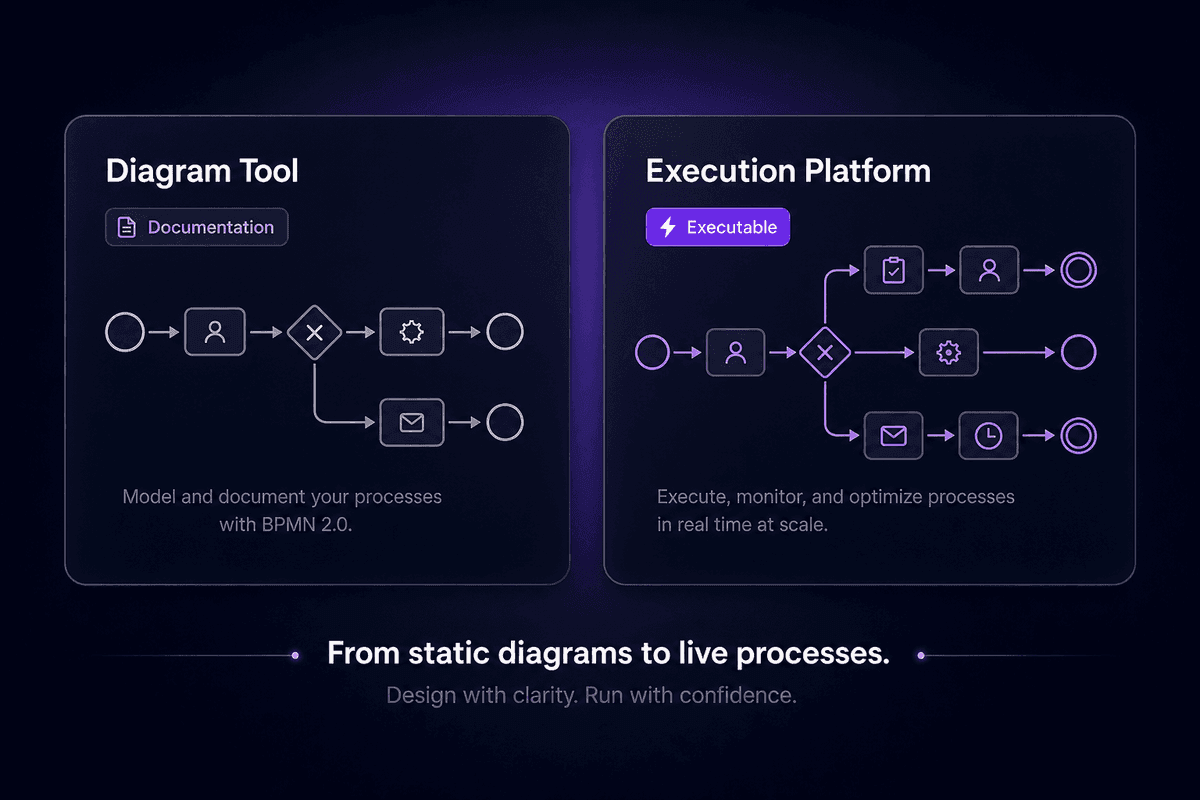
This is the distinction that generates the most misaligned purchases, and I've stopped being surprised when I see it happen.
A BPMN diagram tool produces a visual representation of a business process: boxes, arrows, gateways, events. It follows the business process model and notation standard (or approximates it) and outputs something a human can read. The diagram lives in a file or on a shared canvas. It doesn't do anything else. Lucidchart, draw.io, and Visio are this kind of tool.
A business process modeling platform does something different. It produces BPMN 2.0 models with execution semantics: structured definitions a workflow engine can parse, sequence, and run. The graphical representation is still present, but it's connected to a runtime that can actually execute a business process. Camunda is the clearest example. Bizagi's full automation suite is another, though the free desktop Modeler (not the same product) is documentation-only.
The gap matters because the two types of modeling tool have completely different downstream requirements. If you need to execute a business process automatically, documentation-only tools will produce a beautiful diagram that sits in Confluence and does nothing. If you only need to communicate a process to stakeholders or document it for compliance, execution platforms add enormous complexity and cost with no corresponding benefit.
I keep seeing teams buy Camunda when they needed Lucidchart, and buy Lucidchart when they needed Camunda. Both are wrong purchases for the wrong reasons.
How to Choose the Right BPMN Modeling Tool for Your Team
Before committing to any platform, run down this list. Each item names the decision factor, what goes wrong if you skip it, and the check to run.
- BPMN 2.0 compliance depth
Ask whether you need the tool to produce documentation diagrams or executable process definitions. If your process will be handed to a workflow engine, you need execution semantics. If it's going to a stakeholder presentation, standards compliance is less critical. Most tools don't explain this distinction upfront, which is exactly how teams end up in the wrong product category.
- Automation and execution requirements
BPM without execution capability is documentation software. If your goal is actual business process automation rather than process improvement documentation, the tool needs a runtime or a direct integration path to one. Confirm this before the procurement process starts, not after.
- Collaboration features for your actual users
If your business users and non-technical stakeholders need to participate in BPMN modeling, ease of use and real-time collaboration matter more than compliance depth. A tool that only technical users can operate makes the modeling process slower, not faster. Ask who will maintain the models in six months, not just who will build them.
- Drag-and-drop usability vs. expert configurability
There's a real tradeoff here. The tools that are most accessible for structured way, visual process design (Lucidchart, Cardanit, Bizagi Modeler) are usually the least configurable for complex execution scenarios. The tools with the deepest execution support usually require significant onboarding. Pick based on your team's actual capability, not the demo experience.
- Pricing model beyond the free tier
Free tiers for draw.io and bpmn.io are genuinely free for core BPMN work. Most other "free" plans hit limits at the point where the tool becomes useful at team scale. Model your expected usage at 6 months, not day one. The inefficiency of migrating platforms after 47 workflows are built is not recoverable.
- Ecosystem and API extensibility
If your BPMN diagrams need to connect to live systems, the tool either needs execution capability or a documented API path to connect with platforms that have it. A closed diagramming tool with no export path creates a process documentation island that can't evolve into automation without starting over.
The 10 Best BPMN Tools Ranked for 2026
These tools are ordered from strongest overall fit for teams that need both modeling and execution, toward more specialized or documentation-focused options. The ranking logic reflects job-to-be-done coverage, not feature quantity.
Camunda: Best BPMN 2.0 Tool for Executable Workflow Automation
Camunda sits at the top for one specific reason: it's the only tool on this list that treats BPMN 2.0 as an execution contract, not just a drawing convention. When you model a process in Camunda's modeler, you're producing process models that a real orchestration engine can run, not a diagram that needs to be re-interpreted by a developer downstream.
The open-source engine and cloud-native options (Camunda 8 SaaS being the current version) mean you can run it self-hosted or managed depending on your team's infrastructure preferences. Enterprise teams building complex claims processing, compliance workflows, or multi-system orchestration are the natural fit.
The con is real: Camunda is BPMN software for people who think in BPMN. The learning curve is steep for anyone without a background in process orchestration or workflow engine concepts. I've seen teams underestimate this and spend eight weeks in what should have been a four-week implementation. The pro, when it fits, is that you're building on a standard with genuine staying power.
Verdict: The strongest BPMN 2.0 modeler for teams that need executable process automation. Not a beginner platform.
Bizagi Modeler: Best Free BPMN Desktop Modeler for Business Analysts
Bizagi trips people up in one specific way: the free desktop Bizagi Modeler and the Bizagi Suite (their full automation platform) are not the same product. The confusion is documented enough that it warrants being the first thing I say about it.
The free Modeler is a solid, standards-compliant BPMN 2.0 standard desktop application for process design and documentation. Business analysts who need to model processes clearly, share them with stakeholders, and maintain a process library will find it fit for purpose. The interface is accessible enough that non-engineers can use it without formal BPMN training.
If you need automation, the free Modeler won't get you there. You'd need the paid Bizagi Suite, which is a genuinely different procurement decision. The pro is that the free Modeler is actually useful and not crippled for documentation work.
Verdict: The best free BPMN desktop tool for documentation-focused analysts. Just don't confuse it with the full platform.
Signavio (SAP Signavio Process Manager): Best for Enterprise Process Governance
Signavio sits in a different category than most tools on this list. It's less about drawing individual business processes and more about managing an organizational process architecture, with process mining that connects documented processes to actual execution data from ERP systems.
For large enterprise transformation programs needing end-to-end process transparency across complex process hierarchies, SAP's acquisition of Signavio makes it a strong fit. The collaboration model is built for multi-stakeholder review cycles: business analysts, process owners, and compliance teams working against the same set of process models.
The barrier is pricing. Signavio is enterprise SaaS with enterprise SaaS pricing. Business process management at this scale requires a budget conversation before a technical one. For smaller teams, the governance features are real but the cost-benefit math doesn't usually work.
Verdict: Excellent for large transformation programs. Not the right tool for teams without a dedicated process governance function.
ARIS: Best BPMN Tool for Complex Process Architecture and Compliance
ARIS has been in the process architecture space longer than most tools on this list have existed. The detailed BPMN and BPMN elements support sits alongside EPC, UML, and a repository model built for enterprise governance. For organizations managing compliance programs, enterprise architecture, and regulatory documentation simultaneously, the multi-notation modeling software and versioned process repository are genuinely valuable.
The licensing is enterprise-only, which frames the audience accurately. ARIS is not the notation modeling tool you choose for a 20-person startup. It's the one large, process-driven organizations choose when they need controlled access, audit trails, and a single source of truth for process definitions across departments.
Verdict: Best for compliance-driven, architecture-heavy organizations. Enterprise cost and complexity are the honest cons.
Lucidchart: Best Collaborative BPMN Diagram Tool for Distributed Teams
Lucidchart is the tool I'd suggest to anyone who needs a distributed team to get aligned on a process quickly. The browser-based real-time collaboration, combined with a clean interface and strong visual collaboration features for multiple diagram types, makes it the fastest path from "let's map this out" to "everyone can see the same thing."
What Lucidchart does not do is worth being explicit about: it is not an online BPMN tool with execution semantics. BPMN in Lucidchart produces documentation. If you hand a Lucidchart diagram to a workflow engine, nothing happens. The common mistake is assuming visual fidelity to BPMN shapes equals BPMN execution capability.
Google Workspace integration and broad template support make Lucidchart a natural choice for teams already running on Google's ecosystem.
Verdict: Excellent for collaborative process documentation. Not a replacement for Camunda or Bizagi automation.
Microsoft Visio: Best BPMN Diagramming Tool for Microsoft 365 Organizations
If your organization runs Microsoft 365 and the question is "how do I document processes in a way that integrates with Teams, SharePoint, and Office," Visio is the expected answer. The mature BPMN stencil library and library of shapes cover the standard notation well enough for documentation work, and the Microsoft Teams integration means diagrams can be embedded directly in team channels and wikis.
Visio's limitation is the same as Lucidchart's: the process flow stays in documentation territory. There's no native path from a Visio BPMN diagram to workflow execution. For Microsoft-first organizations, visio is the right documentation tool. For organizations expecting those diagrams to eventually drive automation, they'll need a separate platform.
Verdict: The natural fit for Microsoft 365 shops doing process documentation. Microsoft Visio does not execute workflows.
draw.io / diagrams.net: Best Free BPMN Tool for Version-Controlled Workflows

draw.io (now diagrams.net) is the tool I'd reach for if budget is the constraint and the need is clean BPMN diagrams that live in Git or Confluence. The open-source core is genuinely free, the Confluence add-on has a paid tier, and the browser-based editor handles visual modeling competently without forcing an account or subscription.
The developer-friendliness is real. Storing BPMN diagram files in Git alongside code, reviewing diagram changes in pull requests, and pulling them into Confluence pages are legitimate workflows, not workarounds. Teams who want to diagram quickly without a separate SaaS subscription are well-served.
Execution support doesn't exist here. draw.io diagrams stay in documentation territory.
Verdict: Best genuinely free BPMN diagramming option for version-controlled, developer-adjacent teams.
bpmn.io: Best Open-Source BPMN 2.0 Toolkit for Embedding into Custom Applications
bpmn.io is not a standalone modeling tool for end users. It's an open-source developer toolkit for embedding BPMN 2.0 XML reading, editing, and viewing into custom applications: SaaS products, internal portals, process management platforms.
The sub-process and gateway support in the diagram editor is complete, and the bpmn 2.0 xml output is standards-compliant. The expression editor is available via the properties panel for teams implementing DMN decision logic alongside BPMN. If you're building a product that needs a BPMN canvas inside it, bpmn.io is the established choice, and its position in the broader Camunda ecosystem means it receives active maintenance.
Verdict: The right choice if you're a developer embedding BPMN into a product. Not a good choice if you're a business user looking for a modeling environment.
Visual Paradigm: Best BPMN Tool for Multi-Notation Architecture Modeling
Visual Paradigm is where you go when BPMN alone isn't enough. The platform combines BPMN with UML, ArchiMate, ERD, DMN 1.3, and wireframes in one modeling environment. For enterprise architects and system designers who need to document process notation alongside system architecture and data models in a unified repository, this breadth is the core value.
Visual Paradigm and visual studio have no native integration, though the platform has its own IDE plug-in options. The comprehensive notation support is both the product's strength and its accessibility barrier: teams that only need BPMN will find it heavier than necessary.
Verdict: Best for architects who need multi-notation support in one tool. Overbuilt for lightweight BPMN-only use cases.
Cardanit: Best Browser-Based BPMN-Native Tool for Process Analysts
Cardanit is the tool I'd suggest to a business analyst who wants an intuitive BPMN modeling experience in a browser without the overhead of enterprise platforms. The intuitive bpmn interface, standards-compliant BPMN shapes, and visual flow design are built specifically for the analyst use case, not adapted from a generic diagrammer.
Lower brand recognition is the honest tradeoff. Cardanit doesn't have the community size or tutorial ecosystem of Lucidchart or Visio. Teams that need the tool to "sell itself" internally may find that harder than with a more recognized product.
Verdict: A solid BPMN-native option for analysts who want usability without enterprise complexity.
When a BPMN Diagram Is Enough - and When You Need Process Automation
Here's the decision most comparison articles skip: not every BPMN need requires an execution platform, and treating this as a simple upgrade path creates expensive mistakes in both directions.
The jobs-to-be-done split looks like this:
Use a lightweight modeling tool when: - The goal is stakeholder alignment, process documentation, or onboarding materials - BPMN diagrams will be reviewed by humans, not fed to a workflow engine - Compliance audits require documented process models that don't need to run - A flowchart or swimlane diagram would honestly serve the same purpose
Lucidchart, draw.io, and Visio handle all of these. So does Bizagi's free Modeler. If you're documenting business workflows for a process improvement project and the diagrams live in Confluence, you do not need Camunda.
Switch to an execution platform when: - Process models need to actually trigger system actions, approvals, or data movements - The workflow involves multiple systems, routing logic, and SLA enforcement - You need a visible queue of active process instances, not just a diagram - The process needs to run automatically, not be followed manually
This is where Camunda, Bizagi Suite, and Signavio come in. The BPM definition from the Object Management Group (the body that maintains the BPMN 2.0 standard at bpmn.org) is relevant here: BPMN was designed to support executable process semantics, not just documentation. The split between documentation tools and execution platforms reflects two legitimate uses of the same notation standard.
🤔 Think about this:
Most teams that adopt an execution platform like Camunda when they only needed a diagrammer cite "future-proofing" as the reason. They pay for execution capability for 18 months before the first process actually executes. Meanwhile, the complexity of maintaining an execution platform without real execution requirements creates support overhead that a diagrammer would never have generated. The future-proofing logic sounds reasonable in a planning meeting. It lands differently in the maintenance backlog.
One practical middle path: use a diagrammer to model and align, then build the actual execution in a tool that fits your team's technical capacity. For teams running on Latenode, this means the BPMN model stays in draw.io or Lucidchart as the source of documentation, while the actual process execution runs as a Latenode workflow connecting the systems involved. The per-execution pricing model means a complex multi-step workflow counts as one execution, not six separate tasks, which matters when you're deciding whether to build execution capability at all. Teams using Latenode for healthcare administrative workflows, for example, have found that mapping BPMN-modeled processes onto Latenode nodes lets them use the full 5,500+ integration catalog without remodeling from scratch.
The gateway question that usually resolves this decision: does the process need to run automatically, or does someone need to follow it? If someone needs to follow it, a good diagram is the right product. If it needs to run, you need a runtime.
That is where the wrong tool purchase usually starts.




