



Most "best DPA software" roundups have the same problem: they list ten tools that solve fundamentally different problems, rank them by feature count, and call it a guide. You read it, feel vaguely informed, and still don't know which platform to actually shortlist. That's the problem this article is trying to fix.
The falsifiable claim here is simple: picking the wrong tier of digital process automation software wastes a year of implementation effort, not a quarter. An enterprise suite chosen by a 40-person team without dedicated process architects doesn't just underperform. It occupies your ops roadmap, exhausts your IT budget, and exits through a painful migration 14 months later. The tools are not interchangeable. The tier matters as much as the feature set.
What most roundups skip
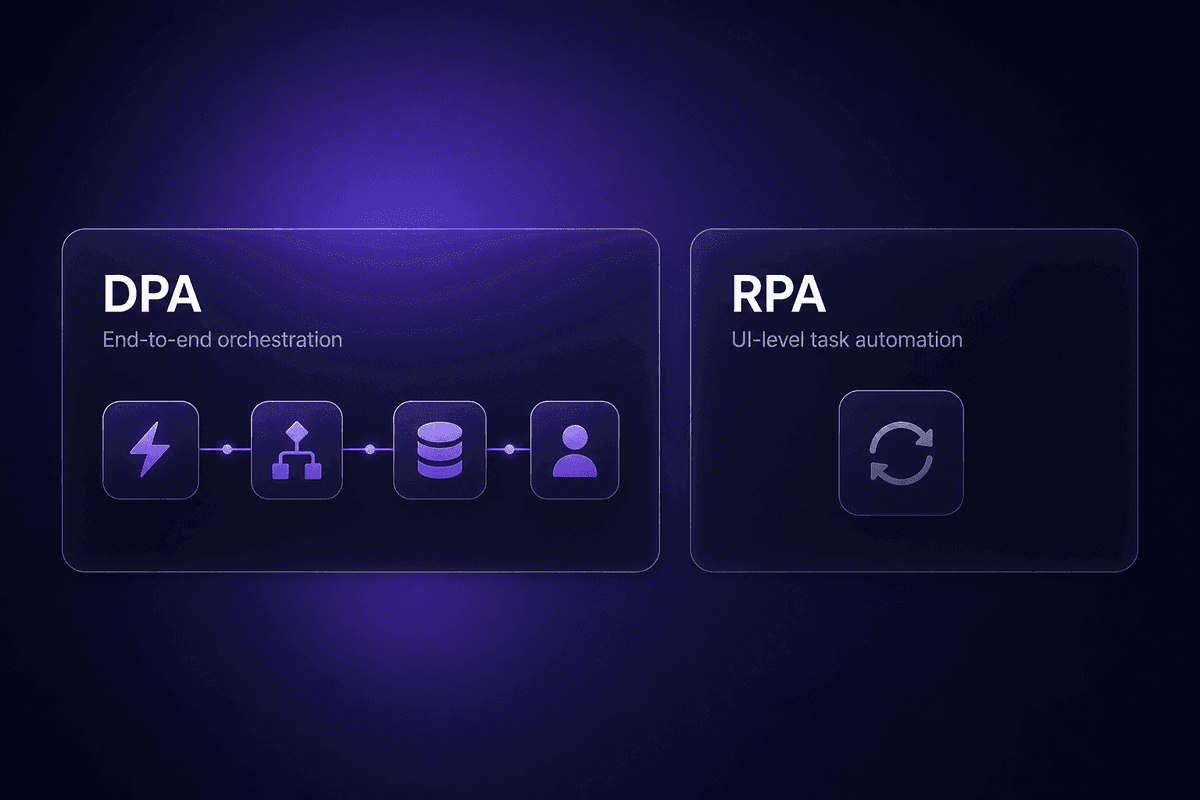
- DPA orchestrates end-to-end processes across people and systems - RPA automates UI-level tasks. They're not the same category.
- Tool fit depends on org size, ecosystem, and who owns the workflow after it ships.
- Enterprise DPA suites are overkill below a certain process complexity threshold - and that threshold is higher than most vendors will tell you.
- Low-code matters when non-developers need to design, maintain, and iterate on automations themselves.
- Automate the process, not the workaround. Most shortlists ignore this distinction entirely.
What Digital Process Automation Software Actually Does (vs. What Teams Think It Does)
Here's the confusion I keep seeing in support and onboarding conversations: teams reach for digital process automation tools expecting something that eliminates manual tasks, the same thing RPA does, just with a nicer interface. That's not wrong, but it's incomplete in ways that matter at implementation time.
Digital process automation is the next evolution of business process management. BPM focused on modeling and governing how work flows through an organization. DPA extends that by actually executing those flows, connecting external user touchpoints, integrating across systems, and making the end-to-end process visible and measurable. It's not just task offloading. It's orchestration.
RPA, by contrast, automates specific UI-level interactions. A bot logs into a portal, copies a number, pastes it somewhere else. Useful for brittle legacy systems. Not the same as designing a process that spans a customer portal, a CRM, a billing system, and a human approval step, with logic at every junction.
When a team conflates the two and buys an RPA-first platform to automate business processes that actually require end-to-end orchestration, the failure mode is predictable. The bots handle their slice. Everything between the bots is still manual, still fragmented, still opaque. The process doesn't improve. It just has more moving parts.
Real DPA handles the whole chain: the trigger, the routing logic, the system integrations, the human touchpoints, the exception handling, and the visibility layer that tells you where things are at any given moment. That's what you're evaluating when you're shortlisting platforms. Not feature checklists. End-to-end process coverage.
Selection Criteria for DPA Software That Actually Hold Up
Your shortlist will be wrong if you evaluate DPA software purely on feature checklists from vendor demos. These are the criteria that actually hold up when a workflow hits production.
- End-to-end workflow coverage across systems
The practical check: map one of your most complex processes from trigger to final output. Can the platform cover every step natively, or does it hand off to a separate tool halfway through? Business workflows that require three platforms to complete are not automated - they're semi-automated, which means someone still owns the gaps.
- Low-code or no-code build capability for the people who will actually own it
The risk of ignoring this: you build a process in a developer-only tool, the developer leaves or moves to another project, and nobody can modify the workflow when the business rule changes. Before shortlisting, confirm whether your business teams, not just IT, can design and iterate on automated processes themselves.
- Integration depth with your existing stack
"800+ integrations" doesn't tell you whether the specific apps you use are supported at full capability or only at basic trigger level. Run a connector test against your top five systems before signing. Rate limits, field mapping depth, and authentication handling vary enormously between platforms.
- Scalability and governance controls
For teams with compliance obligations or multi-department processes, governance is not an add-on. Check for role-based access, audit trails, and process versioning before you're live. Finding out your chosen tool lacks audit logging after a compliance review is the kind of thing that makes people update their CVs.
- Process modeling and business rules visibility
Some platforms hide logic inside black-box nodes. Others expose every rule, condition, and API call in inspectable form. Process modeling transparency matters for debugging, for onboarding new team members, and for audits. If you can't see the logic, you can't trust the output.
- Analytics and process performance monitoring
The right automation platform surfaces where processes slow down, where exceptions cluster, and which steps fail most often. Without that visibility, you're optimizing blind. Check whether the analytics layer shows individual execution-level detail, not just aggregate counts. Choosing the right automation software solution means asking what data it gives you after go-live, not just during the demo.
- Ecosystem and deployment fit for your infrastructure
Cloud-only, on-premises, and hybrid deployment are not equivalent. Some regulated industries require on-prem. Some SMB teams can't maintain self-hosted infrastructure. Right digital process automation choices account for where your data lives, not just what the platform can do.
DPA Software Comparison: 10 Tools Ranked by Use Case Fit
These ten tools cover the range from enterprise DPA suites to no-code process automation built for business users. Use this as a shortlisting filter, not a final ranking. Pricing tiers are directional based on publicly available information; confirm current pricing with each vendor before procurement.
| Tool | Best-fit scenario | Org size fit | Low-code/no-code support | Pricing tier |
|---|---|---|---|---|
| UiPath | Enterprise intelligent automation with RPA + AI + process mining | Large enterprise | Yes (plus developer tools) | Enterprise quote-based; community tier available |
| Pega | Complex case management, AI decisioning, regulated industries | Large enterprise | Partial (model-driven, requires process architects) | Enterprise quote-based |
| Appian | Rapid custom process app builds, workflow unification, data fabric | Enterprise | Yes (low-code first) | Enterprise quote-based |
| SS&C Blue Prism | Governance-first automation for regulated industries | Mid-market to large enterprise | Partial | Enterprise quote-based |
| ServiceNow | IT and customer service workflow automation on a unified platform | Large enterprise | Yes (within its domain) | Enterprise quote-based |
| Mendix | Custom multi-channel process app development | Mid-market to large enterprise | Yes (high-productivity low-code) | Free tier; enterprise plans available |
| Celigo | Cross-system workflow automation across ERP, CRM, SaaS stacks | Mid-market to enterprise | Partial (integration-focused, not process-modeling) | Quote-based; no free plan |
| Nintex | Workflow automation for Microsoft 365-centric organizations | SMB to mid-market | Yes (template-driven, M365 users) | Tiered pricing for SMB and mid-market |
| Bizagi | BPM-rooted DPA for process-mature teams | Mid-market to enterprise | Yes (model-driven) | Free Modeler tier; paid automation editions |
| FlowForma | No-code process automation for Microsoft 365 business users | Mid-sized orgs | Yes (no-code) | Subscription pricing for M365 customers |
These are dpa tools covering most of the process automation software of 2026 landscape. What the table doesn't show: maintenance cost, who you call when something breaks at 2am, and whether the platform's complexity ceiling matches your actual process complexity. Those are the questions the table can't answer. The sections below try to.
The 10 Best Digital Process Automation Tools: What Each One Is Actually Good For

Feature counts don't tell you which platform survives contact with your real processes. What tells you is the maintenance story: who owns the workflow six months after go-live, what breaks first, and what the ticket looks like when it does. Digital process automation tool selection is really a question about long-term operational fit, not day-one capability.
Here's what each of these ten platforms is actually good for, and where the support tickets tend to come from.
UiPath - Best Digital Process Automation Platform for Enterprise-Scale Intelligent Automation
UiPath is the platform I'd point to first for large enterprise teams that need to combine robotic process automation with AI-driven document processing, process mining, and end-to-end workflow automation across complex system landscapes. It's an intelligent automation platform in the full sense: not just bots, but process discovery, orchestration, and an ecosystem that has matured significantly over the last four years.
According to McKinsey's 2025 workplace AI research, 88% of organizations were using AI in at least one business function by mid-2025, but only about 1% considered their deployments fully mature. UiPath's process mining layer is one of the few tools that actually helps you close that gap - it surfaces where the hidden manual work is before you automate the wrong thing.
Best fit: high-volume repetitive tasks, document processing at scale, complex multi-system orchestration in regulated and non-regulated enterprise environments.
The limitation worth naming: the community/free tier exists, but production UiPath is enterprise-oriented in both pricing and operational complexity. Teams without dedicated RPA developers and a clear governance model tend to build brittle intelligent process automation that looks impressive in a demo and accumulates technical debt in production. The platform is powerful. The maintenance requirement is real.
Pega - Best for Complex Case Management and AI-Driven Process Orchestration
Pega's DPA and workflow capabilities are built around unified case management, next-best-action decisioning, and AI-driven process orchestration. For financial services, telecom, and government teams managing long-running cases that span departments, systems, and regulatory checkpoints, Pega is one of the few platforms designed for that specific complexity.
If you're evaluating Pega for digital transformation initiatives, the thing to understand upfront is implementation weight. This is among the most architecture-intensive platforms on the market. You don't stand up Pega with a 2-person ops team over a sprint. Implementing digital process automation at the Pega tier requires dedicated process architects, extended deployment timelines, and sustained internal ownership. Teams that underestimate this don't automate anything faster. They just buy a very expensive consulting engagement.
Pega is the right answer when your process complexity actually justifies it. That bar is higher than most vendor proposals suggest.
Appian - Best Low-Code Process Automation Platform for Rapid Custom App Builds
Appian's core proposition is custom process applications built faster than a full dev cycle. Its low-code platform unifies workflow design, case management, and data fabric in one environment, meaning teams can automate business processes and surface them through custom interfaces without spinning up separate infrastructure.
I've watched skepticism toward Appian expressed publicly, usually by engineers who feel it oversells ease-of-use. That skepticism isn't entirely wrong. The low-code tools are genuinely accessible, but Appian's automation solution sits at enterprise price points and expects enterprise-grade process ownership. If you're a mid-market team hoping to reduce a developer dependency, Appian can help. If you're expecting it to function as a no-code builder for business users with no technical oversight, the tickets will start arriving after the first complex workflow.
Best fit: enterprises that need to automate and deliver custom process applications without a full software development cycle, and have the internal capacity to govern what they build.
SS&C Blue Prism - Best for Regulated Industries That Need Governance-First Automation
Blue Prism evolved from RPA roots into broader digital process automation, and that lineage shows in its governance posture. Centralized control, compliance-grade auditability, and formal automation lifecycle management are built into the platform's architecture, not bolted on later.
For finance, healthcare, and government teams where the business automation question is inseparable from the audit and regulatory question, that's the right foundation. The automation of business processes in those environments isn't just an efficiency exercise. It's a compliance event.
The limitation: Blue Prism's complexity and pricing put it outside practical range for teams that don't have regulatory requirements or dedicated DPA governance programs. Choosing it for business automation outside that regulated context usually means paying for governance infrastructure you'll never use.
ServiceNow - Best DPA Software for IT and Customer Service Workflow Automation
ServiceNow is a strong answer for large organizations standardizing their IT operations and customer service workflows on a single platform. Its built-in workflow automation software, ITSM and CSM capabilities, and process analytics make it one of the more coherent digital workflows environments for organizations that want one platform for service delivery.
The ticket I see from ServiceNow implementations: teams buy it for IT, automate IT workflows successfully, and then try to expand it to cross-department business process automation outside its home domain. It can technically handle broader task automation. But it was designed for IT and customer service, and that's where it earns its price. Pushing it into procurement, sales ops, or marketing automation feels like using a purpose-built tool for a different purpose. It works badly and costs well.
Mendix - Best Low-Code Automation Platform for Custom Multi-Channel Process Apps
Mendix is a high-productivity low-code platform that can automate business flows and surface them through custom apps across web, mobile, and enterprise channels. Flexible deployment (cloud, on-prem, hybrid) and a free tier for evaluation make it accessible for teams that need to accelerate digital transformation but can't invest in full custom development.
Process design in Mendix rewards teams that think in app terms rather than pure workflow terms. If the goal is to automate a process and wrap it in a purpose-built user interface, Mendix is a legitimate choice. If the goal is pure workflow orchestration without the app layer, the tool may be more than you need.
The DPA positioning is real, but Mendix excels when the process and the user experience it enables are designed together, not when workflow automation is the only goal.
Celigo - Best for Cross-System Workflow Automation Across ERP, CRM, and SaaS Stacks
Celigo sits at the intersection of iPaaS and DPA, built around orchestrating processes that span ERP, CRM, and SaaS systems. If your workflow regularly crosses Salesforce, NetSuite, and three other platforms, Celigo's prebuilt integration templates and multi-system coordination capabilities are genuinely useful.
The tools to automate cross-system processes in mid-market and enterprise stacks often hit the same wall: individual integrations work, but nobody owns the end-to-end automate processes logic. Celigo's workload automation solution addresses that integration layer explicitly.
Pricing is quote-based with no free plan. For teams evaluating based on feature scope, that's fine. For teams without a budget already allocated to a dedicated DPA spend, it's an early filter.
That said, Celigo's strength is integration depth, not process modeling. If your priority is designed process governance rather than multi-system orchestration, a different platform on this list is probably a better fit.
Nintex - Best Workflow Automation Software for Microsoft 365-Centric Organizations
If your organization already runs Microsoft 365 and SharePoint, and the goal is to automate processes that live in that ecosystem rather than across a multi-vendor SaaS stack, Nintex is easy to justify. Template-based workflow design, tight M365 integration, and tiered pricing accessible to business users make it a practical starting point for Microsoft-committed organizations.
The complexity ceiling is real, though. Nintex is built for business users automating processes that fit the M365 model. It's not built for the kind of multi-system orchestration or process modeling that Pega or Appian handle. Teams that automate processes successfully in Nintex and then need to extend into more complex cross-system flows will hit that ceiling and need to plan an upgrade path.
For organizations with process mining needs or requiring detailed analytics on cross-department workflows, Nintex's native capabilities are limited compared to enterprise DPA suites.
Bizagi - Best BPM-Rooted DPA Tool for Process-Mature Teams That Value Modeling First
Bizagi is model-driven. You design the process first, using BPMN notation, and then connect it to execution. That sequencing suits process-mature teams that came from business process management disciplines and want governance and documentation built into the workflow before automation is added on top.
The free Modeler tier makes Bizagi a legitimate choice for teams that want to document and map processes without immediately committing to the paid automation editions. That's actually how IBM Business Automation Workflow and similar BPM-rooted platforms have historically been evaluated: process documentation as the entry point, automation as the next phase.
Bizagi has a lighter SERP presence than UiPath or Appian, which sometimes leads to it being overlooked. That's probably the market speaking more than the product. For DPA software decisions where process governance and BPM discipline matter, it's worth including in the evaluation.
FlowForma - Best No-Code Process Automation for Microsoft 365 Business Users
FlowForma is built specifically for Microsoft 365 customers who want to automate forms-driven processes without writing code or involving developers. Business users design the workflows. IT doesn't need to own them. That's a specific and underserved use case, and FlowForma takes it seriously.
Examples of digital process automation that FlowForma handles well: structured approval workflows, compliance-driven forms processes, HR and operations tasks that follow predictable steps and need to be owned by the department running them rather than centralized IT.
The automation initiative scope here is mid-market. This isn't an enterprise DPA suite, and it doesn't pretend to be. If your organization runs M365 and your business users need to own and iterate on digital process automation without developer involvement, FlowForma earns a look. If you need cross-platform orchestration or complex process modeling, the tool runs out of road quickly.
How to Match a DPA Tool to Your Organization: A Decision Framework
Reviewing ten tools doesn't automatically tell you which one fits. The three most common mismatches I've seen aren't about features. They're about tier selection:
- Enterprise suites chosen by teams too small to maintain them. - RPA platforms chosen when the actual need was end-to-end process orchestration. - Microsoft-specific tools chosen by organizations without genuine M365 commitment.
None of those decisions look obviously wrong during vendor demos. They look wrong about eight months later. Here's a practical framework for avoiding them.
When an Enterprise DPA Suite Is the Right Call - and When It's Overkill
The question that determines this isn't "what do we want to automate." It's "who will own this when it breaks at 2am, and can we afford that person to exist indefinitely?"
Enterprise DPA suites like Pega, UiPath, and Appian are justified when you have genuinely complex business processes that span departments and systems, governance requirements that demand auditability and version control, and the internal capacity - people, not just budget - to operate the platform after go-live. The automation improves productivity claim these platforms make is real. So is the implementation and maintenance overhead.
If your process complexity is real but your internal capacity isn't, the right answer might be a managed service model: someone builds and runs the automation for you, using the platform as an operational capability rather than an internal software deployment. That's a procurement question, not a platform question.
For dpa software decisions below that complexity threshold, process mining capabilities, deep governance infrastructure, and enterprise pricing structures are buying you things you don't need. The tool that fits your actual scale is better than the impressive platform that exceeds it. Business goals are best served by tools with business goals that match, not tools with maximum capabilities.
When a Low-Code or No-Code Automation Platform Fits Better Than a Full DPA Suite
If your business processes are owned by non-developers, and the people who need to create process maps, modify workflows, and respond to changing business rules are in ops, HR, or marketing rather than engineering, a low-code or no-code entry point is usually the right call.
Mendix, Nintex, FlowForma, and Appian's low-code layer all let non-technical teams automate processes without waiting for IT cycles. The design-iterate-own loop stays inside the business unit. That's a real operational advantage, and it's the pattern that tends to produce sustained adoption rather than automation projects that work perfectly until the developer who built them moves on.
The ceiling question applies here, too. Low-code platforms typically hit complexity limits when workflows require deep custom logic, cross-system orchestration, or exception handling that goes beyond visual configuration. When a team reaches that ceiling, the path is either upward to a more capable platform, or sideways to a developer-accessible escape hatch within the current tool.
🤔 Think about this:
Most shortlisting exercises are driven by vendor demos and feature checklists. Neither tells you what the platform costs to maintain after the person who built the first workflow leaves the company. The right digital process automation choice has a realistic maintenance story, not just an impressive demo. Ask vendors specifically: what breaks first, who fixes it, and how long does that typically take?
What DPA Software Needs to Handle Before You Trust It with Core Business Processes

This is the part most teams skip during trials, and it's the part that produces the real tickets after go-live.
Digital process automation is only as reliable as the visibility you have into it. A workflow that runs end-to-end but fails to surface errors when something goes wrong is not a reliable workflow. It's a process that will silently break and look fine on a dashboard until someone notices the data hasn't moved in four days.
Before trusting any DPA platform with core business processes, verify these capabilities exist and are actually configured, not just technically available:
Real-time monitoring and execution visibility. The platform should show you last successful run, current status, failed step count, and average execution time per workflow. Not aggregate counts. Individual execution-level detail. If you can't see where in a 12-step automation a failure occurred, debugging becomes archaeology.
Error handling and retry logic. Know whether retry behavior is automatic or manual, what the retry window is, and whether you get notified on first failure or only after repeated failures. An automation initiative that silently retries three times before logging an error is not transparent. It's opaque with extra steps.
Audit trails for compliance. Regulated industries need timestamped, tamper-evident records of who triggered what, when, and what the system did in response. Check whether audit logging is included in your pricing tier or gated behind an enterprise add-on.
Process analytics and optimization signals. DPA platforms worth deploying should tell you which steps are slow, where exceptions cluster, and which workflows are underperforming against their baseline. Repetitive tasks that were supposed to reduce manual hours but are triggering exceptions three times a week are not delivering their value. Analytics surfacing that pattern early saves months of invisible waste.
The platform overview looks clean. The software solutions list covers the functionality. But the monitoring and reporting layer is what you actually live in when something breaks.
That last point is worth emphasizing: most capability gaps in digital process automation surface after go-live, not before. The trial period almost never surfaces error handling edge cases, audit logging limitations, or analytics gaps because trials run happy paths. Production finds the unhappy ones.
📊 In practice:
One of the most common post-go-live discoveries I see: teams realize their chosen platform lacks real-time cross-system error visibility. The automation ran, the step completed, but the downstream system rejected the payload silently. Before signing, ask this in the vendor demo: "Show me what happens when a downstream API returns a 422 error in the middle of a live workflow." What they show you (or can't show you) tells you more about automation capabilities than any feature checklist.




