



Most teams don't have an automation problem. They have a prioritization problem. They buy a tool, wire up three workflows, and then spend the next six months wondering why the promised efficiency gains haven't shown up anywhere measurable. The tool is fine. The strategy was missing from day one.
Business process automation consulting exists to fix that gap. Not the gap between "we have no automation" and "we have automation." The gap between deploying something and knowing what to deploy, in what order, connected to which systems, owned by which team, measured against which outcomes.
That's a strategy problem. And strategy doesn't come in the box with the software.
Before you buy another tool
- BPA consulting is strategy-first; the tool selection happens third, not first.
- The most common mistake is automating a broken process and scaling the breakage.
- A consultant maps workflows before touching tooling - most DIY teams skip this entirely.
- RPA and BPA aren't the same thing; confusing them leads to the wrong scope and the wrong vendor.
- AI won't make your operations efficient if you don't know which operations to target.
What Business Process Automation Consulting Actually Covers
Business process automation, as IBM defines it, is the use of technology to execute recurring tasks or processes where manual effort can be replaced or reduced. That's the mechanism. Consulting is the layer that decides which tasks qualify, in which order, and what connecting them actually requires.
A BPA consulting engagement is a structured advisory service. It's distinct from deploying software. When you buy a platform, you get access to a tool and an onboarding sequence. When you engage a consultant, you get someone whose job is to map your current business processes, identify bottlenecks, rank automation candidates by impact, design a strategy across systems, and govern implementation so the first workflow doesn't become a mess of technical debt by month three.
Firms like Akveo and Grantbot describe the core deliverable as process intelligence before platform selection. The consultant's first output is a picture of your operations - where work slows down, where errors accumulate, where manual work is hiding inside complex business processes - before a single tool is chosen. That sequencing is what makes the difference between operational efficiency that shows up in numbers and automation that just looks busy.
What an Automation Consultant Does That a Tool Vendor Won't
A tool vendor's onboarding covers how to use the tool. That's it. They'll walk you through triggers, connections, and basic error handling. If you ask them which process to automate first, they'll tell you to start with something simple. That's not a strategy. That's a warm introduction to the product.
An automation consultant covers different territory entirely.
Identifying Bottlenecks and Mapping Workflows Before Touching Any Tool
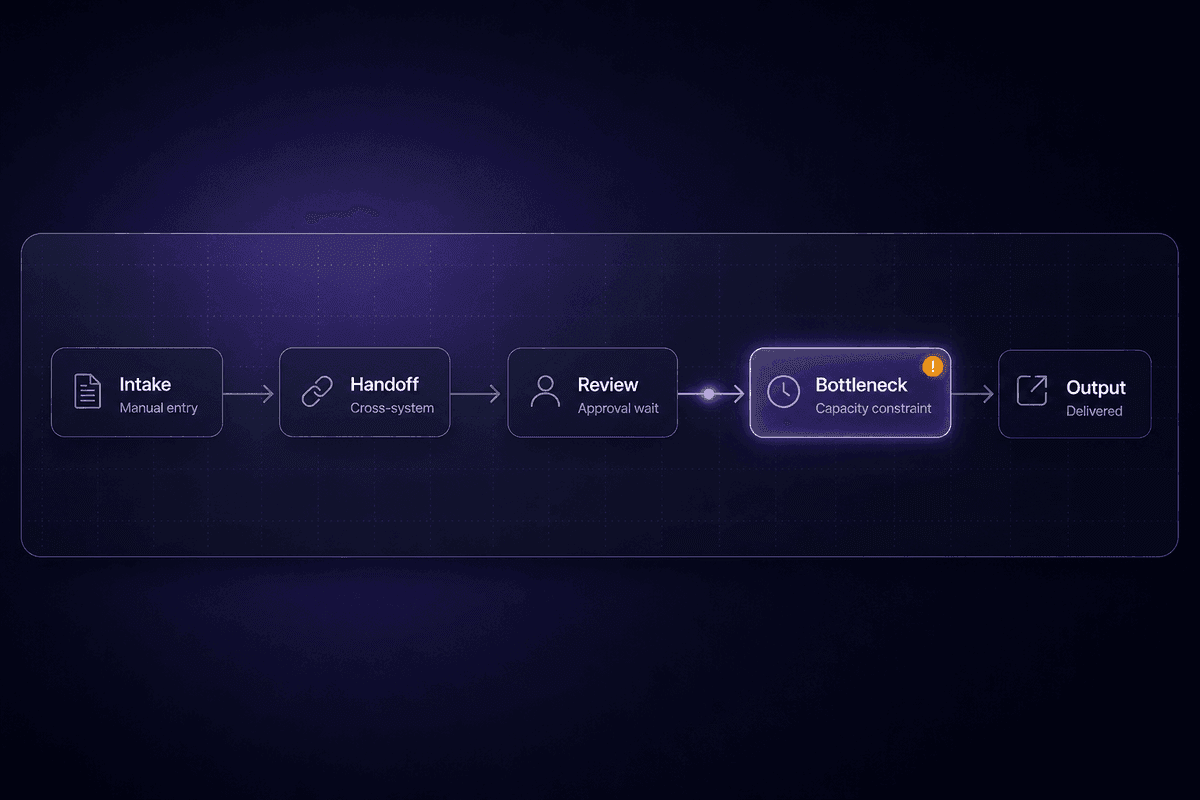
This is the phase most DIY deployments skip, and it's the one that determines whether everything after it works. Before any tool is selected, a consultant maps your current workflow: who does what, in what order, using which systems, with what handoffs between them. The point is to surface where repetitive tasks pile up, where manual work creates errors, and where inefficiency is hiding in the seams between applications.
According to NIX United's guidance on automation prioritization, the right starting point is consistently high-volume, repetitive processes - not the most technically interesting ones. If a process runs daily, involves multiple people copying data between systems, and has a known error rate, that's a strong candidate. If it runs monthly, has edge cases only one person knows how to handle, and takes 30 minutes, it can wait.
The visual workflow map that comes out of this phase is the artifact that prevents expensive rework later. Skipping it is like wiring the plumbing before you've drawn the floor plan.
Tool Selection, RPA, and Intelligent Automation Decisions That Don't Age Badly
Tool selection is where the wrong consulting engagement costs you the most. Choosing robotic process automation to solve a problem that needs API-based integration, or picking a lightweight workflow tool for a process that spans ERP, CRM, and email approval chains, creates a stack you'll be migrating away from in 18 months.
The global RPA market is growing fast - projections put it well into the tens of billions by the early 2030s - and intelligent automation, which adds AI reasoning to rule-based process automation, is expanding the scope of what's automatable. That growth is real, but it also means the tool landscape changes constantly. A good consultant evaluates your existing systems, your team's maintenance capacity, and your process complexity before recommending anything. They're selecting the right tools for your constraints, not the ones they're most comfortable with.
The question underneath tool selection is always: who maintains this in 14 months? I've seen teams build technically impressive automations on platforms that required one specific person to understand them. That person left. The automation became archaeology.
Which Business Processes Are Actually Worth Automating
Not everything that's manual is worth automating. These are the process categories that consistently earn their place as strong automation candidates - and what makes each one a problem when left to manual work.
Order-to-cash across ERP and CRM systems
When a sale closes and the order, invoice, and revenue recognition steps require manual handoffs between systems, errors compound and cash collection slows down. End-to-end automation of this chain - from CRM deal close through ERP order creation to invoice generation - removes the most expensive manual intervention in the revenue cycle. Strong automation candidate because it's high-volume, involves data entry across multiple tools, and errors are directly measurable in dollars.
Procure-to-pay and invoice processing
Finance teams spend significant time matching purchase orders to invoices, routing approvals, and tracking payment status. Automating the invoice intake, three-way matching, and approval routing reduces both the time and the error rate. Anything that hits the ERP system on a predictable schedule with a defined data structure is ready to automate.
Customer and employee onboarding
Onboarding business processes are repetitive by design - the same steps, the same system setups, the same communications, every time. When done manually, they're slow and inconsistent. The failure mode I see most often: teams try to automate onboarding without cleaning up the intake first. Messy input data produces false flags at scale. The automation works; the data was wrong to begin with.
Sales operations and CRM hygiene
Lead routing, deal enrichment, follow-up sequencing, and CRM field updates are high-volume, low-complexity tasks that drain sales ops bandwidth. These automate cleanly when the data model is defined. The problem is that CRM field names change and nobody updates the workflow. I know this particular failure well.
Cross-system supply chain coordination
Supply chain processes that span procurement, inventory, fulfillment, and logistics systems accumulate manual tasks at every handoff point. Automating inventory threshold alerts, reorder triggers, and status updates across entire workflows removes the coordination overhead that typically lives in spreadsheets and email threads.
DevOps and CI/CD pipelines
Engineering teams already automate build, test, and deploy processes, but many still have manual tasks in release coordination, environment provisioning, and incident notification. These are strong automation candidates because the data is structured, the triggers are well-defined, and the cost of errors is immediately visible.
According to data attributed to Forrester, the top three areas where organizations apply digital process automation are operations at 37%, onboarding at 16%, and finance, accounting, and legal at 14%. High volume plus structured data plus a measurable error rate is the pattern, every time.
How a BPA Consulting Engagement Usually Runs, Phase by Phase
The engagement lifecycle matters because this is where most DIY automation projects stall. Teams pick a tool, build something that works, and consider it done. A consulting engagement is structured around the assumption that "done" is a phase, not an endpoint.
Process Discovery and Automation Opportunity Prioritization
The first phase is diagnostic. A consultant interviews stakeholders across departments, reviews existing workflows, and builds a map of where manual work, errors, and delays actually live. NIX United's guidance on this phase is specific: rank candidates by operational savings, error rate reduction, and user impact. A process that saves 20 minutes a week for one person is a different priority than one that eliminates a known 3% error rate across 400 transactions per day.
The output is a prioritized roadmap, not a wish list. You're scoring automation candidates against business needs - volume, risk, complexity, dependency on other systems - and sequencing them so early wins build organizational confidence before harder problems get tackled. The goal is to optimize for momentum, not theoretical efficiency. A quick win that stakeholders can see tends to unlock budget and trust for the next phase.
I keep seeing teams skip this step and jump directly to building. The consequence is that three months later, they've automated five processes and can't measure whether any of them mattered. That's where the ROI conversation gets uncomfortable.

Implementation, Employee Onboarding, and Monitoring After Go-Live
After the design phase comes gradual deployment. Gradual is the operative word. A phased approach limits the blast radius when something doesn't behave as designed in production - and something always doesn't. A consultant governs this rollout, managing the transition from the old process to the automated one while the team runs both in parallel long enough to validate outputs.
Employee onboarding is the phase most organizations underinvest in. The automation works. The people using it don't trust it, don't know how to interpret its outputs, or override it manually when it produces something unexpected. Training isn't optional. Streamline operations means the humans in the loop need a clear picture of when to intervene and when to let the automated processes run.
Ongoing monitoring after go-live is what separates a consultant-governed engagement from a self-serve tool deployment. Useful signals to watch post-launch: failed execution count, skipped records, retry spikes, average execution time drift, and the last successful run timestamp. Any automation project that's been live for more than a week without a monitoring plan is already generating invisible failures. Deploy without monitoring and you find out about problems from a customer, not a dashboard.
This is why support teams drink coffee like it owes them money.
Benefits of Business Process Automation Consulting vs. Going It Alone
The case for BPA consulting isn't that it's the only path to automation. Teams absolutely automate things successfully on their own. The case is that unguided tool deployment has a specific and consistent failure mode: it produces automations that work technically but don't produce measurable business outcomes.
Consulting changes that because it starts with ROI clarity. Before the first workflow is built, there's a defined baseline - current process cost, error rate, cycle time - and a defined target. That baseline is what makes cost savings and cost reduction legible after implementation rather than theoretical in a projection slide.
The scalability argument is also real. An automation designed in isolation tends to break when volume increases or adjacent systems change. A consultant-designed architecture accounts for that - both the technical scalability of the workflow and the organizational scalability of the team maintaining it. Efficiency and productivity gains compound only when the underlying design can absorb growth.
📊 By the numbers:
According to data cited by 2am.tech, nearly six in ten companies have already introduced some level of process automation, with adoption reaching 84% among large enterprises. The consulting market is expanding because having automation and having automation that works are two different things. Many companies in that 60% are in the second category and don't yet know it.
Three Automation Consulting Myths That Keep Teams Stuck
These aren't theoretical objections. They're the specific beliefs that show up as decision blocks in real conversations, producing delayed projects and failed implementations I see from the support and onboarding side.
Myth 1: Automation replaces employees. The actual scope of most automation consulting engagements is manual effort reduction, not headcount elimination. Automating tasks within a role frees capacity. The employee does different work - typically higher-judgment work that can't be automated. I've never seen a consulting engagement designed to eliminate a role. I've seen plenty designed to stop a skilled person from spending 40% of their time on data entry. That's augmentation, not replacement. Teams that believe this myth delay projects while their competitors eliminate the same bottleneck and redeploy the capacity.
Myth 2: BPA is only viable for large enterprises. SMB founders use boutique automation consultancies to automate back-office tasks that are actively constraining growth. An eight-person company where the founder is reconciling invoices manually every Friday has a workflow automation problem, not a scale problem. The processes worth automating exist across industries and company sizes. The engagement scope is smaller; the ROI per hour of manual work replaced is often higher.
Myth 3: RPA and BPA only handle simple, linear tasks. Intelligent automation - combining robotic process automation with AI for document understanding, classification, and decision support - handles genuinely complex, variable processes. Onboarding workflows with inconsistent input data, invoice processing with non-standard formats, support ticket routing with unstructured language inputs. Automating tasks at this level isn't simple, but it's done routinely. The myth usually comes from teams who tried to automate something complex with a basic rule-based tool and concluded the category doesn't work.
🤔 Wait.
The most expensive automation myth isn't about employees or enterprise scale. It's this one: "We have AI tools now, so we can skip the structured process work." Mid-market teams fall into this gap constantly. They buy AI capability, apply it to unmapped, unmeasured processes, and wonder why efficiency doesn't improve. The AI needs a clean process to augment. Without that, it just automates the confusion faster.
Who Actually Hires Business Process Automation Consulting Services
The real audience for BPA consulting is more specific than "companies that want to automate." Four distinct segments show up consistently.
Mid-market and enterprise operations leaders automating order-to-cash or procure-to-pay cycles. These are teams where process complexity spans ERP, CRM, and finance systems, the dollar value of errors is measurable, and efficiency translates directly to working capital. They hire for greater accuracy and risk reduction, not just speed.
CIOs and heads of digital transformation selecting BPM platforms or iPaaS for organization-wide automation programs. Their BPA question is architectural: which platform becomes the backbone, and how does it connect to what already exists. The consulting engagement is as much about vendor selection and integration governance as it is about individual workflows.
SMB founders who've reached the point where manual back-office work is actively limiting growth. Payroll, invoicing, onboarding, reporting - the processes that compound in time cost as the company grows from 10 to 40 people. These engagements tend to be faster and narrower, but the impact on business operations can be immediate. Automate the Friday reconciliation and the founder gets their Friday back.
Product and engineering leaders integrating automation into DevOps pipelines, handling individual tasks like environment provisioning and release coordination. For this segment, the consulting value is process design and tooling selection, not the technical build. They can build it. The question is what to build and in what sequence.
What all four share: they came to consulting because deploying tools alone wasn't producing the customer experience or operational outcomes they expected. The tools weren't wrong. The strategy layer was missing.
A mid-market ops team connecting CRM, ERP, and email approval steps benefits from exactly this kind of consultant-designed automation map. In practice, that might look like a workflow in Latenode that ingests deal data from a CRM via OAuth, triggers an ERP update via API, and routes an approval request through email - all within a single execution. Latenode counts that as one execution rather than six separate tasks, which matters when you're running that workflow at volume. The consultant's value isn't building that workflow. It's knowing that this process needed end-to-end design before anything was wired together, and that the approval routing logic needed an explicit exception path for deals above a certain threshold. That exception path is always the thing that gets discovered in week two if it wasn't designed before week one.




