



Most automation projects fail not because the tools are wrong but because the strategy never existed. Teams pick a platform, automate the most obvious task they can find, and declare success. Six months later they have a collection of disconnected workflows, a support ticket about duplicate records, and no measurable improvement in cycle time.
I've seen this from the support side often enough to stop being surprised by it. The root cause is almost always the same: someone treated automation as a tooling decision instead of an operating model discipline.
The expensive lesson usually arrives late
- BPA is an operating model discipline, not a software purchase.
- Automating a broken process makes it a faster broken process.
- Strategy and process redesign must come before tool selection.
- Most automation projects that fail skip cross-functional ownership, not features.
- Benefits are measurable-but only when you define the metric before you launch.
What Business Process Automation Actually Means in Practice
Both Gartner and IBM frame business process automation around cost optimization, reducing manual intervention, and strategically streamlining how work moves through an organization. IBM's framing is worth quoting directly: BPA is a strategy, not a product. It's how you systematically remove unnecessary human labor from structured work so that people focus on what actually requires judgment.
The problem is that most teams interpret that as "add a bot to a broken workflow." They automate a task, call it BPA, and wonder why nothing changed.
Real business process automation operates at a different level. It covers the full lifecycle of a process: how work gets triggered, how it moves between people and systems, how exceptions are handled, how performance is monitored, and how the process improves over time. A single automated email notification is not BPA. An end-to-end invoice handling flow that captures, routes, approves, reconciles, and archives without manual intervention - that's BPA.
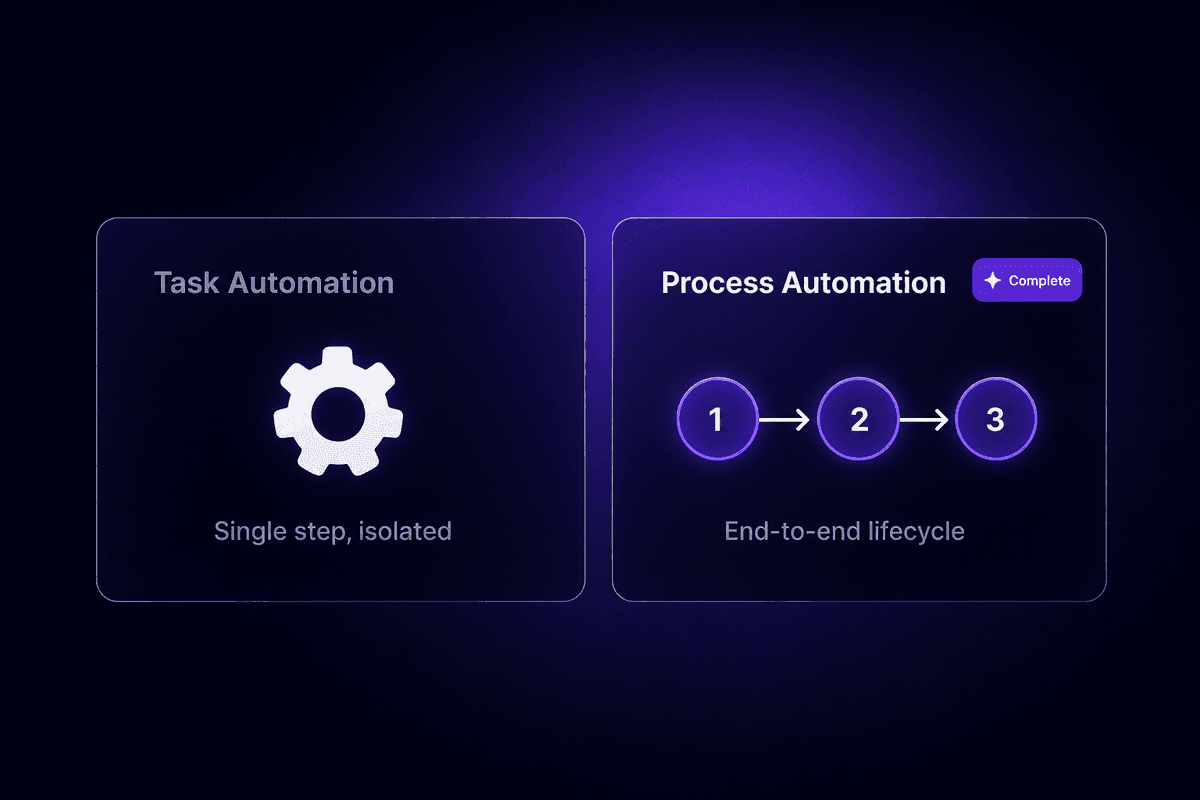
The distinction matters because task-level automation is easy to build and almost never changes business outcomes on its own. Process-level automation requires redesigning how work is done, not just which steps a bot handles.
The Difference Between Automating a Task and Automating a Business Process
Task-level automation removes a single manual step. You stop copying data from one spreadsheet to another. You replace a manual email send with a triggered one. That's simple task automation: useful, worth doing, but unlikely to change a cycle time or reduce error rates in any measurable way because the broader process is still running the same way around it.
Business process automation works at process scope. It's what Kissflow describes as freeing employees from low-value work across an entire workflow - not one task, but the chain of tasks, decisions, handoffs, and exceptions that constitute a real business process. When you automate a process, you redesign how work flows end-to-end. You identify every place where data moves manually, where approvals stall, where exceptions get handled inconsistently, and you streamline the whole thing. The individual tasks change because the process design changed, not the other way around.
That difference explains why one team automates 40 tasks and still fills manual spreadsheets, while another automates 5 processes and genuinely reduces headcount burden.
How Business Process Automation Works: The Core Mechanism
At its core, automation moves work through a process by replacing human judgment at decision points that are rule-based and repeatable. The mechanism has four components: triggers, rules, handoffs, and exception handling.
A trigger is the event that starts the automation, such as a new record created, a form submitted, a date reached, or a threshold crossed. The rules define what happens next based on the data available. Handoffs route work to the next person, system, or automated step without manual intervention. Exception handling catches anything the rules couldn't resolve and routes it to a human.
Automated processes that work in production have all four components defined before launch. The ones that fail usually skip exception handling, assuming the happy path will cover everything. It won't.
Workflow automation is the layer that handles routing and sequencing - getting the right data to the right step at the right time. Management automation sits above it, handling monitoring, logging, performance tracking, and continuous improvement. Both layers are part of a BPA system, but they're not the same thing.
Where Workflow Automation Fits Inside a Broader BPA System
Workflow automation handles the routing layer: which step comes next, which system receives the data, who gets notified, and when. It's the mechanism that sequences the work. If you're building a new employee onboarding flow that creates accounts, sends welcome emails, and schedules the first check-in, the workflow automation is what chains those actions together.
But workflow automation isn't an end-to-end automation system on its own. A BPA system also includes process orchestration across multiple workflows, monitoring to detect failures or delays, exception handling to surface errors before they compound, and optimization loops to improve the process over time based on what the data shows.
The reason this distinction matters: teams that treat workflow automation and BPA as interchangeable terms tend to automate workflows without defining success metrics, monitoring, or exception paths. They build the happy path, ship it, and find out three months later that a silent failure has been dropping records without anyone noticing. Automate workflows, yes. But design the broader system first.
BPA vs. RPA vs. BPM: Where the Boundaries Actually Break Down
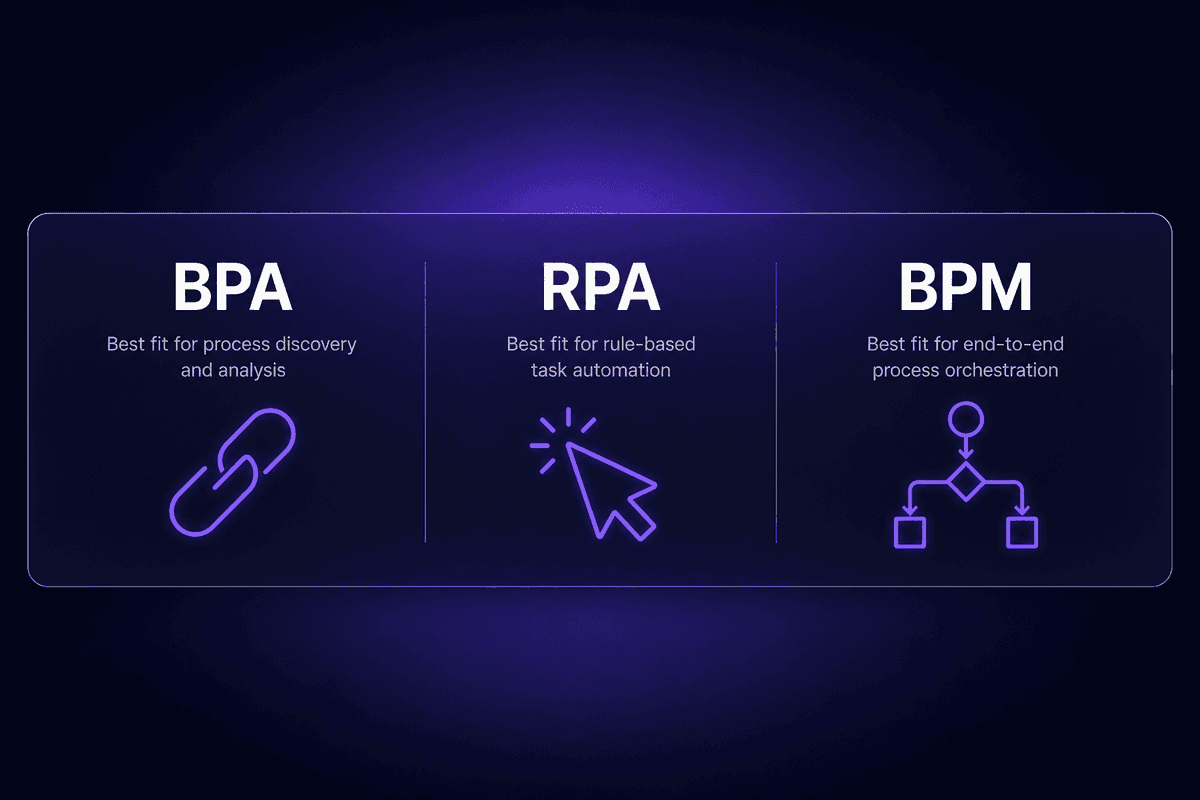
These three terms get used interchangeably often enough that it's worth being specific about what each one actually covers. They're related but they operate at different layers and break in different ways.
| BPA | RPA | BPM |
|---|---|---|
| What it is | Strategy for automating end-to-end business processes | Software bots mimicking human actions at the UI layer |
| Best-fit use case | Multi-step cross-functional processes with structured data | High-volume, repetitive tasks in legacy systems without APIs |
| What it automates | Full process lifecycle: triggers, handoffs, exceptions, monitoring | Specific task execution: clicks, form fills, data entry |
| Typical ownership | Operations, business leads, cross-functional teams | IT, RPA developers |
| Main limitation | Requires process redesign upfront; fails if the process is broken | Brittle against UI changes; doesn't handle exception paths well |
RPA (robotic process automation) is the layer most people confuse with BPA. RPA bots replicate what a human would do on a screen: log in, navigate to a field, copy a value, paste it somewhere else. Useful for legacy systems that have no API. But fragile - update the UI and the bot breaks. RPA at workflow automation level handles task execution. Process complexity tends to break it.
BPM (business process management) is a broader discipline, not an automation category. It includes process modeling, governance, measurement, and continuous improvement. BPA is often built on top of BPM methodology. Teams that skip BPM foundations and jump straight to automation wonder why their automated process doesn't match how work actually flows in practice.
The practical read: RPA for repetitive UI-dependent tasks that can't be reached by API. BPM for the design and governance discipline. BPA for the operating model decision that connects process design to automation to measurement.
Benefits of Business Process Automation That Are Actually Measurable
The benefit categories are well-documented and mostly accurate: cost reduction, faster cycle times, fewer errors, better service quality, and the ability to redeploy employee time toward higher-value work. IBM frames the service quality improvement as particularly significant because consistency of execution eliminates the variance that comes from manual handling. A rule applied 10,000 times runs the same way each time. A human doing the same task 10,000 times does not.
But the benefits are only measurable if you've defined the baseline before you launch. This is where most early-stage automation programs fail. They automate a process, notice things feel faster, and call it a success. Six months later nobody can produce the number that proves it.
The only honest approach is to measure the current state before automating: average cycle time, error rate, cost per transaction, employee hours consumed. Then set a specific target. Then measure again after the automation has run for 90 days in production.
📊 By the numbers:
According to McKinsey Global Institute's analysis of more than 2,000 work activities across 800 occupations, around 60% of all occupations have at least 30% of their activities technically automatable with current technologies. That's the addressable surface. Whether a given organization captures any of it depends entirely on whether they have a strategy to target the right processes - not just the easiest ones.
The ROI promise of automation reduces errors and cuts cost per transaction - but those results require process redesign first, not just tool deployment. Automation reduces the rate of human error in rule-based tasks. It doesn't eliminate errors introduced by a badly designed process, a wrong business rule, or a field mapping that was configured incorrectly in week one.
Which Business Processes Are Worth Automating-and Which Are Not
Not every process is a good automation candidate. Here's how to evaluate them before committing time to build.
- High repetition and low variability
If a task happens more than a few times per day and follows the same steps each time, it's a strong candidate. The automation ROI is highest where volume is high and the rule is the same every time. If your team is making judgment calls on most instances, the automation will need so many exception paths it becomes harder to maintain than the manual process.
- Rule-based decision logic
Good automation candidates have decisions driven by clear criteria: if the invoice exceeds $5,000, route for manager approval. If the lead score is above 70, add to the fast-track queue. If the rule requires subjective evaluation of ambiguous information, automation handles it badly or requires an AI layer that adds complexity and failure surface.
- Measurable inputs and outputs
Processes that are worth automating have clear start points and end points you can measure. "Process is complete" has an observable definition. If you can't state what done looks like before you start, you'll automate into ambiguity.
- Time-consuming and low-value for the humans doing it
The Kissflow framing - freeing employees from low-value work - is accurate. Data entry, status updates, approval routing, and report generation are the canonical examples. Not because they're unimportant, but because they don't require the judgment that people are actually hired to exercise.
- Cross-system data movement
Any process that requires copying data between systems manually, or exporting a CSV from one tool and importing it into another, is almost certainly worth automating. I keep seeing this pattern come up - the marketing ops lead spending three hours every Friday stitching together data from seven platforms. That's a build-it scenario, not a debate.
- Complex judgment calls without defined rules
These look automatable but aren't. A process that requires reading between the lines, weighing contradictory signals, or applying context that isn't in the data is not a good automation candidate without a defined AI strategy and human oversight. Automate the routing; keep the judgment human.
- Poorly defined handoffs and unclear owners
If you can't document in a process map who hands off to whom and what the trigger is, don't automate it yet. Automating an undefined handoff produces automated chaos at higher speed. McKinsey's warning about "paving the cow path" applies here: fixing the process design comes before writing the automation logic.
How to Build a Business Process Automation Strategy That Holds Up
Here's the thing about BPA strategy that the documentation doesn't mention: most organizations skip it entirely. They buy tools, build workflows, and call the collection of workflows a strategy. It isn't.
A real business process automation strategy defines which processes to target, in what order, using what resources, measured against what outcomes, with what governance model keeping the whole thing honest over time. That's not a tool selection. It's an operating model decision.
According to McKinsey, three-quarters of organizations say they're automating or planning to automate business processes. But the 2025 McKinsey State of AI survey found that no more than 10% have scaled AI agents in any single business function. The gap between "planning to automate" and "successfully scaled" is exactly where strategy lives.
The falsifiable claim I'd make here: a process automation strategy designed before tool selection will outperform one discovered after. Every time.
Step 1 - Map Processes and Identify Bottlenecks Before Selecting Automation Software
Before anyone opens an automation platform, map the current state of the processes you're considering. This means walking every step, including the unofficial ones. Document the trigger, the inputs, each decision point, the handoffs, where delays happen, and where errors tend to appear.
Most teams skip this. They know vaguely what the process does and assume the automation tool will make it clearer. It won't. The tool will execute exactly what you configure, including the workarounds and manual patches baked into the current workflow.
The failure mode I see most often: someone maps the process as it's supposed to work according to the documentation, not as it actually works in practice. The gap between those two versions is usually where the bottlenecks and errors live. Automate the documented version and you'll miss both.
Document data entry steps explicitly. Any place where someone is typing information that already exists somewhere else is a delay, an error source, and an automation target. Mark those first. They're your priority candidates.
That is where the ticket usually starts.
Step 2 - Set SMART Goals and Define the Metrics That Prove Successful Automation
Specific, measurable goals before launch. Not "we want to be more efficient" - that's not a goal, it's a feeling. A goal is "reduce invoice processing time from 4 days to 1 day" or "cut error rate on new employee account creation from 15% to under 2%."
Without predefined metrics, automation projects produce activity but no accountability. You'll have a workflow running, a dashboard showing executions, and no ability to prove whether the automation actually delivered what it was supposed to deliver.
Automation goals should align with business objectives that someone outside the operations team actually cares about. Connect automation efforts to cycle time, cost per transaction, service quality, or employee capacity. If the automation goal doesn't connect to something a business leader tracks, it will get deprioritized in the next budget cycle regardless of whether it worked.
Define success before you build. Run the baseline measurement. Review against it after 90 days.
Step 3 - Redesign the Process First, Then Automate It
This is the one most teams resist because it takes longer upfront and produces nothing visible to show a stakeholder. But it's the most important step.
McKinsey's warning - "don't pave the cow path" - is specific: automating a poorly designed process doesn't fix the process. It runs the broken logic faster, at higher volume, with fewer chances to catch errors that a human would have noticed. I've watched this happen with approval workflows that had redundant steps, exception handling that was never defined, and ownership gaps that meant errors waited in queues for days. The team automated the whole thing. The errors started moving faster.
Redesign means questioning every step. Does this step exist because the business requires it, or because someone added it years ago as a workaround that never got removed? Does this handoff add value, or is it a delay created by a system limitation that no longer applies? Is the rule at this decision point correct, or is it an approximation that accumulated over time?
Redesign business processes - especially complex processes - before automation work begins. Automate the clean version of the process. The payoff is significantly higher.
Step 4 - Build for Scale Automation With Governance and Change Management
The governance question is the one teams consistently underestimate until it costs them a production incident.
Governance means: who approves new automation projects, who owns each workflow in production, who maintains it when the person who built it leaves, and who gets the alert when something fails at 2am. Without those answers defined, automation scales into fragility. Every workflow becomes an orphan waiting for someone to eventually break it by changing a connected system without realizing the automation was watching that field.
Cross-functional ownership matters here. McKinsey's guidance on cross-functional collaboration is direct: automation initiatives that succeed at scale involve business leaders in prioritization and ownership, not just IT. Automation capabilities grow when business teams understand what they own, not just when IT builds more workflows.
Change management is the other half. Rolling out automation changes how people work. New handoffs, new notifications, new exception processes, new accountability. Teams that communicate those changes, train affected people, and build feedback loops into the process tend to expand automation successfully. Teams that ship automations without communication find out about the failure modes from the person who was silently working around the automation for three weeks.
For teams building multi-step strategy workflows - connecting approval chains, routing data between systems, or orchestrating cross-functional processes - Latenode's visual canvas makes it practical to show stakeholders exactly how the process flows. The full JavaScript node capability means business logic that doesn't fit simple if/else rules can be encoded inline without deploying a separate service. For a governance review, being able to walk through the exact logic on a visual canvas matters more than people expect.
Business Process Automation Examples Across Finance, HR, and Operations
Concrete examples are where strategy guidance gets real. Here's what BPA looks like across the functions where it's most commonly applied.
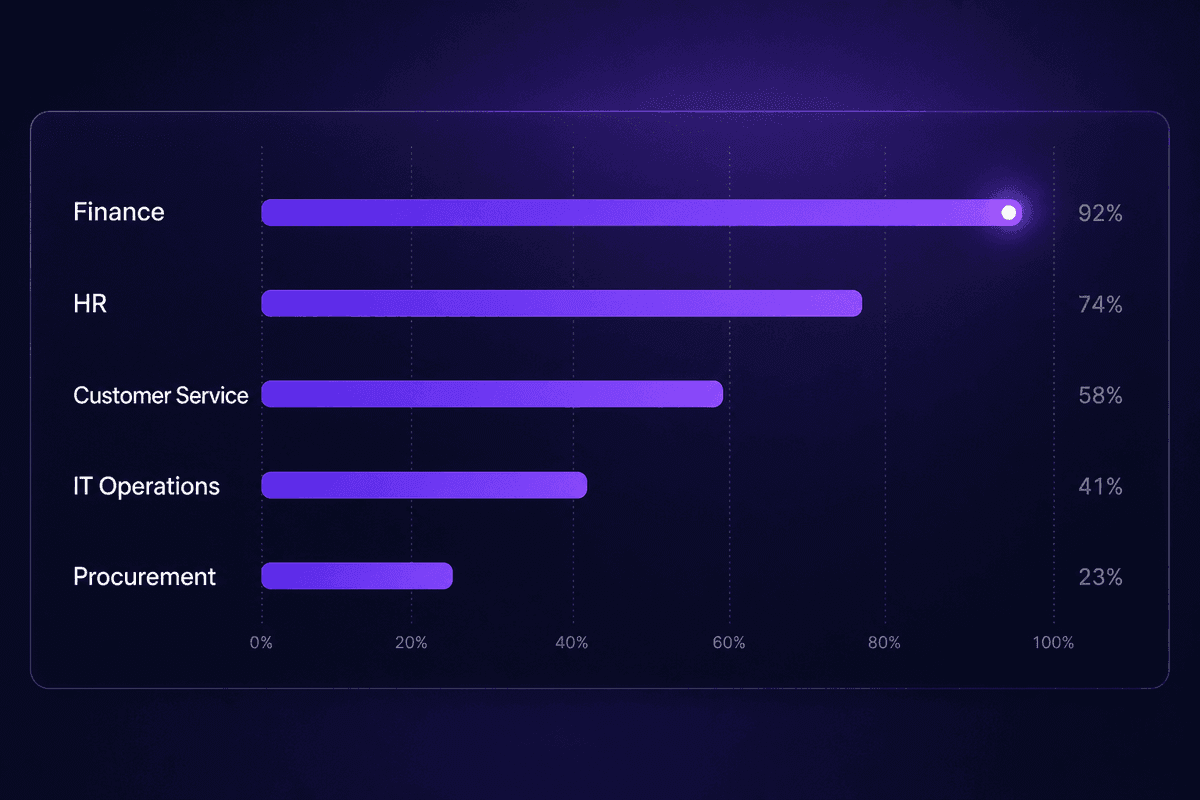
Finance and accounting is one of the highest-ROI starting points for business process automation. Invoice processing - capturing invoice data, matching it to purchase orders, routing for approval, and posting to the general ledger - is rule-based, high-volume, and error-prone when manual. Automating invoice handling reduces cycle time and eliminates the data entry that produces most of the reconciliation errors. Approval workflows for purchase requisitions and vendor onboarding follow the same pattern: clear rules, defined thresholds, measurable cycle time.
HR operations contains several strong automation candidates. The employee onboarding process is the canonical example: a new hire accepted triggers account creation across multiple systems, sends the welcome sequence, schedules the first check-in, and notifies the relevant team leads. The manual version of this takes hours and produces errors. The automated version runs the same way every time. Employee data updates - changes to roles, titles, reporting structures - flow through multiple systems manually in most organizations and are a consistent source of stale records and access control issues.
Customer service benefits significantly from ticket routing and escalation automation. Inbound tickets classified by type and priority, routed to the right queue, and escalated when SLA thresholds approach - that's a process that handles predictable rules at high volume, exactly where automation adds the most value with the least complexity.
IT and operations use automation for provisioning and incident management: new user requests trigger account creation and access provisioning across systems; incident detection triggers alert creation, team notification, and escalation chains without a human in the loop for the routing steps.
Procurement benefits from automating the repetitive data entry in purchase requisitions and the multi-step vendor onboarding process. Vendor data collection, verification steps, approval routing, and system registration can all follow a defined rule chain.
🤔 Wait.
The automation that works cleanly in finance often fails in HR or operations because the process structure is fundamentally different. Finance processes tend to have clear numerical rules and defined approval thresholds. HR processes involve ambiguous data, more exceptions, and stronger sensitivity to errors. Before you scale what worked in one function into another, ask whether the process structure is actually comparable - or just similar enough to look like it is.
Common Misconceptions About Business Automation That Cause Real Failures
Four misconceptions show up with enough regularity in support patterns that they're worth naming explicitly.
Automation replaces jobs. The misconception that drives this one is understandable but wrong. BPA removes low-value manual work from roles - the data entry, status updates, and routine routing that take time without requiring judgment. The Kissflow framing is accurate: automation augments roles by freeing people to do the work they were actually hired for. What I see in support is different: teams that fear automation sometimes run the manual process alongside the automation "just to check," which is how you get duplicated effort and confused records at the same time.
Adding tools creates efficiency without process redesign. This is the most expensive misconception. The tool executes whatever process you configure. A badly designed process automated is a badly designed process running faster and at scale. I've answered enough tickets about mysterious duplicate records and missing approvals to be confident on this one: the tool was almost never the problem. The process design was.
Automation only works for simple linear processes. Not anymore. Intelligent automation - combining workflow automation with AI models, exception handling, and dynamic routing - can handle complex processes with conditional logic, unstructured data, and multi-system orchestration. The 2025 McKinsey Technology Trends Outlook identifies agentic AI as a distinct and growing trend specifically because it enables multi-step, non-linear process automation. AI-enhanced BPA is already in production in insurance claims processing, as documented in a 2025 case study from Khayatbashi et al., where LLMs combined with object-centric process mining delivered measurable accuracy improvements on genuinely complex processes. The limitation isn't process complexity. It's whether the automation technologies are matched to the right problem.
BPA is an IT project. This one causes the most organizational damage. IT teams build automations that business teams didn't request, or business teams buy tools and build workflows without IT involvement, creating security and governance gaps. Neither is the right model. Automation needs cross-functional ownership, with business leads defining what gets automated and why, and IT providing the infrastructure, security, and maintenance frameworks.
Why Treating BPA as an IT Project Is the Most Expensive Mistake
When IT owns the automation roadmap without business alignment, the wrong processes get automated. IT teams optimize for what's technically feasible. Business teams care about what moves their business outcomes. Those aren't the same list.
The failure pattern: IT builds an automation that reduces technical complexity in a system integration. The business process it touches still has the same cycle time, the same bottlenecks, and the same error rate, because the technical problem that was solved wasn't the business problem causing the pain. Business leaders then question why the automation investment produced no visible improvement. IT points to the integration metrics. The conversation goes nowhere.
McKinsey's guidance on cross-functional ownership is specific: automation initiatives succeed when business users define the priority, business leaders own the outcome, and IT provides the infrastructure and governance. Implementing automation without that alignment is how you spend a quarter building something nobody needed. I've watched this from the support side - the signal is usually an automation that works perfectly and solves no one's actual problem.
How to Choose the Right Process Automation Tools Without Locking Yourself In
The tool selection conversation usually happens too early. Teams evaluate automation solutions before they've mapped their processes, defined their goals, or established who will maintain the workflows. That's the wrong order, and it produces tool choices optimized for the demo, not for the team that has to own the system in production.
Here's what actually matters in tool evaluation:
Fit to process complexity. Simple linear workflows don't need advanced orchestration. Processes with conditional logic, exception paths, multi-system data flows, and human-in-the-loop steps need a platform that can handle that complexity without turning every workflow into a custom development project. Match the BPA tools to the complexity you actually have, not the complexity you might someday need.
Integration flexibility. How many of your existing systems does the platform connect to natively? And what happens when a system isn't natively supported? If the answer is "build a custom connector from scratch," factor that into the total cost of ownership. Platforms with large integration catalogs and direct HTTP/API access reduce the risk of getting blocked on a system that doesn't have a pre-built connector.
Governance support. Automation tools that work well at small scale often break at organizational scale because they have no governance layer. Look for role-based access, audit logs, environment separation (staging vs. production), and clear ownership models. These are boring features. They're the ones you'll miss when someone edits a production workflow from their laptop at 11pm.
Team ownership. The right tool is the one your team will actually maintain six months after the person who built it moves on. Automation needs are best served when the platform is accessible to the operations people who understand the process, not just the developers who can write Node.js. Low-code platforms with developer escape hatches - like the ability to write JavaScript inline when the visual builder runs out of road - tend to work best across mixed-skill teams.
That's the actual evaluation checklist. Use it before the demo, not after.




