




Most people searching for business process management examples aren't looking for a definition. They already know what BPM stands for. What they want is a concrete answer to a practical question: what does this actually look like in a real department, on a real Tuesday, with a real person responsible for it?
That's what this article is for. And here's the claim worth making plainly: the BPM examples that actually work share a common structure - a defined trigger, a mapped workflow, and a measurable output. Most teams fail at BPM not because they chose the wrong tool, but because they skip that structure entirely and start building before they've answered the three basic questions.
Where most BPM efforts quietly fail
- BPM requires a trigger, routing logic, and measurable output - most teams only document the middle part.
- The clearest department-level examples come from HR, finance, ops, and customer support.
- Most BPM efforts stall after launch because the optimize stage gets treated as optional.
- Tool selection is downstream of process clarity - not the other way around.
What Business Process Management Actually Means in Practice
BPM is the discipline of identifying, evaluating, and continuously improving repeatable business processes. That's the definition IBM and Pipefy both use, and it's accurate. But the part that gets dropped in practice is the word "continuously."
Most teams treat BPM as a documentation exercise. They map the process, write it down, maybe drop it into a wiki, and call it done. That's not business process management. That's a flowchart with ambitions.
Effective business process management means the process has an owner, a trigger, defined steps with routing logic, and at least one metric that tells you whether it's working. When any of those four elements is missing, you don't have a managed process - you have a habit with documentation.
Business operations run on repeatable patterns: a new employee joins, an invoice arrives, a customer raises a complaint. BPM is what turns those recurring situations into predictable, improvable systems instead of individual judgment calls that vary by who's working that day.
The reason most BPM efforts fail isn't tool selection or budget or organizational will. It's that teams skip process improvement as a discipline and go straight to automation. Automating an unexamined process just makes the broken thing run faster.
That's where the ticket usually starts.
The Main Types of Business Process Management
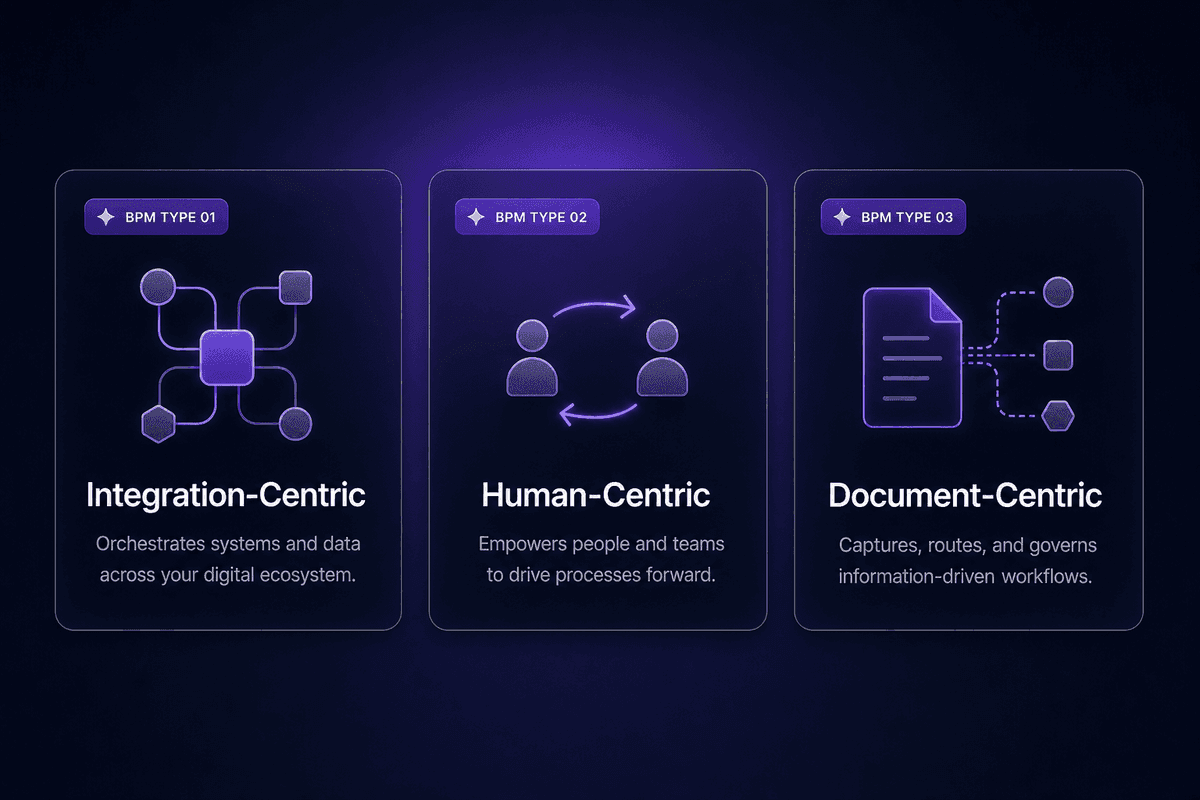
Not every business process has the same shape, and the type of BPM that fits depends on what's actually moving through the process: data between systems, decisions between people, or documents through stages.
There are three main types worth understanding before you look at examples, because the type determines what tools apply, where bottlenecks tend to form, and what "improvement" even means.
Integration-Centric BPM
Integration-centric BPM handles processes where business processes move primarily between systems, with minimal human intervention at each step. The workflow is data-driven: a trigger fires in one system, information passes through transformation or validation logic, and a result lands somewhere else.
This is where the process automation and management software questions surface most directly. When an order placed in an e-commerce platform automatically creates a fulfillment record in a warehouse system and triggers an invoice in accounting, that's integration-centric BPM. The bottlenecks here are usually data format mismatches, authentication failures, or missing field mappings. Humans appear at the edges (setting things up, handling exceptions) but not in the middle.
Human-Centric BPM
Human-centric BPM is the type where approvals, decisions, and handoffs between people define the process flow. A contract that needs legal review before sign-off. An expense report that requires manager approval before reimbursement. A job offer that has to clear three stakeholders before HR sends it.
These are the processes where most operational bottlenecks live. The workflow is only as fast as the slowest human in the chain, and if there's no defined approval process or routing logic, requests end up in someone's inbox until they're chased. Workflow management tools tend to underdeliver here specifically when the process itself hasn't been modeled first - you automate the notification, but the decision logic remains ambiguous.
Document-Centric BPM
Document-centric BPM organizes processes around reviewing, approving, and routing documents through defined stages. Contracts, policy documents, proposals, compliance filings, purchase orders - any process where a document is the thing being worked on.
This type gets confused with project management regularly. Pipefy draws the line clearly: document-centric BPM is governed by business rules about what the document needs before it moves to the next stage. Project management tracks task completion and timelines toward a fixed endpoint. A contract review process is BPM. Planning a product launch is project management. If the process repeats with the same logic every time a new document enters it, you're in document-centric BPM territory.
Business Process Management Examples by Department
Here are five concrete business process management examples across industries and departments. Each one names the trigger, the workflow steps, and what a measurable outcome looks like. These aren't theoretical - they're the processes that consistently appear in real operations queues and support histories.
Employee Onboarding as a BPM Example
Trigger: offer letter accepted and signed.
Without BPM, employee onboarding is a cascade of individual judgment calls. IT gets an email at some point. Someone sets up the laptop. HR sends a welcome packet, maybe. The manager figures out the training schedule. Two weeks in, the new hire still doesn't have access to three systems, and nobody has a clear picture of what's missing.
With BPM applied, the same process looks completely different. The workflow runs in stages: IT provisioning starts the moment the trigger fires, document collection (I-9, tax forms, direct deposit) goes to the new hire via a defined channel, the training schedule is generated from a template, and a manager check-in is scheduled for day 7 and day 30. Every step has an owner. Every step has a completion signal. You can see at a glance what's done and what's stuck.
This is one of the most cited BPM examples across Claromentis, Appian, and ClickUp because it's universally recognizable and the contrast between managed and unmanaged is immediate. It's also a clear human-centric BPM example, since handoffs between IT, HR, and the hiring manager are the core mechanics.
The measurable output: time-to-productivity for new hires, number of access provisioning tickets raised in the first two weeks, and day-30 manager satisfaction scores on process smoothness.
Process steps at a glance:
| Step | Owner | Completion signal |
|---|---|---|
| IT provisioning | IT team | All accounts active |
| Document collection | HR | Forms received and filed |
| Training schedule | Hiring manager | Calendar blocks confirmed |
| Day-7 check-in | Manager | Meeting logged |
Contract Management and Approval Workflows
Trigger: contract draft requested by a sales or procurement team member.
The failure mode that BPM solves here is specific: contracts sitting in someone's inbox because there's no defined routing logic. A sales rep sends a draft to legal. Legal doesn't respond for four days because they didn't know the priority level. The rep follows up. Legal asks for the business context that should have been included in the original request. Another two days pass. The deal slips.
That sequence isn't unusual. It's what happens when an end-to-end process hasn't been mapped.
A bpm workflow for contract management runs like this: draft request submitted with required fields (counterparty, deal value, contract type, deadline) - this is the trigger. The request routes automatically to the relevant legal reviewer based on contract type. Legal reviews and either returns comments or escalates to senior counsel above a defined deal value. Approved contracts route to the signing party. A status trail is maintained throughout.
The measurable outputs: average contract turnaround time, number of contracts stuck at each stage for more than 48 hours, and legal review capacity used per month. These numbers don't exist in organizations without BPM. In organizations with it, they become the basis for capacity planning.
Steps in a process that went from unmanaged to managed: the content of the work didn't change. The routing logic and ownership did.
Finance and Expense Management Processes
Trigger: expense report submitted by an employee.
An unmanaged expense workflow looks like this: employee emails receipts to a manager. Manager forwards to finance. Finance asks which cost center. Employee follows up. Finance enters the data manually. Reimbursement takes two to four weeks. Audit trail consists of email threads.
That's not a hypothetical. That's what I hear described regularly when teams start thinking about process improvement.
BPM adds three things that change the risk profile entirely: routing rules (submissions above a certain threshold go to a second approver), approval tiers (project expenses route differently than travel, which routes differently than equipment), and an audit trail that isn't a pile of forwarded emails.
The quality management implication is direct: finance BPM reduces compliance exposure by making the process consistent and traceable. Business intelligence becomes possible once you have structured data: spend by department, approval time by manager, category breakdowns by quarter.
According to McKinsey's research on organizational productivity, typical cross-cutting management processes consume 40 to 65 percent of management and overhead time. Expense management is a small slice of that, but it's a slice that compounds - every approval touch on a $45 meal reimbursement costs the same management attention as a $4,500 vendor invoice when the process is unstructured.
Process performance metric to track: average reimbursement cycle time from submission to payment. In most unmanaged environments, it's longer than anyone realizes until it's measured.
Customer Support Process Management
Trigger: support ticket received via any channel (email, chat, web form).
The absence of a defined management process in customer support creates three specific failure modes: duplicate handling (two agents work the same ticket because routing didn't prevent it), SLA misses (a high-priority ticket sits in the general queue because triage logic didn't flag it), and no learning loop (the same issue recurs every month because nothing routes it back to the product or documentation team).
BPM maps the process from intake through triage, assignment, resolution, and escalation. A process map for a support ticket might look like: ticket received → auto-classified by type and priority → routed to the right queue → assigned within a defined SLA window → resolved or escalated based on time and complexity thresholds → resolution logged with category tag for trend analysis.
The customer relationship management connection is direct: when customer support runs on a defined workflow, you get data. Ticket volume by category, time-to-first-response by priority, escalation rate by product area. Without the process structure, you have a queue of things that got handled, with no pattern analysis possible.
Business outcomes from managed support processes include measurable SLA compliance rates and a closed loop between support patterns and product or documentation changes. The pattern I see in support frequently: teams that implement BPM for ticket routing see first-response time drop within weeks. The work volume doesn't change. The routing and visibility do.
Procurement and Acquisition Workflows
Trigger: purchase request submitted for a new vendor, product, or service.
A procurement workflow, without defined business processes, turns into a political exercise. Someone needs a new software subscription. They ask their manager. The manager asks finance. Finance asks legal. Legal asks about the vendor's data handling. The original requester is CC'd on an email chain they stopped reading after day three.
BPM structures this as a staged approval workflow: purchase request submitted with vendor details, estimated cost, and business justification → automatic routing based on spend tier (small purchases clear at manager level, larger ones require finance approval, enterprise contracts route to legal) → vendor onboarding steps triggered once approval is granted → purchase recorded and tagged for budget tracking.
The key business activities here - vendor validation, budget approval, compliance check, and purchase recording - all happen in sequence with ownership at each stage. Inventory management connects downstream: approved purchases trigger updates to asset or subscription inventories, so the organization's records stay current.
The compliance angle: procurement is where BPM directly reduces audit exposure. Every purchase decision has a trail. Every approval has a timestamp and an owner.
📊 In practice:
The BPM examples that work across every department in this list share a three-part structure: a defined trigger that starts the process, routing logic that determines what happens next, and a measurable output that tells you whether the process ran correctly. Most teams only build the routing logic. They skip the trigger definition (which means the process starts inconsistently) and skip the output measurement (which means they can never improve it). That's documented chaos, not managed process.
The BPM Lifecycle: Stages Every Process Has to Clear
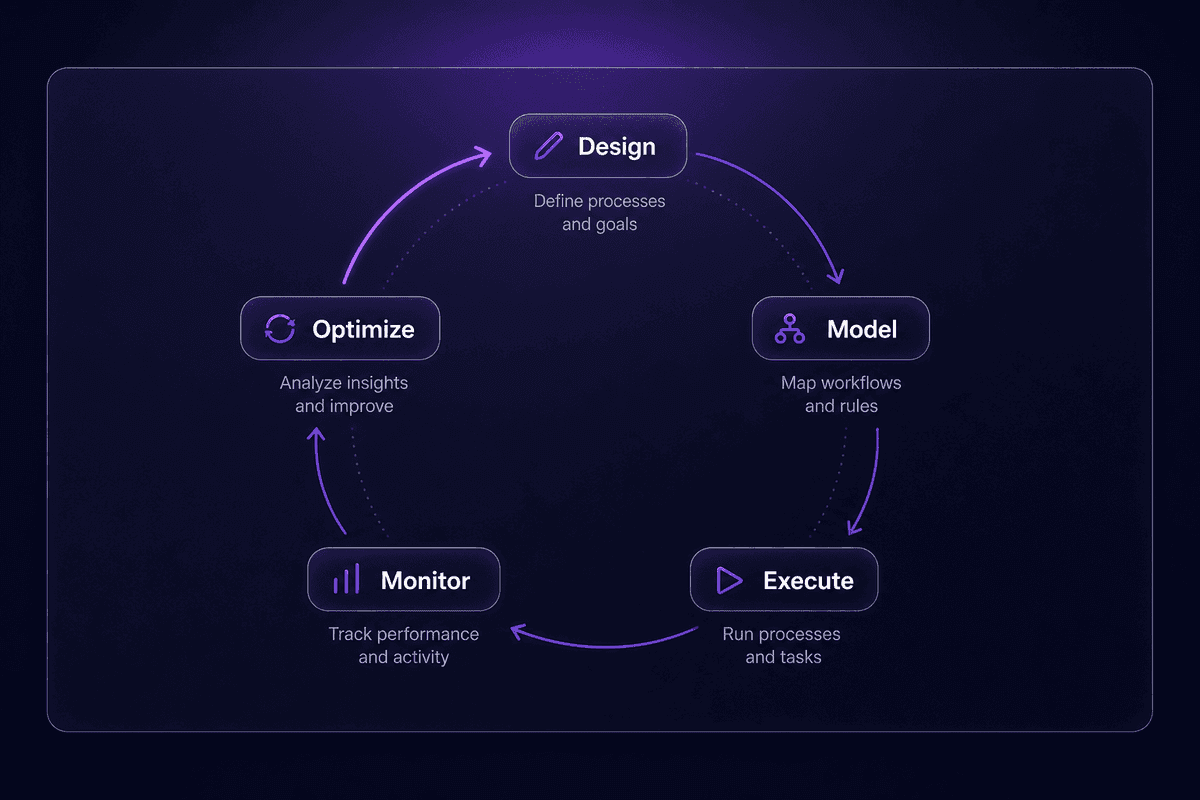
BPM isn't a setup task. It's a cycle. The business process management lifecycle runs through five stages, and most teams treat the first two as the whole project. That's where the process dies.
The five stages: design, model, execute, monitor, optimize. Every stage of the BPM lifecycle has a characteristic failure mode. Understanding those failure modes is more useful than understanding the stages themselves.
Design and Model: Where Most BPM Projects Break First
The design stage is where the process is defined: who triggers it, who owns each step, what the decision points are, and what the output looks like when it's working.
The modeling stage is where that definition becomes a process model that can be executed and tested. This is not the same as documentation. A process model includes decision logic (what happens when an invoice exceeds the approval threshold?) and exception handling (what happens when the approver is on leave?). Most early-stage BPM projects skip both. A business analyst might map the happy path with meticulous care. The edge cases get a note that says "handle manually."
When you use BPM to document without modeling exception handling and decision logic, you produce a diagram that's accurate for 80% of cases and useless for the 20% that actually need guidance. The BPM project breaks on those 20% cases, and the team concludes that BPM doesn't work for their situation. It did work. For the straightforward path. The part that needed the most attention didn't get modeled.
A useful design checklist:
- Trigger defined with specific conditions (not "when needed") - Every decision point has explicit routing logic for each possible answer - Exception paths named and assigned to an owner - Output measurement defined before execution starts - One named process owner responsible for the whole lifecycle
Execute, Monitor, and Optimize: What the Cycle Looks Like After Go-Live
The execution stage is where the modeled process runs against real data with real people. This is when edge cases that weren't modeled start appearing. That's normal. The execution stage is supposed to reveal gaps.
The monitor stage is where process performance data is collected and reviewed. This is the stage teams skip most consistently, according to the pattern McKinsey identified when examining organizations where cross-cutting processes consume 40 to 65 percent of management time: teams launch, declare success, and move on. No one returns to look at the numbers.
The optimize stage closes the loop: the data from monitoring identifies where the process is slow, inconsistent, or producing unexpected outputs, and those insights feed back into design and modeling. This is what business process reengineering involves at its most basic level - using what you've learned from running the process to redesign it better.
Process mining tools can surface execution patterns from logs when the volume is high enough to reveal systemic inefficiencies. For most teams, a simpler signal works first: pick three metrics in the design stage, check them monthly, and ask whether the trend direction is right.
The failure mode that separates a managed process from a deployed one: treating the launch as the finish line. Process improvement is what happens when you make it past that line and keep going.
For teams starting to close this loop, a low-code automation platform can help bridge execution and monitoring without requiring enterprise infrastructure. The way this works in practice: you connect the relevant SaaS tools (your CRM, ticketing system, and project tool) through built-in integrations, configure a workflow that collects process metrics on a schedule, and use a JavaScript node to calculate derived KPIs before pushing the result to a shared dashboard. Latenode runs this kind of reporting workflow as a single execution, regardless of how many steps are involved, which matters when you're building something that runs every day and you need the operational cost to stay predictable. The goal isn't a fancy BI setup - it's a consistent signal that tells you whether the process is improving or stagnating.
Process Management Best Practices That Actually Survive Contact with Operations
Every best practices list for BPM says the same things: document your processes, involve stakeholders, measure outcomes. All of that is true and almost none of it tells you how to avoid the specific mistakes that cause BPM efforts to fail in practice. Here's the version with teeth.
- Start with the process that breaks most visibly
The failure mode this prevents: spending weeks modeling a low-stakes process while the broken one that generates tickets every week goes unmapped. The check: can you name, right now, the one process that creates the most reactive work for your team? Start the BPM initiative there, not with the process that's easiest to diagram.
- Define the trigger before mapping the workflow
Process model failures often trace back to an ambiguous trigger - "when a customer complains" instead of "when a ticket is submitted via the support portal with priority level set to High." A vague trigger means the process starts inconsistently, and inconsistency is the first enemy of measurement. The check: can someone who doesn't already know the process decide whether the trigger has fired?
- Name one owner per process, not a committee
Change management breaks down when responsibility is collective. If three people own the process, it effectively means no single person can be asked why something went sideways. The check: can you write one name next to "process owner" and have that person confirm they accept the accountability?
- Automate after you've run the process manually at least once
This sounds obvious but it's routinely skipped. Teams jump from new process to automated process without a manual validation run that surfaces the 20% of edge cases the model missed. The failure mode: a bpm solution that automates an unvalidated process and scales the errors. The check: does the team have notes from at least one full execution cycle before the first automation is switched on?
- Build measurement into the model, not as an afterthought
Business process management strategy fails when improvement is based on feeling rather than data. If the metric isn't defined before execution begins, the optimize stage has nothing to anchor to. Look at business functions that have operated without KPIs for years - finance teams manually reconciling at month end, HR teams who can't say how long onboarding takes for different roles. The check: what specific number will change if this process improves, and where does that number get logged?
- Include the people who do the work when modeling the process
Business users are the ones who know where the unofficial workarounds live. A process model built by a business analyst in isolation will accurately describe the approved process and miss the three things people actually do to make it function. The check: did at least one person who executes this process on a regular basis review the model before it went to execution?
- Set a review cadence before launch, not after the first incident
Most BPM initiative efforts stall in the monitor stage because there's no scheduled time to look at the data. "We'll review it when something goes wrong" is not a bpm strategy - it's reactive maintenance with extra documentation. Pick a frequency (monthly for new processes, quarterly for stable ones), put it on the calendar, and assign someone to bring the numbers.
- Don't automate workarounds
This is the one I'd put in a larger font if I could. When you find a workaround in a process that's been running for years, the right question is whether the underlying process step it's compensating for is even necessary. Automating a workaround gives it permanence. The check: is this step solving a problem in the actual process, or is it compensating for a design flaw that should be removed?
How to Use Business Process Management Tools Without Overbuilding
The tool discussion comes second. Always. A team that selects a BPM tool before they've modeled the process will spend the first three months customizing the tool to fit an unexamined workflow. The tool doesn't fail. The process clarity did.

That said: tool category matters. The right class of tool depends on what type of process you're managing, how much human interaction is involved, and who will maintain it.
| Tool category | Best-fit process type | Setup complexity | When to avoid it |
|---|---|---|---|
| BPM software / BPM system | End-to-end processes with multiple departments, defined routing rules, and audit requirements | Medium to high | When the process isn't modeled yet; the tool will inherit the confusion |
| Workflow automation platform | Integration-centric BPM; systems triggering systems with conditional logic | Low to medium | When the process is primarily human-centric and depends on judgment calls the tool can't encode |
| Project management software | One-time work with a defined end date and variable steps | Low | When the process repeats with the same logic every time; that's BPM, not project management |
| Robotic process automation | Repetitive UI-based tasks in systems without APIs | Medium to high | When an API exists; RPA is a workaround for API absence, not a first-choice process automation approach |
| Human-centric BPM / approval platforms | Approval workflows, review chains, sign-off processes | Low to medium | When the bottleneck is in system data flow, not human decision points |
One practical note on the workflow automation category: if you're building integration-centric BPM and need to connect systems that have APIs alongside systems that only have a web interface, a low-code platform with a headless browser capability removes the need for a separate browser automation service. Latenode happens to have one built in - I mention it because the alternative is adding a second tool to your stack and a second maintenance obligation to whoever owns the workflow in six months.
The per-execution pricing model also matters here in a way that's easy to miss: a 6-step reporting or approval workflow counts as one execution, not six separate tasks. At scale, that's not a small difference.
🤔 Wait.
Most teams select a BPM tool before they have a process model. That reverses the correct order and almost guarantees the tool gets abandoned or heavily customized to patch a modeling gap that should have been resolved before any software entered the picture. A tool that fits an unmodeled process is just well-funded confusion running at the speed of automation.




