



You've got bots. You've got scripts. You've got a Zapier account with 40 workflows and a Make account someone set up in 2022 that nobody fully understands anymore. Processes run. Individually, they work. But every time a customer request crosses a team boundary, something falls through a gap - a spreadsheet appears, an email goes out, someone manually checks a status that should already be visible somewhere.
That's not an automation problem. That's what happens when you have automations without orchestration.
This guide is a practical look at business process orchestration: what it actually means, how it differs from the automation you're already doing, and why teams that skip the coordination layer end up with more manual work than they started with, just at a different level.
What breaks before you realize what's missing
- Automation handles tasks; orchestration coordinates the full sequence - including handoffs, routing, and human steps.
- Without end-to-end visibility, a process can stall silently while every individual automation reports green.
- Fragmented automations don't fail loudly - they fail at the seams, where one system hands off to the next.
What Business Process Orchestration Actually Means
Business process orchestration refers to the management layer that sits above individual automations and coordinates them into a coherent end-to-end flow. It connects workflows, people, and enterprise systems so that a process moves from start to finish without manual intervention at every handoff point.
The word "orchestration" is doing real work here, not metaphorical work. A conductor doesn't play every instrument. They coordinate timing, sequence, and transition between parts. A business process orchestration layer does the same thing: it decides when a task fires, what happens after it completes, and where the process goes when something goes wrong.
A single automated task is not a business process. Sending an email when a form is submitted is automation. Taking that same form submission, routing it to a triage queue, pulling enrichment data, triggering a credit check, notifying the right team, and logging the outcome to three downstream systems - that's a business process. Orchestrating it means having one layer that controls the sequence and knows the state of the whole thing, not just its individual parts.
The orchestration layer isn't a replacement for your existing tools. It's the connective layer between them. And it's what most teams are missing when they say their automation program "isn't quite delivering" what they expected.

Business Process Orchestration vs. Business Process Management
Business process management (BPM) is the discipline of designing, modeling, monitoring, and improving business processes over time. It's broad by definition - it covers process design, documentation, analysis, governance, and methodology. A BPM initiative might produce a detailed process map, a set of ownership rules, and a continuous improvement cycle. That's genuinely valuable work.
Business process orchestration is something different. It's the operational execution layer. Where BPM asks "what should this process look like?", orchestration asks "is this process actually running right now, across all the systems it touches, in the sequence we intended?"
Conflating the two is expensive. Teams that over-invest in BPM tooling without addressing runtime coordination end up with beautifully documented processes that still break at the handoffs. The diagram is accurate. The execution isn't.
The practical distinction: process modeling tells you what should happen. Orchestration makes it happen - and tells you when it didn't.
Where Process Management Ends and Orchestration Begins
There's a specific moment where BPM leaves off and process orchestration takes over. It's not when automation is complete. It's when process mapping is done and the handoffs between systems still aren't reliable.
You've documented the process. You know who owns each step. You've mapped the systems involved. And still, every time a request moves from intake to approval, someone emails someone else to check a status. That's the gap orchestration fills.
One thing worth naming here: orchestration is often the right starting point for figuring out which parts of a process to automate. Most teams treat it as the final layer added after everything is already running. It's more useful earlier than that. Mapping the process architecture and identifying where handoffs break tells you where automation will actually matter, rather than where it's easiest to implement.
Orchestration takes over exactly where documentation stops being enough.
How Business Process Orchestration Works in Practice
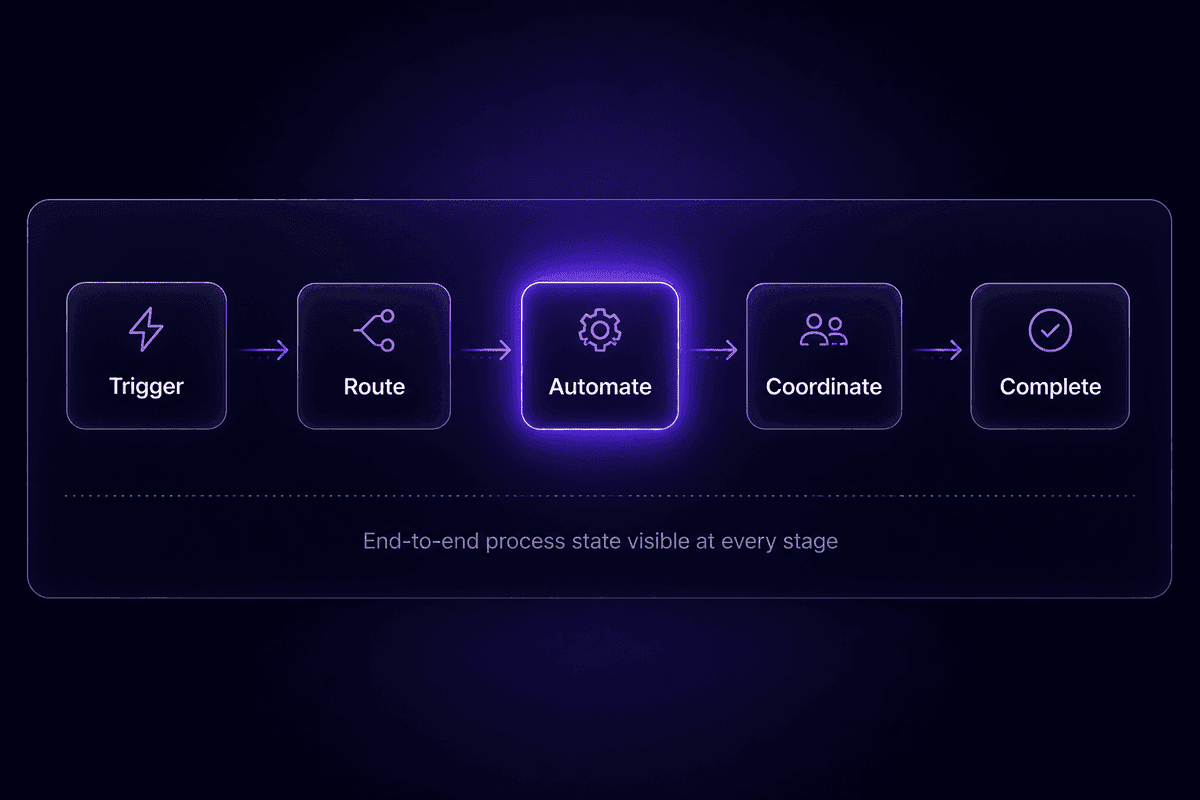
Business process orchestration works through four mechanics operating in sequence. Understanding the sequence matters - skipping one step doesn't simplify anything, it just moves the complexity downstream where it's harder to see.
Process Mapping as the Entry Point
Before orchestration can coordinate anything, the process has to be mapped. Not described - mapped specifically enough that you can identify each step, the system it touches, the person or role responsible, and what triggers the next step. This is where most teams discover that their "documented process" is actually three informal processes that vary by team member.
Process mapping at this level also surfaces the branching logic: what happens if a document is missing, if an approval is denied, if a step times out. Orchestration has to handle those paths, not just the happy path.
Task Automation and Coordinated Data Flow
Once the process is mapped, individual steps get automated: AI models classify or score inputs, RPA handles legacy system interactions, APIs move data between platforms, and rules route cases based on defined criteria. This is where most automation programs already live.
What orchestration adds is coordinated data flow - the guarantee that outputs from one step arrive in the right format, at the right time, as inputs for the next. Without this layer, you end up with automations that each run correctly but don't actually connect into a coherent process. Data sits between systems. Steps run in the wrong order. A downstream task fires before the upstream one completes.
Continuous Performance Tracking
The third mechanic is monitoring - and it's the one most teams skip until something breaks badly enough to get noticed. Good orchestration provides visibility into process performance: how long each step takes, where cases queue up, which paths fail most often, and what the end-to-end completion rate looks like.
This is different from watching whether automations run. An automation can execute successfully while the overall process still fails. A customer application can enter the process, all the automated steps can fire without errors, and the application can still never reach a decision - if the routing logic sends it somewhere nobody monitors.
The only metrics that prove orchestration is working are process-level metrics: cycle time, throughput, and end-to-end success rate. Everything else is instrumentation, not evidence.
Process Orchestration and Automation Working Together
Process orchestration and workflow orchestration are not the same thing as automation. They're complementary. Automation executes individual tasks: it fires an API call, transforms a record, sends a notification. Orchestration decides when that task should run, what data it receives, and what happens after it completes - including what happens when it fails.
The components orchestration coordinates are the ones you're already using: robotic process automation for legacy systems, AI models for classification and decision-making, APIs for system integration, and human task assignments for steps that still require judgment. All of these are automation tools. Orchestration is the layer that gives them a shared sequence and a shared state.
Without the orchestration layer, each of these components operates on its own timing, its own data contract, and its own failure behavior. That's silo sprawl. The individual tools work. The process logic that was supposed to connect them exists only in someone's head - usually the person who set it up, who may have left the team since then.
Automation handles task execution. Orchestration handles process logic. Both are required. Neither replaces the other. Teams that build automation without orchestration eventually discover this when a process crosses more than two systems and the handoffs start failing in ways that no individual automation's logs will explain.
Benefits of Business Process Orchestration That Go Beyond Labor Savings
The default ROI argument for orchestration is labor savings: fewer manual steps, less time spent moving data between systems. That's real, but it understates the case significantly.
Direct labor savings are only part of the picture. Analysis from Digital Applied suggests that calculating ROI purely on avoided labor costs typically understates the actual impact by 30-50%, because it ignores cycle time compression, error reduction, and the downstream revenue effects of faster process completion. A loan that closes three days faster. An onboarding sequence that doesn't require the customer to call in and ask where they are in the process. An underwriting decision that reaches the applicant before they've accepted a competitor's offer.
📊 By the numbers:
According to data from Everest Group cited by ThinkAutomation, well-scoped business process automation implementations have achieved 200-250% ROI within the first 12 months. That's a wide range, and it depends heavily on process selection, scope, and whether teams track the right metrics. Treat it as an order-of-magnitude signal, not a guarantee - but also not as a reason to dismiss the category.
Beyond ROI, orchestration produces:
Cycle time reduction. End-to-end process times drop when handoffs are automatic rather than manual. A process that took five days because it waited for human shepherding across three systems can complete in hours when orchestration handles routing.
Error reduction. Manual data transfer between systems is where errors enter. Orchestrated data flow removes that entry point. Fewer re-entry steps means fewer transposition errors, fewer missing fields, fewer cases that fall through because someone forgot to copy a record.
Scalability without proportional headcount growth. An orchestrated process runs the same way whether it handles 10 cases or 10,000. A manual process requires more people as volume increases.
Governance and audit trail. Orchestration platforms log the state of every process instance: what happened, when, who approved it, and what data moved between systems. That trail is what compliance teams want and what manual processes almost never produce reliably.
Redeployment of staff to higher-value work. This is the benefit that's hardest to measure and most likely to be undersold. When analysts and coordinators stop moving data between systems, they can work on the problems that actually require human judgment. The gain isn't just time - it's cognitive bandwidth redirected to work that compounds rather than just sustains operations.
According to Deloitte's 2026 Global Human Capital Trends research, competitive advantage increasingly depends on the ability to reconfigure work, teams, and processes quickly. Orchestration is the architecture that makes that reconfiguration possible without rebuilding every underlying system from scratch.
End-to-End Business Processes That Benefit Most from Orchestration
Not every process needs orchestration. A two-step automation that fires when a form is submitted probably doesn't. But complex business processes - the ones that cross systems, teams, and decision points - almost always do. Here are the process types where end-to-end process orchestration adds the most value.
- Insurance underwriting and claims processing
The coordination problem here is severe: risk data lives in multiple systems, AI models need to score applications, human underwriters need to review edge cases, and final decisions need to write back to policy and communication systems. Without orchestration, data is manually assembled, cases wait for human routing, and the process breaks down wherever systems don't talk directly. Camunda's work on health insurance underwriting shows how AI-assisted orchestration can standardize routing while keeping underwriters focused on decisions that require judgment.
- Loan origination
A loan application touches credit bureaus, internal risk models, compliance checks, document verification, and approval workflows - often running in parallel, each with their own timing and failure modes. Orchestration ensures that no stage fires with incomplete inputs, that parallel tracks synchronize before final decisions, and that the applicant receives timely status updates rather than silence.
- Customer onboarding
Onboarding spans CRM, provisioning systems, communication tools, and billing - and most of it needs to happen in a specific order, with verification steps between stages. When it works, it feels invisible to the customer. When it doesn't, the customer calls to ask where they are in the process, which is a reliable sign that the business workflow has no coordination layer.
- Case management and customer service escalations
Support cases with multiple owners, compliance requirements, or regulatory timing are natural fits for orchestration. The coordination problem is routing: who owns this case at each stage, what information do they need, and what happens if a deadline is missed. Without orchestration, escalation paths live in someone's head or in a training document nobody reads.
- Procurement and vendor management
Purchase orders, approvals, vendor validations, and contract execution cross finance, legal, and operations. The process integration problem is that each team has its own system and its own definition of "complete." Orchestration establishes a shared process state that all teams can see, with automatic handoffs and visible bottlenecks instead of email chains.
- HR hiring process and employee onboarding
From requisition to offer to day-one provisioning, a robust business process requires coordination between HR systems, IT, finance, and the hiring manager. Without orchestration, tasks fall through because there's no system tracking who still needs to do what - only a shared understanding that's different for every person involved.
Implementing Business Process Orchestration Without Repeating Common Mistakes
There's a version of orchestration adoption where teams spend three months choosing a platform, six months building flows, and then can't answer the question "is this working?" because nobody defined what working looks like. I see the aftermath of that version more than I'd like.
Here's what actually helps.
Starting With the Right Process
Don't start with the most complex process you have. Start with a process that crosses at least two systems and one team boundary, produces visible pain when it breaks, and has a definable outcome you can measure. That combination gives you a real orchestration problem without the political complexity of starting with something that involves six departments and a legacy system held together with hope.
Map the process at the step level, not the swim-lane level. You need to know: what triggers this step, what system it touches, what data it needs as input, what data it produces as output, and what the next step expects. Managing process at this resolution reveals the handoff failures that BPM diagrams hide.
A practical starting checklist:
- Identify the process trigger (event, schedule, or human action)
- List every system the process touches in sequence
- Name every human decision point and who owns it
- Define the success condition: what does "complete" look like?
- Define the failure condition: where does this process typically stall?
Getting KPI Tracking Right Before Go-Live
Most teams measure whether the automation runs. That's not the same as measuring whether the process improves. Cycle time, throughput, and process success rate are the three metrics worth tracking from day one. Without those baselines, you can't prove the orchestration layer is doing anything - and in six months, when someone asks why they approved the budget, you'll want a real answer.
Cycle time is how long the process takes end-to-end, not individual step execution time. Throughput is how many process instances complete successfully per period. Process success rate is what percentage of initiated instances reach a defined successful outcome, as opposed to stalling, erroring out, or requiring manual intervention to continue.
If you track only step-level execution metrics, you'll know that your automations run. You won't know if the process works. Those are different questions.
Orchestration Is Not Just an IT Problem
One misconception that keeps coming up: orchestration is a technical concern, owned by engineering, delivered to business users when it's ready. That framing produces the wrong thing. Business users know where the process breaks. They know which edge cases don't fit the documented flow. And in any real orchestration design, human-in-the-loop steps are first-class participants - not afterthoughts patched on at the end.
The people who manage process bottlenecks, approve exceptions, review flagged cases, and handle the scenarios automation can't handle need to be involved in the design phase. Business teams who are handed an orchestration layer they didn't help design will route around it within three weeks. They have enough institutional memory to do so effectively.
AI adds another dimension here. About 70% of enterprises are now using AI for process automation, and 55% use it for workflow optimization across teams, according to Kore.ai's enterprise operations analysis. As AI becomes a standard component inside orchestration flows, the routing decisions and exception-handling logic become more complex - making the collaboration between IT and business users even more important, not less.
Choosing an Orchestration Platform or Tool That Fits the Process
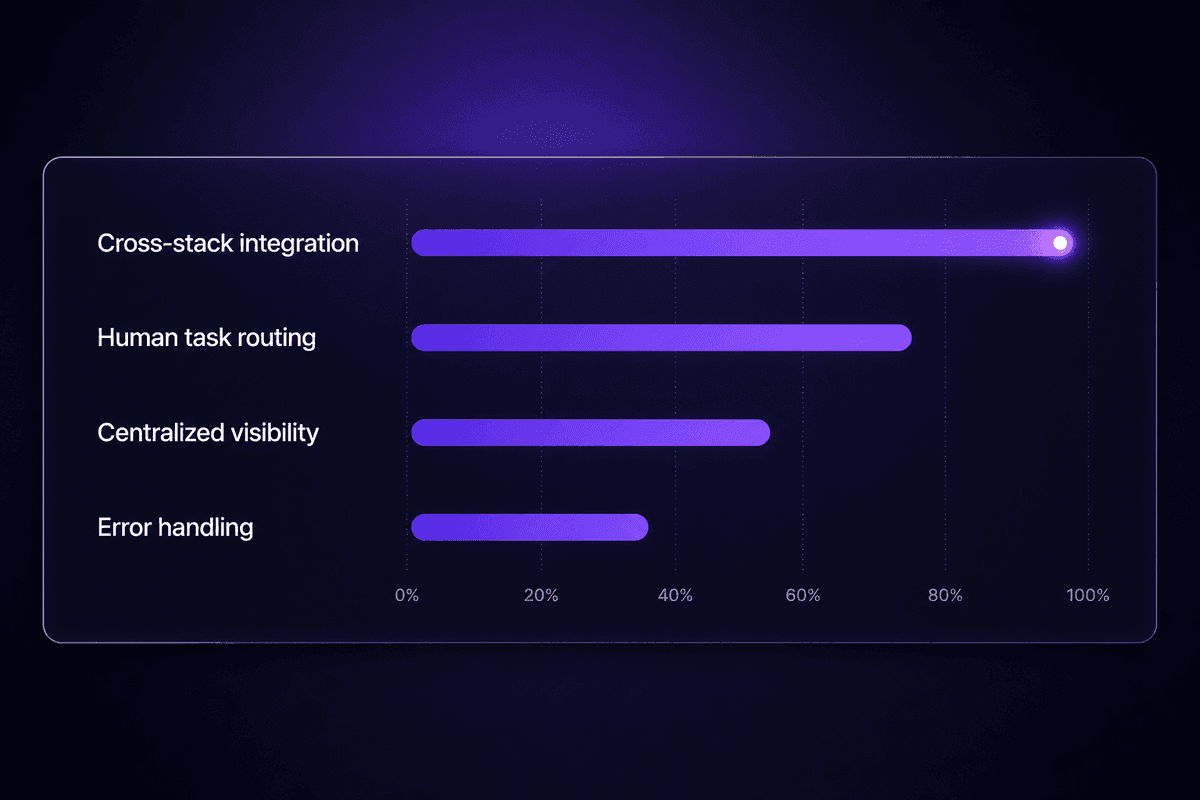
The decision criteria for a process orchestration platform are more specific than "does it integrate with our stack." The right question is: does it reach across your existing tools without requiring you to replace them, does it route human tasks alongside automated ones from the same interface, does it provide centralized visibility into process state rather than just step-level logs, and does it handle error states deterministically rather than silently?
That last point matters more than most evaluations catch. An orchestration tool that fails silently is worse than no orchestration tool, because it adds a layer of apparent progress without actual reliability. Watch for how the platform surfaces errors: does it show you which step failed, with what data, and at what point in the sequence? Or does it just show you that an execution completed, leaving you to investigate manually when downstream outputs are missing?
For teams on a low-code path, the developer escape hatches matter as much as the visual layer. A platform like Latenode lets you build the orchestration flow visually, but drops you into a full JavaScript node whenever the standard connectors run out of road. That practical combination - visual coordination layer plus inline code when needed - tends to produce orchestration that actually stays maintained, because both technical and non-technical team members can navigate it.
🤔 The uncomfortable question:
Most orchestration evaluations ask "does this platform run our process?" The question that determines whether it actually gets used is different: "can the person who owns this process, six months after implementation, understand what it's doing and fix it when it breaks?" If the answer is no, you're building a technical artifact, not an operational capability. Process orchestration technology that can't be owned by the people who understand the process has a predictable failure mode.
The Future of Business Process Orchestration and Orchestration and Automation Technology
The category is moving fast, and in a specific direction: AI is becoming a first-class participant in orchestration flows, not just a step inside them.
The traditional orchestration model is rules-based: if document type equals X, route to queue Y. The emerging model introduces an AI agent as a decision node - where instead of a predetermined rule, an AI model evaluates context and determines routing dynamically. This is what's being called agentic process design: the orchestration layer delegates certain decision points to AI rather than encoding every branch explicitly.
Pega has been describing this convergence as BOAT - business orchestration and automation technologies - the idea that RPA, process intelligence, AI agents, and orchestration platforms are collapsing into a single category rather than remaining separate tools. The practical implication for teams choosing platforms now: you want an orchestration and automation technology layer that can accommodate AI models as process participants, not just as API calls bolted onto the side.
For teams designing processes today, this means a few concrete things. Don't design your orchestration architecture around static branching logic that can't incorporate AI-driven routing later. Choose platforms where AI models are native participants in the workflow, not external integrations that require custom glue. And think carefully about where human oversight is still required - because as AI orchestration capacity grows, the risk isn't that it won't work, it's that it'll work confidently on the wrong thing.
According to Deloitte's research on evolving business and work practices, organizations that will adapt to changing business conditions are those that can reconfigure how work happens - quickly, structurally, without rebuilding their entire stack. Orchestration platforms that support AI agent participation are the architecture that makes that possible. The decision you're making now about your orchestration layer is also a decision about how much flexibility you'll have when the next major shift arrives - and based on current trajectory, it'll arrive before your current implementation has fully stabilized.




