



Most teams don't have a customer service problem. They have a sequencing problem. They grab a helpdesk tool, start routing tickets, and assume the workflow will emerge from the activity. It doesn't. What emerges is a queue with unclear ownership, inconsistent handling, and a growing list of things that "fall through the cracks" - which is just a polite way of saying nobody defined what should happen next.
Building an effective customer service workflow requires making design decisions in a specific order: map what exists, define what good looks like, design the logic, automate selectively, and measure honestly. Skip any step and you're automating chaos at scale. That's worse than the chaos you started with.
Where teams usually get burned first
- Map before you automate - the process that breaks usually reveals a missing owner, not a missing tool.
- SLAs and routing rules must be defined before any automation is configured, or the automation inherits whatever inconsistency existed before.
- Start automation on repetitive, low-complexity tasks: FAQs, acknowledgments, status updates. Not judgment calls.
- Workflows degrade without iteration - treat first launch as version one, not final version.
What a Customer Service Workflow Actually Is (and What It Is Not)

A customer service workflow is a repeatable, structured sequence of steps that governs how a support team handles requests from the moment they arrive to the moment they're resolved. That means defined triggers, explicit owners, documented handoffs, and predictable outcomes - not a rough understanding of who usually handles what.
That last distinction matters. A lot of teams describe their customer support workflow as "we use Zendesk and everyone knows the process." That's not a workflow. That's institutional memory wearing a software subscription as a costume.
A real customer service workflow covers the entire lifecycle of a customer interaction: intake, triage, routing, resolution, escalation where needed, and closure with a feedback loop. Each step has a defined input, a defined output, and someone accountable for what happens in between. Managing customer interactions without that structure means every agent is making independent decisions that look roughly similar but aren't identical, and those small variations compound into inconsistent service quality at scale.
An informal checklist is not a customer service workflow. Neither is a loose SOP that says "escalate if needed." The difference shows up when volume increases, when a team member is out, or when a product change makes the old handling logic obsolete. A workflow survives those conditions. A checklist doesn't.
The distinction matters because the two produce different failure modes. A team relying on informal checklists hits broken handoffs, duplicate responses, and missed tickets - each one a small fire. Those fires are where bad customer experience lives.
Types of Customer Service Workflows Worth Designing First
There are more workflow types than any team should try to design at once. The practical question isn't which ones exist - it's which one is causing the most damage right now. Here are the common customer service workflow examples worth prioritizing, each with the trigger that signals urgency:
- Ticket intake and triage workflow
Triggered by inbound volume that's outpacing your team's ability to sort and assign. This is the most foundational customer service workflow because everything else depends on tickets landing in the right place. Without it, priority tickets sit next to noise and agents choose what to work on based on recency, not urgency.
- Issue resolution workflow
Triggered when resolution times are inconsistent across agents handling similar requests. A structured resolution workflow ensures the right steps happen in the right order, with the right information at hand. Without it, the same type of customer issue gets three different treatments depending on who picks it up.
- Customer order workflow
Triggered by high volume of order-related inquiries, especially post-purchase contacts around status, delays, and changes. This workflow type is often the most automatable - status updates, shipping confirmations, and basic fulfillment queries can be handled without agent involvement when the logic is clean.
- Escalation workflow
Triggered when tickets are regularly surfacing to senior agents without a documented path for getting there. An escalation workflow defines exactly when and how an issue moves upward - not "if it feels complicated" but based on specific criteria: SLA breach, customer tier, issue category, or sentiment signal.
- Customer onboarding workflow
Triggered when new customer churn or early support volume is disproportionately high. Onboarding workflows that guide customers through product setup or feature adoption reduce first-week support load significantly. Without them, onboarding is whatever the assigned rep decides it is.
- Customer complaints workflow
Triggered when escalations are arriving without prior documentation or when complaint resolution times are unpredictable. Complaints require a dedicated customer support workflow because they often involve multiple departments, sentiment tracking, and potential compensation decisions - all of which need defined paths, not improvised ones.
If you're looking at this list and identifying two or three at once, start with triage. Practical examples always show the same pattern: every other workflow breaks faster when triage is broken, because everything downstream inherits bad routing from the start.
How to Create Customer Service Workflows: The Five-Step Process
The order matters more than most teams expect. I've talked to enough support leads who went straight to tooling to know what happens: they configure a beautifully designed helpdesk around a broken process and then spend six months wondering why the metrics didn't improve. The automation worked perfectly. The automation was wrong.
The five steps below aren't just a checklist. They're a sequence where each step depends on the previous one being done honestly. Skipping step one in a customer service workflow build is the single most common mistake, and the most expensive one to fix later.
Step 1 - Audit and Map Your Existing Workflow Process
Before designing anything, document what actually happens today. Not what the team thinks happens, and not what the SOP says should happen. What actually happens when a customer request comes in at 9am on a Tuesday when two agents are out.
Use a flowchart or a simple swimlane diagram. Put the customer actions on one lane, agent actions on another, and system actions on a third. Trace five to ten real recent tickets through the map. You'll find the same three or four things in most teams: a step where handling is inconsistent, a handoff that has no documented owner, a customer journey gap where tickets are rerouted because nobody knew what to do first, and at least one step that made sense in 2022 and doesn't anymore.
That's what you're auditing for: inconsistency, missing ownership, and stale logic. The teams that skip this step and go straight to configuration end up building automation around a broken process. The audit is not bureaucracy. It's the only honest way to know what you're actually designing.
Step 2 - Define SLAs, Roles, and Escalation Rules
Once you know what's happening, define what should happen. This means quantified service levels, not aspirational ones.
For every issue type and priority tier in your support team, set measurable SLA targets: first response time, resolution time, and escalation trigger. Then assign ownership for each workflow step - not just "support team" but a specific role accountable for each action. Where approvals or specialist routing are needed, document the criteria explicitly.
| Issue Type | Priority | First Response | Resolution Target | Escalate If |
|---|---|---|---|---|
| Billing error | High | 1 hour | 4 hours | Unresolved at 3h |
| Feature question | Medium | 4 hours | 24 hours | Unresolved at 12h |
| General inquiry | Low | 8 hours | 48 hours | Customer escalates |
The table above is illustrative. Your thresholds depend on your customer segment and team capacity. The structure doesn't change.
Missing this step is the second most common cause of lost tickets and inconsistent response quality. When SLAs aren't defined per issue type, agents make judgment calls about priority - and judgment calls don't scale. Customer issues that should take one hour take four because nobody agreed on what "urgent" means. That's a definition problem, not a staffing problem.
Step 3 - Design the Workflow Logic, Routing Rules, and Branching Conditions
Now you have a map of what exists and a definition of what good looks like. Time to design the actual flow.
A structured customer service center workflow has three components: triggers (what starts the workflow), branching conditions (what determines which path a request takes), and routing rules (where a request ends up). Most teams get triggers right and underdesign the other two.
Branching conditions should be specific enough to handle the real variety of customer requests your team sees. Common routing variables worth designing for:
- Channel - email, chat, phone, and social media may need different handling paths - Topic or category - billing, technical, product, and general questions route differently - Customer segment - enterprise and free-tier customers often have different SLA commitments - Language - unrouted non-English requests are a signal this wasn't designed for - Urgency signals - certain keywords, sentiment scores, or repeat contacts indicate priority
Each condition should map to a specific output: which queue, which agent role, which SLA clock, and which response template applies. The point of this step is to eliminate manual sorting at scale. If your team is still triaging by eye every morning, the workflow didn't get designed here - it got skipped.
Step 4 - Automate Customer Service Without Over-Automating It
Here's where teams do the most damage. Not from under-automating, but from automating the wrong things first.
The right candidates for early workflow automation are tasks that are repetitive, low-complexity, and don't require judgment: ticket acknowledgments, status update replies, FAQ responses, basic routing rules, and priority tagging. An agent shouldn't be typing "thanks for reaching out, we're looking into this" 40 times a day. That's not support. That's transcription.
What shouldn't be automated early: anything that requires reading between the lines of a customer interaction, anything involving an upset customer where tone matters, and anything with a judgment call embedded in it. Those interactions need a support agent. Automating them saves time once and costs customer satisfaction for months.
Practical automation targets by complexity:
| Task | Automation Fit | Notes |
|---|---|---|
| Auto-acknowledgment on receipt | High | Set it up first |
| FAQ responses via chatbot | High | Requires good knowledge base |
| Priority tagging by keyword | Medium | Review after 2 weeks |
| Bot-to-human escalation | Medium | Design the exit path before the entry path |
| Complaint resolution | Low | Keep human-led |
| Complex billing disputes | Very Low | Do not automate |
The over-automation mistake I keep seeing in the support queue: teams deploy AI chatbots for frontline handling, the bot handles the obvious cases, and then customers with ambiguous or emotionally charged requests hit a dead end. No clean path to a human. The bot keeps trying. The customer gives up. That's not a bot problem; it's a workflow design problem. The exit path from automation to a human agent needs to be designed before the automation goes live, not after the first complaint.
Where it works well: a helpdesk trigger connected to a routing and classification step, with automated draft replies for simple cases queued for agent approval. A workflow that watches for new tickets, classifies intent using an AI model, applies routing rules, and drafts a suggested reply for a human to review before sending can cut initial response time significantly while keeping judgment in the loop where it belongs. Latenode handles this kind of multi-step flow as a single execution - classify, prioritize, assign, draft reply - which makes it practical to build without complicated per-step billing arithmetic.
That is where the ticket usually starts.
Step 5 - Pilot, Measure, and Iterate the Workflow
Don't roll out to the full queue immediately. Pick a ticket category, a single channel, or one team. Run the workflow there for two to three weeks and measure what matters: average handling time, first-contact resolution rate, and CSAT scores on automated versus agent-handled interactions.
The metrics tell you whether the workflow does what it was designed to do. If handling time drops but customer satisfaction scores don't move, the workflow is faster but not better - and those are different problems with different fixes.
The most common mistake at this stage is treating first launch as final. I've seen teams build solid workflows, ship them, and never revisit them. Six months later the SLA definitions no longer match the product tiers, the routing rules reference a team structure that changed, and the automation is confidently doing the wrong thing. Workflows need to adapt to changing customer needs and team structure. Review them when the metrics show degradation, when the product changes significantly, or when routing rules return results that don't make sense anymore. Not on a fixed calendar, and not never.
Customer feedback, both direct and through satisfaction surveys, is an honest signal about what the workflow feels like from the outside. That signal should feed back into design decisions, not just agent performance reviews.
Where Complex Customer Service Workflows Break Down
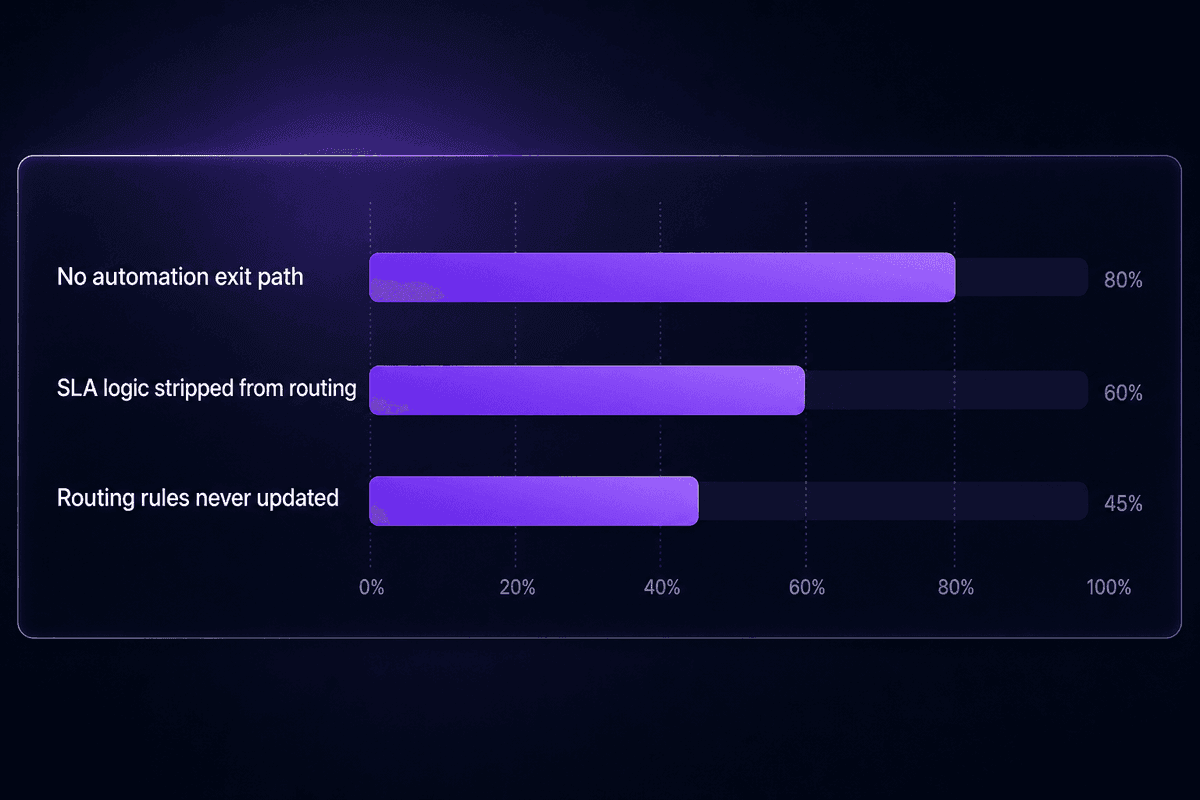
Simple workflows break in predictable ways. Complex ones break in expensive ways. The difference is usually one of three failure patterns: the automation has no exit, the SLA logic got stripped out somewhere in the middle, or the routing rules were designed once and never updated.
These aren't rare edge cases. They're the three most common reasons a customer service workflow that worked at 50 tickets a day stops working at 500.
Ignoring the Human Handoff in Automated Workflows
Automated workflows that don't include a smooth path to a human customer service agent are the most repeated complaint I see when automation is added without designing the exit.
The pattern: a chatbot or auto-routing system handles the first tier of interactions effectively. The volume saves time. The team appreciates it. Then a customer with a complex or emotionally charged issue hits the bot, can't get to a human customer service representative, and the interaction deteriorates. The bot isn't broken. The workflow has no designed exit.
A seamless customer experience requires that automation know its own limits. The handoff conditions should be explicit: specific topics, sentiment thresholds, keywords, repeat contacts, or explicit customer requests to escalate. When those conditions trigger, the workflow should pass the full interaction context, including conversation history, to the agent. Not a clean slate. Not "a customer is waiting." The full picture.
That single design decision - when does automation hand off and what does it pass along - is what prevents customer frustration from turning into churn. Skipping it because "the bot handles most cases" is how you end up with an automation that saves time on easy interactions and damages trust on hard ones.
Skipping SLA and Escalation Logic When Routing Gets Complicated
Multi-step workflows with approval chains, specialist routing, or cross-department handoffs are where SLA logic most commonly gets stripped out during setup. The builder focuses on getting the routing right and removes the SLA timer as a complexity they'll "add back later." They don't.
The consequence: customer support teams hit missed tickets and long wait times that neither the dashboard nor the agents can explain, because there's no visible breach signal. Meeting customer expectations requires that SLA logic be embedded in the workflow, not tracked separately in a spreadsheet someone remembers to check.
Every routing path should carry the SLA clock. When a ticket routes from tier-one handling to a specialist queue, the clock doesn't reset. The specialist queue inherits the remaining SLA time, and if that time is close to breach, the routing rule should reflect it. Resolve customer issues faster by making SLA urgency part of the routing input, not just the reporting output.
For specific setup guidance: flag tickets for escalation when SLA time remaining drops below 20% of the response target. For a 4-hour SLA, that's any ticket unresolved after 3 hours and 12 minutes. Route those to a visible escalation queue before the breach, not after it.
📊 By the numbers:
According to CMSWire research aggregating McKinsey and AmplifAI data, 88% of contact centers have deployed AI in some form - but only about 25% have actually integrated it into day-to-day workflows. That gap is where most of the ROI lives. Buying an AI tool and embedding it into a working workflow with SLA logic and routing rules are very different things.
How to Measure Whether Your Customer Service Workflow Is Actually Working

"Effective" is not a feeling. It's a set of numbers that either move in the right direction or don't, and the wrong numbers tell you almost nothing useful.
The most common measurement mistake: teams track CSAT on human-handled interactions as the primary signal of customer service workflow health. That's one signal. It misses the rest. A customer who never reached a human agent because the chatbot resolved their issue isn't in that CSAT data. Neither is the customer who gave up and churned.
The metrics that tell a complete story - operational and experience together:
| Metric | What It Measures | Watch For |
|---|---|---|
| First response time | Speed of initial acknowledgment | Compare automated vs. human-assisted |
| First-contact resolution rate | Whether issues resolve without re-contact | A drop here means routing is sending work to the wrong place |
| CSAT on automated interactions | Customer satisfaction with bot-handled cases | Flat or declining signals a handoff problem |
| Error rate on repetitive tasks | Accuracy of auto-acknowledgments, routing | Should approach zero; spikes reveal logic failures |
| Ticket reopens | Whether "resolved" means resolved | High reopens often indicate premature closure rules |
| SLA compliance rate | Whether defined targets are being met | Track by issue type, not aggregate |
The tension worth naming: teams that hit internal efficiency benchmarks - handling time down, ticket volume up - but see flat or declining customer satisfaction scores have a workflow design problem. Not a staffing problem. The workflow is faster but doing the wrong thing faster. IBM's research on AI-integrated customer service found that mature AI adopters achieved roughly 17% higher customer satisfaction compared to peers - but only when AI was embedded into the workflow, not bolted on.
🤔 Think about this:
If your handling time is down and your CSAT is flat, you're solving the wrong problem. Faster isn't better unless the customer experienced something better at the end of it. Internal efficiency metrics describe what the team did. CSAT describes what the customer felt. Both matter. They're not the same number.
Customer feedback on specific workflow touchpoints - not just overall satisfaction surveys - is the most actionable signal for iteration. Ask: was the automated response helpful? Did you reach the right person? Was the resolution complete? That feedback connects directly to the workflow step that drove the experience, which is the only feedback that supports design improvement rather than just morale tracking.
A good customer service software setup makes this visible: last successful resolution, ticket reopen count, automated interaction CSAT, SLA compliance by issue type, and error rate on automated tasks. Those fields together tell you whether your workflow is adapting to changing customer expectations or just running.




