




There's a pattern I keep seeing from HR and IT teams who've gone through digital transformation projects. They buy the tools, deploy the platforms, roll out the intranet, send the announcement email. Six months later, employees are still complaining that work feels harder than it should. The IT dashboard shows everything running. The employee survey tells a different story.
That gap, between deploying digital tools and actually improving how work gets done, is what digital employee experience (DEX) is about. Not the technology inventory. The quality of what those tools actually produce for the person using them every day.
The dashboard says deployed. That doesn't mean it works.
- DEX measures quality and effectiveness of digital work, not just how many tools are deployed.
- Strong DEX links directly to engagement, retention, and operational performance-not just IT satisfaction scores.
- The most common DEX mistake: treating it as a pure IT uptime concern when friction often lives in workflows, not servers.
- Most organizations run DEX surveys but have no governance model to act on what the data reveals.
What Digital Employee Experience (DEX) Actually Means
DEX is the overall quality and effectiveness of how employees interact with digital tools across their workday. Not whether those tools exist. Not whether they technically function. Whether they actually help people work.
The Digital Workplace Group frames it around a combination of technical performance and human perception. AIHR defines it similarly: DEX spans every digital touchpoint an employee encounters, from the HR self-service portal they log into on day one, to the collaboration tools they live in all week, to the workflow systems that route their approvals and requests. The quality of those interactions, collectively, is the digital experience.
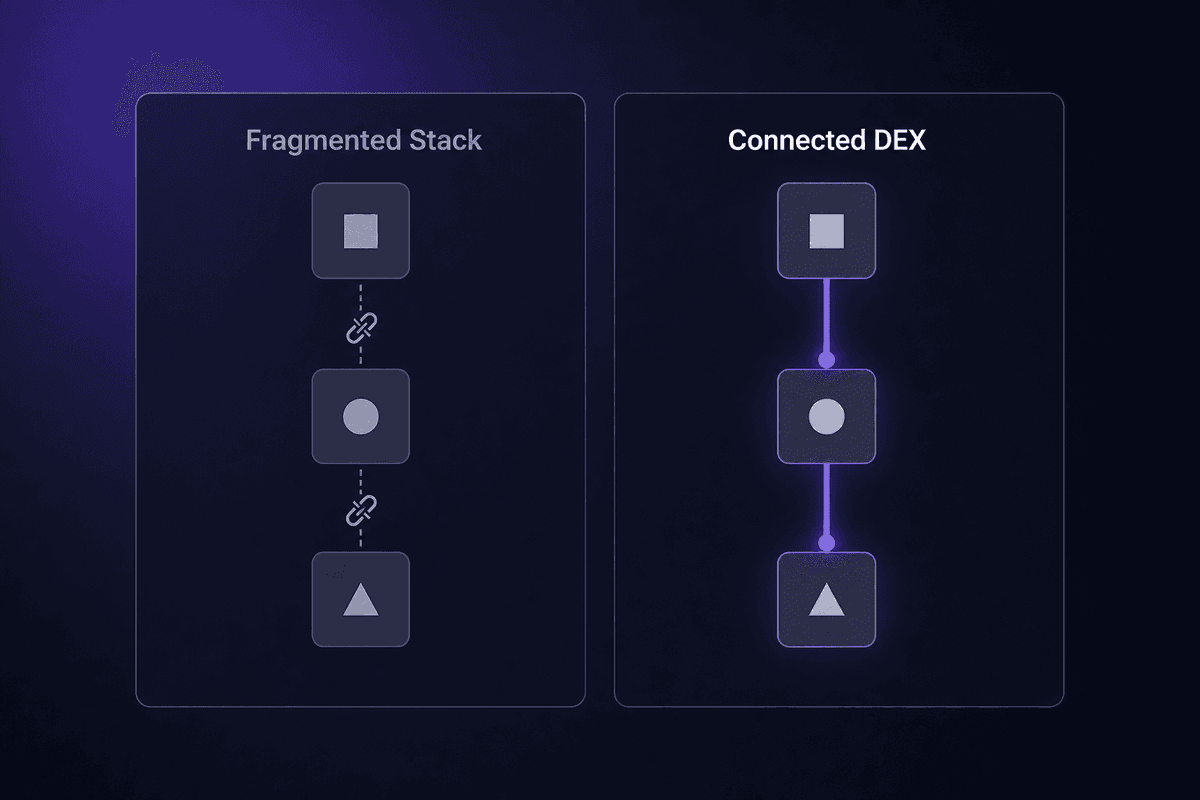
What DEX is not: a list of SaaS tools your IT team has licensed. You can have 40 applications in your stack and a genuinely bad digital experience, because the tools don't connect, they're slow, they require too many logins, or they weren't designed for how your teams actually work. App sprawl is one of the most consistent drivers of poor DEX I encounter. The employees aren't wrong when they say work feels fragmented. They're describing the real thing.
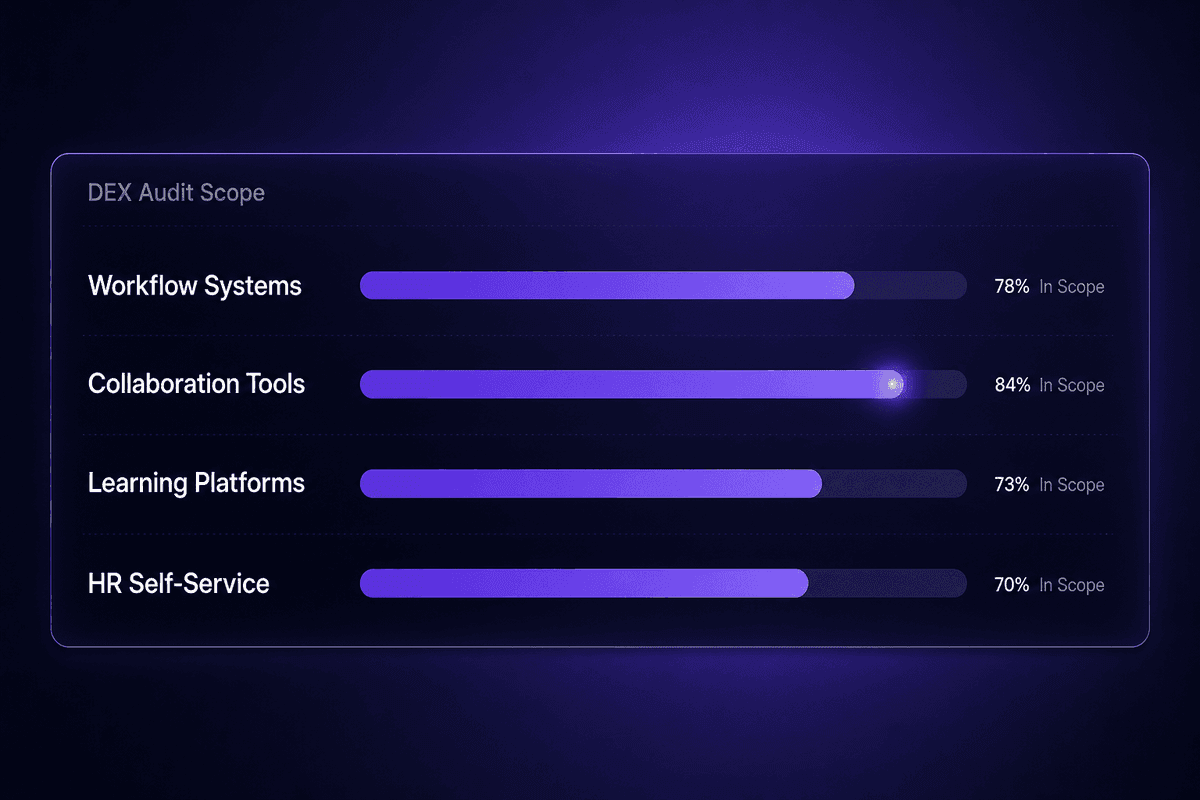
The four categories DEX spans, practically speaking: workflow systems, communication and collaboration tools, learning platforms, and HR self-service. Each of those should be part of any audit a team runs when assessing where their digital experience actually stands.
How DEX Differs from General Employee Experience
Employee experience covers everything: the physical office, management relationships, compensation, culture, the quality of the coffee machine. DEX is the subset of that governed specifically by digital touchpoints, which, for most knowledge workers, now accounts for the majority of their working hours.
The distinction matters because the solutions are different. If engagement is low because of poor management, no amount of improving your HRIS will fix it. But if engagement is low because employees spend 20 minutes a day fighting their expense tool or resetting passwords, that's a DEX problem with a DEX solution. According to Simpplr research, 85% of organizations link DEX directly to engagement and satisfaction. Which means if you're looking at an engagement problem and you haven't looked at digital friction yet, you may be treating the wrong patient.
Teams that conflate overall employee experience with digital employee experience tend to either under-invest in DEX (because they see it as an IT comfort concern) or over-claim that DEX improvements will fix engagement broadly. Neither is accurate.
The Four Dimensions DEX Actually Covers
These aren't abstract categories. They're the practical scope of what a DEX audit should examine, and each one has a specific failure mode when it's missing or broken.
Workflow systems are where employees process requests, complete approvals, and move work through the organization. When these are slow, disconnected, or poorly integrated with adjacent tools, digital work grinds. A promotion approval that requires four separate systems to update manually isn't a workflow system working well. It's a workflow system being tolerated.
Collaboration tools govern how distributed teams communicate and co-create. The friction usually shows up not in the tools themselves but in how poorly they connect to everything else. A message in Slack disconnected from the task in Asana and the file in SharePoint is three separate touchpoints pretending to be one workflow.
Learning platforms affect how employees access and apply knowledge in the moment they need it. Most organizations have one. Fewer have one that employees actually use without being prompted.
Self-service tools let employees access HR data, request time off, update their details, and interact with digital systems without filing a ticket or sending an email. When these don't work well, they generate manual work for HR teams while simultaneously frustrating the people they're supposed to help.
Why Digital Employee Experience Is Important for Engagement, Productivity, and Revenue
The case for DEX has moved well past "keeping employees happy with technology." The business data is getting harder to ignore.
Forrester research found that organizations with a strong DEX are significantly more likely to have an engaged workforce. That's the engagement mechanism people underestimate: DEX doesn't just affect satisfaction scores, it changes whether employees have the cognitive bandwidth to do their best work. An employee spending 40 minutes a day fighting disconnected tools is not an engaged employee. They're an exhausted one.
On the operational side, 91% of organizations in Simpplr's research believe DEX directly influences operational efficiency. 86% believe it affects revenue. Those numbers are from organizations that have actually tried to measure the relationship, not theoretical projections.
Deloitte's 2026 Global Human Capital Trends makes this explicit: competitive advantage now depends on re-architecting work and designing human-centered experiences, not just deploying technology. Organizations that deploy tools without rethinking workflows and experience design are unlikely to see sustainable improvements in how employees work. The technology is necessary. It's not sufficient.
Employee retention closes the loop. Poor digital experience is a churn driver that rarely appears in exit interviews as the primary reason someone left, but it shows up consistently as a contributing factor. PwC's 2025 Global Workforce survey found that 54% of workers already use AI for their jobs, and identifies eliminating everyday annoyances that dampen motivation as one of technology's clearest opportunities to improve the employee experience. Employees who feel their tools work against them don't become champions for the organization's digital transformation. They look for one where the tools work better.
And on employee productivity: when employees can access what they need, complete their workflows without obstruction, and get support from self-service tools instead of waiting in a queue, output goes up. The business outcomes follow from that, not from the technology itself.
📊 By the numbers:
91% of organizations believe DEX influences operational efficiency. 86% link it to revenue. These aren't soft HR metrics-they're business performance signals from organizations that have already tried to measure the connection. DEX isn't a comfort initiative. It has a P&L address.
What Makes a Great Digital Employee Experience: Components Teams Miss
Most teams know they need to improve their digital employee experience. Where they go wrong is in what they think "better" means. The assumption is usually about having modern tools. The reality is about how well those tools connect and serve uninterrupted work.
A common setup failure: an organization replaces its HR system with a modern platform, deploys a new intranet, and migrates to a cloud collaboration suite. All three are excellent products. None of them talk to each other properly. Employees now have three beautiful tools that require them to manually copy information between contexts and log into each separately. The digital friction didn't decrease. It just became more expensive and harder to complain about.
The components that actually define effective digital employee experience:
Usability in the context of real workflows. Not whether the tool has a good UI demo, but whether it fits how employees actually complete work. A tool with excellent standalone usability can still create friction if it doesn't fit the surrounding workflow. If employees have to break their work pattern to use it, most won't use it at the margin. They'll find a workaround. That's what produces shadow IT, and shadow IT is diagnostic of a DEX failure.
Integration quality between systems. Digital friction often lives at the seams between tools, not inside any single tool. When payroll doesn't sync with the HR system automatically, when an approval in one platform doesn't update the task in another, when a new hire record requires manual entry into four systems: that's a digital workplace failure in the integration layer, not in any individual product.
Support accessibility. When something breaks for an employee, how long does it take them to reach a resolution? Not how good the ticketing system is, but how long the employee is blocked. Long waits translate directly into lost productivity, and they shape how employees feel about the organization's commitment to making their work function.
Responsiveness across devices and locations. For distributed and hybrid teams especially, the digital tool that works fine in the office and breaks at 50% functionality on a mobile device or from a home connection is not a complete digital experience. It's an office-first digital experience wearing a hybrid label.
Proactive IT Monitoring vs. Reactive Ticketing
Most IT teams find out about digital friction the same way: an employee files a ticket. Which means by the time IT knows there's a problem, the employee has already spent time being blocked, has already formed a frustration, and the issue has potentially affected multiple users who didn't bother to report it.
DEX-focused platforms and digital employee experience management approaches shift this model toward detection before impact. The principle from platforms like 1E's DEX monitoring work: identify friction before it surfaces as a support request. That means monitoring device performance, application load times, crash rates, and authentication failures proactively, not waiting for user reports to triangulate a problem.
The practical difference in support load is significant. When an IT team catches a slow authentication endpoint before employee tickets start accumulating, they resolve one problem instead of managing 40 frustrated employees plus the incident. Reactive ticketing is the default because it requires no upfront investment. Proactive monitoring is what actually protects end-user experience.
The check for any team building a DEX program: do you have monitoring tools that detect application or workflow degradation before employees report it? If the answer is no, your current DEX management is built on user complaint volume as the signal. That's a delayed, noisy, and demoralizing signal for everyone involved.
Sentiment and Journey Tracking Alongside Technical Metrics
Here's the failure mode that IT dashboards are specifically bad at surfacing: everything shows green and employees are still frustrated.
System uptime is a necessary DEX metric. It's not a sufficient one. A server that's up doesn't mean the workflow it supports is functioning well from the employee's perspective. Application availability doesn't capture how long an employee actually waited for a screen to load under their typical workload, or whether a multi-step process that technically works is practically too cumbersome to complete without workarounds.
Modern DEX monitoring, as described in Moveworks' research on the category, covers the full employee journey across devices, applications, workflows, and sentiment data. That last part is the piece most IT-owned DEX programs skip. Employee sentiment captures what technical metrics miss: the feeling of digital work, whether employees believe their tools are helping or hindering them, and where in the journey friction accumulates enough to affect behavior.
Digital interactions that produce negative sentiment, even when technically successful, still damage the experience. An approval workflow that technically completes in 48 hours but feels opaque and unresponsive to the employee requesting it is a DEX problem that no uptime dashboard will catch. Employee feedback, surveys tied to specific digital interactions, and journey tracking are what bring that signal into the open.
The dashboard was green. The workflow was not.
Where Digital Employee Experience Strategy Usually Breaks Down
These are the failure patterns I see most consistently. Each one has a tell, and a check you can run before it becomes expensive.
Treating DEX as a tool inventory problem
The assumption: if we have the right tools, we have good DEX. The consequence: the organization's stack grows, tool licensing costs increase, and employee friction persists because nobody audited whether the tools connect meaningfully to each other or to how work actually flows. The check: ask employees to walk you through how they complete a common task - a leave request, an expense submission, an onboarding task - and count how many separate logins and manual transfers they perform. That number is your tool inventory problem. A strong digital employee experience strategy addresses the seams between tools, not just the tools themselves.
Running DEX as a pure IT uptime concern
The assumption: if the servers are up and the apps are available, DEX is fine. The consequence: IT reports green status while employees are spending hours on workflows that technically function but are practically cumbersome. The metric that surfaces this: NPS or pulse surveys tied to specific digital touchpoints, not general IT satisfaction scoring. DEX strategies that live entirely in the IT function and never include HR or business operations miss the majority of real friction. Workplace technologies require cross-functional ownership or they get optimized for availability, not for the experience of using them.
Assuming a strong digital workplace is prohibitively expensive
The assumption: proper DEX is an enterprise investment most organizations can't afford. The consequence: teams underinvest in integration quality, monitoring, and self-service tooling, then absorb higher support costs and lower productivity without attributing them to DEX. The check: calculate what your current digital friction actually costs in support load, lost time, and turnover contribution. The organizations that treat DEX as too expensive usually haven't measured the cost of not investing. A positive DEX is not about buying more tools. It's often about improving how existing tools connect and reducing the overhead they generate.
Separating DEX from overall employee experience strategy
The assumption: DEX is an IT program, employee experience is an HR program, and they can be managed independently. The consequence: engagement data, sentiment signals, and digital friction reports sit in separate functions with no shared ownership or feedback loop. DEX improvements improve engagement directly, and engagement problems often have a DEX root cause. When the two are managed in separate silos, neither team has the full picture. The employees' digital experience shapes how they feel about coming to work. That's not an IT metric. But it's also not exclusively an HR one.
Measuring DEX without a governance model to act on it
The assumption: running a DEX survey counts as a DEX program. The consequence: the survey data arrives, nobody owns the action items, friction persists, and the next round of employees who fill out the survey trust the process less because nothing changed from the last time they answered it. The check: before launching a DEX measurement initiative, confirm which team has the mandate and resources to act on what the data reveals. A digital workspace measurement program with no feedback loop is a good way to measure how much employees have stopped expecting things to improve.
Designing digital solutions for office-first assumptions in a hybrid environment
The assumption: the digital environment we built for the office translates to hybrid and remote work with minimal adjustment. The consequence: employees working from home or in distributed locations encounter broken experiences at the exact touchpoints that work fine in the office - VPN-dependent systems, tools that assume low-latency connections, HR portals that only function on managed devices. The check: test every core workflow from outside the office network, on a device that isn't company-managed. What you find in that test is what your remote employees experience every day. That's where a positive DEX becomes unreachable without deliberate redesign.
How DEX Fits Into Broader Digital Transformation Priorities
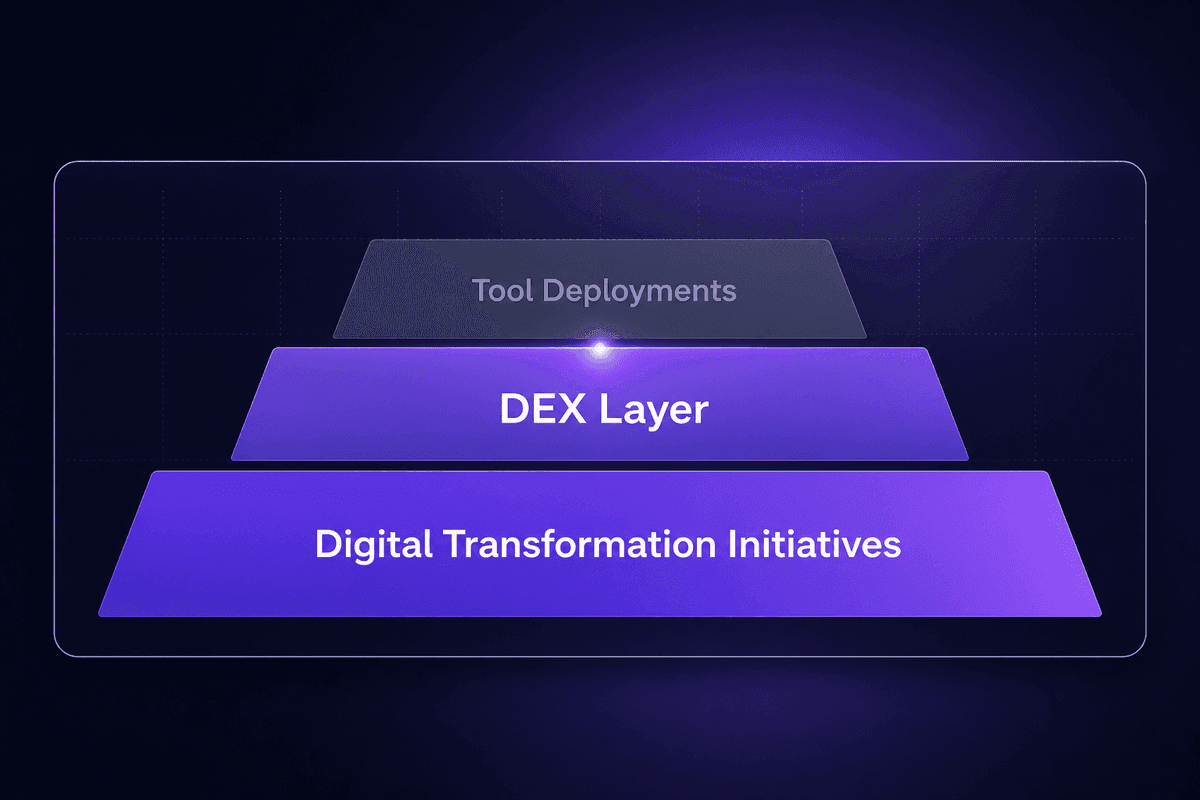
The question I hear from HR and IT leaders fairly often: is DEX a project inside digital transformation, or is it the layer that holds all transformation work together?
It's the second one. And treating it as the first one is what causes transformation initiatives to deliver tool deployments without delivering experience improvement.
Macorva's research on DEX trends identifies it as increasingly central to business planning rather than a sub-initiative under IT or HR. The logic is straightforward: every digital transformation effort, whether it involves AI-driven SaaS integration, hybrid work redesign, or analytics adoption, lands on the employee through their digital interactions. If those interactions are poor, the transformation doesn't reach the human layer. The technology changes, the experience doesn't.
Deloitte's 2026 Global Human Capital Trends makes the same point from the competitiveness angle: digital transformation efforts that focus on new tools without rethinking how work is designed and experienced are unlikely to produce sustainable improvement. The re-architecting of work is inseparable from the design of the experience that work produces.
And according to SHRM's State of AI in HR 2026 report, 62% of organizations already have AI running somewhere in the business, but in only 39% of cases is HR the primary owner of those initiatives. That disconnect matters for DEX. When AI is driven from functions other than HR, the employee experience implications can get deprioritized in favor of operational efficiency metrics. Transformation initiatives that don't include DEX ownership in their governance design tend to optimize for process performance at the expense of the experience of performing it.
Designing for Hybrid and Remote Workforce Needs
The DEX design failure that shows up most predictably in distributed organizations: the digital solutions were built assuming someone would be in an office, connected to a managed network, on company hardware. Then hybrid work happened and those assumptions stopped being true for half the workforce, half the time.
The specific breakpoints: VPN-dependent systems with high latency over home connections, approval workflows that route through on-premise tools, self-service portals that require managed device certificates, collaboration tools that assume synchronous access. None of these were DEX problems in 2019. All of them became DEX problems in 2020 and haven't been fully resolved in many organizations since.
Designing for a distributed workforce in the digital age means testing every core workflow from outside the controlled office environment before declaring it live. It means ensuring employees can access systems, collaborate, and complete work from any location without a degraded experience. HR leaders, CIOs, and workplace strategists who owned office-first digital rollouts often need new tools and a new testing methodology to get this right. The good news: most of the issues are identifiable before they affect the workforce, if you actually run the test.
Tools and Technologies That Support DEX at Scale
Without naming specific products: the categories of tooling that support DEX at scale, based on what the Moveworks and 1E research patterns indicate about what capable DEX tooling actually does.
DEX analytics platforms monitor the full employee journey across devices, applications, and workflows, providing visibility into both technical performance and behavioral signals like adoption rates and task completion. The key capability: they surface problems before employees report them.
Unified digital workplace hubs reduce app sprawl by providing a single entry point through which employees access requests, knowledge, and workflows. The value isn't the hub itself; it's the reduction in context-switching and manual navigation between disconnected systems.
HR self-service and digital employee experience management systems that connect to downstream tools without manual re-entry. When a status change in the HR system requires four separate updates in adjacent tools, the management overhead is a DEX failure. The capability that matters is write-through integration, not just read access.
Monitoring tools that track end-user experience metrics, not just infrastructure availability. Application response time under typical employee workload, login success rates, and error frequency at the workflow level are the signals that show friction before it escalates.
Employee needs across a distributed workforce also push toward digital landscape solutions that work well outside managed networks. That requirement should be in the procurement criteria, not a post-deployment discovery.
How to Measure and Improve Digital Employee Experience
The question that comes up after every DEX initiative launches: how do we know if it's working?
The short answer: you need more than one measurement type, and you need a feedback loop that closes, not just data landing in a dashboard.
The Digital Workplace Group's 2025 analysis recommends balancing technical metrics with behavioral and sentiment indicators. Some organizations have introduced composite DEX scores that combine system data with survey results, which is closer to what a full picture actually requires. Uptime and response time tell you whether the infrastructure works. Adoption rates and task completion tell you whether employees are actually using it. Sentiment surveys tell you how employees feel about using it. You genuinely need all three signal types to credibly claim that your digital transformation is improving the employee experience.
The measurement checklist that gives a working picture:
- Usage analytics - which tools are being used, by whom, how often, and where in workflows employees drop off or abandon tasks
- Employee productivity signals - time to complete common tasks, ticket volume, error rates in self-service workflows
- Employee sentiment surveys - tied to specific digital interactions, not just general job satisfaction
- Feedback loops - structured ways to capture friction reports and route them to the teams who can act
- Journey-level tracking - monitoring employees across multiple touchpoints, not just within individual tools
What improvement looks like in practice: reduce in time-to-complete common digital tasks, decrease in IT support tickets for friction-related issues, increase in self-service completion rates, and employee sentiment scores tied to specific tools showing upward movement over time. "Better digital employee experience" isn't an abstract goal. It shows up as specific observable changes in those numbers.
DEX Monitoring: What to Track Beyond Uptime
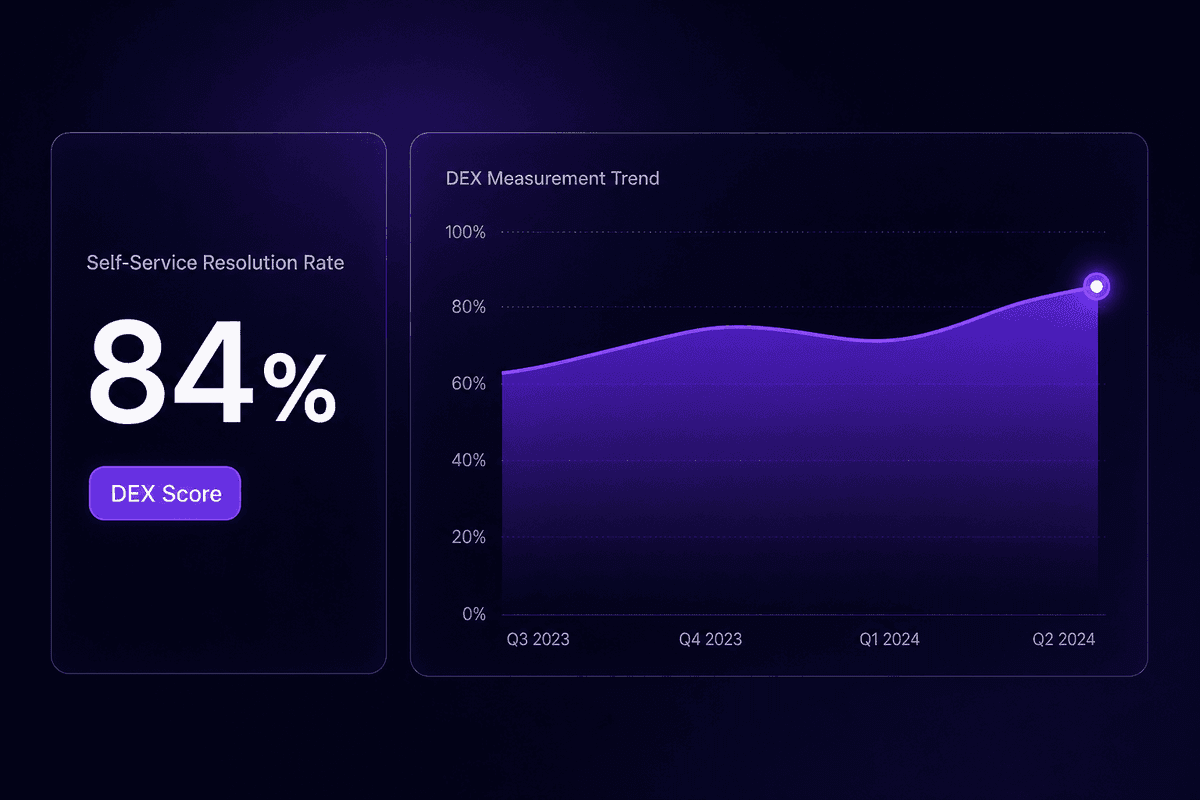
Uptime as a DEX metric has a specific failure mode: it tells you whether a system is available, not whether it's usable. And those are different things.
A system that's up but slow creates friction. A system that's up but requires 6 clicks to complete a task that should take 2 creates friction. A system that's available but not connected to adjacent tools creates friction. None of those show up as uptime problems.
The metrics worth watching at the digital tool and interaction level:
| Metric | What it reveals | Signal threshold |
|---|---|---|
| Application response time under load | Whether the tool is usable in real conditions, not just in testing | Flag if above typical baseline for that tool type |
| Login success rate | Authentication friction, token expiry, access configuration gaps | Any consistent failure rate worth investigating |
| Task completion rate | Whether employees finish workflows or abandon them mid-process | Drop in completion is a workflow design or usability signal |
| Employee Net Promoter Score (eNPS) tied to specific tools | Sentiment on digital interactions, not just overall job satisfaction | Directional movement over time matters more than absolute number |
| Self-service resolution rate | Whether employees get answers from digital tools or escalate to human support | Lower rate = more friction in self-service layer |
Interactions with digital tools that produce repeated failures, high abandonment, or consistent negative sentiment are the signals that composite DEX monitoring should surface. The employee productivity connection is direct: employees who can move through their digital tools without obstruction produce better work, faster. The monitoring goal is catching degradation before it becomes a behavior pattern.
Cross-Functional Governance: Who Actually Owns DEX
Nobody does. That's usually the honest answer. And it's the reason DEX programs stall after the first quarter.
DEX spans IT, HR, and business operations. IT owns the infrastructure and application layer. HR owns the employee experience strategy and feedback mechanisms. Operations owns the workflow design. When no single team owns the whole, each team optimizes its part. The organization ends up with a well-maintained infrastructure, a solid HR survey program, and a set of workflows that nobody has reviewed for friction because the review would require all three teams in the same room agreeing on priorities.
The failure pattern is specific: organizations run DEX surveys, collect data, distribute reports, and then nothing moves. Not because the data is bad, but because there's no governance structure to convert data into action items with owners and timelines. The feedback loop never closes. Employees who responded to the survey see no change and stop responding to the next one. The data degrades in quality exactly when the program needs it most.
The experience of employees depends on someone owning the gap between what the data reveals and what actually gets fixed. In mature DEX programs, CHROs, CDOs, and digital transformation offices typically share that ownership through a cross-functional model. The CHRO brings the employee experience mandate. The CDO brings the technology direction. The digital transformation office holds the accountability for cross-team execution. None of them can own it alone.
A practical example of how automation can help close the gap: in Latenode, a team managing DEX feedback can build a workflow that routes sentiment survey responses to the relevant function automatically, with HR items going to HR, IT friction reports going to IT, and workflow issues going to ops, without manual triage. When a new hire record triggers in the HRIS, a workflow can automatically collect document submissions, provision accounts, and generate personalized onboarding content using RAG against uploaded HR policy documents. The multi-step sequence runs as a single execution. The team monitors progress rather than managing logistics. That's the difference between governance that acts on DEX data and governance that collects it. Someone still needs to own the decisions. But the routing, the prioritization signals, and the feedback loops can be automated so the humans in the governance model are focused on the right problems.
🤔 Think about this:
Most organizations measure digital employee experience through surveys. But a survey without a cross-functional feedback loop is just documentation of frustration. If the team that receives the data doesn't have the mandate to act on it-or the routing to get it to the team that does-the survey doesn't improve the experience. It just proves it was measured.




