




Most teams know their workflows are slow. What they don't know is exactly what to fix first. That gap between awareness and diagnosis is where most improvement efforts stall, and where the most expensive mistakes get made: jumping to tools before mapping the current state, automating a process that shouldn't exist, or measuring success the day after launch and never again.
The central claim here is simple and worth arguing about: you cannot improve workflow efficiency without measuring it first. Not because measurement is satisfying, but because without a baseline, every change is just rearranging friction.
Fix the process before you automate it
- Map current-state workflows before changing anything-no baseline means no real improvement.
- Automate only after redesigning; automation locks in whatever flaws already exist.
- Set numeric targets tied to cycle time or error rate, not vague productivity goals.
- Pilot with a small group first-adoption drops sharply if you skip this step.

Workflow Efficiency Definition: What It Actually Measures
Workflow efficiency measures how much useful output a process produces relative to the time, effort, and handoffs it consumes. That's a different thing from speed. A team that closes support tickets in 20 minutes might still be deeply inefficient if each ticket requires five handoffs, two system logins, and a manual copy-paste step nobody has questioned in two years.
Efficiency means the ratio holds up: output stays high while the inputs stay lean. The moment a business process accumulates redundant steps, unclear ownership, or approval layers that exist because they've always existed, inefficiency starts compounding. It doesn't announce itself. It shows up as rising cycle time, growing error rates, and a vague sense that more effort is producing the same result.
The mistake I see most often is treating key performance indicators as optional. Teams will redesign a workflow based on instinct, launch it, and then describe the result as "better." Better than what? If there's no before-state data on task completion time, handoff count, or error rate, "better" is just a feeling. Feelings don't hold up in a retrospective. Measurable outcomes do.
Inefficiency, left unmeasured, becomes invisible. And invisible problems don't get fixed-they get automated.
Causes of Workflow Inefficiency Most Teams Don't See Coming
These patterns show up in support queues, retrospectives, and the kind of conversations people have after the third time a process breaks. Each one has a first symptom that's easy to misread.
Redundant handoffs with no clear owner
A task moves from person A to person B to person C before anyone actually works on it. The symptom teams notice first is that things take longer than expected. The reason it persists: nobody mapped the process, so nobody knows that step two adds zero value and only exists because step three requires it. That's where the bottleneck lives, not in the tools.
Tool fragmentation across email, chat, and project management apps
Information about the same task sits in three different places and nobody is sure which version is current. The symptom is constant status-checking and the feeling that nothing is ever actually resolved. The silo forms gradually as each team adopts the tool they prefer, and by the time anyone notices, the context-switching cost is significant. According to research summarized by Conclude.io, digital workers toggle between apps nearly 1,200 times per day, losing the equivalent of five working weeks per year just to reorientation.
Undocumented steps that live in one person's head
The process works fine until that person goes on vacation. The symptom: a task stalls for no apparent reason and someone eventually messages the one person who knows what "manually check the export before uploading" actually means. This redundancy is invisible until it becomes a crisis.
Duplicate effort from disconnected systems
Two people update the same record in different tools because there's no integration between them. Wasted time accumulates silently, and the error rate compounds every time the two versions drift apart. The first visible symptom is usually a data inconsistency, not a breakage.
Process debt from workarounds nobody removed
Someone built a workaround six months ago because the original step was broken. The original step got fixed. The workaround stayed. Time-wasting steps accumulate this way, layered on top of each other, until the process is three times as long as the work actually requires.
How to Measure Workflow Efficiency Before You Change Anything
The baseline-first principle is not a formality. It's the thing that separates a real improvement from a reorganization. If you don't measure what's broken before you change it, you have no way to confirm you made it less broken.
To audit existing workflows properly, you need data on: average task completion time from trigger to done, number of handoffs per task, work-in-progress count (how many tasks are in flight at any given moment), error rate and rework incidents, and SLA adherence. These five metrics tell you where friction actually lives, not where you assume it lives.
Skipping this step is the second most common mistake in any workflow improvement project. The first is automating a broken process, which we'll get to. But the measurement skip is close behind, because it feels like overhead when you're eager to fix something. It isn't overhead. It's the only thing that makes the fix verifiable.
To measure workflow efficiency properly before changing anything, start with a process inventory. Write down every step in the workflow, who owns it, and how long it typically takes. Then collect cycle-time data from whatever system logs it: your project tool, your CRM, your support platform. Add frontline input from the people doing the work. They know which steps feel wrong; the data tells you how wrong.
Once you have that baseline, you can identify bottlenecks by looking for where tasks pile up, where rework is highest, and where handoffs multiply without corresponding output. That's where you start. Not where it feels slow. Where the numbers say it's slow.
Time-Based and Quality Metrics Worth Tracking
Cycle time is the most useful leading indicator: how long does it take to get from task start to completion? A rising cycle time means something in the middle is slowing down, even if throughput looks fine on the surface.
Queue length tells you where tasks are accumulating. If one person or one step consistently has ten things waiting and everyone else has two, that's your bottleneck. Rework incidents reveal where outputs are wrong the first time, which usually points to either an unclear handoff or an underspecified input. Escalation rate signals that tasks are regularly going beyond their assigned owner to get resolved, which means either the ownership model is wrong or the person doesn't have what they need to close the task.
None of these require sophisticated analytics to start tracking. A shared spreadsheet with those four columns tells you more in a week than a year of gut instinct.
Workload and Adoption Metrics That Signal Real Change
Throughput per person is the lagging indicator that confirms whether a workflow change actually increased productivity or just moved the friction somewhere less visible. If cycle time drops but throughput stays flat, someone absorbed the saved time into a different bottleneck.
Tool adoption rate is the metric most teams forget to track after a workflow redesign. The new process exists on paper. People know about it. But six weeks later, half the team has reverted to emailing attachments because the new system had three extra steps they didn't find intuitive. The key to success here is watching actual usage, not reported usage. Getting things done on time is only a meaningful signal if the work went through the new process, not the old one. If you don't track adoption separately, you'll misread reversion as a performance problem when it's actually a change management problem.

5 Steps to Improve Your Workflow Efficiency This Quarter
There are ways to improve workflow efficiency that work, and ways that feel productive while compounding the original problem. The difference usually comes down to sequence. These five steps follow the order that matters: understand before you change, redesign before you automate, and test before you scale. Strategies to enhance workflow efficiency all share one thing in common-they begin with what currently exists, not what should eventually exist.
Step 1: Analyze and Map Your Current Workflows
Before anything else, build a process inventory. List every step in the workflow you want to improve, who is involved in a workflow at each point, and what triggers the next step. Then draw it. A flowchart, a whiteboard diagram, a swim-lane view in a shared doc. The format doesn't matter. The act of mapping forces clarity that verbal descriptions never achieve.
Collect both cycle-time data and frontline input. The people doing the work know which steps in a workflow feel wrong; the data tells you how much they cost. An efficient workflow starts with an honest picture of what the current business workflows actually are, not what the documentation says they are.
The most common mistake here is skipping this step entirely and jumping straight to solutions. I've seen this pattern enough times to stop being surprised by it. A team spends three weeks building an automation that moves faster through the wrong process. The speed is real. The efficiency gain is not.
Step 2: Prioritize Problems and Efficiency Goals
Once you have a current-state map, prioritize pain points by business impact and feasibility. Not everything broken is equally worth fixing. A step that adds four hours to a process that runs twice a year matters less than a step that adds 15 minutes to a process that runs 200 times a week.
Translate each priority into a specific numeric target. "Reduce approval cycle time by 30%" is an efficiency goal. "Be more productive" is not. Vague goals produce no accountability and no way to know whether the change worked. Tie every goal to a metric from your baseline, identify areas for improvement by comparing current state to what's achievable, and make sure someone owns each target.
If your team can't achieve the goal within a quarter with a reasonable pilot scope, the goal is probably too large. Break it down.
Step 3: Redesign Workflows to Eliminate Friction
This is where the actual work happens. Look at your current-state map and ask: which steps could be removed entirely? Which handoffs exist only because two systems don't talk to each other? Which approval steps catch real problems versus acting as a speed bump that exists by habit?
To streamline a part of the workflow, start with the highest-friction points from your baseline data. Remove redundant approvals first. Batch similar tasks where possible: reviewing five items in one session is more efficient than reviewing each as it arrives. Reduce handoffs by asking whether each step requires a different person or just a different system.
Standardize repeatable steps with templates and documented SOPs before you touch any part of the entire workflow that might be automated. This is the point everyone rushes past: you have to optimize the redundancies that waste time on paper before you put any of this into a tool. The principle is simple: standardize first, automate second. A step that's inconsistent in manual execution will be inconsistent at scale.
Step 4: Automate Intentionally-Not Just Eagerly
Automation is where teams do the most damage to processes they've already fixed on paper. The warning deserves to be stated plainly: automating a broken process locks in that process and makes it harder to change later. Automation is not a substitute for redesign. It's what you do after redesign, to make a well-defined, rules-based, standardized process run without human intervention at every step.
The work that actually benefits from automation: repetitive tasks like data entry, routing decisions based on fixed criteria, status notifications, record creation, and system-to-system data sync. These are the steps where the decision is always the same, the input is consistent, and the only variable is whether a human did it or a script did it. Automate those. Leave the steps that require judgment, context, or exception-handling to humans, at least until the patterns are well understood.
One pattern I see repeatedly in support: a team builds workflow automation for their most visible problem without fixing the input quality first. The automation fires correctly, but the data it receives is inconsistent, so the output is inconsistent, and now the inconsistency runs at scale. In Latenode, a setup like this often shows up when users wire a trigger before testing the payload shape. The scenario runs. The downstream records are wrong. The dashboard looks green. That's the failure mode worth designing against before you build anything.
For teams connecting routing or notification workflows after a redesign, the practical pattern looks like this: define the triggering condition precisely, map the exact fields the next step needs, and build the error path before the happy path. A good automation tool makes this visible. Latenode's per-execution pricing means a 6-step workflow counts as one execution rather than six separate tasks, which changes the math on how aggressively it makes sense to handle edge cases inline.
Step 5: Pilot, Measure, and Continuously Improve
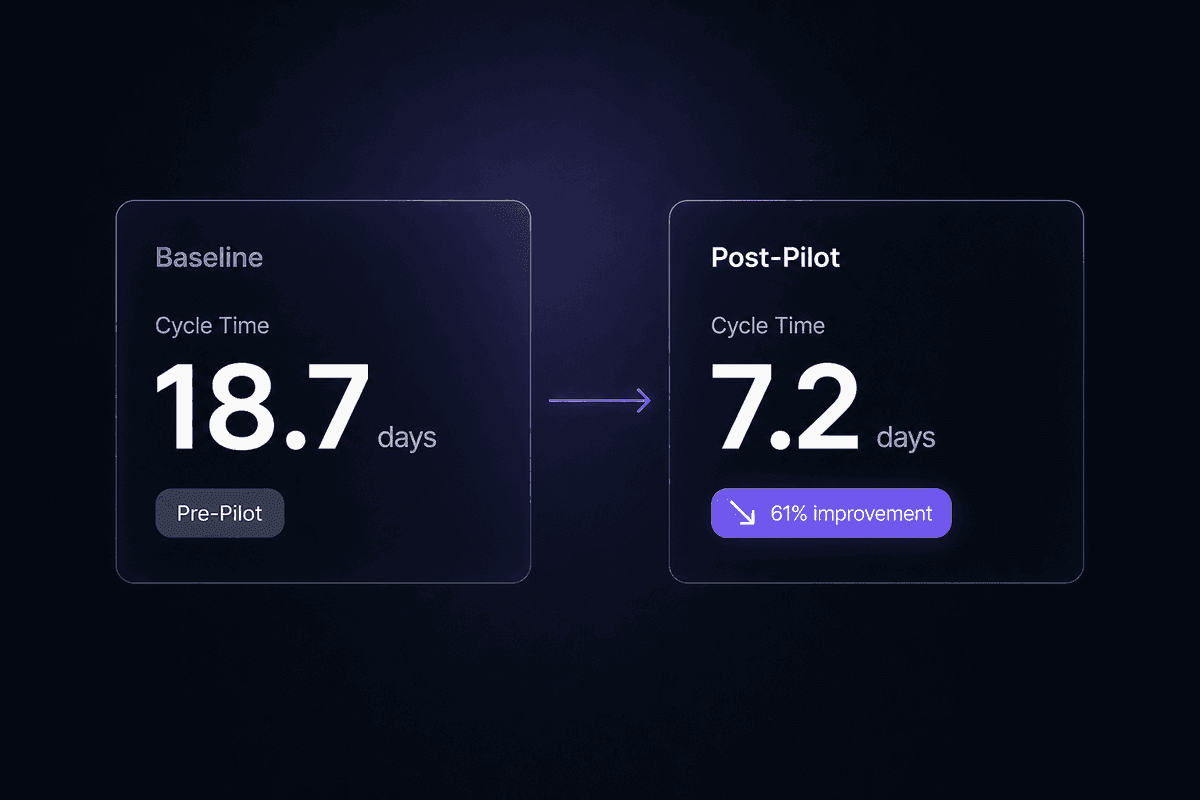
Launch the redesigned workflow with a small group before scaling it to the full team. A pilot that runs for two to four weeks with a subset of actual work gives you real signal about what breaks, what confuses people, and what the baseline numbers look like post-change.
Track leading indicators immediately after launch: cycle time, error rate, handoff count. Compare them to your original baseline. If the numbers moved in the right direction, scale. If they didn't, figure out which step is still causing friction before expanding the scope.
Build a regular retrospective cadence. Workflow improvement is not a one-time event. The right mindset is closer to agile methodology: short cycles, visible metrics, and a genuine willingness to adjust when the data says something isn't working. A culture of continuous improvement means the team treats workflow efficiency as an ongoing variable, not a project that got closed. Figure out what works best through iteration, not through perfect upfront design. The goal is sustained workflow improvement over 90 days, not a successful launch week.
Workflow Efficiency Tools and Technologies: What to Consolidate First
Before adding any new tool to a workflow stack, the right question is whether the current stack can be reduced. Teams consistently underestimate how much their existing tools are creating the problem they're trying to solve.
The four categories that actually matter for most teams: project management (where work is tracked and assigned), documentation (where processes and decisions are recorded), communication (where coordination happens), and workflow automation platforms (where rules-based work runs without manual intervention). That's it. Everything else is usually an expansion of one of those categories or a workaround for a gap between them.
The overload pattern is consistent: a team adds tools like Slack for communication, a separate PM tool for task management, a different documentation system, and then individual software solution choices for specific functions, and they end up with five surfaces that fragment the same information. Workflow management becomes harder to see in aggregate. Priority disappears inside separate notification streams. New tools meant to reduce friction add it.
Consolidation before addition is the right call when: the same information lives in more than two places, when status updates require manual replication across systems, or when a task's history exists partly in email and partly in a project tool and partly in someone's memory. If those conditions are true, adding another tool makes things worse.
Productivity gains from tool consolidation aren't theoretical. The research on context-switching suggests that the cognitive recovery cost per significant app switch is measurable and cumulative. Reducing the number of surfaces a person has to visit to complete a task reduces that cost directly.
📊 In practice:
According to research cited by ActivTrak, it takes an average of 23 minutes and 15 seconds to fully regain focus after a significant interruption. Each transition between tools in a fragmented stack isn't a five-second cost. It's potentially a 23-minute one. A team that switches apps 10 times in a morning has lost the equivalent of nearly four hours of deep-work capacity before lunch.
The Mistakes That Keep Workflow Improvements From Sticking
A workflow redesign that doesn't hold past the first month usually isn't a design problem. It's a human system problem. The process was fixed. The people around it weren't.
The organizational failure modes here are consistent enough that I can describe them without much variation: ownership wasn't assigned clearly, training was skipped or treated as optional, leadership support was visible at launch and invisible afterward, and nobody measured adoption 60 or 90 days later. By the time processes to ensure the new workflow is being used should have kicked in, the team has quietly reverted and nobody is sure when it happened.
These opportunities to improve the human side of a workflow change get passed over because they feel soft. They're not soft. They're the difference between a change that sticks and a retrospective that begins with "why didn't the last initiative work."
Automating a Broken Process and Calling It Fixed
This is the most common mistake, and the most expensive to undo. When you automate before redesigning, you preserve every flaw in the current process and make those flaws run faster, more consistently, and at larger scale. The process doesn't improve. It accelerates.
The irony is that no-code and low-code tools have made this easier to do badly at speed. You can build a multi-step automation in an afternoon without ever asking whether each step in that automation should exist. Robotic process automation tools have the same problem in the enterprise context: a process that required eight manual steps before RPA now requires eight automated steps, and changing any of them requires opening the automation tool rather than just changing the process. Hardcoded inefficiency with fewer errors, which is not the same as coding fewer errors into the process itself.
Current-state analysis must come first. Always. The only exception is a process so simple and isolated that there truly is nothing to redesign-and in my experience, that process doesn't exist often.
Skipping Change Management and Losing Adoption
New workflows fail without three things: training that happens before go-live rather than after the first round of confusion, clear ownership for each step so nobody assumes someone else is handling it, and visible support from whoever has authority over the team.
Employee training is the investment most teams cut when timelines compress. Then they wonder why the tool adoption rate is 40% three weeks after launch. Upskilling isn't about teaching people to use new software. It's about making the new process feel less uncertain than the old one. New employees pick this up faster than tenured ones because they have no existing habits to override. Tenured employees revert because the old way works, even if it's slower-and familiar slow is easier than unfamiliar fast.
Change management is also how you create a positive feedback loop where early adopters become internal advocates instead of frustrated exceptions. Without it, the people who struggled become the people who warn everyone else.
🤔 Think about this:
Most teams measure workflow efficiency gains in week two post-launch, when everyone is still paying attention. Few measure them in week ten, when reversion is already underway. If your workflow efficiency initiatives are assessed only at launch, you're measuring the best possible version of the result-before the habits that undermine it have had time to form.




