Most teams have some version of an incident process. A Confluence page, maybe a runbook, a Slack channel called #incidents that gets used twice a year and then forgotten until something catches fire. The process exists on paper. What breaks is everything else: the moment a real outage hits and nobody can remember who the escalation contact is, or the severity matrix turns out to have five levels that all feel like Sev-2 under pressure.
The central claim here is worth stating plainly: the difference between an incident workflow that works and one that just exists comes down to three things-how the workflow is structured, how escalation paths are designed and tested, and whether the tooling fits the team rather than the team fitting around the tooling. All three have to hold at the same time, or the process collapses exactly when you need it most.
What usually breaks first
- Workflow structure reduces resolution time more than any single tool choice.
- Triage is where most processes fail under pressure-severity matrices get skipped entirely.
- ITSM teams and SRE teams need different tools; using the wrong one creates process friction, not just inefficiency.
- Automation handles notification routing and ticket creation well; escalation judgment still needs a human.
- Post-incident reviews that don't produce specific ownership for follow-up actions are just documentation, not improvement.
What an Incident Management Workflow Actually Covers
An incident management workflow is not a ticketing process. Tickets are one artifact inside a much larger sequence. The workflow covers everything from the moment a disruption is detected to the moment the team has understood why it happened and changed something to prevent recurrence.
The incident management process, as Atlassian's IT service desk documentation lays it out, spans at least ten distinct stages: logging, categorization, prioritization, initial diagnosis, escalation, resolution, closure, and a post-incident review for major events. Each of those stages is a potential handoff. Each handoff is a potential failure point if the workflow doesn't define who owns it and what happens next.
The practical difference between a mature incident management process and an ad hoc one is not sophistication. It's predictability. When the process is documented and practiced, teams move faster because they don't have to negotiate roles and steps in real time. When it isn't, every incident comes with an invisible tax: five minutes to agree on severity, ten minutes to find the right person, another ten to reconstruct what already happened. Multiply that by the number of incidents per quarter and the cost stops looking invisible.
The Incident Response Lifecycle From Detection to Post-Incident Review
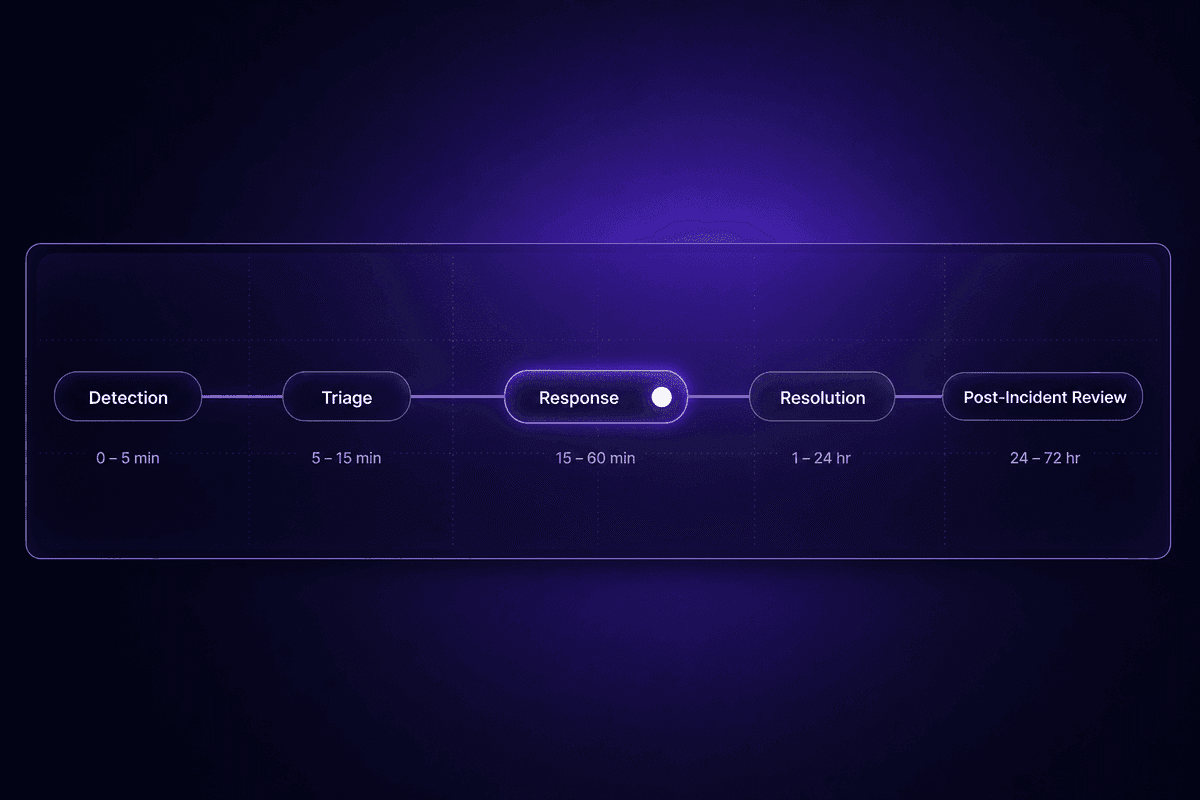
The incident response lifecycle has five phases, and they're connected. Missing or compressing one causes problems in the phases that follow.
Detection is incident identification-a monitoring alert, a user report, or an internal check that something is wrong. Detection quality determines how quickly the rest of the lifecycle can move. A delayed detection means delayed everything else.
Triage is the classification step: what type of incident is this, how severe, what's affected. This is where most workflows break first, which is covered in more detail in the next section.
Response is the active containment and stabilization phase. The incident response team identified during triage coordinates here: diagnosis, workarounds, communication to stakeholders, and escalation if the initial responders can't resolve it.
Resolution and closure happen when normal service operation is restored and the incident record is formally closed with actions documented. Closing without documentation is one of the more common shortcuts teams take under pressure. It costs them the ability to learn from the event.
Post-incident review follows for any major incident. This is where the structured process feeds continuous improvement. Giva's ITIL 4 best-practice guidance treats post-incident reviews as a standard step, not an optional one-with templates that specify timelines, root cause, impact, and follow-up actions. Teams that skip this step tend to resolve the same incident class multiple times.
Incident Prioritization, Triage, and Categorization: Where Most Workflows Break First
Prioritization and triage sound procedural. They're actually where most incident workflows collapse under real conditions. The process looks fine in low-stakes situations. The moment the on-call engineer is in the middle of three things at once and three alerts fire simultaneously, the matrix goes out the window and everyone defaults to gut feel.
The problem isn't that teams lack a classification system. Most have one. The problem is that incident types are frequently miscategorized under pressure because the severity criteria are either too complex to apply quickly, too ambiguous to distinguish between adjacent levels, or not practiced until a real incident forces the issue.
I keep seeing this pattern in support: a team designs a five-level severity matrix in a planning meeting, tests it exactly once during onboarding, and never touches it again. Six months later, half the team considers everything Sev-2 because it's the middle option and nobody wants to be wrong about declaring a Sev-1. The categorization process technically exists. It's not being used.
How to Build a Severity and Priority Matrix That Gets Used
A working priority matrix uses three inputs: impact (how many users or systems are affected), urgency (how quickly will this get worse if left unaddressed), and scope (which services are involved). That's it. A matrix built on more than three dimensions tends to produce analysis paralysis during triage, which is the worst moment to introduce ambiguity.
The practical guidance from incident management teams with mature prioritization is: three to four severity levels, each with concrete criteria, not abstract ones. "Sev-1: customer-facing service fully down or data at risk" is usable under pressure. "Sev-1: significant business impact" is not, because every engineer under stress will interpret that differently.
Here's a starting threshold table. These are illustrative, not benchmarks:
| Severity | Impact Criteria | Urgency Signal | Default Response Time Target |
|---|---|---|---|
| Sev-1 | Customer-facing service fully down, data loss risk, or regulated data exposure | Degrading rapidly or already affecting customers at scale | Immediate page, 15 min to acknowledge |
| Sev-2 | Partial service degradation or significant internal system failure | Stable but blocking key operations | 30-60 min response during business hours |
| Sev-3 | Minor degradation or non-critical system affected | Low risk of spreading, workaround exists | Next business day |
The teams that actually use their matrix are the ones that made it fit on half a page. Complexity is the enemy of prioritization under stress. If the engineer has to think for more than 30 seconds to classify an incident, the matrix isn't working-it's creating a different kind of problem.
Security Incident Categorization vs. IT Incident Categorization
This distinction matters more than most people realize until it doesn't. A security incident and a service disruption incident may look similar at detection-something is wrong, something is down-but they require completely different response types, escalation paths, and handling procedures.
A standard IT incident routes to ops or engineering. A security incident routes to the security team and, depending on the type of event, to legal, compliance, or an external incident response firm. Misclassifying a data breach as an infrastructure outage doesn't just slow the response. It potentially violates reporting obligations and leaves the wrong people in charge of a major incident they're not equipped to handle.
The setup mistake I see most often: security incident criteria are defined in the security team's documentation but not in the triage runbook that the first-line ops engineer actually uses. So when a suspicious access pattern comes in at 11pm, the person on call classifies it as a routine IT incident because that's the only framework they have in front of them.
Incident handling for security events needs to be a named category in the first-line triage decision tree, not buried in a separate document that only the security team updates.
Escalation and Response Team Structure in an Effective Incident Management Process
Escalation is the part of the incident management process everyone agrees is important and almost nobody designs carefully. The runbook has an escalation section. The escalation section lists names and Slack handles. And then a real Sev-1 hits on a Friday evening and the first name on the list is on paternity leave, the second hasn't been updated since last quarter, and the third person doesn't have access to the system that just broke.
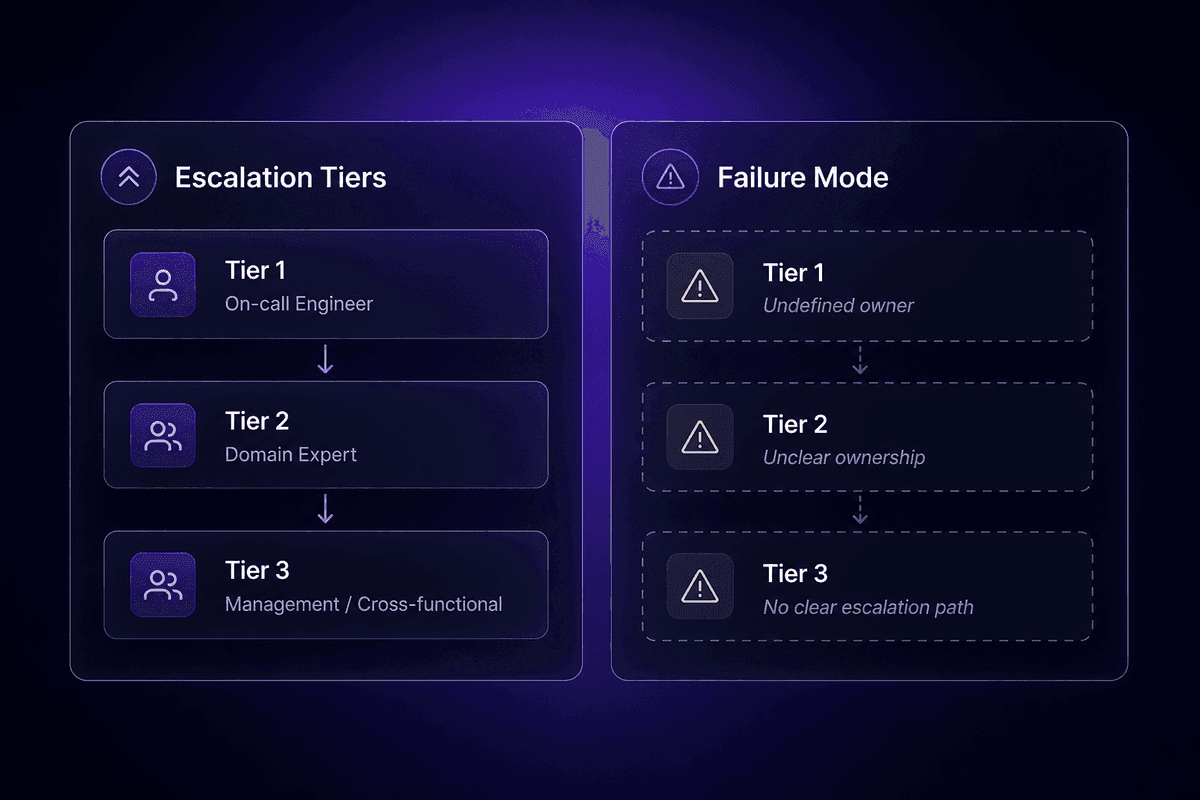
An effective incident management process treats escalation as a tiered system with clear ownership at each level, not as a phone tree. Tier 1 is first-line triage and initial diagnosis-usually the on-call engineer. Tier 2 is domain-specific expertise-the person who owns the affected service or system. Tier 3 is management or cross-functional coordination for major incidents requiring business decisions, external communication, or regulatory response.
The failure mode that actually creates chaos isn't usually a gap in the triage process. It's ambiguous ownership at the tier boundaries. When it's unclear whether a Sev-2 that hasn't resolved in two hours should stay with Tier 1 or escalate to Tier 2, different people will make different calls. Some escalate immediately. Some wait for explicit confirmation. The incident sits in the gap while both paths are being considered.
Defining On-Call Roles and Incident Response Team Ownership
The incident response team structure needs to define more than who gets paged. It needs to define what each person is responsible for during an active incident and what they're explicitly not responsible for.
The standard roles: Incident Commander owns the response process-communication, coordination, and escalation decisions. They don't fix the issue. Technical Lead owns the diagnosis and resolution path. Communications Owner handles stakeholder updates, which during a major incident means keeping the rest of the organization informed without requiring the technical team to stop and write status updates. Scribe logs the timeline in real time.
Roles and responsibilities need to be assigned before the incident, not during it. The question "who's IC for this?" during an active Sev-1 is a sign that the workflow wasn't built to handle real pressure. I've had support conversations where the whole team was investigating the same system simultaneously because nobody had defined who the lead was. They were each working in parallel, occasionally undoing each other's changes. The management team resolved that by pre-assigning on-call rotation roles with explicit scope-not by adding more people to the response.
When Escalation Paths Fail and How to Redesign Them
Escalation paths fail in two specific ways. The first is a coverage gap: the right person is unavailable and there's no defined backup. The second is a severity misread: the incident was classified lower than it should have been, so the escalation path that was triggered is too slow for what's actually happening.
To resolve incidents effectively when the primary path breaks, the runbook needs to define a backup for every tier, not just the primary contact. It also needs a severity escalation trigger: if the incident hasn't been resolved within a defined window and still matches certain criteria, severity is automatically upgraded and the next tier is notified. Flag any workflow that hasn't had a successful resolution path tested in the last 90 days.
The resolution process itself should log every escalation decision with a timestamp and a reason. This sounds like overhead during a live incident. In practice, it's the only way to improve escalation accuracy over time-because without the log, the post-incident review is reconstructed from memory rather than from fact, and memory is very charitable about what the severity actually looked like at 2am.
That is where the ticket usually starts.
🤔 Wait.
Most escalation failures happen not because the escalation path is wrong, but because no one has ever tested it during a low-stakes period. Runbooks are written once, reviewed at onboarding, and assumed to work until the first real Sev-1 proves otherwise. A 30-minute tabletop exercise every quarter catches more gaps than any amount of documentation review-and well-defined incident management processes include that exercise explicitly.
How to Build an Incident Management Workflow: Steps and Template Logic
Building an incident management workflow from scratch usually goes wrong in the same direction: the team creates a comprehensive document, everyone agrees it's thorough, and then nobody uses it because it's too long to consult during an actual incident. The template becomes a compliance artifact rather than a working tool.
A usable workflow template has two layers. The first is the full process documentation-complete steps, role definitions, escalation criteria, communication templates. This lives in the wiki and informs training. The second is the incident runcard-a compressed, decision-tree version of the process that fits on one screen and can be followed under pressure. The runcard is what teams actually use during an incident. The full documentation exists to create and update the runcard.
The Core Steps Every Incident Response Process Needs
Working from Atlassian's ITSM workflow framing, here's the core build sequence for an incident response process:
- Identification and logging. Incident is detected and logged with a unique ID, timestamp, and initial description. The log entry is the start of the audit trail. Every subsequent action references this record.
- Categorization. Classify the type of incident and which services or systems are affected. This informs routing and escalation path selection.
- Prioritization. Apply the severity matrix to assign a severity level. Set the response time target based on that level.
- Initial diagnosis and escalation. First-line responder attempts initial diagnosis. If resolution requires domain expertise or the incident exceeds a severity threshold, escalate to the appropriate tier with full context-not just a notification.
- Resolution and recovery. Technical team resolves the incident and restores service. Resolution steps are documented in the incident record in real time, not reconstructed afterward.
- Closure. Incident is formally closed with a recorded resolution summary and affected service confirmed as restored.
- Post-incident review. For major incidents, a structured review produces a root cause summary and specific follow-up actions with named owners and deadlines.
A practical approach to incident management is to build each step as a checklist item, not a paragraph. Responders under stress can follow a checklist. They cannot reliably extract the relevant action from prose documentation at 1am.
What a Working Incident Response Plan Looks Like vs. One That Just Exists
A working incident response plan has three characteristics that documentation-only plans lack. First, it has triggers: specific observable conditions that activate each phase of the plan. "When monitoring detects X" is a trigger. "In the event of a significant incident" is not. Second, it has named owners for every step, not generic role labels. "The on-call SRE assigned via PagerDuty" is a named owner. "The engineering team" is not. Third, it has communication expectations: who gets notified at each severity level, through which channel, and within what time window.
The Gomboc.ai best practices guide for DevOps teams notes that one of the clearest signals of a mature incident management process is whether teams track MTTR and other metrics as active feedback loops, not just for reporting. Plans that are tested and updated regularly produce every incident's actions in a form that actually changes the next version of the plan. Plans that sit in a wiki do not.
I talked to an ops lead last year who had a thorough response plan in Notion. Beautifully organized. Cross-referenced with runbooks. Nobody had touched it in eight months. When they had their first real Sev-1, the escalation contacts were outdated, the Slack channels listed no longer existed, and the stakeholder communication template referenced a status page they'd deprecated. The plan had everything except the one thing that matters: regular maintenance. Past incidents are only useful if the review process forces the plan to catch up with the team's actual current state.
Automation in Modern Incident Management
Automation in modern incident management is genuinely useful for specific things and genuinely risky for others. The useful part is well-documented: alert routing, ticket creation, severity tagging, notification delivery, runbook execution for known remediations. The risky part is less discussed: automation that runs without judgment gates suppresses signals, routes incidents incorrectly, or executes remediation steps on the wrong scope when alert rules are stale.
The division is straightforward in principle and hard in practice. Automate the things that don't require judgment and where errors are cheap to catch. Keep human control over the things that do require judgment and where errors are expensive to see.
What the Incident Response Workflow Should Automate First
The safe automation targets in the incident response workflow, in roughly this order:
Alert intake and deduplication
Monitoring tools fire multiple alerts for the same underlying event. Auto-deduplication groups related alerts before a human sees them. This alone reduces triage noise significantly. Watch for: duplicate ticket creation and alert storms that produce 50 tickets for one incident.
Ticket creation and initial log entry
When an alert crosses a defined threshold, automate the creation of the incident record with the alert payload, timestamp, and initial severity tag. This guarantees every incident has a log entry from the moment of detection, not from when someone got around to creating a ticket.
Notification routing
Based on severity and affected service, auto-route notifications to the right Slack channel and page the appropriate on-call contact. Automate the lookup; don't automate the decision of whether to escalate.
Status page updates for known incident types
For incident categories that follow a known pattern, automated status page updates reduce the load on the communications owner during active response.
Runbook execution for defined remediations
Service restarts, cache clears, and rollback triggers for specific error conditions can be automated when the trigger criteria are precise and the remediation is idempotent. If running it twice produces the same outcome as running it once, it's safer to automate.
A concrete example of how this works in practice: in Latenode, you can wire a monitoring alert directly to ticket creation in your incident tracker and a Slack escalation message in a single workflow. One of Latenode's 5,500+ integrations handles the incoming alert payload, a JavaScript node applies your severity tagging logic based on alert type and affected service, and the routed notification hits the right channel within seconds of detection. The per-execution pricing model means a six-step workflow like this counts as one execution, not six separate tasks, which matters when you're handling alert volume at any real scale. The field mapping between the monitoring payload and the ticket schema still needs a human review before going live-that part hasn't been automated away.
Where Automation Creates New Failure Points in Incident Management
The support-side risk with over-automated incident workflows is specific: alert rules go stale. The conditions that were accurate six months ago no longer match the current system architecture, so the automation routes incidents incorrectly or suppresses signals that should have been escalated.
I've seen this in configuration management situations where a service was migrated to a new infrastructure provider, but the alert routing rules still referenced the old service tags. New incidents on the migrated service went to a queue nobody was watching. The monitoring dashboard was clean. The automate logic was executing exactly as designed. What it was designed to do was six months out of date.
In service management terms: automation doesn't maintain itself. Every rule, routing condition, and threshold needs a review cycle-not just when something breaks, but on a schedule. Flag any automated routing rule that hasn't been reviewed in 90 days. Check for downtime patterns that correlate with specific alert categories being silenced rather than resolved. The signal worth watching: incident volume drops without a corresponding improvement in MTTR or recurrence rate. That usually means incidents are being routed to the wrong queue or not creating tickets at all.
Best Incident Management Tools and How to Choose Between Them
The tool category is real. The differences within it matter more than most comparison guides admit. ITSM teams running service desk operations have different needs than SRE teams managing real-time production incidents, and using a tool designed for one context in the other creates friction at every step.
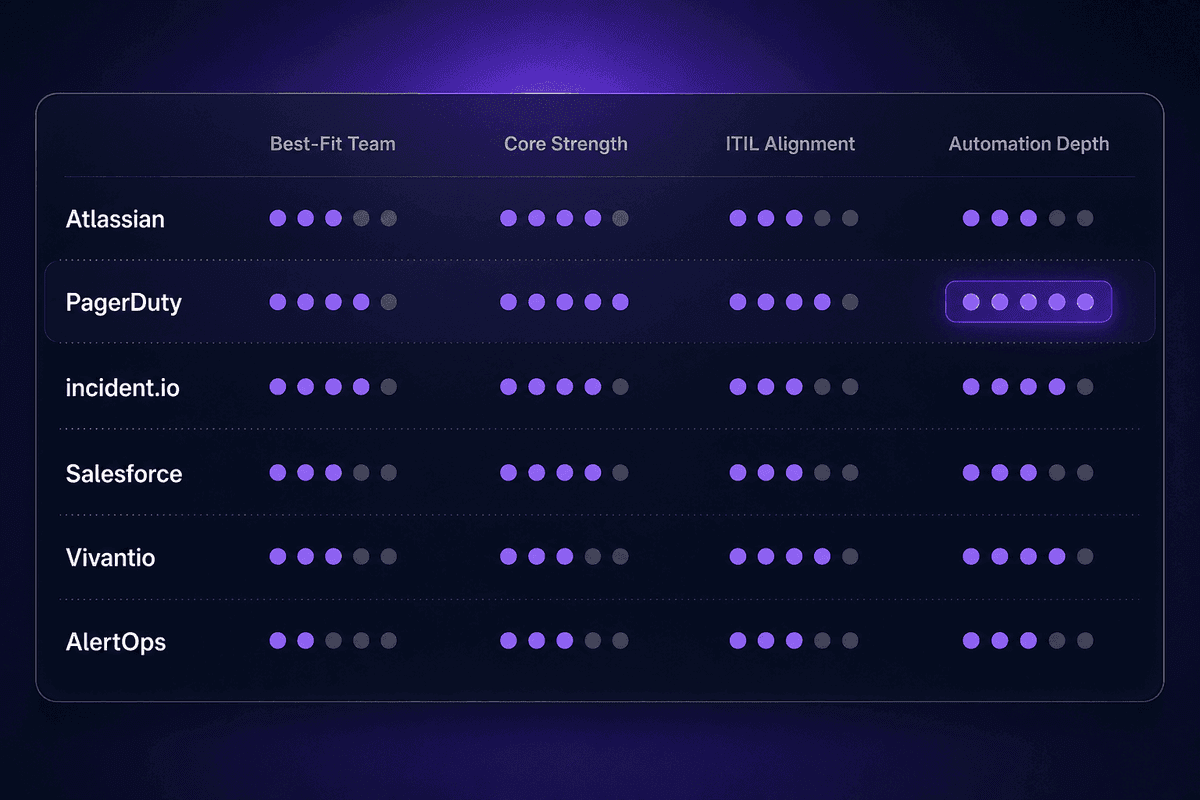
Here's an honest comparison based on what these tools actually do and what maintenance reality looks like after the initial setup:
| Tool | Best-Fit Team Type | Core Strength | ITIL Alignment | Automation Depth |
|---|---|---|---|---|
| Atlassian (Jira Service Management) | ITSM / IT service desk teams | Structured ticket workflows, SLA tracking, integration with dev tooling | Strong; built around ITIL service management practices | Moderate; rule-based automations, deeper with Jira Automation |
| PagerDuty | Engineering / SRE / on-call teams | On-call scheduling, alert routing, escalation policies | Partial; strong on response, less on ITSM process structure | High; event intelligence, alert correlation, runbook automation |
| incident.io | Modern DevOps / product engineering teams | Slack-native incident workflow, post-incident tooling, timeline capture | Light; designed for fast-moving engineering teams, not ITIL compliance | High; workflow automation built into the incident loop |
| Salesforce Service Cloud | Enterprise ITSM / customer-facing operations | CRM integration, case management, cross-functional visibility | Configurable; aligns with ITIL when configured for it | High; Flow automation, though setup complexity is real |
| Vivantio | Mid-market ITSM teams | ITIL-compliant workflows, flexible service catalog | Strong; designed explicitly around ITIL framework | Moderate; workflow automation within ITSM process scope |
| AlertOps | On-call and alert management teams | Alert routing, escalation, on-call scheduling | Partial; focused on response speed over process compliance | Moderate to high; integration-heavy alert workflow automation |
The column that usually gets skipped in tool comparisons is maintenance cost. Atlassian after 18 months looks different from Atlassian at deployment. Somebody owns those 47 automation rules. Somebody knows why the escalation policy for "payments team - Tier 2" has a 23-minute delay instead of 15. That somebody might have left the company.
That's not a feature gap. That's a Monday morning ticket.
ITIL-Aligned Incident Management Tools for IT Service Teams
ITIL alignment in a tool means more than an ITIL certification badge. It means the workflow structure-ticket states, escalation definitions, closure requirements, and post-incident review triggers-mirrors ITIL incident management practices natively rather than requiring custom configuration to get there.
Atlassian's Jira Service Management and Vivantio are both designed around the ITIL framework in this practical sense. The service desk workflow in Jira reflects ITIL's stages from logging through closure, with SLA tracking built into the ticket lifecycle. Vivantio is explicit about ITIL compliance as a product positioning element, with structured workflows for incident, problem, and change management in a way that satisfies service level audit requirements.
For IT service teams operating within a regulated environment or under formal SLA obligations, ITIL alignment isn't decorative. It determines whether the process documentation holds up when audited. The change management connection matters too: ITIL-aligned tools typically track whether an incident was preceded by a change event, which is where root cause analysis often starts for service disruptions.
Incident Response Tools Built for Engineering and SRE Teams
PagerDuty and incident.io are built for a different problem than ITSM platforms. They're optimized for the 10-minute window after an alert fires: who gets paged, what happens if they don't respond, how the incident is declared and staffed, and how the response team stays coordinated during active diagnosis.
PagerDuty's strength is on-call scheduling and alert routing. Its event intelligence layer automates alert correlation and groups incidents before they hit the on-call queue. The setup investment is real, though-routing policies, escalation tiers, and service dependencies all need to be configured accurately, and stale configurations are a known failure mode after re-orgs.
incident.io is Slack-native in a way that ITSM tools aren't, which matters for engineering teams that live in Slack. Declaring and managing an incident from a Slack command, with automatic timeline capture and stakeholder updates built into the channel workflow, removes a class of overhead that slows response teams during an active outage. The post-incident tooling is particularly well-designed-which matters because that's often where engineering teams lose the most time: writing the review after the incident is already resolved. The tool can automate a significant portion of timeline reconstruction.
How to Choose the Right Incident Management Workflow for Your Team
Use these decision rules, not feature comparisons, as the starting point. Each one points toward a specific workflow pattern or tooling direction based on what your team actually looks like.
ITSM team with SLA obligations and audit requirements
Choose an ITIL-aligned tool and a workflow structured around formal ticket states, SLA timers, and post-incident review documentation. Best practices here are codified in the ITIL framework. Atlassian or Vivantio fit this pattern. The workflow should maintain an audit trail from logging through closure.
Engineering or SRE team, real-time production incidents
Choose a tool built for alert-first workflows-PagerDuty or incident.io. The incident management process here is less about documentation structure and more about time-to-declare and escalation speed. Integrate with your monitoring stack directly. Keep the workflow simple enough to follow at 2am.
Small team with mixed responsibilities (ops plus some engineering)
Start with a simple three-severity matrix, a shared Slack channel with clear naming conventions, and a lightweight ticketing tool. Avoid ITSM platforms before you have the volume to justify the configuration overhead. The workflow matters more than the tool at this stage.
Cross-functional incidents involving compliance or legal
Plan for the workflow to span systems-your IT service desk, your email or CRM, and potentially a compliance reporting tool. Automation that normalizes incident records across these systems minimizes duplicate data entry and reduces the risk of missed reporting obligations. This is where a low-code automation layer between tools earns its cost.
Team with manual processes and no existing workflow
Build the process first. A documented severity matrix, a named escalation path, and a post-incident review template can be implemented in a spreadsheet and Slack in a day. Choosing a tool before the process is defined means you'll configure the workflow around the tool's defaults rather than your own escalation logic. You'll rebuild it after the first major outage.
Team that already has a tool but incidents still feel chaotic
The tool is probably not the problem. Start with the escalation path test described in the callout above, then check whether the severity matrix is actually being used versus being bypassed in the ticket creation flow. Process gaps show up as tool problems more often than the reverse-and minimize business impact starts with owning that distinction.
📊 In practice:
Teams that configure their incident management workflow around tool defaults-rather than their own escalation logic-consistently rebuild the process after their first major outage. The default Priority 1 definition in a generic ITSM tool is rarely calibrated to your actual services, your actual team structure, or your actual SLAs. The outage reveals the gap. The rebuild takes a sprint. Designing around your logic first costs two hours. Designing around the tool's logic costs two hours and one expensive incident.
Measuring Incident Management Effectiveness: KPIs and Post-Incident Review
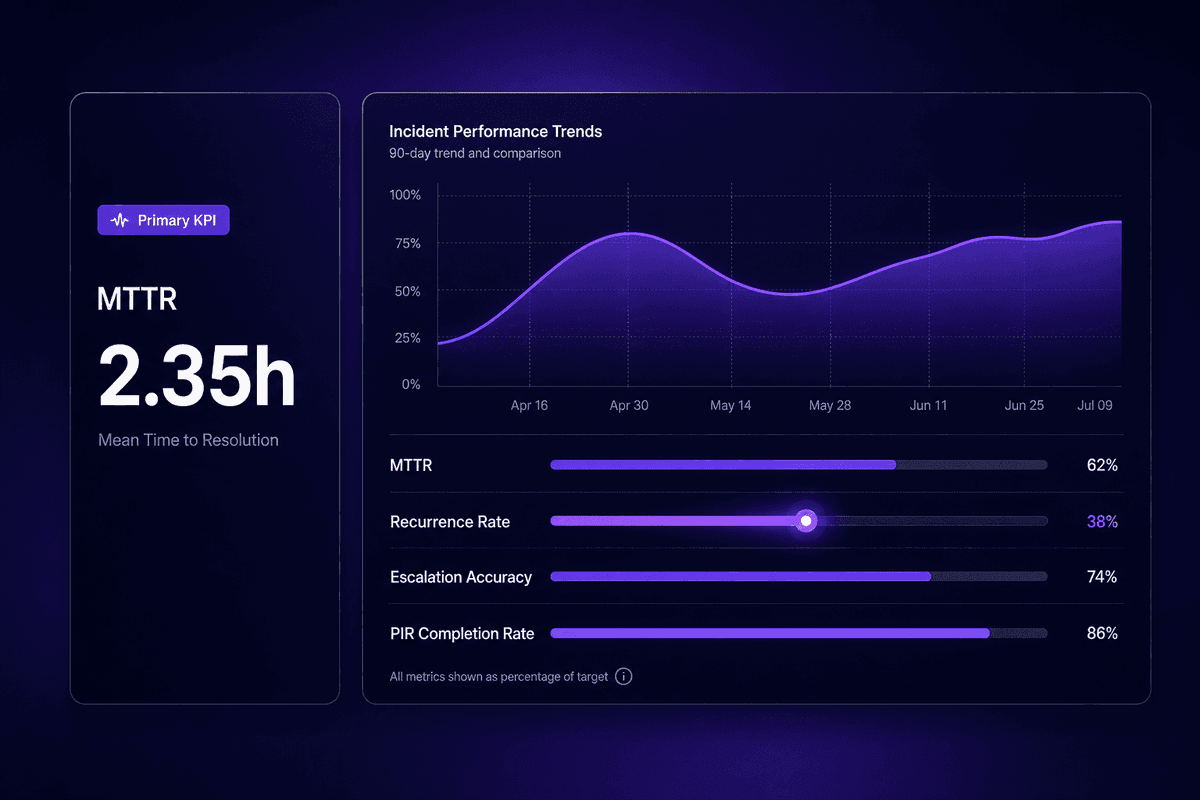
Mean time to resolution (MTTR) is the number most teams track and the one that appears on every status report. It's worth tracking. But EasyVista's MTTR analysis points to what MTTR actually measures: the combined effect of detection speed, triage accuracy, escalation efficiency, and resolution quality. A low MTTR says the workflow is working. A rising MTTR tells you something has degraded-but not which part. That's where the supporting KPIs matter.
Four metrics worth tracking together:
- MTTR (Mean Time to Resolution) - the primary health indicator. Benchmark against your own historical baseline, not industry averages.
- Recurrence rate - what percentage of incident volume represents the same incident class within 30 and 90 days. High recurrence means root cause analysis isn't producing real workflow changes. This is often more revealing than MTTR because it shows whether you're resolving incidents or just surviving them.
- Escalation accuracy - what percentage of incidents were escalated to the correct tier on the first attempt. Frequent re-escalations signal triage miscategorization or unclear ownership boundaries.
- Post-incident review completion rate - for Sev-1 and Sev-2 incidents. If teams are completing PIRs for fewer than 80% of major incidents, the review process has too much friction to maintain consistently.
A post-incident review that actually works produces three specific outputs: a short root cause summary connected to a log of actions taken during the incident, a list of specific process or tool changes (not vague recommendations), and an assigned owner and deadline for each action item. Reviews that produce only documentation are common. Reviews that produce ownership are rarer and far more useful for preventing similar incidents in the future.
From a knowledge base perspective: every completed PIR is a future incident prevention artifact. Feeding PIR outputs back into runbooks, severity matrix criteria, and escalation path documentation is how a mature incident management process improves over time rather than just repeating itself. Senior management visibility into recurrence rate trends is often the lever that gets resources allocated to systemic fixes rather than one-off patches.