Most AP teams I talk to know their invoice process is broken. They just don't have a clean picture of where it breaks, why it keeps breaking in the same spots, and what a fixed version actually looks like end to end. They're managing the symptoms: chasing approvers, reconciling mismatches, catching duplicate payments after the fact. The process underneath those symptoms is rarely examined as a whole.
Here's the central argument of this article: a well-designed invoice processing workflow, covering receipt through payment and GL posting, eliminates most of the exceptions, delays, and approval confusion that manual handling creates. Not by moving faster. By removing the structural gaps that cause those problems in the first place.
Where the process usually breaks first
- Invoice processing spans receipt, capture, coding, PO matching, approval, payment, and GL posting - most manual workflows only handle parts of this.
- Receiving a PDF by email is not automation; it's manual processing with a digital delivery mechanism.
- Most exceptions occur because the invoice, the PO, and the goods receipt don't agree - a matching problem, not a volume problem.
- Automation fixes the structural handoff gaps that cause delays, not just the speed of individual steps.
What Is Invoice Processing in Accounts Payable?
Invoice processing is the full operational lifecycle that begins when a supplier sends an invoice and ends when the payment clears and the transaction posts to the general ledger. It sits inside the accounts payable function and forms the downstream half of the procure-to-pay cycle, connecting the purchasing side (requisitions, purchase orders, goods receipts) to the financial close side (cash disbursements, GL entries, audit records).
That positioning matters. Invoice processing isn't a single task. It's a series of steps involving different people, different systems, and different validation rules at each handoff. The vendor submits an invoice. Someone captures the data. Someone else codes it to the right GL account and cost center. A third person or system matches it against the original purchase order and the receiving record. An approver signs off. Payment runs. The transaction posts.
Every one of those handoffs is a place where the invoice process can stall, error, or disappear entirely. When companies talk about AP problems, they're usually describing one or more broken handoffs in that sequence, even if they don't describe it that way. Cash flow accuracy and financial record quality both depend on whether that sequence runs cleanly from invoice receipt to payment. When it doesn't, the downstream effects show up in late payments, missed early-payment discounts, duplicate disbursements, and a general ledger that doesn't match reality.
That's the structural problem. The rest of this article is about fixing it.
Invoice Processing Workflow: What Each Stage Actually Does
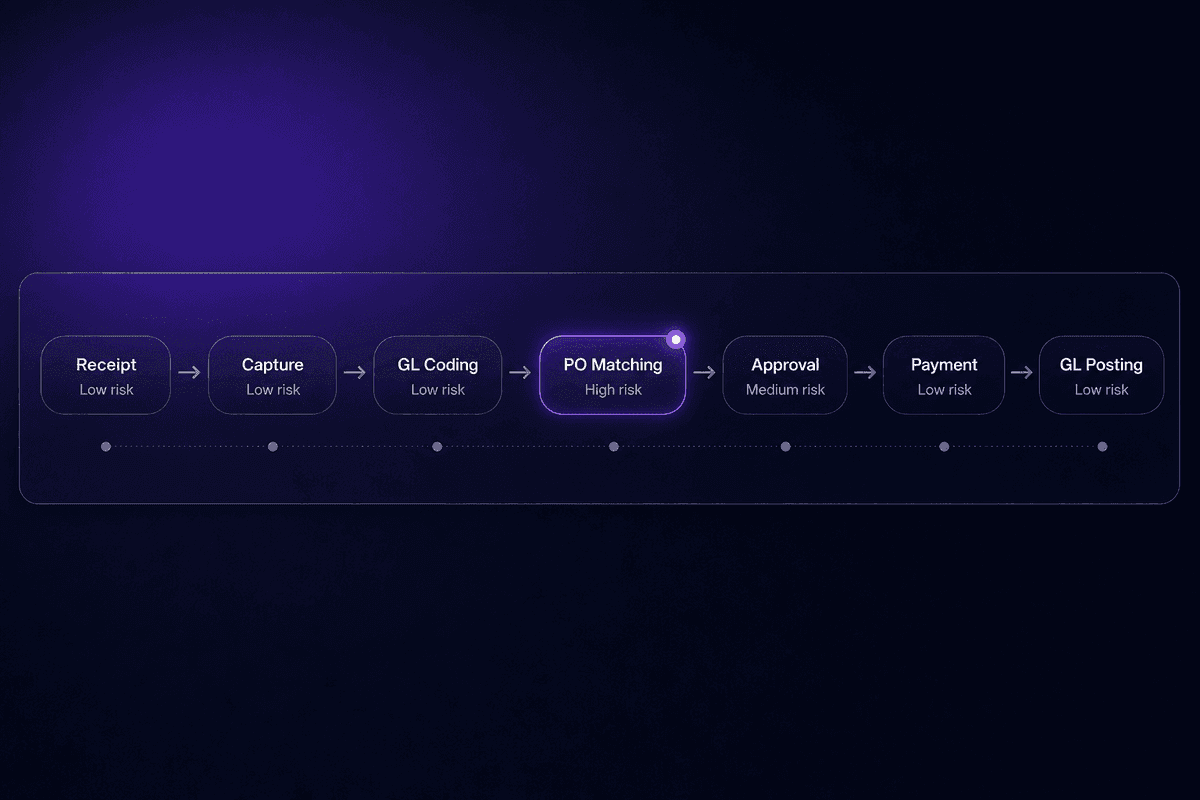
The canonical invoice processing workflow runs through seven stages. Most teams cover some of them. Very few have deliberately designed all seven as a connected sequence with clear ownership at each handoff. That gap is usually where the exceptions live.
The stages, in order: receipt, data capture, GL coding, PO matching (including three-way match), approval routing, payment execution, and GL posting. Each stage should produce a defined output that feeds directly into the next. When that output is missing, ambiguous, or delivered to the wrong place, the next stage stalls.
From a support perspective, where I watch these failures in real time, the most common pattern is not a single broken stage. It's a missing handoff between stages. The invoice arrives but doesn't get captured. It gets captured but isn't coded. It gets coded but sits in an inbox waiting for an approver who didn't know it was waiting. These aren't catastrophic failures. They're quiet delays that accumulate into a backlog.
The sections below break down the three most consequential stages. Receipt and capture is where format chaos creates the first delay. Matching is where most exceptions originate. Approval and payment is where unclear ownership turns a clean invoice into a three-week hold.
Invoice Receipt and Data Capture
Invoices arrive in every format imaginable. Email attachments, paper mail, EDI feeds, supplier portals, fax (yes, still). Each channel requires a different intake method, and each introduces its own failure mode.
The format problem is the first source of processing delays, and it's also one of the most misunderstood. Receiving a PDF by email is not the same as automated data capture. The invoice is received, but the data inside it - vendor name, invoice number, line items, amounts, due date - still needs to be extracted, validated, and entered somewhere useful. If that extraction is happening manually, you have digital delivery on top of manual processing. That's not e-invoicing. That's a slightly faster version of the old problem.
True invoice capture means the data comes out of the document and lands in your AP system in a structured format, ready for the next stage. That requires OCR at minimum, usually with some validation layer on top. Without it, every invoice received by email is still a manual data entry event, just dressed differently.
Electronic invoices submitted through a supplier portal or EDI bypass this problem entirely, because the data arrives structured. But most organizations handle a mix of formats, which means the capture stage needs to handle the messiest input reliably before anything downstream can run clean.
Invoice Coding, PO Matching, and 3-Way Matching
After capture, the invoice needs to be assigned to the right GL accounts and cost centers. This is GL coding, and it's where context enters the process. The same invoice can code differently depending on the type of expense, the department that requested it, the budget period, and the project it belongs to. Manual coding is slow and error-prone. Automated coding using vendor history and rule sets is faster but requires setup.
Matching is the validation control that sits between coding and approval. The three-way match compares three documents: the vendor invoice, the original purchase order, and the goods receipt (the confirmation that the goods or services were actually delivered). All three need to agree on quantity, price, and terms before the invoice can move forward.
This is where most invoice exceptions originate. A price on the invoice doesn't match the PO. The quantity received differs from what was invoiced. The vendor invoice number doesn't correspond to an open PO. Any mismatch holds the invoice for manual review, and that review can take hours or days depending on who owns the exception and how fast they can reach the vendor or the purchasing team.
According to Gennai's 2026 invoice management statistics roundup, the performance gap between manual-heavy AP teams and automated ones is substantial enough to justify a full workflow redesign. That gap starts here, in the matching stage, where a significant share of processing delays are born.
Invoice Approval Workflow and Payment Execution
Approval routing is a formal design decision, not an email chain. That distinction matters. When approval "happens" by forwarding a PDF to a manager and waiting, there's no defined timeout, no escalation path, no status visibility, and no record of when the approval was requested. Invoices disappear into inboxes and stay there until a new invoice from the same vendor arrives and someone goes looking.
I keep seeing this pattern in support. An AP team does everything right through matching, then loses weeks in the approval stage because nobody owns the follow-up. The invoice approval workflow needs to specify: who approves what threshold, what happens if they don't respond in 48 hours, and where the invoice goes after approval. Those three things alone eliminate most of the approval-stage delays I watch teams wrestle with.
After approval, payment execution triggers based on the payment terms. ACH, check, wire, card - the method matters less than the timing. Approved invoices that sit in a payment queue because nobody scheduled the run miss early-payment discount windows and accumulate late payment risk. Payment should be triggered automatically from approval status, not waiting for someone to notice the queue.
GL posting happens after payment confirms. The transaction closes and the books update. This step is often invisible until it doesn't happen - which is how a paid invoice becomes a reconciliation problem two weeks later.
Challenges in Invoice Processing That Show Up in Every AP Queue
These aren't hypothetical. They're the recurring failure modes that show up in AP queues across team sizes, industries, and tool stacks. Each one has a specific signal that tells you it's happening.
Invoice exceptions from 3-way match failures
Price, quantity, or receipt discrepancies between the invoice, PO, and goods receipt hold invoices for manual review. The signal: invoices aging in an "exceptions" folder longer than two days, with no assigned owner and no documented resolution path.
Missing or unclear approval ownership
When no one knows who is supposed to approve a specific invoice type or amount, it waits until someone notices or a vendor complains. The signal: approval requests going unanswered for more than 72 hours, or AP staff manually chasing approvers by Slack, email, and phone for the same invoice.
Manual invoice processing at volume
A small AP team handling 200-300 invoices a month manually hits a throughput ceiling that can't be solved by working harder. The signal: invoices consistently processed in batches at end of week rather than in near-real time, and payment terms regularly missed as a result.
Duplicate payment risk
Manual invoice entry creates duplicates when the same invoice arrives through multiple channels or gets re-entered after a query. The signal: the same vendor invoice number appearing more than once in the AP system, or vendor reconciliation calls flagging overpayments.
Inability to track invoice status across the workflow
Without a structured system, there's no real-time view of where any given invoice sits. The signal: AP staff spending time answering "where is invoice X?" rather than processing invoices, because status exists only in someone's inbox.
Missed early payment discounts
Slow processing means invoice payment dates arrive before the workflow even reaches approval. The signal: a pattern of paying at net-30 or net-45 on invoices that offered 2/10 early-payment terms, with no systematic capture of those discount opportunities.
Fraud exposure from manual controls
Manual invoice handling creates gaps where duplicate invoices, vendor impersonation, or altered bank details can pass review. The signal: no automated duplicate detection, no vendor master validation at intake, and approval workflows where a single person can authorize and process payment without a second check.
Every one of these has "manual invoice" handling somewhere in its root cause. The exception rate, the approval delay, the duplicate risk - none of them are mysterious. They're predictable outputs of a process that relies on human attention at every step.
📊 By the numbers:
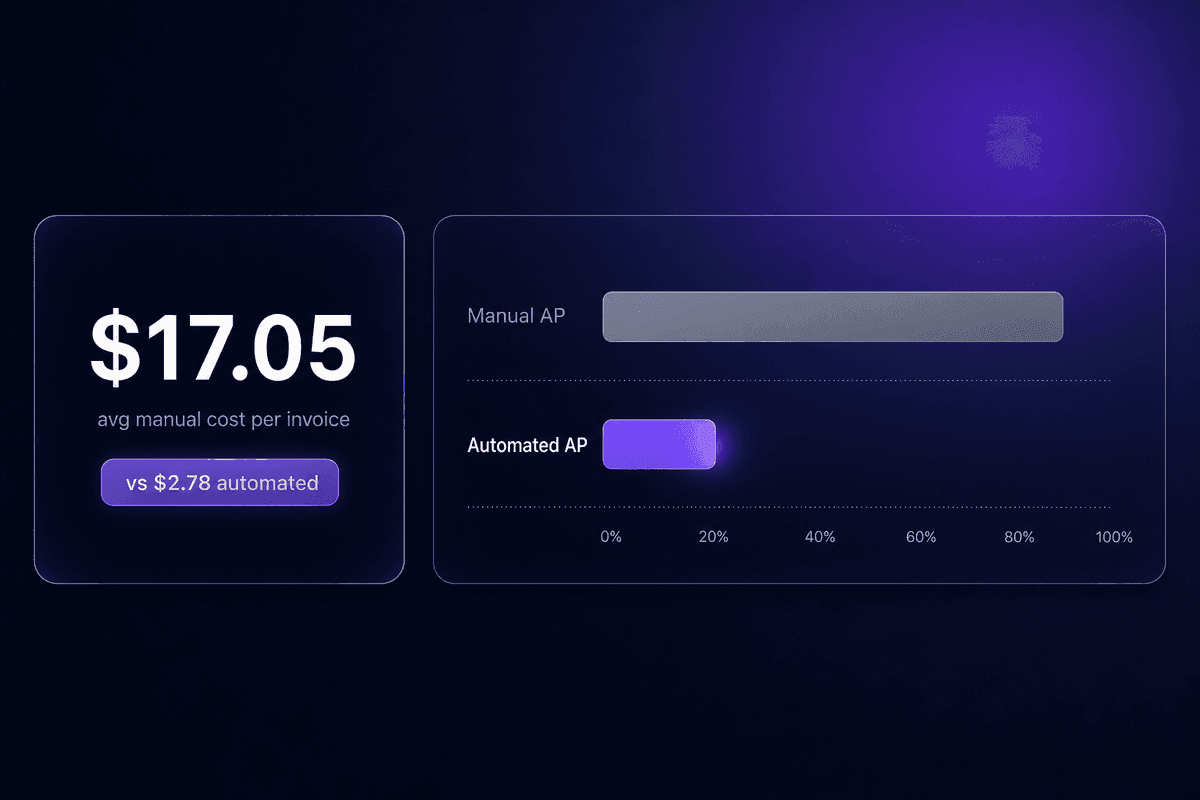
Manual invoice processing costs between $12.88 and $19.83 per invoice, according to Parseur's benchmark analysis. Best-in-class AP teams using AI tools process the same invoice for $2.78, in 3.1 days, compared with 17.4 days for average manual-heavy teams. That's not a marginal difference. At 300 invoices a month, the cost gap alone runs into tens of thousands per year.
Manual vs. Automated Invoice Processing: Where the Real Difference Lives
The comparison below uses data from the research cited above. Where the data supports a specific number, the table uses it. Where it doesn't, I've written a note rather than filling in a figure that isn't there.
| Dimension | Manual invoice processing | Automated invoice processing |
|---|---|---|
| Data capture method | Manual entry from paper invoice or email PDF | OCR extraction with AI validation; structured data from EDI or portal |
| Processing time | 17.4 days average for manual-heavy teams | 3.1 days for best-in-class AI-assisted teams (Gennai, 2026) |
| Cost per invoice | $12.88-$19.83 per invoice | As low as $2.78 per invoice with AI tools (Parseur) |
| Approval routing | Email-based, no defined escalation path | Rule-based routing with thresholds, reminders, and escalation logic |
| Error and exception rate | High; driven by manual entry errors and missed match discrepancies | Reduced; matching runs automatically and exceptions are flagged, not buried |
| Audit trail quality | Dependent on inbox hygiene and manual documentation | Structured log at every stage; timestamp, approver, and action captured automatically |
A note on the fraud risk row: the research reports that about 68% of enterprises using AP automation software report lower financial fraud risk after adoption. That's a directional finding, not a universal guarantee, but the mechanism is clear - automated duplicate detection and vendor master validation catch things that manual review misses at volume. The manual process row for fraud exposure is "high and unstructured." The automated row is "systematically controlled." That's the real difference.
How Automated Invoice Processing Works in Practice
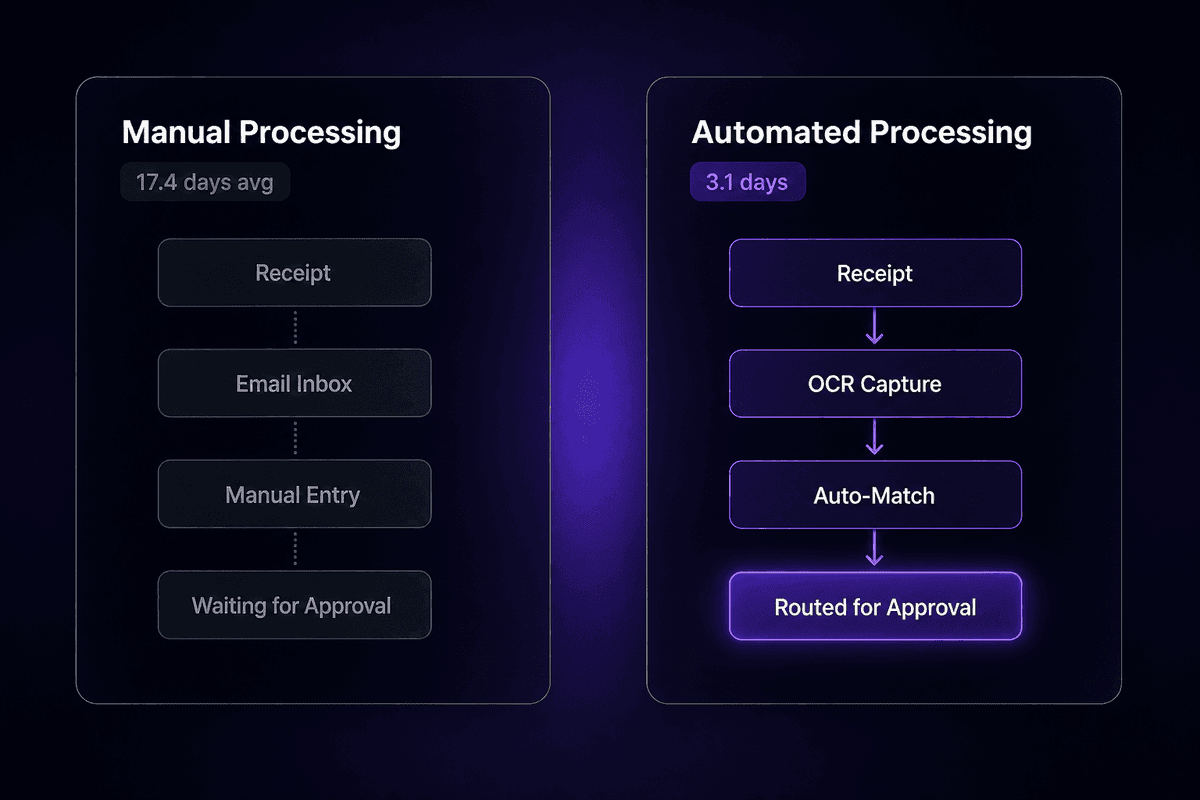
Accounts payable automation changes the structure of the workflow, not just the speed of individual tasks. That distinction matters, because I've seen teams adopt AP automation software and still struggle with the same exception rates they had before. The tool moved faster. The process stayed broken.
What AP Automation Software Handles vs. What Still Needs Human Review
What automation handles well: data extraction from PDFs and structured documents using OCR and machine learning; GL coding based on vendor history and rules; three-way match execution across invoice, PO, and goods receipt; approval routing based on amount thresholds and department rules; payment scheduling against terms; and GL posting after payment confirmation. These are deterministic, repeatable steps. An AP workflow built correctly runs all of them without manual intervention for the majority of invoices.
What still needs human judgment: invoices from vendors with no PO history, line items that don't map cleanly to existing cost centers, pricing disputes where the vendor and internal records contradict each other, missing goods receipts for services-based invoices, and escalations where the approval chain breaks down. Invoice automation software routes these exceptions to a person. It doesn't resolve them.
The misconception I hear regularly is that AP automation eliminates the AP team. It doesn't. The AP team shifts from processing every invoice manually to managing the exceptions, improving the rules, and handling the vendor relationships that automation can't navigate. The software handles the 80% that follows a predictable pattern. The ap workflow design determines how cleanly that 80% flows and how quickly the remaining exceptions reach the right person. The invoice management system is still only as good as the rules someone put inside it.
That's not a product limitation. That's how the category works.
Benefits of Invoice Processing Automation Beyond Speed
The speed improvement is real. A 62% reduction in cycle time, from roughly 20.8 days to 7.9 days per invoice, is the figure Gennai cites from market research. But faster processing is the surface benefit. The structural benefits are what make the case for smaller and growing teams.
Fraud reduction and duplicate prevention happen automatically at scale. Every invoice runs through vendor master validation and duplicate detection on intake rather than relying on someone spotting the problem in a reconciliation review two weeks later. Early payment discounts become capturable because invoices move through the approval process in days instead of weeks - you can only capture a 2/10 discount if the invoice clears approval inside 10 days. Audit readiness is a byproduct of automation rather than a separate documentation effort, because every stage generates a timestamped record automatically.
And then there's the scalability argument, which is the one that matters most for growing businesses. The benefits of automated invoice processing compound as volume grows. A team processing 300 invoices a month with automation can handle 600 with the same headcount. That same team processing 300 manually is already at their ceiling. Efficient invoice processing at scale is essentially impossible without structural automation - you're either adding people or adding tools, and the cost math strongly favors the tools.
In Latenode, an AP team can wire invoice receipt, AI-based data extraction, matching logic, and approval routing into a single workflow without separate subscriptions for each step. I mention this specifically because teams building these workflows for the first time often assume they need one tool for OCR, another for routing, and another for notifications - then balk at the integration overhead. A platform with built-in AI models, custom JavaScript nodes for matching rules, and OAuth-connected integrations to the accounting software you already use can handle the full pipeline in one place. Latenode's per-execution pricing also means a six-step invoice workflow counts as one execution rather than six separate tasks, which changes the cost math at volume.
Invoice Processing Best Practices That Reduce Exceptions Before They Start
These aren't general tips. Each one addresses a specific structural failure point in the canonical workflow. They're the practices a well-designed accounts payable workflow builds in by default, because fixing exceptions after they appear costs more than designing them out upfront.
Standardize invoice intake to a single channel before anything else. Multiple intake channels (email, portal, paper, EDI) mean different capture methods, different validation rules, and different failure modes running in parallel. The first step in fixing an AP process is usually collapsing all invoice receipt to one primary channel with defined handling for exceptions. This alone reduces the surface area of the problem significantly.
Separate vendor setup from invoice intake. Missing PO numbers and unrecognized vendor names cause exceptions at the matching stage. An ap process that validates vendor records and PO existence before invoices enter the workflow catches those problems before they become holds. Invoice approval process failures often trace back to an invoice that never should have passed intake in the first place.
Assign explicit ownership to every step in the approval chain. The invoice approval process route should specify a primary approver, a backup, a timeout threshold (48 hours is a reasonable starting point), and an escalation path. "Send it to the manager" is not an approval workflow. A rule that says "invoices over $5,000 route to the department head, with a 48-hour response window before escalating to the VP" is. The difference between those two is most of the approval-stage delay I see teams experiencing.
Build 3-way match rules before processing volume, not after. The matching rules that define acceptable tolerances (price variance of $X, quantity variance of Y%) need to exist before invoices run through the system. Setting them retroactively means the early exceptions get handled inconsistently, and the exception queue grows before the rules catch up.
Track invoice status at every stage, not just at payment. An invoice processing system without real-time status visibility is a black box. The AP team can't answer "where is invoice X?" without opening an inbox. That question takes 15 minutes of manual searching. Multiply by 300 invoices a month and you have a non-trivial overhead that a structured status field in any AP tool eliminates. Watch for these fields specifically: last processing stage, current owner, days since receipt, and exception flag.
Review the invoices you get an invoice for most often from the same vendors. High-exception vendors are a signal. They might be submitting invoices inconsistently, or your PO process isn't generating the records they need to match against. The fix is sometimes on the vendor side and sometimes on yours. Either way, addressing the steps involved in your exception rate by vendor is faster than fighting exceptions individually.
None of this requires a sophisticated invoice processing system. It requires deliberate design. Email, Excel, or an ERP without dedicated automation can move invoices. They can't enforce routing rules, run matching logic automatically, or maintain status visibility across the full lifecycle without significant manual overhead. That's not a technology gap - it's a process design gap.
🤔 Wait.
If your current setup involves receiving invoices by email, entering data manually, and routing approvals through a shared inbox - that's manual invoice processing, not AP automation. The emails are digital. The process is manual. The distinction matters because manual processing at scale gets more expensive as volume grows, while automated processing gets proportionally cheaper. If you're not sure which one you have, count how many invoices require human action at each step. That number is your current automation gap.