




Most teams come to marketing workflow automation backwards. They pick a tool, start wiring triggers, and spend three weeks building something that technically runs - and then wonder why the numbers don't move. The process was broken before they automated it. Now it's broken faster.
The falsifiable claim this article is built around: marketing workflow automation only improves efficiency and revenue when workflows are mapped correctly, triggered on clean data, and monitored continuously after launch. Not after a one-time setup. Not because the platform is powerful. Because the underlying process was worth automating in the first place.
If you're here because you've launched automations that aren't producing results, or because you're about to build your first workflow and want to avoid the obvious traps, this is written for you.
What usually breaks first
- Automating a broken process makes the problem faster, not fixed.
- Set one measurable goal per workflow before touching any automation tool.
- Dirty CRM data breaks triggers before the first contact enters the workflow.
- Automation without continuous monitoring is just a future support ticket waiting to open.
What Marketing Workflow Automation Actually Covers (And What It Doesn't)

Marketing workflow automation is two different things that most guides treat as one.
The first is customer-facing: automated email sequences, SMS follow-ups, lead nurture tracks, abandoned cart messages, re-engagement campaigns. These are the automated workflows most people picture when the phrase comes up. They're trigger-based, channel-delivered, and measured by open rates, click rates, and conversion.
The second is internal execution: creative brief routing, campaign approval sign-offs, asset handoff between design and copy, pre-launch QA checklists, post-campaign reporting. These workflows determine whether your customer-facing automation ever goes live on time, with the right assets, reviewed by the right people. Most guides ignore them. Most teams that struggle with marketing ops feel the gap without being able to name it.
The operational problem these two categories share is the same: scattered handoffs, inconsistent follow-up, manual routing that depends on whoever is paying attention that week. Digital marketing at any scale breaks down when the process that creates campaigns and the process that delivers them both rely on people remembering to do things.
Marketing automation in the narrow sense (the MAP - your HubSpot, your Marketo, your Klaviyo) handles customer-facing channel delivery well. It handles nurture sequence triggers, segment routing, and send scheduling. What it doesn't handle well, usually without additional tooling, is the internal operations side: cross-team approvals, creative QA, project handoffs, data validation before records enter the sequence.
That gap is where a lot of marketing teams get stuck. They buy a MAP, build email workflows, call themselves automated, and still find that campaigns launch late, go out with wrong content, or reach the wrong people because nobody caught the data problem upstream.
This article covers both sides. Customer-facing automated workflows and the internal execution workflows that make them possible.
Why Most Automated Workflows Break Before They Scale
I keep seeing the same pattern come through our support queue. A team builds something, tests it, watches it work for two or three weeks, and then gradually notices it's producing less. Open rates drop. Conversions stagnate. Someone checks the workflow and realizes records stopped entering weeks ago, or the wrong segment is triggering, or there's a branching condition that made sense when the workflow was built but no longer reflects how the CRM data is actually structured.
The failure mode almost never starts with the automation platform. It starts before that.
The two root causes I see most often: teams automate broken or unclear processes instead of fixing them first, and teams launch too many workflows at once without clear owners or objectives. Both compound fast.
Automating a broken process is the more expensive mistake. A team has a manual lead qualification process that's inconsistent and slow. They automate it. Now they have an inconsistent and slow process that runs automatically at scale, touching every new lead, before anyone notices that the scoring criteria were wrong. By the time the ticket opens, the damage is spread across months of pipeline.
Launching without clear ownership is quieter but just as damaging. A marketing ops team builds six workflows in a week: welcome sequence, nurture track, post-trial follow-up, re-engagement, sales alert, and content download follow-up. Each one has someone who built it. None of them has someone who owns it - who monitors performance, updates conditions when the segment definition changes, and answers for it when numbers shift. Three months later, four of the six are running on stale conditions and nobody can tell which ones.
Neither of these is a platform problem. They're process and organizational problems wearing a technical costume.
Dirty Data Breaks Triggers Before the Workflow Even Runs
Here's something I spend more time explaining than I expected to: a workflow trigger is only as good as the data that fires it.
Duplicate records in your CRM mean a single contact gets enrolled twice, or not at all, depending on how your deduplication logic handles conflicts. Missing fields mean routing conditions hit null values and either fail silently or route everything to a default branch that makes no sense for most contacts. Bad consent status means contacts who should be excluded get enrolled, which creates compliance exposure and spikes your unsubscribe rate before you've even evaluated the creative.
Clean, unified data across your CRM and MAP isn't optional for reliable trigger logic. It's the prerequisite. A decent rule of thumb: before you build any trigger that depends on a record field, manually pull 50 records and check whether that field exists, is consistently formatted, and carries the value you're expecting. Human error in data entry, combined with inconsistent import hygiene, breaks more automations than bad workflow design.
That's where the ticket usually starts.
Over-Automating Customer Touchpoints Drives Unsubscribes, Not Conversions
The other failure I see regularly comes from the opposite direction: a marketer who has automation running correctly, but running too broadly, too often, with conditions that don't differentiate well enough between segments.
Sending emails at high frequency to a poorly segmented list isn't a workflow problem. It's a segmentation and content problem. But the symptom - rising unsubscribe rates, complaint flags, decreasing open rates - looks like the automation is failing. Teams often respond by tweaking send times or email copy, which changes nothing fundamental, because the real issue is that the conditions for entering and exiting the workflow are too loose.
The engagement metrics are your early warning here: if unsubscribe rate on an automated sequence is climbing while open rate holds steady, contacts are opening out of habit or curiosity, not relevance. That's the sequence telling you the conditions need tightening before the sending cadence.
It's not that you're sending too many emails across multiple channels. It's that you're sending the same emails to people who aren't ready for them.
Prerequisites: What Has to Be True Before You Automate a Single Workflow
Before you build anything, this list should be checked completely. Each item here is a failure mode in waiting if skipped.
- Defined marketing goals and KPIs for each workflow
Without a specific, measurable objective - lead-to-opportunity conversion rate, email sequence revenue attribution, approval cycle time - you have no way to evaluate whether the workflow is working after launch. Workflows without clear objectives become impossible to improve or justify. Check: can you write one sentence that defines what success looks like for this workflow? If not, don't build it yet.
- Mapped as-is customer journeys and internal execution processes
You need to know what actually happens today before designing the to-be version. Who does what, in what order, with which tools, and where the handoffs break. Skipping this step is the most direct path to automating the broken version of your process. Check: document the current state manually before touching the automation platform.
- Clean and unified CRM and MAP data
Segment conditions, lifecycle stage routing, lead score thresholds, and consent flags all depend on field values that exist, are consistently formatted, and mean what you think they mean. An automation built on a CRM with duplicate contacts, missing job titles, or inconsistent lifecycle stages will route incorrectly from day one. Check: run a data quality audit on the specific fields your trigger conditions will use.
- Stakeholder alignment on roles and SLAs
Who owns each workflow after it launches? Who approves changes to conditions? What's the SLA for reviewing a workflow that stops performing? Marketing ops, campaign managers, sales team leads, creative, and legal all touch different parts of the workflow at different stages. If ownership isn't explicit before launch, the first problem will surface as a confusion about who handles it, not as a technical issue. Check: assign a named owner to each workflow before it goes live.
- Clarity on which manual processes are worth automating first
Not all manual processes deserve automation. Automate the ones that are genuinely repetitive, error-prone, and high-volume. If a process happens twice a week and takes five minutes, the ROI calculation probably doesn't hold. If it happens hundreds of times a week and involves human routing decisions that follow a predictable pattern, that's the right candidate. Check: list your top five time-consuming manual tasks and rank them by frequency and error rate.
How to Design Effective Marketing Automation Workflows: A Five-Phase Process

This is the section where most guides give you a diagram and a list of steps. I'm going to give you the actual mechanism at each phase, because the steps aren't the hard part. The hard part is knowing what goes wrong at each one.
Phase 1 - Map As-Is Workflows Before You Touch the Automation Platform
The instruction here is simple and almost universally ignored: before you open your automation tool, document what actually happens today.
This means identifying the repetitive, error-prone tasks in your current process - not the tasks you wish existed, not the ideal-state process, but the one your team actually runs. Who handles a lead after a form submission right now? Does it go to one person? Two? Does it depend on the lead source? Does it sometimes fall through because the person who handles it was out that day?
Write it down. Every step, every tool, every person, every handoff. Then look for the steps that are repetitive, prone to human error, or dependent on someone remembering to do something. Those are your automation candidates. The steps that require judgment, creative input, or exception handling by someone who knows the context - those stay manual for now.
The reason this step matters: when you skip it, you design your to-be automation based on how you think the process works. Which is almost never how it actually works. I've seen teams build lead nurture sequences without realizing that their existing tools qualify leads to the marketing automation platform using criteria that haven't been updated since 2022. The automation fires correctly. The criteria are wrong. Phase 1 catches that before the build.
Remove unnecessary steps before automating the remaining ones. A six-step manual process often has two steps that exist for historical reasons nobody remembers. Automate the clean version of the process, not the accumulated version.
Phase 2 - Set One Measurable Goal Per Workflow and Define Entry Triggers
Every workflow needs exactly one objective, stated as a measurable outcome. Not "improve lead quality" - that's a direction. Something like "increase lead-to-opportunity conversion rate from 12% to 18% within 90 days for inbound enterprise leads." One metric. One timeframe. One segment.
This matters because it determines everything downstream: which entry trigger is correct, what actions make sense in the sequence, and what exit condition indicates the workflow succeeded. Without a clear objective, you end up with a workflow that's doing several things somewhat well and nothing well enough to measure.
Entry triggers are where teams make their first technical mistake. The trigger should match the behavioral or status signal that actually indicates readiness for the workflow's actions. Common options here: form submission, cart abandonment, contract signed, creative brief submitted, inactivity period crossed, lifecycle stage change, lead score threshold reached. Each one fires under different data conditions, which brings you back to Phase 1's data quality work.
Exit conditions matter as much as entry triggers. When does a contact leave this workflow? When they convert? When they reach a time limit? When they take a disqualifying action? Workflows without exit conditions either run indefinitely (creating duplicate enrollment risks) or require manual cleanup. Define the exit before you build the steps.
Your automate efforts are only as strong as the goal they're pointed at. This is also where you define what "working" means for iteration in Phase 5.
Phase 3 - Design Branching Logic, Actions, and Timing for Effective Marketing Automation
This is the phase where most workflow diagrams look clean and most production workflows look like a different diagram entirely.
Each step in the workflow needs a specified action: send email, assign task, create ticket, update field, request approval, notify sales, route to Slack. Not "follow up with the lead" - that's a human instruction, not an automation step. The automation needs to know exactly what to do, with what payload, to which system.
Branching conditions layer on top of the actions: if the contact is in segment A, take path 1. If deal size is over a threshold, escalate to the enterprise track. If engagement score hasn't changed in 14 days, exit to re-engagement. These conditions are where modern marketing automation gets genuinely useful and where poorly structured data creates the most damage. A branch condition on a field that's missing for 30% of your contacts means 30% of your contacts take the default path regardless of what the default path is designed for.
Timing and schedule logic belongs here too. Time delays between actions prevent batching contacts into a spike that overwhelms delivery infrastructure or creates implausible delivery timing. Scheduled steps need to account for time zones and business hours when the workflow involves human actions on the receiving end (like sales notifications). A notification arriving at 2am on a Saturday has a different probability of being acted on than one arriving Monday morning. This is what I mean when I say effective marketing depends on when the message lands, not just what it says.
For complex workflows that touch both the MAP and internal project management systems, this is the phase where orchestration tools - ones that can connect your MAP, CRM, and project tooling into one automated sequence - earn their place. A workflow built in Latenode, for example, can receive a trigger from a form submission, pass it to an AI node to enrich or classify the record, update the CRM, notify the right sales team channel in Slack, and create a follow-up task in your project management tool, all within one execution. The custom workflows that span these tools are what a MAP alone typically can't handle without additional connectors.
Phase 4 - Build in Your Automation Tool and Run QA Before Going Live
The build phase is where the designed workflow gets mirrored into your actual automation platform. Visual workflow builders are genuinely useful here: you can see the branching logic, spot gaps in the condition coverage, and share the structure with non-technical stakeholders for review before anything touches live data.
Use a template if your tool provides one for the workflow type you're building. Templates prevent you from missing standard components like error handling and unsubscribe compliance footer in email steps. Customize from the template rather than building from scratch.
QA with real sample records before launch. Not test contacts you created this morning with blank fields. Pull actual records that represent the range of data states in your system: records with missing fields, records in unusual lifecycle stages, records that might trigger multiple entry conditions. Run them through the workflow manually and verify:
- Does the entry trigger fire correctly for each record type? - Do branching conditions route to the right path when fields are present and when they're missing? - Do notifications reach the right channel with the right payload? - Do any records fall through without taking any action? - Does the workflow automation exit conditions behave correctly?
The QA step catches the problem before it's a production problem. The visual workflow builder shows you whether the logic is structurally correct. The sample record test shows you whether the data makes the logic work. These are different questions. Both need answers before launch.
Process automation that skips QA with sample records is one of the most consistent sources of the tickets I'm describing in this article.
Phase 5 - Launch With a Limited Workflow Set, Then Monitor and Iterate
Start with three to five workflows maximum. Pick the ones with the clearest entry triggers, the most measurable goals, and the highest frequency of the process they're automating. Lead handoff from marketing to sales, welcome and onboarding sequences for new customers or users, abandoned cart recovery if you're in e-commerce. These are high-impact, well-understood, and have enough volume in the first weeks to generate signal for iteration.
The set-and-forget failure mode starts here. Teams launch, watch the first two weeks, see numbers that look acceptable, and move on to building the next workflow. Then six weeks later, the data conditions have shifted, a segment definition changed, a CRM field was renamed, and the workflow is silently routing incorrectly. Nobody notices because nobody is watching.
Your dashboard after launch should show, at minimum: last successful execution, failed execution count, records enrolled in the last 7 days, average email open and click rates if applicable, and exit rate. If any of these hasn't been reviewed in a week, that's a blind spot.
Iterate based on what you see. A/B test subject lines in email steps. Adjust timing delays based on when engagement peaks. Tighten segment conditions based on who's converting and who isn't. Refine the exit condition if contacts are leaving the workflow before they've received enough touchpoints to convert. The marketing automation workflows that produce durable results are the ones that get reviewed and adjusted monthly, not the ones that run exactly as built.
At Deloitte Digital's research on content automation, organizations that adopted marketing content automation saw 29% greater revenue impact from content marketing compared to peers not using automation. That number holds only when the automation is maintained. It doesn't arrive automatically at launch.
Which Marketing Workflows Are Worth Automating First
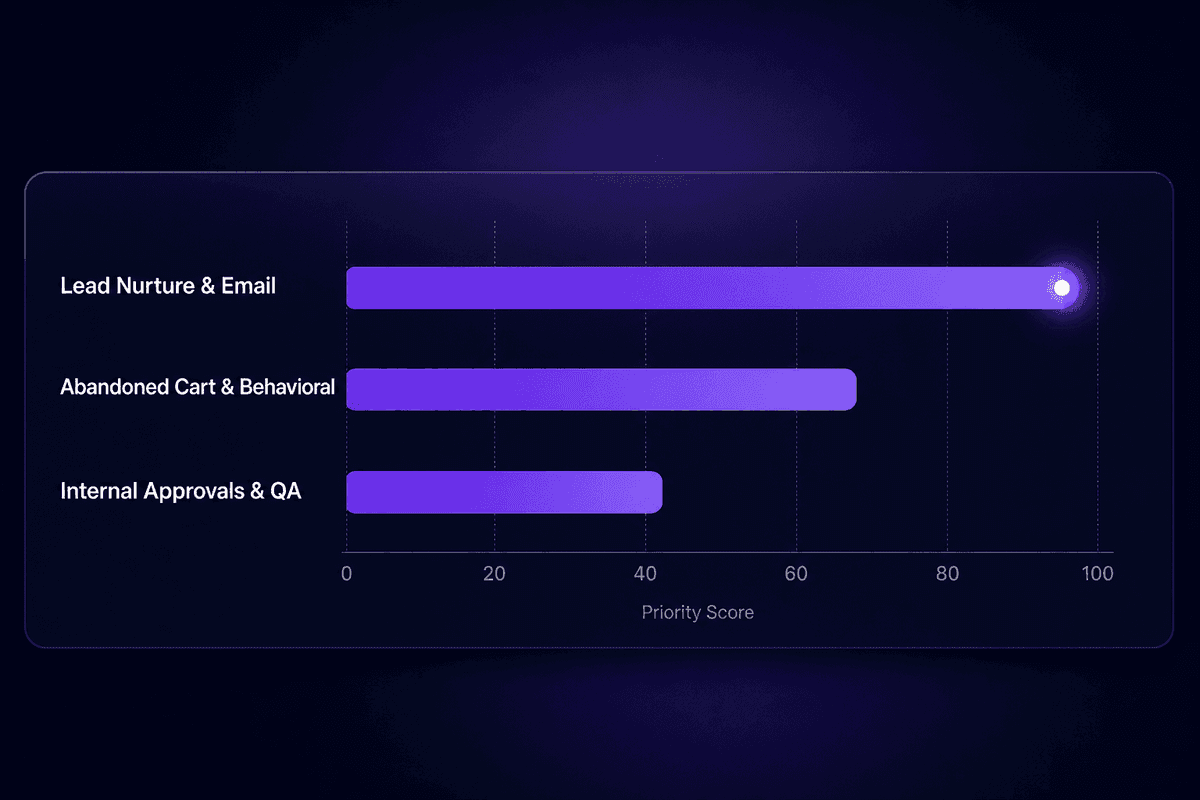
Not every workflow deserves your first sprint. Here's how to prioritize when you're starting out, and what makes each category worth the build time.
Lead Nurture and Email Marketing Automation Workflows
Lead nurture is the right starting point for most marketing teams, and it's worth understanding why.
The structure is well-defined: clear entry trigger (form submission, content download, demo request), a sequence of educational content emails matched to the buyer's stage, a measurable exit condition (demo booked, trial started, sales conversation opened), and a conversion event you can tie revenue attribution to. The goal is singular, the path is mapped, and you can measure email campaign open and click rates at each step to identify where contacts drop off.
Welcome emails and early nurture sequences are also high in volume, which means you get statistical signal quickly for iteration. A sequence that's running correctly will show a consistent pattern: high open rate on the welcome email, gradual engagement with the educational content, and a conversion rate at the marketing and sales handoff point that tells you whether the nurture content is doing its job.
The McKinsey research on agentic AI in marketing workflows notes that fewer than 10% of CMOs have captured value across end-to-end workflows, despite nearly 90% experimenting with AI use cases. The gap is almost always in the workflow design, not the tooling.
This marketing automation category is where gains are most directly traceable.
Abandoned Cart, Re-Engagement, and Behavioral Trigger Workflow Examples
Behavioral trigger workflows are the most data-dependent category in this list, and also the most common source of the "why did this stop working" tickets I see.
Abandoned cart workflows, re-engagement sequences after inactivity, and product recommendation triggers all require the underlying behavioral data to be reliable. If your e-commerce data isn't capturing cart events correctly - because of a tracking pixel that broke after a site redesign, or because user sessions aren't being attributed consistently - the workflow trigger never fires. Or fires for the wrong contacts. The workflow logic may be sound. The data feeding it is the problem.
Real-time processing requirements make this more acute. A cart abandonment workflow needs to fire within an hour of abandonment to have meaningful impact. That requires event data to flow from your storefront to your MAP quickly and accurately. If there's an ETL delay, or if the session data doesn't carry the right identifiers to match against the CRM record, the timing window closes before the email goes out.
Automation software for behavioral triggers is only as good as the event infrastructure feeding it. Before you build these workflows, verify the event data quality with the same sample record approach from Phase 4. These fail most when the data conditions are assumed to be working rather than verified.
Internal Approval and Campaign QA Workflows Teams Usually Skip
I want to spend a moment on this category because it's the one most guides skip entirely and the one where operational teams consistently leave time on the table.
Internal marketing workflows - creative approvals, campaign launch QA, asset handoffs from design to copy to deployment - are measurable. They have a cycle time today. That cycle time can be reduced. The manual effort of chasing approvals, re-sending briefs, and manually verifying that every campaign element has been checked before launch is real, it's routine, and most of it follows a predictable enough pattern to be automatable.
The barrier is that these workflows don't produce a conversion email or an open rate. The return shows up as shorter approval cycles, fewer last-minute errors caught after launch, less time spent on routine tasks that feel administrative. Teams that focus on strategy miss these workflows because they don't look strategic. But four hours recovered per campaign manager per week across a ten-person team is 160 hours a month that goes back to work that actually requires human judgment.
Build the creative approval routing workflow. Assign reviewers automatically based on campaign type. Set SLAs with notifications before deadlines pass. Track cycle time. You'll have the before and after data to justify the next sprint.
📊 By the numbers:
Organizations that implemented marketing content automation saw 29% greater revenue impact from content marketing and were 24% more likely to meet content production demands compared to peers not using automation, according to Deloitte Digital's research. That's not a rounding difference. It's the gap between a team that ships and one that's always catching up.
Automation Tools and Platforms: What the Stack Actually Needs to Handle
The honest version of this section: most marketing teams try to solve everything with their MAP and then wonder why internal execution problems persist. The MAP handles channel delivery well. It doesn't handle the full stack of what end-to-end marketing operations actually requires.
Here's what the stack needs to cover, in practical terms:
| Layer | What It Handles | Common Tool Category |
|---|---|---|
| Channel delivery and triggers | Email, SMS, push; trigger-based enrollment; segmentation | MAP (HubSpot, Klaviyo, Marketo) |
| CRM and lifecycle data | Contact records, lifecycle stage, lead score, deal status | CRM (HubSpot, Salesforce) |
| Workflow orchestration | Cross-tool handoffs, approvals, internal routing, data transformation | Low-code automation (Latenode, Make) |
| Analytics and reporting | Performance dashboards, attribution, A/B test results | Analytics (Metabase, Google Analytics) |
The analytics layer matters more than teams give it credit for during the build phase. Implementing automation without a plan for how you'll measure it is a common mistake that surfaces three months later when someone asks how the workflows are performing and the answer is "we're not sure."
Best tools decisions in this space should account for two things teams regularly underweight: maintenance reality and ownership clarity. A tool that's technically capable but requires a specialist to change conditions every time a segment definition updates will become orphaned. A tool that any ops generalist can navigate and modify is more valuable in practice, even if it has a smaller feature set.
HubSpot's built-in automation is the right call for teams deeply embedded in the HubSpot ecosystem - the trigger logic connects cleanly to CRM data and the learning curve is lower for marketing ops teams with HubSpot experience. The limitation appears when you need to automate outside the HubSpot boundary: connecting to a project management tool, routing data through a custom transformation, or orchestrating an approval process across teams using different systems.
What a Marketing Automation Platform Handles vs. What It Doesn't
A MAP is excellent at what it was built for: trigger-based communications to contacts, segmentation, send scheduling, A/B testing on email content, and reporting on channel performance. If the workflow lives entirely within the channel delivery layer - enrollment, sends, delays, conversions - the MAP handles it.
Traditional marketing automation platforms have a defined boundary. On the other side of that boundary: internal team workflows, cross-system data transformations, approvals that involve non-marketing stakeholders, custom routing logic that depends on data from external systems, and AI-powered decision steps that require calling models the MAP doesn't natively support.
Modern AI-powered workflow platforms exist precisely to cover that gap. Marketing automation in a MAP and workflow automation in an orchestration layer work better as complements than as substitutes. The MAP handles customer-facing channel execution. The orchestration layer handles everything else: the data quality steps before records reach the MAP, the approval routing that runs alongside campaign building, and the cross-system handoffs that happen before and after the channel delivery step.
Where AI Fits Into Workflow Automation Without Overpromising
McKinsey's research on agentic AI in marketing workflows estimates that AI has the potential to power as much as two-thirds of current marketing activities, including content generation, synthetic audience testing, and media planning. That's a forward-looking estimate, not a current benchmark. The same report notes that fewer than 10% of CMOs have captured value across end-to-end workflows.
The honest framing for AI in automation workflow design right now: it's an optional layer on top of well-designed base workflows, not a replacement for clear process design.
Where AI delivers reliable value inside automation workflows today: timing optimization (sending when engagement probability is highest based on historical behavior), routing decisions (classifying incoming leads or support requests into the right track), and content selection for dynamic segments (choosing which email variant to send based on behavioral signals). These are bounded, measurable uses where AI improves a step that already works.
The AI marketing tools that create problems are the ones added before the workflow design is solid. If your trigger logic is broken, adding AI to the routing step doesn't fix it. If your segmentation conditions are too broad, AI-powered content selection still sends the right message to the wrong people.
Latenode's approach to this is practical: the platform gives you access to over 1,200 AI models from a single dropdown - GPT-4o, Claude, Gemini, Mistral - so you can add an AI step to any workflow node without managing separate API keys or building custom connectors. The AI agents layer on top of your designed workflow logic rather than replacing it. That distinction matters for reliability. The base workflow needs to be correct first. The AI layer optimizes what's already working.
AI-powered workflows are only as good as the workflows they're powering.
How to Measure Whether Your Marketing Workflow Automation Is Working
If you're measuring automation performance only at launch, you're measuring the wrong thing at the wrong time.
The three measurement categories that matter for ongoing workflow health: operational efficiency (is the process running cleaner?), lead and revenue performance (are outcomes improving?), and workflow health indicators (are the automations themselves running correctly?). These need continuous monitoring, not a post-launch check.
Efficiency Metrics: Cycle Time, Handoff Errors, and Internal Workflow Health
For internal execution workflows - approvals, creative handoffs, campaign QA - the metrics are operational. Approval cycle time before automation vs. after. Number of missed handoffs per week. Manual errors caught in QA versus errors that made it to launch. These are workflow-level health indicators that confirm process automation is working at the operational layer.
The dashboard signals to watch in real time: last successful execution timestamp for each workflow, failed execution count over the past 7 days, average execution time (a spike here often precedes a complete failure), and notification delivery confirmation for any workflow step that fires an alert to a human. If your approval routing workflow notifies a reviewer but you have no confirmation the notification was received and acted on, you have a silent gap.
Optimize based on what you see: if approval cycle time isn't dropping, check whether reviewers are receiving notifications and what their response time looks like. The workflow may be functioning correctly while the human step is the bottleneck. Real-time monitoring is what tells you the difference.
Revenue and Engagement Signals That Confirm the Automation Is Earning Its Keep
For customer-facing workflows, the performance signals are lead-to-opportunity conversion rate, repeat purchase rate, email open and click rates at each sequence step, unsubscribe rate, and complaint rate.
Unsubscribe and complaint rates are the most important early warning signal for over-automation. If either is trending up on a running sequence, the workflow is doing something - sending too frequently, targeting too broadly, sending content that doesn't match where the contact is in the marketer's intended journey. Optimization for this starts with the exit conditions and segment definitions, not with subject line testing.
Lead-to-opportunity conversion tells you whether the nurture sequence is genuinely moving contacts toward readiness or just filling their inbox. The follow-up step that sales takes after handoff is part of this measurement: if conversion rate after handoff is low, the problem might be the nurture content, or it might be the handoff quality. Tracking both ends of the customer journey through the workflow tells you which one.
I talked to an ops lead last quarter who had a nurture sequence with a 48% open rate and a 2.1% lead-to-demo conversion. The open rate was masking the conversion problem. Contacts were opening out of expected behavior on the welcome email, then stalling. The issue was that the sequence exited contacts after three emails regardless of engagement, so high-intent contacts who opened everything but hadn't clicked were falling out before receiving the direct demo CTA. Fixing the exit condition raised conversion without touching the email content.
🤔 Wait.
High open rates on an automated email sequence are not confirmation the workflow is performing. If contacts exit the sequence before reaching the conversion step - because the exit condition is too broad, the timing is too short, or the routing sends them somewhere there's no conversion event - the engagement metrics will look healthy while the revenue metrics stagnate. Check the conversion funnel, not just the top of it.
Marketing Workflow Automation Best Practices That Prevent the Obvious Mistakes
These aren't general tips. Each one names the failure it prevents and the check you should run.
- Fix processes before automating them
The failure mode: automating a broken process makes errors faster and harder to diagnose. The check: document the current-state process manually before touching the platform. If you can't map it on paper, you don't understand it well enough to automate it yet.
- Launch three to five workflows with named owners, not twenty without accountability
The failure mode: too many workflows at once makes measurement impossible and troubleshooting a guessing game. When four workflows change simultaneously and conversion drops, you can't tell which one caused it. The check: every workflow that goes live should have a named person responsible for monitoring and updating it.
- Tighten segmentation before adding frequency
The failure mode: broad segments with weak conditions produce high volume and low relevance. Unsubscribes spike. Complaint rates follow. The check: review your entry conditions and make sure the contacts enrolling match the journey you've designed. If 40% of enrolled contacts don't convert within the expected window, the segment definition probably needs narrowing.
- Maintain data quality as an ongoing discipline, not a one-time pre-launch step
The failure mode: CRM data degrades. Fields are renamed, segments change, lifecycle stages get reassigned. Workflows built on field conditions from six months ago route incorrectly as data drifts. The check: review the field conditions in your active workflows quarterly. In HubSpot, run a report on field completeness for the key fields your triggers depend on. Set a calendar reminder.
- Treat automation as a continuous monitoring discipline, not a launch event
The failure mode: set-and-forget workflows run on stale conditions indefinitely. Revenue metrics stagnate. The team assumes the automation is working because nobody is getting complaints. The check: review active workflow performance dashboards weekly for the first month after launch, then monthly. Any workflow that hasn't shown a successful execution in 7 days should be investigated before assuming it's just low-volume.
- Use workflow templates where your platform provides them
The failure mode: building from scratch increases the chance of missing standard components - error handling, compliance footers, exit conditions. The check: start from a template for common workflow types and customize rather than build. If your platform doesn't have a template for your use case, document the build as a reusable internal template for the next one.
- Don't conflate the automation platform with the workflow design
The failure mode: teams blame the tool when the problem is the workflow logic. Every major platform - HubSpot, Marketo, and orchestration tools like Latenode - can be set up to fail if the conditions and triggers are wrong. The check: before escalating a problem to vendor support, verify that the workflow conditions are correct against a sample record. Nine times out of ten, the tool is doing exactly what you told it to do.
- Assign CRM clean-up as a periodic workflow task, not a someday project
The failure mode: duplicate records, missing consent flags, and stale lead scores accumulate silently and degrade trigger reliability over time. By the time the problem surfaces in workflow performance, months of bad data have already passed through. The check: schedule a quarterly CRM audit with a defined checklist - duplicates, missing required fields, consent status, lifecycle stage currency - and tie it to your workflow review cycle.




