



If you found this by searching "what is MCP" or "model context protocol JSON-RPC," you're probably in one of two situations. Either you've read four articles about MCP and still can't explain what it actually does in a sentence, or something in your AI toolchain is behaving strangely and someone mentioned MCP as the reason. Both situations land here.
MCP gets described as a lot of things: a framework, a platform, an AI connector, a way to give LLMs tools. Most of those descriptions are technically adjacent to true but miss the mechanism entirely. MCP is a communication protocol specification - a defined set of rules for how an AI application and a tool-providing server talk to each other. It runs on top of JSON-RPC 2.0. That's the whole thing. Everything else is what you build on top of it.
The falsifiable claim this article defends: MCP solves the NxM integration problem by giving LLMs a standardized, transport-agnostic way to reach external tools and data through a defined base protocol built on JSON-RPC 2.0 - and the reason it works is precisely because it didn't reinvent the messaging layer from scratch.
What most overviews skip entirely
- MCP is a protocol spec built on JSON-RPC 2.0, not a platform - understanding that distinction changes how you implement it.
- JSON Schema is how LLMs know what arguments a tool accepts before calling it; skip schema and you get runtime confusion, not a build error.
- The client/server split in MCP is not the same as in REST: both sides can initiate requests, which trips up most developers the first time.
The Problem MCP Is Solving: LLM Isolation and the NxM Integration Hell
Before MCP, connecting an AI model to an external tool meant writing a custom integration. Every time. If you had three AI models and five tools, you potentially had 15 different connectors to build, maintain, and update whenever something changed on either end. That's the NxM problem: N models multiplied by M tools, and the matrix grows fast.
I keep seeing this pattern in support: teams had already built the same file-reading or database-querying logic into three different AI agents because there was no standard way to share it. One team had a Python connector, another had a TypeScript wrapper, a third was using a curl-based workaround. Different codebases, same output. Nobody reused anything because nothing was designed to be reused. Development and debugging happened in isolation on each implementation.
The OpenAI function-calling API helped narrow this for ChatGPT specifically. But it was proprietary - a solution for one host, not a specification other AI models could adopt. The broader ecosystem needed something different: a standard that any host could implement, that any tool server could speak, that didn't require custom code on every pairing.
MCP is Anthropic's answer to that. Published as an open specification with public SDKs, it defines a common interface: a chat interface can connect to an MCP server the same way any other host does, following the same protocol. The AI models on one side and the tools on the other speak a shared language instead of a bespoke one. The NxM matrix collapses to N+M.

What Is the Base Protocol in MCP and Why JSON-RPC Powers It
Here's where most MCP overviews lose people. They describe what MCP lets you do - give LLMs tools, read resources, use prompt templates - but skip over what it actually is mechanically. The MCP specification is direct about it: all messages between MCP clients and servers must follow the JSON-RPC 2.0 specification, using JSON-RPC 2.0 request, response, and notification message types as the base protocol.
That's not a detail. That's the architecture. MCP isn't a new messaging format. It's a set of rules built on top of an existing, well-understood one. The JSON-RPC 2.0 specification defines a stateless, lightweight, transport-agnostic RPC protocol that uses JSON as its data format. "Transport-agnostic" is the important part: JSON-RPC doesn't care whether messages move over stdio, HTTP, WebSockets, or something else. MCP inherits that flexibility directly, which is why the same MCP server can talk to a local IDE over stdin/stdout and to a remote cloud service over HTTP without changing the message format.
MCP is also not a proprietary Anthropic tool format. Synvestable's 2026 enterprise deployment analysis estimated MCP adoption among Fortune 500 companies at around 28% within 18 months of availability - indicative rather than exact given partial data disclosure, but the directional signal is clear: this spec is moving into production across organizations that don't standardize on anything Anthropic-specific. The reason is that JSON-RPC-based interoperability is real, not marketing language.
Think of it this way: MCP gives the ecosystem the specification. JSON-RPC gives MCP its messaging grammar. JSON Schema gives each tool call its vocabulary. These three layers are distinct, and conflating them is where most implementation confusion starts.
Why JSON-RPC 2.0 and Not REST or GraphQL
The honest answer to this question is usually "because it fits better," which isn't satisfying until you understand what "fits" means here.
REST is resource-oriented. You model the world as nouns (endpoints) and verbs (HTTP methods). That works well for CRUD operations but feels awkward for things like "invoke this function with these parameters and give me a result." JSON-RPC is action-oriented. The entire API is a single endpoint, and what you're calling is a named method. That maps cleanly onto "call this tool with this payload."
GraphQL solves a different problem: fetching shaped data from a graph. Powerful for that use case. Overkill here.
What makes JSON-RPC 2.0 specifically useful for MCP is the notification type. A notification is a one-way JSON-RPC message - it doesn't require a response. MCP uses notifications for things like progress updates and capability signals, where the sender doesn't need to wait. JSON-RPC also supports sending multiple requests in a batch, which matters when an AI agent needs to fan out several tool calls efficiently. REST doesn't have native equivalents to either pattern. JSON handles the payloads throughout, keeping the format consistent and parseable by any language with a JSON library.
How JSON Schema Ties Into the Protocol
This is the detail that most overviews skip, and it's actually the part that makes MCP tools machine-readable rather than just machine-reachable.
When an MCP server exposes a tool, it doesn't just register a name. It provides a schema - specifically, a JSON Schema definition - that describes what inputs the tool accepts and what those inputs must look like. The MCP specification requires JSON Schema 2020-12 as the default dialect.
Why does this matter? Because an LLM calling a tool doesn't guess at the arguments. It reads the schema. The schema is the contract between the tool server and the LLM: "this tool accepts an object with a required field called query of type string, and an optional field called limit of type integer." The LLM can construct a valid call from that description automatically. Without the schema, available tools are opaque - the AI has to be told how to call them through prompting rather than discovering it through the protocol.
From a support perspective: the most common tool-invocation failures I see are schema mismatches where the LLM sends a params object that doesn't match what the server declared. The error is usually opaque because the validation happens server-side and the response just says "invalid parameters." Check the schema first. That resolves the ambiguity before the debugging spiral starts.
MCP Core Components: Hosts, Clients, and Servers
The terminology here trips people up, including people who understand REST and RPC fine. MCP uses the words "client" and "server" in ways that are related to their usual meanings but not identical to them. Getting this wrong produces a mental model where the LLM is the client, which leads to incorrect assumptions about where things break when they break.
There are three structural roles in MCP:
The host is the application the user is actually running. Claude Desktop is a host. Cursor is a host. A custom AI application your team built that calls out to an LLM is a host. The host is responsible for the user experience and for managing the LLM. It contains an MCP client.
The MCP client lives inside the host. It's the protocol handler - the thing that knows how to speak MCP and JSON-RPC, manages connections to one or more MCP servers, routes requests, and delivers responses back to the LLM. The common mistake is treating the MCP client as passive, like a simple HTTP client that fires requests. It's not. The MCP client handles capability discovery and maintains session state. The LLM itself doesn't know the protocol details; that's the client's job.
The MCP server exposes tools, resources, and prompts. It doesn't have to be a web server in the traditional sense. It's a process that knows how to receive MCP JSON-RPC messages and respond to them. The server might be a local subprocess talking over stdio, or a remote service sitting behind an HTTP endpoint. The protocol looks the same from the client's perspective either way.
The confusion I see in support usually looks like this: a developer builds an MCP server, connects it to an AI application, and then wonders why the "client" (which they've identified as the user-facing app) seems to be sending requests the server isn't expecting. The answer is usually that the MCP client inside the host is the actual counterparty, and it has its own initialization and capability negotiation sequence that has to run before any tool can be called.
That is where the ticket usually starts.
What an MCP Server Actually Exposes
An MCP server speaks in three primitives. Only three. That's the full vocabulary.
Tools are executable functions. They take inputs, do something, and return results. "Search this database," "send this email," "run this query" - all tools. The LLM calls these when it needs to take an action or retrieve computed results. Tools defined with JSON Schema are auto-discoverable.
Resources are readable data. Files, database records, API responses, configuration values - anything the LLM needs to read but doesn't need to invoke as a function. Resources are the external data sources and tools that provide context without requiring function execution.
Prompts are templated interaction patterns. A prompt in MCP is a pre-defined way to structure an interaction - reusable prompt templates that the host can select and the LLM can use with specific parameters. Think of them as named conversation starters with slots. A prompt might be "summarize this document" with a document parameter, exposed by the server so the host can offer it as a user-selectable option.
That's the full set. Any MCP server you encounter exposes some combination of these three. Before building or debugging an MCP server, the first question is always: which primitives is it actually providing, and are they correctly declared?
What MCP Clients Are Responsible For
MCP clients are not passive. This is the implementation detail that bites most developers building their first MCP-connected application.
The client sits inside the host and manages the connection to one or more MCP servers. It handles the capability discovery process - during initialization, the client asks the server what it supports, and the server responds with its list of available tools, resources, and prompts. From that point on, the client knows what the LLM can call. The LLM itself doesn't interrogate the server directly; the client maintains that state on its behalf.
Clients are also responsible for lifecycle management: establishing the connection, maintaining the session, and handling disconnection. If the server goes down mid-session, the client has to decide what to do - surface an error, attempt reconnection, or fail gracefully into the host's error handling. Most beginner MCP implementations skip the lifecycle logic and discover this gap the first time a server process exits unexpectedly.
One more client responsibility that often goes unmentioned: in MCP, the server can also send requests to the client. This is one of the places where MCP differs from a simple REST mental model. Capability negotiation is bidirectional. The client must be implemented to receive, not just send. Architecturally, this adds complexity that REST developers don't expect the first time they read the spec.
How Auth Fits Into the MCP Connection
Short answer: MCP doesn't handle auth for you. The base protocol delegates it entirely to the transport or application layer.
This is the assumption that causes the most security gaps in MCP deployments. Teams read the MCP spec, implement a server, connect a client, and move on - without actually adding authentication. The protocol runs fine. The server is quietly open to any process that can reach it.
What MCP does say is that servers are open-source and that authentication must be handled by the implementation, not by the protocol itself. For local stdio connections, auth is often not required because only local processes can reach the server anyway. For remote MCP servers over HTTP, authentication typically means OAuth at the transport layer or API key validation in the server's HTTP handling. Neither is automatic. Both require explicit implementation.
If you're exposing an MCP server over HTTP and you haven't explicitly wired up authentication, treat that server as public until you do.

Transport Mechanisms: How MCP Messages Actually Move
MCP specifies the message format - JSON-RPC over JSON - but it doesn't mandate how those messages travel between client and server. That's what the transport layer handles. There are two primary options, and picking the wrong one for your setup is one of the most common first-implementation mistakes.
The choice isn't arbitrary. It depends on whether your client and server are running on the same machine, on the same network, or somewhere across the internet. It depends on your proxy and load balancer configuration. And it depends on how much latency you can tolerate. Most guides don't mention that last one, which is why teams default to HTTP for everything and then wonder why local tool calls feel slow.
MCP and its JSON-RPC messaging layer work the same way regardless of transport. A tool call looks identical in the message format whether it travels over stdin or over HTTP. The transport is just the pipe. What changes is which pipes are available and what breaks when they're misconfigured.
🤔 Wait.
What happens to in-flight MCP requests when the transport connection drops mid-session? Most MCP overviews describe initialization and happy-path tool calls, but connection interruption during a multi-step agent run is a real operational scenario. MCP itself doesn't define reconnection semantics - that's implementation territory. If your MCP client doesn't handle reconnection explicitly, dropped connections produce silent failures: the LLM stops receiving tool results, the host may not surface an error, and the user sees a stalled or incomplete response with no clear signal about why.
Stdio Transport: When Local Process Communication Makes Sense
Stdio is the simpler path. The MCP client spawns the server as a subprocess and communicates over stdin and stdout using JSON-RPC messages. The client writes to the server's stdin. The server writes responses to its stdout. That's the whole transport layer.
This setup is lower-latency than HTTP for local tool calls because there's no network stack involved and no handshake overhead beyond the MCP initialization. It's the default for tools like Claude Desktop and Cursor, where the MCP server lives on the same machine as the host application.
The practical constraint is obvious: stdio only works when client and server run on the same machine. No exceptions. If your MCP server needs to be shared across multiple hosts, or if it lives on a remote machine, stdio isn't an option. This covers most local IDE and desktop assistant scenarios cleanly, which is exactly what it was designed for.
HTTP Plus SSE Transport: What It Adds and Where It Breaks
HTTP with SSE (Server-Sent Events) is the remote-capable transport. The server exposes an HTTP endpoint. The client opens an SSE stream for server-to-client messages. HTTP POST requests handle client-to-server calls. The combination gives you bidirectional communication over standard HTTP infrastructure, which is what you need for any MCP server that isn't running locally.
The newer "streamable HTTP" variant consolidates some of this, but the core pattern holds: one direction over SSE, the other over POST.
The real friction is SSE support. SSE is not universally handled correctly by all proxies, load balancers, and API gateways. Some terminate long-lived connections. Some buffer responses and break the streaming semantic that SSE requires. In production environments with Nginx, AWS API Gateway, or corporate proxies in the chain, this causes silent failures: the client's SSE connection drops, the server-to-client message queue backs up, and nothing in the application logs indicates why. You see a stalled tool call from the LLM side and nothing obvious from the infrastructure side.
If your HTTP+SSE MCP server works locally and breaks in staging, check the proxy and load balancer configuration before debugging the MCP implementation itself. That resolves most of these cases faster than anything else.
What the MCP Lifecycle Looks Like in Practice
Reading the MCP spec as a static document misses something important: MCP describes a live session with a defined sequence of steps. Two systems have to handshake, negotiate, and establish mutual understanding before any tool gets called. Understanding that sequence is what separates "I read about MCP" from "I can build with MCP."
The workflow from first connection to first tool result has three real phases: initialization and capability negotiation, then the actual tool call (or resource read, or prompt fetch), then the response handling. AI systems built on top of MCP depend on this sequence running correctly. If capability negotiation produces a mismatch, the tool call never gets attempted. If the tool call produces a malformed params object, the server rejects it before any business logic runs. Context-aware AI applications need all three phases to work cleanly.
Capability Negotiation During Initialization
When an MCP client connects to a server for the first time, after the transport connection is established, the two sides exchange a handshake. The client sends an initialize request that includes the protocol version it supports and its own capabilities. The server responds with the protocol version it supports and its capabilities. If the versions match (or an acceptable negotiated version is agreed upon), the session proceeds. If they don't, this is where the mismatch surfaces - not mid-workflow, not inside a tool call, but right here during initialization.
This is actually useful. Version mismatches surfacing at handshake time rather than during execution means you know immediately when a server is running a deprecated protocol version your client doesn't support. The initialize response also includes the identifier for what tools, resources, and prompts the server has available. The client builds its awareness of the server's capabilities from this response before it ever issues a tool call.
Get the initialization sequence wrong and everything downstream fails silently or with confusing errors. It's the first thing I check when someone tells me their MCP integration "isn't working."
How a Tool Call Moves Through the Protocol
After successful initialization, a tool invocation is a single JSON-RPC request/response cycle. The client sends a request with a method name corresponding to the tool, a unique request ID, and a params object shaped according to the tool's JSON Schema declaration. The server validates the params against the schema, executes the tool, and returns a structured JSON result with the same request ID.
The params validation step is load-bearing. A malformed params object - a missing required field, a wrong type, an unexpected key the schema doesn't define - returns a JSON-RPC error before any business logic runs. From the server's perspective that's correct behavior. From the LLM's perspective, receiving an error code where it expected additional context produces confusion that shows up as hallucinated or incomplete responses downstream.
This is exactly the scenario from Latenode's engineering work: when engineers are wiring MCP servers into internal systems and hitting opaque JSON-RPC validation errors, the problem is usually schema mismatch - the AI agent constructs a params object that doesn't align with what the server declared. In a Latenode workflow, a JavaScript node can handle the parameter shaping inline before the request reaches the server, with built-in RAG letting an AI node read the official MCP spec to validate the payload shape. The correction happens at the canvas level, not in a stack trace at 11pm. Standard error codes apply: -32600 is invalid request, -32601 is method not found, -32602 is invalid params. Those three cover the majority of tool call failures.
Security Considerations That Most MCP Setups Get Wrong
Security in MCP is not about whether the protocol itself is secure. The protocol is well-specified and the JSON-RPC layer is well-understood. The risks come from how tool exposure is configured, what those tools can reach, and what happens when a compromised or malicious component enters the session.
Prompt injection through tool responses
An LLM calling an MCP tool trusts the tool's response as additional context. If an untrusted data source is somewhere in the pipeline - a web search result, a user-uploaded file, a third-party API - a malicious response can inject instructions that redirect the LLM's behavior. The mitigation is output sanitization at the tool layer and clear separation between trusted system prompts and tool-returned data. Treat tool responses as untrusted input, not privileged context.
Over-permissive server tool exposure
An MCP server that exposes every available function by default gives the end user (and the LLM) access to everything the server can reach. Most teams expose what's convenient, not what's necessary. The principle of minimum tool exposure applies: each registered tool should have a defined scope, and tools that access sensitive systems should require explicit context before they're callable. Sandboxing at the tool level - limiting what a given tool can read, write, or execute - is not optional in production.
Missing auth on remote MCP servers
As covered in the transport section: MCP over HTTP with no authentication layer is an open server. APIs accessed through those tools are then accessible to anyone who can reach the endpoint. Require authentication at the transport or application layer before any MCP server goes beyond local development. OAuth or API key validation over HTTP+SSE are both reasonable. Neither is automatic.
Lack of transport-layer encryption for HTTP+SSE
SSE over plain HTTP means all MCP messages - including tool calls, data returned from resources, and any session metadata - travel in the clear. In LAN environments this may be acceptable. In any environment with external traffic, TLS is required. The MCP spec doesn't enforce this. Your infrastructure has to.
Tool poisoning from a compromised server
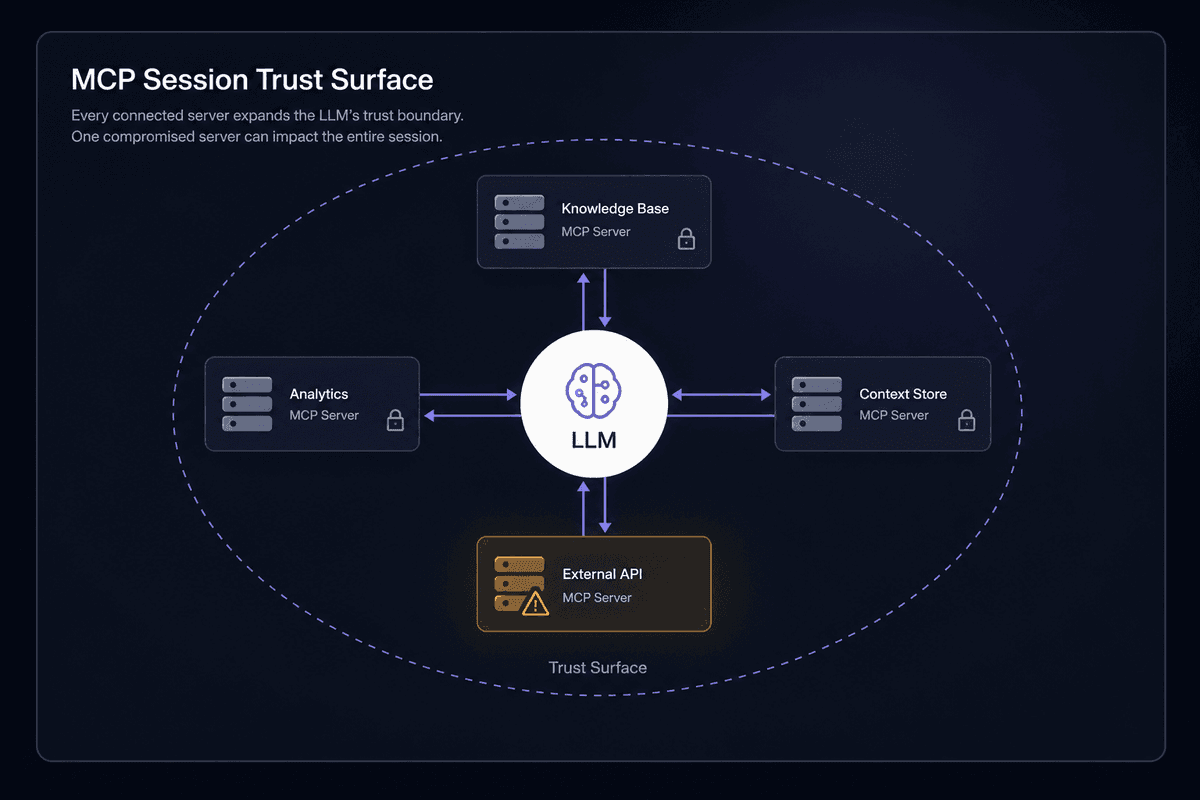
This is the threat model most teams don't think about until an incident. If one of the MCP servers registered in a session is compromised, the LLM can't distinguish its responses from legitimate ones. A poisoned server can inject instructions into tool responses that influence the LLM's behavior across the entire session - not just the calls made to that server. Every registered MCP server is part of the LLM's trust surface. The question isn't "is this tool safe?" It's "are all registered servers safe?"
💡 The counterintuitive part:
MCP's trust surface isn't bounded by the tools the user intentionally calls - it extends to every server registered in the session. A user who triggers one tool call is implicitly trusting every connected MCP server's permissions and outputs, including ones they've never directly interacted with. That reframes MCP security entirely: it's not "is this protocol safe" but "have I audited every server this session can reach." Most teams haven't.
MCP in Practice: Real Ecosystems and Where This Goes
The specification matters more when you see what's building on top of it. GitHub now has MCP servers for repository operations. Docker has published MCP tooling. OpenAI's ecosystem is beginning to intersect with the standard. TypeScript and Python SDKs exist and are actively maintained by the MCP project. Developers who would previously have written a custom connector for each AI model can now write one MCP server and expose it to any compliant host.
That's the practical test of whether a specification actually solved the NxM problem: do implementations reuse across model providers and hosts, or do teams still write custom code for each pairing? The evidence from the early enterprise deployments - however imprecise the 28% figure from Synvestable's analysis is - suggests that reuse is happening at meaningful scale, which means the specification is doing its job.
For teams building on Latenode, the MCP Server Builder lets you expose a Latenode workflow as an MCP server - callable from Claude Desktop, Cursor, or any other MCP-compatible host. The workflows sitting behind that server can pull from 5,500+ integrations, run AI against uploaded documents via built-in RAG, or execute custom logic in a JavaScript node. The protocol details stay invisible to whoever is calling the tool. From the caller's side it's just a tool they discovered during capability negotiation. From your side it's a full automation workflow.
The MCP specification defines the interface. What you put on the other side of that interface is up to you.
If you're building something that needs to stay running when things go wrong: implement the lifecycle handling first, not the tools. Add logging at the transport layer. Validate your JSON Schema declarations against real test payloads before connecting an LLM. And remember that every MCP server you register is part of your trust surface from the moment the handshake completes.
The protocol is clean. The hard part, as usual, is everything around it.




