




Most teams don't have a purchasing problem. They have a visibility problem that only shows up as a purchasing problem at the end of the month, when finance is reconciling and someone realizes three departments bought the same software subscription independently, none of them with a PO, and all three invoices are now sitting in AP's queue waiting for approvals that should have happened six weeks ago.
The purchase order process exists to prevent exactly that. Not as paperwork. As a control mechanism. The difference matters more than most guides admit.
Here's the argument this article is going to make, and it's one you can push back on: a structured purchase order process with clear approval rules and three-way matching reduces maverick spend and invoice exceptions more reliably than any single tool purchase. The tool helps. The process is the thing.
Where most PO processes quietly fail
- A PO that skips the requisition step hands finance a commitment they never saw coming.
- Three-way matching is the strongest signal of process health - low exception rates mean the rest is probably working.
- Automating approvals before policy rules are defined just routes the wrong spend faster.
- The PO isn't the document. It's the control point. Treating it as a formality is how maverick spend survives.
What the Purchase Order Process Actually Covers
Here's what I've noticed from spending time in procurement and AP conversations: when someone says "our PO process is broken," they almost never mean the document itself. They mean the whole sequence. The requisition that never got submitted. The approval that sat in someone's inbox for two weeks. The invoice that arrived before the goods receipt existed. The three-way match exception that surfaced at payment time when it should have been caught at receipt.
The purchase order process is an end-to-end procurement workflow that runs from the moment someone identifies a need all the way through to payment. The PO document is one artifact in that sequence. Without the controls around it - requisition, approval, receiving, matching - it's just a form.
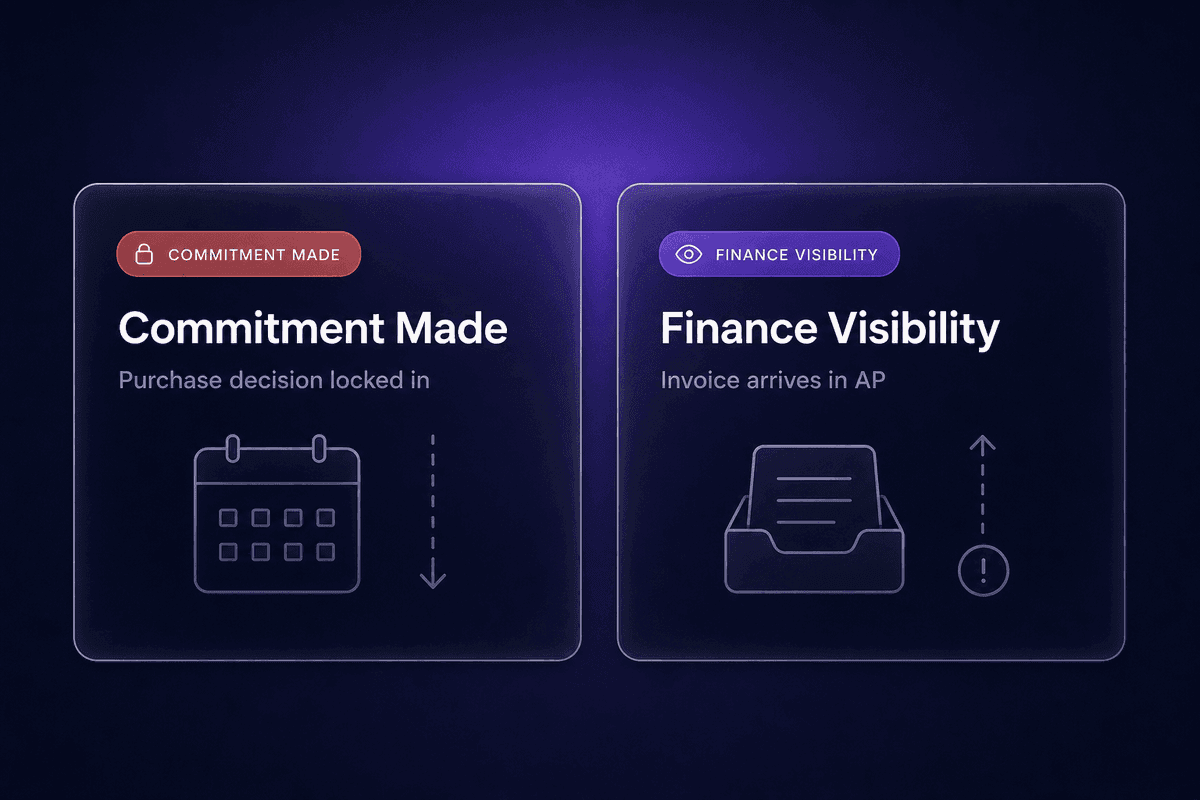
The procurement process fails most often not because teams lack tools, but because they treat the PO as an administrative formality rather than the control mechanism it's designed to be. Finance only sees the commitment when the invoice arrives. By then, the decision has already been made, the budget impact is locked in, and the only question is whether anyone can find the paperwork to justify the payment.
That's where the real cost lives. Not in the document. In the gap between commitment and visibility.
What a Purchase Order Is-and What It Commits Both Sides To
A purchase order is a document that a buyer issues to a seller listing the specific goods or services being requested, the agreed price, the quantity, and the delivery terms. That description is accurate. It's also incomplete.
The more important fact: a purchase order becomes a legally binding document once the supplier accepts it. At that moment, it's not a request anymore. It's a contract between buyer and seller, creating enforceable obligations on both sides. The supplier is committed to deliver what's specified. The buyer is committed to pay on the stated terms.
This is why incomplete PO details are not just an admin nuisance. A purchase order with vague item descriptions, missing unit prices, or unclear delivery terms is a contract with holes in it. Every one of those holes becomes a potential dispute at the invoice stage. The supplier sends 100 units; the PO said "units" without specifying. The price on the invoice doesn't match the figure in the email thread because the email wasn't the PO. Finance has to chase context that should have been recorded on day one.
Accepts a purchase order, and the agreement is live. Everything after that runs on what the PO actually says.
Purchase Order vs Purchase Requisition vs Invoice
These three documents do different things, and keeping track of which one does what is where AP involvement typically gets delayed.
A purchase requisition is an internal request. Someone in the business says "I need this," documents the details, and routes it for approval internally. Nothing has been committed to any external party yet. Purchase requests stay inside the organization until approved.
A PO is the external commitment. Once approved internally, procurement issues it to the supplier. Now the agreement is real.
An invoice is the supplier's payment demand. It arrives after delivery, referencing the PO, and asks accounts payable to release funds.
The failure pattern I keep seeing: AP gets pulled in at the invoice stage because the PO was issued without a proper requisition, or the requisition and the PO have different details, or nobody sent the PO to finance at all. So AP is reconciling three documents that don't talk to each other, chasing down the person who made the original request, and hoping the goods receipt actually exists somewhere. Late AP involvement is a symptom of a broken upstream process, not an AP problem.
The Key Steps in the Purchase Order Process
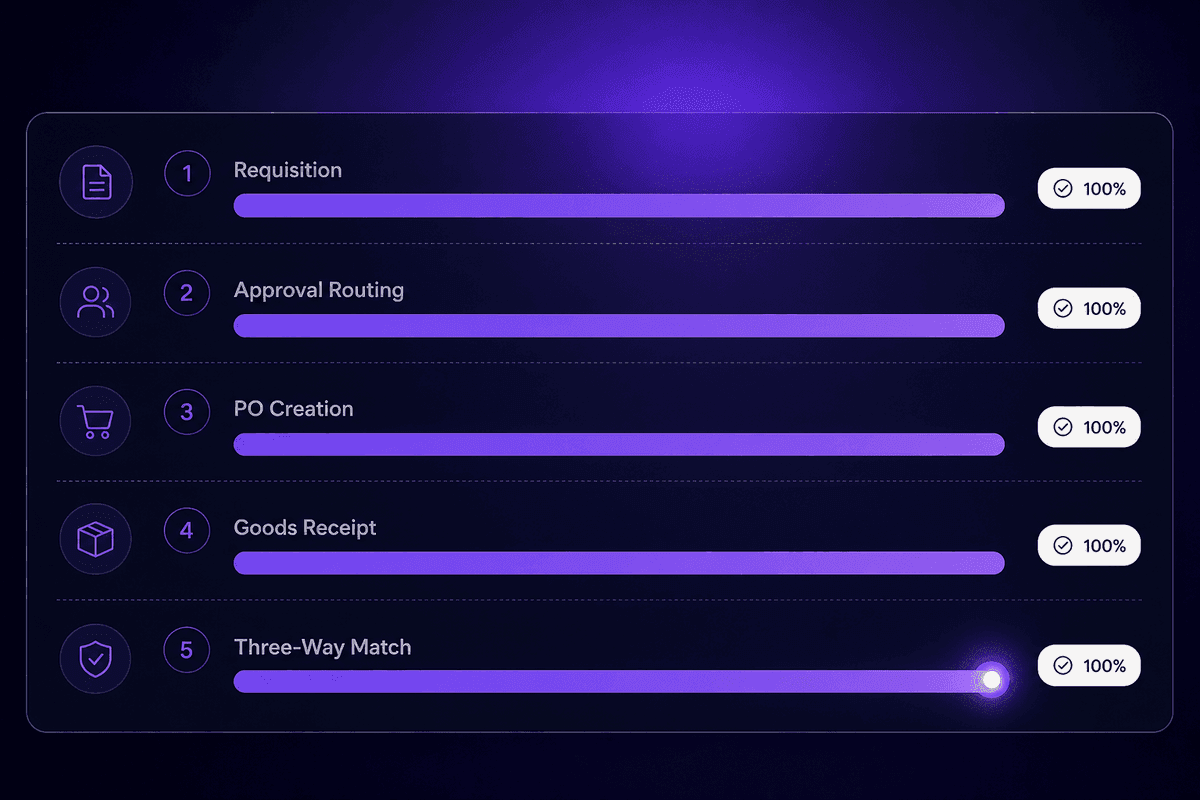
The process runs in a sequence that most teams know in theory and frequently shortcut in practice. Each step has a clear owner and a clear completion signal. When a step gets skipped, the next person in the chain usually finds out too late to fix it without friction.
Step 1: Identify the Need and Submit a Purchase Requisition
Every purchase starts with someone identifying a requirement. The requester's job at this stage is to document the need in enough detail that anyone reviewing it can make a sensible decision: what goods or services are being requested, why they're needed, what the estimated cost is, when they're needed by, and which cost center or budget line the spend should hit.
A purchase requisition captures all of this before any commitment is made to a supplier. This step ensures that every purchase is justified and budgeted before it reaches procurement - which sounds obvious until you consider how often it gets bypassed. When the finance team sees a requisition, they can verify it against the budget. When they don't, they're approving invoices for spend they didn't know was coming.
The completion signal for this step: a submitted, complete requisition with item details, cost estimate, timing, and cost center. Incomplete requisitions - missing cost centers, vague descriptions, no price estimate - stall every subsequent step and are one of the cleanest predictors of exception rates downstream.
Step 2: Apply Policy Checks and Route for Approval
Not every requisition follows the same approval path. Spend thresholds, vendor risk categories, and the type of goods or services being purchased all determine who needs to sign off and whether a formal PO is required at all.
A well-defined approval workflow maps specific spend bands to specific approval levels: purchases under a threshold go to a department head, larger spends go to finance, anything involving a new vendor gets an additional check, anything with contractual terms goes to legal. The policy does the routing. The approver just decides.
Skipping or soft-pedaling this step is the main driver of maverick spend. When approval routing is unclear, people default to whatever gets the purchase done fastest, which usually means bypassing the process entirely and using a company card. The spend management problem isn't the card. It's the absence of a clear approval process that makes the card feel like the easier option.
The approval process has a measurable completion signal: an approved or rejected requisition with a recorded decision, a timestamp, and the approver's identity. If you can't produce that audit record, the approval didn't happen in any meaningful sense.
Step 3: Create and Issue the Purchase Order
Once approved, procurement generates the PO and transmits it to the supplier. A complete PO has no optional fields. What a purchase order should include: a unique PO number, the supplier's full details, itemized descriptions with quantities and unit prices, delivery date and delivery details, payment terms, applicable terms and conditions, and the internal account code or cost center.
PO creation that skips any of these creates problems in direct proportion to how far into the process you go before noticing. A missing account code means the goods receipt can't be matched to a budget line. A vague item description means receiving staff can't verify what arrived. Missing payment terms mean the invoice might arrive with the supplier's preferred terms instead of yours.
Transmission method matters too. Email is still common. Supplier portals and EDI are better for high-volume or ongoing suppliers because they create a structured record and reduce the chance the PO gets lost in an inbox. However it's sent, the purchase order creation step is complete only when the supplier has unambiguously received and confirmed the document.
That confirmation is the moment the legal commitment becomes real. Everything before it is internal process.
Step 4: Fulfillment, Delivery, and Goods Receipt
The supplier fulfills the order and delivers. On the buyer's side, this step is about receiving, not just accepting. Someone physically or digitally confirms what arrived, compares it against the PO, and records the result in a goods receipt note (GRN).
The GRN records quantities received, any shortages, any visible damage, and the date of receipt. This document becomes the middle leg of the three-way match in the next step. Without it, AP has no verified record of what was actually delivered, which means any invoice discrepancy instantly becomes a dispute about facts rather than a clear exception to resolve.
This step also feeds inventory management: the received goods update stock levels, which affects reorder planning and supply chain visibility. Receiving staff who treat this step as a formality, marking goods as received without inspecting them, create the same downstream problem as skipping the requisition: someone in AP is going to be reconciling incomplete information under time pressure.
The completion signal: a posted GRN that matches or documents variance from the PO, attached to the original PO record in the system.
Step 5: Three-Way Match, Invoice Approval, and Payment
The supplier sends an invoice referencing the PO. AP's job is to verify it against two other documents: the original PO and the goods receipt. This is three-way matching: comparing all three to confirm that what was ordered, what was received, and what's being billed all align on quantities, prices, and terms before payment is released.
When the invoice matches the PO and the GRN within tolerance, it can be approved automatically and queued for payment. That's the target state. When it doesn't, it becomes an exception: someone in AP has to investigate the discrepancy, contact the supplier or the internal requester, and resolve the mismatch before the payment can move.
The practical success signal for AP is the inverse of exception rate. A high automatic match rate means the upstream process is working. Low exceptions on vendor invoices mean POs are complete, receiving is accurate, and invoice matching runs clean. A high exception rate means something upstream is broken, usually at the requisition, PO creation, or receiving step, and AP is absorbing the cost of that breakage in the form of manual resolution work.
Every invoice exception is a question that should have been answered earlier. Three-way match just reveals where the answer is missing.
📊 In practice:
A three-way match discrepancy looks like this: the PO states 50 units at $120 each, the GRN records 47 units received with 3 noted as damaged, and the vendor invoice bills for 50 units at $125 each. AP now has two mismatches to resolve simultaneously - the unit count variance and the price discrepancy - neither of which the supplier can waive without a formal credit note. This scenario surfaces at the payment stage because receiving didn't flag the damage formally and the price change wasn't communicated through a PO amendment. Both were fixable at the time they happened.
Types of Purchase Orders and When Each One Applies
Not every purchasing situation calls for a standard one-time PO. The type of purchase order you use should match the commercial relationship, the frequency of purchases, and the level of pricing certainty. Using a standard PO for a recurring supplier relationship creates unnecessary administrative volume. Using a blanket PO for a one-off purchase means you've committed to a volume you may not need.
There are four main types of purchase orders, and each has a specific context where it performs well and a context where it creates more problems than it solves.
| PO Type | Typical Use Case | Key Benefit | When to Avoid It |
|---|---|---|---|
| Standard purchase order | One-time purchase with known quantity, price, and delivery date | Clear commitment on both sides; easy to match and close | Recurring purchases from the same supplier - creates unnecessary PO volume |
| Blanket purchase orders | Recurring purchases from a supplier over a defined period, with agreed pricing | Reduces administrative overhead; locks in pricing and terms for a period | When volume is genuinely unpredictable - you're committing to spend that may not materialize |
| Contract purchase orders | Long-term supplier relationships where terms and conditions are agreed in advance, but quantities are not fixed | Establishes legal framework upfront; individual releases are simple to issue | Short-term or one-off purchases - the upfront negotiation cost isn't justified |
| Planned purchase orders | Purchases where quantity and delivery date are estimated in advance based on forecasts, with a firm schedule | Supports inventory planning and supplier capacity management | When forecasts are unreliable - a planned PO with wrong quantities creates receiving and invoicing mismatches |
In practice, most SMBs run on standard POs and eventually graduate to blanket POs once their supplier relationships stabilize. Contract and planned POs tend to appear when procurement volume justifies the setup cost or when supply chain planning requires more structured lead time management. The mistake I see most often: teams default to standard POs for everything because that's what they know, then wonder why AP is processing the same supplier invoices twelve times a year instead of consolidating against a single blanket agreement.
Common Challenges in the Purchase Order Process-and What Causes Them
The failure modes in a PO process are not random. They cluster around the same root causes, and most of them are detectable before they produce a support ticket for finance or a late payment to a supplier. Here's what actually breaks, and how to spot it early.
Skipping the requisition step entirely
When line-of-business teams bypass the requisition and go straight to a purchase, procurement and finance see the commitment for the first time at the invoice stage. There's no approved budget check, no cost center confirmed, no record of who authorized the spend. Detection signal: invoices arriving in AP with no matching PO on file.
Incomplete PO details at creation
A PO created without full item specifications, account codes, or accurate pricing creates a discrepancy between what was committed and what's on the invoice. This isn't just an admin error - it's a contract hole that the supplier will fill with their own interpretation. Detection signal: three-way match exceptions at payment stage where the mismatch traces back to a vague or incomplete original PO.
Late AP involvement in the workflow
AP that enters the process only at the invoice stage has no opportunity to flag commitment errors, budget overruns, or vendor terms issues before they become problems. The accounts payable team becomes a reactive resolver rather than a proactive control. Detection signal: AP exception resolution time running longer than three days on routine invoices.
Manual workflows generating duplicate POs
Email-based and spreadsheet-driven PO processes create duplicate purchase orders when approvers forward the wrong version, or when the same requisition gets issued twice because the first one wasn't tracked. This produces duplicate vendor invoices and duplicate payments if AP doesn't catch the duplicate PO problem upstream. Manual data entry compounds this - the same request gets keyed twice by two different people. Detection signal: a supplier calling about a duplicate shipment or AP finding two open POs for the same requisition.
Missing or weak vendor management controls
Issuing POs to vendors not in the approved vendor master, or to vendors with expired contract terms, creates compliance and spend management exposure. Supplier management discipline - validating vendor records before PO issuance - is a basic control that manual processes regularly skip under time pressure. Detection signal: invoice processing exceptions where the vendor name doesn't match any record in the approved vendor list, or payment holds triggered by missing vendor documentation.
Absence of visibility into PO status
When open POs aren't tracked in real time, teams can't answer basic questions: what's been ordered and not yet received, what's been received and not yet invoiced, what's open and overdue. This is a po process gap that produces budget surprises at month-end and gives procurement no early warning on delivery delays. Detection signal: finance teams running manual status-check emails to suppliers because there's no dashboard showing open orders.
Maverick spend bypassing the PO process
When the formal process feels too slow, people use company cards or informal approvals. The spend happens, the vendor delivers, and the invoice arrives with no PO to match against. Finance sees the commitment for the first time at reconciliation. This is maverick spend, and it's almost always a symptom of an approval process that takes too long or asks for too much from the requester. Detection signal: a high percentage of vendor invoices flagged as "no PO" in AP.
Vendor relationships suffering from poor communication
Suppliers who receive inconsistent or incomplete POs, or who can't get acknowledgement that their invoices are in the matching queue, chase payment through account managers and escalation calls. That's vendor relationship friction that maps directly back to PO quality. Detection signal: supplier payment queries arriving through channels other than AP, or suppliers requesting early payment discounts as compensation for persistent invoice delays.
That is where most month-end close surprises start.
Purchase Order Automation: What to Actually Automate and What to Leave Alone
The APQC benchmark data is worth sitting with here: top-performing procurement functions process a median of 7,405 purchase orders per FTE annually, while bottom performers manage 1,460. That's a 5x productivity gap between quartiles, and the difference isn't headcount - it's how much of the work is handled by people versus systems. Manual email routing, spreadsheet tracking, and re-keying data from PDFs into ERP systems are the things that put teams in the bottom quartile. Automation in the right places moves them up.
But "automate the PO process" covers a lot of ground, and not all of it is equally ready to automate. Some parts genuinely remove friction. Others, when automated before the process is stable, create new problems faster than the old ones were costing you.

Where Automation Fits into the PO Process Flow
The highest-value automation targets in a PO process are the steps that are repetitive, rule-based, and currently done by humans who are spending time on the mechanics rather than the decisions.
Requisition routing is the first place to look. The rules about who approves what based on spend threshold and cost center are usually already documented somewhere. Encoding them into an approval workflow so the system routes automatically, rather than the requester figuring out who to email, cuts cycle time significantly without requiring anyone to make a different decision. The decision gets made. Just faster, with less chasing.
PO generation from approved requisitions is the next. If the requisition has all the required fields and the approval is complete, there's no reason a person should be manually creating the PO document. The data's there. The system can populate it.
Supplier acknowledgement confirmation and three-way matching logic are where automation pays off most clearly in AP. Manual email and spreadsheet processes for matching are the primary source of duplicate POs, missed exceptions, and late payments. Automating the match doesn't eliminate exceptions; it moves human attention to the exceptions that actually need judgment, and keeps the clean matches flowing without manual intervention.
The completion signal for an automated purchasing process: the cycle from approved requisition to issued PO happens in minutes, not days. Most of the work is routing and status updates. Humans own the decisions and the exceptions, not the paperwork in between.
How to Automate Your Purchase Order Process Without Breaking Approvals
Here's the mistake I see most often when teams decide to automate their purchase order process: they build the automated approval routing before they've written down what the policy actually is.
The automation runs. Requests flow through. And spend management gets worse, not better, because the rules the system is enforcing are incomplete or inconsistent. An automation that routes a $50,000 software purchase to a department head for approval because nobody defined the threshold for finance review isn't automating your process. It's automating a gap in your governance.
The right sequence: define the policy first. Write it down in a format that could be coded: "purchases under $2,500 go to the department head; $2,500-$25,000 go to the department head and finance; above $25,000 require CFO approval and a three-quote minimum." Then automate that. Specific, testable rules. Real-time routing based on fields that exist in your requisition form.
The second risk is automating a single step in isolation. Automate approval routing but leave PO creation manual, and you've sped up the part that wasn't the bottleneck. Automate requisition submission but leave approval routing manual, and the requisitions just queue up faster. The process has to be traced end-to-end before you decide what to automate first.
In Latenode, a workflow that handles approval routing for POs connects a requisition intake form to a JavaScript node that applies the business rules, then routes to the appropriate approver with full budget and vendor context pulled from your finance system via one of over 5,500 available integrations. Because Latenode's pricing is per execution rather than per step, this multi-step flow counts as a single execution. Worth knowing before you price out how many approvals you expect to run in a month.
Digital Purchase Orders and Supplier Portal Integration
Transmitting POs by email creates an acknowledgement problem. You sent it. Did they receive it? Did they read it? Is there a confirmation? Email doesn't answer those questions automatically, and chasing acknowledgement is exactly the kind of low-value work that erodes procurement cycle time.
Digital purchase orders transmitted through supplier portals or EDI (Electronic Data Interchange) solve this. The supplier receives the PO in a structured format, the portal logs the receipt and any acknowledgement, and the buyer gets confirmation without a follow-up email. The audit trail is clean from the start: every version, every acknowledgement, every change captured in the system.
For supply chain scenarios where delivery timing matters - where a missed or misunderstood PO creates a receiving gap that backs up the whole procurement process - that structured acknowledgement is worth more than it looks. The visibility it creates upstream directly reduces the number of receiving discrepancies and three-way match exceptions downstream.
Best Practices for Purchase Order Management That Finance Teams Actually Use
The best practices for purchase order management that actually survive contact with real procurement teams are not about being organized. They're about governance: rules that are enforced consistently, roles that are clearly defined, and data quality that's high enough that you can actually trust the numbers you're reviewing.
Here's what works in practice.
Define spend thresholds clearly, in writing, in the system. Every company needs a documented policy that maps spend levels to approval requirements. Not as a PDF on the intranet - encoded into the approval workflow. When the threshold lives only in someone's memory or in a document nobody reads, it doesn't function as a control.
Validate vendor master data before any PO is issued. AP problems that trace back to vendor data - wrong payment terms, outdated bank details, duplicate vendors - are largely preventable at the procurement team level by maintaining a clean, validated vendor list and requiring PO creation to reference an approved vendor record.
Use a centralized PO system as the single source of truth. When POs live in spreadsheets, email threads, and separate procurement software and accounting software, nobody has real visibility into open commitments. Finance teams need to be able to answer at any moment: what's been ordered, what's been received, and what's still outstanding. That's only possible if all PO data lives in one place. Accounting systems and procurement software that don't talk to each other are a visibility problem wearing a technology costume.
Assign a PO template that enforces required fields. A template that can be submitted incomplete is not a control - it's a suggestion. Required fields in the template (account code, cost center, vendor reference, delivery date) prevent the downstream exceptions that incomplete POs create.
Review match rates as a process health metric, not an AP metric. The automatic three-way match rate is the most informative number a finance team can track for PO process health. A match rate that drops tells you something broke upstream - in requisition quality, PO completeness, or receiving accuracy. Reviewing it monthly and tracing exceptions back to their source is how the process improves over time. The procurement team owns the inputs that determine what this number is.
🤔 Think about this:
Most PO process guides tell you how to run the process. Almost none of them tell you what "working" looks like in measurable terms. If you can't answer these three questions, you don't know whether your process is performing or just running: What's your cycle time from approved requisition to issued PO? What percentage of your total spend is covered by POs? What's your automatic three-way match rate? A target match rate above 80% is a reasonable starting benchmark. Cycle times above five business days for routine purchases usually indicate approval routing is the bottleneck. Spend coverage below 70% usually means maverick spend is a real problem, even if nobody's named it yet.
How to Choose the Right Purchase Order System for Your Team
The decision between a dedicated procurement platform, an ERP-embedded PO module, and a lightweight spend management tool comes down to four factors: team size, approval complexity, integration requirements, and how seriously your organization takes audit readiness.
The honest answer is that only 9% of organizations have fully automated their spend analysis according to Ardent Partners' CPO Rising 2025 data, with 28% still using manual spreadsheet-based reporting. Most teams are earlier in this journey than the vendor demos suggest.
Here's how to think through the choice:
If your team is under 20 people and your approval structure is simple, tools like a basic spend management module or a lightweight procurement system handle the core workflow without a six-month implementation project. The purchasing process is simple enough that the overhead of a full ERP PO module isn't justified.
If you're running 50+ people with multiple approval tiers and multiple cost centers, you need something that can encode real approval rules, connect to your accounting systems, and produce purchase order records that your auditors will accept. An ERP with a built-in PO module (think NetSuite, SAP, or similar) gives you that integration without a custom-build. The tradeoff is setup complexity and the fact that ERP PO modules are often built for accountants, not for the requester who just needs to order something.
If your primary pain is AP exceptions and three-way matching volume, AP automation tools that specialize in invoice matching are worth evaluating separately from procurement systems. The procurement system handles the front of the process; AP automation handles the back. They need to connect, which is where integration requirements become real.
A quick decision framework:
| Your situation | Likely right fit | Watch out for |
|---|---|---|
| 15-person team, simple approvals, limited audit requirements | Lightweight spend management tool | Outgrowing it in 18 months as headcount and vendors grow |
| 50-person+ team, multiple approvers, ERP already in place | ERP-embedded PO module | Poor UX for requesters; low adoption if the process feels burdensome |
| High PO volume, recurring suppliers, AP bottleneck | Dedicated procurement platform with AP integration | Integration complexity with existing accounting software and supply chain systems |
| Multi-system environment, custom approval logic needed | Workflow automation connecting existing tools | Requires clear process definition before automating; automation before governance creates faster chaos |
Payment terms enforcement, cash flow visibility, and audit trail quality should all be on the evaluation checklist regardless of which category you're in. The procurement costs of a bad system decision aren't just the software price - they're the AP exceptions, the maverick spend, and the audit findings that follow when the process doesn't actually run the way it was designed.
Software like Latenode fits the fourth row of that table well, specifically the case where approval logic is complex enough to need custom rules, or where the PO workflow needs to connect to systems that don't have a native integration. For teams that already have an ERP and an AP tool but need a way to route requisitions based on business logic and sync records between systems, a workflow layer that applies the policy rules in code and connects the existing tools is often faster to implement and easier to modify than a new procurement system purchase.




