




"We need to streamline our processes." You've heard it in a planning meeting, seen it in a strategy deck, maybe written it yourself in a quarterly objective. And then everyone nods and moves on, because nobody wants to be the person who asks what it actually means.
That's the real problem. The phrase travels everywhere. The definition rarely follows.
Before automation enters the conversation
- Streamlining means removing non-value-adding steps first - automation comes after, not instead.
- The most common mistake: treating "streamline" as a synonym for "automate," which scales broken processes faster.
- The same principles apply whether your team has 5 people or 5,000 - the scope changes, not the logic.
What Streamlining Processes Means, Without the Jargon
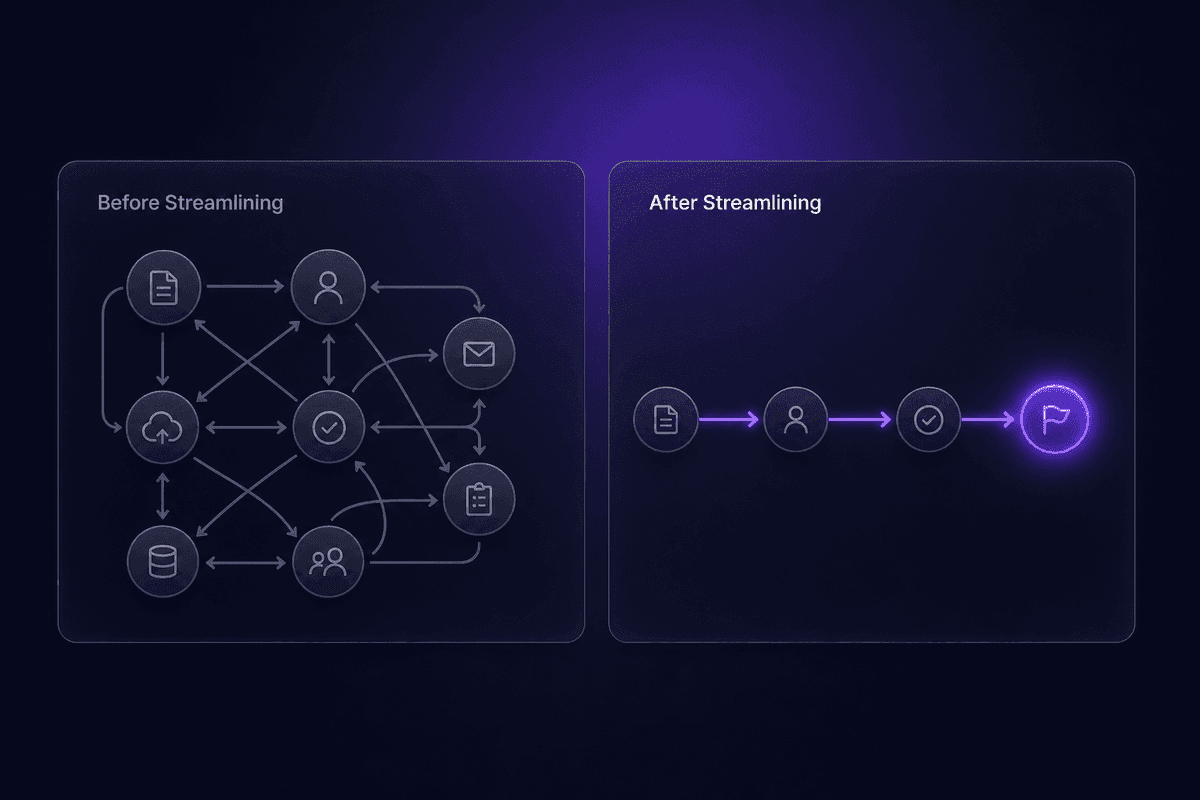
To streamline processes means to remove what doesn't need to be there. Unnecessary steps, redundant approvals, repeated data entry, handoffs that exist because of habit rather than necessity - these are the things process streamlining targets.
Rebecca Wilson's framing on LinkedIn puts it cleanly: streamlining is about making work flow with less friction, fewer errors, and less wasted effort. Indeed's take is similar: it's the practice of simplifying a workflow so that work moves from start to finish without stalling, duplicating, or bouncing between people for no clear reason.
The definition matters because the phrase gets misused constantly. "Streamline processes" doesn't mean "buy a new tool." It doesn't mean "automate everything in sight." It means: look at what your process currently consists of, identify what's adding cost or delay without adding value, and remove or redesign those parts. The outcome is a process that does mean something operationally - faster cycle times, fewer error points, clearer ownership.
That's it. The concept isn't complicated. The application usually is, which is why the jargon creeps in.
The Core Idea: What a Streamlined Workflow Actually Looks Like
A non-streamlined workflow has a recognizable shape. There are approval steps where the approver adds nothing except a signature. There's data entered in one system, exported to a spreadsheet, and re-entered in another. There are three people cc'd on an email because nobody ever decided who actually owns the decision.
When processes are streamlined, that shape changes. Fewer handoffs. Decisions happen at the point where the information lives, not two hops away. Manual data entry disappears where automation handles rule-based tasks - invoice fields, status updates, routing logic.
Kissflow describes this well: the goal is reducing unnecessary steps and replacing manual handoffs with automated movement wherever the logic is clear and repeatable. A streamlined workflow still involves people. It just stops wasting their time on the parts that don't need them.
How Streamlining a Process Differs from Just Automating It
Automation is one tool. Streamlining is the work you do before you reach for the tool.
The misconception I keep seeing: teams decide to "streamline and automate" their processes, then immediately open their workflow software and start building. The logic sounds right - automate the manual steps, eliminate the waste. But if you automate a broken process, you get a faster broken process. The bottleneck doesn't disappear. It runs at scale.
HEFLO and Kissflow are both explicit about the sequencing: map the current process, identify the bottlenecks, simplify and standardize, and only then selectively apply automation. That order isn't arbitrary. You can't simplify what you haven't mapped. You can't automate well what you haven't simplified first.
Streamlining often means cutting steps before any software is involved. Sometimes the answer is just: that approval layer adds nothing, remove it. The automation comes later, to handle what remains.
Why Businesses Need to Streamline Processes in the First Place
The operational drivers are concrete. Faster cycle times. Fewer errors. Lower costs. Staff time redirected toward work that actually requires judgment.
ExpenseIn's research on the cost of manual business operations describes what most ops managers already feel: repetitive manual work is expensive not just in salary cost but in error rates, in delays, in the follow-up that every mistake creates. Kissflow's framing adds the revenue side - process inefficiency doesn't just cost money directly, it slows the delivery of outcomes that customers pay for.
The goal of streamlining is to improve efficiency in ways that show up in real metrics: the time from lead to proposal, the days to process an invoice, the response time on a support ticket, the hours per week a finance team spends reconciling data. These aren't abstract. They're measurable, and they move when processes actually improve.
There's also a business performance angle that tends to get underplayed: streamlined processes make organizations more adaptable. When your workflows are documented, simplified, and clear, changing them is faster. When they're tangled, every change touches something unexpected. That's the difference between a team that can pivot in two weeks and one that can't.
The practical drivers behind process streamlining also connect to something McKinsey's 2025 AI adoption survey makes visible: by mid-2025, 88% of organizations were using AI in at least one business function, up from just over half in 2021. That shift means "reduce costs and improve efficiency" increasingly involves combining classic process improvement with AI-assisted steps - not replacing the logic of streamlining, but extending it.
📊 In practice:
Most processes can be redesigned and re-implemented within weeks, not years, when teams prioritize the workflows closest to customer impact and revenue flow. The assumption that process improvement is a slow, large-scale undertaking is one of the main reasons it keeps getting deferred. It doesn't have to be a transformation program. It can start as a Tuesday afternoon.
What Streamlining Business Processes Actually Involves, Step by Step
The typical sequence is simpler than most process improvement literature suggests, but it does require doing things in the right order.
You start by looking at your current processes as they actually run - not how they were designed to run, not how they appear on an org chart, but the actual sequence of steps that happens today. This is sometimes uncomfortable. The map reveals the workarounds.
From there, you identify where the friction is: the steps that slow things down, the handoffs that add delay, the data that gets entered more than once, the approvals that bottleneck without adding oversight. The HEFLO process improvement framework describes this as eliminating the inefficiencies that slow you down - which sounds obvious until you realize most teams have never actually documented where those inefficiencies live.
Next comes the part most teams skip: simplify and standardize before adding tools. Remove the step that shouldn't exist. Standardize the format so data doesn't need to be cleaned downstream. Clarify who owns what decision. This is the work that makes automation worth doing later.
Then, and only then, you look at what's left and ask: which of these remaining steps is rule-based and repeatable? Those are your automation candidates. Not everything - just the parts where a computer will consistently outperform a human copy-pasting data between systems.
The Moxo framing captures the goal well: the point is eliminating inefficiencies that slow you down, not replacing every human touch in sight.
Mapping the Current State and Spotting Inefficient Processes
When you map out your current process, you're doing something specific: you're looking at each step and asking four questions. Who initiates it? Who owns it? How long does it take? And where does it stall?
The stalling is usually where the bottleneck lives. You're looking for existing processes that have accumulated steps nobody questions anymore - the approval that was added after one bad incident in 2019, the weekly report that two people create independently and then compare manually, the field that gets filled out in the CRM and also in a spreadsheet because "just in case."
Visibility into process status matters here. A lot of teams know something is slow, but they can't tell you exactly where it slows. Mapping gives you that visibility. Once you can see where work waits, you can act on it. Before the map, you're guessing.
How to Make a Process More Efficient Before Adding Tools
Making it more efficient starts with a simpler question than most people expect: does this step need to exist at all?
Remove what doesn't earn its place. Then standardize what remains - the same input format, the same naming convention, the same decision criteria applied consistently. This isn't about control. It's about reducing the variation that creates downstream errors and re-work.
Process changes at this level often require no software. Rewriting a form so it captures the right information up front. Removing an approval layer that doesn't catch anything meaningful. Defining what "done" means for a task so it doesn't bounce back three times.
I've watched teams go through this and discover that their "automation problem" was actually a process clarity problem. When they improve business processes at the structural level first - simplify, standardize, clarify ownership - the automation step becomes much smaller and much more reliable. Because you're automating something that already works, just manually.
Benefits of Streamlining Business Processes That Show Up in Real Work
The concrete outcomes of streamlined processes aren't vague productivity improvements. They show up in specific, recognizable ways.
- Shorter cycle times from trigger to outcome
When unnecessary steps are removed and handoffs reduced, the time from "process starts" to "process completes" drops. A finance manager who used to spend three days chasing invoice approvals via email finishes the same cycle in hours when the routing is automated and approvers get a direct request with context. That's cycle time made visible.
- Fewer errors from manual data entry
Every time a person copies data from one system to another, there's an error risk. Streamlined processes cut the number of manual transfer points, which cuts the error rate. The downstream effects of that - less reconciliation, fewer corrections, lower re-work volume - are where the real time savings show up.
- Reduced redundancy in how work gets done
Redundancy is expensive in a specific way: it's invisible. Teams often don't know they're doing the same thing twice until someone maps it. Removing that overlap saves time and reduces the coordination overhead that comes with managing parallel effort.
- Staff capacity freed for higher-value work
When employees are no longer the routing mechanism between systems, they stop spending time on work that doesn't require them. Processes improve and that freed capacity goes somewhere more useful - judgment calls, relationship management, the things automation can't handle.
- Lower operational costs without eliminating roles
Manual work has a cost per unit that scales linearly. Automated rule-based steps don't scale the same way. As volume increases, the cost of a streamlined process grows much more slowly than the cost of a purely manual one. This is how process streamlining reduces costs operationally without necessarily reducing headcount.
- More consistent customer outcomes
Inconsistency in a customer-facing process is usually a process problem. When a customer experience depends on who specifically handles their request that day, the process isn't standardized. Streamlining removes that variance. Every customer gets the same response time, the same information, the same follow-up - because the process runs the same way every time. Saves time internally and improves what the customer actually receives.
Where Streamlining Processes Gets Applied Across Business Teams

Process streamlining isn't an operations-only concept. The same logic applies across every function - the workflows look different, but the underlying problem is the same: work that stalls, data that gets re-entered, decisions that wait longer than they should.
Different teams recognize the problem in different language. Finance calls it approval bottlenecks and reconciliation overhead. Sales calls it CRM hygiene and follow-up gaps. Support calls it response time and ticket routing. HR calls it onboarding friction. The language varies. The structure of the problem doesn't.
Operations and Back-Office: Approvals, Onboarding, and Expense Workflows
For HR, finance, and back-office teams, the highest-friction workflows tend to be the ones with lots of repetitive tasks that have to happen in the right sequence. Employee onboarding: system account creation, welcome communications, access provisioning, first-week scheduling. Expense management: submission, categorization, approval routing, posting to the accounting system. Invoice processing: extraction, coding, routing, approval, sync.
Each of these involves team members who are intelligent, skilled people spending significant time on steps that don't require intelligence or skill. They require consistency. That's what workflow automation handles well.
The streamlining move here is twofold: first, simplify the approval layers and remove the steps that exist out of habit. Then automate repetitive tasks that follow clear rules. Financial processes that used to take days because an approver was in a different time zone can complete in hours when the routing happens automatically with the right context attached.
Latenode's scenario builder maps naturally to these workflows. In the AP invoice scenario described in Section E, a finance manager builds a flow that extracts vendor, amount, and line items from incoming invoices via an AI model - selected from the 1,200+ available in a single dropdown, no separate API setup - then applies coding and approval rules inline using a JavaScript node, and routes everything to the accounting system and approver chat automatically. What previously took hours of manual handling becomes a review-exceptions job. The setup took under 90 minutes. The improvement in cycle time was the kind that shows up in month-end close.
Customer-Facing Teams: Process Efficiency in Sales, Service, and Support
For sales, customer service, and support teams, process efficiency shows up in two numbers: response time and consistency. Customers feel variation in both. A support ticket that gets answered in 11 minutes has a different quality impression than one that takes four hours, even if the answer is identical.
The sales process has its own version of this. Leads that wait two days for initial outreach convert at lower rates than leads contacted the same day. When the routing, enrichment, and assignment happen automatically, the response time improves without requiring the team to be faster as individuals.
Customer relationship management systems hold a lot of this data, but the gap between CRM data and actual process execution is where things break. The contact is in the system. Nobody followed up. The ticket was assigned. Nobody noticed it had been sitting for 48 hours. Streamlined processes close that gap by making the process state visible and routing exceptions automatically.
Customer experience improves most when the consistency is highest - when every customer who submits a request with a certain priority level gets the same quality of response within the same window, regardless of which team member happens to be on that day. Process streamlining is what makes that consistency achievable.
That is where most support leads discover the real scope of the problem.
Four Misconceptions About Process Streamlining That Create Real Problems

I've watched each of these cause actual damage. Not theoretical damage - delayed projects, false-start automation builds, demoralized teams. They're worth naming directly.
Misconception 1: Streamlining is code for layoffs
This one is persistent and does real harm. When a team hears "we're going to streamline our processes," the first thing many people assume is that someone has decided there are too many of them. That's not what the phrase means, and conflating the two creates resistance that kills improvement efforts before they start.
The goal is eliminating redundant steps and manual work, not headcount. When repetitive tasks get automated, the people who were doing them get their time back. What they do with that time is a management question, not a process question. I've seen teams where streamlining genuinely enabled growth without adding staff - the same team handled more volume because the process got better. Nobody lost a job. The workload got less exhausting.
Misconception 2: It's a one-time project
Teams treat process improvement like a construction project: you design it, build it, and it's done. Then they wonder why the same inefficiencies reappear six months later.
Processes drift. The tool gets updated, the team changes, the volume grows, the customer expectation shifts. A process that was streamlined for a 20-person company starts developing new bottlenecks at 60 people. You have to optimize regularly, not just once. Scribe's framing on this is worth holding: streamlining is an ongoing cycle of measuring, refining, and re-optimizing, not a deliverable with a launch date.
🤔 Wait.
If most teams treat process streamlining as a project, complete it, and then stop - why do the same inefficiencies keep appearing six months later? Because processes don't stay streamlined on their own. Without a regular review cycle, every process gradually accumulates the workarounds, exceptions, and informal steps that made it inefficient to begin with. The "project" framing guarantees the result doesn't hold.
Misconception 3: This only works for large enterprises
I keep seeing this assumption even in smart teams. The idea that process documentation, workflow mapping, and automation are things companies only do once they cross some headcount threshold. This isn't true, and it's actually backwards.
A 10-person company with a messy, undocumented process wastes a higher percentage of its available capacity than a 500-person company with the same problem. The principles are the same at any size. Affordable tools and straightforward workflow mapping make it accessible to small teams. A new process that clarifies one repetitive workflow can have outsized impact in a company where one person's time is a significant fraction of total capacity.
Misconception 4: Streamlining means automating everything
This is the one that creates the most technical debt. A team decides to "really streamline" their operations and immediately starts building automations across every repetitive task they can identify. Six months later, they have a collection of automations nobody fully understands, some of which are running on stale logic, some of which conflict with each other, and one of which is doing something that was already replaced by a software update last quarter.
The right sequence - map, identify, simplify, then selectively automate - doesn't get followed because automation feels like the action. It's faster, more visible, more satisfying than the unglamorous work of removing steps and standardizing inputs.
But automating is only the last step. A business grows and its processes need to grow with it. Each new process should start with the same question: what can we remove before we decide what to automate?
Ways to Streamline Processes That Work Across Team Sizes
The tactics below don't require a specific platform or a transformation program. They work at five people and at five hundred.
Standardize documentation before anything else. Pick one place where process steps live and one format for how they're written. The goal isn't perfection - it's consistency. When everyone uses the same format, gaps become visible. When documentation lives in one place, maintenance is possible. "Standardize" here doesn't mean spend six months writing process manuals. It means: before this workflow runs again, write down the steps in a way that someone else could follow them.
Reduce approval layers to what actually matters. Most approval chains have at least one layer that exists because nobody removed it when circumstances changed. Audit each one: what decision is this approver making, and what information are they acting on? If the answer is "they rubber-stamp everything" or "they escalate anything unusual anyway," the layer is a delay mechanism, not a control. Remove it from existing workflows and watch the cycle time drop without changing any software.
Consolidate communication channels around specific workflows. Tool sprawl creates coordination overhead. Work gets done across email, Slack, a project management tool, and two different docs platforms - and nobody has full visibility. When you pick one channel for a specific workflow and move everything there, the number of dropped handoffs drops sharply. This is especially true for approval flows where the approver might not see the request until three days after it was sent to the wrong channel.
Automate repetitive tasks after the process is clean. Rule-based, high-volume, low-judgment tasks are the right automation targets: routing, data capture, status updates, notifications, record creation. Tools in the business process automation space - including project management tools that handle workflow routing and automation software that connects your apps - handle these well when the underlying process is already simplified. When it's not, you're automating confusion, and that runs faster than confusion usually should. Using technology to handle the repetitive middle of a workflow frees team members to focus their time on strategic work at the edges where judgment is actually needed.
Measure before and after. Streamlining efforts that don't define a before-state have no way to confirm improvement. Pick one metric per workflow: cycle time, error rate, handoff count, re-work volume. Measure it before you start. Measure it three months later. Optimized processes are ones where that number actually moved - that's how business outcomes from process work become visible instead of assumed.
Increase productivity isn't a number that floats. It appears in specific metrics, in specific workflows, measured against a specific baseline. The goal is to eliminate the steps that inflate those metrics without adding value. Business process improvement, at any scale, is that simple and that hard.




