Most teams know their work is happening. Emails go out, orders get filled, invoices get paid. The work moves. But somewhere between "the work moves" and "we understand why it sometimes doesn't," there's a gap. That gap is where formalizing a business process earns its keep.
A business process is not just documented work. It's a repeatable, stakeholder-oriented sequence of activities that makes performance predictable, auditable, and - critically - improvable. That distinction matters more than it sounds. Ad-hoc work can produce results. A business process produces results you can measure, repeat, and fix when they degrade.
The part teams learn late
- A business process is distinct from a task or project - it's a repeatable sequence with a measurable, stakeholder-facing outcome.
- Formalizing processes changes performance predictability; ad-hoc work can succeed once, a process can succeed reliably.
- Three types matter in practice: core (delivers customer value), support (enables core), and management (plans and controls).
- Automation applied before a process is stable just produces faster failures.
What a Business Process Actually Is (and What It Is Not)

A business process is a structured, repeatable series of activities performed by people or systems to achieve a specific organizational goal and deliver value to a stakeholder. That stakeholder is often a customer, but it can also be an internal team, a regulator, or a partner. What defines it is the end-to-end nature: the sequence runs from a triggering event (a customer request, a new hire, an invoice arrival) to a defined outcome.
The Gartner-cited framing from process management research puts it cleanly: a process is event-driven, end-to-end, and produces a result oriented toward what the customer or stakeholder actually receives. That's different from a lot of how teams think about their work.
Here's what a business process is not. A business task is a single unit of work - one action, one person, one moment. A process is a series of connected tasks. A business project is temporary and produces a unique deliverable. A process is ongoing and produces consistent, repeatable outputs. A business function (like HR or finance) is an organizational capability - it describes what a department does. A process describes the specific sequence of business activities that function performs to actually deliver an outcome.
Business rules sit inside processes: the conditions, constraints, and decision logic that govern how activities execute. "Approve all invoices under $500 without secondary review" is a business rule. The invoice approval workflow is the process that applies it.
The difference between a business process and how most teams operate in practice is that the process makes the sequence explicit, visible, and measurable. Without that, you can still do excellent work. You just can't explain why it worked, or diagnose with any precision why it didn't.
That is where the ticket usually starts.
Types of Business Process: Core, Support, and Management
There are different types of business processes, and the distinction is more useful than taxonomic. Understanding which type you're dealing with changes what you optimize, in what order, and why. The standard typology covers three categories: core processes, support processes, and management processes. Together, these types account for most of what happens inside any organization - and for most of what goes wrong when process improvement initiatives miss their target.
Core Business Processes: Where Customer Value Is Actually Created
Core processes are the ones whose output goes directly to the customer. Order fulfillment, customer service, product delivery - if a customer can feel the result of the process, it's probably core. These are the processes most directly tied to customer satisfaction, and consequently the ones most worth analyzing and optimizing first.
Two examples: an e-commerce order fulfillment process runs from purchase confirmation to delivery tracking update. A customer service process runs from the moment a support ticket opens to the moment the issue is resolved and the customer acknowledges it. Both are core. Both are visible to the customer. A breakdown in either one shows up immediately in the feedback queue.
Core processes are also where automation investment produces the clearest measurable impact, because the outputs are customer-facing and usually well-defined. If cycle time drops or error rate falls, the business sees it directly.
Support and Management Processes: The Infrastructure Nobody Wants to Think About
Support processes - HR onboarding, IT provisioning, financial reporting, accounts payable - don't deliver value directly to external customers. They enable the people and systems that do. Management processes handle strategic planning, budgeting, performance monitoring, and compliance oversight. They set the direction and measure whether the organization is staying on it.
Neglecting these creates bottlenecks in core processes in ways that are easy to misattribute. When human resources can't onboard a new hire in under two weeks, the customer service team stays understaffed and ticket resolution times climb. When management processes lack visibility into actual process performance, improvement initiatives get funded based on gut feeling rather than evidence. The support and management layers aren't glamorous. But the people who've spent time diagnosing core process failures often find the root cause one layer back, inside a support or management process nobody had mapped.

Business Process Examples Teams Can Actually Map
Here are examples of common business processes across functional areas, each with the department that owns it and the measurable output it produces.
Order fulfillment (Operations)
Runs from customer purchase confirmation through picking, packing, shipping, and delivery notification. The measurable output is on-time delivery rate and order accuracy. Errors here are visible to customers and expensive to recover.
Employee onboarding (HR)
Runs from offer acceptance through account provisioning, equipment setup, compliance training, and first-month check-in. The measurable output is time-to-productivity for new hires. When this process is informal, new employees improvise - and the variance shows up in early performance data and retention numbers.
Invoice processing (Finance)
Runs from invoice receipt through verification, approval routing, payment execution, and reconciliation. The measurable output is accounts payable cycle time and error rate. This is one of the processes where manual data entry errors accumulate fastest - and where business process automation makes the most straightforward case.
Customer support ticket resolution (Customer Service)
Runs from ticket creation through triage, assignment, diagnosis, resolution, and customer confirmation. The measurable output is resolution time, first-contact resolution rate, and customer satisfaction score. Without a defined process, ticket routing becomes tribal - whoever gets the email first handles it.
Marketing campaign execution (Marketing)
Runs from campaign brief through content creation, approval, scheduling, launch, and performance review. The measurable output is campaign throughput and time-to-launch. Without a defined business process, campaigns get held up in informal approval loops and deadlines slip without any visible record of why.
Inventory replenishment (Operations)
Runs from inventory threshold triggers through purchase order creation, vendor confirmation, receipt, and stock update. The measurable output is stockout rate and order lead time. Business goals around operational efficiency depend on this process running predictably - which it won't if replenishment triggers are manual and inconsistent.
Why Business Process Management Determines Whether Improvement Sticks
Documenting a process is not the same as managing it. This is the mistake that turns process improvement into a one-time event instead of an ongoing discipline - and it's where most improvement initiatives eventually stall.
Business process management (BPM) is the discipline of designing, executing, monitoring, and continuously improving business processes. Not just mapping them. Not just automating them. Managing them over time, as the organization changes and the process either adapts or degrades. The economic weight behind this discipline is significant: according to Allied Market Research via Comidor, the global BPM market is valued at approximately $15.4 billion. That's not a niche discipline finding its audience. That's mainstream operational investment at scale.
📊 By the numbers:
The global BPM market sits at roughly $15.4 billion, according to Allied Market Research data via Comidor. Organizations are not paying that much to document their processes. They're paying to change the business landscape around how those processes perform over time. Documentation is the starting point, not the outcome.
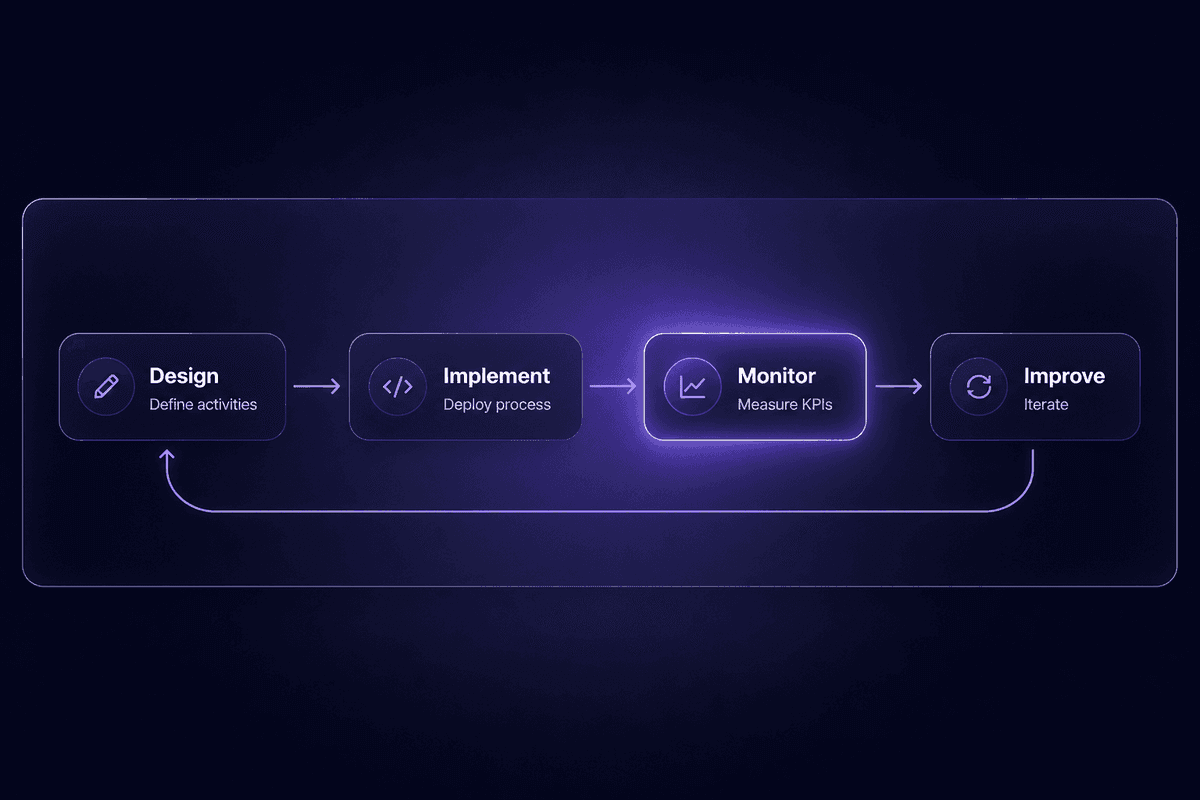
The BPM lifecycle has four phases that matter in practice. Design: defining the process, its activities, roles, rules, and intended outcomes. Implementation: deploying the process through people, tools, or automation. Monitoring: measuring whether the process performs as designed. Improvement: changing the process when the evidence says it should change. The common misconception is that reaching the implementation phase completes the work. It doesn't. Implementation without monitoring is just optimism at scale.
Business Process Monitoring: What Breaks When Nobody Is Watching
Business process monitoring is the measurement layer that turns BPM from a design exercise into something operationally useful. Without it, a process that was well-designed in January degrades in ways the organization doesn't notice until a customer complains or a quarter closes badly.
What typically degrades when monitoring is absent: cycle time creeps upward as small inefficiencies accumulate. Error rate climbs as edge cases emerge that the original design didn't account for. Handoff delays appear between teams or systems as volume grows or personnel changes. None of these show up as a single visible failure event. They accumulate.
Key performance indicators for process monitoring should include cycle time per process instance, error or exception rate, process completion rate, and handoff delay between stages. Continuous improvement depends on having these numbers visible before they become critical. BPM without monitoring is a documented process that's slowly becoming a historical artifact.
Business Process Model and Notation (BPMN): The Standard Most Teams Skip
Business process model and notation (BPMN) is the visual standard for mapping how a process flows - who does what, in what order, with what decision points and exception paths. It's a shared diagramming language that makes a business process model readable by both the operations team that runs the process and the IT team that automates or integrates it.
Teams that skip BPMN are fine until they need to hand a process definition to a developer, an automation specialist, or an auditor. At that point, a Confluence page full of prose descriptions creates friction. Process diagrams built to the BPMN standard communicate unambiguously across those boundaries. The notation handles parallel paths, decision gateways, event triggers, and error exceptions in a format that maps directly to how most automation tools model workflow logic. Skipping it doesn't derail a process. It just makes data management and business process execution conversations harder than they need to be, every time.
Business Process Automation and Process Improvement: Where Teams Usually Get It Backwards

Here's the pattern I keep seeing in support: a team identifies a slow, manual process. They decide to automate it. They build the automation. The automation runs. The problems get faster.
Automating a broken process doesn't fix the process. It runs the broken version more quickly and more consistently, which means the downstream errors accumulate faster and the root cause becomes harder to isolate. Business process automation exists to eliminate repetitive manual steps in a stable, well-defined process - not to compensate for a process that was never clearly defined in the first place. A small-scale benchmark published on arXiv in early 2026 found automated workflow execution averaged 1.23 seconds versus 185.35 seconds manually, with zero observed errors in automated runs against a 5% error rate manually. Those numbers are compelling. They're also only meaningful if the process being automated is worth running at that speed and repeatability.
The relationship between process improvement and automation is sequential: improve first, then automate. Well-designed processes reduce operational errors and costs not because automation is running, but because the underlying sequence is sound. Automation then locks in that soundness and removes the manual labor from it.
A team at a mid-size operations company mapped their lead intake workflow before building anything automated. They found that three handoff steps were redundant, two required data that was already available upstream, and one approval step had no actual decision criteria attached to it. They redesigned the workflow. Then they automated the stable version. The automation in Latenode took a few hours to build - the workflow captured the incoming request, used its 5,500+ integrations to write records into the right tools, and applied a JavaScript node for the routing logic. The part that took longer was the process analysis that preceded it.
The misconception that business process automation is primarily about cutting jobs misframes the problem. The actual pattern from practice: automation takes the low-value task burden off people who were spending hours on copy-paste work, manual data transfer, or repetitive approval routing. A Workday guide on business process automation identifies repetitive, rule-based workflows with frequent manual data entry errors as the primary candidates - not roles, but tasks. The goal is to reduce costs associated with error recovery and manual labor, not headcount reduction. The workflow continues. The person doing it is reassigned to work that requires judgment.
AI adds a layer to this that's worth naming. Automating structured, rule-based steps is well-understood at this point. Where AI enters the picture is in processes that involve unstructured inputs, classification decisions, or document extraction. A process that used to require a human to read a PDF and extract three fields can now include an AI classification step inline. The process design question doesn't change: is the underlying sequence stable and well-defined? The AI step has to fit into a designed process, not substitute for one.
Process optimization, in this framing, is the discipline of getting the sequence right before you decide anything about tooling or automation. Streamline the logic. Remove the redundancies. Define the exception paths. Then build.
Business Process Analysis Before You Automate Anything
Business process analysis (BPA) is the diagnostic step that happens before a team builds automation or changes systems. Business analysts map the current state of a process - every activity, every decision point, every handoff - and identify where inefficiencies, redundancies, and control gaps are hiding. The goal is to understand existing processes with enough precision that improvement decisions are based on evidence rather than assumption.
IBM's framing of BPA positions it as a precondition for meaningful improvement. That's accurate. Without it, a team is guessing at what to automate and in what order. With it, they can see which steps produce the most errors, which handoffs introduce the most delay, and which activities could be eliminated entirely versus automated.
The practical benefit isn't elegance. It's avoiding the pattern where a team invests in building an automation for a step that should have been removed from the process entirely. Effectiveness of business processes depends on analyzing the current state before redesigning or automating it - a step that looks essential when you're inside the process often turns out to be a workaround someone added in 2021 that nobody removed. AI-assisted process discovery tools can accelerate this analysis by surfacing patterns in process logs. But the judgment call - what stays, what changes, what gets automated - still requires someone to think clearly about what the process is actually supposed to accomplish. The goal is to streamline based on that clarity, not on convenience.
Three Misconceptions About Business Processes That Slow Teams Down
These come up enough in practice that they're worth naming directly. Each one shapes how teams approach process improvement in ways that set up predictable failures later.
Processes are bureaucratic paperwork that slow work down
This one is common in fast-moving teams and not entirely wrong as a description of poorly designed processes. But the correct mental model is that a well-designed process is what makes fast work repeatable - process standardization reduces the cognitive load of routine decisions, which frees attention for the work that actually requires judgment. Process documentation isn't the bureaucracy; the bureaucracy is what happens when processes are undefined and everyone improvises differently.
Process automation is mainly about cutting jobs
This framing shapes resistance before analysis even begins. The correct mental model is that automation targets tasks, not roles - specifically the repetitive, rule-based steps that consume time without requiring judgment. The goal is to automate the work that makes people feel like they're an expensive data-entry system, and redirect that capacity toward work where human judgment adds genuine value. Efficiency and effectiveness improve together; the headcount conversation is separate and usually doesn't go the direction the fear assumes.
Once a process is documented or improved, the work is done
This is the one that produces the most expensive surprises. Improving the business processes once and then monitoring nothing is how a carefully redesigned workflow degrades silently over the next 18 months. Processes change as organizations change: people leave, systems get updated, volume grows, edge cases accumulate. AI tools can help surface degradation signals earlier. But the correct mental model is that process improvement is continuous - design, implement, monitor, improve, repeat - not a project with a completion date.
🤔 Think about this:
Most process improvement initiatives have a launch date and a project owner. Almost none have a continuous process owner responsible for monitoring and iteration after launch. That's not a design failure. It's an ownership failure. If your last process initiative didn't include a named owner for the monitoring phase, the question worth asking now is: what has quietly degraded since then?
Who Actually Uses Business Process Thinking and How
Business process thinking isn't one team's job. But different functions use it for different things, and understanding those mechanisms makes it easier to see where it actually applies in your organization.
Operations and process improvement teams use process mapping as their primary tool. They diagram the current state of a workflow, identify where bottlenecks accumulate, measure cycle times and error rates, and design the improved version. Their work is visibility: making a process legible enough to see what's actually happening versus what was intended. Process orchestration across departments starts here.
Executives and strategy leaders use end-to-end process views to understand how strategic goals translate into operational reality. A strategic planning initiative that says "reduce customer churn by 15%" has to trace back to specific processes - onboarding, support resolution, renewal workflows - to know what actually has to change. Without process visibility, strategic goals are intentions. With it, they become targets attached to mechanisms.
IT and digital transformation teams use process definitions as blueprints for automation and system integration. A well-mapped process tells a developer exactly what triggers exist, what data needs to move, where decisions happen, and what exception paths require handling. Teams that bring IT in without that map spend weeks in scoping conversations that process analysis could have collapsed into hours. This is the mechanism behind the productivity gains that business process management and BPM investment actually deliver. Latenode is built for this path: teams that have done the analysis work can build the automation directly, using the workflow as the spec.
Compliance, risk, and quality functions use documented processes to ensure compliance and establish accountability. A documented process with defined roles, decision rules, and audit trails makes a compliance audit tractable. Without it, demonstrating that the right steps happened in the right order requires reconstructing events from scattered records. Within the process, responsibilities are explicit. That explicitness is what makes accountability possible rather than theoretical. Stakeholder clarity is built into the design, not retrofitted after the audit request arrives.
Changing business needs affect every one of these groups. Business applications change, teams grow, volume increases - and a process that was optimized for one context quietly becomes a bottleneck as the context shifts. The teams that catch this earliest are the ones that built monitoring into the process from the start, not the ones that revisit their process documentation once a year and expect it to still reflect reality.