




Here's a question I get in support more than you'd expect: "We set up a workflow, so why isn't anything happening?" Nine times out of ten, the answer is the same. They built the diagram. They forgot about the thing that runs it.
A workflow and a workflow engine are not the same object. One is a map. The other is the car. You can have a beautifully detailed map and go nowhere. This article is about the car: what it actually does, how it works under the hood, and how to know whether you actually need one before you spend three months building around one.
The part teams learn late
- A workflow engine executes and manages state - the diagram is just a blueprint until the engine runs it.
- 89% of organizations planned workflow automation adoption, but fewer than 70% automated even half their repetitive processes.
- An engine is the right choice when processes are long-running, multi-system, or need real error recovery - not for every three-step automation.

What a Workflow Engine Actually Is
Most definitions of a workflow engine bury the important part. IBM defines a workflow engine as an application that automates and manages workflows by defining, executing, and monitoring sequences of tasks tied to specific business goals - and that last part is where teams stop reading. They see "automates" and assume that means "runs things automatically," which is technically true and practically insufficient.
A workflow engine manages and monitors activity states. It doesn't just trigger actions. It knows where a process instance is at any given moment, what condition has to be true before the next step runs, and what to do when something fails. It's an active runtime system, not a passive scheduler sitting in a cron job.
The confusion costs people real time. A team buys a workflow tool, draws a beautiful process diagram with approvals and branching logic and escalation paths, activates it, and then discovers that nothing actually persists across steps. A timeout happens. Nobody hears about it. The ticket sits. The diagram never knew anything was wrong. The engine would have.
That gap - between a defined process and an executing runtime - is what most support tickets about "broken workflows" actually describe. They built the model. They assumed they also got the executor. Sometimes they did. Often they didn't realize the two were separate things with different responsibilities.
The Difference Between a Workflow and a Workflow Engine
A workflow is the blueprint. It describes what should happen: step A leads to step B if condition X is true, otherwise go to step C, notify someone at step D. The workflow answers the question "what." It is a process model. Executable in theory. Inert on its own.
A workflow engine is what takes that blueprint and drives actual execution against it. It is the runtime that instantiates the workflow, tracks which step each instance is currently in, evaluates transition conditions, and decides whether execution moves forward, waits, retries, or raises an error. Workflow execution only happens because an engine is managing it. The engine answers the question "what runs everything."
Salesforce captures this distinction cleanly: the workflow is "what," the engine is "what executes." Conflating the two is the most common reason teams underestimate what they're buying. They see a drag-and-drop process builder and assume the executable runtime is included. Sometimes it is. Sometimes what they got is a very professional-looking diagram tool.
How a Workflow Engine Fits Into the Broader Orchestration Stack
The engine doesn't exist alone. IBM describes workflow orchestration as the coordinated execution of multiple automated tasks across business applications and services - the engine is the component at the center of that coordination. Think of it as the process management backbone: it calls services, waits for responses, tracks state, and routes results. It is what turns a collection of tools and integrations into something that behaves like a coherent end-to-end process rather than a series of disconnected API calls.
In an orchestration stack, the engine sits between the process definition layer (the diagram, the BPMN model, the JSON definition) and the execution layer (the actual services, APIs, and systems doing work). It is the management system that makes the two layers talk to each other in the right order, at the right time, with the right recovery behavior when something goes sideways.
How Modern Workflow Engines Work Under the Hood
The reason I find myself explaining this repeatedly in support is that people interact with the surface of workflow engines without ever seeing what's underneath. They configure triggers and actions. They see a green status light. They assume everything is working. The engine is actually doing something considerably more complex.
State Management and Activity Transitions
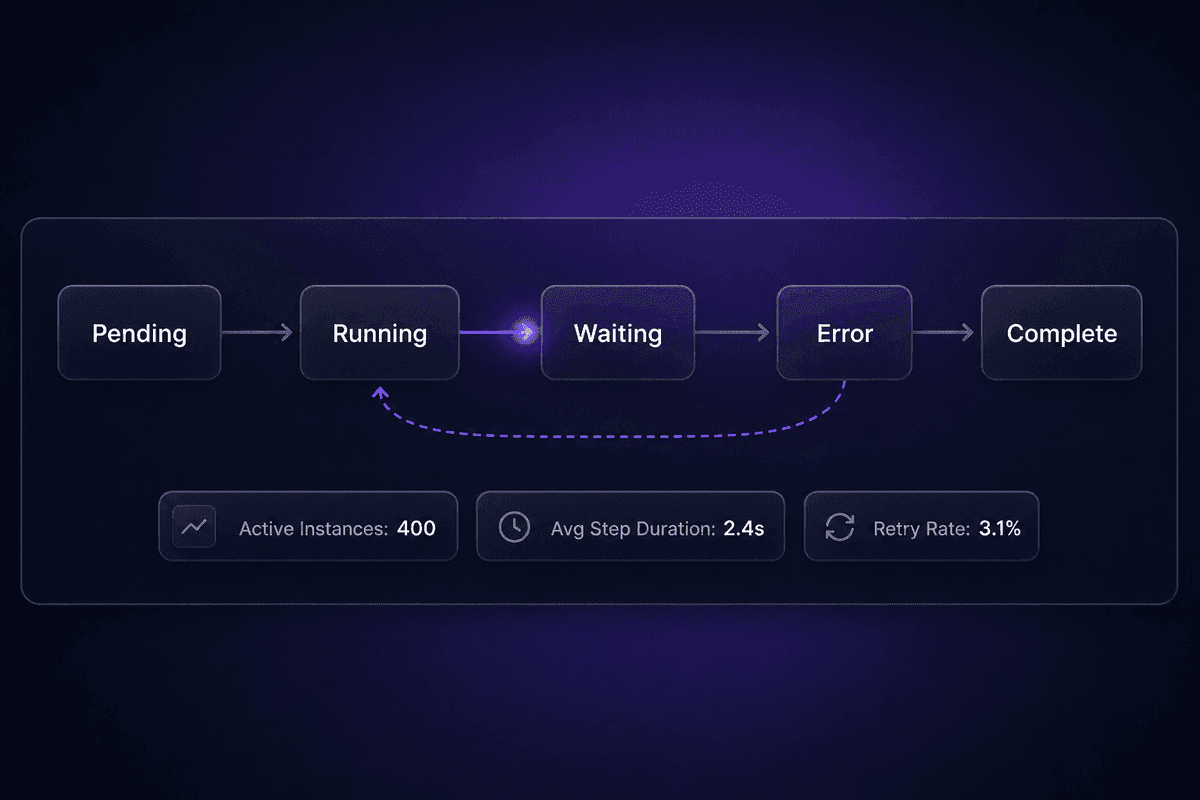
State management is the core capability that separates a workflow engine from a simpler automation tool. At any moment, the engine knows exactly which step each active process instance is in. Not approximately. Exactly. If you have 400 customer onboarding workflows running simultaneously, the engine holds the current state for all 400 - which step they're on, what inputs arrived, what's still pending, and how long each has been waiting.
When a step completes, the engine evaluates transition conditions to determine what activity to move to next. This is the sequencing logic: if step B returns a certain value, go to step C; if it times out, go to the error handler; if it returns a specific code, wait for a human action before continuing. Without this, a broken step has no recovery path. The process just stops. You find out three days later when someone calls to ask where their thing is.
Durable execution is what makes this reliable at scale. The engine persists state between steps so that if a server restarts, a service goes down, or a network call fails, the process instance can resume from exactly where it stopped. Real retry logic is part of this: the engine knows the difference between "retry this step" and "the process instance itself has failed and needs human review." A scheduler doesn't know that difference. It just runs again and hopes.
The practical failure mode when state management is absent: a payment workflow calls an external API, the call times out, and the engine has no record that the call ever happened. So it retries. The payment goes through twice. The customer gets charged twice. The dashboard shows the original timeout as an error, and the duplicate charge appears as a success somewhere else entirely.
That is where the ticket usually starts.
Where AI-Driven Decision-Making Changes the Execution Path
Traditional workflow engines follow hard-coded rules. Condition A is true → go to step B. Clean, predictable, and increasingly insufficient for complex real-world processes where the right next step depends on context that can't be reduced to a binary check.
Modern engines are incorporating AI-driven decision-making into the routing layer. Instead of evaluating a fixed condition, the engine passes the current process state to a model, receives a recommended next action, and follows it. This is what makes genuinely agentic behavior possible inside a process: the business logic isn't fully prewritten. The AI contributes part of the decision at runtime.
The practical implication is significant. If you're architecting workflows today, you need to know whether your engine can handle non-deterministic branching or whether it only routes against static conditions. An engine that can call an AI model mid-process and act on the result is a fundamentally different system than one that can't. I've watched teams build entire workarounds for this - exporting state to a separate AI service, parsing the result manually, feeding it back in - when the right answer was choosing an engine that handled it natively.
Embedded Library vs. Standalone Platform - Which Architecture Are You Actually Buying
Two deployment models exist and they carry very different operational costs. An embedded library approach means you pull a workflow engine into your existing codebase - typically as a .NET, Java, or Node package with a graphical designer. You own all the infrastructure. You deploy it, maintain it, scale it, and debug it. The engine is yours to configure in any programming language that the library supports, and tools like Docker or open-source options like Temporal give you flexibility that a hosted platform can't. The trade-off is real: the engineering ownership never goes away.
A standalone hosted platform puts the engine infrastructure in someone else's hands. You configure workflows through a visual interface, connect services via pre-built integrations, and let the platform handle the runtime concerns. Faster to start. Less backend complexity on day one. But the moment you hit an edge case the platform's visual layer doesn't address, you need to know what escape hatches exist - whether you can write custom logic, call arbitrary APIs, or extend the system without rebuilding it somewhere else. Low-code surface doesn't mean zero backend complexity. It means someone else owns most of it, not all of it.
What Workflow Engines Are Actually Used For
Use cases drawn from the research, organized by team type, the process automated, and what typically breaks without an engine coordinating it.
Engineering and IT: orchestrating distributed services
Teams running microservices architecture use workflow engines to coordinate multi-step processes that span multiple services - order validation, inventory reservation, payment processing, notification delivery. Without an engine tracking state across all of them, a partial failure in step three leaves the order in a half-complete state with no automated recovery path and no clear owner. You find out from the customer, not from the system.
Operations, finance, and HR: approval and escalation flows
Purchase approvals, PTO requests, contractor onboarding, vendor contract renewals - these are long-running business processes that wait for human action, sometimes for days. An engine holds state between those human touchpoints, enforces deadlines, escalates when thresholds are crossed, and maintains an audit trail. Without one, the process lives in email threads and someone's memory. Complex workflows that cross multiple approvers become genuinely difficult to track or recover when they stall.
Security and incident response: coordination under pressure
A security alert triggers a sequence: classify the event, notify the right team, gather evidence, escalate if unacknowledged after a threshold, document the resolution. Workflow engines enable teams to automate workflows across this kind of incident response reliably because the engine enforces ordering, handles escalations, and creates a full record. Without it, the process automation exists as a checklist that gets skipped when people are moving fast.
Product teams: engines as application infrastructure
Some product teams embed workflow engines directly into their applications to power user-facing process automation - subscription lifecycle management, document approval chains, customer onboarding sequences. Workflow engines enable building these as first-class application features with state persistence, error handling, and visibility baked in, rather than a series of ad-hoc database flags and cron jobs that accumulate technical debt invisibly.
Customer operations: payment and refund handling
This is the use case I see underestimated most often. A payment workflow calls a provider, waits for a response that might come in four seconds or four hours, evaluates the result, triggers a refund or escalation, and needs to build workflows that survive network interruptions, API timeouts, and human delays. A real engine handles this with durable state and retry logic. Scripts and schedulers handle it until they don't.
In Latenode, a setup like this can be built around payment provider webhooks that start a flow, with a JavaScript node handling the escalation logic and one of the 1,200+ available AI models classifying the event type - timeout, dispute, cancellation - to route the case appropriately. The whole thing counts as a single execution regardless of step count, which matters once you're running hundreds of these per day. You can also wire it to external systems via automatic OAuth integration without writing connection code for each API.
Using a Workflow Engine vs. Building Custom Orchestration
This is the decision that generates the most overthinking I see from engineering teams. The question is usually framed as "should we build our own or buy?", but the more accurate framing is: which of these three options fits your actual process complexity, maintenance capacity, and team ownership model?
| Approach | Best-fit scenario | Setup complexity | Maintenance burden | Where it breaks down |
|---|---|---|---|---|
| Dedicated workflow engine (embedded library) | Long-running processes, distributed microservice orchestration, teams with engineering ownership | Medium to high | Owned by engineering | Your team grows, ownership becomes unclear, nobody updates the process definitions |
| Standalone workflow platform | Ops and business process automation, approval flows, non-engineering owners, rapid iteration | Low to medium | Shared between platform and team | Edge cases require custom logic the platform's visual layer can't express |
| Custom orchestration code | Unique requirements, full control priority, teams with strong engineering capacity | High | Fully owned by engineering | Scales into maintenance debt; exits the original engineer's head and lives in nobody else's |
Apache Airflow is the standard answer for data pipeline orchestration with engineering teams who can maintain Python-based DAGs. Netflix Conductor was built specifically for microservice orchestration at scale - it handles long-running processes, parallel execution, and retry logic across distributed systems. Both are genuine options. Both also require engineering maturity to operate. The teams I see struggle with them are not the ones who chose the wrong tool - they're the ones who underestimated the ongoing ownership cost after the initial setup stopped being exciting.
Scalable doesn't automatically mean the right choice. If your process has three steps, runs synchronously, and doesn't need to survive failures across distributed systems, a lightweight integration platform will handle it without the overhead of a full engine. The overhead becomes justified when you need durable execution, complex branching, multi-system state, or error recovery that goes beyond "retry three times and log it."
What I'd note about the custom orchestration path: for existing workloads that don't have clear process boundaries, writing custom orchestration code that gives you greater flexibility today becomes a maintenance problem in six months when the engineer who wrote it is on a different project. I've handled enough of those support conversations to have an opinion about this.

Why Workflow Automation Adoption Gaps Persist Despite High Market Spending
The adoption gap is well documented and genuinely frustrating to read. Survey data cited across the industry shows that 89% of organizations planned to adopt workflow automation, but only 68% had successfully automated even half their repetitive processes. That gap - 21 percentage points between intent and execution - doesn't close on its own. It has specific structural causes, and most of them are not budget problems.
The four misconceptions I keep watching derail automation programs before they get anywhere meaningful:
Engines are only for large enterprises. The market data doesn't support this anymore. Large enterprises account for the majority of market revenue, but smaller teams are the fastest-growing adopter segment. The complexity threshold for needing an engine has dropped as platforms became more accessible. A 15-person ops team with a multi-system approval workflow genuinely benefits from a workflow engine, not just a Zap.
Automation replaces workers. This misconception causes business process management initiatives to fail politically before they fail technically. Teams resist automation because they read it as a headcount threat. The practical reality is that engines remove the manual chasing, error recovery, and status checking that nobody wants to do anyway. The automation bottleneck is usually the belief that someone's job is at risk, not the technology.
You need a single all-in-one platform. This one costs time and money in ways that aren't always visible until the contract is signed. Teams stall trying to find one tool that handles every process and every integration. The reality is that workflow engines can coexist with other tools when integration points are clearly defined. Start with what's most broken. Streamline that first. Expand from a working foundation rather than a complete architecture that exists only in a slide deck.
You must overhaul everything at once before starting. The "we need to simplify the process before we automate it" argument is legitimate in theory and paralyzing in practice. Business users don't have the bandwidth for a six-month process redesign before touching a single automation. The teams that actually close the adoption gap start with one process, prove the outcome, and build momentum from there.
📊 By the numbers:
The workflow automation market was valued at approximately $26 billion in 2024, with reported productivity gains of 30-40% and ROI figures cited as high as 200-300% within a year of full deployment. A 21-point gap between intent (89%) and execution (68%) in the same cohort means the investment is there. The structural adoption barriers are not primarily financial.
What to Check Before You Commit to a Workflow Engine
I'm going to give you the actual questions to answer before you commit to a workflow engine, because the standard "assess your needs" advice is not useful to someone trying to make this decision by Thursday.
The scalability question is real but often asked too early. Before you think about whether the engine will scale, ask whether your process justifies an engine at all. Does it involve distributed steps across multiple systems? Does it run long enough that network failures or service downtime could interrupt it? Does it need error recovery beyond "retry and log"? Does it span multiple actors - humans, services, external APIs - that all need to be coordinated? If the answer to most of these is yes, an engine is justified. If your process is three sequential API calls that complete in under five seconds, you might be buying infrastructure for a problem a simpler automation already solves.
The state persistence question is the one teams skip and later regret. If your process can't survive a failure partway through and resume from exactly where it stopped, you'll rebuild the human-intervention layer manually every time something breaks at an inconvenient moment. Ask whether you need to predefine recovery logic, or whether you're comfortable with processes that fail silently and require manual restart.
And BPMN: if your organization has existing process definitions modeled in a standards-based notation, check whether the engine you're evaluating can interpret those definitions natively or whether you'll be rebuilding everything in a proprietary format. That migration cost is not always visible in the initial evaluation.
Scalability and Process Complexity Thresholds
The practical signals that an engine's overhead is justified: you need distributed tracing across multiple systems to understand why a process failed; you have observability requirements that mean every step must be logged with its input, output, and duration; your data processing crosses more than two external services with different SLAs; you're running cloud services with rate limits that require intelligent retry and backoff logic; your process involves a series of tasks where failure in step four means steps one through three need to be compensated or rolled back.
If your current automation fails, and the recovery is "someone clicks retry," you probably don't have a workflow engine problem. You have a monitoring and alerting problem, which is much cheaper to solve.
Illustrative complexity thresholds as practical starting points: flag any workflow that requires more than three external service calls with state dependency between them; consider a dedicated engine when any single process instance might run for longer than 24 hours; treat any process that involves human approvals with SLA enforcement as engine territory, not scheduler territory.
Who Needs to Own It After Setup - the Part Teams Usually Skip
This is where the pre-purchase evaluation almost always goes quiet. Everyone is excited about building the automation. Nobody wants to talk about who maintains the business process definitions in six months when requirements change, who monitors execution logs and responds when a task fails its retry limit, who handles the lifecycle of a process when a downstream API changes its schema, and who updates the JSON or YAML configuration when the approval flow gains a new step.
The audit trail and data integrity requirements compound this. Some processes - financial approvals, compliance workflows, anything that touches a CRM or external billing system - need a human who can read the execution log, explain what happened to a process instance on a specific date, and trace an error back to its source. That's not a setup-day problem. That's an ongoing task management responsibility that needs a named owner before you go live.
Teams that integrate a workflow engine with APIs and build workflows across APIs, GitHub-managed process definitions, and external CRM systems often discover the real maintenance burden when the first process definition needs updating after the original engineer has moved on. I've handled those conversations. They usually start with "nobody knows how this was built" and end with "can you help us find the YAML."
Building blocks are easy to assemble the first time. The question is who reassembles them when they fall apart at 2am on a Tuesday.




