

Quick answer: the best Airtable alternative for each need
- Open-source clone you can host: Baserow
- Spreadsheet view on your SQL database: NocoDB
- Same feel, less per seat: Stackby
- Work management on a relational database: SmartSuite
- Tables next to your Zaps: Zapier Tables
- Spreadsheet-style project tracking: Smartsheet
- Databases inside team docs: Notion
- Free with a Google account: Google Sheets
- Teams on Microsoft 365: Microsoft Lists
NocoDB self-hosts for free under a fair-code license, which is not an open-source license. The ten tools below are grouped by how directly they replace an Airtable base, from database-first tools to suite apps that cover part of it. The order is not a score, and Airtable appears only as a reference row.
Why teams look for Airtable alternatives in 2026
Airtable charges per seat, caps records per base on every plan and meters automation runs and AI credits, and since September 2026 it belongs to Bending Spoons. Teams move for a lower bill, more rows, self-hosting or a database they already run.
"Bending Spoons S.p.A. (NASDAQ: BSP) has completed the previously announced acquisition of Airtable."
Source: airtable.com
Airtable is a relational database in a spreadsheet-like grid, with linked records, automations, custom interfaces, AI features and grid, Kanban, calendar, gallery and form views. Free is $0 with 1,000 records per base, up to 5 editors and 100 automation runs a month. Team is $20 per seat per month billed annually or $24 billed monthly, with 50,000 records per base and 25,000 runs. Business costs $45 per seat per month billed annually or $54 monthly for 125,000 records per base and 100,000 runs. Enterprise Scale has custom pricing, with 500,000 records per base and 500,000 runs.
Every trigger counts as a run, failed runs included. Run limits apply per workspace and reset on the first of the month, with no carry-over. Each plan adds a monthly allowance of AI credits that does not carry over: 500 per editor on Free, 15,000 per paid user on Team and more on higher plans. Airtable charges per seat; its pricing page bills users with edit permissions, while its plans help article also bills Team collaborators with Commenter access, so check who needs a paid seat before you buy.
On August 4, 2026, Bending Spoons announced a definitive agreement to acquire Airtable, and on September 4, 2026, it completed the acquisition.
Airtable still has strengths. Free includes unlimited bases and Interface Designer. A workspace that hits its record limit keeps its data, though new records are blocked until an upgrade.
Airtable alternatives at a glance
Prices are in USD as each vendor lists them in November 2026, for the entry paid plan.
| Tool | Best for | Free plan | Paid from | Billed per | Limit counted per |
|---|---|---|---|---|---|
| Airtable | Reference, not counted | Yes, up to 5 editors | $20 Team, billed annually | Seat | Records per base |
| Baserow | Open-source self-hosting | Yes, 3,000 rows | $10 Premium, billed yearly | User | Rows per workspace |
| NocoDB | Your SQL DB on Business | Yes, 1,000 records | $12 Plus, billed annually | Seat, 9 billed at most | Records per workspace |
| Stackby | Lower per-seat price | Yes, 1,500 rows | $4.2 Economy, annually | Seat | Rows per stack |
| SmartSuite | Relational work management | No, 14-day trial | $15 Team, billed annually | Seat, minimum 3 | Records per Solution |
| Zapier Tables | Data for your Zaps | Yes, 2,500 records | $19.99/mo billed yearly | Account | Records per account |
| Latenode Tables | Rows that start scenarios | Yes, 1,000 rows | $10 Starter, per month | Member | Rows per workspace |
| Smartsheet | Spreadsheet-style projects | No, 30-day trial | $9 Pro, billed yearly | Member | Automations per month |
| Notion | Databases inside docs | Yes, limited blocks | $10 Plus, billed yearly | Seat | Blocks (Free, 2+ members) |
| Google Sheets | Free simple lists | Yes, with Google Account | $7 Workspace, annual plan | User | Cells per spreadsheet |
| Microsoft Lists | Microsoft 365 teams | Preview, personal account | $7.00 Basic, paid yearly | User | Items per list |
1. Baserow: best open-source Airtable clone you can host yourself
Baserow replaces an Airtable base directly, for teams that want an open-source edition on their own server or a hosted cloud.
Link to table fields connect rows across tables, as in Airtable, and Lookup and Rollup fields pull data through them. Cloud Free is $0 with 3,000 rows per workspace. Premium costs $10 per user per month billed yearly or $12 billed monthly, with 50,000 rows and paid views such as Kanban, Calendar and Timeline. Advanced is $18 or $22 per user per month with 250,000 rows. On Cloud Premium every workspace collaborator is billable; on Cloud Advanced only Editor, Builder and Admin roles are billable, and Viewers and Commenters are free.
Baserow is open core: code outside its premium and enterprise directories is the open-source edition under the MIT (Expat) license, while Premium, Advanced and Enterprise features are paid. Self-hosted, the open-source edition is free with unlimited rows. Baserow imports an Airtable base from a public share link. On the cloud, a workspace over its row limit for 7 consecutive days cannot create new rows until it upgrades or cuts usage.
2. NocoDB: best for a spreadsheet view on your own SQL database
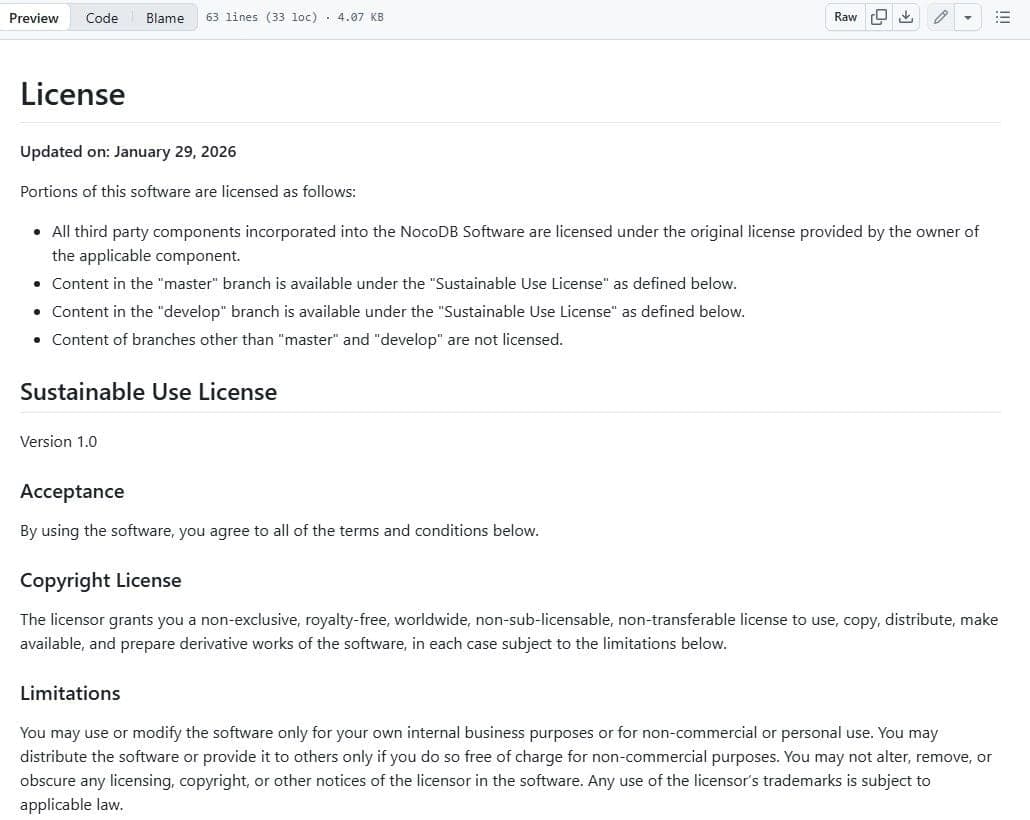
NocoDB replaces Airtable directly on top of a database you own, putting a spreadsheet interface on PostgreSQL or MySQL. Its free self-hosted edition is fair-code, not open source.
It connects to an existing database as a data source, with PostgreSQL 14 or MySQL 5.7 and later recommended. Schema editing is off by default, but Lookup, Rollup and Formula columns still work. NocoDB's repository is under the Sustainable Use License, which allows use or modification only for your own internal business purposes or for non-commercial or personal use; NocoDB calls its free self-hosted Community edition fair-code.
Cloud Free is $0 for up to 3 users and 1,000 records, counted across all bases in a workspace. Plus costs $12 per seat per month billed annually or $15 monthly, but it bills at most 9 seats, so the total caps at $108 or $135 a month. Business is $24 or $30 per seat under the same 9-seat cap. Self-hosted, Community is free and Business costs the same as on the cloud. One catch: Cloud Plus cannot connect external databases, while Business includes 10 external database connections.
3. Stackby: best for Airtable's feel at a lower per-seat price
Stackby replaces Airtable directly with the same building blocks at annual per-user prices below Airtable's, for small teams that can accept a partial import.
A stack is a database of tables with 25+ column types. Link, lookup and aggregate columns handle relationships, and other columns pull live data from outside APIs with no code. Economy costs $4.2, Business $8.3 and Pro $12.5 per user per month, billed annually for the default team of 3 users; the per-user price changes with team size. Rows are counted per stack: 1,500 on Free, 7,000 on Economy, 50,000 on Business and 100,000 on Pro.
Free allows up to 5 users per the Free card, though the comparison table lists unlimited users. Billed monthly, Economy costs $10 per user per month. The Airtable importer pulls a whole base with a personal access token. Only the first grid view of each table comes over, and formulas and views stay behind.
4. SmartSuite: best for work management on a relational database
SmartSuite replaces an Airtable base directly and adds project and process features on top, for operations teams that want linked tables, Kanban boards and dashboards in one paid workspace.
Work lives in Solutions, each a collection of tables for one workflow, process or project. Every plan includes unlimited Solutions and every view type: Grid, Card, Kanban, Calendar, Timeline, Map, Chart, Form and Dashboards. SmartSuite's pricing page lists a Gantt Chart view but does not say which plans include it.
Team costs $15 per seat per month billed annually or $20 monthly, with a minimum of 3 billable users and 5,000 records per Solution. Professional is $32 or $36 per seat, with a minimum of 5 and 100,000 records per Solution. Enterprise has custom pricing; the pricing page gives a minimum of 25 billable users on an annual plan while the help center says 15, so confirm with sales. Only editors are billed. The downside: no free plan, only a 14-day Professional trial with no credit card, and a 3-seat minimum on Team.
5. Zapier Tables: best for tables that feed your Zaps
Zapier Tables replaces Airtable only as a data store for automations, for teams already on Zapier whose lists mostly feed Zaps. Tables steps use no tasks.
Every Zapier plan includes Tables, with unlimited tables and 100 fields per table. Free allows 3 views per table, and Professional and Team allow 50. A Button field on a row starts a Zap on every plan. Zapier's pricing page counts Tables records per account (2,500 on Free, 100,000 on Professional, 500,000 on Team), while its Tables help article speaks of records per table; confirm before relying on it.
Tables comes with Zapier plans, sold by monthly task tier. Free is $0 with 100 tasks a month and one user. Professional starts from $19.99 a month billed yearly ($29.99 billed monthly) and Team from $69 ($103.50 monthly), and the price rises with the monthly task tier you choose. Imports take a CSV file or certain apps, and Airtable is not among those named. Imported records do not fire the New Record trigger, so migrated rows start no Zaps.
6. Latenode Tables: best for tables that start automation scenarios
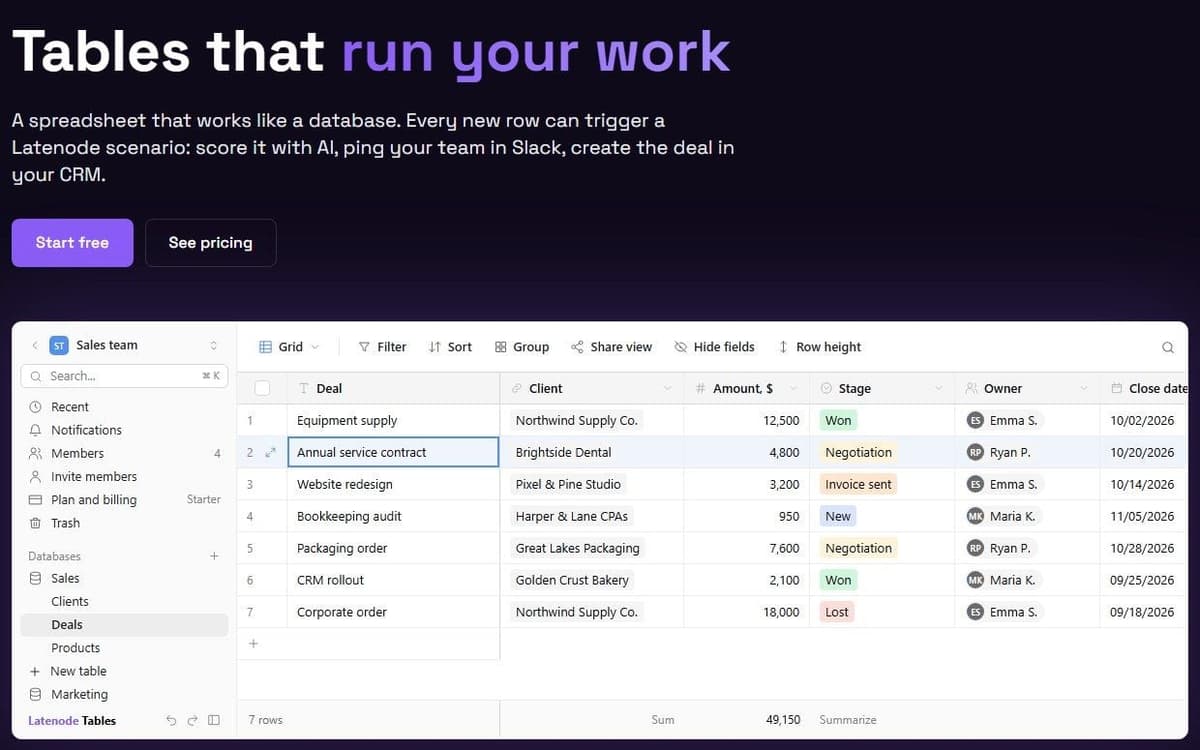
Latenode Tables is Latenode's own table product: a spreadsheet that works like a database, where a new row can start a Latenode scenario. It suits teams automating in Latenode.
You get more than 25 field types and linked tables with sums, averages and counts. The New Row Created trigger can start a scenario that pings your team in Slack, and webhooks fire when a row is created, updated or deleted. There is also a REST API, an MCP server link for Claude, ChatGPT or Cursor, and whole-base import from an Airtable shared link.
Free is $0 for one workspace with 1,000 rows, 1 GB of files and up to 3 members. Starter costs $10, Pro $20 and Business $40 per member per month. Every plan has every feature and is billed daily from the Latenode balance, separate from the Latenode automation plan. The trade-off: it runs as a cloud service on table.latenode.com and offers grid, gallery and form views, so there is no Kanban, calendar or Gantt view.
7. Smartsheet: best for spreadsheet-style project tracking at scale
Smartsheet replaces Airtable partly: it is a work-management tool with a grid, built to manage projects, programs and processes in one place. It fits project teams that track work in rows and lean on automations.
Smartsheet bills per member, meaning a paid user who creates and edits. Pro costs $9 per member per month billed yearly or $12 monthly, with a minimum of 1 and a maximum of 10 members, unlimited contributors and 250 automations a month. Business costs $19 or $24 per member per month and needs at least 3 members; guests, contributors and automations are unlimited. Enterprise, for 10 or more members, and Advanced Work Management have custom pricing.
New signups get no free plan, only a 30-day trial with no credit card, though existing Free accounts keep their access. Pro stops at 10 members and 250 automations a month. An eleventh member or heavier automation means moving to Business, with its 3-member minimum. Check Smartsheet's pricing page for sheet size limits before you move a large base.
8. Notion: best for databases inside team docs
Notion replaces Airtable partly: its databases sit inside the pages a team already writes in. It works best for teams that want linked lists next to their docs.
A Notion database is a collection of pages, and each item is a page with properties such as dates, status and links. Views include table, board (Kanban), timeline, calendar, list, gallery and chart. A relation property links items across databases (one-way by default, or two-way), and rollups sum or average numbers across related pages. On Free, automations are basic buttons; custom database automations start at Plus.
Free costs nothing. Plus costs $10 per seat per month billed yearly or $12 monthly, Business $20 or $24, and Enterprise has custom pricing. Guests are free. Notion AI is a limited trial on Free and Plus, while Business includes 1,500 Standard and 500 Select credits per seat per month. Migration is harder: a CSV imports as a database but cannot create relations, rollups or formulas, and Notion's import help lists no Airtable importer.
9. Google Sheets: best free option for simple lists
Google Sheets replaces Airtable only partly: it is a spreadsheet, not a relational database. That works for small teams with flat lists and Google Accounts.
Sheets is free for anyone with a Google Account, though some AI features need a Google Workspace plan. Each spreadsheet holds up to 20 million cells or 100 MB, and the limit is counted per spreadsheet, not per base or workspace. Tables in Sheets give each column a type such as number, text, date, dropdown, checkbox or smart chips. Google's list of table column types includes no linked-record type.
That is the real gap: the links between tables that hold an Airtable base together have no direct match. For company accounts on Google Workspace, Business Starter costs $7 and Business Standard $14 per user per month on the Annual plan with a 1-year commitment, billed monthly, excluding tax, for up to 300 users. If Sheets is still the plan, read how to run Google Sheets as a database with automated syncing and validation.
10. Microsoft Lists: best for teams already on Microsoft 365
Microsoft Lists replaces Airtable partly, for tracking work inside Microsoft 365: lists with views, rules and templates, saved to SharePoint and usable in Microsoft Teams. It suits companies already paying for Microsoft 365.
Lists tracks events, issues and assets, with templates such as an issue tracker and an onboarding checklist. A list can show as a grid, gallery, calendar or custom view, with conditional formatting, basic forms, rules, reminders and comments. You can start one from a template, a CSV file or an Excel workbook, and use it as a data source for Power Apps, with workflows in Power Automate.
Lists is included in Microsoft 365 Business Basic at $7.00 and Microsoft 365 Business Standard with Copilot at $23.50 per user per month, paid yearly as auto-renewing annual subscriptions. Microsoft's page lists no monthly-commitment price. The Copilot plan adds usage-based billing for select advanced AI features. Personal Microsoft accounts get a preview with no price stated and lower limits of its own. On work or school accounts a list can store up to 30 million items. A view showing more than 5,000 items can still hit the list view threshold, which cannot be changed in SharePoint.
How to move a base off Airtable
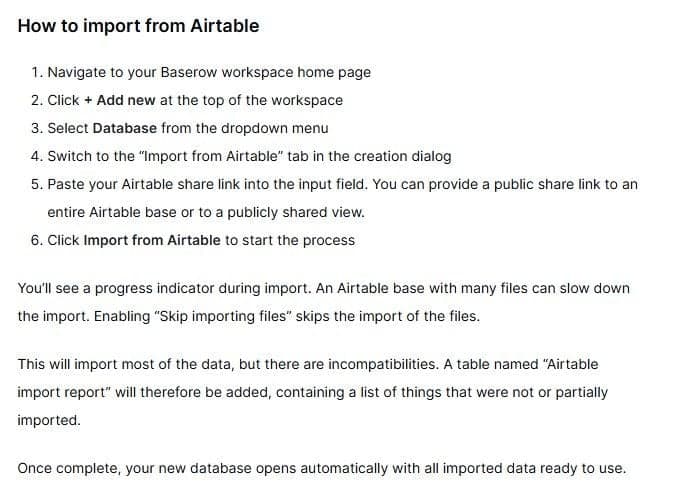
Export each table to CSV, or use a tool that pulls a whole base. Airtable itself exports records from a grid view as CSV, one table at a time. It cannot export a whole base as a single file.
"A table named "Airtable import report" will therefore be added, containing a list of things that were not or partially imported."
Source: baserow.io
Baserow imports one base at a time from a public share link. Tables, records, links, attachments and grid views with their filters and sorts come across. Automations, interfaces and formula, lookup and rollup fields must be rebuilt.
NocoDB imports from a shared base or shared view URL. For a shared base's records it needs an Airtable personal access token, and formula fields do not come over. Stackby also uses a personal access token; it brings in only the first grid view of each table and skips formulas and views. Latenode Tables imports a whole base from its shared link, while Zapier Tables and Notion take CSV files. Before you switch:
- Test with one real base first.
- Check the unit of the new limit: records per base, rows per workspace or rows per stack.
- Rebuild automations and interfaces; none of the importers above lists them as moved.
- Check who needs a paid seat under each vendor's rules.
How to choose an Airtable alternative
Start with the limit you will hit first and where your team already works. A record cap, a need to self-host or a team living in Google Workspace or Microsoft 365 narrows the ten quickly.
- What the limit counts and where: records per base on Airtable, rows per workspace on Baserow, rows per stack on Stackby, cells per spreadsheet on Google Sheets.
- Whether the price scales with seats, who counts as a seat, and minimums such as 3 billable users on SmartSuite Team.
- Free plan caps, and whether a free plan exists at all: SmartSuite and Smartsheet give new signups a trial, not a free plan.
- Self-hosting and license: Baserow's open-source edition is MIT-licensed, while NocoDB's Community edition is fair-code.
- Linked records and the views the team opens every day, such as Kanban, calendar or Gantt.
- Automations, an API or an MCP server, if other systems read and write the data.
- Where the team already works: Google Workspace, Microsoft 365 or a docs tool.
For project work outside the ten, look at monday.com and ClickUp. Both are work-management tools rather than relational databases. Our comparison of workflow management software covers that category. Coda was renamed Superhuman Docs on July 8, 2026, keeping the same features under a new name. Grist is an open-source relational spreadsheet: its grist-core repository is released under the Apache License 2.0 and its Community edition can be self-hosted for free, while Grist Labs sells further features under a proprietary license.