

Quick answer: the best no-code app builder for each kind of app
Best picks by need: Bubble for web and native mobile apps, Softr for a beginner's first app, Glide for spreadsheet-based business apps, Microsoft Power Apps for Microsoft 365 teams, Google AppSheet for Google Workspace teams, FlutterFlow for cross-platform apps with exportable code, Adalo for native store apps, WeWeb for AI drafts finished visually, Base44 for one-prompt full-stack apps.
The ten differ in how you build (drag and drop, a prompt or both), whether they publish native mobile apps and how they count usage. They are grouped by kind, not ranked by score: visual builders with an AI helper, the Microsoft and Google suites, mobile builders, then AI-first builders.
What a no-code app builder is and how it works
A no-code app builder lets you create a working app without writing code. You either arrange prebuilt parts in a visual editor or describe the app in plain language and let an AI build it, then adjust what it made.
Every app has three layers, and the builder supplies each one without code: a database that holds the records, a user interface of screens and forms, and the logic behind clicks, form submissions and sign-ins.
Drag-and-drop editors let you place prebuilt blocks on a page and set their behavior in side panels. Most of the ten pair such an editor with AI: the AI drafts, you finish by hand. The Bubble AI Agent, which Bubble labels beta, drafts a starting point you keep editing visually, and Softr and WeWeb work the same way. Hosting, sign-in and publishing differ by tool.
No-code, low-code and vibe coding: how they differ
No-code keeps you out of the code entirely. Low-code adds a code layer for custom logic and expects some coding knowledge. Vibe coding tools write real code from your prompts: code you own, but also code you must read, test and maintain.
Microsoft describes Power Apps as low-code. FlutterFlow allows custom code on every plan and Flutter project downloads on paid plans. WeWeb offers code export and self-hosting from Essential. Three tools outside this list show how prompt-to-code works: Lovable generates a project with a fixed stack, Bolt.new lets you download a ZIP on desktop, and Replit Agent can continue work on a GitHub repository.
No-code gives you guardrails and visual control within the platform's limits. Code generation gives flexibility and portable code, but someone on the team has to understand that code. For a first app, or a team without developers, a no-code builder is the safer start.
No-code app builders at a glance
All ten start free, with limits: Power Apps and AppSheet only for building and testing, Bubble without going live, Glide without published apps. Bubble (native mobile builder currently in public beta), FlutterFlow and Adalo publish to the App Store and Google Play. Base44 adds a web-view wrapper from Builder up. Prices are in USD as listed in November 2026, monthly unless marked billed annually or billed yearly.
| Tool | How you build | Native mobile apps | Free plan | Paid from | Billing unit |
|---|---|---|---|---|---|
| Bubble | Visual editor, AI Agent (beta) | iOS and Android (beta) | Build and test, not live | $39/mo, $32 billed annually | Workload units, AI credits |
| Softr | AI generator plus blocks | No, PWA on Business | 5 app users, 5K records | $25/mo, $19 billed yearly | App users, records |
| Glide (GlideOS) | Prompt, sheet or file | No, Add to Home Screen | No published apps | $25/mo (Basic) | Credits |
| Microsoft Power Apps | Canvas, model-driven, Copilot | Wrap for Android and iOS | Developer Plan, no production | $20/user/mo, paid yearly | Per user |
| Google AppSheet | From data or Gemini | Runs in the AppSheet app | Build and test, 10 users | $5/user/mo (Starter) | Per user, or per app |
| FlutterFlow | Visual editor or AI agent | iOS and Android | 2 projects in Studio | $39/mo, $29 billed yearly | Plan, seats, AI usage |
| Adalo | Drag and drop plus Ada | iOS and Android | 500 records per app | $65/mo (Builder) | Flat monthly fee |
| WeWeb | AI plus visual editor | Installable PWA | 1M AI tokens a month | $20/mo billed annually | Developer seats, hosting |
| Base44 | Chat plus visual edits | Web-view wrapper (Builder) | 25 message credits a month | $20/mo, $16 billed annually | Message, integration credits |
| Latenode App Builder | AI chat with a plan step | No, mobile browser | First app free | Pay per step | Steps |
1. Bubble: best for web and native mobile apps built in one visual editor
Bubble suits founders who want web and native mobile apps from one visual editor. The Free plan lets you build and test but not go live. Starter costs $39 a month for web, $49 for mobile and $69 for web and mobile, or $32, $42 and $59 billed annually.
"Bubble apps are built visually and run on the Bubble platform, so there's no traditional codebase to export"
Source: bubble.io
The Bubble AI Agent, which Bubble labels beta, starts with a planning session. It then generates UI, database, workflows and logic, privacy rules included, and all of it stays editable in the visual editor. Agent requests can spend AI credits (500 a month on Free, 1,000 on Starter), and the credits do not roll over. Initial app generation currently uses no credits, and visual editing is free. The native mobile builder, currently in public beta, publishes iOS and Android apps to both stores. On a combined plan, the mobile app shares the web app's backend. The API Connector reaches any REST or GraphQL API.
Workload units meter server activity: 50K a month on Free, 175K on Starter, 250K on Growth, 500K on Team. Past that allowance, Starter, Growth and Team apps buy a workload tier or pay overages, and overages can be switched off. Bubble says fluency takes a few weeks. Code export stops at a raw JSON file of app logic, because Bubble apps run on the Bubble platform with no traditional codebase to export.
2. Softr: best for client portals and internal tools as a first app
Softr fits teams building a first client portal or internal tool on data they already have. The Free plan gives unlimited apps but caps you at 5 app users, 3 builders and 5K records. Basic costs $25 a month, or $19 a month billed yearly.
The AI app generator drafts the interface, database, permissions and workflows for a client portal or CRM. You refine the draft in a visual editor of pages and blocks. Data sits in Softr's own database or in sources such as Airtable, Google Sheets, Excel, HubSpot and Supabase, synced both ways. User groups decide who sees which pages and which records each person can read, edit, create or delete. Workflows react to user actions and database changes.
Every plan from Free through Business caps app users, counted as unique emails, and only Pro and above can buy more. A public app with open sign-up outgrows the plans fast. Softr publishes to neither the App Store nor Google Play on any plan. Softr's pricing page lists the installable mobile app (PWA) under Business, while a Softr help guide says 'Professional plan and above', a plan name the pricing page no longer shows; confirm before purchase.
3. Glide: best for turning a spreadsheet into a business app
Glide is for teams that run on spreadsheets and want internal apps. GlideOS plans are Free, Basic at $25, Plus at $50 and Pro at $125 a month for 5 members, billed monthly only. Free cannot publish apps or run workflows. Basic includes 100 credits and publishes personal or team apps. Public apps start on Plus.
GlideOS, separate from the original platform now called Glide Classic, builds internal business apps from a spreadsheet, a prompt or a file. Each project has one database with tables from spreadsheet files, Google Sheets or SQL databases. A Google Sheet is copied into a GlideOS table, and app edits do not flow back to it. Credits pay for AI work: building with the agent and AI features inside apps. Actions you take yourself use none. Workflows start on a schedule, an incoming request, an event in a connected service or an app action.
Published GlideOS apps install from a browser with Add to Home Screen. Glide's general help article describes PWA distribution, but it does not set out a separate store-submission policy for GlideOS. Glide's trust center lists SOC 2, GDPR and CCPA.
4. Microsoft Power Apps: best for organizations already on Microsoft 365
Power Apps makes sense for organizations whose data lives in Microsoft 365. The free Developer Plan is for building and testing, not production. Power Apps Premium costs $20.00 per user per month, paid yearly, or $12.00 per user per month, also paid yearly, with a 2,000-seat minimum through sales.
"A paid plan is required to deploy or run solutions in a production environment for production use"
Source: learn.microsoft.com
Microsoft calls Power Apps a platform for low-code enterprise apps. Canvas apps are built in Power Apps Studio, which Microsoft likens to a PowerPoint slide deck. Model-driven apps come together from a sitemap and components. Copilot turns a natural-language description into Dataverse tables for building a canvas app. Data comes from Dataverse or sources such as SharePoint, Microsoft 365, Dynamics 365 and SQL Server. Apps run in a browser and on phones and tablets. The wrap feature packages a canvas app as a custom-branded Android or iOS app distributed through the Google Play Store, Apple Business Manager or Microsoft Intune.
Licensing is the main limit. Eligible Microsoft 365 licenses can cover production apps that extend Microsoft 365 using standard connectors. Check whether your app uses premium connectors or other features that require additional licensing.
5. Google AppSheet: best for teams that work in Google Workspace
AppSheet works for Google Workspace teams building on their sheets and forms. Building and testing is free with up to 10 test users. Starter costs $5, Core $10 and Enterprise Plus $20 per user per month. Core is included with eligible Google Workspace plans; check your edition.
You can create an app from Google Sheets, Excel, Google Forms or a database, including AppSheet's own. Or describe it with Gemini for App Creation, available on paid AppSheet accounts and with eligible Google Workspace plans; check your edition. Automations send email, SMS and push notifications, and connectors reach Google Workspace apps such as Drive, Calendar and Docs. Apps run on iOS and Android through the AppSheet app and in mobile or desktop browsers. For public apps without sign-in, Publisher Pro costs $50 per app per month for an unlimited number of users, with no sign-in options or security filters.
Per-user pricing is the drawback. Licenses must cover every signed-in user and every guest user, with guests counted per device, so the cost rises with each person who opens the app.
6. FlutterFlow: best for cross-platform mobile apps with code you can export
FlutterFlow suits builders who want iOS, Android and web apps from one project, with Flutter code to take away. Free includes 2 projects in Studio and a free AI allowance. Basic costs $39 a month, or $29 a month billed yearly ($351 a year).
One subscription covers two builders: FlutterFlow, where an agent builds the app from a description, and FlutterFlow Studio, the visual builder for iOS, Android and web. Studio's Generate with Designer turns a described page or component into widgets, and every plan imports Figma themes. Every plan also allows custom code. Basic and up add Flutter project and APK downloads plus one-click App Store and Google Play deployment. Pro and Max carry 2.5 and 5 times Basic's AI usage. FlutterFlow's plan cards label Pro as 'Growth in Studio' and Max as 'Business in Studio', while its pricing FAQ says each plan has the same name in both; confirm before purchase. AI import of Figma frames is Max only.
You connect and configure the backend yourself, Firebase or Supabase, for example by enabling Firebase Authentication in the Firebase console. That takes some grasp of app structure and backend setup, which makes FlutterFlow a hard start for a complete beginner.
7. Adalo: best for publishing native mobile apps without code
Adalo is aimed at founders who want a native app in the App Store and Google Play without code. On the Free plan you can build and test. Builder, which adds App Store, Google Play and web publishing, costs $65 a month, $175.50 a quarter or $624 a year.
Lay out screens by drag and drop, or have Ada, Adalo's AI builder, build screens, database and logic from a description, then edit visually. Every project ships with a hosted Postgres database. Stripe payments, Google Maps, Firebase push notifications and analytics, and Google and Apple sign-in are built in. Adalo compiles native iOS and Android builds, signs them and submits them to App Store Connect and Google Play Console through your own developer accounts. The same app also publishes to the web.
Pricing is a flat monthly fee with no per-action metering and no per-seat pricing. Free holds 500 records per app and 1 app editor, and Builder has 5 editors. Builder publishes only 2 apps, with 1 instant update a month. An Apple Developer account ($99 a year) and a Google Play account ($25 one-time) are separate costs, as Adalo's pricing FAQ says.
8. WeWeb: best for AI drafts you finish in a visual editor, with code export
WeWeb suits teams that want AI to draft a web app they refine visually. Free has 1M AI tokens a month and a WeWeb subdomain capped at 1,000 sessions in total. Essential is $20 a month billed annually. WeWeb hosting starts at $13 per app per month for the front end alone, or $20 with the WeWeb backend on Launch+, billed annually. Self-hosting does not require a WeWeb hosting plan.
WeWeb AI has Build, Plan and Ask modes. The drag-and-drop editor lets you fine-tune anything from pixel changes to workflows with branching. Figma designs come in through the WeWeb Figma plugin. Data runs on WeWeb's built-in backend or an external one such as Supabase, Xano or Airtable. Every paid plan, billed annually from $20 a month, includes export of a standalone Vue.js single-page app and self-hosting. The editor ignores changes made in exported code. On mobile, a WeWeb app can be an installable progressive web app, as WeWeb's docs describe it.
Expect two bills: developer seats in the editor and one WeWeb Cloud plan per hosted app. App users never need a seat. Backend and self-hosting settings assume some technical knowledge.
9. Base44: best for a full-stack web app from a single prompt
Base44 is for founders who want a full-stack web app from one description. Free gives your personal workspace 25 message credits a month, at most 5 a day, plus 100 integration credits a month. Starter costs $20 a month billed monthly or $16 a month billed annually.
You describe the app and Base44 builds it. Every plan includes an integrated backend and database, authentication and user management. You edit by chat or visually, and manual visual edits use no credits. Free shows the code, but editing it needs a paid plan. Message credits pay for AI chat: about 0.5 for a simple text change and 3 to 4 for an app-wide one. Integration credits pay for built-in services such as email and LLM calls. People can add an app to a phone's home screen. The files for an App Store or Google Play submission, a native web-view wrapper, need Builder or higher.
The exported code still relies on Base44 to run, as its developer-tools docs put it. A ZIP export (Builder or higher) gives you a copy of the code, not a way off the platform. Frequent changes drain credits. When they run out, actions that use them pause until the next reset.
10. Latenode App Builder: best for web apps that hand work to automated workflows
Latenode App Builder suits web apps that trigger automations. As of November 2026, the first app is free, with no card and no subscription. After that you pay per step, and each step's price shows in the chat.
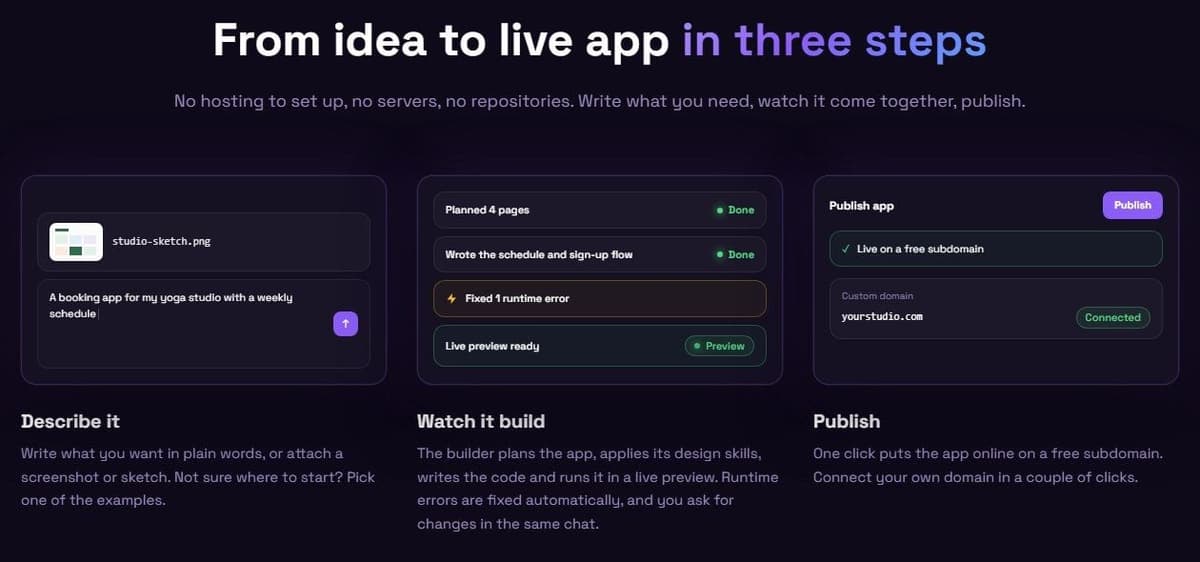
It builds web apps, websites and landing pages from a description, screenshot or sketch. As of November 2026, Plan mode asks a few questions and writes a plan you approve before any code is built. Apps get a React front end, a serverless back end and, if needed, a database you edit like a spreadsheet in the Database tab. Publishing takes one click, a custom domain needs one CNAME record, and projects export to GitHub.
By webhook or API request, apps can call a Latenode workflow that updates a CRM, notifies the team or runs an AI agent. As of November 2026, hosting is free up to 1,000 visits a month, then from $5 a month with 30,000 visits included. Latenode's AI app builder does not make native store apps or desktop software. Its apps work in mobile browsers.
What you can build without code, and where no-code stops
Without code you can build web apps, client portals, internal tools, dashboards and simple customer apps, and some builders also publish native mobile apps. No-code stops where you need logic, design or infrastructure the platform does not offer.
- You can use only the blocks, data sources and features the platform has. If a feature is missing, you wait for it or find a workaround.
- The app depends on the vendor's pricing and product changes. Only some builders export code you can run elsewhere: Bubble apps run on the Bubble platform, and Base44's exported code still relies on Base44.
- Usage meters grow with traffic and team size, and more users can increase seat or workload charges. AI credits track whichever building or AI actions a vendor meters, and a flat-fee plan may absorb extra use within its limits.
- A native store app needs a builder that publishes to the App Store and Google Play. Builders without store publishing stop at an installable web app or a home screen shortcut.
- Heavy custom logic or large data usually calls for a developer or a low-code layer, where code fills the gaps the visual editor leaves.
How to choose a no-code app builder
Start from the app you need (web or native mobile, for your team or for the public) and from where your data already lives. Then compare how each builder counts usage as the app grows. That meter sets the bill once real people use the app.
- Delivery: a web app, an installable web app or a native app in the App Store and Google Play.
- Data: a spreadsheet, Airtable, Microsoft 365 and Dataverse, Google Workspace or the builder's own database.
- Sign-in: who logs in and how pricing counts them, whether per user, app users, workload units, credits, tokens or steps.
- Building style: visual, by prompt or both, and whether you can keep working without AI once the credits run out.
- Exit: whether you can export the code and what you keep if you leave.
- Connections: integrations, an API connector or webhooks for the rest of your stack.
- Free plan: what it holds back, such as publishing, a custom domain or the number of users.
- Help: documentation and a community for when you get stuck.
Before you commit, run a short pilot with your own data:
- Build the same small app, with contacts, deals and a dashboard, in two builders.
- Publish it to a test address.
- Invite two people with different roles.
- Check the usage meter after a few days of real use.