



Quick answer: the best no-code automation tool for each need
Start with Zapier for app workflows, Make for visual scenarios, Latenode for low-code workflows with AI models and custom code when needed, IFTTT for smart-home routines, Pabbly Connect for lifetime task plans and Activepieces for a free cloud allowance. Then Power Automate for desktop flows, Airtable for database automations, Parabola for agent building, Bardeen for browser tasks, Workato for self-service credits or an enterprise quote, and Tray.ai for a sales-led evaluation.
Prices and plan limits below are as listed in September 2026, with each vendor's billing unit. The relevant price is the price for your workload, billing term and account scope. Latenode is our own platform.
What no-code automation tools do in 2026
No-code automation starts with work you can describe as a repeatable sequence. A trigger supplies data, actions use it, and conditions decide which path to take. A visual builder can make that sequence easier to inspect. The purchase still depends on the actual actions and limits available on your plan. If you sell this work to clients, see our guide to starting an AI automation agency.
These tools fall into families. Zapier, Make, Pabbly Connect and Activepieces are general app-to-app builders that mostly replace each other: Zapier pairs workflows with Tables and Forms, Make has a visual builder with routers and filters. IFTTT covers consumer and smart-home services. The others are layers, not substitutes: Airtable keeps automation allowances next to database records and editors, Bardeen counts credits in action rows and enrichment, Power Automate separates desktop flows that run with a person from unattended flows, and Workato and Tray.ai sell enterprise integration. If Zapier is not the right fit, our guide to Zapier alternatives compares other platforms.
Those differences matter when comparing prices. A seat, an Applet, an action task, an agent credit and a bot describe different things. Identify the billable event first, then compare the size of the included allowance. The same long workflow lands on a different cost pattern with each of these vendors. For the wider category, see our guide to business process automation tools.
Two tools outside the twelve cover neighboring jobs. Gumloop builds AI agents and workflows on credits: Pro starts at $37 a month with 20,000 credits and a 14-day free trial, and our Gumloop alternatives guide compares it with other agent builders. Unito keeps work items aligned between tools such as Asana, Jira and Salesforce and bills by items in sync, where each item synced between two tools counts twice; it shows exact plan prices in the app during a free trial.
No-code automation tools at a glance
| Tool | Best for | Meter | Free plan | Entry price |
|---|---|---|---|---|
| Zapier | App workflows | Successful actions | 100 tasks/month | from $19.99/mo annual |
| Make | Visual scenarios | Credits | 1,000 credits/month | Core from $9/mo annual |
| Latenode | Low-code AI workflows | CPU seconds | 10,000 CPU sec/month | No base fee, then usage |
| IFTTT | Smart-home routines | Applets | 2 Applets, no run cap | Pro $2.99/mo annual |
| Pabbly Connect | Lifetime task plans | External actions | 100 tasks/month | from $16/mo annual |
| Activepieces | Cloud run allowance | Runs plus AI credits | 1,000 credits/mo | Plus $16/mo annual |
| Power Automate | Desktop workflows | Users or bots | Free license or trial | $15.00/user/mo yearly |
| Airtable | Database automations | Seats and runs | 100 runs/month | $20/seat/mo annual |
| Parabola | Agent building | Agent-run credits | Free tier, no time cap | Not published |
| Bardeen | Browser tasks | Action-row credits | 100 free credits | Basic $10/mo monthly |
| Workato | Platform evaluation | Self-service credits | 50,000 credits, once | Pro $75/mo self-serve |
| Tray.ai | Enterprise evaluation | Tasks | Trial through sales | Custom quote |
What one workflow costs on five meters
Take one lead workflow: a web form sends 1,000 leads a month, an AI step classifies each lead, the workflow creates a CRM record and posts a Slack message. Here is what each meter counts and the smallest plan that covers the month without overage purchases.
| Platform | Units per lead | Units a month | Plan that covers it |
|---|---|---|---|
| Zapier | 3 tasks: AI step on the Standard tier, CRM, Slack; the trigger is free | 3,000 tasks | Professional, 5,000 tasks: $89 a month billed yearly or $133.50 monthly |
| Make | 4 credits: instant form trigger, AI app, CRM, Slack | 4,000 credits | Core, 10,000 credits: $9 a month billed yearly or $10.59 monthly |
| Activepieces | 3 credits: 1 per run plus 2 for a fast-model AI step | 3,000 credits | Plus, 10,000 credits: $20 month to month |
| Pabbly Connect | 3 tasks: AI app, CRM, Slack; triggers are free | 3,000 tasks | Standard, 10,000 tasks: $16 a month billed annually |
| Latenode | CPU seconds of runtime | Depends on run length | Free up to 10,000 CPU seconds, then Pay as you go |
Three details move these numbers. Zapier sets new AI steps on paid plans to its Premium tier, at 5 tasks a run, which makes 7 tasks a lead, 7,000 a month and the 10,000-task tier at $129 a month billed yearly. On Make, a third-party AI app such as OpenAI counts one credit, while Make's own AI Provider adds token usage. On Latenode the cost depends on run length and model usage, so time a test run before comparing: 1,000 runs use 1,000 times the CPU seconds of an average run, the first 10,000 CPU seconds a month are free, Pay as you go bills seconds from 10,001 to 100,000 at $0.00012 each, and an AI node that calls a paid provider adds PnP tokens at $1 each. Among the other free plans, Zapier Free stops at two steps, Make and Activepieces Free give 1,000 credits a month and Pabbly Connect Free 100 tasks, all short of this workflow.
1. Zapier: best for app workflows with forms and tables
Zapier fits when the workflow, form and table belong in the same buying decision. Its pricing page describes Zapier as connecting 9,000+ apps, so check your own apps against the catalog. Its Free plan includes Zap workflows, Tables and Forms, unlimited workflows and a shared allowance of 100 tasks per month. Free workflows are limited to two steps, and the plan includes Zapier Copilot.
A task is counted when Zapier completes a unit of work: each successful action counts separately, while triggers, polling, failed actions and built-in steps such as Filter, Formatter and Paths do not. Count completed actions when you budget. A whole workflow is not the unit, and unlimited workflows still draw on the same monthly task allowance.
Professional starts at $19.99 per month billed annually at the 750-task tier, or $29.99 per month with monthly billing. It adds multi-step workflows, premium apps, webhooks, AI fields and conditional form logic. That starting figure becomes a purchase price only after you check the billing selector and the task volume you need.
New accounts receive a 14-day Professional trial without a credit card. Use that trial to check the exact apps and actions your process needs, then compare the result with the Free restrictions.
2. Make: best visual multi-step scenarios on a budget
Make has a visual workflow builder, routers and filters, with access to 3,500+ apps. Free includes 1,000 credits per month and a minimum scheduled interval of 15 minutes. That interval matters if the workflow is meant to respond quickly to incoming work.
Core costs $9 per month billed annually or $10.59 per month with monthly billing at the 10,000-credit monthly tier. It adds unlimited active scenarios, scheduling down to the minute and API access. The pricing slider changes the credit volume, so the entry price covers that credit tier and no more. Unified APIs and developer platforms are compared in our guide to API integration platforms.
Make now calls its billing unit credits. For non-AI apps and third-party AI apps, an operation equals a credit; modules using Make's AI Provider also account for tokens. A scenario with AI needs a closer estimate than a count of its visible modules.
Make's help center states that credits expire at the end of the term, so plan usage across the whole period, busy days included. That passage covers the Free plan; confirm the carry-over rule for the tier you buy.
3. Latenode: low-code workflows with AI models and custom code when needed
Latenode puts a visual builder, AI Copilot and an AI Agent builder with 335+ LLM models under one subscription. Custom JavaScript nodes make it a low-code option when a visual workflow needs custom logic. Webhook triggers, a headless browser and a built-in database support different ways to receive, process and store data.
The billing unit is workflow runtime in CPU seconds, calculated from runs and average execution time. Adding steps does not itself multiply the bill. Free costs $0 per month, requires no credit card and includes 10,000 CPU seconds each month plus 5 active workflows.
Pay as you go has no base fee and includes 10,000 CPU seconds monthly. It charges $0.00012 per CPU second in the 10,001-100,000 bracket, and each bracket applies only to execution time within it. Paid external-provider usage is additional: 1 PnP token equals $1 per token. Compare runtime and provider usage separately. Converting CPU seconds into another vendor's tasks means examining the workload first.

4. IFTTT: best for consumer and smart-home automation
With IFTTT you buy Applets. Free permits up to 2 Applets with unlimited runs, according to IFTTT's getting-started guide. A Free Applet can contain a trigger, an action and an optional delay, according to IFTTT's October 2024 help page.
Pro includes 20 Applets at $2.99 per month billed annually, a $35.88 yearly charge. Pro+ includes unlimited Applets at $8.99 per month billed annually, a $107.88 yearly charge. Pro adds multi-action Applets and Webhooks; Pro+ adds AI services, queries and filter code.
Billed month to month, Pro is $4.99 per month and Pro+ is $14.99 per month. The plans page opens on yearly prices, so switch the toggle to Monthly to confirm before buying.
Polling checks run every 5 minutes on Pro and Pro+ and every hour on Free, according to IFTTT's polling guide. Webhooks are unavailable on Free and limited to 240 calls per minute on the paid plans. A plan choice here covers two things at once: the service restriction and the polling interval.
5. Pabbly Connect: best for lifetime task plans
Pabbly Connect separates external actions from internal processing. An action performed on an external app counts as a task; internal tools such as filters, routers, formatters and the email parser do not. That split matters when a workflow spends substantial effort preparing data before sending it elsewhere.
Free includes 100 tasks per month without a credit card, with up to 2 workflows and up to 2 steps. Standard is $16 a month billed annually ($194 a year at checkout) at the 10,000-task tier. Keep that recurring subscription separate from the lifetime offers.
Standard Lifetime costs $349 as a one-time payment for 3,000 tasks per month, with feature restrictions. Ultimate Lifetime costs $799 as a one-time payment for 10,000 tasks per month. Ultimate Plus Lifetime costs $1,298 as a one-time payment for 20,000 tasks per month. Both include all features.
Lifetime describes the payment arrangement, while the task allowance remains monthly. Check restricted features on Standard and estimate external actions before selecting a lifetime tier. A larger internal workflow can leave the billable task count unchanged.
6. Activepieces: best for a free cloud run allowance
Activepieces Free includes 1,000 credits a month for up to 5 users. The pricing page is not consistent about the reset: its plan table lists the Free reset as daily, while its FAQ says the credits renew every month and also that runs past the quota wait until the next day. Test a burst on the Free plan before you rely on it for a process with occasional peaks.
Plus costs $16 per month billed annually, or $20 per month month to month, and includes 10,000 credits per month for up to 5 users. Team lists $166 per month billed annually, or $200 month to month, with 50,000 monthly credits and 25 users. Plus and Team overage costs $0.007 per credit.
Every plan includes all integrations and unlimited automations, and a whole run costs a credit before additional AI-step credits, so Free covers about 1,000 ordinary runs a month. The AI step adds 2 credits for a fast model, 10 for a smart model or 20 for a frontier model.
Estimate ordinary processing and AI steps separately. Those figures cover the cloud offer. Activepieces also documents a self-hosted Community Edition: its core is MIT licensed, runs and users are not metered there, and projects, single sign-on, audit logs and Git Sync stay in the paid editions.
7. Microsoft Power Automate: best for Microsoft desktop workflows
Power Automate separates a person's desktop automation from unattended processing. Premium includes attended desktop flows. Process includes unattended desktop flows, while Hosted Process adds a Microsoft-hosted virtual machine. Pick the execution arrangement first, then compare starting prices.
The US page lists Premium at $15.00 per user per month, Process at $150.00 per bot per month and Hosted Process at $215.00 per bot per month. All are paid yearly and subject to regional availability and checkout pricing. A user license and a bot allowance are different units, so treat them as different purchases.
A bot assigned to a machine can execute a single unattended desktop flow at a time. Concurrent runs require multiple bots. Work out how the proposed process handles simultaneous work, then size the deployment.
The pricing page advertises a 30-day free trial for UI-based cloud flows and standard connectors, subject to regional availability. Microsoft's licensing documentation adds two things: a Power Automate Free license at no cost for work or school accounts in a Microsoft Entra tenant, covering cloud flows without sharing and attended desktop flows run locally with standard connectors only, and a 90-day trial license with most Premium capabilities. Check what your account already carries first.
8. Airtable: best automations inside a database
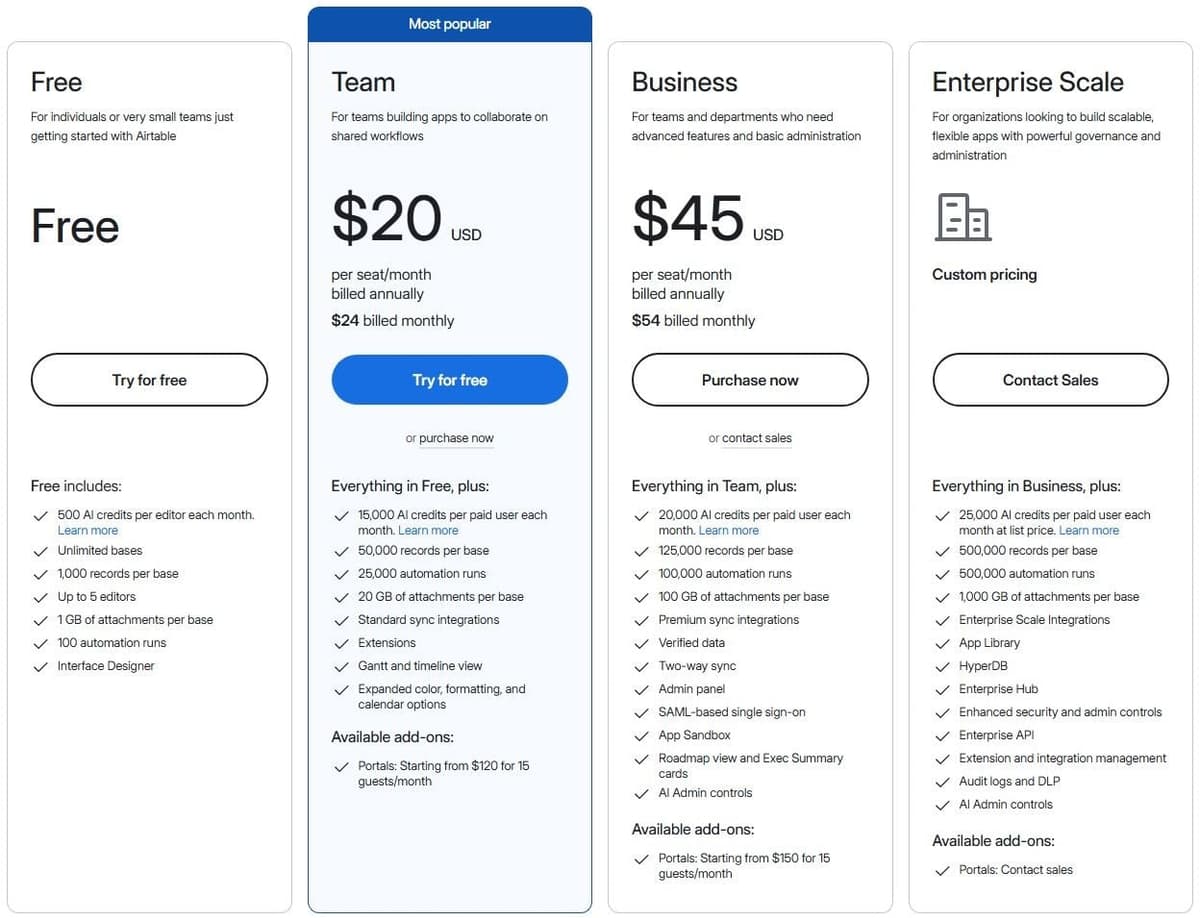
Airtable charges per seat and caps both database contents and automation runs. Free allows up to 5 editors, 1,000 records per base and 100 automation runs per month. It also includes 500 AI credits per editor each month, a separate allowance from automation runs. Teams that need boards, owners and approvals rather than app-to-app automation can compare workflow management software such as Asana, monday.com and Jira.
"Runs per month 100 25,000 100,000 500,000 ... For automations and API limits, you will be capped at the usage limit on your current plan."
Source: airtable.com
Team costs $20 USD per seat per month billed annually or $24 with monthly billing, with billable seats and minimum purchase to confirm. Business costs $45 USD per seat per month billed annually or $54 with monthly billing, with billable seats and minimum purchase to confirm.
Monthly automation allowances are 25,000 runs on Team, 100,000 on Business and 500,000 on Enterprise Scale. Automations are capped at the current plan's usage limit. Find out how failed or retried runs count, especially if the workflow throws frequent exceptions.
Team bills users with editing rights to a base. Read-only collaborators, form submissions and share links incur no charges on Team or Business. Review permissions as part of the budget. Readers and the people maintaining the workflow may need different things.
If Make, Zapier or another tool will update Airtable records, store an ID of your own in each record and have the automation search on it before writing, so a change updates the row instead of adding a duplicate. That field also protects you if the data ever moves: one user on r/Airtable warned that "every record gets a new ID on import. anything that stored the old one stops matching, and nothing throws an error." Airtable also caps how many automations a single base can hold, separately from monthly runs: 75 on Free, 100 on Team, 150 on Business and 200 on Enterprise Scale.
9. Parabola: best for agent building on a free self-serve tier
Self-serve plans start with Basic: 1 user, 1,000 credits and limited AI, on a free tier you can use indefinitely. The page gives every plan a monthly allotment, so confirm Basic's allocation. The current pricing page describes Prowork by Parabola, so evaluate that product and leave older spreadsheet-plan names out of a new purchase.
Prowork consumes credits when agents run, not while you build them. Simple agents use fewer credits, complex tasks use more, and plans include a monthly allotment. Business credit volumes are custom. Request a representative run estimate: the page gives no universal credit cost for an agent.
Self-serve includes an agent builder and pre-built integrations. Business adds team deployment support, role-based access controls, version history and rollback. Those matter when several people will maintain the process. Confirm the paid plan amount, credit allocation and required integrations directly in the proposed package.
10. Bardeen: best for browser action workflows
Bardeen Basic lists $10 per month billed monthly for an additional 100 credits per month, with seat scope to confirm. Premium lists $50 per month for an additional 1,000 monthly credits or $480 per year for an additional 12,000 yearly credits, with seat scope to confirm.
"Each row an action creates costs 1 credit . Enrichment rows cost 3 credits. Importing data and using utilities are free"
Source: bardeen.ai
The page also advertises 100 free credits, with the free-credit refresh period to confirm. Unused credits expire at the billing-period end. Count that free allowance once when estimating capacity, since the refresh period decides whether it returns.
An action row costs a credit, an enrichment row costs 3 credits, and importing data and utilities are free. The page labels import/export free and permits free CSV downloads. But its example assigns 4 credits to exporting 4 rows to Google Sheets: the free export label and Google Sheets example differ; confirm the action.
Enterprise uses annual billing and custom bulk credits, with scraper building, maintenance and premium support through sales. For a browser process, price the specific scraping, enrichment and destination actions together before comparing credit tiers. Dedicated providers are compared in our guide to data enrichment tools.
11. Workato: best for comparing enterprise and self-service paths
Workato has two purchase paths: the enterprise page is quote-based; self-service documentation lists separate credit prices. So a flat claim that Workato has no public prices misses that separate documentation.
Free provides a one-time grant of 50,000 credits. Pro starts at $75 per month for 2,500 credits per month. Those are different allowance periods: the Free grant arrives once, while the Pro allowance returns each month.
Unused Pro credits expire at the end of the billing month without rolling over. The documentation calls the Workato credit one common billing unit for every capability, from workflows to documents and agents, and says Free and Pro reach the same capabilities, so the difference is volume. For an enterprise evaluation, request the actual agreement and plan scope rather than extrapolating from a self-service tier.
12. Tray.ai: best enterprise automation by quote
Tray.ai sells Pro, Team and Enterprise through a custom quote based on usage and required features. Its Tasks cover integration, automation, MCP and agents. Ask the sales team to map that unit onto a representative workflow of your own; another vendor's task definition will not carry over.
A free trial is arranged through sales. All plans include business-hours support and knowledge-base access; Team and Enterprise add 24/7/365 support, enhanced SLAs and dedicated Slack channels.
Use the trial discussion to agree on the process, evaluation criteria and support coverage you need. Request a written usage estimate and confirm what happens above the included volume. The published description stops short of a universal entry price or a task-to-workflow conversion.
Free no-code automation tools compared
Ongoing allowances and evaluation access are two different things. Zapier Free includes 100 tasks per month, Make Free includes 1,000 credits per month, and Pabbly Connect includes 100 tasks per month. Activepieces Free includes 1,000 credits per month. Airtable Free includes 100 automation runs monthly alongside editor and record limits.
IFTTT's Free allowance is up to 2 Applets with unlimited runs, according to IFTTT's getting-started guide. An Applet cap is a different constraint from a monthly action allowance. A free runtime allowance is different again, and it needs an execution-time estimate.
Free plans also differ in how fast a trigger fires. A polling trigger sees new data only at its next check: IFTTT's polling guide gives every hour on Free and every 5 minutes on Pro and Pro+, Make Free runs scheduled scenarios at most every 15 minutes, and Latenode polls every 10 minutes, with faster polling sold as an add-on on Pay as you go. A webhook trigger reacts when the event arrives; Make and Latenode list instant webhooks on every plan, while IFTTT keeps Webhooks for Pro and Pro+ and Zapier keeps Webhooks by Zapier for paid plans. One user on r/Airtable described what a slow trigger looks like: "This morning the automation in Base A fired 18 minutes after the record was created in Base B."
Judge a trial by what is left when it ends. Zapier's Professional trial lasts 14 days, while Tray.ai arranges a trial through sales. Note which premium features you used during evaluation, then check whether the finished workflow still fits an ongoing free plan. Keep separate notes for workflow limits, consumption limits and account access.
Some of these free plans can run AI steps, within tight limits. An Activepieces Free run costs 1 credit and each AI step adds 2 credits on a fast model or 20 on a frontier model, so the 1,000 monthly credits cover about 333 runs with one fast-model step, or 47 with a frontier-model step. Make's AI Provider is available on every plan, Free included, and Airtable Free adds 500 AI credits per editor each month. IFTTT keeps AI services for Pro+, and Zapier Free stops a Zap at two steps, so a trigger, an AI step and a step that sends the result already need Professional.
No-code automation examples
Use these as workflow briefs to test, with connector availability checked separately. Route a submitted lead form into a CRM, then send the responsible team a Slack message. Extract an invoice email into a sheet and flag incomplete fields for review. Send a new order into a shipping process and prepare a customer message. When the invoice also needs approval and payment, dedicated invoice processing software covers those steps.
Prepare approved social posts for scheduling, with an editorial checkpoint before release. Triage a support ticket with an AI step and ask a person to review uncertain classifications. Assemble a weekly report from database records and send exceptions to its owner. Build a smart-home routine around a chosen trigger and action, after checking the relevant service and plan. Our guide to social media automation tools compares the schedulers such a flow can feed.
Set up your first workflow: lead form to CRM to Slack
- Write the rule in one sentence, for example: every form lead becomes a CRM contact, and the sales channel hears about leads from companies above a size you choose.
- Connect the form as the trigger, submit a test entry and check that every field arrives, including empty ones.
- Add the CRM step. Search for the email first and update the match, so a repeat lead does not create a duplicate record.
- Add an AI step that labels each lead, or a plain filter if a rule on company size is enough, then the Slack message with a link to the CRM record.
- If a person must approve before anything is written, add a human-in-the-loop step. Zapier's Human in the Loop pauses a Zap until a reviewer approves, and its help article lists a paid account as a prerequisite; in Power Automate the approvals connector is a standard connector.
- Send failed runs to a shared inbox or channel, switch the workflow on and compare the first week of CRM records with the form's own submission log.
How to choose a no-code automation tool
Write down the process before comparing subscription cards. Identify its trigger, actions, branches, expected run frequency and busiest period. Record which steps only transform data and which send work to another app. Then map those events to the vendor's meter: an external action, a credit-consuming operation or a complete run can produce different budgets.
Check app availability and plan restrictions using the exact actions you need. Ask whether the schedule is frequent enough, how errors are reported, what a retry consumes and who can maintain the workflow. Review user permissions and concurrent desktop work separately from monthly volume.
Plan for the failure nobody sees. One user on r/Notion said of built-in automations: "They'd break silently and I'd find out three weeks later my reminders were routing into the void." Find out where each tool sends error alerts and how long it keeps run history; Latenode, for example, keeps 3 days of execution history on Free and 30 days on Pay as you go. For workflows that matter, add a last step that records the time of each successful run and a scheduled check that alerts a shared inbox when that record goes stale.
Latenode is a low-code option whose CPU-second meter calls for a runtime estimate, with paid provider usage considered separately.
Check the code option before you need it. One user on r/nocode described the tipping point: "once the visual tool starts burying you in 30 checkboxes for one thing it's already slower than writing three lines of code." Several tools here take code, each on its own meter: a Code by Zapier step in Python or JavaScript uses 1 task per run, with extended runtime billed at 1 task per 30 seconds; Make's Code App runs JavaScript or Python at 2 credits per second of execution on Core, Pro and Teams; IFTTT keeps filter code for Pro+; and Latenode's JavaScript nodes count toward the same CPU-second runtime as the rest of the workflow. When one step is the problem, move only that step into code and keep the rest of the workflow visual.
Compare monthly and annual payment terms only after fixing the workload and required features. A free plan can help validate a small process, while a trial can reveal paid capabilities that will disappear afterward. Before purchasing, write down the selected tier, billing period, account scope and any vendor response about ambiguous limits. Repeat the estimate when the workflow changes, especially when adding AI, enrichment or another external action.
No-code vs low-code: where no-code stops
No-code works for processes you can draw as triggers, actions and branches with the controls a builder offers: routing a form, syncing records, posting alerts. It starts to strain when one step needs logic those controls lack, such as reshaping nested data, calling an API with no connector or handling many exceptions. Low-code tools keep the visual canvas and let you write that one step in code, on the terms described above for Zapier, Make, IFTTT and Latenode. Check the code option before you reach the first step that does not fit.




