

Quick answer: the best vibe coding tool for each kind of builder
Use Lovable for a first web app with no setup, Bolt.new for fast prototypes with code access, v0 for React interfaces on Vercel and Replit to build and host in the browser. Pick Cursor for AI editing of your own code, GitHub Copilot for AI inside VS Code and GitHub, Claude Code for multi-file terminal tasks and Codex for an agent in ChatGPT plans.
The ten tools below fall into three kinds: browser app builders, AI code editors and terminal agents. The right one depends on how much code you want to see: none at first, every change, or only the agent's final report.
What vibe coding tools are: three kinds
Vibe coding means describing software in plain language and letting an AI write, run and change the code. The tools differ in where the project lives, how much of the code you see and how much the AI does without asking.
Browser app builders, such as Lovable, Bolt.new, v0 and Replit, put a chat beside a live preview. All four open in a browser, and Bolt runs its development environment in the browser itself. Publishing is a separate step.
AI code editors, such as Cursor, GitHub Copilot and Devin Desktop, formerly Windsurf, work on the project folder on your computer. They show every change before you accept it.
Terminal agents, Claude Code and Codex, take a task, read and edit files, run commands such as tests and report what changed. The kinds overlap at the edges: Claude Code also runs in VS Code, Cursor and JetBrains IDEs. Tools of the same kind replace each other. Tools of different kinds work together: a builder for the first version, then an editor or agent for the exported code.
Vibe coding tools at a glance
Nine of the ten tools have a free option. Claude Code has none. The cheapest monthly subscription is $8, for Cursor Plus or ChatGPT Go. Go offers lightweight Codex tasks in the desktop app, subject to rollout. Prices are in USD as the vendors list them in November 2026, monthly unless marked billed annually.
| Tool | Kind | Best for | Free plan | Paid from | Usage unit |
|---|---|---|---|---|---|
| Lovable | Browser app builder | First full-stack web app | 5 credits/day, 30/month | Pro, $25/mo | Credits |
| Bolt.new | Browser app builder | Fast prototypes with code | 300K tokens/day, 1M/month | Pro, $25/mo | Tokens |
| v0 by Vercel | Browser app builder | React UIs on Vercel | 7 messages/day, $5 one-time | Plus, $30/user/mo | Credits |
| Replit | Browser app builder | Build and host in one place | Starter, daily Agent credits | Core, $20/mo | Credits |
| Latenode App Builder | Browser app builder | Apps tied to workflows | First app free | Pay per step | Steps |
| Cursor | AI code editor | Editing your own repo | Limited usage | Plus, $8/mo | Weekly usage pool |
| GitHub Copilot | AI code editor | VS Code and GitHub teams | 2,000 completions/month | Pro, $10/user/mo | AI credits |
| Devin Desktop | AI code editor | Editor with its own agent | Light agent quota | Pro, $20/mo | Daily and weekly quota |
| Claude Code | Terminal agent | Multi-file terminal tasks | None | Pro, $20/mo | Five-hour and weekly limits |
| Codex | Terminal agent | ChatGPT subscribers | Limited, on ChatGPT Free | Go, $8/mo, subject to rollout | Limits vary by plan |
1. Lovable: best for a first full-stack web app with no setup
Lovable suits founders and marketers who want a full-stack web app with no setup. The Free plan gives 5 build credits a day, up to 30 a month. Pro starts at $25 per month for 100 monthly credits, or $250 per year billed annually.
Lovable is a chat-first browser builder that hosts apps on Cloud, a built-in backend with a database, storage, authentication and functions on Supabase's open-source foundation. New apps use TanStack Start from May 13, 2026, or from June 22 for Enterprise workspaces. Earlier apps use React + Vite, and you cannot choose the framework.
Git sync with GitHub works on every plan, but editing and downloading code need a paid plan. Lovable's pricing page lists Plan Mode at 1 credit per message, while Lovable's docs add the cost of any extra work by planning subagents, so confirm before purchase. The catch: daily build credits expire at the end of each day.
2. Bolt.new: best for fast browser prototypes with full code access
Bolt.new is for quick prototypes with full access to the code. The Free plan includes 300K tokens a day and 1M tokens a month, with no card required. Pro costs $25 per month billed monthly and starts at 10M tokens a month with no daily token limit.
Bolt.new builds and runs a web app from a prompt on StackBlitz's WebContainers, a full development environment inside the browser, so you install nothing. It supports Node.js on the back end and any JavaScript framework on the front end. Projects back up to a GitHub repository or download as a zip file on desktop.
On paid plans, unused monthly tokens stay for up to two months while the subscription is active. Free plan tokens do not roll over. The main gap: PHP or Python back ends are not compatible.
3. v0 by Vercel: best for React and Next.js interfaces deployed on Vercel
v0 fits teams that build React and Next.js interfaces and ship them on Vercel. The Free plan costs $0 per month with a 7 message per day limit, and new users get $5 in one-time credits. v0 Plus costs $30 per user per month with $30 of monthly credits per user.
v0's docs list web apps, dashboards, e-commerce, SaaS and AI apps, up to full-stack apps with authentication and databases. The stack is Next.js, React, TypeScript, Tailwind CSS and shadcn/ui. A result deploys to production on Vercel with one click or goes out as a pull request through the bi-directional GitHub integration.
Credits carry a USD value and are drawn at model token rates. Generation pauses when they run out. Unused monthly credits roll over and expire after 65 days. One drawback: the docs list mobile-responsive apps, not native ones.
4. Replit: best for building and hosting in one browser workspace
Choose Replit if you want to build and host in one browser workspace. The free Starter plan gives daily Agent credits up to a monthly cap and one published app, which goes down after 30 days. Core costs $20 per month, or $18 per month billed annually, with $20 towards more powerful models.
Replit pairs an AI agent with hosting and publishing, and it imports public and private GitHub repositories. Starter is not on replit.com/pricing, its credit amounts are unpublished, and it offers only Lite build. Core lifts the published-app cap to unlimited.
On Core and Pro, Free Mode costs nothing within its allowance. Paid modes use effort-based pricing, and in Build Mode the Agent bills one checkpoint per request, according to Replit's AI billing docs. Replit publishes no per-checkpoint price, so watch your credit balance on large builds.
5. Latenode App Builder: best for web apps that hand work to automated workflows
Latenode App Builder fits teams whose apps hand work to automated workflows. As of November 2026, the first app is free, with no card and no subscription, and then you pay per step. The chat shows the price of each step.
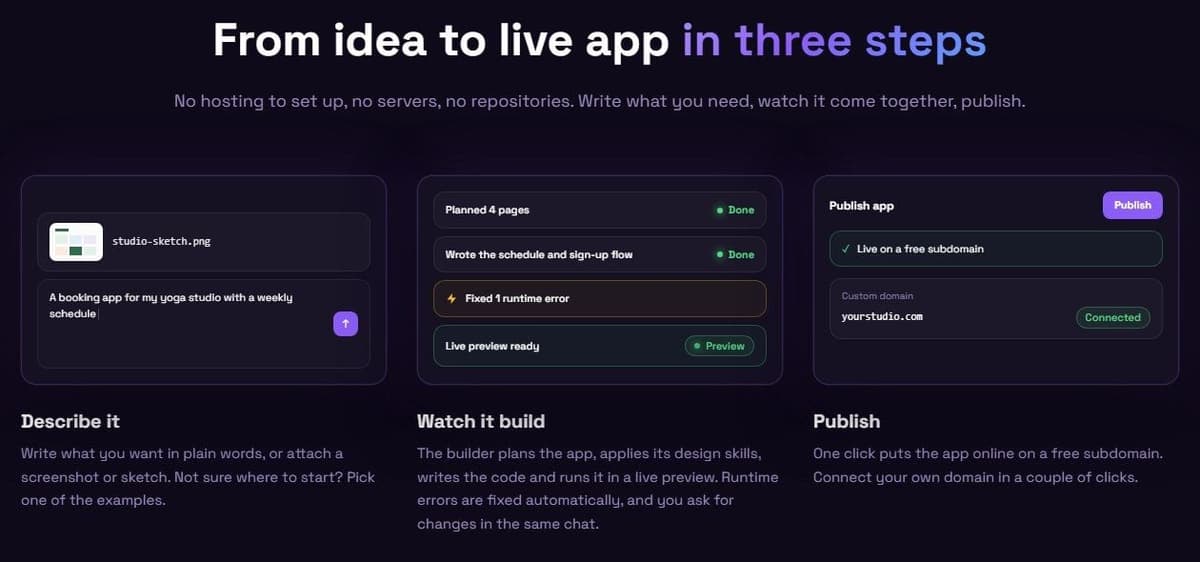
This AI app builder turns a plain-language description, a screenshot or a sketch into a web app, website or landing page. Plan mode builds nothing until you approve a plan. Apps get a React front end, a serverless back end and their own database when needed.
One click publishes to a free subdomain, a custom domain takes one CNAME record, and the project exports to GitHub. Apps can call a Latenode workflow by webhook or API request to update a CRM. As of November 2026, hosting is free up to 1,000 visits a month, then from $5 a month with 30,000 visits included. It does not build native App Store or Google Play apps or desktop software.
6. Cursor: best for developers editing their own repository with AI
Cursor is for developers who want AI help inside their own repository. Free includes limited AI usage with no published limits. Plus costs $8 per month and has a weekly usage pool. The price card lists Grok only, while the model guide also lists Composer 2.5, so check the model picker before subscribing.
"Instant Grep builds and queries its index on your machine."
Source: cursor.com
Cursor is an AI code editor built on the VS Code codebase, so you can migrate VS Code settings. Its Agent edits code and runs terminal commands, and code search stores no embeddings of your codebase.
Paid plans are sold as part of The X Subscription: Plus, Premium at $30, Super at $100 and Ultra at $200 per month. Hobby, Start, Pro and Pro+ remain for existing customers only. Third-party models such as Claude, GPT and Gemini sit outside the included pool. From Premium up, they bill at API list price from prepaid credit.
7. GitHub Copilot: best for teams already working in VS Code and GitHub
GitHub Copilot suits teams that already work in VS Code and on GitHub. Copilot Free costs $0 with no credit card and includes 2,000 completions per month plus limited chat and agent usage. Pro costs $10 per user per month with unlimited completions, code review and $15 of monthly AI credits.
Copilot works in VS Code, JetBrains IDEs, Neovim, Eclipse and Zed, and agent mode also runs in Visual Studio and Xcode. On paid plans, the coding agent, Copilot in the cloud, takes assigned work and opens a pull request.
GitHub AI Credits are worth $0.01 per credit, and completions do not use them. GitHub's docs list Pro at 1,500 monthly AI credits, and GitHub says the flex part of the allowance may change over time. The limitation: on Copilot Free, models come only through auto model selection, according to GitHub's Copilot plans docs.
8. Devin Desktop (formerly Windsurf): best for an AI code editor with its own agent
Devin Desktop suits developers who want an AI code editor with an agent built in. It is the new name for Windsurf: Cognition announced it on June 2, 2026, and windsurf.com now redirects to devin.ai. The Free plan costs $0 with a light quota for coding with agents, and Pro costs $20 per month.
Free includes unlimited inline edits and Tab completions with limited model availability. Pro adds increased quotas with frontier models, Devin Cloud agents and extra usage at API pricing. The local agent, Devin Local, supports subagents. In Pro, Max and Teams you can delegate work to Devin, the cloud agent, then review its pull requests in the editor.
Usage runs on a daily and weekly budget, for the individual Free, Pro and Max plans, according to Devin's docs. Free users wait for the reset. The drawback: quota sizes are not published as numbers.
9. Claude Code: best for handing multi-file tasks to an agent in the terminal
Claude Code suits developers who hand over multi-file tasks and review the result. Claude's Free plan does not include it. Pro does, at $20 per month billed monthly or $200 paid up front for a year (about $17 per month). So do Max at $100 per month and Ultra at $200 per month.
"These limits are shared across Claude and Claude Code"
Source: support.claude.com
Claude Code is Anthropic's agentic coding tool: it reads the codebase, edits files and runs commands in the terminal, IDEs, a desktop app or the browser. Max is billed monthly only, with 5x Pro usage. Ultra gives 10x Pro usage every week and no 5-hour limit for verified accounts. Team standard seats cost $20 per seat per month billed annually or $25 billed monthly, for teams of at least 2 and at most 150 people.
The catch: Pro and Max have a five-hour session limit and a weekly limit.
10. Codex: best for ChatGPT subscribers who want a coding agent
Codex suits ChatGPT subscribers who want a coding agent in their plan. Free and Go ($8 a month) list lightweight coding tasks in the desktop app, subject to rollout. Plus ($20 a month) includes web, CLI and IDE access. Pro starts at $100 a month. Business, Edu and Enterprise also include Codex.
The CLI runs locally, and its GitHub repository is published under the Apache-2.0 license. The IDE extension works in VS Code and compatible editors such as Cursor. Codex Cloud runs tasks remotely, then lets you review changed files and commit or open a pull request.
Pro comes in plans at $100, $200 or $500 per month. Business costs $20 per user per month billed annually for at least 2 users, or $25 per user per month billed monthly. The weak spot: OpenAI gives only estimates of local messages per five-hour period for Plus and Business, and weekly limits may also apply.
How to choose a vibe coding tool
Decide where the project should live and how much code you want to see. Then compare the free plans and how each tool counts usage.
- No setup or full control: a browser builder gives you a web workspace, an editor works on your local folder, and a terminal agent works through commands.
- Check the free allowance. Lovable gives 5 build credits a day, up to 30 a month, and Bolt.new 300K tokens a day and 1M a month. Cursor, Devin Desktop and Replit Starter publish no numbers.
- Know the usage unit: credits for Lovable, v0 and Replit, tokens for Bolt.new, a weekly usage pool for Cursor and AI credits for GitHub Copilot. Claude Code and Codex have five-hour and weekly limits, Devin Desktop a daily and weekly quota, and one builder bills in steps. At the limit, v0 pauses generation, and Cursor waits for the weekly reset or bills prepaid credit.
- Code export to GitHub lets the project move to an editor later. Lovable, Bolt.new and v0 all connect to GitHub.
- Hosting, a database and a custom domain: Lovable includes hosting and a database, while Bolt.new's Free plan has no custom domain.
- Plan the pairing: a builder for the first version, then an editor or agent, such as Claude Code or Codex inside Cursor.
Then give two tools one hour each:
- Run the same small task in both.
- Count how often you had to step in.
- Ask for a second, unrelated change and check that the first one survived.
- Break something on purpose and ask the tool to fix it.
What vibe coding tools still leave to you
The tool writes and runs the code. Three jobs stay with you: checking that the app does what you meant, protecting user data and keeping a working version you can return to.
- Read each change or diff before you accept it, even when the preview looks right.
- Test the app as a user would, including sign-in and any data that should stay private to one account.
- Save a version or a commit after every round that works, so a bad change costs minutes instead of the project.
- Read every command an agent asks to run before you approve it, especially commands that delete files or touch a database.
- Keep real customer data and secrets out of unattended agent runs.
- Write short project instructions the tool reads first: the stack, the folders it may change and the commands it may run.