

Quick answer: the best DevOps automation tool for each stage
DevOps automation tools run builds, tests, deployments, infrastructure changes and alerts without a person starting each step. The right pick depends on the pipeline stage you want to automate:
- CI/CD inside a GitHub repository: GitHub Actions
- One application from code to deployment: GitLab CI/CD
- Self-hosted pipelines with plugins: Jenkins
- Infrastructure as code: Terraform, or Pulumi for general-purpose languages
- Configuration: Ansible
- Containers and orchestration: Docker and Kubernetes
- GitOps delivery to Kubernetes: Argo CD
- Monitoring and on-call: Prometheus and PagerDuty
- Workflows around the pipeline (alerts, tickets, release notes): Latenode
Most teams need one tool per stage, not one tool for everything. Prices below are in US dollars with their unit and billing period, as of November 2026. For what DevOps automation covers beyond tools, see DevOps automation.
DevOps tools by pipeline stage
This article uses seven stages: plan and code, build and test (CI), deliver and deploy (CD), infrastructure, configuration, run (containers), and monitor and respond. The table maps the tools in this list, plus common alternatives, to the stage each one owns.
Plan and code comes first because every later stage starts from Git. A push starts a CI run, Argo CD reads the desired state from a repository, and Terraform files are versioned like application code.
| Stage | What gets automated | Tools in this list | Other options |
|---|---|---|---|
| Plan and code | Repositories, pull requests, work items | GitHub, GitLab | Azure DevOps |
| Build and test (CI) | Builds and tests on every change | Actions, GitLab, Jenkins | CircleCI, Selenium |
| Deliver and deploy (CD) | Releases to staging and production | Argo CD, GitLab CI/CD | Spinnaker |
| Infrastructure | Cloud resources from config files | Terraform, Pulumi | OpenTofu |
| Configuration | Server state, software, rolling updates | Ansible | Chef, Puppet |
| Run (containers) | Images, scheduling, scaling, restarts | Docker, Kubernetes | Not covered here |
| Monitor and respond | Metrics, alerts, on-call escalation | Prometheus, PagerDuty | Grafana Cloud, Datadog |
Continuous integration builds and tests every change pushed to the repository. A deployment tool promotes a tested build to staging and production. Monitoring triggers an alert when a metric crosses a threshold. Selenium is in the CI row as a browser automation tool that pipelines call for tests, not as a pipeline.
DevOps automation tools at a glance
The twelve tools below differ most in license and hosting. Jenkins, Kubernetes, Argo CD and Prometheus are open source projects that sell no plan of their own. GitHub Actions, GitLab, Docker and PagerDuty are vendor services with a free tier and paid plans. Terraform is source-available under the Business Source License, while Pulumi and Ansible pair an open source core with a paid service or a supported edition.
| Tool | Stage | License | Hosting | Free tier | Paid from |
|---|---|---|---|---|---|
| GitHub Actions | CI/CD | Proprietary; runner: MIT | Both | 2,000 Linux min/month | $4 per user/month |
| GitLab CI/CD | CI/CD | CE: MIT; EE: EE license | Both | 400 min/month, 5 users | $29 per user/mo, annual |
| Jenkins | CI/CD | MIT | Self-hosted | No license fee | None (open source) |
| Terraform | Infrastructure as code | Business Source 1.1 | Both | HCP: 500 resources | $0.10 per resource/month |
| Pulumi | Infrastructure as code | Apache 2.0 (engine) | Both | 1 user, 500 workflow min | $40 per org/month |
| Ansible | Configuration | GPL-3.0 | Self-hosted | Community, no fee | Quote only |
| Docker | Containers | Apache 2.0 (Engine) | Both | Personal, 1 user | $9 per user/mo, annual |
| Kubernetes | Orchestration | Apache 2.0 | Both | No license fee | None (open source) |
| Argo CD | GitOps delivery | Apache 2.0 | Self-hosted | No license fee | None (open source) |
| Prometheus | Monitoring | Apache 2.0 | Self-hosted | No license fee | None (open source) |
| PagerDuty | On-call, incidents | Proprietary | SaaS | 5 users, 1 schedule | $21 per user/mo, annual |
| Latenode | Workflows around CI/CD | Hosted service | SaaS | 10,000 CPU sec/month | $0.00012 per CPU second |
Prices as of November 2026.
1. GitHub Actions: best for CI/CD inside GitHub repositories
GitHub Actions is a CI/CD tool that automates build, test and deployment inside a GitHub repository. Workflows are YAML files in the .github/workflows directory that run on a schedule or when a repository event fires, such as a pull request or a pushed commit. Jobs run on GitHub-hosted Linux, Windows and macOS virtual machines or on self-hosted runners.
For private repositories, GitHub Free includes 2,000 CI/CD minutes a month and 500MB of Packages storage, Team 3,000 minutes and 2GB, and Enterprise 50,000 minutes and 50GB, all on standard Linux runners. GitHub's billing docs count that included usage in dollars ($12, $18 and $300 a month on these three plans), so Windows and macOS minutes use it up faster. Public repositories are free on standard GitHub-hosted runners, and self-hosted runners are free too. Extra usage is billed monthly at $0.006 per minute on a Linux 2-core runner, $0.010 on Windows 2-core and $0.062 on macOS. Team costs $4 and Enterprise $21 per user per month. Eligible Enterprise Cloud customers get Copilot access with separately metered AI usage. The limitation: Actions is tied to GitHub, so code hosted elsewhere needs another CI tool.
2. GitLab CI/CD: best for one application from code to deployment
GitLab CI/CD is a CI/CD tool that comes built into GitLab, so source code management and pipelines live in one application. A .gitlab-ci.yml file in the project root defines stages, jobs, scripts, variables and job dependencies. A commit, a merge request, a schedule or a manual run creates a pipeline. Its jobs run on a Linux, Windows or macOS runner on GitLab.com, or on a runner you register yourself.
GitLab Free costs $0 per user per month, needs no credit card and includes 400 compute minutes per month and 10 GiB of storage. Premium costs $29 per user per month, billed annually, with 10,000 compute minutes per month and $8 of GitLab Credits per user per month for AI features. Ultimate has custom pricing and 50,000 compute minutes per month. Besides GitLab.com, you can run a self-managed instance or GitLab Dedicated, a single-tenant SaaS managed by GitLab. The catch: on GitLab.com, Free stops at 5 users per private top-level group, while public groups and self-managed Free installs have no such cap.
3. Jenkins: best for self-hosted pipelines extended with plugins
Jenkins is a CI/CD tool that runs as an open source automation server. It is a self-contained Java program with packages for Windows, Linux, macOS and other Unix-like systems, configured through its web interface. Pipelines are code: a Jenkinsfile in the Pipeline domain-specific language sits in the project's repository. A Multibranch Pipeline project finds and builds every branch that contains one, plus pull requests through a branch source plugin.
Jenkins lists 2300+ community-contributed plugins that connect it to tools across the CI/CD toolchain, and it can spread builds, tests and deployments across several machines and platforms. It is licensed under the MIT License, so there is no license fee. The trade-off is upkeep: Jenkins runs on your own servers, so your team installs, updates and secures the server and every plugin.
4. Terraform: best for infrastructure as code across clouds and services
Terraform is an infrastructure as code tool that defines cloud and on-prem resources in declarative configuration files. Its language is built on HCL, and providers on the Terraform Registry connect it to virtually any service with an API. The workflow is write, plan and apply: Terraform shows what it will create, update or destroy, applies the plan after approval and tracks real infrastructure in a state file.
According to HashiCorp's licensing FAQ, first posted on August 10, 2023, HashiCorp moved future releases from MPL 2.0 to the Business Source License. Terraform 1.6.0 and later is under the Business Source License 1.1, and earlier versions were MPL 2.0. According to HashiCorp's pricing FAQ, HashiCorp's business operations moved to IBM on September 1, 2025, and the HCP Terraform Free tier covers up to 500 managed resources. IBM HCP Terraform Essentials starts at $0.10, Standard at $0.47 and Premium at $0.99 per managed resource per month. OpenTofu continues as the open source fork under MPL-2.0. The limitation: the license bars offering Terraform to third parties on a hosted or embedded basis to compete with IBM's paid versions.
5. Pulumi: best for infrastructure as code in general-purpose languages
Pulumi is an infrastructure as code tool that lets you define infrastructure in TypeScript, JavaScript, Python, Go, .NET, Java, YAML and HCL. Its CLI and SDK are open source under Apache-2.0, and Pulumi Cloud is the managed service that tracks infrastructure state and coordinates updates.
Pulumi Cloud Free costs $0, needs no credit card and includes 1 user, IaC state management and up to 500 workflow minutes. Essentials costs $40 per month with 40 credits, up to 500 managed resources and unlimited users. Pro costs $400 per month with 400 credits and up to 2,000 managed resources. Resources are billed hourly, which works out to $0.1825 per resource per month on Essentials and from $0.365 on Pro. Self-service billing is monthly by card, and Pro also offers annual contracts. On monthly terms, the up-front fee creates a pool of Pulumi Credits, and usage above it is billed in arrears. One drawback: unused monthly credits expire, so a quiet month still costs the full fee.
6. Ansible: best for agentless configuration management
Ansible is a configuration management tool that manages system configuration, deploys software and performs zero-downtime rolling updates. You declare the desired state of a local or remote system in human-readable YAML playbooks, and Ansible connects to managed nodes over SSH with existing OS credentials, without installing an agent. Most modules leave an already-correct state unchanged, but idempotency depends on the playbook and its modules. Community Ansible is free and open source under GPL-3.0.
Red Hat Ansible Automation Platform is the paid, supported edition. Red Hat publishes no price for it. Cost depends on sizing and subscription and is quoted by Red Hat or a partner, with Standard (9 AM to 5 PM support) and Premium (24x7 support) subscriptions. It is also sold through AWS Marketplace and deployed in your own AWS cloud. The downside: budgeting for it starts with a sales quote.
7. Docker: best for packaging applications into containers
Docker is a container tool that packages an application and its dependencies into an image. You build the image from a Dockerfile, a text document with every command needed to assemble it, and containers run from that image. Docker Engine is the open source containerization technology underneath, and Docker Hub is the registry for storing and sharing images.
Docker Personal costs $0 per month for 1 user and includes Docker Desktop, Docker Hub, 1 private repository and a Docker Hub pull limit. Docker's pricing page lists 100 pulls an hour, while its Docker Hub docs give authenticated Personal users 200 pulls per 6 hours. Pro costs $9 per user per month billed annually or $11 monthly, for 1 user. Team costs $15 per user per month billed annually or $16 monthly, for up to 100 users. Business costs $24 per user per month on an annual plan only, through sales. The limitation is licensing. Under the Docker Subscription Service Agreement, Docker Desktop is free for small businesses (fewer than 250 employees and less than $10 million in annual revenue), personal use, education and non-commercial open source. Larger organizations and government entities need a paid plan.
8. Kubernetes: best for running containers across a cluster
Kubernetes (K8s) is a container orchestration tool that automates deployment, scaling and management of containerized applications across a cluster. It is self-healing: it restarts failed containers, replaces them and kills containers that fail a user-defined health check. Rollouts and rollbacks move deployed containers from their actual state to the desired state at a controlled rate. Applications scale with a command, a UI or automatically based on CPU usage, and Kubernetes provides service discovery and load balancing.
"Does not deploy source code and does not build your application."
Source: kubernetes.io
Kubernetes runs on on-premises, hybrid or public cloud infrastructure. It is open source under Apache-2.0, so the software carries no fee, while managed Kubernetes services are billed by the cloud provider that runs them. The limitation: Kubernetes does not build your application or deploy source code, so it sits next to a CI tool and, usually, a delivery tool such as Argo CD.
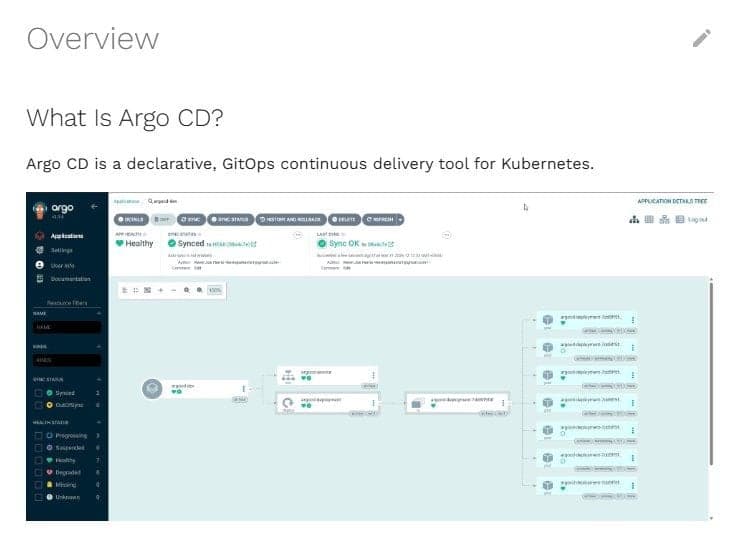
9. Argo CD: best for GitOps delivery to Kubernetes
Argo CD is a GitOps delivery tool that keeps Kubernetes applications in the state stored in Git. It runs as a Kubernetes controller, compares the live state of each application with the target state in a Git repository and marks deviating applications as OutOfSync. You choose manual or automatic sync, and you can roll back to any configuration committed in Git.
Manifests can be Kustomize applications, Helm charts, Jsonnet files or plain YAML or JSON. Argo CD deploys to multiple clusters and has a web UI, a CLI for automation and CI integration, and webhook integration with GitHub, Bitbucket and GitLab. The project is open source under Apache-2.0 and sells no paid plan, so the cost is the cluster capacity it runs on and the time to operate it. Argo CD delivers to Kubernetes only, so any workload outside a cluster needs a different deployment tool.
10. Prometheus: best for metrics monitoring and alerting
Prometheus is a monitoring tool that collects metrics and raises alerts. The open source toolkit was originally built at SoundCloud and joined the Cloud Native Computing Foundation in 2016 as its second hosted project after Kubernetes. The server pulls metrics over HTTP from instrumented jobs, finds targets through service discovery or static configuration and stores the data locally as time series with timestamps and key-value labels. PromQL queries that data, rules over it record new series or generate alerts, and Grafana can visualize the results.
"If you need 100% accuracy, such as for per-request billing, Prometheus is not a good choice"
Source: prometheus.io
Alertmanager deduplicates, groups and routes alerts to receivers such as email or PagerDuty, and it handles silencing and inhibition. All Prometheus components are available under the Apache 2 License on GitHub. Prometheus says it is not a good choice when you need 100% accuracy, such as per-request billing.
11. PagerDuty: best for on-call and incident response
PagerDuty is an incident response tool that assigns incidents to on-call responders and escalates them until someone acts. Escalation policies notify one target at a time. If nobody acknowledges, resolves or reassigns the incident before the timeout, it moves to the next rule, and escalation stops once a responder acknowledges. Policies connect services to users or on-call schedules, and alerts can arrive from monitoring tools such as Prometheus through Alertmanager.
The Free plan costs $0 per year with 5 users, 1 on-call schedule and 1 escalation policy. Professional costs $21 per user per month billed annually or $25 billed monthly. For chat routing, see how to automate incident response with PagerDuty and Slack. According to Atlassian, Opsgenie sales ended on June 4, 2025, and Opsgenie will shut down on April 5, 2027, with its capabilities moving to Jira Service Management. The limitation: Free allows a single escalation policy, while other plans set no limit.
12. Latenode: for workflows around the pipeline (alerts, tickets, release notes)
Latenode is not a CI/CD or infrastructure as code tool and does not build, test or deploy code: it is a workflow tool that reacts to events from GitHub, GitLab, Jenkins, Azure DevOps, PagerDuty and Sentry. It then messages Slack, Microsoft Teams or Google Chat, opens Jira or Linear issues and writes AI summaries. Webhook triggers are instant on every plan, HTTP request nodes call any API, and JavaScript runs in any node. It lists 5,500+ integrations across 1,200+ apps and LLMs, plus 335+ AI models in one subscription. AI Copilot is an AI assistant built into every workflow.
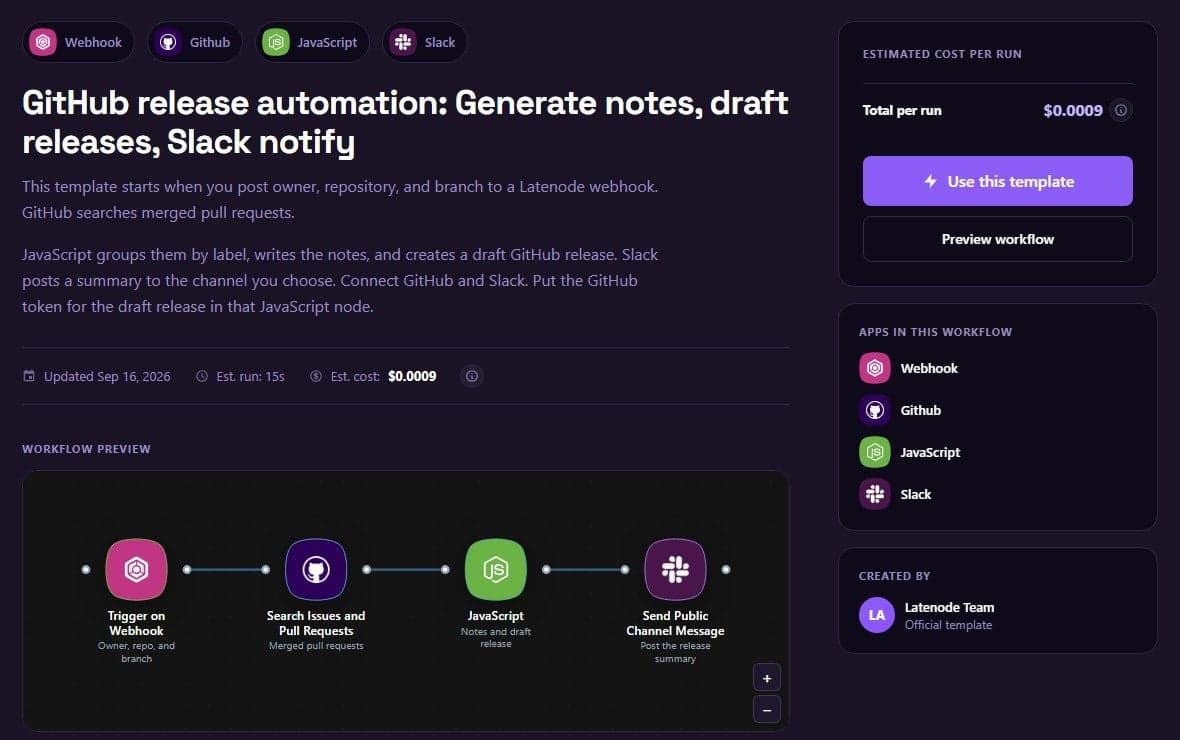
Billing counts runtime in CPU seconds, not steps. Free costs $0 per month with 10,000 CPU seconds, 5 active workflows, a 3-minute run limit and 3-day history. Pay as you go has no base fee and unlimited active workflows, then $0.00012 per CPU second up to 100,000 a month, lower rates above. Paid-provider nodes add PnP tokens. Templates include "GitHub release automation: Generate notes, draft releases, Slack notify" and "Automatically notify stakeholders of new PagerDuty incidents". The limitation: you still need a CI/CD tool and a monitoring tool; Latenode connects them.
What happens around the pipeline: alerts, tickets and release notes
CI/CD and monitoring tools produce events, and someone still has to tell people, open tickets and write release notes. There are three ways to do it: the tools' own notifications, ChatOps bots, or a separate workflow automation tool. Typical event and action pairs:
- A failed build: a Slack message with the failing step
- A new PagerDuty incident: an email to stakeholders
- A new GitHub release: an AI summary posted to Slack
- A new Sentry error: a Jira issue with the stack trace
- A new Azure DevOps work item: a Google Chat message
A workflow tool does not replace the CI/CD tool: it reacts to what the pipeline reports. In Latenode, each line above is one workflow that starts from an app trigger or a webhook. For the human side of an outage, see incident management workflow best practices.
How to choose a DevOps automation tool
Start with the stage that costs your team the most time, then pick a tool that fits where your code already lives. Six criteria separate the DevOps automation tools in this list:
- Where the code is hosted. A team on GitHub gets CI in GitHub Actions without a separate server, while teams on GitLab or Azure DevOps have GitLab CI/CD or Azure Pipelines.
- Self-hosted or managed, and who maintains it. A self-hosted tool such as Jenkins, Prometheus or Argo CD shifts installation, upgrades and security to your team.
- Configuration language and coding skills. GitHub Actions workflows, GitLab pipelines and Ansible playbooks use YAML, Terraform uses HCL, and Pulumi works in general-purpose languages as well as YAML and HCL.
- License. Jenkins under MIT and Kubernetes under Apache-2.0 are open source, Terraform is source-available under the Business Source License, and hosted services such as PagerDuty are proprietary.
- Pricing unit. GitHub and GitLab charge per user plus build minutes, HCP Terraform and Pulumi Cloud per managed resource, and Datadog per host.
- Integrations with chat and ticketing. Check that alerts reach your chat and that a failure can open a Jira issue, natively or through the Jira REST API.
DevOps tools automate software delivery, while IT process automation tools automate service desks and back-office jobs.
Which tools work together and which replace each other
Most stacks combine one tool per stage, and tools replace each other where their jobs overlap. GitHub Actions, GitLab CI/CD and Jenkins are alternatives for CI, as Terraform, Pulumi and OpenTofu are for infrastructure as code. OpenTofu, as the OpenTofu project describes it, is a drop-in replacement for Terraform that keeps existing workflows and configurations. Ansible works after Terraform: Terraform provisions the servers, then Ansible configures what runs on them. Docker builds the images that Kubernetes runs, and Argo CD deploys what CI built. Prometheus with Alertmanager feeds PagerDuty. Latenode connects these tools to chat, tickets and people and replaces none of them.