



Quick answer: the best business process automation tool for each need
App-to-app automation with a card checkout: Zapier or Make. Automation inside Microsoft 365 with RPA: Microsoft Power Automate. Enterprise integration, self-service or by contract: Workato. No-code process apps: Kissflow or Pipefy. Process automation at enterprise scale: Nintex, Appian or Decisions, formerly ProcessMaker. Developer-grade orchestration: Camunda. Approvals with published per-user prices: Cflow. Custom workflows with code and runtime billing: Latenode.
Prices are as listed on September 14, 2026. Five of the twelve publish no price, and their sections describe how they bill instead. Each section names the unit the vendor bills on. A $19.99 subscription metered in tasks and a $15.00 seat metered per user answer different questions. Prices and limits move, so confirm on the vendor's page before signing anything.
Editorial note: Latenode publishes this article and is one of the products discussed. The comparison uses public product documentation and pricing pages. Worked examples are calculations under stated assumptions, not results from a hands-on benchmark. Recommendations describe which requirements a product may fit; they are not a measured ranking of performance or reliability.
What business process automation tools do in 2026
Business process automation (BPA) is the use of software to run a repeatable process, such as an approval, an onboarding or an order, from start to finish. The tools below each cover part of that job, which is why they fall into different categories.
Buyers meet five categories under one name. App-to-app automation platforms move data between SaaS tools, from a single trigger and action to longer multi-step workflows. iPaaS platforms integrate systems of record under governance, with environments, access control and deployment review. No-code process and workflow apps handle approvals and requests, where a form starts a case and people take turns on it. BPM and orchestration platforms model long-running processes in standard notation and execute them for days or weeks, with state, escalation and an audit trail. Underneath all of that sits a workflow layer with code, for the custom logic none of the others cover. See no-code automation tools for a broader comparison of visual builders.
Choose the process layer first
| What needs to happen | What to evaluate | Where to start |
|---|---|---|
| Move records between apps | Actions, mapping, retries, usage | Zapier, Make, Latenode |
| Connect core business systems | Deployment, connectors, audit | Workato; Power Automate |
| Route requests between people | Forms, approvals, reminders | Pipefy, Cflow, Kissflow |
| Combine documents and approvals | Generation, approvals, signing | Nintex |
| Coordinate long-running work | State, decisions, human tasks | Camunda, Appian, Decisions |
These groups are starting points, not exclusive feature boundaries or a measured ranking. Power Automate fits a Microsoft-centered process. In the last two rows, compare environments, versioning, request history and recovery after a failure as well. A connector tool can participate in a business process without supplying the full process-management interface. For scheduling and posting, see our guide to social media automation tools.
Pricing follows the category rather than the feature list. Vendors meter per user, per task, per credit, per business action, per bot or by contract. The same automation can look cheap on one meter and expensive on another. Every section below names the unit first, then the price, then the limitation.
BPA, RPA and BPM: what each one automates
Robotic process automation (RPA) is one technique inside BPA, and business process management (BPM) is the discipline of modeling the process that BPA then runs.
| Term | What it automates | Tools in this list |
|---|---|---|
| BPA | A whole process, through APIs, connectors and forms | Zapier, Make, Workato, Pipefy, Cflow, Latenode |
| RPA | Screen-level steps, run by software bots | Power Automate desktop flows, Appian RPA bots |
| BPM | Long-running processes modeled in BPMN or DMN | Camunda, Appian, Decisions |
Outside the twelve, UiPath and Automation Anywhere are RPA-first. UiPath has a free Community plan and a Basic plan from $25 per month; Automation Anywhere sells through its sales team.
Business process automation tools at a glance
Here are the twelve tools. They appear in the order of the sections that follow. For store operations, see our guide to ecommerce automation tools.
| Tool | Best for | Pricing model | Entry price |
|---|---|---|---|
| Zapier | App-to-app automation | Per task | $0; $19.99/mo yearly |
| Make | Visual scenarios | Per credit | $0 Free, $9/mo yearly |
| Power Automate | Microsoft 365 and RPA | Per user, per bot | Free license; $15.00/user/mo |
| Workato | Enterprise integration | Credits; Tasks or business actions | Free grant; Pro from $75/mo |
| Latenode | Code-level workflows | Per CPU second | $0 Free plan |
| Kissflow | No-code business apps | Annual contract | Quote only |
| Pipefy | Process management | Per user | Free Starter plan |
| Nintex | Document workflows | Contract | Quote only |
| Appian | Enterprise low-code | Per user, per app | Quote only |
| Camunda | Developer orchestration | License or SaaS | Quote only |
| Decisions | Rules-driven processes | Contract | Quote only |
| Cflow | Approvals and requests | Per user | From $110/month for 10 users, billed annually |
1. Zapier: best for app-to-app automation with the widest catalog
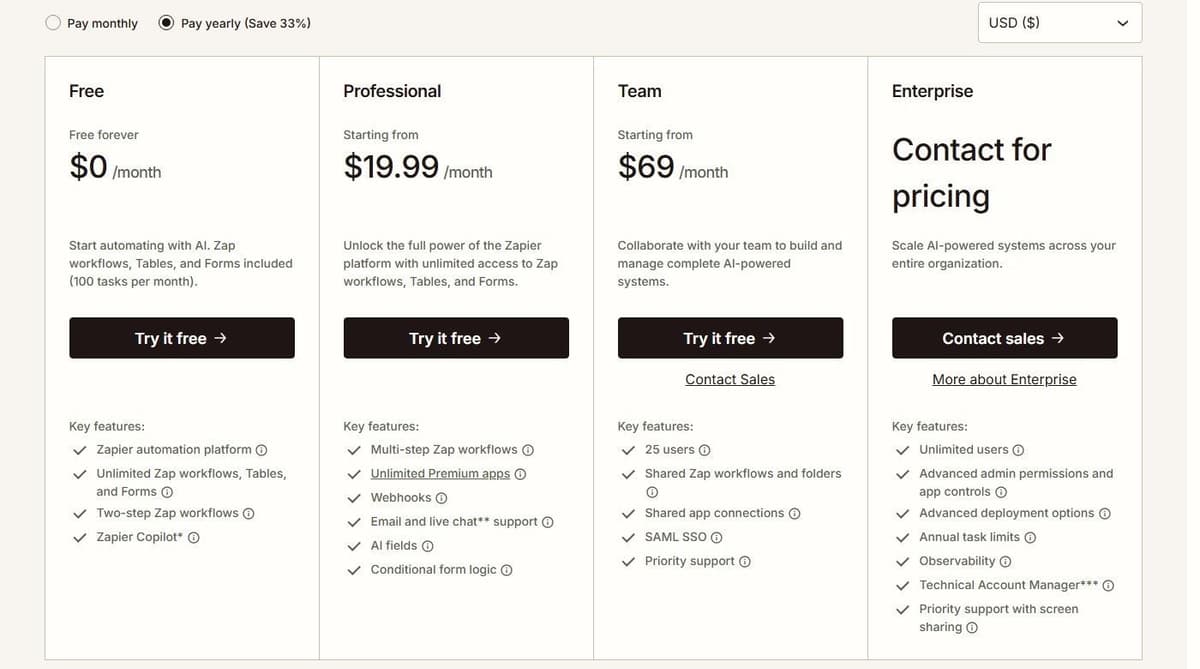
Zapier is the usual answer when two SaaS tools need to talk and nobody wants a project. The Free plan is free forever at $0 a month, with unlimited Zap workflows, two-step Zaps, Tables, Forms, Zapier Copilot and 100 tasks a month.
Professional starts at $19.99 per month with annual billing for 750 tasks. It adds multi-step workflows, premium apps and webhooks. Live chat starts at the Professional 2,000-task tier and above. Team starts at $69 per month with annual billing for 2,000 tasks and 25 users, with shared workflows, folders, app connections and SAML SSO.
Zapier's Team seat information is inconsistent: its plan card and comparison table list 25 users, while its FAQ says Team and Enterprise allow unlimited users. Confirm the Team allowance before purchase.
The meter is the task. Each ordinary successful billable action in a Zap counts separately, and checking or polling for new data never uses one. Built-in steps are free: Zapier Tables, Zapier Forms, Filter, Formatter, Paths, Delay, Looping, Sub-Zap, Digest, Zapier Manager and Storage.
A workflow with seven successful ordinary billable actions uses seven Zapier tasks per run. Free built-in steps do not add tasks, and AI, MCP and extended code may use different rates. Task count alone does not multiply the subscription price by seven; compare the capacity tier and any excess usage. Our Zapier pricing guide lists every plan and task tier.
2. Make: best visual scenario builder at a low entry price
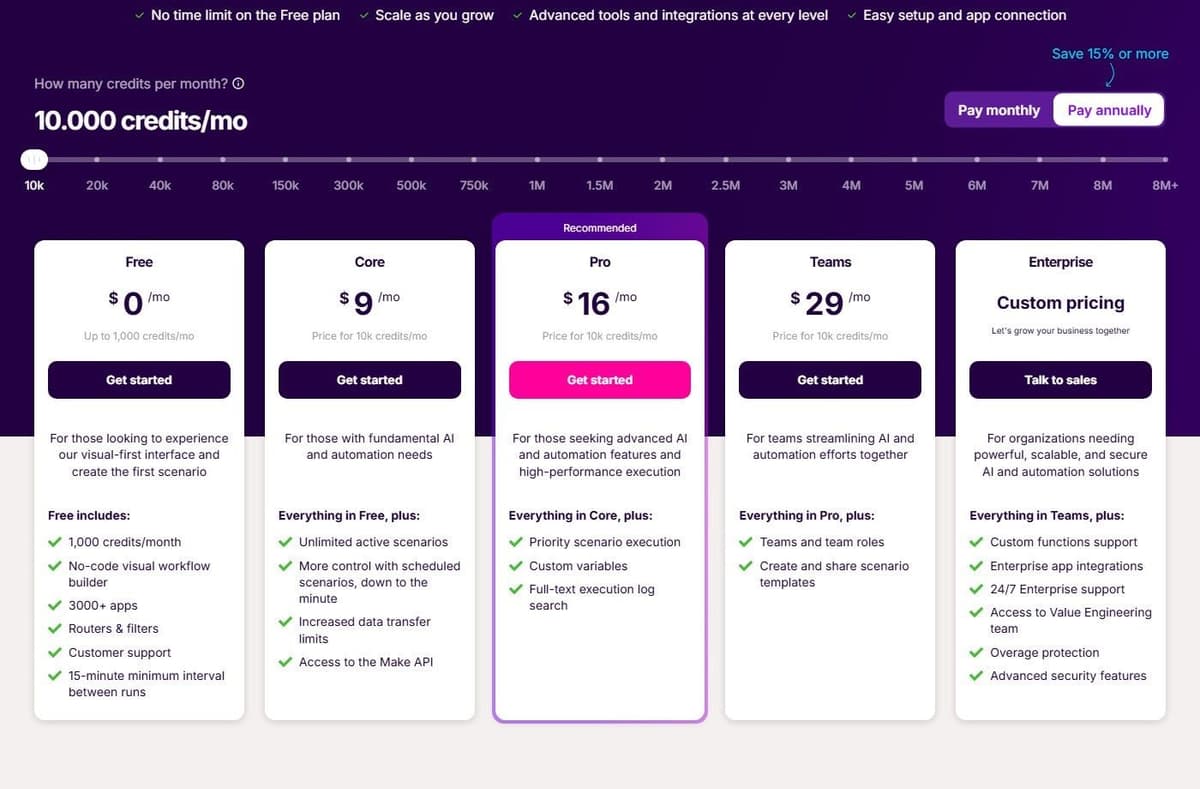
Make draws automations as a canvas of modules, routers and filters. That beats a vertical list once branching starts. Free is $0 a month with up to 1,000 credits, 3,500+ apps by Make's own count, and a 15-minute minimum run interval.
With yearly billing, Core is $9 a month for 10,000 credits, and it adds unlimited active scenarios, minute-level scheduling, higher data transfer limits and the Make API. Pro is $16 a month for the same 10,000 credits, adding priority scenario execution, custom variables and full-text log search. Every plan includes multi-step workflows and instant webhook execution.
The meter is the credit. Most actions consume 1 credit, Router and Filter consume none, and some advanced features that use Make's AI Provider may use more. Free is capped at 2 active scenarios and 5-minute runs against 40 minutes on paid plans. Log storage runs from 7 days on Free to 60 days on Enterprise.
A scenario with many executing modules drains a plan faster than the price suggests. Our Make.com pricing guide shows what each credit tier costs.
3. Microsoft Power Automate: best for Microsoft 365 processes and desktop RPA
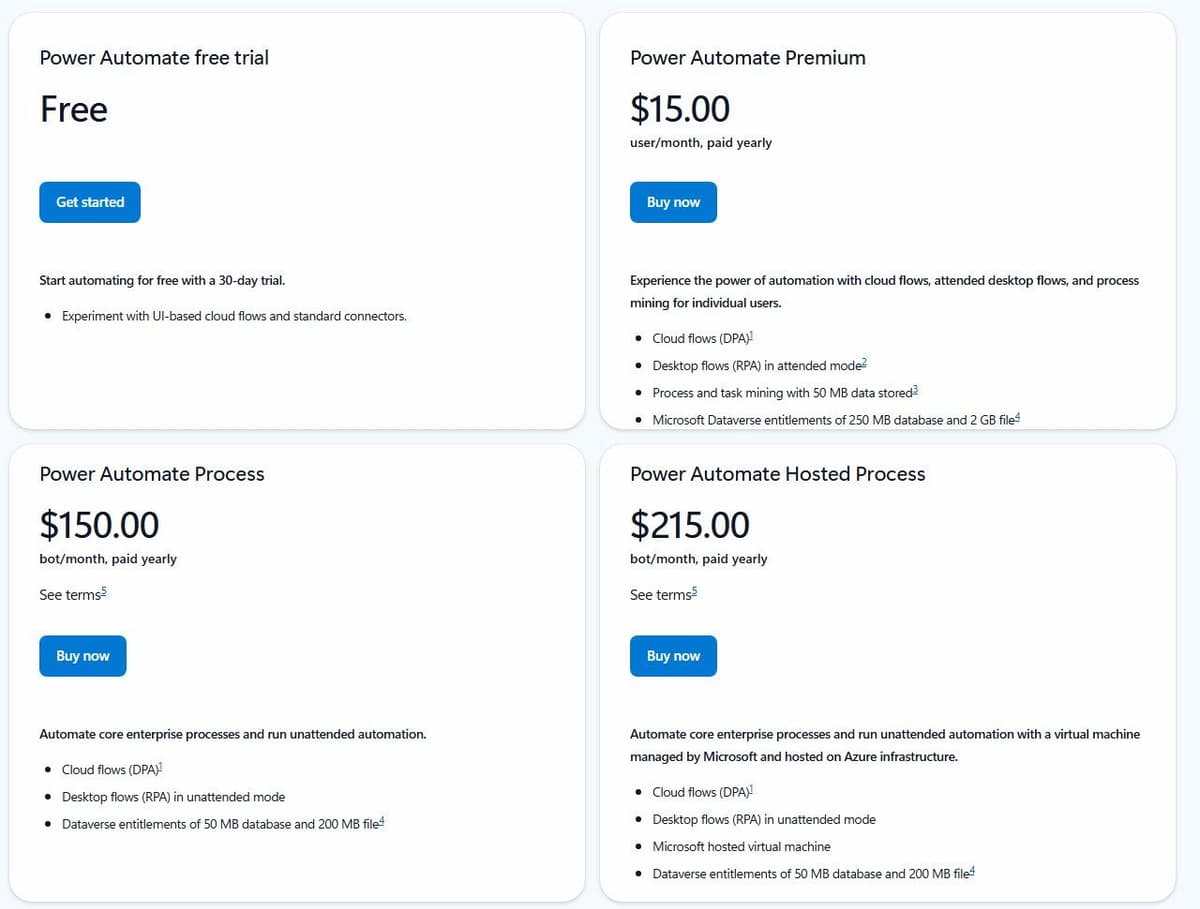
If the process lives in SharePoint, Outlook, Teams and Dataverse, Power Automate is already in the building. Premium is $15.00 per user a month paid yearly. That covers cloud flows, attended desktop flows for RPA, and process mining for individual users. It also carries Microsoft Dataverse entitlements of 250 MB database and 2 GB file storage.
Unattended automation is licensed separately and per bot. Process is $150.00 per bot a month paid yearly and runs unattended desktop flows. Hosted Process is $215.00 per bot a month and adds a Microsoft-hosted virtual machine, so nobody has to keep a desktop awake for the robot.
Power Automate has a permanent Free license for eligible work or school accounts in a Microsoft Entra tenant. It covers cloud flows with standard connectors without sharing, plus local attended desktop flows. Premium connectors and broader deployment requirements need additional licensing. Premium is a user license; Process can license a cloud flow for premium and custom connectors regardless of the owner or triggering user's license. Desktop automation has further licensing conditions. Free, a Premium trial and Process are different options.
Watch the shape of the licensing: per user plus per bot on a Microsoft-centered stack, with a 30-day trial for UI-based cloud flows and standard connectors. At $150.00 per bot the unattended line is the expensive one, and the value thins out the further a process sits from Microsoft 365. For processes outside that stack, see our Power Automate alternatives.
Approvals sit on the cheap side of that licensing. Microsoft says its approvals connector is a standard connector, so any license that grants Power Automate with standard connectors is enough to create approval flows. Its Start and wait for an approval action supports everyone-must-approve, first-to-respond, custom-response and sequential approvals. Approvers can respond from Outlook, a Teams adaptive card or the Power Automate action center if they hold a Power Automate license or an Office 365 or Dynamics 365 license with built-in Power Automate capabilities.
4. Workato: best enterprise integration and orchestration by contract
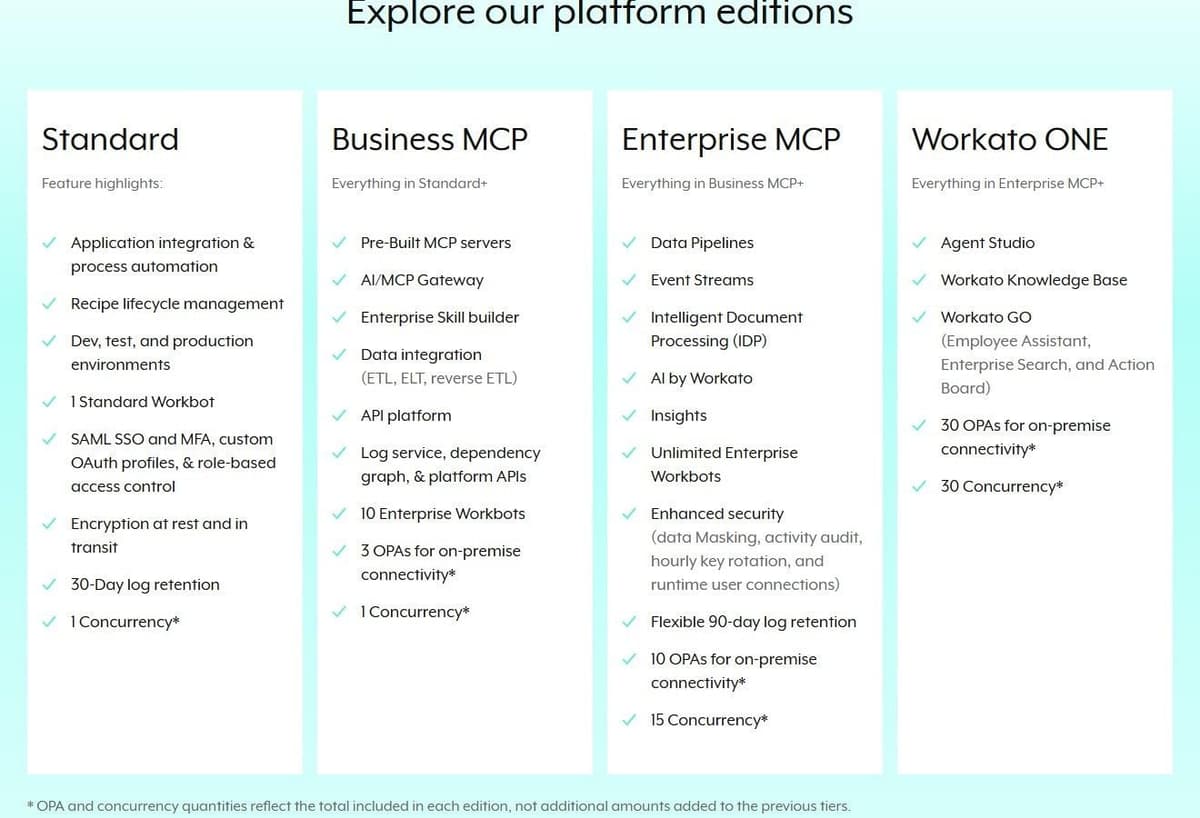
Workato is an iPaaS for teams integrating systems of record under governance. Its enterprise pricing page publishes no rates: it offers Schedule a demo and Get a quote, and states that pricing and plan structures may vary based on contract terms and when the customer joined. Four platform editions are listed, Standard, Business MCP, Enterprise MCP and Workato ONE, and each higher edition includes everything in the one below it.
Workato offers both self-service and enterprise purchasing paths. Its self-service documentation lists Free with a one-time grant of 50,000 credits, and Pro from $75 per month for 2,500 recurring monthly credits. These are not monthly Free credits or an enterprise price quote. Enterprise editions and existing contracts must be evaluated separately, including their platform fees, usage metrics and negotiated terms.
The enterprise model is documented even if the rate is not. A direct customer pays a platform edition fee, which determines access to capabilities, plus a usage fee that scales with usage volume. The same customer can buy extras such as additional OPAs and concurrency. For workflow recipes, Workato's documentation counts Tasks: each successful action step is one, utility connectors included, and triggers and control steps are not counted, so a trigger and three app actions use three Tasks. On contracts still metered in business actions, only triggers and actions in eligible apps count: a third-party-app trigger and three eligible actions use four, a utility trigger with them three. By its own count Workato includes 1,200+ pre-built connectors for every user, with unlimited workspaces and users as of September 2026, plan dependent.
So the self-service tiers can be budgeted from the documentation, while an enterprise edition still starts with a sales call. Our Workato pricing guide covers both paths.
5. Latenode: for custom process workflows with code and runtime billing
Latenode is a low-code automation layer. The builder is visual drag-and-drop, with an AI Copilot in every workflow, an AI agent builder for business processes, 335+ LLM models under one subscription, a headless browser for sites with no API, webhook triggers, a built-in database with global variables, and custom JavaScript nodes when a step needs real code.
Billing is where the math changes. Latenode charges for workflow runtime in CPU seconds (runs multiplied by average seconds), with no per-operation fees. Extra steps do not multiply the bill. The first 10,000 CPU seconds are free every month on both plans. Free keeps 5 active workflows and caps a run at 3 minutes. Pay as you go has no base fee and allows 10 minutes per run. It bills $0.00012 per CPU second in the first paid bracket, with lower rates above it. Cost tracks duration, so it does not map onto task or credit counts.
Scope is the trade-off. This is an automation layer, not a BPM suite: no process modeling in BPMN, no case management. A team that needs a modeled, auditable process will look further down this list.
6. Kissflow: best no-code platform for business-led apps, quote-based
Kissflow sells one platform to business teams that want process apps without engineering, and it does not charge by the app. Unlimited applications and unlimited integrations are listed as included, with no per-app or per-integration charge stated. Hosting comes in public and private cloud, and the platform lists 25+ AI-powered automation features by Kissflow's own count.
"Pricing built around the value you generate"
Source: kissflow.com
Pricing is a conversation rather than a page. Kissflow publishes no prices, no plan names and no user tiers. It answers the question in its own words, "Pricing built around the value you generate," next to a Set Up a Consultation button. What the page does commit to is the contract shape: fixed annual agreements, with no surcharges for AI or API usage. That removes the usage-based surprise of metered platforms.
Nothing about cost is public, so a shortlist needs a consultation before Kissflow can be set against a $19.99 subscription or a per-seat price.
7. Pipefy: best free starting point for process management
Pipefy models requests and approvals as pipes: a form starts a card, the card moves through phases, each phase has rules and owners. Starter is free with no credit card, up to 5 processes and up to 10 users. That is enough to run a real intake process and find out whether the team uses it. Business and Enterprise both show Contact Sales; Business is billed per user and allows unlimited users and unlimited processes. Every plan includes 1,000 single-use AI credits, and more are bought as add-ons.
Automation carries its own meter. Pipefy's plan comparison lists automation jobs a month as 15, 300 and 2,000 and API calls a month as 205, 500 and 10,000, in the order Starter, Business and Enterprise. Companies with 11 to 200 employees are offered up to 90% discount on SMB packages. For people operations, see our guide to HR automation tools.
That free tier is the limitation. Fifteen automation jobs a month is a sandbox, not a production allowance. Any real rollout moves to a quoted plan.
8. Nintex: best for process automation with documents and e-signature, quote-based
Nintex positions an end-to-end process automation platform with agentic business orchestration. The target is organizations that want process, documents and signatures in one product instead of three. For accounts payable, see our guide to invoice processing automation software.
There is no self-serve price, and that is worth stating plainly. The pricing URL resolves to a contact page titled "Contact us about platform, products and pricing" that publishes no prices, no plan names and no tiers. A free trial is mentioned on that page, but no length and no terms are given. Visitors are directed to sales instead.
Shortlist Nintex only if the team is ready to run a sales cycle before it sees a number.
9. Appian: best enterprise low-code with a published billing basis
Appian is enterprise low-code: process modeling, case management and a data layer over existing systems. Three platform tiers are published, Standard, Advanced and Premium, each "Priced per user, per month, per app," with no dollar amount shown.
Tiers separate on capacity. AI Actions run to 200K a month on Standard, 500K on Advanced and 1M on Premium. RPA is capped at 5 bots, 25 bots and unlimited bots, in the same Standard, Advanced and Premium order on Appian's comparison table. Standard allows a single data source and 4M rows per record type, Advanced multiple sources and 20M rows. Premium adds Intelligent Document Extraction at 50,000 pages a month. The cloud SLA is 99.8 to 99.99 percent. A free Appian Community Edition gives a dedicated instance as a personal development environment.
The unit is published, the rate is not, so per user, per month, per app still ends in a quote.
10. Camunda: best developer-grade process orchestration
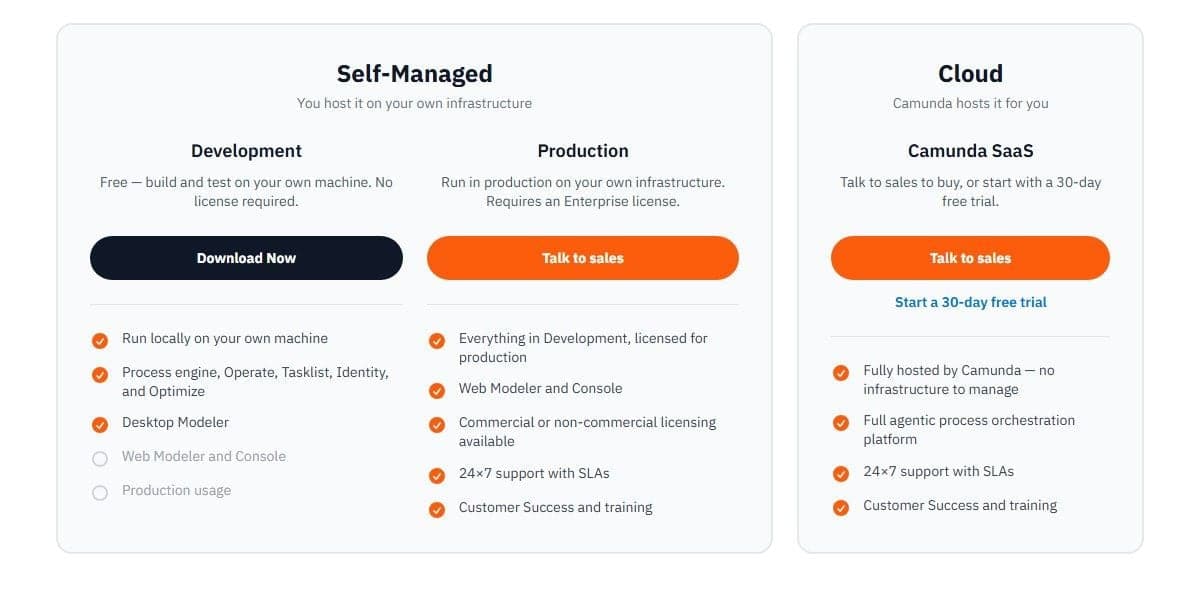
Camunda suits engineers who want processes as BPMN and DMN models executed by an engine they can test, version and deploy like code. Three options sit on the pricing page, none of them with a price: Development as Self-Managed and free, Production as Self-Managed and licensed, and Camunda SaaS as cloud hosted.
"Talk to sales to buy, or start with a 30-day free trial."
Source: camunda.com
The free part is real but narrow. Self-Managed is free for development on your own machine and requires no license, which makes the first prototype cost nothing but time. Running Self-Managed in production requires an Enterprise license, obtained by talking to sales. Camunda SaaS is bought through sales or started as a 30-day free trial. No usage is billed during that trial, and when it ends the account can stay free but limited to BPMN and DMN modeling. Enterprise pricing is quote only, for both SaaS and Self-Managed.
The moment a process goes to production, the platform becomes quote-based.
11. Decisions, formerly ProcessMaker: best for rules-driven process orchestration, quote-based
The ProcessMaker pricing URL now serves Decisions content, carrying the notice "ProcessMaker is now Decisions." Anyone following an old bookmark lands somewhere unfamiliar. The product is rules-driven process orchestration: decision logic and workflow in one engine.
Cost is not public. The page publishes no prices and only offers a demo, with Get a Demo and Request a Demo as the calls to action. The offering splits into a Mid-Market offering and an Enterprise offering, and neither one carries a price.
There is no tier list, no free plan and no trial to size the work against, so a Decisions evaluation starts with a call.
12. Cflow: best published per-user pricing for approvals and workflows
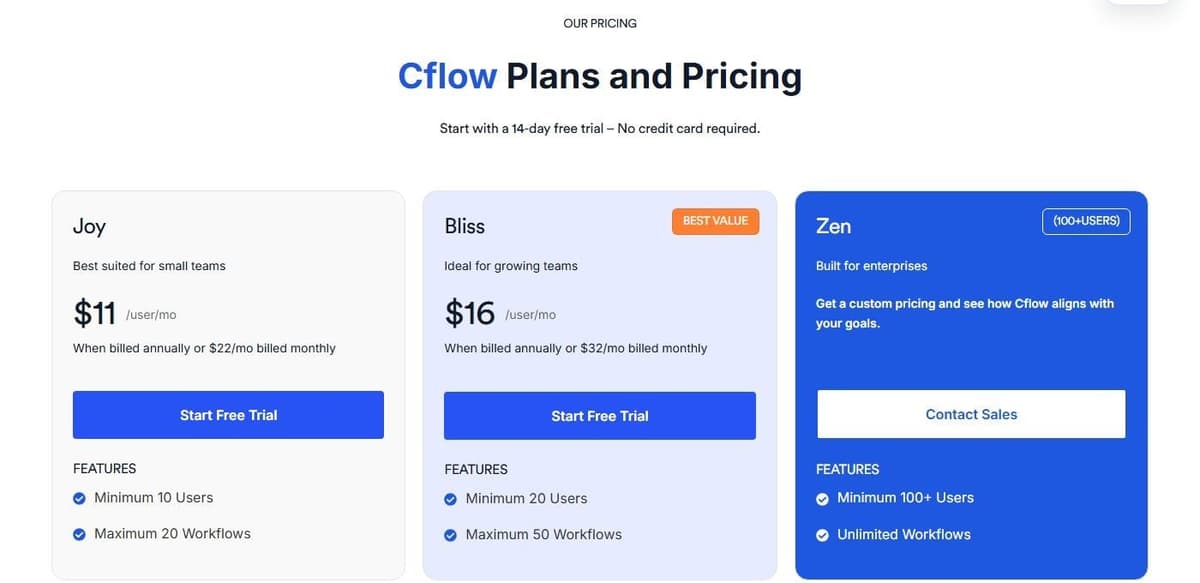
Cflow runs approvals, requests and internal workflows, and its seat prices are public. Cflow's advertised per-user price has a minimum purchase. Joy at $11 per user per month with annual billing and a ten-user minimum starts at a $110 monthly equivalent, or $1,320 per year. Bliss at $16 with a twenty-user minimum starts at $320 per month, or $3,840 per year. Those are the minimum team subscriptions before tax, not single-user entry prices.
Monthly billing is $22 per user on Joy and $32 on Bliss, with the same seat minimums. Joy allows up to 20 workflows, Bliss up to 50, and Zen starts at 100+ users with unlimited workflows at custom pricing. A 14-day free trial needs no credit card.
AI is metered separately: 10,000 credits a month on Joy, 20,000 on Bliss, 30,000 on Zen. Credits expire at the end of the monthly billing cycle, and extra credits cost $20 per 10,000. Two add-ons are priced annually: OCR from $1,000 a year for 1,200 pages, and Cflow Sign from $595 a year for 500 documents.
Cflow suits a process that already involves ten or more people. Confirm the current rates on the vendor's pricing page before modeling cost.
How to choose a business process automation tool
The common mistake is comparing two numbers that measure different things. Name the meter first: users, tasks, credits, business actions, bots or a contract. Then put the shortlist through one real process before the demo calls start.
Choose that process with care. One user on r/AiAutomations applies three tests to any candidate: "is it frequent, is it stable enough not to need constant fixing, and does it pay back within a couple months." Write the steps down by watching someone do the work, since the documented version and the real one often differ, and record today's time or cost per case so you can show what the automation changed. Name who handles a case by hand when the automation fails. If an outside builder will set the process up for you, our guide to the AI automation agency model ends with what to check before you hire one.
A purchase-request example
A useful evaluation starts with one request: an employee submits a form, a manager reviews it, finance checks the budget, and the approved purchase is recorded in the business system. The process must also handle rejection, missing information, an absent approver and a failed system update.
| Requirement | What to demonstrate |
|---|---|
| Form and validation | Fields, attachments, corrections |
| Human tasks | Approver, delegation, queue |
| Deadlines | Reminders, escalation, no auto-approval |
| Rules | A traceable amount or budget rule |
| Integration | One approved write, no duplicates |
| Long-running state | Resumes after a wait or failure |
| Audit and change | Who decided and which version ran |
If the process needs BPMN or DMN artifacts, add model import/export and execution support to the requirements. A screenshot of a pricing page cannot demonstrate those capabilities. Evaluate the selected edition with this process before treating two subscriptions as interchangeable.
When you run the example, watch what starts the approval. One user on r/nocode gave the rule to test for: "Tie notifications and approvals to the status change from draft to submitted, never to record updates, and run validation against the current schema at that moment." Ask the vendor to show that a saved draft notifies no one, that a correction after submission does not restart the chain, and how one request passes through operations, finance and IT with each group seeing only the fields it needs.
Then re-price the shortlist on your own volume, with seat minimums, per-bot licenses and free tiers included. Cflow Joy starts at 10 users, and Power Automate charges $150.00 per bot a month for unattended work on top of user licenses. The same process can be cheap per task and expensive per credit.
Give the integration row its own test. Decide which system owns each field, for example the CRM for the customer record and accounting for invoice status, keep one shared customer ID in both, and push a single invoice through end to end before switching the sync on for everyone. Because a sync can drift without failing outright, schedule a regular check that compares records on both sides. One user on r/hubspot put it this way: "In every portal I've worked with, the sync degrades over time rather than breaking cleanly, so I don't fully trust it even after months of stability."
Business process automation examples by department
Need one real process to test the shortlist? These are common candidates.
| Process | Human step | Where to look |
|---|---|---|
| HR: new-hire onboarding | Manager confirms equipment and access | tools for HR workflows |
| Finance: invoice approval | Approver checks amounts above a limit | invoice approval software |
| Operations: purchase request | Manager and finance approve | Pipefy or Cflow; the example above |
| Ecommerce: order to fulfillment | Staff review held orders | ecommerce automation by store task |
| Sales: lead routing | Rep accepts or reassigns the lead | sales automation tools |
| Marketing: social publishing | Editor signs off before release | social media scheduling tools |




