

Quick answer: the best Lovable alternative for each need
- Prompt-to-app with full code access: Bolt.new
- Coding and hosting in one workspace: Replit
- React and Next.js apps on Vercel: v0
- All-in-one app with built-in logins: Base44
- Visual building and native mobile apps: Bubble
- Free, local and open source: Dyad
- Developers taking the code further: Cursor
- Internal tools on existing databases: Retool
The right pick depends on why Lovable stopped fitting. Each tool meters usage in its own unit, so check what the free plan publishes and what the meter counts.
Why people look for Lovable alternatives
Lovable turns a chat prompt into a hosted full-stack web app. Every build message spends credits from one balance that also pays for Lovable Cloud hosting and AI features in published apps. Lovable picks the framework, and its built-in backend is on by default unless you connect your own Supabase project.
Lovable does the first version well: the app gets a database, sign-in, storage and functions on Lovable Cloud, and Plan mode plans a change before Build mode makes it. Projects sync two-way with GitHub, github.com on every plan. Custom domains come with paid plans, and unlimited members share one credit pool. Free gives 5 daily credits, up to 30 a month. Pro starts at $25 a month and Business at $50 a month, billed monthly, and Enterprise has custom pricing via sales.
Common reasons to move:
- A predictable bill: Try to fix and security fixes share 10 free uses per account, and each use comes back after 24 hours. While all 10 are in use, further fixes draw credits, and credits spent on reverted messages are not refunded.
- Full code access or a project on your own computer: code editing and download are on paid plans only.
- Your own AI model or API keys, paid to the provider directly.
- Native App Store and Google Play apps: Lovable builds mobile-friendly web apps, not React Native projects, and suggests a Progressive Web App or a Capacitor wrapper.
- Visual editing of layout and logic without prompting.
- Internal tools on databases a company already runs, priced per person. Lovable itself lists user roles from Pro and SSO from Business.
- Paying per change instead of a monthly credit tier.
Lovable alternatives at a glance
Eight of the nine have a free plan, and the ninth makes the first app free. Bolt.new, v0 and Replit can publish a live app for free, Replit for 30 days; Bubble's Free plan cannot. Prices are in USD as each vendor lists them in November 2026, monthly unless marked billed annually.
The order is not a ranking. The first five are direct replacements: prompt-to-app builders that also host the app. Bubble and Dyad replace Lovable another way, visually or on your own computer. Cursor and Retool are partial replacements, for the code or for internal tools. The Lovable row is for reference only.
| Tool | Best for | Free plan | Paid from | Billing unit |
|---|---|---|---|---|
| Lovable | Reference: hosted web apps | 5 credits a day, 30 a month | Pro, $25/mo | Credits |
| Bolt.new | Prompt-to-app, full code | 300K tokens/day, 1M/mo | Pro, $25/mo | Tokens |
| Replit | Build, host and code | Starter, 1 app for 30 days | Core, $20/mo | Effort-based credits |
| v0 by Vercel | React and Next.js on Vercel | 7 messages a day | Plus, $30/user/mo | Credits per user |
| Base44 | All-in-one with logins | 25 message credits/mo | Starter, $20/mo | Message, integration credits |
| Latenode App Builder | Apps tied to workflows | First app free | Pay per step | Steps |
| Bubble | Visual apps, native mobile | Build only, no live app | Starter, $39/mo (Web) | Workload units |
| Dyad | Free, local, open source | Free app, your own keys | Pro, $20/mo | Provider bill or AI credits |
| Cursor | Developers extending code | Limited, no numbers given | Plus, $8/mo | Weekly usage pool |
| Retool | Internal tools on your data | Up to 5 users | Team, $12/builder/mo | Builders, internal users |
1. Bolt.new: best for prompt-to-app building with full code access
Bolt.new turns a prompt into a hosted full-stack web app, like Lovable, and suits builders who want to see and change the code. Free gives 300K tokens a day within 1M a month. Pro costs $25 a month, or $18 a month billed annually, and starts at 10M tokens a month.
The whole development environment runs in the browser. New projects use Bolt Database by default, included on every plan. On Pro or Teams you can use your own Supabase account instead, or claim an existing Bolt Database into it. Published projects get a free bolt.host address, and custom domains need a paid plan. Projects back up to GitHub with a full change history or download as a zip on desktop. The Expo integration publishes mobile apps to TestFlight, the App Store and Google Play.
Where Lovable spends credits, Bolt meters tokens: the work it does reading prompts and files and writing code. Hosting is counted in web requests. Unused paid-plan tokens last up to two months while you subscribe; Free tokens do not roll over. Lovable projects import through GitHub, but Bolt's import page is silent on the Lovable Cloud database, users and secrets. The catch: Bolt supports JavaScript-based technologies only, with Node.js on the backend, so PHP or Python backends are not compatible.
2. Replit: best for building, hosting and coding in one workspace
Replit suits builders who also want to work in the code. The free Starter plan gives daily Agent credits up to a monthly cap and one published app that goes down after 30 days. Core costs $20 a month and includes $20 of monthly credits for Agent work, hosting and databases.
The Replit AI Agent, databases and publishing sit in one workspace. Development databases are free with every Replit App; only production databases are billed, by compute time and storage. Agent's Free Mode costs nothing within its allowance on Core and Pro. Paid modes use effort-based pricing: one checkpoint per Build Mode request captures the completed work, and bug fixes typically cost less than complex builds. Usage beyond the credits is billed pay-as-you-go. Replit imports public and private GitHub repositories, which is how a Lovable project synced to GitHub comes across. Agent also builds native iOS and Android apps you test on a phone with Expo Go, with simulator previews on Core and up.
The free plan shows the gap with Lovable: Starter has Lite build only, while Full build and Plan Mode need Core. Replit bills effort-based credits per checkpoint, Lovable bills credits per message. Budgets are hard to predict: a request costs what the work takes, and production database rates are not published on the pricing page or in the docs.
3. v0 by Vercel: best for React and Next.js apps hosted on Vercel
v0 suits teams that already build in React and Next.js and host on Vercel. Free allows 7 messages a day as of November 2026, and new users get $5 in one-time credits. Plus costs $30 per user per month and includes $30 of monthly credits per user, plus $2 of free daily credits on login.
v0 builds web apps, dashboards, e-commerce, SaaS and AI apps in Next.js, React, TypeScript, Tailwind CSS and shadcn/ui. That covers full-stack apps with authentication and databases, and mobile-responsive apps. Design Mode lets you edit visually. The GitHub integration runs both ways: v0 imports existing repositories and lets you create and merge pull requests without leaving it. Deploying to production on Vercel takes one click, or v0 opens a pull request for review.
Unlike Lovable, where a workspace shares one credit pool among unlimited members, v0 prices each user separately. v0 credits work like a prepaid balance drawn at model token rates. Generation pauses when they run out, and unused monthly credits roll over and expire after 65 days. Hosting is Vercel rather than Lovable Cloud, and v0 builds web apps in one stack, so a team that wants another framework or host gains less from it.
4. Base44: best for all-in-one apps with a built-in database and logins
Base44 suits non-technical builders who want the database and logins handled. Free gives the personal workspace 25 message credits a month, at most 5 a day, plus 100 integration credits and up to 5 apps. Starter costs $20 a month, or $16 a month billed annually, with 100 message and 2,000 integration credits a month.
Every plan includes AI app building, an integrated backend and database, and authentication and user management. Message credits pay for AI chat prompts that plan, update or fix the app. Integration credits pay for the live app's use of built-in services such as email, image generation and LLM calls, plus backend function runs; calls made with your own API key use none. By Base44's own estimates, a simple visual or text change costs about 0.5 message credits and an email about 1 integration credit. Starter adds connecting a domain. Builder, at $50 a month or $40 a month billed annually, adds workflows. Base44 is part of Wix.
Next to Lovable, that is two credit types instead of one balance, and Base44's own database instead of Lovable Cloud. Two-way GitHub sync of the full source code comes on the Builder plan and higher. Watch the integration credits: they grow as people use the live app, and Base44 counts them only after each action runs. There are no top-ups, so actions that need them pause until the reset or an upgrade.
5. Latenode App Builder: best for paying per step and connecting apps to workflows
Latenode App Builder suits occasional builders who prefer paying per change to a monthly tier, and teams whose apps feed workflows. As of November 2026 the first app is free; after that you pay per step, and the chat shows each step's price.
Latenode's AI app builder makes web apps, websites and landing pages from a description, a screenshot or a sketch. Plan mode asks a few questions and builds nothing until you approve the plan. Apps get a React front end, a serverless back end and a database when needed. You edit the database like a spreadsheet, with CSV export, and every change is a version with one-click rollback.
Publishing takes one click, to a free subdomain or to a custom domain with one CNAME record and HTTPS, and the project exports to GitHub. An app can call a Latenode workflow by webhook or API request to update a CRM, notify the team or run an AI agent. As of November 2026, hosting is free up to 1,000 visits a month, then from $5 a month with 30,000 visits, and a next simple site starts from $0.50. Apps run in mobile browsers; native App Store or Google Play apps and desktop software are not supported.
6. Bubble: best for visual no-code apps, including native mobile
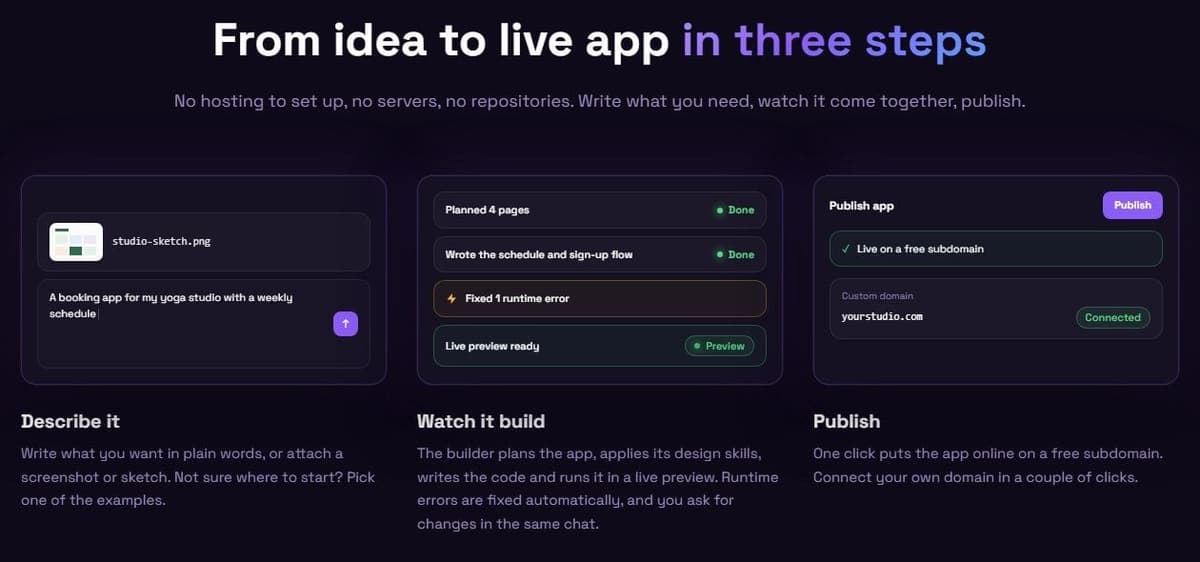
Bubble swaps prompting for visual building and suits non-technical builders who want native mobile apps. On Free you can build but not launch a live app. Starter costs $39 a month per project on the Web tab, $49 on Mobile and $69 on Web and Mobile, or $32, $42 and $59 a month billed annually.
"A paid plan is necessary for deploying a live version of your app"
Source: bubble.io
Bubble's AI Agent generates a first version. You refine it in a point-and-click editor that builds pages, the database and workflows visually. Native iOS and Android apps run on React Native and share one backend and database with the web app. The meter is workload units: the server resources needed to host, run and scale an app, such as database searches, API calls and payments. Without a workload tier, overages cost $0.30 per 1,000 workload units.
Compared with Lovable, workload units replace credits and you edit logic by hand. Bubble's ownership page says there is no way to export an app as code. A newer manual page says an AI agent can recreate the app in code through the Bubble MCP (beta), without guaranteed fidelity. Neither gives a download of Bubble source code. The editor takes time to learn, and an app that hits its workload limit with overages disabled is taken offline.
7. Dyad: best free, open-source and local option
Dyad is a free app on your own computer, for builders who want local code and their choice of model. Dyad Free uses your own API key and includes the basic Agent at 20 messages a day. Dyad Pro costs $20 a month with 200 AI credits a month.
"Dyad is a local, open-source AI app builder"
Source: github.com
It runs on macOS and Windows; Linux support is experimental and untested, by Dyad's own docs. Each app is a regular Git repository in a folder you keep, so other tools can open it. You build with your own API keys, a supported AI subscription, or local models through Ollama or LM Studio. The database is your own Supabase project, or Neon for Next.js and Vite projects. Dyad does not host apps; its guide deploys through GitHub and Vercel. The repository licenses code outside src/pro under Apache 2.0. Code inside src/pro is under FSL-1.1-ALv2, which grants an Apache 2.0 license on the second anniversary of each release.
Compared with Lovable, you pay provider bills instead of credits. On Pro, unused credits roll over while the subscription lasts. The downside is setup: keys, a backend and a host must be in place before the first app goes live.
8. Cursor: best for developers taking the code further
Cursor suits developers continuing a Lovable project locally. Free usage is limited, and Plus costs $8 a month with a weekly pool. The pricing card lists Grok only, while the model guide also lists Composer 2.5. Check the model picker before subscribing.
Clone the Lovable repository from GitHub and open it in Cursor. The editor is based on VS Code, imports VS Code settings and indexes code locally, and its Agent edits files and runs commands. Premium ($30 a month) adds third-party models at API list price from prepaid credit. At the weekly limit, you wait for the reset, use prepaid credit or upgrade. Paid plans are part of The X Subscription, and older plans remain available to existing customers.
The difference from Lovable is the whole setup: a local repository instead of a hosted prompt-to-app builder, with a host you choose. Paid plans with cloud-agent access also offer Cursor's Apps feature, which can host and publish web apps from a repository. Cursor assumes you can read and run code.
9. Retool: best for internal tools on databases you already run
Retool suits internal tools on existing databases, and Business also supports customer portals and embedded apps. Free covers 5 users and 250 pooled AI credits monthly. Team costs $12 per builder and $7 per internal user per month, or $10 and $5 on annual billing. Confirm seat minimums at checkout.
Retool's app builder, on all plans, generates a working app connected to your data from a description. An AI agent in the Chat tab plans and executes changes, the Code tab takes hand edits, and apps run on React 19. The classic builder remains a drag-and-drop IDE. Every plan, Free included, connects to all databases and APIs, and workflows come with 500 runs a month on Free. Agents are billed hourly outside the AI credit pool, with up to 20 free hours a month. Audit logs and rich permissions start on Business; granular roles, Git source control, SSO and SCIM are Enterprise only. Enterprise, with custom pricing via sales, adds self-hosted or air-gapped deployment.
Lovable gives unlimited members one credit pool, while Retool bills each builder and internal user by activity in the billing cycle. It also works on data you already have instead of a new Lovable Cloud backend. Retool is aimed at teams with developers, and the bill grows with each builder and user.
How to choose a Lovable alternative
Start from why Lovable stopped fitting. Then compare who will maintain the app, what the meter counts and what the free plan lets you publish.
- Who builds and maintains the app: a non-developer, a developer or both. Code editors and local builders assume someone reads code.
- Code access and export: two-way GitHub sync, a download, or none at all.
- Where the backend and data live: built into the tool, in your own Supabase project, or in databases you already run.
- The billing unit (credits, tokens, effort-based credits, workload units, steps or seats) and what happens when it runs out: a pause until the reset, a pay-as-you-go charge or, on some plans, an app taken offline.
- Native App Store and Google Play apps, or web apps only.
- Hosting and a custom domain: included, on paid plans only, or yours to arrange.
- Team controls: unlimited members or per-seat pricing, roles and SSO, and which plan includes them.
Then run a short trial before paying:
- Build the same small app in two tools from the same prompt.
- Ask for a second change and check that the first one survived.
- Sync the code to GitHub or download it, and open it outside the tool.
- Note what the usage meter showed after each step.
How to move a project off Lovable
The code leaves easily, because Lovable syncs a project two-way with GitHub, github.com on every plan. The backend takes more work: export the Lovable Cloud database or move to your own Supabase project, import the repository into a tool that reads code, and point the custom domain at the new host.
- Connect GitHub in Lovable and check that the repository has the latest code.
- Export the database: a PostgreSQL archive with the data, user accounts and password hashes, without storage files, edge function code, secrets or sign-in settings. Lovable's database backups page lets anyone who can manage a project's settings export the database and names no plan. Its plan table lists 'Data exports' under Enterprise only, so check in your workspace before you plan the move. Or move to your own Supabase project by hand and give up Lovable Cloud features such as daily backups.
- Import the code into Bolt.new through its Lovable import via GitHub, into Replit from GitHub, or open the repository in Cursor. Dyad can import a repository, but its builder-to-builder import is experimental and limited to Node.js-based JavaScript apps. Bubble's Universal import turns a Lovable codebase ZIP into a Bubble app; it is in beta, open to a subset of Bubble users for now, and data is imported separately. Retool and Base44 mean a rebuild.
- Restore storage files, configure sign-in and secrets, and test the new deployment with a sample account before repointing the domain. Then cancel. Credits work to the end of the billing period, after which unused monthly and rollover credits freeze without a refund.