



Quick answer: Make vs Zapier in 60 seconds
Choose Zapier when it supports the exact apps and actions you need and its workflow editor fits your team. Choose Make when a visual canvas helps you build and maintain branching, loops and data transformations. Both have free plans. For AI work, compare supported models, tools, permissions and approval controls before estimating usage costs.
In practice the two count work differently: Zapier charges tasks for billable actions, while Make charges credits for ordinary module operations and none for Router and Filter, so the same workflow is counted differently on each side.
Editorial note: Latenode publishes this article and is one of the products discussed. The comparison uses public product documentation and pricing pages. Worked examples are calculations under stated assumptions, not results from a hands-on benchmark. Recommendations describe which requirements a product may fit; they are not a measured ranking of performance or reliability.
Are Make and Zapier the same company?
No. Make is the platform that used to be called Integromat, and it took its current name on February 22, 2022. Celonis acquired Integromat in 2020. Make later launched as a business unit inside Celonis, as Munich Startup reported at the time. Zapier has no such parent. It operates as an independent company. If Zapier is not the right fit, our guide to Zapier alternatives compares other platforms.
Confusion here is easy to explain. Both tools sit in the same category, connect many of the same business apps, and land in the same listicles. The rebrand made it worse. Years of Integromat tutorials and forum threads still circulate under the old name, so newcomers meet two names for one product and assume a corporate link. There is not. The IFTTT vs Make comparison covers the two head to head.
What changed in 2025 and 2026
Make renamed its billing unit from operations to credits. Ordinary non-AI module operations generally consume one credit, while AI and code can follow separate charging rules. Router and Filter are excluded. Estimate usage from the operations that actually execute, including repeated work on multiple bundles. Plans and credit volumes are broken down in our guide to Make.com pricing.
On the AI side, Make AI Agents arrived in beta and Maia landed as a plain-language layer over the builder. Make MCP Server exposes scenarios as callable tools for outside AI clients. Make Grid, included in all paid plans, draws real-time maps of how workflows, data flows and dependencies relate. If Make is not the right fit, our guide to Make.com alternatives compares other options.
Zapier's changes started earlier and cut deeper into packaging. It retired the Starter plan on April 2, 2024, which made Professional its cheapest paid tier. The same repricing introduced an Enterprise plan aimed at rolling automation out to more teammates and departments with extra governance. Since then Zapier has shipped Copilot on every plan, Agents, Chatbots and its own MCP server. Every tier and billing option is broken down in our guide to Zapier pricing.
Pricing for AI steps moved too. Since June 15, 2026, AI by Zapier steps are priced by model tier instead of a flat per-step rate, available on Professional, Team and Enterprise. A single step that reaches 75 tasks in one run pauses the Zap for manual approval.
In September 2026 both vendors also added new ways to build workflows from outside AI tools. Zapier opened early access to Next Gen Zaps, which you can describe in an AI tool such as Claude or Cursor and deploy to Zapier, and Make announced an official Make plugin for ChatGPT that builds, runs and reviews Make automations from the chat. Both are new, so check which plans can use them, whether they are available right now and how their runs are metered before you rely on either.
Make vs Zapier at a glance
Figures marked as vendor counts come from the platforms themselves and do not reconcile. Read this as a shape, not a scoreboard.
| Criterion | Make | Zapier |
|---|---|---|
| Best for | Complex branching logic | Linear step-based Zaps |
| Builder | Visual canvas, modules | Linear editor, steps |
| Integrations | 3,000+ apps (vendor) | 9,000+ apps (vendor) |
| Free plan | 1,000 credits a month | 100 tasks a month |
| Entry paid price | $9 a month, Core annual | $19.99 a month, annual |
| Billing unit | Per operation; AI, code vary | Task per billable action |
| Branching | Routers, no module cap | Paths, 10 branches |
| Code steps | Python and JavaScript | Python and JavaScript |
| AI agents | All plans, in beta | Free tier, 400 activities |
| Scheduling interval | 15 min free, 1 min on Core | 15 min free, 1 min on Team |
| Enterprise security | SSO, 99.5% uptime SLA | SSO, logs, 99.99% uptime |
Building automations: scenarios vs Zaps
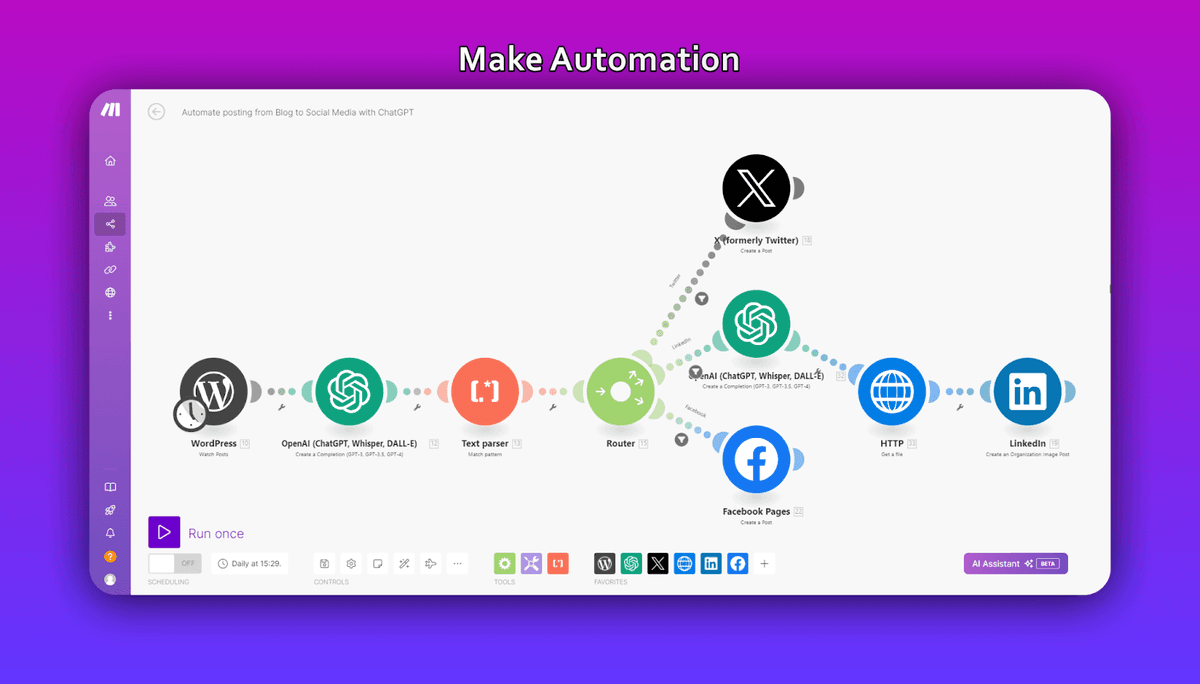
Make gives you a canvas. Modules sit as bubbles you wire together, and the layout carries meaning. A router splits the flow into visible parallel branches, an iterator breaks an array into single bundles, an aggregator puts them back together. Make's own comparison says most scenarios can hold an unlimited number of modules, which is why long data-processing chains end up here rather than in a linear editor.
"Error handler modules (Rollback, Break, Resume, Commit, Ignore) - no credits counted. Router module - no credits counted."
Source: make.com
Two additions matter for debugging. As of April 2026, If-else and Merge modules were in open beta. Scenario Run Replay re-runs a workflow against historical data instead of waiting for the trigger to fire again. On paid plans, Make Grid maps how your scenarios relate, which matters once you have more of them than you can hold in your head.
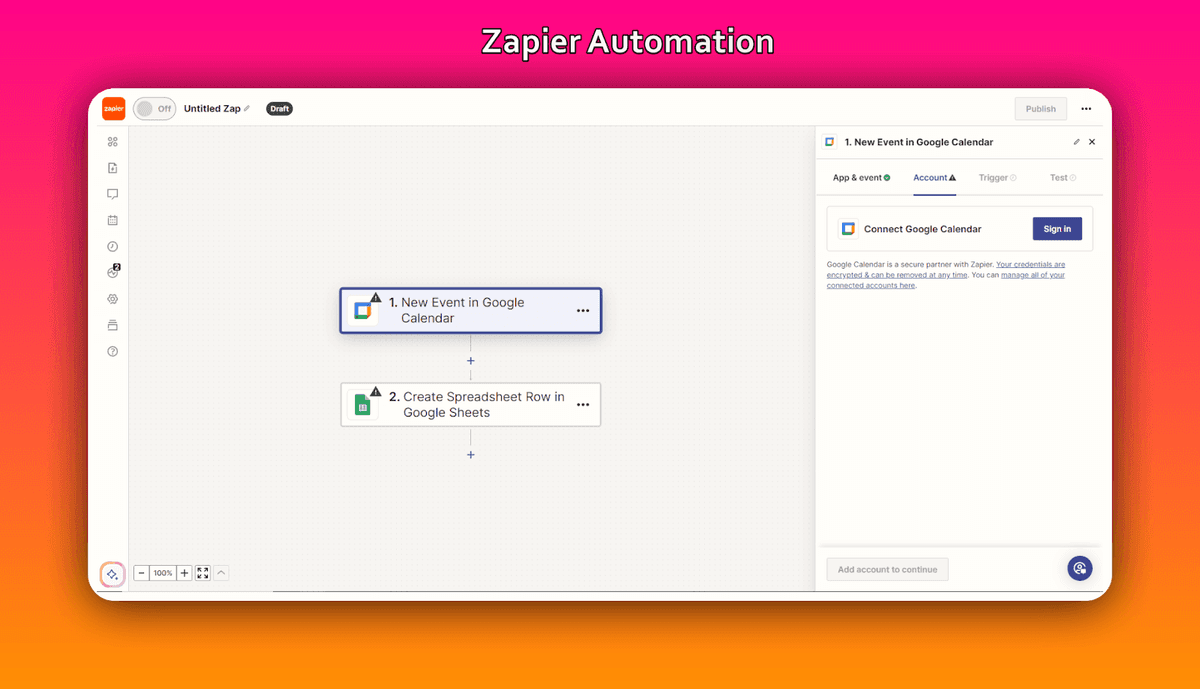
Zapier works down a list: a trigger, then steps, top to bottom. Branching comes from Paths, and the documented ceilings are 3 nested Path steps, up to 10 path branches inside the same path group, and 100 steps total per Zap. That is generous for what most teams actually build and tight for what Make users enjoy building. Filters cut runs short, Formatter reshapes text, dates and numbers, and Looping repeats a set of steps.
Zapier's comparison says Make earned its power-user reputation on unlimited Routers, Iterators and Aggregators. It claims Zapier has since closed the gap with Looping, improved Paths, Sub-Zaps, Custom Actions and Code by Zapier. Both sides sell code as the escape hatch. Zapier Code steps let you drop a Python or JavaScript step inside a Zap. On Make's paid plans the Make Code app runs custom Python and JavaScript, and Enterprise plans add Custom Functions applied inline.
Zapier presents a workflow as a sequence of steps, while Make exposes routes and the movement of data between modules on a canvas. The more useful interface depends on the job: a short linear flow emphasizes step setup; a flow with several routes emphasizes how data moves between them. This comparison does not establish a universal learning-time difference.
Integrations and actions per app
Catalog size is a starting point, not proof that an integration supports your workflow. Check the exact trigger, action, fields and authentication method you need. Also check who maintains the integration and where to report failures; do not assume every listed connector is maintained directly by the platform vendor.
Depth per app is the more useful question. Make's own comparison says it exposes roughly double the number of preset actions per app. It cites Xero as the example: 25 actions on Zapier against 84 on Make, searches included. If your work lives inside two or three heavy systems, that difference decides more than any catalog total. If it spans thirty light tools, the catalog wins.
Neither catalog is a hard limit. Make's HTTP module will call any REST API you can authenticate against, and Webhooks by Zapier does the same on its side. Zapier lists webhooks among the Professional plan's headline features. Anything with an API is reachable from both. The only question is how much of the request you assemble by hand.
Pricing and limits in 2026: credits vs tasks
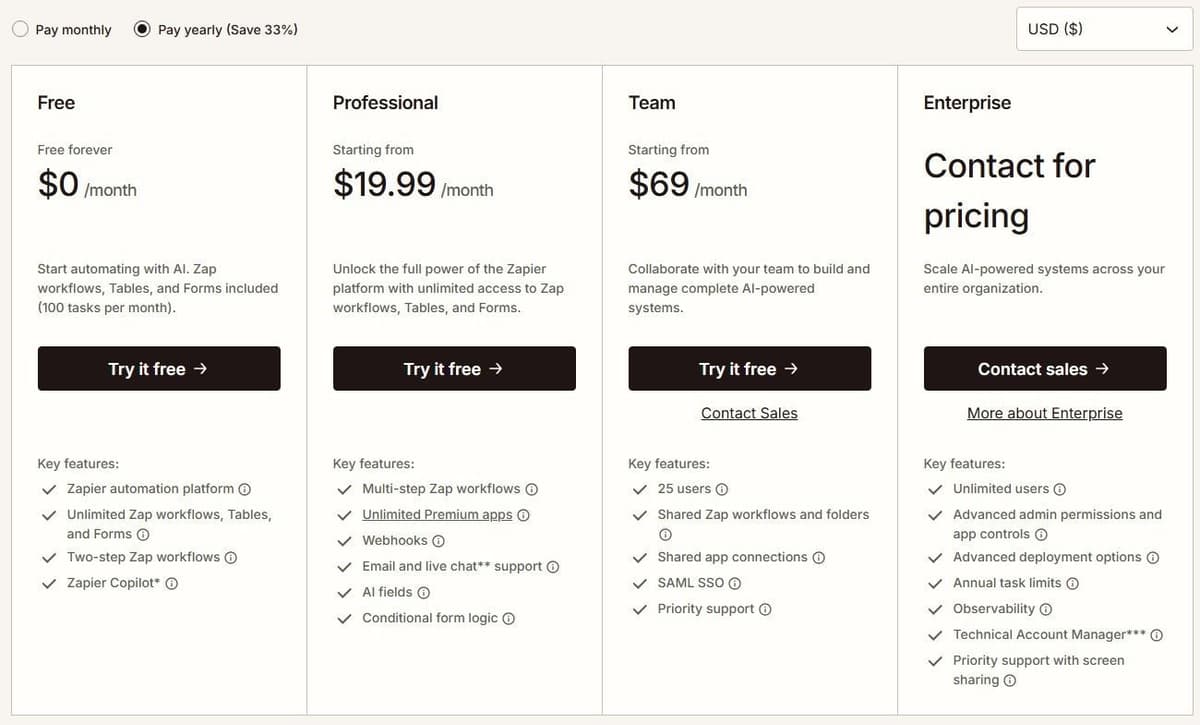
As of September 2026, Zapier's Free plan costs $0 a month. It includes 100 tasks plus Zap workflows, Tables, Forms and Copilot, with free Zaps capped at two steps: one trigger, one action. Professional starts at $19.99 a month billed annually for 750 tasks, or $29.99 billed monthly. It adds multi-step Zaps, unlimited premium apps and webhooks. Team runs $69 a month annually or $103.50 monthly for 2,000 tasks and 25 users, with shared Zaps, folders and SAML SSO. The Enterprise card lists unlimited users, and its price is a custom contract, not a published figure. The paid task slider tops out at 2 million tasks a month.
"In Zap workflows, the following do not count as tasks: All trigger steps. Any Filter or Paths step. All action steps that error or halt."
Source: help.zapier.com
Zapier's Team seat information is inconsistent: its plan card and comparison table list 25 users, while its FAQ says Team and Enterprise allow unlimited users. Confirm the Team allowance before purchase.
Zapier advertises a 33% discount for paying yearly, and another 15% off paid plans for non-profits, excluding pay-per-task charges. Every new account starts on a 14-day Professional trial, no credit card.
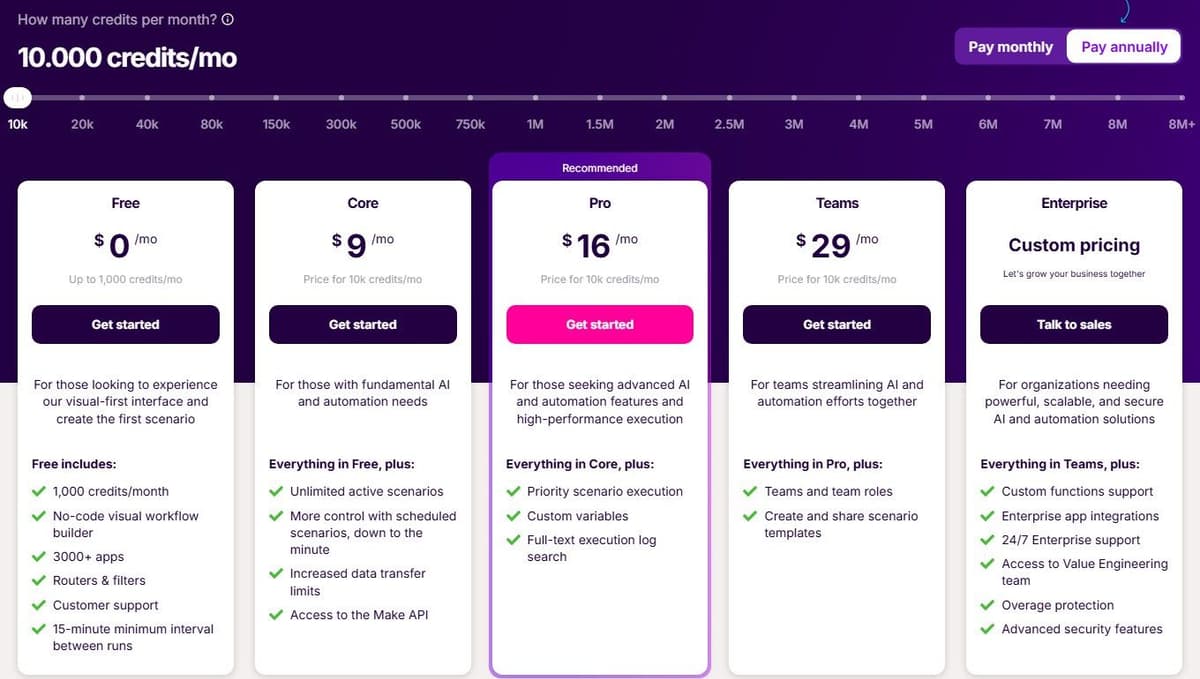
Make's Free plan gives 1,000 credits a month, access to 3,000+ apps and a 15-minute floor between scheduled runs, with credits expiring at the end of the term. With yearly billing, Make lists Core at $9 a month, Pro at $16 and Teams at $29, each for 10,000 credits a month; monthly billing runs $10.59, $18.82 and $34.12. Enterprise is custom pricing with overage protection and advanced security features.
| Plan | Monthly billing | Annual billing | Included volume |
|---|---|---|---|
| Make Free | $0 | $0 | 1,000 credits a month |
| Make Core | $10.59 | $9 | 10,000 credits a month |
| Make Pro | $18.82 | $16 | 10,000 credits a month |
| Make Teams | $34.12 | $29 | 10,000 credits a month |
| Zapier Free | $0 | $0 | 100 tasks a month |
| Zapier Professional | $29.99 | $19.99 | 750 tasks a month |
| Zapier Team | $103.50 | $69 | 2,000 tasks a month |
| Zapier Enterprise | Custom quote | Custom quote | Custom, unlimited users |
Make's Router and Filter do not consume credits. Most ordinary non-AI module operations do, including trigger checks and actions that process incoming bundles. Branching can increase usage when additional actions actually run; adding a Router alone does not. AI features and Make Code have separate charging rules, so count the modules that execute rather than every item drawn on the canvas.
Zapier charges tasks for successful billable actions, not every step in a Zap. Triggers, Filter, Paths, Formatter, Delay and Looping do not consume tasks. Actions inside a loop can still be billable. AI, extended Code runtime and MCP use their own rates. Zapier Agents has a separate activity allowance, so its usage should not be added to a Zap's task count.
What the same workflow costs
Consider one incoming event that creates a CRM record and sends a Slack notification. Each run produces one input item and completes both actions. The calculation excludes AI, code, retries, extra polling, searches and third-party app subscriptions. A filter that allows every item through adds no charge on either platform.
Under those assumptions, Make uses three credits per run: one trigger operation and two action operations. Zapier uses two tasks. The table selects a plan with enough included capacity, with no overage purchases.
| Runs per month | Make usage and monthly cost | Zapier usage and monthly cost |
|---|---|---|
| 50 | 150 credits / Free, $0 | 100 tasks / Professional 750, $19.99 |
| 300 | 900 credits / Free, $0 | 600 tasks / Professional 750, $19.99 |
| 1,000 | 3,000 credits / Core 10,000, $9 | 2,000 tasks / Professional 2,000, $49 |
Paid prices are in USD with one-year billing: $108/year for Make Core, $239.88/year for Zapier Professional 750, and $588/year for Professional 2,000. The figures exclude tax and assume the required connectors are available on the selected plans. Zapier Free is excluded because this example needs two actions after the trigger, making it a multi-step Zap. Free-plan limits still apply on Make.
This is a tariff calculation, not a measured benchmark or a universal cheapest-platform ranking. More actions, polling, AI or a different billing commitment can change the result.
Pay-per-task pricing depends on the plan and billing cycle. Use the rate shown in the account's Billing settings rather than applying one multiplier to every customer. With pay-per-task turned on, total usage can reach three times the included task allowance before Zaps stop, so a Professional plan on its lowest tier stops at 2,250 tasks. For an upgrade decision, compare the larger plan's price with the current plan plus the expected excess tasks at that account-specific rate.
If you would rather have Zaps stop than run into overage, Zapier's help center says pay-per-task billing can be turned off, so Zaps stop at the plan's task limit instead. That setting matters when something repeats more often than planned; one user on r/zapier put it this way: "it's only the 4th of the month and the quota is already screaming."
Make sells extra credits in bundles of 1,000 or 10,000 at the fixed price defined in your subscription. Check that price before choosing between extra credits and a larger allowance.
How does Make compare to Zapier in pricing and features?
Side by side, the differences are the meter, the entry price and the ceiling. Make charges credits per module operation and gives Router and Filter free; Zapier charges tasks for successful billable actions and lets built-in steps such as Filters, Paths and Formatter run free. The cheapest paid tiers are Make Core at $9 a month billed yearly for 10,000 credits and Zapier Professional at $19.99 a month billed yearly for 750 tasks, with the next Professional tiers at $39 a month for 1,500 tasks and $49 for 2,000, yearly billing. On overage, Zapier's help center states that exceeding a paid plan's task limit with pay-per-task enabled caps total usage at three times the plan's task limit. On features, Make's own comparison says it supports 3,000+ app integrations, 560 of them AI apps, and roughly double the preset actions per app compared with Zapier, while Zapier's comparison credits Make's power-user appeal to unlimited Routers, Iterators and Aggregators and says Zapier answered with Looping, improved Paths, Sub-Zaps and Custom Actions. Both are vendor claims, so check the exact app and action you need on each catalog.
AI agents, Maia and Copilot
Make AI Agents are available on all plans with Make's AI Provider. Connecting your own AI provider requires a paid Make plan. With a custom connection, Make charges for operations and the AI provider bills token usage separately. You build, run and debug them inside the same Scenario Builder you use for everything else. Uploading files hands an agent context, so you skip assembling a retrieval pipeline first. Make's AI Agents page says they orchestrate processes across 3,000+ apps, and the ecosystem brings in 350+ AI apps you can wire up as ordinary modules.
Maia is the plain-language layer. As of September 2026, Make's Maia page describes it as a co-worker for AI and automation that turns written requests into automation and Make AI Agents. That same page says it is included in all plans. The vendors disagree here. Zapier's June 2026 comparison said Maia was still in early access, while Make's own page presents it as available on every tier. Make MCP Server sits alongside it, turning scenarios into callable tools for ChatGPT, Claude, Cursor and other MCP-compatible agents, covering that same catalog plus 30,000+ actions.
Zapier spreads its answer across products. Copilot ships on every plan, though Free-plan use is capped by a daily message limit that resets at 12:00 AM UTC. Zapier Agents Free includes 400 activities per month. An activity is not a complete agent run: one run can consume several activities. Agents Pro is $400 billed annually, about $33.33 a month, and includes 1,500 monthly activities. This allowance is separate from Zap task usage. Chatbots Pro is $160 billed annually, about $13.33 a month, for up to five chatbots. Zapier's MCP server meters against your task pool: one tool call consumes two tasks. Zapier's June 2026 comparison frames the platform as AI orchestration, with agents acting on 9,000+ connected apps without workflows designed in advance.
The AI products differ in how they are built, connected and governed. Compare the required models, tool access, context, approval before external actions and failure recovery. Then price a representative workflow. This documentation-based comparison does not establish a measured winner for agent quality.
Treat a workflow drafted by Copilot or Maia as a first draft. One user on r/zapier found that "the ai silently injected a formatter by zapier step to parse a basic date string." Before you turn a generated workflow on, open every step the assistant added, run it on a real record that includes empty fields, and compare the result in the destination app with what you expected.
Reliability, speed, security and support
Speed is mostly a scheduling question. Make's Free plan will not run a scheduled scenario more often than every 15 minutes. Core brings that down to the minute, which Make's help center gives as the lowest regular interval. Zapier's polling follows the same shape: 15 minutes on Free, 2 minutes on Professional, 1 minute on Team and Enterprise. According to Zapier's help center, paid plans get a customizable per-Zap interval down to that minute. Webhooks are instant on both. Every Make plan includes instant webhook execution, while Webhooks by Zapier requires a paid Zapier plan.
Fast triggers do not help when a run keeps going on bad data after something upstream changes, such as a date format, a renamed field or the output of an AI step. One user on r/AiAutomations described it: "I've had a live workflow start failing quietly because the model's output format changed by a hair and my parsing assumed the old shape." A check right after the trigger that stops the run when a required field is empty or malformed adds no usage on either platform: Zapier does not count Filter or Paths steps as tasks, though they need a paid plan, and Make's filters sit on the connections between modules, so they use no credits. When Make does flag a module, it may only be where bad input from an earlier step finally broke, so check what the earlier modules passed into it before you rebuild it.
Make advertises a 99.5% uptime SLA for Enterprise. Zapier advertises 99.99% uptime and an Enterprise SLA. These published claims do not establish measured reliability or identical contract coverage. Compare the actual agreement, measurement period, exclusions and service credits before choosing on uptime.
Uptime figures say nothing about a workflow that stops running, or keeps reporting success while moving nothing, without raising an error, for example after a connection expires. One user on r/zapier put it this way: "I've been burned twice, both times a customer told me before Zapier did." On either platform, end the workflow with a step that records the time and the number of records each run processed, and run a separate scheduled check that alerts a shared inbox when that time is too old or the count is zero. On Zapier, Storage by Zapier steps do not count as tasks, so that record costs no tasks; on Make, it is one more ordinary module operation, usually one credit per run.
Security baselines sit close together. Make's standard tier covers GDPR, SOC 2 Type II and ISO 27001, with AES-256 encryption at rest and TLS 1.2 or 1.3 in transit. According to Make's pricing page, the infrastructure runs on AWS in the EU and North America across all tiers. Make Enterprise adds SSO via OAuth2 or SAML2, role-based access controls, audit logs, on-premises agents, custom functions, dedicated value engineers and 24/7 priority support with 2-hour response SLAs.
Zapier's side reads much the same on paper. Make's comparison says Zapier Enterprise covers similar ground with SSO, advanced admin controls, Premier support, custom retention policies and activity logs. Zapier's comparison claims its connection event logs begin on Team while Make's audit logs begin on Enterprise, and lists SOC 2 Type II, SOC 3 and GDPR for both.
Zapier includes Live Chat from the Professional plan's 2,000-task tier and above. Make's own comparison says Make Academy carries 36 courses against Zapier Academy's 12, which is a count, not a quality measure.
Who should choose Make, and who should choose Zapier
For a small business, begin with the exact apps, actions and monthly workload. Zapier is a candidate when its supported actions and editor fit the work; confirm that the selected task tier covers a normal month and a peak month.
For e-commerce and marketing workflows with branching and repeated data processing, compare Make's routers, iterators and aggregators with Zapier's Paths and Looping. Choose the version your team can understand, test and maintain, then compare its actual metered work.
For developer workflows, compare the required language, execution limits, custom API access and debugging tools. Both platforms offer code and MCP capabilities; MCP availability alone does not distinguish them. Check the plan and charging rules for the specific feature you will use.
For enterprise governance, compare the selected editions and contracts. Make lists unlimited users on all of its plans, while Zapier's plan cards list 25 users on Team and unlimited users on Enterprise. User count is separate from team roles, SSO, audit logs, deployment controls and support commitments. Both vendors advertise an Enterprise SLA.
Move one workflow without creating duplicate records
Start with a workflow whose inputs, outputs and owner are known. Map every trigger, action and field, then test the replacement against sample data in a sandbox or a separate destination. During parallel comparison, let only one platform write to production. Use the source event ID as an idempotency key and check how the destination handles repeated requests. Compare outputs, failures, latency and usage before switching the trigger. Keep the original workflow disabled but recoverable until the replacement has completed a normal business cycle.
Make vs Zapier vs Latenode
Both platforms here bill by countable units of work: Zapier by billable action, Make by module operation. That is easy to audit, and the bill follows the actions and operations a run performs rather than the time the work takes. A third model bills by how long the work takes, worth knowing before you commit to per-step pricing for years.
Latenode is built on that model. You pay for workflow runtime measured in CPU seconds, runs multiplied by average duration, with no per-operation and no per-step fees. Adding steps does not multiply the bill. The first 10,000 CPU seconds each month are free on both plans. The free plan costs $0 forever with no credit card, covering 5 active workflows, one execution worker, 3 minutes per run and a 3-day run history. It has a visual drag-and-drop builder, an AI Copilot inside every workflow and an AI agent builder.
Estimation is the honest catch. Runtime billing rewards lean workflows and punishes slow ones, but you cannot price a workflow until you have run it, a harder mental model than counting steps on a diagram. Latenode is not the winner here: if you need the biggest connector catalog or a signed enterprise SLA, the choice comes down to Zapier and Make. Runtime billing is a reason to look, not to switch on its own.





