



Quick answer: the best Make.com alternative for each need
The best Make.com alternative depends on the unit you pay in: Zapier for the widest app catalog, Pabbly Connect for a high task allowance on a fixed subscription, Activepieces for open source self-hosting, Pipedream for code if you already use it (its Workflows product shuts down on March 31, 2027), Latenode for runtime billing, Albato for transaction pricing, Integrately for ready-made automations, Zoho Flow for Zoho, Power Automate for Microsoft, IFTTT for smart home.
The billing period sits next to each number where the vendor states one, because annual and monthly rates differ on almost every platform here. Each entry names the unit you are billed in. That unit, not the headline price, decides what you pay after the switch.
Editorial note: Latenode publishes this article and is one of the products discussed. The comparison uses public product documentation and pricing pages. Worked examples are calculations under stated assumptions, not results from a hands-on benchmark. Recommendations describe which requirements a product may fit; they are not a measured ranking of performance or reliability.
Why people look for Make.com alternatives in 2026
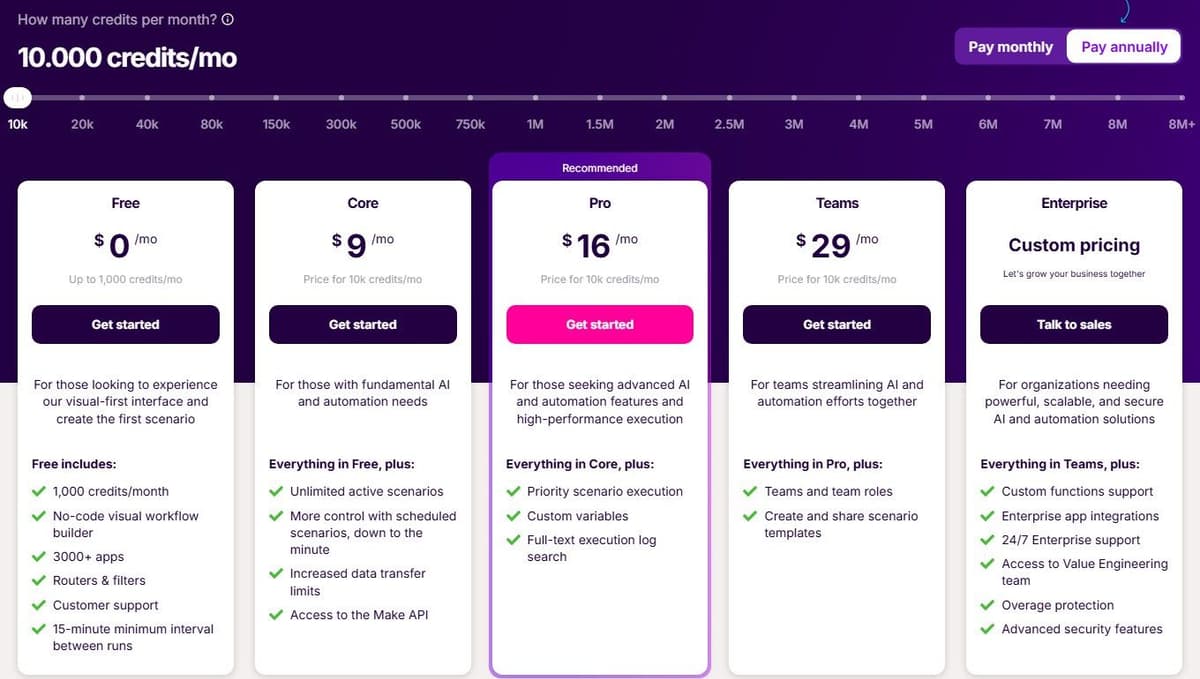
Make's Router and Filter do not consume credits. Most ordinary non-AI module operations do, including trigger checks and actions that process incoming bundles. Branching can increase usage when additional actions actually run; adding a Router alone does not. AI features and Make Code have separate charging rules, so count the modules that execute rather than every item drawn on the canvas. See Make.com pricing for every plan and credit tier.
"Each action your scenario performs consumes a certain number of credits - most actions consume 1 credit, while some advanced features leveraging Make's AI Provider may use more."
Source: make.com
The Free plan gives 1,000 credits a month and holds scheduled scenarios to a 15-minute minimum interval. Anything that has to react faster needs a paid plan or a webhook. Core starts at $9 a month billed annually for 10,000 credits. Run out mid-cycle and you buy extra credits in bundles of 1,000 or 10,000 at the price fixed in your subscription. Enterprise adds 24/7 priority support with 2-hour response SLAs and a guaranteed 99.5% uptime SLA. No price for it is published, so check the vendor's pricing page.
None of that makes Make.com a weak product. The visual canvas is expressive, and routers, iterators and aggregators handle branching and batching cleanly. AI agents are in beta and available on all plans. Maia turns plain language into automations and is included in all plans. Make MCP Server exposes scenarios as callable tools for MCP-compatible agents across 3,000+ apps by its own count. Zapier, a competitor, says in its own comparison that the builder is powerful but has a steeper learning curve. Routers and iterators are where beginners feel it. For the head-to-head view, see Make vs Zapier.
If the canvas is the problem rather than the price, try a plain-language builder before you migrate. One user on r/AgentsOfAI described the wish this way: "Ideally, I could just describe the AI agent I want in a prompt, have the platform build most of it for me, and then connect the apps/accounts I need." Make's Maia page says Maia is included in all plans, with usage paid in credits on paid plans and a 30-day trial on Free; Zapier's Copilot is available on every plan, with a daily message cap on Free; and Latenode has an AI Copilot built into every workflow. These assistants help with the build, but you still connect the accounts and test the result before it runs on real data.
Make.com alternatives at a glance
Ten tools, in the order covered below. The free-plan column shows what each vendor allows at no cost, and the conditions behind those rows differ, so read the section for any tool you shortlist.
| Tool | Best for | Free plan | Paid from |
|---|---|---|---|
| Zapier | Widest app catalog | 100 tasks/mo | $19.99/mo yearly |
| Latenode | Runtime billing, AI | 10,000 CPU seconds/mo | $0.00012 per CPU sec |
| Activepieces | Open source, self-host | CE, or 1,000 credits/mo | Plus $16/mo yearly |
| Pabbly Connect | High task allowance | 100 tasks/mo | $16/mo billed yearly |
| Pipedream | Code in workflows; closes Mar 31, 2027 | No new signups | Plans withdrawn |
| Albato | Transaction pricing | 100 transactions/mo | $15/mo billed yearly |
| Integrately | Ready-made automations | 100 tasks/mo | $19.99/mo yearly |
| Zoho Flow | Zoho users | 100 tasks/mo | $25/mo yearly |
| Power Automate | Microsoft 365, RPA | Free license, work accounts | $15/user/mo yearly |
| IFTTT | Smart home Applets | 2 Applets | $2.99/mo yearly |
CE in the table means Activepieces Community Edition, the free self-hosted edition without a credit meter.
1. Zapier: best for the widest app catalog
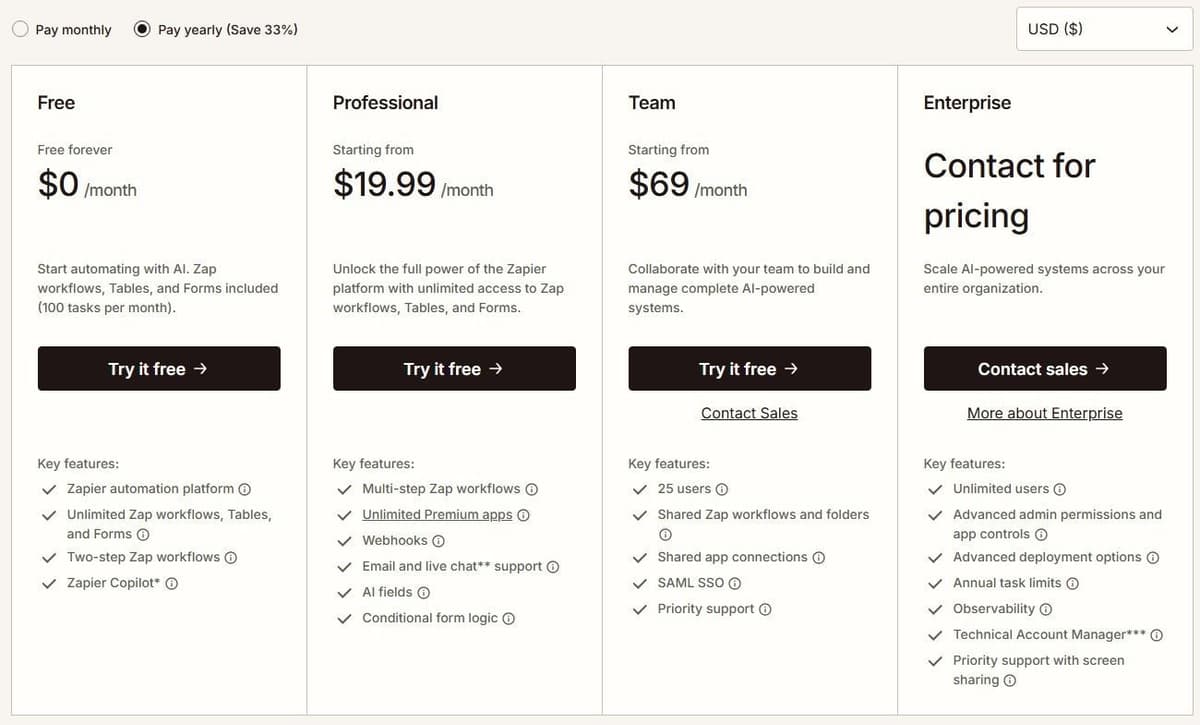
Zapier connects more than 9,000 apps by its own count. That catalog is the main reason it stays on shortlists. Every plan, including Free, includes unlimited Zap workflows, and Copilot is available on every plan, with a daily cap on Free. The free tier gives 100 tasks a month and two-step Zaps, meaning one trigger and one action. Other platforms are compared in our guide to Zapier alternatives.
A task is an ordinary successful billable action, subject to documented built-in exemptions and feature-specific rates. Trigger polling checks do not consume tasks, and only billable completed actions count. Forecast usage from the billable actions that actually execute. Professional starts at $19.99 a month billed annually for 750 tasks. Starter was retired on April 2, 2024, which makes Professional the cheapest paid tier now. Polling runs every 15 minutes on Free, 2 minutes on Professional and 1 minute on Team and Enterprise.
Two details matter for AI work. Agents run up to 400 activities a month on the free tier, and one MCP tool call consumes two tasks. Task usage is pooled across the account, so Zap workflows, AI steps, code and MCP all draw on the same allowance. The limitation is volume. In a busy account, 750 tasks disappear fast.
2. Latenode: for runtime billing with AI and code
Latenode bills workflow runtime instead of steps. You pay for the seconds a scenario actually runs, measured in CPU seconds, so adding modules does not multiply the bill. The first 10,000 CPU seconds each month are free on both plans. Free costs $0 a month with no credit card: 5 active workflows, one execution worker, a 3-minute limit per run, 3 days of history, and still every app, AI agents, RAG storage, the headless browser and the database.
Pay as you go has no base fee. The same 10,000 CPU seconds are included, and usage beyond them starts at $0.00012 per CPU second. Caps lift to unlimited active scenarios, five parallel workers, a 10-minute run limit and 30 days of history. It also includes custom JavaScript steps, an AI Copilot in the builder, an AI agent builder and 335+ LLM models under one subscription.
The limitation is comparison. Runtime does not map onto Make.com credits, so you cannot convert your bill on paper. Run one real scenario and read the seconds it burns. Expect a learning curve while that intuition builds.
3. Activepieces: best open-source alternative you can self-host
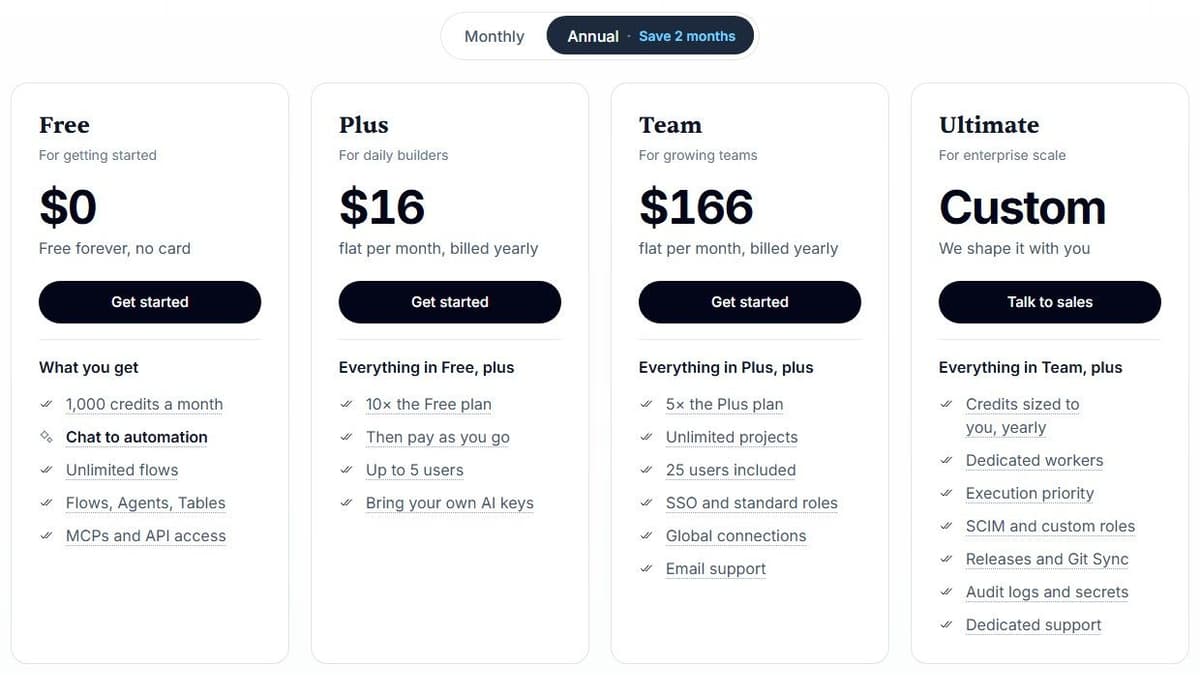
Activepieces Community Edition is a free, self-hosted option built on the MIT-licensed core. It has no credit meter or cap on runs and users. You pay for hosting and operations, and for any external services your flows use. Community Edition excludes features such as SSO, audit logs, projects and Git Sync. Its credit-metered plans cost the same on Activepieces' cloud or your own servers, and their credit allowances do not apply to the free Community Edition.
On these plans, billing counts a credit per run rather than per step. One credit covers a whole run no matter how many steps it has. With Activepieces-supplied AI models, each AI step adds 2 credits for a fast model, 10 for a smart model or 20 for a frontier model; agentic actions add one credit each. On Plus and higher plans, using your own AI provider keys makes each AI step cost one Activepieces credit, with model usage billed separately by your provider. The Free plan gives 1,000 credits a month for up to 5 users. Plus is $16 a month billed annually with 10,000 credits a month for up to 5 users. Team is $166 a month with 50,000 credits for 25 users, and Ultimate is custom. Overage on Plus and Team costs $0.007 per credit. The platform can also be embedded inside another product.
The trade-off is the catalog. 760+ integrations is a fraction of what the largest platforms list, so check your specific apps first. Self-hosting also means you own uptime, updates and backups.
4. Pabbly Connect: a high task allowance for a fixed subscription
Pabbly can be a useful budget candidate, but Make's free Router and Filter must be excluded from any claimed saving. Compare the actions that actually run and select a plan that covers the resulting monthly usage. The same number of boxes on two canvases does not imply the same number of charged units. The Make vs Pabbly Connect comparison works through credits against tasks.
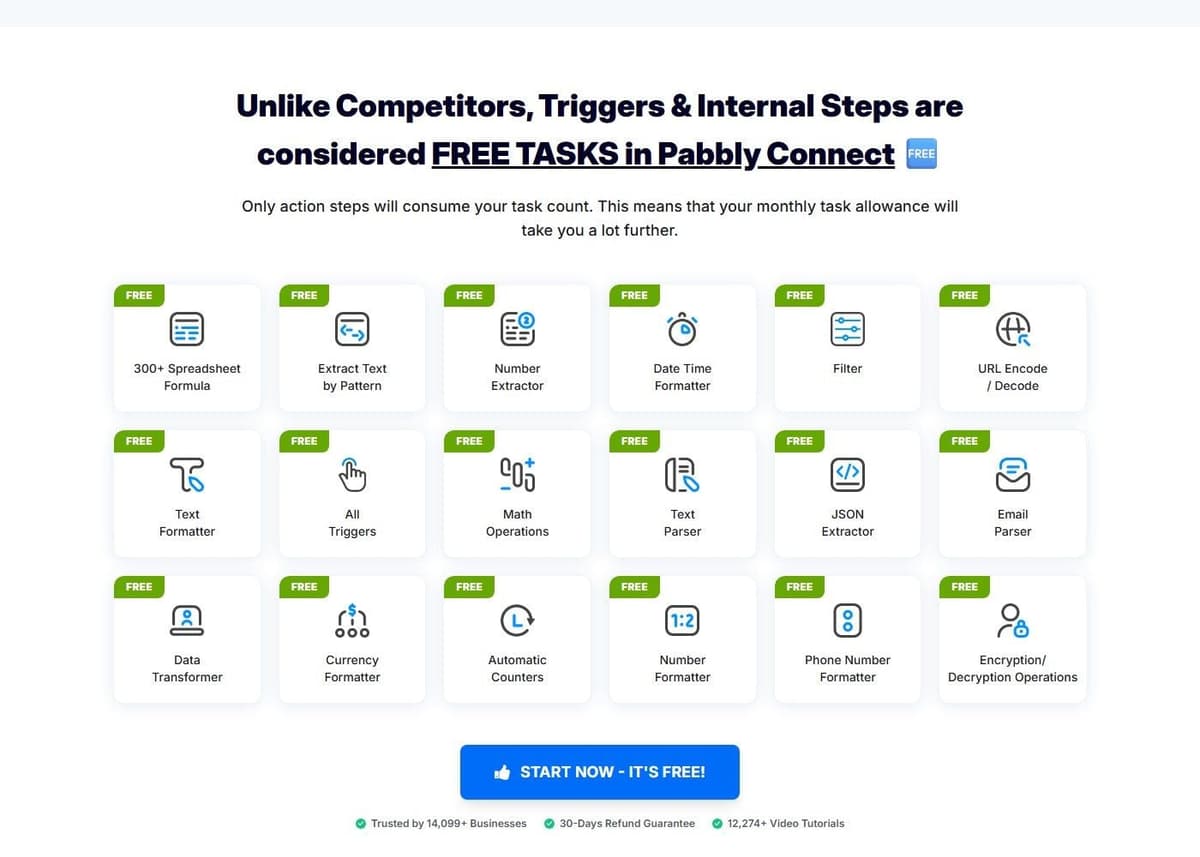
Pabbly counts a task when an action runs on an external app. Triggers, checks for new data and internal steps such as Filter, Router, Text Formatter, Iterator, Email Parser and JSON Extractor are not counted. The free plan gives 100 tasks a month with no credit card, capped at 2 workflows of up to 2 steps. Standard gives 10,000 tasks a month at $16 a month billed annually, against a regular price of $19 a month. Unlimited gives unlimited tasks at a regular $79 a month, and the same page shows multi-year prepay discounts down to $59 a month. One-time lifetime plans exist too: Standard Lifetime at $349 for 3,000 tasks a month, Ultimate Lifetime at $799 for 10,000 tasks a month and Ultimate Plus Lifetime at $1,298 for 20,000. For Pabbly against Zapier directly, see Pabbly Connect vs Zapier.
It lists JavaScript and Python code modules, MCP servers, human-in-the-loop approvals and an AI assistant, across 2,000+ integrations by its own count. The limitation is access. Team members are not available on monthly plans. Our Pabbly Connect alternatives guide covers the tools people compare it with.
5. Pipedream: best for existing users who want code in workflows
For teams already on it, Pipedream suits people who would rather write ten lines than click through a mapping interface. Workflow steps run Node.js, Python, Go and Bash. It integrates 3,000+ apps.
If you already run workflows on it, check the timeline. Pipedream's documentation says Pipedream Workflows will shut down on March 31, 2027, and Pipedream is no longer accepting signups or subscriptions for Workflows; existing workflows keep running until that date. Pipedream Connect, which covers its Connect API, MCP Servers and API Proxy, is not affected.
New buyers cannot pick a Workflows plan any more. As of October 2026, Pipedream's pricing page lists only its Connect plans: a development-only Free plan that cannot run in production, Startup with 10,000 usage credits and 100 external users for $99 a month billed annually ($150 month to month), and Business on an annual contract. Pipedream deletes Workflows data, credentials included, by April 30, 2027.
Until the shutdown, existing workflows bill by compute: one credit covers up to 30 seconds at 256 MB for each workflow segment. A 35-second segment uses two credits; allocating 512 MB doubles the credit use for the same duration. Branches and pauses can create separately billed segments. Pipedream Connect also has an external-user billing component, so a Workflows estimate does not price an embedded-auth deployment.
This builder is aimed at developers, so a non-technical team moving off it may prefer a visual canvas.
6. Albato: best for transaction-based pricing with a small team
Albato bills transactions. A transaction is counted for each automation step after the trigger, and triggers themselves are free. So a three-step automation costs two transactions per run. Extra transactions beyond the plan cost $0.0330 each. It connects 1,000+ apps, with transaction packages up to 2M a month.
Free is $0 with 100 transactions a month, 5 active automations, 2 steps per automation, unlimited apps and connections, 7 days of log storage and a 15-minute automation update time. Pro is $15 a month billed annually, or $22 a month billed monthly, for 1,000 transactions. It lifts the limits to unlimited automations and steps, data migration and auto replay, Albato AI, AI agents, parallel scenario execution, 30 days of logs and a 5-minute update time. A Teams plan is marked coming soon at $65 a month billed annually from 5,000 transactions with 5 team seats, so treat that price as provisional. A Custom enterprise plan is quote-based.
The two-step ceiling on Free makes it a demo, not a workspace. The pricing page also contradicts itself on trial length, showing one figure on the Pro card and another in its FAQ. So check the vendor's pricing page before planning around one.
7. Integrately: best for ready-made one-click automations
Integrately sells ready-made automations: pick two apps, pick a use case, activate it. The company claims 20 million+ ready automations for 1,500+ apps, by its own count. The practical effect is real, because the common jobs are already wired for you.
Tasks are counted per successful action, condition, modify-data or search step. Triggers are free, and failed actions are not counted. Free gives 100 tasks a month with single-step automations and a 15-minute update time, without webhooks, filters or branching. Starter is $19.99 a month billed annually for 2,000 tasks, with multi-step automations, webhooks, filters and a 5-minute update time. But it is limited to 3 premium apps, 20 automations and 1 user, and branching is still not included at that level.
Higher tiers add branching and larger task allowances; check the current numbers on Integrately's pricing page. A 14-day free trial covers the paid features. The limitation is that a one-click library only helps while your process matches a template.
8. Zoho Flow: best for Zoho users
Zoho Flow describes itself as an AI-powered app integration and workflow automation platform. Its natural home is a company already running Zoho apps, where the connectors, the admin model and the invoice are all familiar.
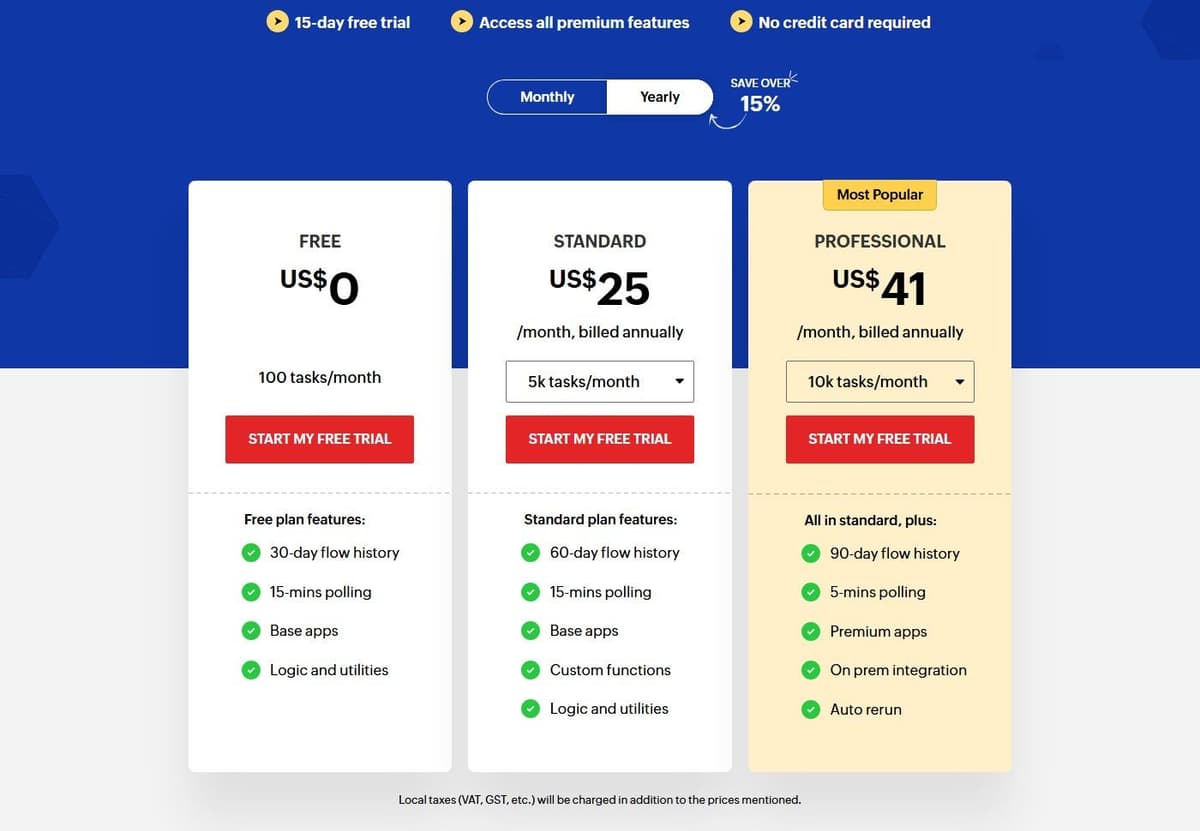
The free plan costs nothing and includes 100 tasks a month, 30 days of flow history, 15-minute polling, base apps, and logic and utilities. A 15-day free trial opens all premium features without a credit card. Standard starts at 5,000 tasks a month, and Zoho Flow prices by region. US prices are $25 a month billed annually for 5,000 tasks, $31 for 10,000, $46 for 20,000, $80 for 50,000 and $105 for 100,000 tasks. Buyers outside the United States may see other currencies, so check your own region on the vendor's pricing page before you budget.
The limitations follow from the same logic. Fifteen-minute polling on the free plan rules out anything time-sensitive. A flow history of 30 days is short if you need to audit failures after the fact. And the platform loses much of its advantage once your core systems sit outside the Zoho suite.
9. Microsoft Power Automate: best for Microsoft 365 and desktop RPA
Power Automate is the default answer when the work lives inside Microsoft 365, and part of the process is not an API at all but a legacy desktop application somebody has to click through. It covers cloud flows, attended desktop flows and unattended robots in one family of licenses.
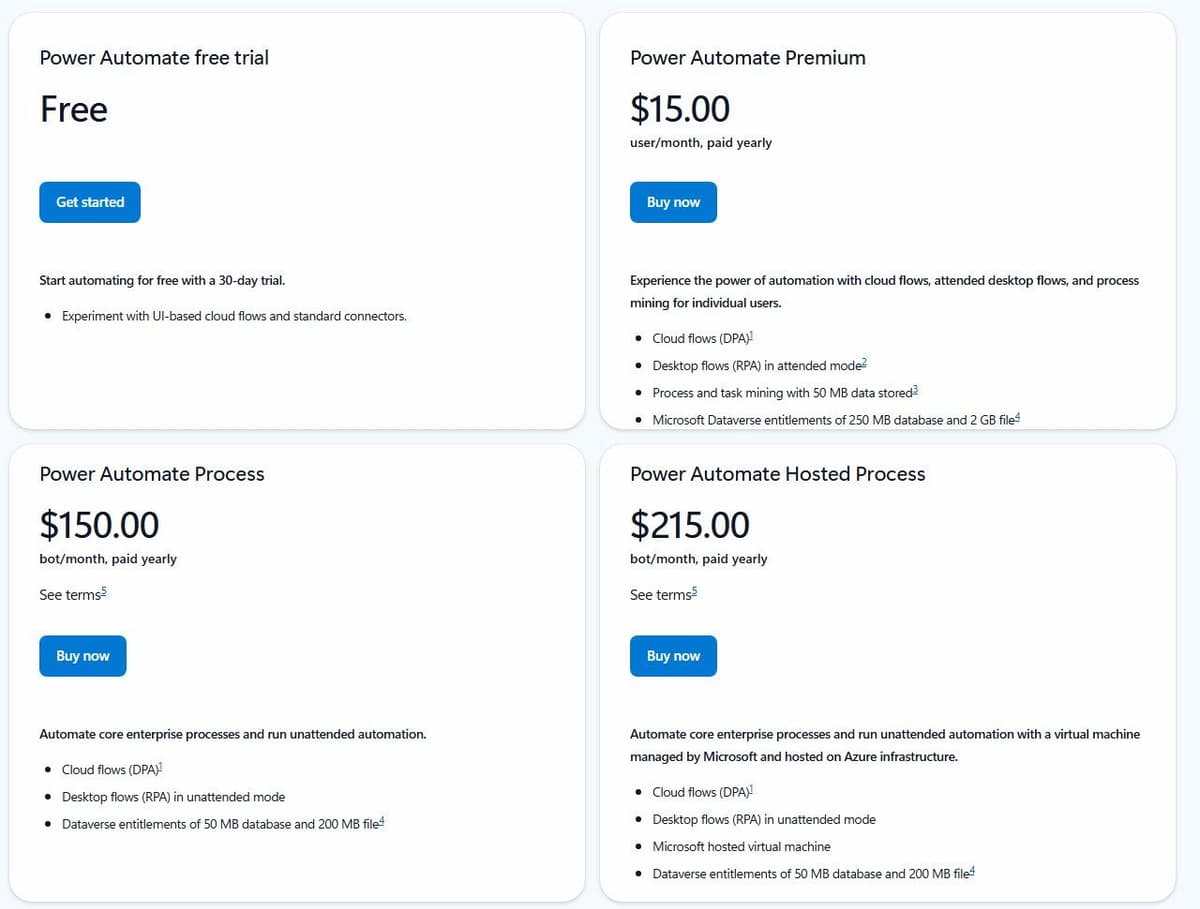
Power Automate has a permanent Free license for eligible work or school accounts in a Microsoft Entra tenant. It covers cloud flows with standard connectors without sharing, plus local attended desktop flows. Premium connectors and broader deployment requirements need additional licensing. Premium is a user license; Process can license a cloud flow for premium and custom connectors regardless of the owner or triggering user's license. Desktop automation has further licensing conditions. Free, a Premium trial and Process are different options.
A 30-day free trial covers UI-based cloud flows and standard connectors. Premium is $15.00 per user per month paid yearly. It includes cloud flows, attended desktop flows for RPA and process mining for individual users, plus Microsoft Dataverse entitlements of 250 MB database and 2 GB file storage. Unattended automation is licensed separately. Process is $150.00 per bot per month paid yearly and runs unattended desktop flows. Hosted Process is $215.00 per bot per month, which adds a Microsoft-hosted virtual machine so you do not have to supply the desktop yourself.
The catch is the shape of the bill rather than the rate. Per-user pricing is comfortable for a team of five and awkward for a department of five hundred. Per-bot pricing turns each robot into its own budget line. So scope the rollout before it leaves the pilot stage. Teams leaving Microsoft licensing can start with our Power Automate alternatives.
10. IFTTT: best for personal and smart home Applets
IFTTT is the odd one out here, deliberately so. An Applet is a connection between two or more apps or devices that lets them do something they could not do on their own. At minimum it needs a trigger and an action. It reaches more than 1,000 services. Our IFTTT vs Make comparison sets the two side by side.
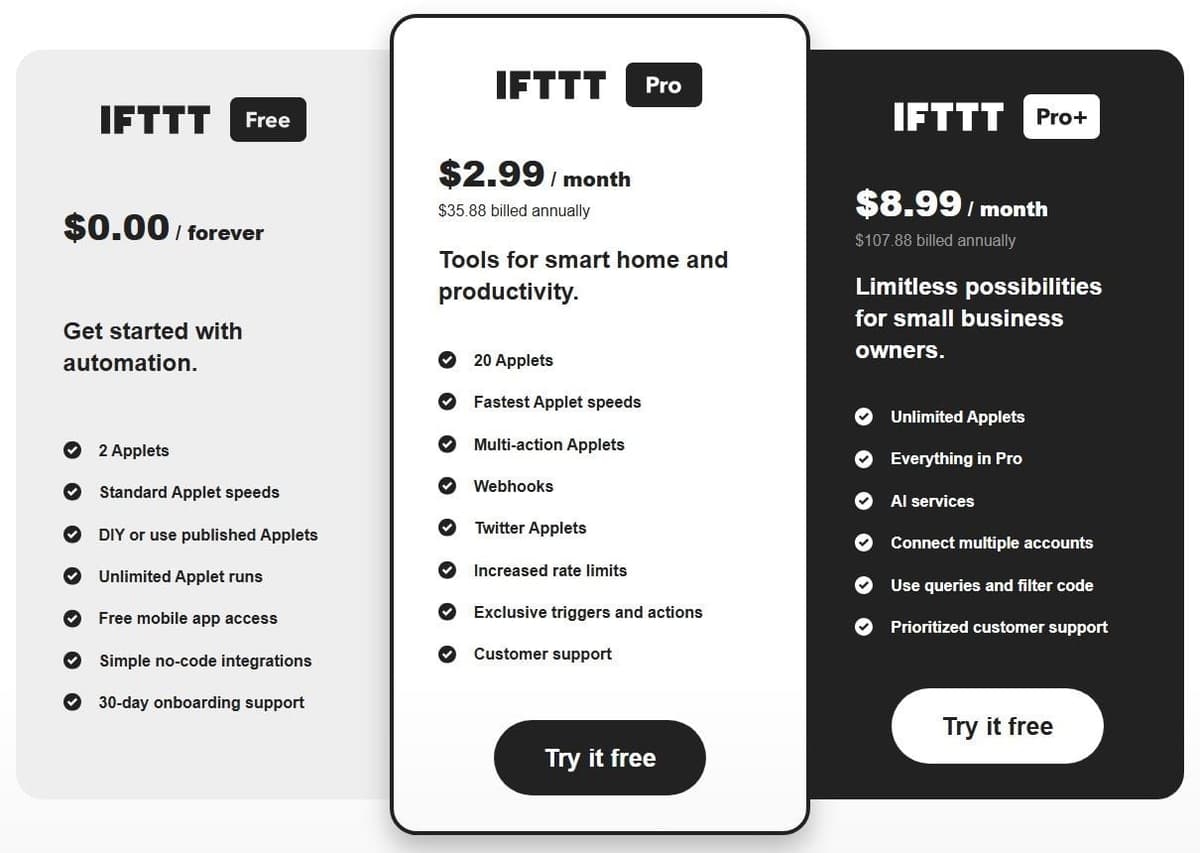
Free costs nothing forever and allows 2 Applets with unlimited runs, each limited to one trigger and one action. Pro is $2.99 a month, billed as $35.88 annually, and raises the cap to 20 Applets. Pro+ is $8.99 a month, billed as $107.88 annually, with unlimited Applets, AI services such as the AI Content Creator and the AI Summarizer, queries, filter code and multiple account connections. Monthly and yearly billing are both available on any paid plan.
Speed separates the tiers as much as volume does. Polling Applet checks happen every 5 minutes for Pro and Pro+ users, versus every hour on Free. Applets originally supported one trigger and one action and were later expanded to multiple actions or conditional filters. But this remains a personal automation tool. For business workflows, pick something else on this list.
AI agent builders and enterprise iPaaS as Make.com alternatives
Two kinds of tool sit outside the ten above. AI agent builders swap a drawn scenario for an agent that picks its own steps, and they bill for the model work behind each run, plus seats at Lindy, rather than per module. Enterprise iPaaS sits at the other end, for companies that want integrations run and governed centrally.
Gumloop
Gumloop builds AI agents that work across your tools. Its pricing page lists two plans: Pro, from $37 a month with a 14-day free trial, and Enterprise at custom pricing. Pro includes 20,000 credits a month, unlimited agents and unlimited seats. A credit is indexed at $0.005, and each agent run is billed at list price for the model tokens, compute and paid API calls it uses, with an 8% orchestration fee on top, or 16% with your own model keys. Unused credits do not roll over, and past 20,000 the agents stop unless you switch on pay as you go at $0.005 a credit.
Next to Make, the trade is predictability. A Make module operation has a known credit cost, while a Gumloop run costs whatever the model reads and writes, so price a few real inputs before you budget. The plan table also marks Workflows as legacy. Our Gumloop alternatives guide covers the tools in the same group.
Lindy
Lindy sells an AI teammate rather than a canvas. Free costs $0 and comes with $50 in credits that last 7 days, with no credit card. After that, Team starts at $29.99 per user a month for 3,000 credits each, and every active user in the workspace is billed. Credits pool across the team, top-ups cost $10 per 1,000 credits, and the selector runs up to 1,750,000 credits for $9,999.50 a month. Lindy lists 1,500+ integrations, and Enterprise, at custom pricing, adds SSO, SCIM, audit logs and HIPAA with a signed BAA.
The seat is the big difference from Make, which includes unlimited users on every plan. Because Lindy bills each active user, a five-person team starts at $149.95 a month before any top-ups. Our Lindy AI alternatives guide compares the other agent tools.
Workato
Workato is an enterprise iPaaS with a self-service door. Workato Free comes with 50,000 credits, granted once. Workato Pro is billed monthly by credit card: $75 a month for 2,500 credits, $100 for 3,500, $275 for 10,000, $780 for 30,000 and $1,275 for 50,000, and credits left at month end do not carry over. One credit balance covers every capability, from running workflows to running agents. Recipes are counted in Tasks, one per action step, with triggers and control steps such as IF conditions and loops free, and Tasks convert into credits. Enterprise editions are sold through sales.
The jump from Make is steep on paper: Make Core's 10,000 credits cost $9 a month billed annually, and 10,000 Workato credits cost $275 a month. The two credits do not measure the same work, so price your own recipes before you compare. Our Workato alternatives guide covers the platforms around it.
How to choose a Make.com alternative
Start with arithmetic, not features. Take one representative month of Make.com credits and translate it into each unit: Zapier, Pabbly Connect, Integrately and Zoho Flow charge a task per billable action; Activepieces plans charge one credit per run; Albato charges a transaction per step after the trigger; Latenode bills runtime seconds; Power Automate bills per user or per bot. A run in which ten ordinary Make.com modules execute burns ten credits, and the same work may cost one credit, nine tasks, or a couple of seconds elsewhere.
Use two separate tests. For cost, calculate one complete workflow at your expected monthly volume, including polling, loops, code and AI. For simplicity, build that workflow and record the time needed to map fields, diagnose a failed item and change a route. A cheaper plan does not prove that the editor is easier to use.
Staying on Make.com is a legitimate answer. If your scenarios lean on routers, iterators and aggregators, migrating a working system to save a few dollars a month is rarely worth the weekend. Plenty of teams pair tools instead: the canvas keeps the complicated work, and a cheaper unit takes high-volume, low-complexity jobs.
What the same workflow costs
Consider one incoming event that creates a CRM record and sends a Slack notification. Each run produces one input item and completes both actions. The calculation excludes AI, code, retries, extra polling, searches and third-party app subscriptions. A filter that allows every item through adds no charge on any of the three platforms.
Under those assumptions, Make uses three credits per run: one trigger operation and two action operations. Zapier and Pabbly each use two tasks. The table selects a plan with enough included capacity, with no overage purchases.
| Runs per month | Platform | Usage | Plan and monthly price |
|---|---|---|---|
| 50 | Make | 150 credits | Free, $0 |
| 50 | Zapier | 100 tasks | Professional 750, $19.99 |
| 50 | Pabbly | 100 tasks | Standard 10,000, $16 |
| 300 | Make | 900 credits | Free, $0 |
| 300 | Zapier | 600 tasks | Professional 750, $19.99 |
| 300 | Pabbly | 600 tasks | Standard 10,000, $16 |
| 1,000 | Make | 3,000 credits | Core 10,000, $9 |
| 1,000 | Zapier | 2,000 tasks | Professional 2,000, $49 |
| 1,000 | Pabbly | 2,000 tasks | Standard 10,000, $16 |
Paid prices are in USD with one-year billing: $108/year for Make Core, $239.88/year for Zapier Professional 750, $588/year for Professional 2,000, and, for Pabbly Standard, $16 a month billed annually ($194 a year at checkout). The figures exclude tax and assume the required connectors are available on the selected plans. Zapier Free is excluded because this example needs two actions after the trigger, making it a multi-step Zap. Pabbly Free is excluded for the same reason, because its workflows are limited to 2 steps. Free-plan limits still apply on Make.
Routers show where Make's low price per credit pays off. Take 2,000 form leads a month. A Router sends 400 enterprise leads down a route that creates a CRM deal and posts a Slack alert, and the other 1,600 down a route that adds the contact to an email list. Make bills the trigger plus the actions on the route each run takes: 2,000 + 800 + 1,600 = 4,400 credits. Zapier's Paths and Pabbly's Router cost nothing, so both count only the 2,400 actions, and Activepieces counts one credit per run, or 2,000.
| Platform | Usage a month | Plan and monthly price |
|---|---|---|
| Make | 4,400 credits | Core 10,000, $9 |
| Pabbly Connect | 2,400 tasks | Standard 10,000, $16 |
| Activepieces | 2,000 credits | Plus 10,000, $16 |
| Zapier | 2,400 tasks | Professional 5,000, $89 |
Monthly prices assume annual billing. Zapier's Paths step needs a paid plan, and 2,400 tasks overshoot the 2,000-task tier, so Zapier lands on Professional 5,000 at $89 a month, or $1,068 a year. Activepieces needs Plus because 2,000 runs exceed its 1,000 free credits. For a scenario that branches like this, Make Core stays the cheapest of the four, a fair reason to keep router-heavy work where it is.
More actions, polling, AI or a different billing commitment can change the result.
Move one workflow without creating duplicate records
Start with a workflow whose inputs, outputs and owner are known. Map every trigger, action and field, then test the replacement against sample data in a sandbox or a separate destination. During parallel comparison, let only one platform write to production. Use the source event ID as an idempotency key and check how the destination handles repeated requests. Compare outputs, failures, latency and usage before switching the trigger. Keep the original workflow disabled but recoverable until the replacement has completed a normal business cycle.




