



Quick answer: the best Zapier alternative for each need
Make is the best Zapier alternative for visual scenarios on a budget. Pabbly Connect fits a high task allowance on a fixed subscription, Activepieces open source and self-hosting, Pipedream developers who already use it (its Workflows product takes no new signups and shuts down on March 31, 2027), Power Automate Microsoft shops, Workato or Tray.ai enterprise, and Latenode runtime billing with AI and code.
Each tool is described by the unit it actually bills: tasks, credits, transactions, seats or runtime.
Editorial note: Latenode publishes this article and is one of the products discussed. The comparison uses public product documentation and pricing pages. Worked examples are calculations under stated assumptions, not results from a hands-on benchmark. Recommendations describe which requirements a product may fit; they are not a measured ranking of performance or reliability.
Relay.app is not on this list. It announced on its site that it is shutting down, with free accounts ending August 15, 2026 and paying customers losing access on September 14, 2026. New signups and free-to-paid upgrades are already switched off.
Why people look for Zapier alternatives in 2026
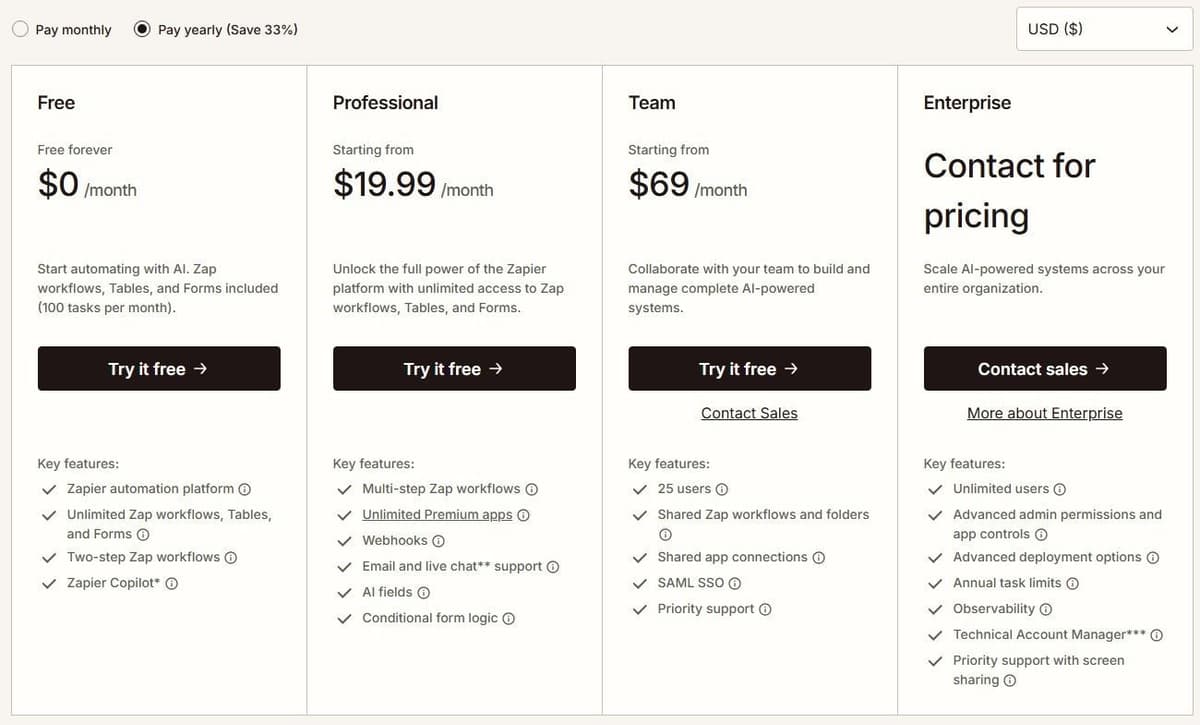
Zapier's Free plan costs $0 a month and includes 100 tasks. Zap workflows on it stop at two steps: one trigger and one action. The first paid tier is Professional at $19.99 a month billed annually for 750 tasks, or $29.99 when billed monthly. Starter was retired on April 2, 2024, which left Professional as the cheapest paid option. For tiers above Professional, check Zapier's pricing page. Enterprise pricing is not published and requires contacting sales. What each Zapier plan includes is set out in our guide to Zapier pricing.
Look at the unit, not the headline. A task is an ordinary successful billable action, subject to documented built-in exemptions and feature-specific rates, and polling checks, triggers and failed steps do not count. What surprises people is pooling. Billable Zap actions, AI steps, Code steps and MCP calls use the account's task allowance at their applicable rates. Zapier SDK actions are free during the current beta. Using the SDK inside Code by Zapier does not remove the Code step's own task or runtime charges. One MCP tool call consumes two tasks. Speed is tiered too: polling every 15 minutes on Free, 2 minutes on Professional, 1 minute on Team and Enterprise.
None of that makes Zapier a weak product. It connects more than 9,000 apps by its own count. Copilot is available on every plan, with a daily cap on Free that resets at midnight UTC. Zapier Agents run up to 400 activities a month at no cost, and every new account starts on a 14-day Professional trial with no credit card. The real question is whether you are paying for breadth you never touch.
Catalog size is a starting point, not proof that an integration supports your workflow. Check the exact trigger, action, fields and authentication method you need. Also check who maintains the integration and where to report failures; do not assume every listed connector is maintained directly by the platform vendor.
Zapier alternatives at a glance
This shortlist covers different replacement jobs rather than every automation product on the market. "Free" may mean a limited hosted plan, a trial or a self-hosted edition; the table distinguishes them. "Open source" refers to the license of a specific component or edition, not merely to a download button. Evaluate any other candidate against the same workflow and operating requirements.
Here are the twelve tools in the order they are covered below, with the free tier and the entry paid price each vendor publishes. Caveats, billing terms and limits come next.
| Tool | Best for | Free plan | Paid from |
|---|---|---|---|
| Make | Visual scenarios | 1,000 credits a month | $9/mo billed yearly |
| Latenode | Runtime billing with AI | 10,000 CPU seconds | $0.00012 per CPU sec |
| Activepieces | Open source, self-host | CE, or 1,000 credits/mo | Plus $16/mo, yearly |
| Pabbly Connect | High task allowance | 100 tasks a month | $16/mo billed yearly |
| Integrately | Ready-made automations | 100 tasks, single step | $19.99/mo, yearly |
| Albato | Transaction pricing | 100 transactions | $15/mo billed yearly |
| Zoho Flow | Zoho users | 100 tasks a month | $25/mo billed yearly |
| Pipedream | Existing users who code; closes Mar 31, 2027 | Closed to new signups | No Workflows plans sold |
| Power Automate | Microsoft 365 and RPA | Permanent Free license | $15/user/mo, yearly |
| Workato | Enterprise iPaaS | Free, 50,000 credits once | $75/mo self-serve, or quote |
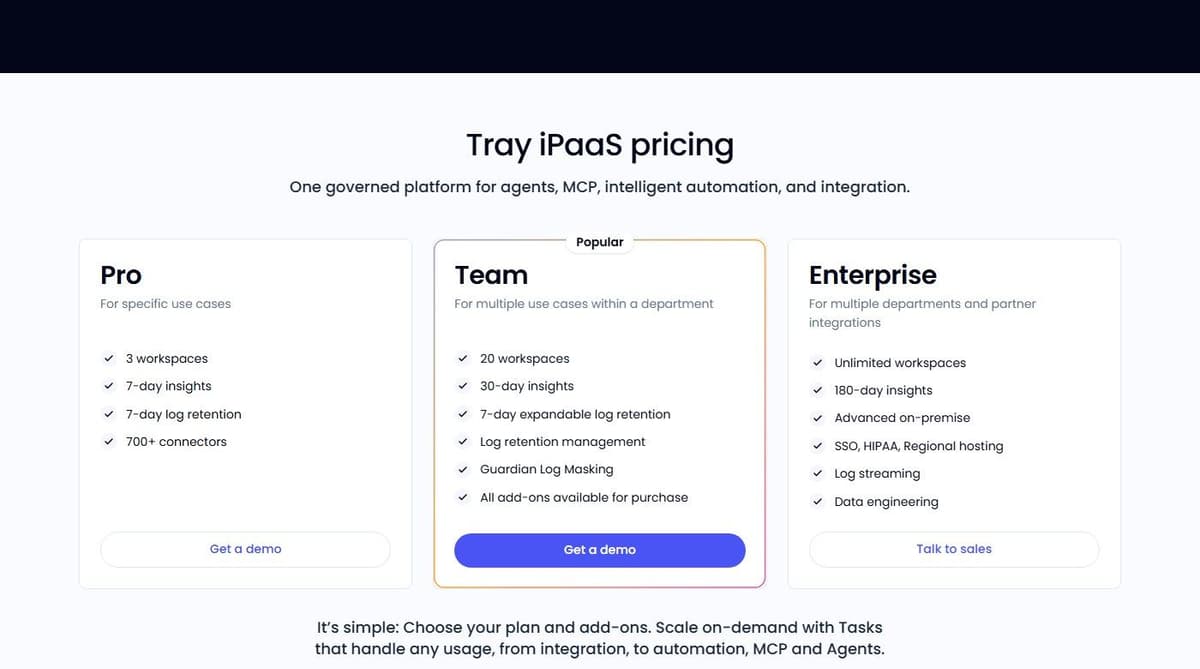
| Tray.ai | Enterprise agents | Trial via sales | Quote |
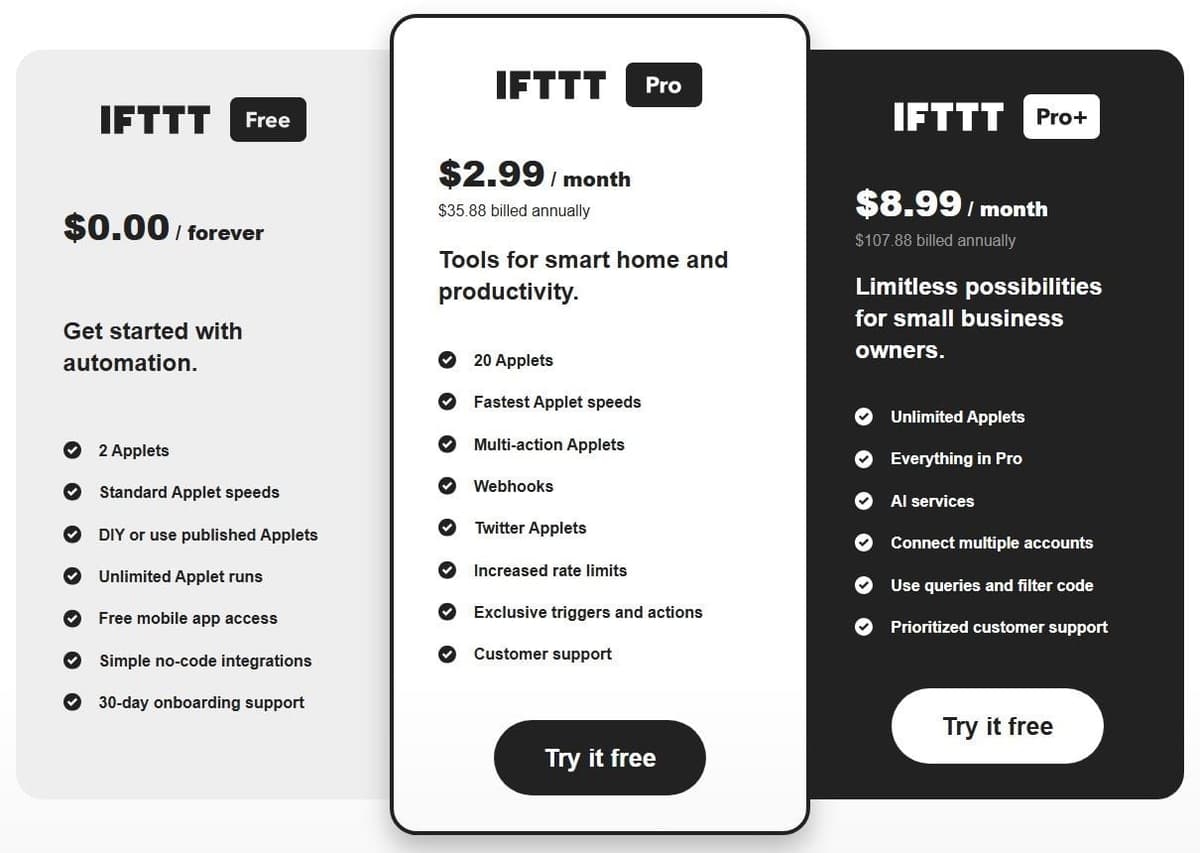
| IFTTT | Personal, smart home | 2 Applets | $2.99/mo billed yearly |
CE in the table means Activepieces Community Edition, the free self-hosted edition without a credit meter.
What free means for each Zapier alternative
Grouped by the kind of deal:
| What free means | Tools and allowance |
|---|---|
| Monthly allowance | Make, Activepieces 1,000 credits; Pabbly, Integrately, Zoho Flow 100 tasks; Albato 100 transactions; Latenode 10,000 CPU seconds |
| A cap on active Applets | IFTTT, 2 Applets |
| Self-hosted, no meter | Activepieces CE |
| A one-time grant | Workato, 50,000 credits |
| Eligible work or school accounts | Power Automate |
| A trial arranged by sales | Tray.ai |
| Closed to new accounts | Pipedream Workflows |
Leaving Zapier Free over its two-step cap? Pabbly Connect and Albato allow 2 steps on free plans, and Integrately and IFTTT one action, so a trigger with two actions needs a paid plan on all four.
1. Make: best for visual scenarios on a budget
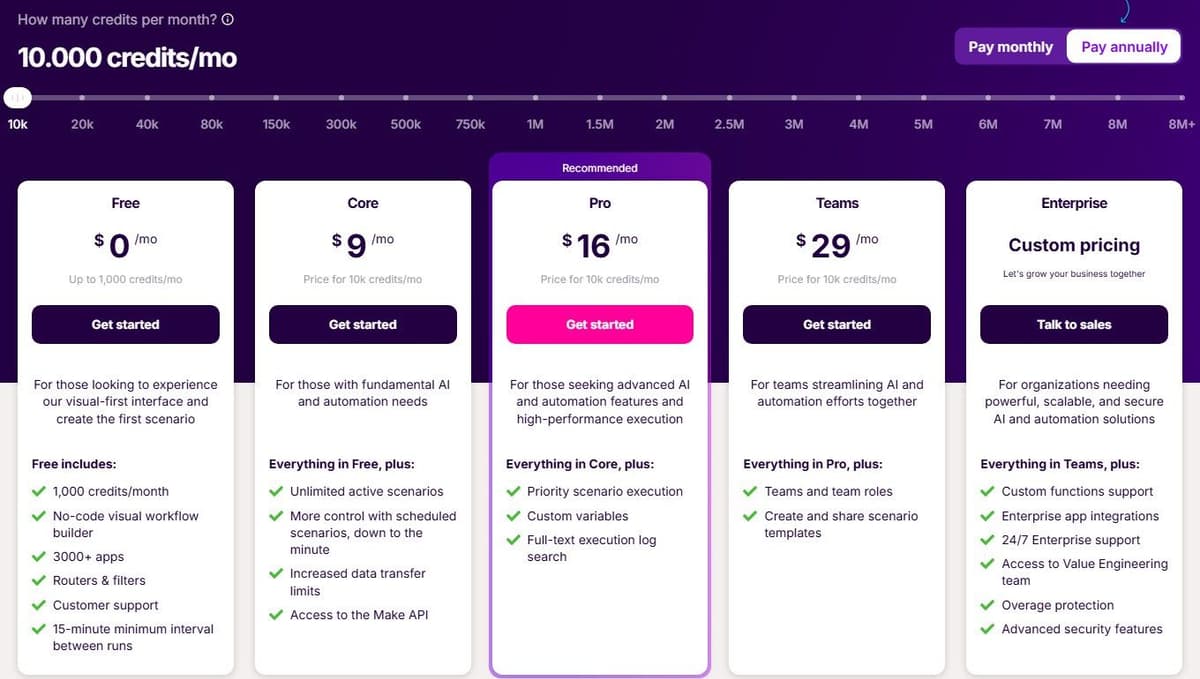
Make is a canvas. You drag modules onto a scenario and wire them together, and the shape of the workflow is visible at a glance. It bills in credits, the unit that used to be called operations. Ordinary module operations spend one credit each, such as adding a Google Sheet row or fetching Gmail data, while Router and Filter spend none. Make and Zapier are compared directly in Make vs Zapier.
Free costs $0 a month with 1,000 credits, access to 3,500+ apps and a 15-minute minimum interval between scheduled runs. Core is $9 a month billed annually for 10,000 credits and brings scheduling down to the minute. Extra credits come in bundles of 1,000 or 10,000 at a price fixed in your subscription.
Zapier's own comparison credits Make's power-user appeal to unlimited routers, iterators and aggregators, and most scenarios can hold an unlimited number of modules. AI agents are available on all plans in beta, and the Maia assistant is included on every plan. Make MCP Server exposes scenarios as tools for MCP-compatible agents. For background on the protocol, see our guide to MCP.
But not every step costs one credit. Code execution is charged at 2 credits per second, and AI or multi-bundle steps can cost more.
2. Latenode: for runtime billing with AI and code
Latenode bills workflow runtime in CPU seconds rather than per operation or per step, so adding steps does not multiply the bill. Both plans include the first 10,000 CPU seconds every month.
Free is $0 a month with no credit card. It caps you at 5 active workflows, one execution worker, 3 minutes per run and 3 days of history, while still including all apps, AI agents, RAG storage, the headless browser and the built-in database. Pay as you go has no base fee and charges $0.00012 per CPU second above the included 10,000, with lower rates in higher brackets, unlimited active scenarios, 5 parallel workers and a 10-minute run limit. Custom JavaScript code steps are supported, an AI Copilot sits in the builder, and an agent builder handles business processes. 335+ LLM models come under one subscription.
The trade-off is the mental model. Runtime does not map onto Zapier tasks. Forecasting a bill means estimating how long your workflows really run, and that takes a few weeks of live data to learn.
3. Activepieces: best open-source alternative you can self-host
Activepieces Community Edition is a free, self-hosted option built on the MIT-licensed core. It has no credit meter or cap on runs and users. You pay for hosting and operations, and for any external services your flows use. Community Edition excludes features such as SSO, audit logs, projects and Git Sync. Its credit-metered plans cost the same on Activepieces' cloud or your own servers, and their credit allowances do not apply to the free Community Edition.
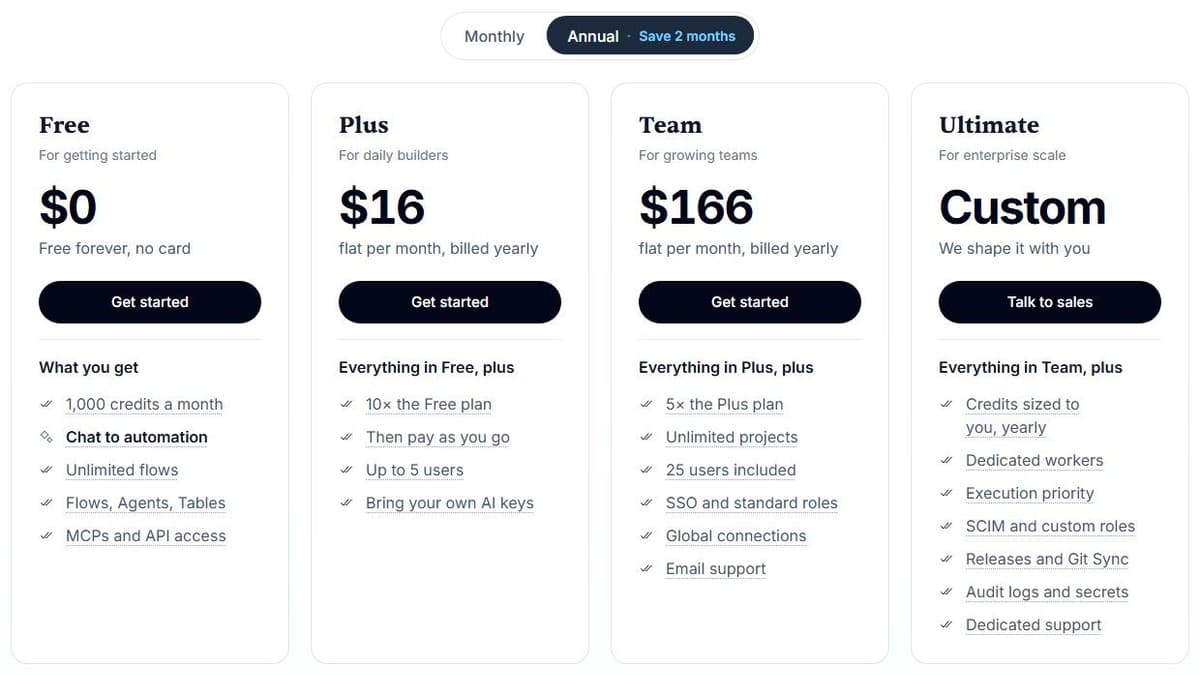
On the metered plans, one credit covers a whole run regardless of how many ordinary steps it contains. That holds for ordinary steps only. With Activepieces-supplied AI models, each AI step adds 2 credits for a fast model, 10 for a smart model or 20 for a frontier model; agentic actions add one credit each. On Plus and higher plans, using your own AI provider keys makes each AI step cost one Activepieces credit, with model usage billed separately by your provider. At $0, the Free plan gives 1,000 credits a month for up to 5 users. Plus is $16 a month billed annually with 10,000 credits a month for up to 5 users. Team is $166 a month with 50,000 credits for 25 users, an Ultimate tier is custom-priced, and overage on Plus and Team costs $0.007 per credit. The platform can also be embedded inside another product. See our guide to Zapier free plan limits for what Free includes and leaves out.
With 760+ integrations, the catalog is smaller than the big task-based platforms. Check your specific apps before committing.
4. Pabbly Connect: a high task allowance for a fixed subscription
Pabbly is worth comparing when your workflows need many billable external actions and the required integrations are available. Compare the monthly bill for a complete workflow, including the billing commitment. Tasks, credits and CPU seconds are not interchangeable units, so no platform is cheapest for every workflow.
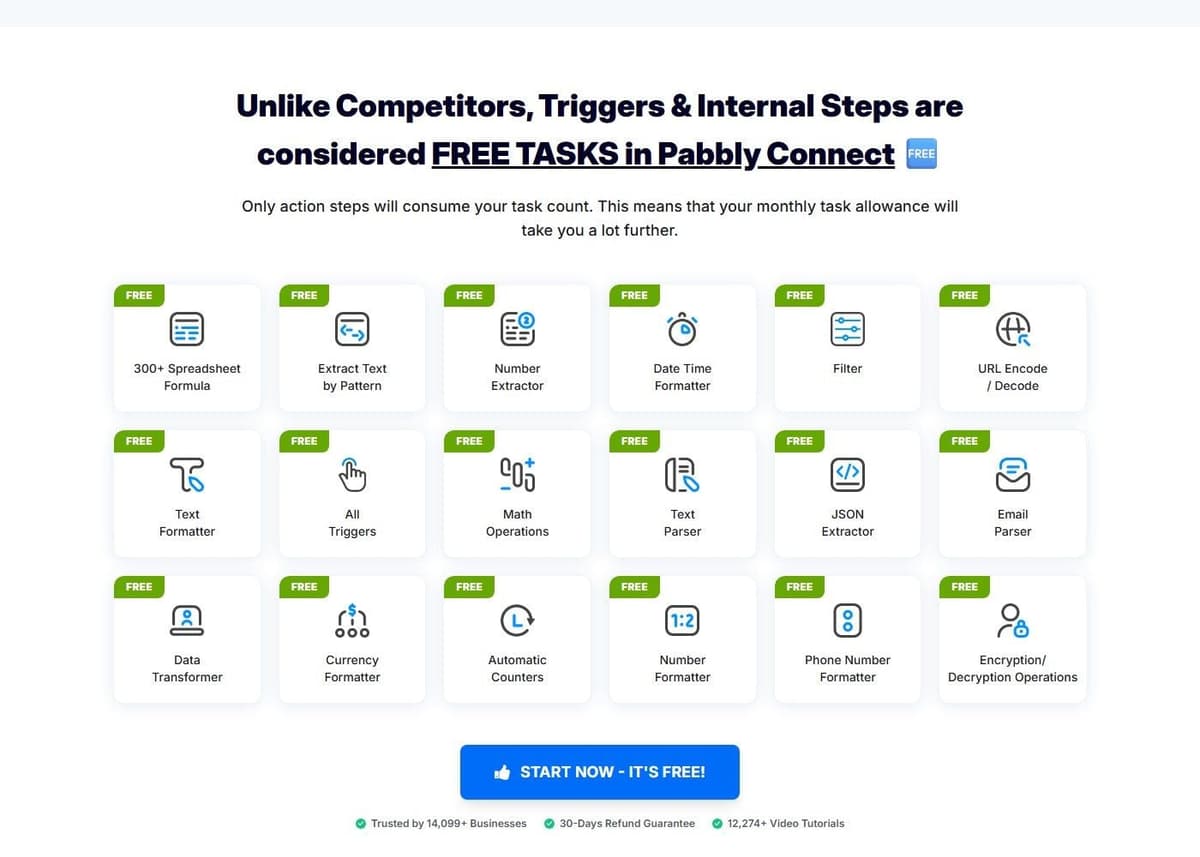
A task is charged only when an action runs on an external app. Filters, routers, formatters, schedules, iterators, the email parser, the JSON extractor and array functions are all free, as are the checks for new data. Its free plan gives 100 tasks a month with no credit card, limited to 2 workflows of up to 2 steps. Standard lists 10,000 tasks a month at $16 a month billed annually, against a regular price of $19 a month, with deeper two-year and three-year discounts on the page. Unlimited gives unlimited tasks and all features at a regular price of $79 a month, with multi-year discounts down to $59 a month. One-time lifetime deals also exist: Standard Lifetime at $349 for 3,000 tasks a month with feature restrictions, Ultimate Lifetime at $799 for 10,000, and Ultimate Plus Lifetime at $1,298 for 20,000.
Pabbly lists 2,000+ integrations by its own count. It also ships JavaScript and Python code modules, MCP servers, human approvals and an AI assistant. One catch: team members are not available on monthly plans. Our Pabbly Connect vs Zapier comparison covers the price and catalog trade-off.
5. Integrately: best for ready-made one-click automations
Integrately sells speed of setup. Its pitch is a library of prebuilt automations you activate rather than build, with 20 million ready automations across 1,500+ apps by its own count. A 14-day free trial lets you test them.
On Free you get 100 tasks with single-step automations and a 15-minute update time, and there are no webhooks or filters. Starter is $19.99 a month billed annually for 2,000 tasks, but it is capped at 3 premium apps, 20 automations and 1 user. That is the tier most people outgrow first. It adds multi-step automations, webhooks, filters and a 5-minute update time, though branching only starts at Professional. Professional is $39 a month billed annually for 10,000 tasks with unlimited apps and a 2-minute update time. Growth is $99 for 30,000 tasks and Business is $239 for 150,000, both on the same annual terms. Taxes are extra on all of them.
Task accounting is reasonable. Every successful action, condition, modify-data or search step counts, while triggers are free and failed actions are not charged. The catch is that one-click templates only help where a template already exists for your exact pair of apps.
6. Albato: best for transaction-based pricing with a small team
Albato counts transactions rather than tasks, and the definition is precise. A transaction is charged for each automation step that runs after the trigger. Triggers themselves are free. Extra transactions beyond your package cost $0.0330 each, and packages scale to 2 million a month.
"A transaction is counted for each automation step that runs after the trigger. Triggers themselves do not consume transactions."
Source: albato.com
Free costs $0 with 100 transactions a month, 5 active automations, 2 steps per automation, unlimited apps and connections, 7-day log storage and a 15-minute update time. Pro is $15 a month billed annually, or $22 a month billed monthly, for 1,000 transactions. It lifts the caps: unlimited automations and steps, data migration and auto replay, Albato AI and AI Agents, parallel scenario execution, 30-day logs and a 5-minute update time. A Teams plan is marked coming soon at $65 a month billed annually from 5,000 transactions with 5 seats, so treat that price as provisional until it launches. A Custom enterprise plan is quote-based.
With 1,000+ apps the catalog is mid-sized. One quirk worth flagging: Albato advertises a free trial, but its own page gives two different lengths. Check the page before you plan around it.
7. Zoho Flow: best for Zoho users
Zoho Flow describes itself as an AI-powered app integration and workflow automation platform. If your team already runs on Zoho apps, it is the natural first stop, since it lives inside the same account and billing you already have.
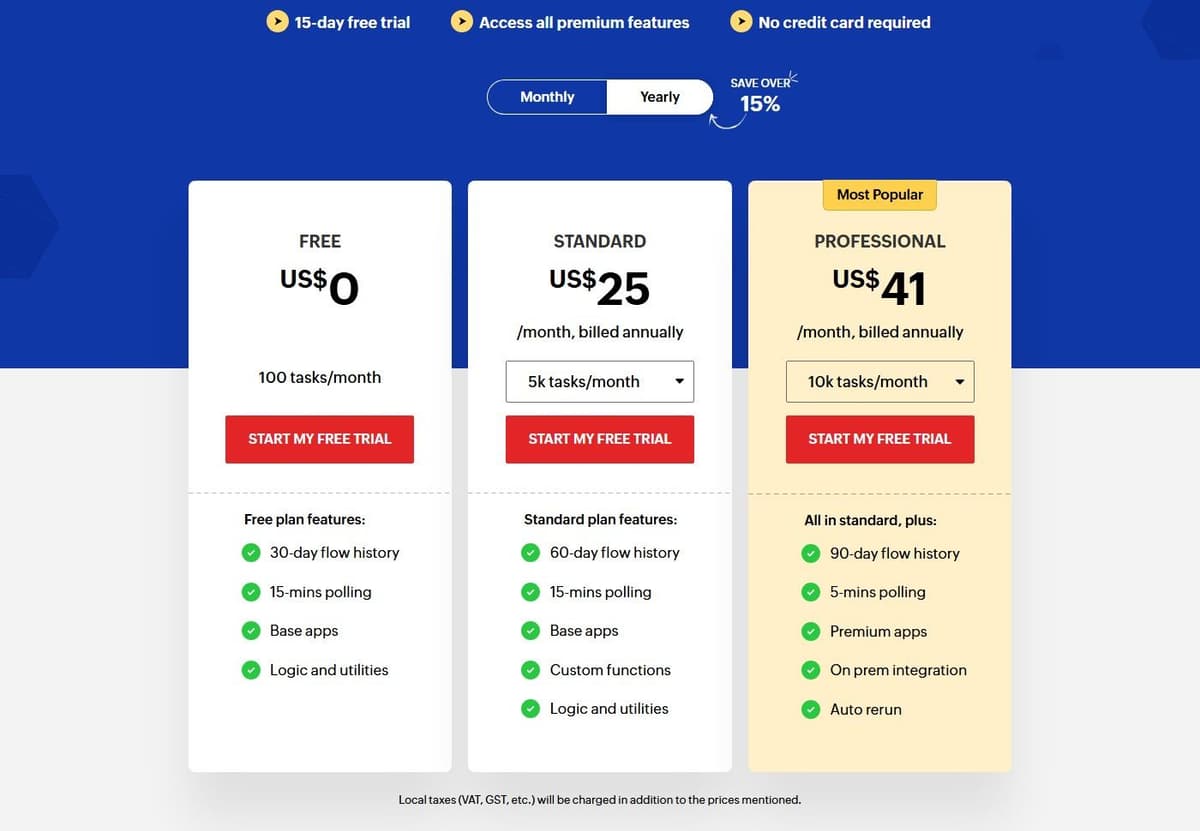
Zoho's free plan costs nothing and includes 100 tasks a month, 30-day flow history, 15-minute polling, base apps and the logic and utilities blocks. A 15-day free trial opens up all premium features with no credit card. Standard starts at 5,000 tasks a month, and this is where you need to read carefully: Zoho prices by region. In US dollars, Standard is $25 a month billed annually for 5,000 tasks, rising to $31 for 10,000, $46 for 20,000, $80 for 50,000 and $105 for 100,000 tasks. Buyers outside the United States may see other currencies, so open the pricing page in your own currency before you budget.
Regional pricing makes cross-border comparison awkward. The free tier's 15-minute polling also rules out anything that needs to feel instant.
8. Pipedream: best for existing users who want code in workflows
For teams already on it, Pipedream is the option for people who would rather write ten lines than click through a form builder. Workflow steps run Node.js, Python, Go and Bash code next to 3,000+ integrated apps. A workflow can be half connectors and half script.
If you already run workflows on it, check the timeline. Pipedream's documentation says Pipedream Workflows will shut down on March 31, 2027, and Pipedream is no longer accepting signups or subscriptions for Workflows; existing workflows keep running until that date. Pipedream Connect, which covers its Connect API, MCP Servers and API Proxy, is not affected.
As of October 2026, Pipedream's pricing page lists only Pipedream Connect plans: Free for building and testing, with no production environment; Startup at $99 a month billed annually, or $150 monthly, with 10,000 usage credits and 100 external users, then $0.012 per extra credit; and Business on an annual contract. Workflows data, credentials included, is deleted by April 30, 2027.
Until the shutdown, existing workflows bill by compute: one credit covers up to 30 seconds at 256 MB for each workflow segment. A 35-second segment uses two credits; allocating 512 MB doubles the credit use for the same duration. Branches and pauses can create separately billed segments. Pipedream Connect also has an external-user billing component, so a Workflows estimate does not price an embedded-auth deployment.
9. Microsoft Power Automate: best for Microsoft 365 and desktop RPA
Power Automate is the answer when the automation has to reach into legacy Windows software rather than SaaS APIs alone. It covers cloud flows and desktop flows. Desktop flows drive the user interface of applications that have no API at all. Our guide to Power Automate alternatives covers open-source and enterprise options too.
Power Automate has a permanent Free license for eligible work or school accounts in a Microsoft Entra tenant. It covers cloud flows with standard connectors without sharing, plus local attended desktop flows. Premium connectors and broader deployment requirements need additional licensing. Premium is a user license; Process can license a cloud flow for premium and custom connectors regardless of the owner or triggering user's license. Desktop automation has further licensing conditions. Free, a Premium trial and Process are different options.
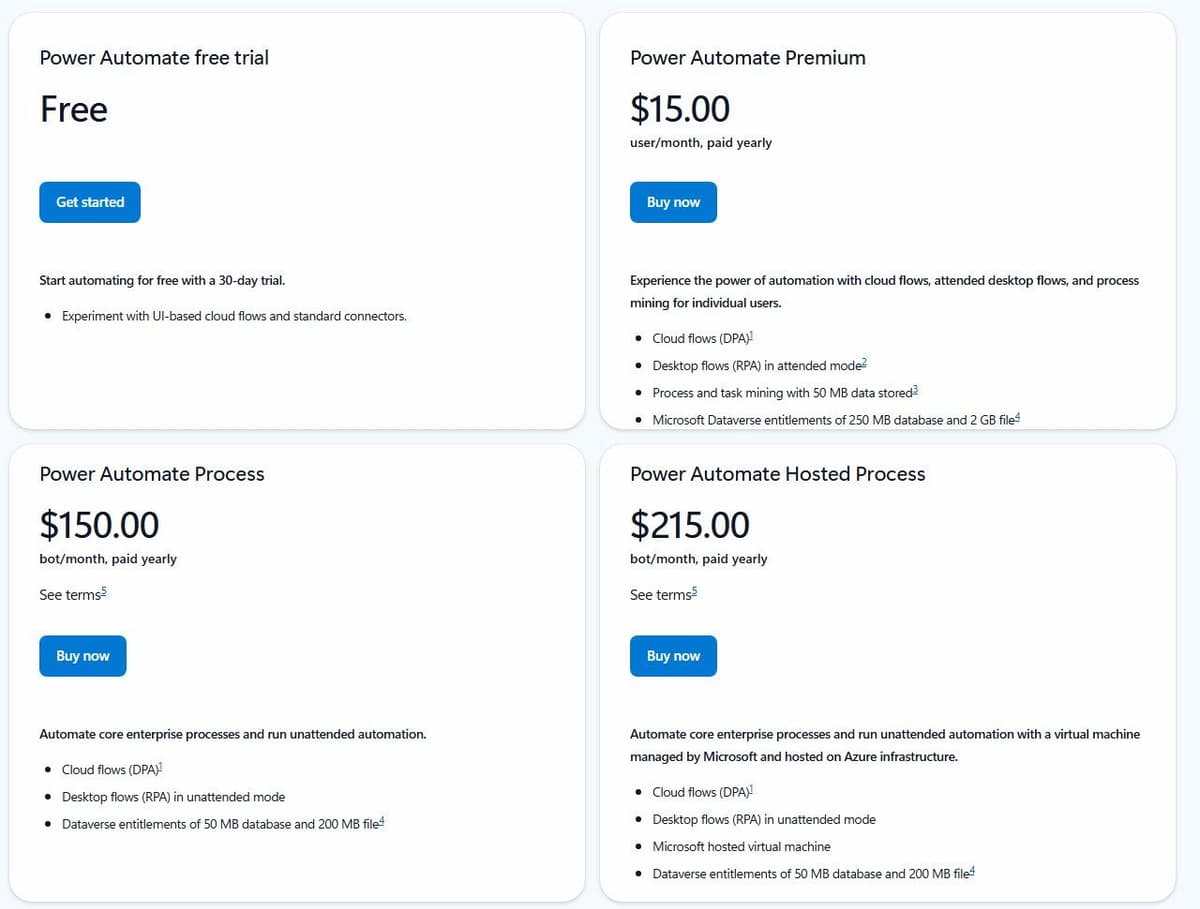
Power Automate Premium costs $15.00 per user a month paid yearly. It includes cloud flows, attended desktop flows and process mining for individual users, along with Microsoft Dataverse entitlements of 250 MB database and 2 GB file storage. Unattended automation is licensed separately, and it is not cheap. Power Automate Process is $150.00 per bot a month paid yearly for unattended desktop flows, and Hosted Process is $215.00 per bot a month with a Microsoft-hosted virtual machine included.
The limitation is the shape of the pricing. Per-user and per-bot licensing suits organizations that already buy Microsoft seats, but a two-person startup automating a handful of SaaS apps will find the per-bot tiers hard to justify against a task-based or runtime-based platform.
10. Workato: best for enterprise iPaaS on a contract
Workato offers both self-service and enterprise purchasing paths. Its self-service documentation lists Free with a one-time grant of 50,000 credits, and Pro from $75 per month for 2,500 recurring monthly credits. These are not monthly Free credits or an enterprise price quote. Enterprise editions and existing contracts must be evaluated separately, including their platform fees, usage metrics and negotiated terms.
"Workato's pricing and plan structures may vary based on your contract terms and when you joined."
Source: workato.com
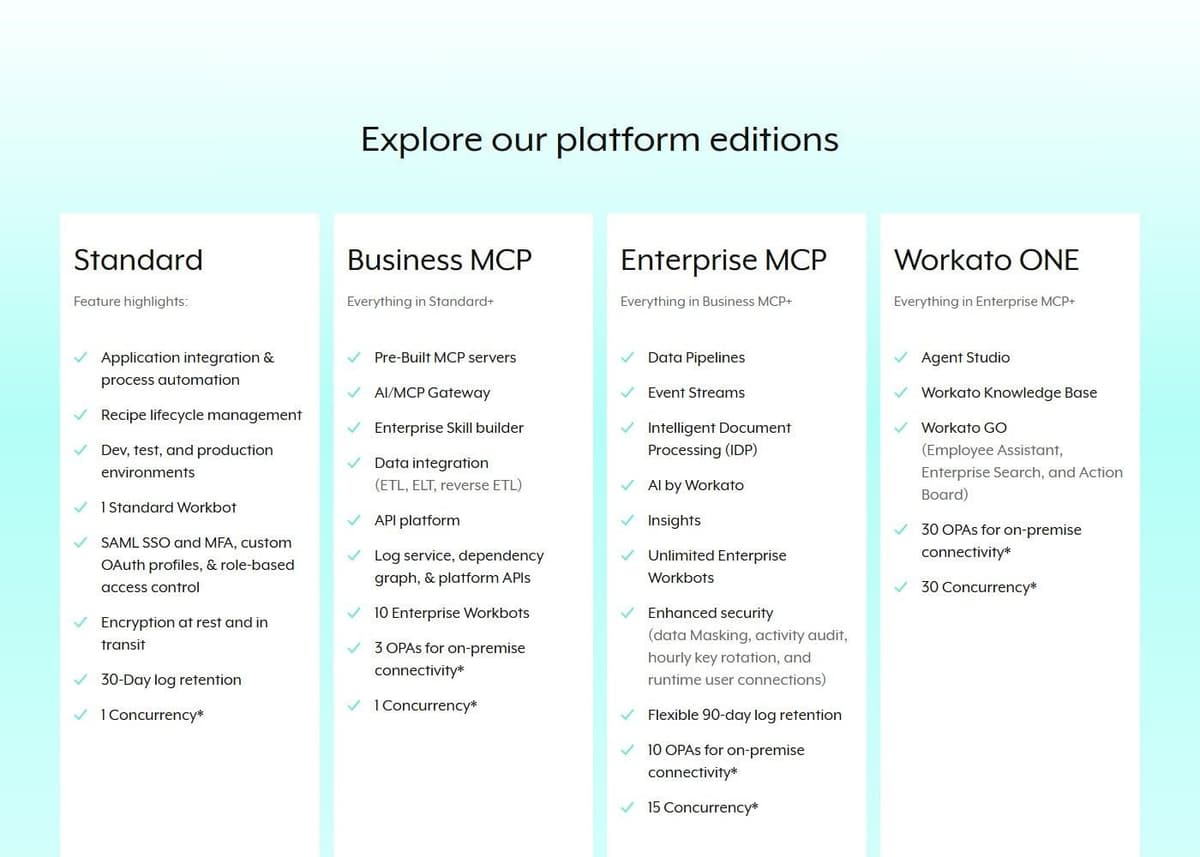
By Workato's own figures, every user gets 1,200+ pre-built connectors along with unlimited workspaces and users. Still, because enterprise pricing is quote-based, what any given contract includes may differ from the marketing page. The pricing page lists Business MCP and Enterprise MCP tiers. The enterprise tier adds unlimited Enterprise Workbots plus the governance features that usually drive the purchase: data masking, activity audit, hourly key rotation and runtime user connections. For the platforms that compete with Workato itself, see our guide to Workato alternatives.
The obvious limitation sits at the enterprise end: procurement. You cannot model an enterprise contract in a spreadsheet before talking to sales, and a renewal negotiation is part of the deal. That is acceptable when the requirement is auditability across departments, and painful when it is not. Our Zapier vs Workato comparison goes deeper.
11. Tray.ai: best for enterprise orchestration with agents
Tray.ai targets the same buyer as Workato but leads with agents. It offers a no-code Agent Builder for conversational or autonomous agents and an Agent Gateway for building and deploying MCP services. Tray Helix is marketed as a governed runtime for apps built with AI. Visual builders are compared side by side in our guide to no-code automation tools.
Pricing follows the enterprise pattern. The Pro, Team and Enterprise plans are priced by custom quote based on usage and features, with usage measured in tasks that cover integration, automation, MCP and agents alike. One meter runs across the whole platform rather than a separate line item per capability. A free trial exists, but it is arranged through the sales team rather than a signup form. Every plan includes business-hours support, and Team and Enterprise add 24/7/365 support with enhanced SLAs and dedicated Slack channels.
Limitations match Workato's enterprise path, with one addition. Because tasks are the meter and the rate is negotiated, you cannot compare Tray.ai's cost per task with a published platform's until you have a quote in hand. Budget a sales cycle before you can even estimate.
12. IFTTT: best for personal and smart home Applets
IFTTT works in Applets. It defines an Applet as a connection between two or more apps or devices that lets them do something they could not do alone. Every Applet needs at least a trigger, the data change that starts it, and an action, the work IFTTT performs in response. Applets originally supported one trigger and one action, and were later expanded to allow multiple actions or conditional filters.
At $0.00 forever, Free covers 2 Applets, each limited to one trigger and one action, with standard speeds and unlimited Applet runs. Pro is $2.99 a month, billed as $35.88 annually, and raises the cap to 20 Applets. Pro+ is $8.99 a month, billed as $107.88 annually, with unlimited Applets plus AI services, queries, filter code and multiple account connections. The AI Content Creator and AI Summarizer are Pro+ exclusives. Polling-based Applet checks run every 5 minutes on Pro and Pro+ versus every hour on Free.
With 1,000+ services, IFTTT shines at bridging device brands, such as making Philips Hue lights react to a Ring doorbell. It is not built for business workflows. See Zapier vs IFTTT and IFTTT alternatives for more.
How to choose a Zapier alternative
Start with the billing unit, not the sticker price. Zapier, Pabbly Connect, Integrately and Zoho Flow charge a task per billable action, so wide multi-step workflows are what cost you money. Make charges a credit per ordinary module operation. Activepieces charges one credit per run no matter how many ordinary steps it holds, Albato counts every step after the trigger as a transaction, and Latenode bills the seconds a run takes. Power Automate charges per user or per bot instead. Map one honest month of your traffic onto each unit before comparing headline prices.
Check the meter again once a Zap grows into loops and Code steps. Looping and Formatter steps themselves do not count as tasks, but every successful action inside a loop does, each time it runs, and each Code by Zapier run uses a task plus 1 task per 30 seconds of extended runtime. One user on r/zapier described "Huge task consumption just for passing data through lookup tables and loops" in a complex Zap. For a Zap like that, a per-run meter such as Activepieces, where one credit covers a whole run of ordinary steps, may fit better than a bigger task tier.
Then decide what free has to mean. An allowance that resets daily suits small jobs running constantly; a monthly pool suits bursts. If cost control or data residency outranks convenience, the Activepieces Community Edition runs on your own servers, with hosting and operations as the cost. Latenode allows code in the workflow, and so does Pipedream for teams already on it.
Quote-based platforms earn their keep when governance is the requirement: audit trails, data masking, many workspaces and a contract to point at. Plenty of teams also pair tools, keeping something cheap for routine syncs and something faster or code-first for the heavy jobs. If you build these workflows for clients, our guide to starting an AI automation agency prices one client workflow on Zapier, Make, Activepieces and Latenode.
Two cheaper options never appear on a pricing page: a feature already built into an app you pay for, such as payment reminders in an invoicing tool, and a script you write yourself, which removes the subscription but not the upkeep. One user on r/automation put it this way: "cheaper hosting can lose its advantage if every small change needs the original developer." Before you count a script as free, decide who will change it when the process changes, and add that time to the comparison.
What the same workflow costs
Consider one incoming event that creates a CRM record and sends a Slack notification. Each run produces one input item and completes both actions. The calculation excludes AI, code, retries, extra polling, searches and third-party app subscriptions. A filter that allows every item through adds no charge on any of the three platforms.
Under those assumptions, Make uses three credits per run: one trigger operation and two action operations. Zapier and Pabbly each use two tasks. The table selects a plan with enough included capacity, with no overage purchases.
| Runs per month | Make usage / monthly equivalent | Zapier usage / monthly equivalent | Pabbly usage / monthly equivalent |
|---|---|---|---|
| 50 | 150 credits / Free, $0 | 100 tasks / Professional 750, $19.99 | 100 tasks / Standard 10,000, $16 |
| 300 | 900 credits / Free, $0 | 600 tasks / Professional 750, $19.99 | 600 tasks / Standard 10,000, $16 |
| 1,000 | 3,000 credits / Core 10,000, $9 | 2,000 tasks / Professional 2,000, $49 | 2,000 tasks / Standard 10,000, $16 |
Paid prices are in USD with one-year billing: $108/year for Make Core, $239.88/year for Zapier Professional 750, $588/year for Professional 2,000, and, for Pabbly Standard, $16 a month billed annually ($194 a year at checkout). The figures exclude tax and assume the required connectors are available on the selected plans. Zapier Free is excluded because this example needs two actions after the trigger, making it a multi-step Zap. Pabbly Free is excluded for the same reason, because its workflows are limited to 2 steps. Free-plan limits still apply on Make.
Four more meters, priced the same way: Activepieces bills one credit per run, Albato a transaction per action, Integrately and Zoho Flow a task per action.
| Runs per month | Activepieces credits | Albato transactions | Integrately tasks | Zoho Flow tasks |
|---|---|---|---|---|
| 50 | 50 / Free, $0 | 100 / Pro, $15 | 100 / Starter, $19.99 | 100 / Free, $0 |
| 300 | 300 / Free, $0 | 600 / Pro, $15 | 600 / Starter, $19.99 | 600 / Standard, $25 |
| 1,000 | 1,000 / Free, $0 | 2,000 / Pro plus extra, $48 | 2,000 / Starter, $19.99 | 2,000 / Standard, $25 |
Prices assume annual billing, before tax, and as in the first table a plan used exactly to its limit covers the month. At 1,000 runs Albato adds 1,000 extra transactions at $0.0330 each; Albato Free and Integrately Free are excluded for their step limits.
More actions, polling, AI or a different billing commitment can change the result.
Move one workflow without creating duplicate records
Start with a workflow whose inputs, outputs and owner are known. Map every trigger, action and field, then test the replacement against sample data in a sandbox or a separate destination. During parallel comparison, let only one platform write to production. Use the source event ID as an idempotency key and check how the destination handles repeated requests. Compare outputs, failures, latency and usage before switching the trigger. Keep the original workflow disabled but recoverable until the replacement has completed a normal business cycle.




