Quick answer: Zapier vs IFTTT in 60 seconds
Pick Zapier for business automation: more than 9,000 app integrations, multi-step workflows, filters, and webhooks. Pick IFTTT for smart home and personal automation, where its Applets bridge device brands and every plan includes unlimited Applet runs. Both have free plans. You can test each in an afternoon.
For SMB operations, marketing, and developer work, Zapier is the safer purchase, because the workflow logic and the app catalog are far deeper. For a solo user linking phone, lights, doorbell, and a few social accounts, IFTTT costs a fraction of Zapier. It also does not meter how often your automations fire. Price is not the deciding factor. What matters is whether your automations need branching, formatting, and error handling, or just one reliable trigger with an action or two.
Editorial note: Latenode publishes this article and is one of the products discussed. The comparison uses public product documentation and pricing pages. Worked examples are calculations under stated assumptions, not results from a hands-on benchmark. Recommendations describe which requirements a product may fit; they are not a measured ranking of performance or reliability.
What IFTTT and Zapier are
IFTTT is short for If This Then That. It links more than 1,000 apps, devices and services through Applets, each of which starts with a trigger in one service and runs one or more actions in others. IFTTT sells three plans to individual users, Free, Pro and Pro+, and its catalog leans toward phones, smart home devices and personal accounts.
Zapier describes its product as no-code automation across 9,000+ apps. Its workflows are called Zaps: a trigger starts a chain of action steps, and each successful billable action counts as a task. Zapier and IFTTT share the trigger-and-action idea; they differ in how far one workflow can go and in who they are built for.
What changed in 2025 and 2026
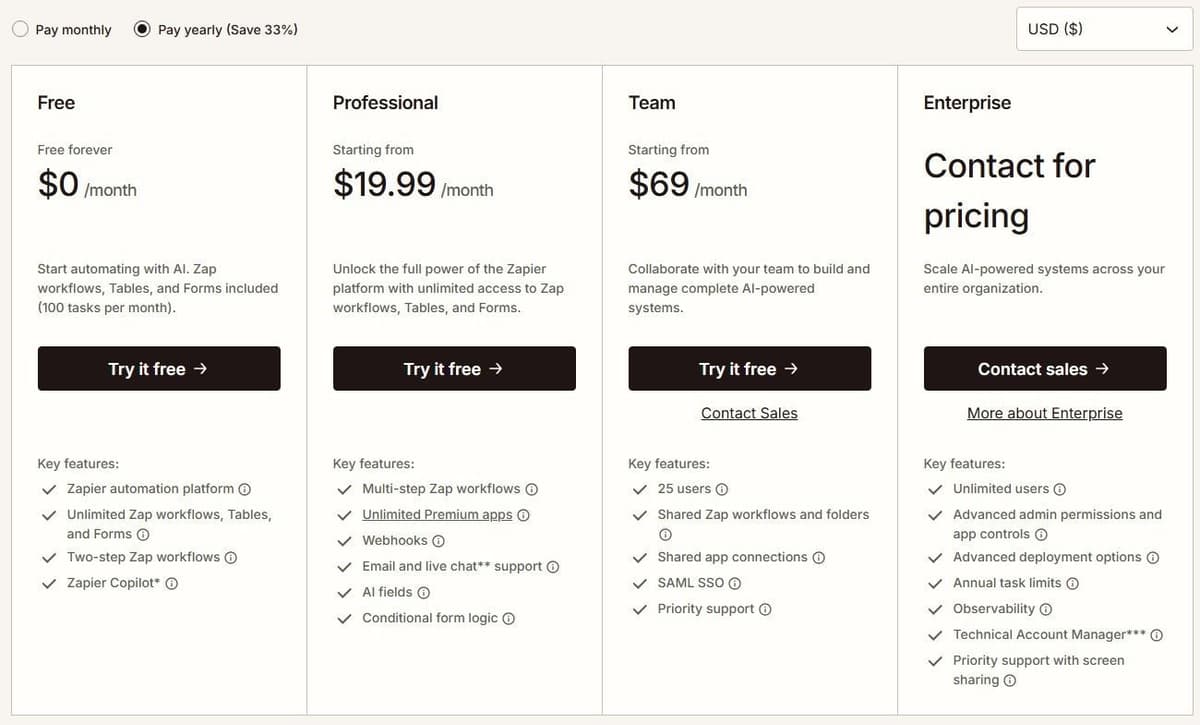
Zapier's plan lineup is the first thing to check. Professional is the lowest-cost paid tier, and its task tiers start at 750 tasks a month. Enterprise is aimed at scaling automation across more teammates and departments, with extra governance; its pricing is not published and requires contacting sales. See Zapier pricing for every plan and task tier.
On the AI side, starting June 15, 2026 Zapier began pricing its AI by Zapier steps by model tier instead of a flat per-step rate. That pricing is available on Professional, Team, and Enterprise, though tool calls are not available on Enterprise accounts. Zapier also added a guardrail. An AI step pauses the Zap for manual approval if a single step reaches 75 tasks in one run. Copilot, Zapier's AI building assistant, is included on every plan, including Free. See Zapier alternatives for free, cheaper and open-source options.
What matters when choosing in 2026
Compare the current plan's workflow limits, app access and billing unit. Zapier separates task-based workflows from Agents activity allowances. IFTTT separates plans mainly by Applets and capabilities such as multiple actions, queries and filter code. Old plan names and historical price changes do not determine what a new account can build today. Our guide to IFTTT alternatives covers business, free and smart home picks.
Zapier vs IFTTT at a glance
| Criterion | Zapier | IFTTT |
|---|---|---|
| Best for | Business ops, marketing, developers | Personal use, smart home |
| Integrations | 9,000+ apps | 1,000+ apps and devices |
| Free plan | 100 tasks/mo, two-step Zaps | 2 Applets, unlimited runs |
| Entry paid price | $19.99/mo annual, 750 tasks | $2.99/mo annual, 20 Applets |
| Multi-step | Professional and up | Pro and up |
| Logic | Filters, Paths, Formatter | Filter code on Pro+ |
| Webhooks | Professional and up | Pro and up |
| Polling | 15, 2 or 1 min by plan | Hourly free, 5 min paid |
| AI | Copilot on all plans, Agents | AI services on Pro+, MCP on all plans |
| Smart home | Not a focus | Core strength |
| Teams | 25 users on Team, SAML SSO | No team tier |
Zapier's Team seat information is inconsistent: its plan card and comparison table list 25 users, while its FAQ says Team and Enterprise allow unlimited users. Confirm the Team allowance before purchase.
Integrations: 9,000+ business apps vs 1,000+ services and smart home devices
Zapier connects to more than 9,000 apps, which it says is more than any other automation tool. Premium apps become available on Professional and above. Say your stack mixes accounting software, help desks, ad platforms, and databases. The odds that everything you need already has a maintained connector are simply higher here.
IFTTT connects more than 1,000 apps and devices; by its own count, over 1,000 brands and services trust it to connect securely. The catalog leans consumer and hardware: phones, speakers, cameras, lights, social accounts, and voice assistants. IFTTT's own smart-home material shows the pattern, describing Applets that bridge different device brands so Philips Hue lights can react to a Ring doorbell. That cross-brand link is why IFTTT still has a loyal base. See our guide to IFTTT pricing for the Free plan, Pro and Pro+.
Catalog size is a starting point, not proof that an integration supports your workflow. Check the exact trigger, action, fields and authentication method you need. Also check who maintains the integration and where to report failures; do not assume every listed connector is maintained directly by the platform vendor.
For smart home use, add one more check: an Applet keeps working only while every service in it stays on IFTTT. One user on r/ifttt put it this way: "It seems TPLink stopped supporting IFTTT... What alternatives do I have to do this?" Before you build a routine around a device, open its service page on IFTTT, confirm that the trigger or action you need is still listed, and keep a note of what each Applet does so you can rebuild it elsewhere if the service goes.
Building automations: Zaps vs Applets
A Zapier task is a unit of billable work, such as an ordinary successful email-send or spreadsheet-row action; documented built-in exemptions and product-specific rates still apply. An IFTTT Applet is a connection between two or more apps or devices that lets them do something they could not do alone. It needs at minimum a Trigger, the data change that starts it, and an Action, the work IFTTT performs in response. The IFTTT vs Make comparison covers the two head to head.
"The free plan lets you enable up to two Applets, each with one trigger and one action."
Source: help.ifttt.com
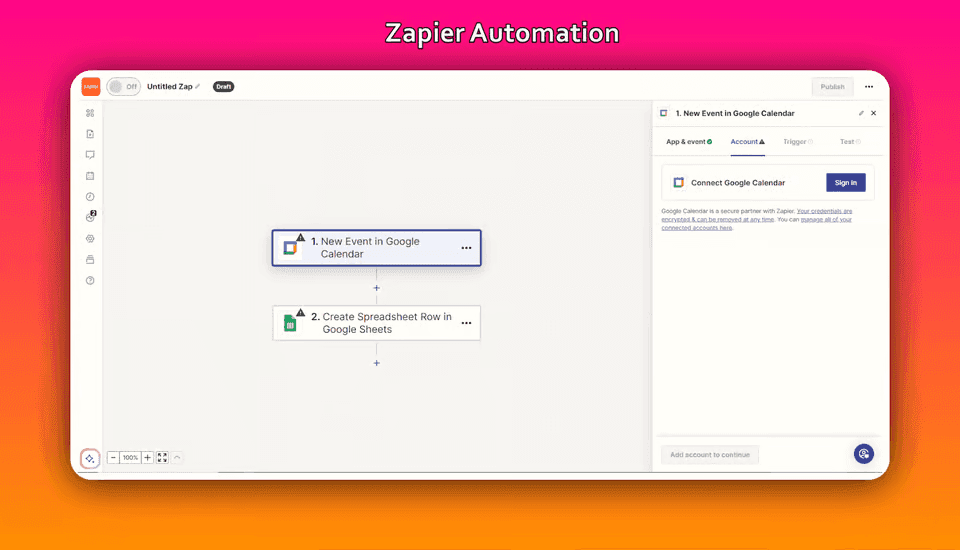
Structurally, Zapier gives you more room. Every plan, including Free, includes unlimited Zap workflows, and every plan includes the full platform: Zap workflows, Forms, and Tables. On the free tier, a Zap is two steps: one trigger and one action connecting two apps. Move to Professional and you get multi-step Zaps, unlimited premium apps, and webhooks. That is where Filters, Paths, and Formatter start to earn their keep. Filters stop a run when conditions are not met, Paths branch a single trigger into different outcomes, and Formatter cleans up dates, text, and numbers before they reach the destination app.
IFTTT's builder is deliberately narrower. Free Applets are limited to one trigger and one action. Pro adds multi-action Applets, webhooks, and increased rate limits. Pro+ adds queries and filter code, where you can write short conditional logic and pull extra data before an action runs. It also adds multiple account connections for people running two Twitter or Google accounts. There is no equivalent of Paths, and no formatter library.
Error handling is the other gap. Zapier surfaces failed runs per Zap, offers Zapier Manager as a built-in monitoring option, and publishes incident reports when things break. IFTTT gives you Applet activity logs. That is enough to see that something did not fire, but rarely enough to explain a partial failure across several actions. If a broken automation costs you money, the debugging story on Zapier is the stronger one.
Pricing and limits in 2026
Zapier meters billable actions. IFTTT meters how many Applets you keep enabled. That single difference drives almost every cost comparison between them.
"In Zap workflows, the following do not count as tasks: All trigger steps. Any Filter or Paths step. All action steps that error or halt."
Source: help.zapier.com
| Plan | Monthly billing | Annual billing | Included |
|---|---|---|---|
| Zapier Free | $0 | $0 | 100 tasks/mo |
| Zapier Professional | $29.99/mo | from $19.99/mo | 750 tasks/mo and up |
| Zapier Team | $103.50/mo | from $69/mo | 2,000 tasks/mo and up |
| Zapier Enterprise | custom | custom | up to 2 million tasks/mo |
| IFTTT Free | $0 | $0 | 2 Applets, unlimited runs |
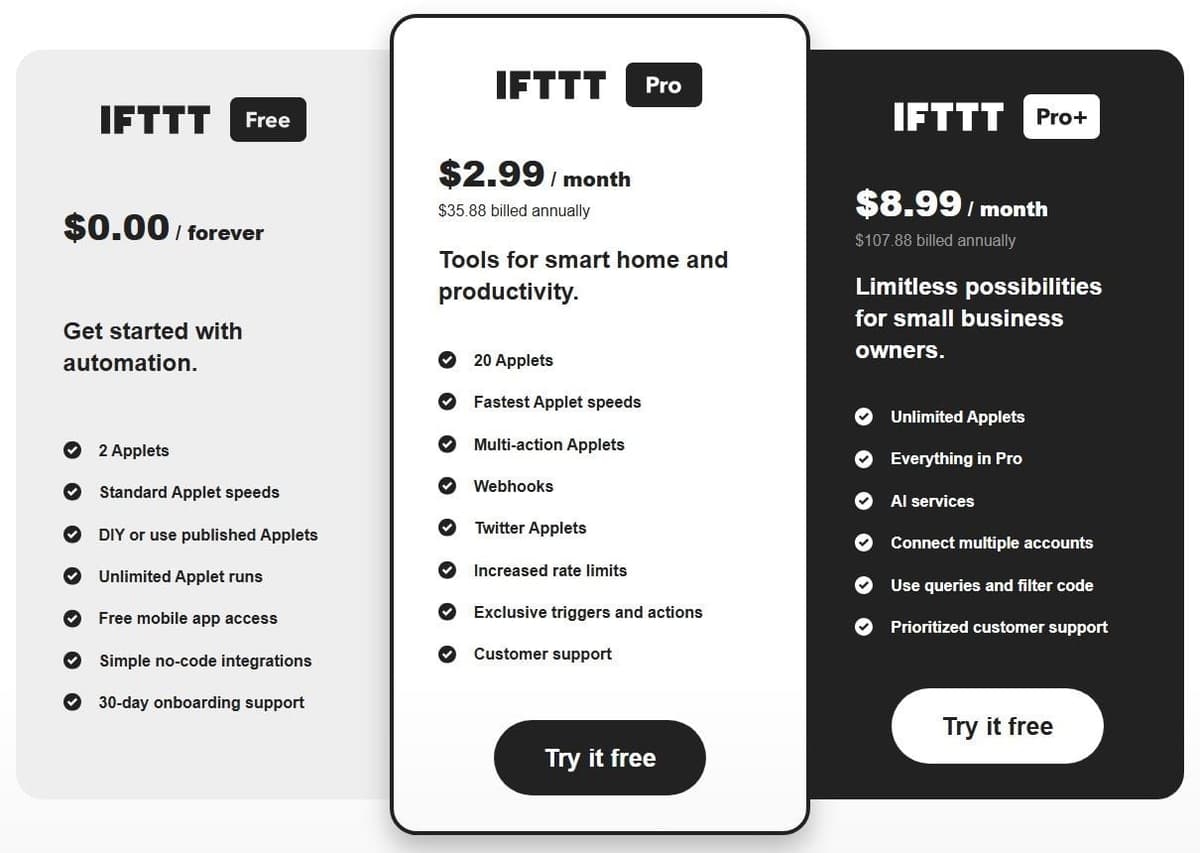
| IFTTT Pro | $4.99/mo | $2.99/mo ($35.88/yr) | 20 Applets, unlimited runs |
| IFTTT Pro+ | $14.99/mo | $8.99/mo ($107.88/yr) | unlimited Applets and runs |
Zapier's monthly rates run higher than the annual ones. Professional is $29.99 per month billed monthly against $19.99 per month on annual billing, and Zapier advertises a 33% discount for paying yearly. Non-profits get 15% off any paid plan, excluding pay-per-task charges. Every new account gets a free 14-day Professional trial with no credit card.
IFTTT supports monthly or yearly billing on any paid plan, and new Pro or Pro+ subscribers get a 7-day free trial if they have not had one before. Billed month to month, IFTTT lists Pro at $4.99 a month and Pro+ at $14.99 a month, against $2.99 and $8.99 a month on yearly billing.
What 100 to 5,000 runs a month cost
For a simple automation with one trigger and one successful billable action, 1,000 runs use 1,000 Zapier tasks. Professional's 1,500-task tier covers that volume at $39 per month with annual billing ($468 paid for the year), without overage. The 750-task tier does not include enough capacity; using it with pay-per-task may cost less, but the result depends on the account's excess-task rate.
IFTTT counts active Applets rather than charging for every ordinary run. If the trigger and action are available on Free and you need no more than two Applets, the subscription cost for this illustration is $0. If the automation needs Pro features, Pro is $2.99 per month billed annually ($35.88/year); Pro+ is $8.99 ($107.88/year). Service-specific limits still apply.
The same one-trigger, one-action automation at other volumes shows where the two meters part ways. The table assumes one Zap or one Applet, annual billing and no overage.
| Runs per month | Zapier tasks and plan | IFTTT plan |
|---|---|---|
| 100 | 100 tasks / Free, $0 | Free, $0 |
| 1,000 | 1,000 tasks / Professional 1,500, $39 a month | Free, $0, unless a service limit applies |
| 5,000 | 5,000 tasks / Professional 5,000, $89 a month | Free, $0, unless a service limit applies |
On Zapier, the price follows the run count: Professional 5,000 is $1,068 a year, and 100 runs fill the Free plan's 100 tasks with nothing to spare. IFTTT runs stay unlimited on every plan, and most services have no rate limit set by IFTTT. A few do. Send me an email allows 30 emails a day on Free and 750 on Pro, so an Applet that emails you on every run outgrows Free at about 900 runs in a 30-day month and then needs Pro, at $2.99 a month billed annually.
The cheaper subscription helps only if it can perform the required action, so confirm the trigger, the action and any service limit before you compare prices.
Zapier charges tasks for successful billable actions, not every step in a Zap. Triggers, Filter, Paths, Formatter, Delay and Looping do not consume tasks. Actions inside a loop can still be billable. AI, extended Code runtime and MCP use their own rates. Zapier Agents has a separate activity allowance, so its usage should not be added to a Zap's task count.
AI features: Zapier Copilot and Agents vs IFTTT AI services
Copilot is the feature most people will touch first. It ships on every Zapier plan, including Free, and turns a plain-language description into a draft Zap. Free-plan Copilot usage is capped by a daily message limit that resets at 12:00 AM UTC each day. Zapier does not publish the numeric message count. Treat it as a soft ceiling for casual building rather than an all-day drafting tool.
Beyond Copilot, Zapier's AI layer is a set of paid products. AI by Zapier steps are now priced by model tier on Professional, Team, and Enterprise. The 75-task-per-step approval pause acts as a runaway-cost brake. Zapier Agents Free includes 400 activities per month. An activity is not a complete agent run: one run can consume several activities. This allowance is separate from Zap task usage. Agents Pro is $400 billed annually, equivalent to $33.33 a month, for up to 1,500 activities a month. Zapier Chatbots Pro is $160 billed annually, equivalent to $13.33 a month, supporting up to 5 chatbots. Because AI steps draw from the shared task pool, an AI-heavy Zap can burn through a Professional allocation faster than a plain three-step workflow.
IFTTT's approach is simpler and cheaper, but it is gated. AI services sit on the Plans page as a Pro+ exclusive alongside queries, filter code, and multiple account connections. The AI Content Creator tool is available only to Pro+ subscribers. So is the AI Summarizer, which turns long content into summaries and action items. For a marketer who wants an Applet that drafts a caption or condenses a newsletter, Pro+ is inexpensive.
Building with AI is not limited to Pro+, though. IFTTT's homepage promotes Chat Create, the tool its help center calls IFTTT Chat: it builds an Applet from a single prompt that you then refine with what IFTTT calls its agent, and the help center lists it next to the classic editor as one of two ways to create an Applet on any plan. IFTTT also runs an MCP server that connects AI assistants such as Claude, ChatGPT and Cursor to your IFTTT services. IFTTT says MCP is available on all plans, with limits by tier: Free can search services and Applets and create or enable free Applets, Pro adds running actions and Pro Applets, and Pro+ adds queries and Pro+ Applets. The AI services themselves stay inside the Pro+ subscription, with a cap of 200 queries a day across all of them. But if AI has to make routing decisions inside a business process, Zapier is the platform with the machinery, and the metering to match.
Speed and reliability: polling intervals, applet delays, run limits, uptime and support
Latency splits along plan lines on both platforms. Zapier's polling interval is 15 minutes on Free, 2 minutes on Professional, and 1 minute on Team and Enterprise. Paid plans also let you customize the faster interval per Zap. IFTTT's non-realtime trigger checks run every 5 minutes for Pro and Pro+ users, versus every hour on Free. That hourly delay is the free tier's biggest practical limit for anything time-sensitive.
Run limits work in opposite directions. IFTTT includes unlimited Applet runs on every tier and gates you on Applet count instead: 2 on Free, up to 20 on Pro, and unlimited on Pro+. Zapier gates you on tasks, never on the number of workflows, since unlimited Zap workflows are included everywhere.
On reliability, Zapier advertises 99.99% uptime and an Enterprise SLA, while IFTTT's plans page lists no uptime figure. An advertised figure is not a measured result, so do not budget against a number you read in a comparison post. Zapier also offers transparency: a public status page with incident detail. That includes a May 2026 report communicating the scope and remediation of webhook-triggered Zap failures. Support tiers differ too. Zapier includes Live Chat starting at the Professional plan's 2,000-task tier and above, so the entry-level 750-task price point does not come with chat access. For IFTTT support levels by plan, check the vendor's pricing page.
Who should choose Zapier, and who should choose IFTTT
SMB operations should choose Zapier. Order-to-invoice, lead-to-CRM, and onboarding sequences need filters, branching, and multi-step actions, plus connectors that stay maintained. Budget for Professional at minimum, and size the task tier from your actual run count rather than your workflow count.
Marketing teams should also choose Zapier, with one exception. If your automation is mostly publishing and summarizing content for a single brand, IFTTT Pro+ delivers AI content tools and unlimited Applets for under nine dollars a month on annual billing.
Developers get more from Zapier. Billable Zap actions, AI steps, Code steps and MCP calls use the account's task allowance at their applicable rates. Zapier SDK actions are free during the current beta. Using the SDK inside Code by Zapier does not remove the Code step's own task or runtime charges.
Personal productivity and smart home belong to IFTTT. Cross-brand device links, unlimited runs, and a price point measured in single-digit dollars on yearly billing are hard to argue with. And the two-Applet free tier is a real free tier rather than a trial.
Move one workflow without creating duplicate records
Start with a workflow whose inputs, outputs and owner are known. Map every trigger, action and field, then test the replacement against sample data in a sandbox or a separate destination. During parallel comparison, let only one platform write to production. Use the source event ID as an idempotency key and check how the destination handles repeated requests. Compare outputs, failures, latency and usage before switching the trigger. Keep the original workflow disabled but recoverable until the replacement has completed a normal business cycle.
Zapier vs IFTTT vs Make and Power Automate, and where Latenode fits
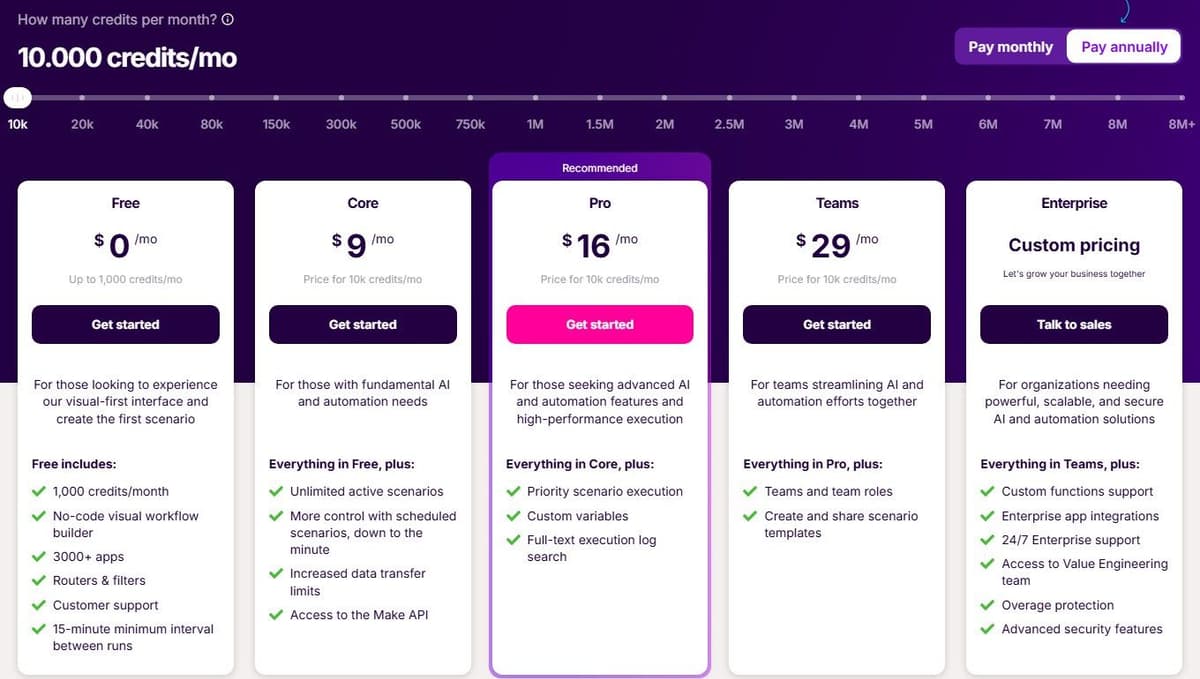
Make is the natural third option when Zapier's per-task cost stings but IFTTT's logic is too thin. Its free plan is $0 a month with up to 1,000 credits, access to 3,500+ apps, a 15-minute minimum interval between scheduled runs, and a maximum of two active scenarios. Core, Pro, Teams, and Enterprise allow unlimited active scenarios. With yearly billing, Make lists Core at $9 per month, Pro at $16 and Teams at $29, each for 10,000 credits a month. Monthly billing runs $10.59, $18.82 and $34.12. Enterprise uses custom pricing and adds overage protection and advanced security features. If Make and Zapier end up as your final two, our Make vs Zapier comparison sets their meters and editors side by side.
Ordinary module operations, such as adding a Google Sheet row or fetching Gmail data, consume a credit each, while Router and Filter consume none. Make renamed that unit from "operations" to credits on August 27, 2025. Run out mid-cycle and extra credits come in bundles of 1,000 or 10,000 at a price fixed in your subscription. Infrastructure sits on AWS in the EU and North America across all tiers.
Teams that already work in Microsoft 365 have a fourth option to weigh. Power Automate is the low-code automation service in Microsoft Power Platform, with automated, instant and scheduled cloud flows. A Free license for work or school accounts covers cloud flows you do not share, with standard connectors such as SharePoint, Teams and Approvals, while connectors such as Salesforce and Dataverse are Premium; Power Automate Premium costs $15.00 per user per month, paid yearly. Our Power Automate vs Zapier comparison covers that choice.
Latenode takes a different billing angle. It charges for runtime in CPU seconds with no per-step fees, and includes 10,000 CPU seconds a month on its free tier. It also ships an AI Copilot and AI agent nodes for building and running AI-driven logic inside workflows. There is a tradeoff. Thinking in execution time rather than tasks or credits takes adjustment, and the platform assumes more comfort with logic and code than IFTTT ever asks for. If your workflows are step-heavy but individually short, runtime billing can behave differently from per-action pricing. Model that against your own run pattern before switching.