

Quick answer: the best Replit alternative for each need
- Closest match for non-technical builders: Lovable
- Fast browser prototypes with code access: Bolt.new
- React interfaces deployed on Vercel: v0
- Free and local with your models: Dyad
- AI editor for the exported code: Cursor
- AI inside VS Code and GitHub: GitHub Copilot
- Multi-file tasks in the terminal: Claude Code
- Browser coding without an AI agent: GitHub Codespaces
The right pick depends on which part of Replit you want to replace: the agent that builds and hosts the app, the editor where the code changes, or the browser workspace where it runs. Then compare what each free plan allows and the unit it bills in: credits, tokens, requests or core hours.
Why people look for Replit alternatives
Replit puts an AI agent, a database and hosting in one browser workspace and bills Agent work by effort from a monthly credit balance. People leave when they want a different usage unit, their code and hosting under their own control, or a tool that fits their skills better.
Replit Agent builds web apps and native iOS and Android apps. Every Replit App gets a free development database, and publishing is available on every plan. Replit can also prepare pull requests on a team's GitHub or GitLab repositories, in early access, with availability that differs by workspace. Core and Pro users can pick a model manually in Power Mode or Max Mode.
Starter costs $0 with no time limit and gives daily Agent credits up to a monthly cap, plus one published app that goes down after 30 days. Core is $20 a month billed monthly with $20 of monthly credits. Replit's pricing page shows $18 a month billed annually, while Replit's docs say Core is $204 a year, so confirm before purchase. Pro starts at $100 a month. Under effort-based pricing, Agent spends more credits the longer it works, so a bug fix typically costs less than a complex build. Publishing and database operations draw on the same credits.
The nine alternatives replace different parts. Sections 1 to 5 cover app builders that take over the agent and, except Dyad, the hosting. Sections 6 to 8 cover AI code editors and agents for the exported code, and section 9 covers a cloud dev environment that replaces the browser workspace.
Replit alternatives at a glance
Seven of the nine have a free plan or free monthly usage. Claude Code has none, because the free Claude plan excludes it. Among the monthly subscriptions, Cursor Plus starts at $8. Prices are in USD as the vendors list them in November 2026, billed monthly unless marked billed annually.
| Tool | What it replaces | Best for | Free plan | Paid from | Usage unit |
|---|---|---|---|---|---|
| Replit | Reference | Build and host in one place | Starter | Core, $20/mo | Credits |
| Lovable | Agent and hosting | Non-technical builders | 5 credits a day, 30 a month | Pro, $25/mo | Credits |
| Bolt.new | Agent and hosting | Browser prototypes | 300K tokens/day, 1M/mo | Pro, $25/mo | Tokens |
| v0 | Agent and hosting | React apps on Vercel | 7 messages/day | Plus, $30/user/mo | Credits |
| Latenode App Builder | Agent and hosting | Apps tied to workflows | First app free | Pay per step | Steps |
| Dyad | Agent, on your computer | Local builds, own models | Free, own API key | Pro, $20/mo | AI credits |
| Cursor | Editor for exported code | Developers with a repo | Limited usage | Plus, $8/mo | Weekly usage pool |
| GitHub Copilot | Agent inside your editor | VS Code and GitHub teams | 2,000 completions/mo | Pro, $10/mo | AI credits |
| Claude Code | Agent for exported code | Multi-file terminal tasks | None | Claude Pro, $20/mo | Plan usage limits |
| GitHub Codespaces | Browser workspace | Coding without an AI agent | 120 core hours, 15 GB/mo | $0.18/hour, 2-core | Core hours |
1. Lovable: best for non-technical builders who want the closest match to Replit Agent
Lovable suits non-technical builders who want to describe a full-stack web app in chat and have it hosted. Free gives 5 build credits a day, up to 30 a month, plus 20 Cloud credits a month. Pro starts at $25 a month for 100 monthly credits.
Lovable hosts the apps it builds on a built-in backend, Lovable Cloud, with a database, storage, authentication, realtime and functions on Supabase's open-source foundation. Git sync with GitHub, GitLab and Bitbucket works on every plan, but editing and downloading code need a paid plan.
One credit balance covers building, chatting, running deployed apps and AI features. A Plan mode message costs 1 credit plus any extra work by planning subagents, while Build mode cost depends on the complexity of the request. Mobile is the main difference from Replit. Lovable builds mobile-friendly web apps, not React Native projects, while Replit Agent builds native ones. To move to Lovable, import the code ZIP (up to 250 MB), then migrate database records and users through the separate backend step. Passwords and active sessions do not transfer.
2. Bolt.new: best for fast browser prototypes with full code access
Bolt.new is for people who want a working prototype in the browser and full access to its code. Free gives 300K tokens a day and 1M tokens a month. Pro costs $25 a month billed monthly and starts at 10M tokens a month with no daily token limit.
Bolt runs on StackBlitz's WebContainers, a full development environment inside the browser, so nothing needs installing. Projects connect to a GitHub repository for a full history of changes and download as a zip file on desktop. The Expo integration builds mobile apps and publishes them to TestFlight, the Apple App Store and Google Play.
Hosting is included: up to 333k web requests on Free and 1M on Pro. On paid plans, unused monthly tokens stay for up to two months while the subscription is active. Free tokens do not roll over. Bolt supports Node.js on the backend and any JavaScript framework on the frontend. PHP or Python backends are not compatible.
3. v0 by Vercel: best for React and Next.js interfaces deployed on Vercel
v0 fits people who want React and Next.js interfaces or full-stack apps that deploy straight to Vercel. The Free plan allows 7 messages a day, and new users get $5 in one-time credits. Plus costs $30 per user per month with $30 of monthly credits per user.
v0 builds web apps, dashboards, e-commerce, SaaS and AI apps with Next.js, React, TypeScript, Tailwind CSS and shadcn/ui. Projects range from simple components to full-stack apps with authentication, databases and external API integrations. A finished app deploys to production on Vercel with one click, or v0 opens a pull request for review instead. It also imports existing GitHub repositories and lets you create and merge pull requests without leaving it.
Credits work like a prepaid balance, drawn down at model token rates. Unused monthly credits roll over and expire after 65 days. When credits run out, generation pauses, and Free users must upgrade before they can buy more usage.
4. Latenode App Builder: best for web apps that hand work to automated workflows
Latenode App Builder fits web apps that hand work to automated workflows. The first app is free, with no card or subscription, and then you pay per step. Each step's price shows in the chat.
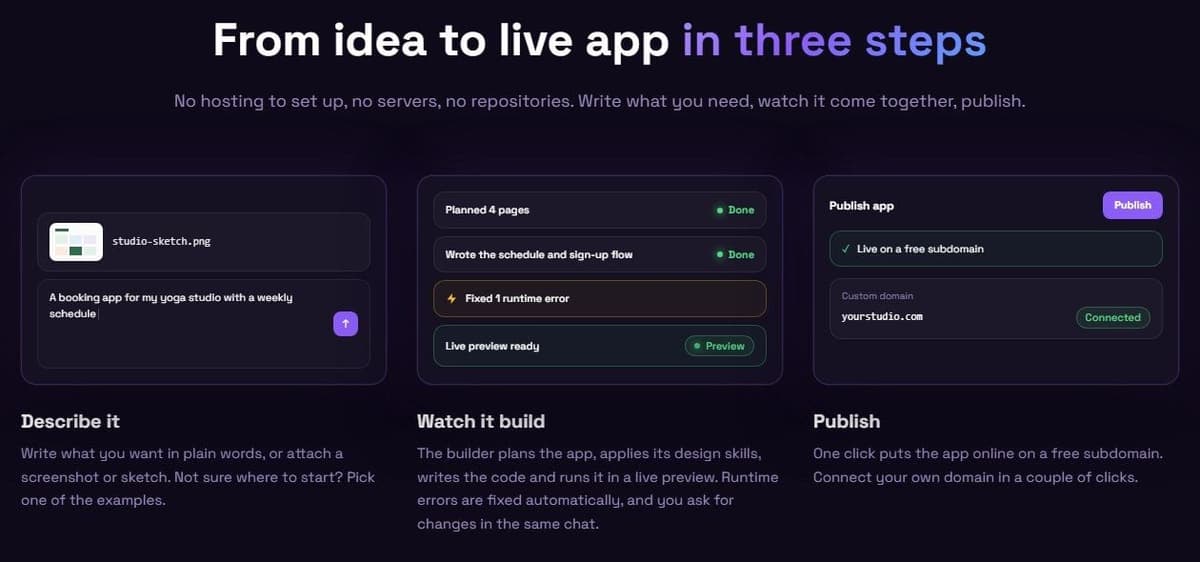
Latenode's AI app builder turns a description, a screenshot or a sketch into a web app, website or landing page. Plan mode asks a few questions, then builds nothing until you approve its plan. Apps get a React front end, serverless back end and database when needed. Publishing to a free subdomain takes one click; a custom domain takes one CNAME record. The full project exports to GitHub.
Apps can call a Latenode workflow by webhook or API request to update a CRM or run an AI agent. As of November 2026, hosting is free up to 1,000 visits a month, then from $5 a month with 30,000 visits. Native App Store, Google Play and desktop apps are not supported, but apps work in mobile browsers.
5. Dyad: best for building apps on your own computer with your own AI models
Dyad is for building apps on your own computer with local models or your own API keys. Free needs no sign-up and includes a Basic Agent limited to 20 messages a day. Pro costs $20 a month and adds 200 AI credits a month and the Pro Agent.
Dyad is a desktop app for macOS and Windows, with experimental Linux support. It is open source under Apache 2.0, except the src/pro directory, which has its own license. App code stays on your computer and each app is a regular Git repository. With local models, it works offline.
Models run locally through Ollama or LM Studio, or through API keys from OpenAI, Anthropic, Google Gemini, OpenRouter and other providers. Dyad connects apps to Supabase or Neon for the backend but has no hosting of its own. Its guide syncs the code to GitHub and deploys it on Vercel. Your machine sets the limits: Node.js must be installed, and weaker computers are better off with a cloud model. Only JavaScript apps are supported.
6. Cursor: best for developers who move the exported code into an AI editor
Pick Cursor if you move exported Replit code into an AI editor. Free includes limited AI usage, and Plus costs $8 a month with a shared usage pool. The pricing card lists Grok only, while the model guide also lists Composer 2.5, so check the model picker before paying. Premium costs $30 a month with 4x the usage of Plus.
Cursor is built on the VS Code codebase, so you can migrate VS Code settings. Its Agent completes complex coding tasks on its own, running terminal commands and editing code. Code search (Instant Grep) builds its index on your machine without storing embeddings of the codebase.
Each paid plan has one usage pool for Cursor models that refreshes weekly. When it runs out, you wait for the reset, pay from prepaid credit or upgrade. Third-party models such as Claude, GPT and Gemini sit outside the pool and, on Premium and above, cost the model's API list price from the first request. Cursor is sold as part of The X Subscription. From Replit, push the project to GitHub, then open the repository in Cursor. A local workflow still needs a host. On a paid plan with cloud-agent access, Cursor's Apps feature can also publish and host a web app.
7. GitHub Copilot: best for teams already working in VS Code and GitHub
GitHub Copilot makes sense for teams already working in VS Code and GitHub. Free costs $0, needs no card and includes 2,000 completions a month. Pro costs $10 a month with $15 of monthly AI credits, and part of this monthly credit allowance may change over time.
Copilot runs in VS Code, Visual Studio, JetBrains IDEs, Eclipse and Xcode, with agent mode in all five. It also runs in Neovim, Zed and Raycast. On paid plans, Copilot in the cloud takes an assigned issue, raises a pull request and requests a review when it is finished. Copilot Free keeps Copilot Chat on GitHub.com and GitHub Mobile, with limited chat and agent usage and models only through auto model selection.
Chat and agents spend GitHub AI Credits at $0.01 per credit, while code completions use none. The allowance resets monthly, and a dollar budget for paid usage lets you keep working past it. Copilot handles code changes and review; you choose where the app will run.
8. Claude Code: best for handing multi-file tasks to an agent in the terminal
Claude Code is for developers who hand multi-file tasks to an agent. The free Claude plan does not include it. Pro does, at $20 a month billed monthly or $17 a month on annual billing ($200 up front), as do Max at $100 a month and Ultra at $200 a month.
Claude Code is Anthropic's agentic coding tool for the terminal, IDEs, the desktop app and the browser. It reads the codebase, edits files and runs commands, and it can open pull requests and run in GitHub Actions. In Manual permission mode, file edits and most shell commands ask for approval first.
Usage limits are shared with the Claude plan, including IDE use in VS Code, Cursor and JetBrains. Pro and Max have a five-hour session limit and a weekly limit; verified Ultra accounts have only the weekly one. Max gives 5x Pro usage and Ultra 10x Pro usage every week. Claude Code changes the repository; you pick where the result is deployed.
9. GitHub Codespaces: best for coding in the browser from a GitHub repository
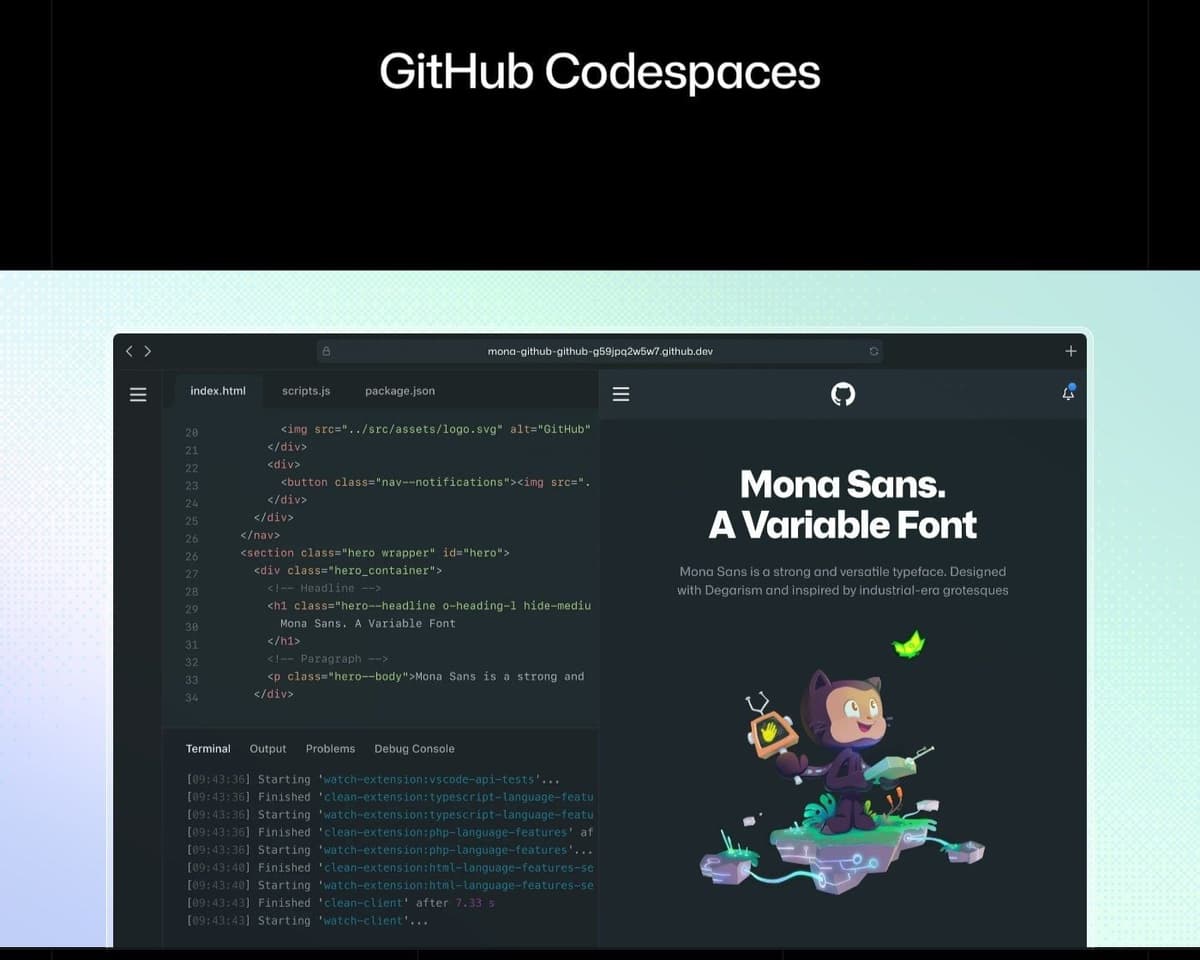
GitHub Codespaces suits students and developers who want browser coding without an AI builder. Each month, personal accounts on GitHub Free get 120 core hours (60 hours on a 2-core machine) and 15 GB-month of storage. GitHub Pro gives 180 core hours and 20 GB-month. Beyond that, usage is pay as you go.
"Using Codespaces in the browser provides you with a fully featured development experience. You can edit code, debug, use Git commands, and run your application."
Source: docs.github.com
A codespace is a cloud development environment on a Linux virtual machine hosted by GitHub. It opens VS Code in the browser from a template or any branch or commit in a repository, and committed dev container files give everyone the same setup.
No AI agent is included, and Copilot is an optional extension. A running codespace uses the quota until it stops, by default after 30 idle minutes. Past the quota, a 2-core machine costs $0.18 an hour and storage $0.07 per GB-month. Without a payment method, usage is blocked until the monthly reset. A forwarded port lets you share a running preview for testing while the codespace is active. Choose a production host before moving a continuously available app.
How to choose a Replit alternative
Decide which part of Replit you are replacing, how much code you want to see and where the app will be hosted. Then compare what each free plan allows and how usage is counted.
- App builder, code editor or browser workspace: builders replace Replit Agent, editors and agents work on existing code, and Codespaces replaces the workspace.
- Your coding skills: Lovable and Bolt.new work through chat; Cursor, GitHub Copilot and Claude Code edit code you review.
- Hosting, a database and a custom domain: Lovable and Bolt.new host apps and v0 deploys to Vercel; Dyad documents deployment to an external host. For local Copilot, Claude Code or Cursor workflows, choose a deployment target. Eligible Cursor cloud-agent plans can also host web apps.
- Code export to GitHub: Lovable, Bolt.new and v0 sync with GitHub, and Dyad keeps each app as a Git repository, so the project can move again.
- The usage unit and what happens at zero: Lovable and v0 bill credits, Bolt.new tokens, Cursor a weekly pool, Copilot AI credits, Codespaces core hours; v0 pauses generation at zero, and Codespaces blocks usage without a payment method.
- Native mobile apps: Replit's docs list native iOS and Android apps built with Expo; Bolt.new builds mobile apps through Expo, Dyad only experimental hybrid apps, Lovable mobile-friendly web apps.
Staying on Replit makes sense when you want the agent, the database, hosting and native mobile apps in one place and accept billing by Agent effort. On Core and Pro, Free Mode costs nothing within its allowance. Replit asks for confirmation before a paid action starts, so you decide when Agent work costs credits.
How to move a project off Replit
Push the code to a GitHub repository from the Git pane, export the database, copy the secrets to the new host, then choose where the app runs and point the domain there.
"The Git pane in Replit provides a visual interface for Git operations, eliminating the need to use command-line Git commands."
Source: docs.replit.com
- Push the code. In Tools, then Git under Setup, connect GitHub, commit and push with a single click. Branches are created and published there too.
- Export the database. In the My Data tab, download tables one at a time as .csv, .json or .xlsx, or run pg_dump from the Shell to save every table in one file for another PostgreSQL database. External SQL clients can also connect with the production connection string.
- Copy the secrets. Use Edit as JSON or Edit as .env in the Secrets tool to list them all, check Production app secrets under Publishing, and add them on the new host.
- Move the domain. At your DNS provider, enter the record types, names and values supplied by the destination host. A domain bought through Replit moves to another registrar via Replit Support after ICANN's 60-day waiting period.
Then open the repository in Cursor, GitHub Codespaces or an editor with GitHub Copilot, or import it into Bolt.new or v0, which accept existing GitHub repositories.