



Quick answer: the best HR automation tool for each need
Choose BambooHR for core HRIS, Rippling for connected HR, IT and finance, Gusto for US payroll, Deel for global hiring, Personio for European teams, and Zoho People for a low-entry-price suite HRIS. Consider Lattice or Leapsome for performance and engagement, Breezy HR for recruiting, Homebase for hourly scheduling, Connecteam for deskless teams, and Latenode for custom workflows between systems.
Prices are in US dollars and keep each vendor's billing period and unit; where a vendor asks for a quote or leaves a condition unclear, the sections below say so.
What HR automation tools do in 2026
HR automation tools move routine work through a defined process: collect employee information, request approval, update the relevant record and notify whoever acts next. So ask which part of that process causes delays. Missing onboarding documents call for a different purchase from difficult shift scheduling or a scattered recruitment pipeline. Approval flows and BPM suites are compared in our guide to business process automation tools.
Core HRIS products organize employee records and requests, while payroll-first tools focus on paying people. Global hiring platforms handle international employment and contractor administration. Recruiting products manage candidates; performance tools organize reviews and feedback. Platforms for hourly teams bring schedules and time records together. When a process crosses those boundaries, a separate workflow layer can connect the parts.
The prices also measure different things. An employee, contractor, software user, seat and business location are distinct billing units. Some plans add a base fee or require an annual agreement. Compare the total arrangement for your team before you call a smaller displayed number the cheaper deal.
HR automation tools at a glance
Use the table to shortlist a product family, then read the price conditions in its section. Where an entry price needs several qualifications, the table points to those terms instead of squeezing them into one incomplete figure.
| Tool | Best for | Meter | Entry price |
|---|---|---|---|
| BambooHR | Core HRIS | Employee or flat fee | See headcount terms |
| Rippling | HR, IT and finance | Employee plus base | Quote only |
| Gusto | US payroll | Base plus person | Simple $49/mo + $6 per person, monthly |
| Deel | Global hiring | Worker type | See service terms |
| Personio | European teams | Employee | See quote terms |
| Zoho People | Suite HRIS | User | Free plan |
| Lattice | Reviews and engagement | Seat; annual minimum | USD 4,000/year minimum |
| Leapsome | People enablement | Employees and modules | Platform $7 + modules from $3 |
| Breezy HR | Recruiting | Plan and add-ons | Free plan |
| Homebase | Hourly scheduling | Location | Free plan |
| Connecteam | Deskless teams | Hub and users | Free plan |
| Latenode | Custom workflows | CPU seconds | Free plan |
| Lever | Recruiting with a candidate CRM | Team size and hiring needs | Quote only |
| Workday | Enterprise HCM | Not published | Quote only |
| ADP Workforce Now | Payroll and HR packages | Package | Quote only |
1. BambooHR: best core HRIS for small and mid-size teams
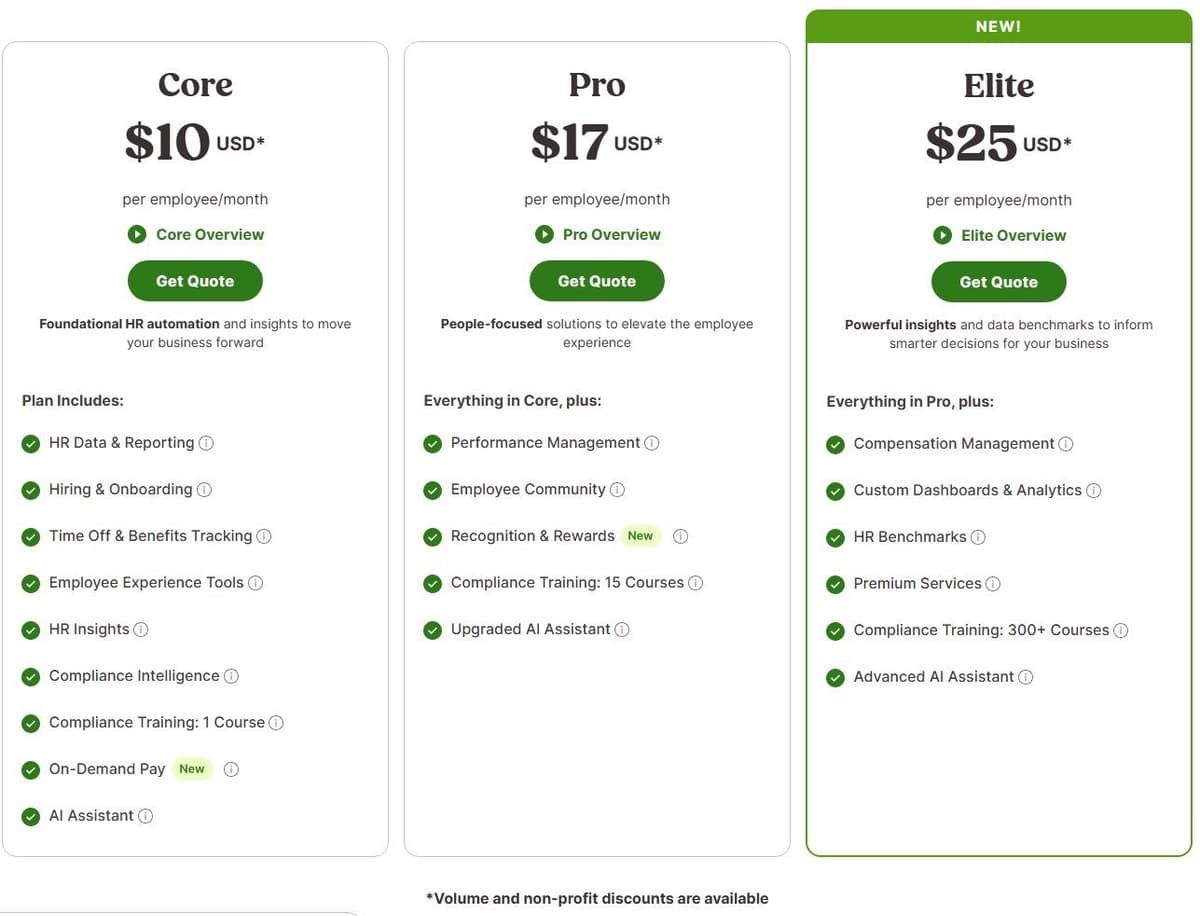
BambooHR suits a team that wants employee records, hiring and time-off processes organized around an HRIS. Core includes records and workflows. Pro adds performance management, Elite adds compensation planning. Pick the tier by the process you need to run, not by advanced people-management features that no one owns yet.
"$10 USD per employee per month for Core ... For companies with more than 25 employees ... Volume and non-profit discounts are available"
Source: bamboohr.com
For companies with more than 25 employees, monthly starting prices are $10 USD per employee for Core, $17 USD per employee for Pro and $25 USD per employee for Elite. For companies with 25 employees or fewer, the monthly flat rate starts at $250 USD. BambooHR states that volume discounts apply automatically and nonprofit discounts are available. Terms run month-to-month or longer.
Payroll, benefits administration and time tracking are additional products. The page restricts its payroll and benefits administration add-ons to US employees, and lists a separate Global Employment add-on, powered by Remote, for workers elsewhere. Request a quote with the required add-ons itemized. Then you are comparing the system you would actually operate, including the work your HR team expects to stop doing by hand.
2. Rippling: best for HR, IT and finance in one system
Rippling is worth considering when an employee change needs to reach HR, finance and IT together. The pricing page describes workflows across systems, and you can buy individual products alongside the required core Rippling Platform. Raise that core-platform requirement in the buying conversation, even when the immediate need is one payroll or IT product.
Most products use per-employee, per-month billing. Some may charge or include a monthly base fee. Rippling's pricing page asks for a custom quote and lists no plan price.
Ask for a proposal that separates the platform, chosen products and base fees. Bring an actual employee-change process to the demo and identify who approves each change. Compare on one point: whether the proposed setup covers those handoffs at an acceptable total cost.
3. Gusto: best payroll-first tool for US small businesses
Gusto is built around payroll. Simple includes single-state payroll and unlimited payroll runs; Plus adds multi-state payroll, next-day pay and time tracking. Premium includes a dedicated service advisor, custom reports and priority support. Match the plan to the payroll and support work you need covered.
"Single-state payroll ... Unlimited payrolls per month"
Source: gusto.com
On month-to-month terms, Simple lists a $49 monthly base plus $6 per person per month. Plus lists an $80 monthly base plus $12 per person per month, and Premium a $180 monthly base plus $22 per person per month.
Contractor Only normally lists a $35 monthly base plus $6 per contractor in months when paid. Its offer reduces the monthly base to $0 while retaining $6 per person per month for the first 6 months, subject to offer terms. Compare the regular cost once the promotion ends. Keep a contractor-only requirement separate from employee payroll.
4. Deel: best for hiring and paying people abroad
Deel prices by the type of working relationship, so settle that before you compare fees. Contractor Management lists $49 per contractor per month and Contractor of Record lists $325 per contractor of record per month. PEO lists $125 per US PEO employee per month and EOR lists $599 per EOR employee per month. Deel says this pricing runs month to month with no long-term commitment required.
Those are different service categories, not interchangeable HRIS seats. The page describes centralized contractor management and automated invoicing. Deel says EOR fees cover employee onboarding, payroll processing, benefits administration and ongoing HR support. Use that stated scope to frame your questions, then confirm the arrangement for the worker and country involved.
Deel's pricing page also lists HR plans: Core at $5 per employee per month for worker profiles, time off and attendance, Advanced at $19 with performance tools, and Elite at $29 with compensation and headcount planning. It shows no free HR tier, so price the HR plan explicitly if employee-record management is part of your purchase. Do not treat a hiring-service price as the price of the whole HR platform.
5. Personio: best for European small and mid-size teams
Personio splits its lineup into Core and Core Pro. Core lists employee profiles, workflow automation, time tracking and preliminary payroll. Core Pro adds API access for custom integrations and workforce planning. So the upgrade question is concrete: decide whether you need that API access and workforce planning for the workflows you want to build.
Personio does not publish prices. The cost depends on the plan you choose, Core or Core Pro, and Personio gives it as a quote.
Personio says yearly subscriptions have a 12-month minimum and initial setup carries a one-time fee based on company size. Headcount and extra apps affect the quote. Ask for the subscription, implementation charge and chosen apps together. Confirm any contractual minimum headcount, and do not read a company-size suitability range as a purchase requirement.
6. Zoho People: best for a low-entry-price per-user HRIS inside a suite
Zoho People's US pricing starts with Essential HR, offers Workforce and Talent as two parallel editions, and tops out with Enterprise. Workforce adds attendance, timesheets and time off, Talent adds OKRs, performance evaluation and a learning management system, and Enterprise includes Essential HR, Workforce and Talent. Choose the edition that covers the employee process you intend to operate. The lowest price only helps if that edition includes the work.
For Essential HR, Workforce, Talent and Enterprise respectively, annual billing lists $3, $5, $5 and $8 per user per month, plus local taxes, with purchase minimums to confirm. Monthly billing lists $4, $6, $6 and $10 per user per month respectively, plus local taxes, with purchase minimums to confirm.
The free edition covers up to 3 users for US buyers, while Zoho's tables for other regions allow 5, so confirm the edition. Zoho also advertises a 30-day free trial. Avoid treating either limit as universal.
7. Lattice: best for performance reviews and engagement
Lattice fits a shortlist built around performance reviews, succession planning, surveys and recurring feedback. Product-based pricing lets the buying discussion start with the people process. But an annual minimum means the organization-level commitment matters more than a seat price alone.
Foundations, the package Lattice marks Most Popular, lists $13 USD per seat per month billed annually, with a $4,000 minimum annual agreement. Its card bundles Performance and Goals and OKRs with analytics, the AI agent and integrations, so weigh it against the price of those base products bought separately. Goals lists $8 USD and Engagement $4 USD per seat per month billed annually, with the same $4,000 minimum annual agreement. Compensation and Grow add-ons list $6 USD and $4 USD per seat per month respectively, billed annually, under the $4,000 minimum annual agreement.
Performance lists $10 USD per seat per month, billed annually, under the same $4,000 minimum annual agreement, and Lattice's FAQ confirms that Performance, like Goals and OKRs, can be bought on its own. Ask for a written quote covering both the selected products and the annual commitment.
8. Leapsome: best for people enablement in one platform
Leapsome sells modules individually or together. The page lists review automations, onboarding, workflows, learning and compensation reviews. Recruiting and Time Tracking are sold as regular modules too, and every module sits on top of the HRIS platform, which is always part of the plan.
Leapsome prices per employee per month: a platform plan plus the modules you choose, with no setup fee. In US dollars the page lists Agentic HRIS Pro at $10 per employee a month, cut to $5 by a US launch offer that ends December 31, and Agentic HRIS Foundation at $7, free with any Talent Suite module bought by December 31. Talent Suite modules run from $3 to $7 per employee a month, with Performance Reviews at $7. The page's estimator shows list prices only, and multi-module and volume discounts come in the quote. Leapsome also offers a 14-day free trial.
Use the trial to follow a real review or onboarding process, and note which modules it needs. Ask sales to quote that combination and explain the contract commitment. Modular pricing is easier to judge once the workflow is clear.
9. Breezy HR: best recruiting automation with a free plan
Breezy HR Bootstrap is free forever with unlimited users, 1 active position or candidate pool, and access to candidates added within the last 30 days. That is a bounded recruiting option, not an archive of every past applicant.
Startup, Growth and Business list $157, $273 and $439 per month respectively with annual pricing. Monthly pricing lists $189, $329 and $529 per month. Startup includes candidate stage actions, interview self-scheduling and unlimited positions. Growth adds automated reference checks; Business adds position and offer approvals.
Add-ons start at $30 per 100,000 Breezy Intelligence credits, $41 per month for SMS and $49 per month for Onboard. Breezy's pricing page does not say how many text messages the SMS price covers or how many credits an AI action uses. Before you budget those extras, ask what your expected candidate activity would consume. Check whether your recurring need is sourcing, scheduling or approval management, because the upgrade may differ.
Recruiting with a built-in candidate CRM: Lever
If your recruiters source and nurture candidates as well as track applications, Lever puts an ATS and a candidate CRM in one platform. Lever says every plan includes applicant tracking, candidate relationship management, reporting and analytics, and key integrations, with onboarding sold as an add-on. Pricing comes as a custom quote that scales with team size and hiring needs. Its integration marketplace lists BambooHR and ADP as preferred HRIS and payroll partners, and Lever says it is SOC 2 Type II certified.
10. Homebase: best for hourly teams, scheduling and time clocks
Homebase charges by location, and that shapes the decision. Basic is free for 1 location with up to 10 employees and includes basic scheduling and time tracking. Paid plans allow unlimited employees. That changes the comparison with software that charges for each person.
With monthly billing, Essentials costs $30 USD per location per month, Plus $70 USD per location per month and All-in-One $120 USD per location per month. Essentials adds advanced scheduling and time tracking, Plus adds time-off controls, and All-in-One adds employee onboarding.
Payroll is separate: Homebase lists a standard $49 base fee a month plus $6 per employee paid a month, whichever plan you choose, or $29 a month for teams of up to 5, as of October 2026. Tip Manager adds $25 per location per month and Task Manager adds $13 per location per month; job post boosts start at $50 per post. These dollar amounts belong to different billing units. Build your comparison around the locations, payroll use and add-ons you actually need. The page also advertises six months free of Payroll and the Plus plan for accounts that add payroll, as a limited-time offer with terms applying, which is why the Plus card can show $0; the regular monthly figures above are the baseline for comparison.
11. Connecteam: best for deskless teams with a free plan
Connecteam separates Operations, Communications and HR hubs. Operations covers clocks, schedules, forms and tasks; HR covers time off, courses, documents, hiring and onboarding. Small Business advertises free access for up to 10 users while the FAQ says fewer than 10 employees. The headline and FAQ disagree at the boundary, so confirm eligibility.
For the first 30 users in each hub, Basic, Advanced and Expert cost $29, $49 and $99 USD per month billed yearly, or $35, $59 and $119 USD per month with monthly billing. Above that included headcount, Operations Basic adds $0.80 USD per extra user per month with yearly billing, or $1 USD with monthly billing. Communications Basic and HR Basic each add $0.50 USD per extra user per month with yearly billing, or $0.60 USD with monthly billing.
A 14-day trial needs no credit card. Afterward, Limited is free for up to 30 users with fewer features. Do not confuse Limited access to another hub with buying that hub's paid tier. Choose the hubs and feature levels before calculating the total.
12. Latenode: for custom HR workflows between tools
Latenode fits the workflow layer around an HR system of record. The visual builder, AI Copilot and AI Agent builder cover custom process design. The platform lists 335+ LLM models under one subscription, webhook triggers, a built-in database, custom JavaScript logic and a headless browser for websites without an API. Visual builders are compared side by side in our guide to no-code automation tools.
For an HR project, those are the building blocks for routing documents or preparing information for review. Check access to your own HRIS, ATS and payroll system before you design the connection. The feature list alone does not prove a ready-made integration.
Free costs $0 per month without a credit card and includes 10,000 CPU seconds monthly and 5 active workflows. Pay as you go has no base fee and includes the same monthly CPU allowance. It then charges $0.00012 per CPU second within the 10,001-100,000 bracket, with lower rates in higher brackets. The bill follows runs multiplied by average seconds per run, so a few long workflows can cost more than many quick ones; workflow steps do not multiply the bill. Paid external-provider nodes can add usage charges at $1 per PnP token. Budget provider use separately from runtime.

HR automation examples
These are workflow designs to discuss with a vendor, not proof that every listed tool implements every handoff:
- New-hire onboarding: let an HRIS collect employee details, then route approved requests for equipment and accounts to the responsible teams.
- Time-off approval: use the HRIS request and approval process, then check how an approved absence reaches the team calendar.
- Payroll changes: route a proposed pay or employee-data change for review before sending it to the payroll system.
- Interview scheduling: use an ATS to move a candidate to the scheduling stage and coordinate the next conversation.
- Performance cycles: use a performance platform to organize review requests and follow-up reminders.
- Document renewals: define an owner and a review process for expiring contracts or employee documents.
- Employee-data updates: use a workflow layer when approved changes must pass between the HRIS, payroll and IT systems.
How to choose an HR automation tool
Start with headcount, countries and working patterns. An hourly workforce on location-based schedules is a different buying problem from an office team focused on review cycles. Decide whether payroll belongs inside the new platform or connects to a provider you intend to keep. For international hiring, settle the worker relationship before you discuss the fee.
Growth changes the payroll test. Before you move off a small-business payroll tool after an acquisition, a new legal entity or hires in new states, ask each vendor to add an entity and a state during the demo, to put its payroll submission deadline before payday in writing, and to show an HR change reaching payroll without retyping. In this list, Gusto keeps Simple to single-state payroll and adds multi-state payroll on Plus, which lists an $80 monthly base plus $12 per person per month on month-to-month terms. One user on r/humanresources, in a thread about switching payroll after an acquisition, warned that "the second you try to absorb new entities, multi-state tax mapping turns into a nightmare."
Next, write down the full billing formula. Include the base fee, employee or user charge, location count, chosen modules and any annual minimum. Keep the currency visible. An annualized monthly rate is not the same payment arrangement as a cancelable monthly subscription. And write the feature and eligibility limits of any free plan next to the label.
Then review the systems you already run. Ask the vendor to demonstrate the specific data movement you need, including approval, rejected requests and corrections. A catalog entry is not proof of the action your process requires. For approval routing outside HR, see our guide to workflow management tools.
Check security with documents rather than logos. Ask each vendor for its current SOC 2 Type II report and where employee data is stored. BambooHR, for example, describes an annual third-party SOC 1 and SOC 2 audit, shares its SOC 2 Type 2 report through its Trust Center once you register and accept a nondisclosure agreement, and hosts customer data in the United States, Canada or Ireland. Then test permissions during the demo: a hiring manager should see pay data only for their own team, and an audit log should show who changed which record.
Ask what happens when an approver does not answer. A workable setup gives each approval a deadline, sends one reminder, then escalates to a backup approver or to HR, and shows the employee where the request is waiting. One user on r/AiAutomations described the alternative: "The system sends reminders to managers, managers ignore them, employees ask HR what is happening and HR checks the system to confirm that the system is waiting for the manager who ignored it."
Finally, compare extending what you already run with buying another platform. If the problem is a handoff, a workflow layer may be the narrower purchase. When the missing capability is employee-record management or payroll itself, look at that underlying product first.
If your HR requests, SharePoint lists and Teams channels already live in Microsoft 365, extending them with Power Automate may be the narrower purchase. Microsoft includes a Free license for work or school accounts that runs cloud flows with standard connectors, without sharing, and its approvals connector is standard, with everyone-must-approve, first-to-respond and sequential approvals. Approvers can answer from Outlook or a Teams card if their Office 365 license includes Power Automate capabilities, and Power Automate Premium costs $15 per user a month, paid yearly.
Moving up from small-business payroll: Workday and ADP
When the payroll test above rules out a small-business tool, look at the enterprise suites. Workday HCM bundles a core HR database, process automation, workforce management, recruiting, talent, learning and benefits. Workday offers payroll in more than 60 countries, including the US, Canada, the UK and Ireland, and says certified partner integrations cover payroll requirements in 180+ countries. Workday Orchestrate, a low-code builder inside the platform, connects payroll, ERP, finance, IT and benefits systems. Workday issues a third-party SOC 2 Type II report annually and makes a SOC 3 summary public. It publishes no HCM price list and sends buyers to its sales team.
ADP Workforce Now combines payroll and HR in three packages: Select covers payroll and HR, Plus adds benefits administration and Premium adds time and attendance. ADP offers Workforce Now demos for companies with 50 to 999 employees and for those with 1,000 or more. The package page shows no dollar prices, only a Get pricing button for each package. ADP Marketplace offers ready-made apps that share employee data between ADP and other HR systems.
Neither vendor lists prices, so ask for subscription, implementation and integration costs in one proposal. Then run the same entity, state and payroll-deadline test before you sign.
Which tools work together and which replace each other
Settle the architecture before you sign a subscription. BambooHR, Personio and Zoho People compete for the same job, owning the employee record, so compare them against each other instead of buying two, and treat Rippling the same way when it would also own IT and finance data. Lattice and Leapsome are the second overlapping pair, and Homebase and Connecteam the third for hourly and deskless teams. The products that sit together are the ones answering different questions: a core HRIS with Gusto for US payroll or Deel for international hiring, Breezy HR beside an HRIS whose own hiring module is too thin, and a performance platform next to whichever system holds the records. Do not buy overlapping platforms until you decide which one owns the authoritative employee record.
The handoffs deserve their own design. Identify where an approved change originates, where it must go and who handles a failed update. Any integration you buy should preserve that ownership instead of creating competing records for staff to reconcile by hand.
Check API access before you design those handoffs, because it varies by product and plan. BambooHR documents an open REST API for employee data and reports, plus webhooks, and its marketplace lists over 150 integrations. Personio reserves API access for custom integrations for Core Pro. Zoho People lists its API from Essential HR up to Enterprise, with employee and form data available in XML or JSON, and its built-in automation covers field updates, mail alerts and webhooks. Workday pairs Orchestrate with thousands of public APIs and prepackaged connectors, while custom integrations with ADP go through API Central, which is purchased online. Ask for the API documentation and any extra fee in writing before you count an integration as included.
Latenode's webhook triggers, database and custom JavaScript support give you building blocks for workflows across the systems you can reach. The CPU-second meter prices runtime separately from paid external-provider usage. Weigh the proposed connection and its running cost alongside the HR products it supports. See Latenode for HR automation for how it fits around HR tools.




