




Quick answer: what Make.com costs in 2026
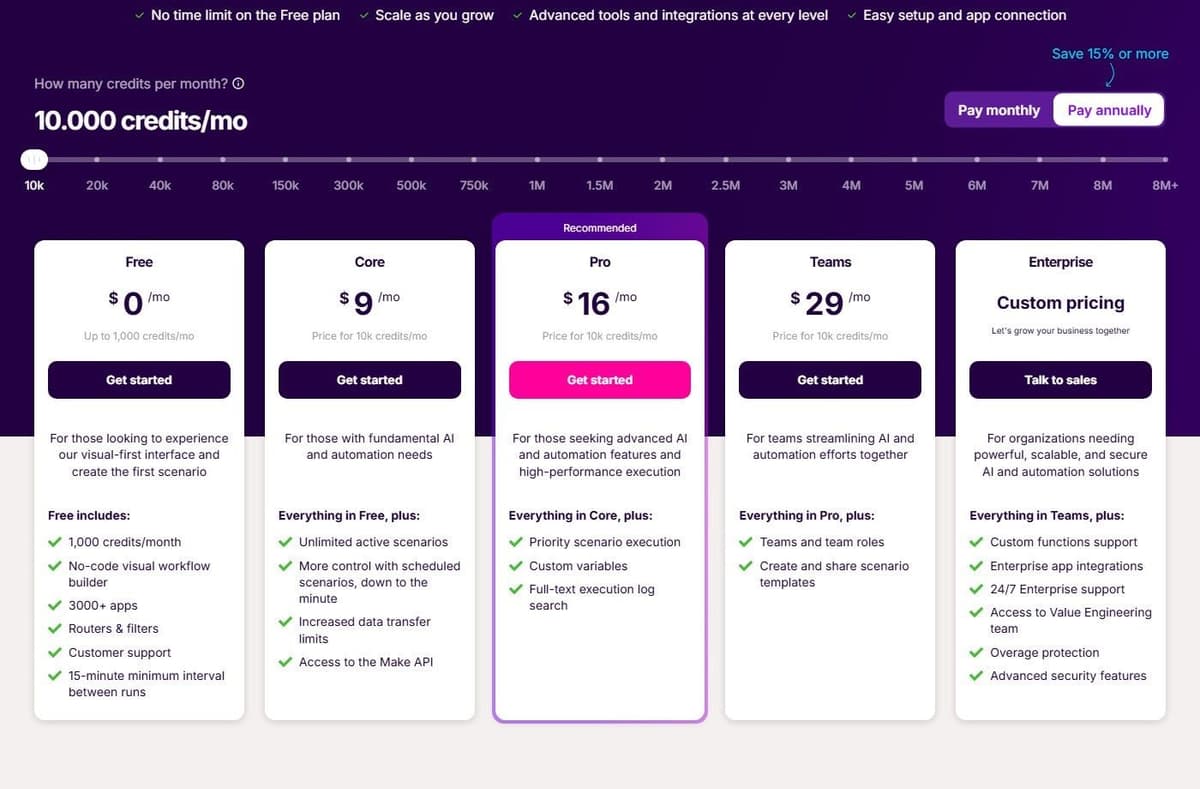
Make.com is free at $0 a month with 1,000 credits. With yearly billing, Core costs $9, Pro $16 and Teams $29 a month for 10,000 credits. Switch to monthly billing and the same plans are $10.59, $18.82 and $34.12. Enterprise is priced by quote. Prices climb with the credit volume you pick on the slider.
Editorial note: Latenode publishes this article and is one of the products discussed. The comparison uses public product documentation and pricing pages. Worked examples are calculations under stated assumptions, not results from a hands-on benchmark. Recommendations describe which requirements a product may fit; they are not a measured ranking of performance or reliability.
Make.com pricing plans at a glance
| Plan | Yearly | Monthly | Credits | Adds |
|---|---|---|---|---|
| Free | $0 | $0 | 1,000 a month | Routers and filters |
| Core | $9 | $10.59 | 10,000 a month | Unlimited scenarios |
| Pro | $16 | $18.82 | 10,000 a month | Priority execution |
| Teams | $29 | $34.12 | 10,000 a month | Teams and templates |
| Enterprise | by quote | by quote | by quote | Enterprise apps, SSO |
The yearly column shows the monthly equivalent when paying for a year in advance. Core, Pro and Teams are shown at 10,000 credits per month. Free includes 1,000 monthly credits; Enterprise pricing and capacity are custom.
Core is the first plan with unlimited active scenarios, one-minute scheduling and access to the Make API. Pro adds priority execution, custom variables and full-text log search. Teams adds team roles and shared scenario templates. Enterprise carries no list price. Free includes the visual builder and 3,500+ apps, Make's own count. See Make.com alternatives for cheaper, simpler and open-source options.
What a Make credit is
A scenario is an automated workflow. It starts when it receives data from one app, such as a new Google Sheets row, transforms that data and sends it to another app. Make now uses credits as its billing unit. Ordinary operations and credits are related, but they are not interchangeable for every feature: AI, code and documented free modules need separate treatment. For non-AI apps and for third-party AI apps such as OpenAI, Anthropic Claude and Gemini, one operation equals one credit. For the head-to-head view, see Make vs Zapier.
"Each action your scenario performs consumes a certain number of credits - most actions consume 1 credit, while some advanced features leveraging Make's AI Provider may use more."
Source: make.com
Make's Router and Filter do not consume credits. Most ordinary non-AI module operations do, including trigger checks and actions that process incoming bundles. Branching can increase usage when additional actions actually run; adding a Router alone does not. AI features and Make Code have separate charging rules, so count the modules that execute rather than every item drawn on the canvas.
Make also separates fixed from dynamic usage. Fixed means a set number of credits per run whatever the input size: a Google Drive upload is one credit per file however large it is, and some AI Content Extractor modules are fixed at 2 or 10 credits. Dynamic means AI and advanced modules bill on tokens, file size, pages processed or run time. Error handler modules, meaning Rollback, Break, Resume, Commit and Ignore, consume nothing, and custom Python or JavaScript in the Make Code app on paid plans costs 2 credits per second of code execution time.
What a scenario run costs
Assume a trigger receives one lead, creates one CRM record and posts one Slack message. With ordinary non-AI modules and no retries, searches or extra processing, that is three credits per run. A Router or Filter does not add a credit. At 1,000 runs, the scenario needs 3,000 credits, which fits Core's 10,000-credit tier at $9 per month billed annually ($108/year). It does not fit the 1,000-credit Free allowance.
Now change the input to a scheduled check every 15 minutes. Over a 30-day month that produces 2,880 trigger checks, including empty checks. If those checks return 1,000 leads in total and each lead still causes two actions, usage becomes 2,880 + 2,000 = 4,880 credits. Both variants fit the same Core tier, but the polling version leaves less capacity for other scenarios.
Bundles matter: five input items sent to each of the two action modules produce ten action operations, not two. Code, AI, extra API calls and retries must be added separately.
More scenarios with webhook triggers and ordinary modules, at yearly billing:
| Scenario | Credits per run x runs | Credits a month | Core tier, price |
|---|---|---|---|
| Order sent to 3 apps | 4 x 4,000 | 16,000 | 20,000, $16 |
| Ticket sent to 4 apps | 5 x 7,000 | 35,000 | 40,000, $29 |
| Record sync with lookup | 3 x 40,000 | 120,000 | 150,000, $99 |
How the price scales with credit volume
Every plan is priced by the monthly credit volume you choose on a slider. The headline prices are only the first rung of a ladder. With yearly billing, the ladder runs like this.
| Credits | Core | Pro | Teams |
|---|---|---|---|
| 10,000 | $9 | $16 | $29 |
| 20,000 | $16 | $29 | $53 |
| 40,000 | $29 | $53 | $99 |
| 80,000 | $55 | $91 | $172.90 |
| 150,000 | $99 | $153.45 | $291.56 |
| 300,000 | $182.16 | $268.54 | $510.22 |
Above 300,000 credits a month the slider drops Core and offers only Pro and Teams. With yearly billing, 500,000 credits cost $410.27 on Pro or $779.50 on Teams a month. Then 1 million credits cost $748.73 or $1,400.67, and 2 million cost $1,377.67 or $2,451.18. At the top of the slider, 8 million credits a month cost $4,811.40 or $8,231.05.
Per 1,000 credits, those yearly prices work out to:
| Credits a month | Core | Pro | Teams |
|---|---|---|---|
| 10,000 | $0.90 | $1.60 | $2.90 |
| 300,000 | $0.61 | $0.90 | $1.70 |
| 1 million | not offered | $0.75 | $1.40 |
| 8 million | not offered | $0.60 | $1.03 |
Monthly billing runs higher at every step. At 20,000 credits you pay $18.82 a month on Core and $62.35 on Teams. At 1 million credits it is $880.86 on Pro or $1,647.85 on Teams. Make labels the yearly toggle Save 15% or more. Across the ladder the yearly price lands about 15% below the monthly price for the same volume. The exact saving differs slightly by tier. In dollars, yearly billing saves $19.08 a year on Core, $33.84 on Pro and $61.44 on Teams at 10,000 credits.
What happens when credits run out
When an organization runs out of credits, its scenarios stop until more are added. A notification arrives as you approach 75% of your purchased credits, and again at 90%. So the stop should not be a surprise. Incoming webhooks are not lost the moment you hit zero. They queue up to the storage the plan allows, which is 667 queued webhooks per 10,000 monthly credits, up to a maximum of 10,000.
"Your scenarios won't continue to run, until credits are added again. But don't worry, we will let you know per notification as soon as you are approaching 75% and again at 90% of your purchased credits."
Source: make.com
There are three ways out. Upgrade to a larger credit volume. Buy extra credits in bundles of 1,000 or 10,000, priced at your plan's own credit rate plus 25%. Or turn on auto-purchase of 10,000 credits, available on Core, Pro and Teams only.
Extra credits expire with the term: after one month on a monthly subscription, or at the end of the year on an annual Pro or Teams subscription. On Free, the 1,000 monthly credits expire at the end of the term as well. Yearly billing also carries a credit flexibility option: prepaid annual credits that expire after 12 months instead of each month. That one is plan-dependent, so confirm it for the plan you are buying.
Limits that come with each plan
Free allows 2 active scenarios. Paid plans make that unlimited. On Free a scenario runs no more often than every 15 minutes; paid plans schedule down to one minute. A single run may take up to 5 minutes on Free and 40 minutes on paid plans. Maximum file size steps up from 5 MB on Free to 100 MB on Core, 250 MB on Pro, 500 MB on Teams and 1,000 MB on Enterprise. Execution logs are kept 7 days on Free, 30 days on Core, Pro and Teams, and 60 days on Enterprise.
Access to the Make API arrives with Core, rate limited to 60 calls a minute there, 120 on Pro, 240 on Teams and 1,000 on Enterprise. Data transfer is 512 MB on Free and scales on paid plans at 5 GB per 10,000 monthly credits. The same per-10,000-credit rule governs 10 MB of data storage, 10 MB of incomplete-execution storage up to a 2 GB ceiling, and the webhook queue. At 150,000 credits that works out to 75 GB of transfer, 150 MB of each storage type and a queue of 10,000 webhooks. Data stores are capped at 1,000 per organization.
Pro runs scenarios at high priority, Teams and Enterprise at priority. Support is tiered too: 90 days of expert access on Free, technical support on Core and Pro, dedicated consultants on Teams, and 24/7 assistance from senior specialists on Enterprise. Every plan is hosted on AWS in the EU or North America.
AI features and what they cost in credits
Make AI Agents are in beta. They are built, run and debugged inside the Scenario Builder, and they take context from uploaded files rather than a separate retrieval workflow. Make AI Agents are available on all plans with Make's AI Provider. Connecting your own AI provider requires a paid Make plan. With a custom connection, Make charges for operations and the AI provider bills token usage separately.
With Make's AI Provider the credit cost follows the model and the token count. The Small and Medium tiers, which run GPT-5 nano, give 18,080 input tokens or 2,260 output tokens per credit. The Large tier, GPT-5 mini, gives 3,616 input or 452 output tokens per credit. A named model such as Claude Sonnet 5 gives 301 input or 60 output tokens per credit. Those conversion rates are subject to change.
With a custom AI provider connection, include both Make usage and the provider's token bill. With a Make-managed connection, use the documented credit rules for the selected feature and model. A one-credit ordinary app operation is not a universal price for an AI step.
For agents, price a range rather than a single run. One user on r/AgentsOfAI put it this way: "If one report can use 500 points and another uses 5,000, then 60,000 points could mean very different things depending on the workflow." Make itself says a single scenario run can use anywhere from two credits to thousands, and with Make's AI Provider the cost follows the model and the tokens the agent reads and writes; reusing one Conversation ID passes the growing history to the agent on every exchange and uses more tokens, while leaving the field blank passes less. Test the agent on a handful of real inputs and size the plan for the most expensive one, not the average.
Make Grid maps relationships between workflows, data flows and dependencies. It sits with the rest of the AI feature set on paid plans, a plan-dependent detail worth confirming for the plan you buy. Make MCP Server turns scenarios into callable tools for ChatGPT, Claude, Cursor and other MCP-compatible agents.
Billing rules: discounts, downgrades and cancellation
Pay for a year in advance and it costs less than paying month to month. NGOs and non-profits are invited to ask about a non-profit discount. Its size is not published.
A downgrade is not a quiet change of tier. Active scenarios that rely on higher-plan features are stopped after a warning. The card is charged immediately, the downgrade date starts a new billing cycle, and unused credits move across as extra credits valid for the next month or year. Canceling is gentler. The plan runs to the end of the monthly cycle or the annual term, then the organization switches to Free. One exception: if the owner already owns another free organization, the subscription is removed instead, and nothing can run until a plan is added.
Enterprise is where the governance features live. The list runs to overage protection, access to Make's Value Engineering team, custom functions, enterprise apps such as Workday finance modules, Coupa, ServiceNow, Greenhouse and Infor M3, SSO via OAuth2 or SAML2, role-based access controls, a 99.5% uptime SLA, 24/7 priority support with 2-hour response SLAs, audit logs and on-premises agents. Standard security covers GDPR, SOC 2 Type II and ISO 27001, with AES-256 encryption at rest and TLS 1.2 or 1.3 in transit.
How Make's pricing compares with Zapier, Pabbly Connect, Activepieces and Latenode
Platforms most often lined up against Make meter usage in different ways. That is what makes headline comparisons misleading. Make charges a credit per ordinary module operation, from $9 a month billed yearly for 10,000 credits, with 1,000 credits a month free.
Zapier counts ordinary successful billable actions as tasks, and AI and MCP steps can use different rates. Polling never costs a task, and built-in steps such as Filter, Formatter and Paths are free. The free plan gives 100 tasks a month. Professional starts at $19.99 per month with annual billing for 750 tasks. With pay-per-task billing on, Zaps run past the plan limit at a higher rate. With it off, they pause. See Zapier pricing for every task tier.
Pabbly Connect gives 100 free tasks a month. Standard is listed at $16 a month billed annually for 10,000 tasks, against a regular price of $19 a month. A task counts only when an action runs on an external app, so formatters and the email parser cost nothing. It also sells lifetime plans at $349 for 3,000 tasks a month and $799 for 10,000. The Make vs Pabbly Connect comparison works through credits against tasks.
Activepieces Community Edition is a free, self-hosted option built on the MIT-licensed core. It has no credit meter or cap on runs and users. You pay for hosting and operations, and for any external services your flows use. Community Edition excludes features such as SSO, audit logs, projects and Git Sync. Its credit-metered plans cost the same on Activepieces' cloud or your own servers, and their credit allowances do not apply to the free Community Edition.
The Activepieces plans are metered in credits, and a run is one credit however many ordinary steps it holds: free gives 1,000 credits a month for up to 5 users, then Plus is $16 a month billed annually for 10,000 credits, with AI charged separately. With Activepieces-supplied AI models, each AI step adds 2 credits for a fast model, 10 for a smart model or 20 for a frontier model; agentic actions add one credit each. On Plus and higher plans, using your own AI provider keys makes each AI step cost one Activepieces credit, with model usage billed separately by your provider. Latenode bills workflow runtime in CPU seconds instead of operations or steps. You get 10,000 CPU seconds free every month, then $0.00012 per CPU second on Pay as you go.
That is five meters: per ordinary module operation, per billable action, per external action, per run and per runtime. A ten-module scenario and a ten-step Zap do not cost the same. Neither maps onto CPU seconds. So a fair comparison starts with your own workflow shape.

Who Make's pricing suits and who should look elsewhere
Make suits teams that want a low entry price and fine-grained control over volume. $9 a month billed yearly for 10,000 credits is a modest commitment, and the ladder has enough rungs to match real growth. Teams whose scenarios run few modules per event get the most out of that model.
The watch points are just as concrete. Free allows 2 active scenarios and schedules no faster than every 15 minutes, so it is a place to learn rather than to run a business on. Long scenarios burn through a volume quickly, and aggregators and iterators count too. Core stops at 300,000 credits a month, after which only Pro and Teams appear on the slider. AI Provider usage converts tokens to credits at model-specific rates that are subject to change. Extra credits and auto-purchase are charged at the fixed price written into your subscription, so find that number first.




