



Quick answer: is IFTTT free in 2026?
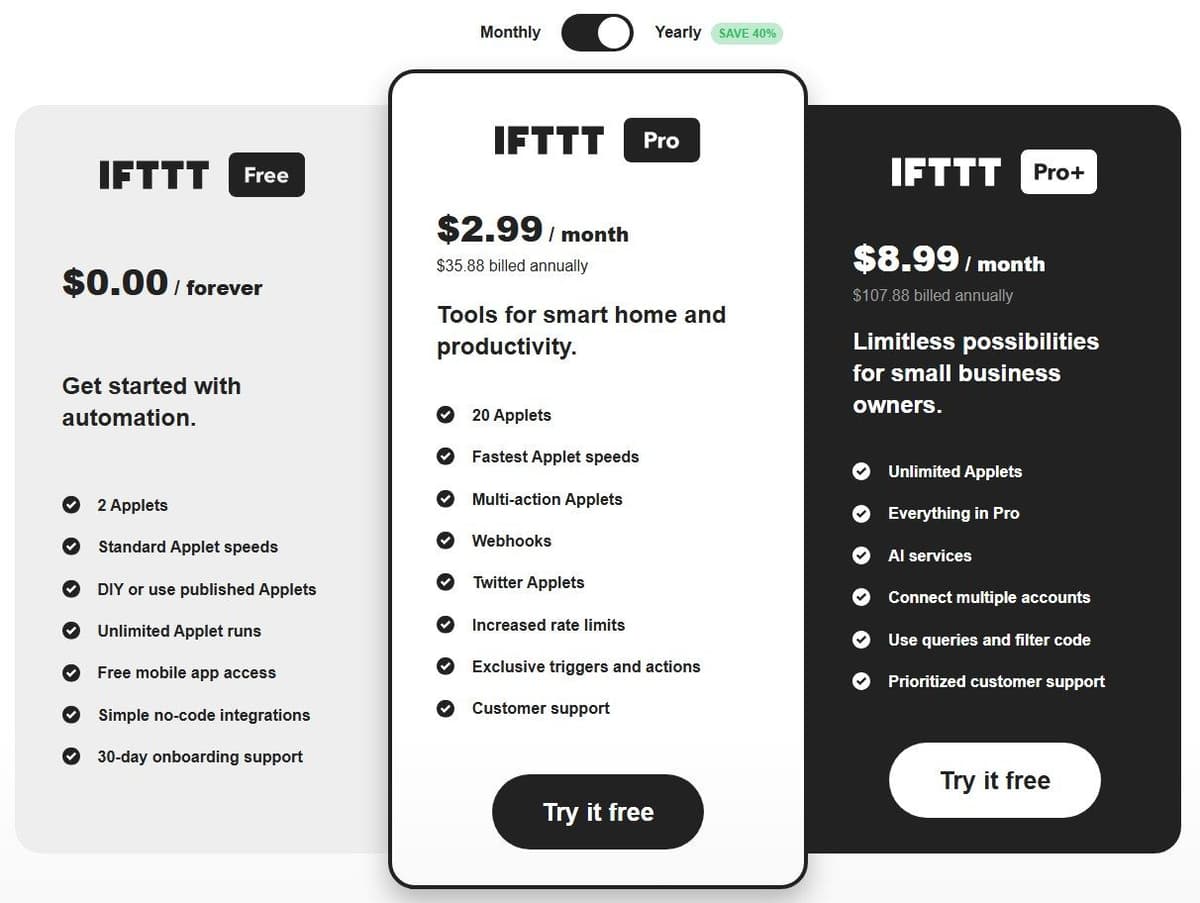
Yes. IFTTT's Free plan costs $0.00 forever and holds 2 Applets, each with one trigger and one action, at standard speed with unlimited runs. Pro starts at $2.99 a month billed annually, which is $35.88 a year. Pro and Pro+ both come with an automatic 7-day free trial for first-time subscribers.
What the IFTTT Free plan includes
Every IFTTT account starts on Free, and nothing about it expires. The wider field is covered in our guide to IFTTT alternatives.
| Item | Free plan | Note |
|---|---|---|
| Price | $0.00 forever | No subscription required |
| Applets | 2 at a time | Yours or from the community library |
| Triggers and actions per Applet | One trigger, one action | Multi-action Applets need Pro |
| Applet runs | Unlimited | No monthly execution cap |
| Applet speed | Standard | Polling triggers checked once an hour |
| Delay before an action | 15 seconds to 3 hours | Set inside the Applet, before the action |
| Published Applets | Yes, if the card has no tier badge | Badged cards need Pro or Pro+ |
| Mobile app | Full access | Included at no cost |
| Onboarding support | 30-day onboarding support listed | Technical support is for Pro and Pro+ |
| Free trial | 7 days of Pro or Pro+ on upgrade | One per account, not a plan |
The support row needs a caveat. As of September 2026, according to IFTTT's plans page, the Free card lists 30-day onboarding support. IFTTT's help center reserves technical support through ifttt.com and the IFTTT app for Pro and Pro+ subscribers, and routes billing questions to an email address anyone can use. IFTTT does not define what onboarding support covers. The Zapier vs IFTTT comparison goes deeper on this.
What the Free plan leaves out
Free gives you the trigger-and-action basics and stops there. What it leaves out, with the plan that adds each one:
- Multi-action Applets, several actions from one trigger event instead of a separate Applet per action: Pro.
- Webhooks, marked not available on Free and limited to 240 calls a minute on the paid tiers: Pro.
- SMS and phone call actions, both marked not available on Free: Pro, where Call my phone is 100 a month and Send me an sms is 100 a month in the US and Canada and 10 a month elsewhere.
- Twitter, now X, Applets: Pro. IFTTT states the service is only available to Pro and Pro+ users, so you cannot enable one on a free account.
- Fastest Applet speeds, increased rate limits for certain services, and exclusive triggers and actions: Pro.
- Queries, which request extra data while an Applet runs: Pro+.
- Filter code, which adds conditional logic to an Applet: Pro+.
- Connecting multiple accounts of one service: Pro+.
- AI services, not available on Free or Pro and capped at 200 queries a day across all of them: Pro+.
- Developer tools, which IFTTT's plans page FAQ describes as access to its Platform for publishing your own API: Pro+.
- Customer support: Pro, prioritized on Pro+. The Free card still lists 30-day onboarding support, which IFTTT never defines, so confirm what it covers before you count on it.
IFTTT MCP, which lets AI assistants such as Claude, ChatGPT and Cursor work with your IFTTT services and Applets, is available on every plan, but your tier sets what the assistant can do. On Free it can search services and Applets and create or enable free Applets up to your Applet quota; running actions starts at Pro, and running queries at Pro+. The paid plan named in the setup steps on ifttt.com/mcp is the AI tool's own. See IFTTT vs Make for a direct comparison.
How long can you use IFTTT for free
Indefinitely. The Free plan has no subscription fees, according to IFTTT's help center, and IFTTT's plans page prices it at $0.00 forever.
"we grant you a 7-day free trial. If you don't like it and cancel before the trial runs out, you won't be charged. ... if your account previously had a free trial you won't be eligible for another trial"
Source: help.ifttt.com
The 7-day trial is separate, and it is not a plan. IFTTT grants it when a Free account upgrades to Pro or Pro+, and charges nothing if you cancel before the trial runs out. An account that has already had one gets no second trial. You can pay for any paid plan monthly or yearly, according to IFTTT's help center. A new subscriber picks the yearly option at checkout, and an existing subscription switches between monthly and annual billing on ifttt.com/billing; one bought through the App Store or Google Play switches in that store's subscription settings.
Canceling only stops the automatic renewal. The account keeps Pro or Pro+ features until the end of the current billing cycle. IFTTT does not charge it again, and then drops it to the free plan automatically. Payments are final and IFTTT offers no refunds. IFTTT does not say what happens to Applets above the two-Applet limit after that downgrade, whether they are archived, switched off or deleted. Ask IFTTT before you cancel with more than two running.
What counts as an Applet and a run on the Free plan
IFTTT defines an Applet as a connection between two or more apps or devices, composed of triggers and actions. The trigger starts the Applet; the action is the end result of a run. On Free that means one trigger and one action, and you hold two such Applets at a time, built by you or enabled from the community library. A published Applet card carries a tier badge when it needs Pro or Pro+. Every Applet in your My Applets list, built or enabled, switched on or off, counts toward the cap until you archive or delete it.
IFTTT counts a run every time it detects a new trigger event and executes the Applet, passing trigger data to the action. Checks that find no new event are not runs. Runs are unlimited and IFTTT states there is no monthly execution cap, so the two-Applet ceiling, not volume, limits a free account.
Standard speed comes down to polling frequency. IFTTT checks polling triggers every hour for Free users and every 5 minutes for Pro and Pro+. It expects a polling Applet to run within one hour of the trigger event on Free, against 5 minutes on the paid plans. Realtime Applets, whose trigger service notifies IFTTT of a new event, normally run within a few seconds, and IFTTT names no plan difference for them, according to IFTTT's help center. Once a trigger fires, the action runs within a few seconds unless you add a delay of 15 seconds to 3 hours, according to IFTTT's help center.
Rate limits depend on the service, and where they exist the Free column is the tightest one. IFTTT applies no rate limits to the majority of its services, but its rate-limit table gives Free 30 emails a day from the Send me an email action against 750 a day on Pro and Pro+, 5 Blogger posts a day against 25, and 25 Pinterest pins a day against 200, and it marks Send me an sms and Call my phone as Not available on Free. Hit a limit and the Applet shows a usage limit exceeded error in its activity feed, then starts working again on its own: daily limits reset at midnight in your account's time zone, monthly limits on the first of the month.
When Free stops being enough and what Pro and Pro+ cost
Free usually runs out at one of these points: a third Applet, a second action on the same trigger, a webhook, an X Applet, faster runs, filter code, or two accounts of one service connected at once. According to IFTTT's plans page FAQ, the free plan suits anyone taking a first step into automation. Pro is for people who own multiple smart devices or who want to build with multiple actions.
Pro is shown at $2.99 a month billed annually, which is $35.88 a year, and lifts the ceiling to 20 Applets. Pro+ is shown at $8.99 a month billed annually, or $107.88 a year, and makes Applets unlimited. As of September 2026, according to IFTTT's plans page, the rates it carries with monthly billing are $4.99 a month for Pro and $14.99 a month for Pro+. The plans page opens on yearly prices, so these two show only after you switch the toggle to Monthly. Check the Monthly toggle on ifttt.com/plans before you buy.
On those figures a year of monthly billing is $59.88 for Pro and $179.88 for Pro+, against $35.88 and $107.88 on the annual option: the yearly cycle saves $24.00 on Pro and $72.00 on Pro+, the 40% the plans page advertises next to its Yearly toggle. The annual option is a single charge for twelve months that IFTTT does not refund, so the monthly rate is the safer one until you know you will stay.
Whichever tier you pick, the first week is the 7-day trial, and IFTTT charges nothing if you cancel inside it. You can change plan at any time. On a cancellation the account keeps Pro or Pro+ features until the end of the active billing cycle, but IFTTT's Billing FAQ says a switch from Pro+ down to Pro takes effect immediately and turns the unused Pro+ time into a credit against future charges. Prices on ifttt.com/plans are in US dollars. Subscriptions bought through the Google Play Store or the Apple App Store are billed in the buyer's local currency.
Pro+ is the top self-service plan. The same plans page also points to a business solution with behavioral insights, enterprise reliability and dedicated support, and publishes no price for it, so a team that needs those has to ask IFTTT.
Free alternatives to IFTTT
If two Applets are not enough, these free tiers are worth a look.
"Usage-based: pay for workflow runtime in CPU seconds (runs x average seconds), not per operation and not per step. Workflow steps do not multiply the bill."
Source: latenode.com
| Tool | Free tier | Meter | Steps per workflow | Note |
|---|---|---|---|---|
| Zapier Free | $0 a month, free forever | 100 tasks a month | Two-step Zap workflows | Unlimited Zaps, one user, 15-minute polling |
| Make Free | $0 a month, no time limit | 1,000 credits a month | Not stated on the pricing page | 2 active scenarios, 15-minute minimum interval between runs |
| Pabbly Connect free | $0 a month, no card required | 100 tasks to start | Up to 2 steps | Up to 2 workflows, data checks not counted |
| Activepieces Free | $0 a month for up to 5 users | 1,000 credits a month | Not stated on the pricing page | Unlimited flows; separate self-hosted edition |
| Latenode Free | $0 a month, no card required | 10,000 CPU seconds a month | Not stated on the pricing page | 5 active workflows, 10-minute polling |
Zapier Free fits many small workflows and few runs: unlimited Zap workflows for one user, two steps each, 100 tasks a month counted on successful action steps, not trigger steps. On Make's Free plan each module action spends one credit out of 1,000, so it suits scenarios of a few modules. Pabbly Connect's free plan starts you with 100 tasks and does not count checks for new data. Activepieces Free gives up to 5 users 1,000 credits a month; runs past the quota wait until the credits refresh. The self-hosted Community edition is separate: the MIT-licensed core with unlimited flows and users, without projects, SSO, audit logs and Git Sync, on a server you pay for. Latenode Free bills 10,000 CPU seconds a month, runtime rather than operations or steps. Extra steps do not multiply the bill, and the figure is not directly comparable with Applets or tasks.

Is IFTTT worth it in 2026
For a smart-home owner with one or two standing automations, a lamp that reacts to sunset, a doorbell that pings a phone, the Free plan is enough and costs nothing to keep. It also costs nothing to find out whether automation fits your habits, which is true of the free tiers in the table above as well. The moment you want a third automation, two actions from one trigger, or a reaction measured in minutes rather than up to an hour, Free stops fitting: a switched-off Applet still counts toward the two, so making room means archiving one. That is when Pro starts to make sense. Pro+ is narrower: filter code, queries, AI services, several accounts of one service. The only free route to IFTTT Pro that IFTTT documents is the 7-day trial on upgrade, granted once per account. If neither tier fits your work, test a free tier elsewhere first.
Archiving or switching off an old Applet has one trap. An Applet that uses filter code or queries needs Pro+, and one with several actions needs Pro, so an older Applet of that kind may not come back on a free account once you switch it off. One user on r/ifttt described trying to edit an Applet they had run for years: "Now it says I can't do this because Filter Code requires Pro+ account. And now I can't reconnect my old applet I assume because I don't have Pro+." Before you switch off or archive an old Applet, open it and check which features it uses.




