



Quick answer: what Zapier costs in 2026
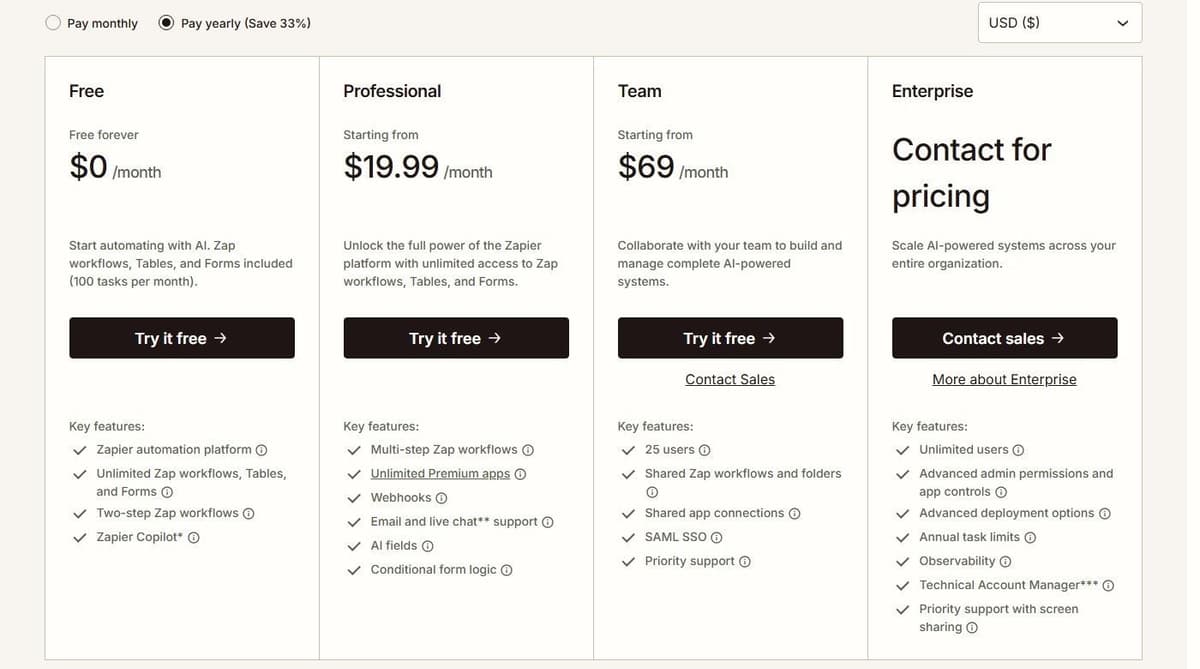
Zapier is free at $0 a month with 100 tasks. Professional starts at $19.99 a month billed annually for 750 tasks, or $29.99 with monthly billing. Team starts at $69 a month billed annually with 25 users, or $103.50 a month billed monthly at 2,000 tasks. Enterprise is by quote. Yearly billing is labeled Save 33%.
Zapier's Team seat information is inconsistent: its plan card and comparison table list 25 users, while its FAQ says Team and Enterprise allow unlimited users. Confirm the Team allowance before purchase.
One older detail still confuses buyers: Zapier retired its Starter plan on April 2, 2024, which made Professional the lowest-cost paid plan. If you remember a cheaper entry tier from an old quote, it no longer exists.
Editorial note: Latenode publishes this article and is one of the products discussed. The comparison uses public product documentation and pricing pages. Worked examples are calculations under stated assumptions, not results from a hands-on benchmark. Recommendations describe which requirements a product may fit; they are not a measured ranking of performance or reliability.
Zapier pricing plans at a glance
Four plans, two billing bases. The yearly column is the per-month price when you pre-pay a year. The monthly column is the same plan paid month to month. Our guide to Zapier alternatives sorts the options by billing unit and use case.
| Plan | Yearly | Monthly | Entry task tier | Notes |
|---|---|---|---|---|
| Free | $0 | $0 | 100 a month | Two-step Zaps |
| Professional | $19.99 | $29.99 | From 750 a month | Multi-step Zaps |
| Team | $69 | $103.50 | From 2,000 a month | 25 users (FAQ says unlimited), SAML SSO |
| Enterprise | By quote | By quote | Annual task limits | Unlimited users |
Task figures are entry tiers, not ceilings, and each row shows the starting price for that plan. Professional's task tiers are priced in a separate table below, so read this one as a list of plans rather than as a quota ladder.
Which plan carries the features that change what you can build:
| Feature | Free | Professional | Team | Enterprise |
|---|---|---|---|---|
| Zap steps | Two-step | Multi-step | Multi-step | Multi-step |
| Webhooks | No | Yes | Yes | Yes |
| Premium apps | No | Unlimited | Unlimited | Unlimited |
| Filters and Paths | No | Yes | Yes | Yes |
| Shared Zaps and folders | No | No | Yes | Yes |
| Shared app connections | No | No | Yes | Yes |
| SAML SSO | No | No | Yes | Yes |
Is Zapier free?
Yes. The Free plan is free forever at $0 a month. It includes 100 tasks a month, unlimited Zap workflows, Tables, Forms and Copilot, with Copilot capped by a daily message limit that resets at midnight UTC. The Zapier free plan limits are the other half of the picture: Zaps stay at two steps, one trigger and one action, according to Zapier's pricing page; polling runs every 15 minutes; premium apps are not included; and the 100 tasks are one shared pool for Zap workflows, AI steps, code, MCP and SDK calls, so a single MCP tool call spends two of them.
Even a small job can need a paid plan once it has a condition. One user on r/automation described an unpaid-invoice reminder they run without Zapier: "it skips weekends and stops once the payment hits." In Zapier, a rule such as stopping once the invoice is paid needs a Filter or Paths step, and Zapier's help center lists both on Professional, Team and Enterprise but not on Free, so a reminder like this starts at $19.99 a month billed annually. If your invoicing tool already sends payment reminders, check that before you pay for a Zap.
What a Zapier task is
Zapier counts successful billable actions, with exemptions for triggers and several built-in tools, including Filter, Paths, Formatter, Delay and Looping. Five ordinary billable actions use five tasks; five steps in the Zap editor do not necessarily do so. AI, MCP and extended code execution can use different rates. See Zapier MCP pricing for how tool calls spend tasks.
A Zap is an automated workflow with a trigger and one or more actions. It runs its action steps every time it is triggered. On the Free plan a Zap is two steps, one trigger and one action, connecting two apps. Premium apps are available only on paid plans.
Several built-in steps run without costing a task:
- Zapier Tables and Zapier Forms
- Filter by Zapier and Formatter by Zapier
- Path by Zapier, Delay, Looping and Sub-Zap
- Digest, Zapier Manager and Storage
Billable Zap actions, AI steps, Code steps and MCP calls use the account's task allowance at their applicable rates. Zapier SDK actions are free during the current beta. Using the SDK inside Code by Zapier does not remove the Code step's own task or runtime charges. One MCP tool call consumes two tasks. Starting June 15, 2026, AI by Zapier steps are priced by model tier rather than a flat per-step rate, on Professional, Team and Enterprise. But tool calls are not available on Enterprise accounts. An AI step that reaches 75 tasks in a single run pauses the Zap for manual approval.
Logic steps have their own shape. Each Paths step allows up to 10 branches within the same path group. A Zap can nest at most 3 Path steps, and a workflow is limited to 100 steps in total. Code steps run Python or JavaScript inside a Zap and draw on the same pooled quota.
How the price scales with task tiers
Price follows the task tier you pick, and Professional tiers start at 750 tasks.
Professional: three useful task tiers
| Included tasks per month | USD a month, billed yearly | Annual subscription |
|---|---|---|
| 750 | $19.99 | $239.88 |
| 1,500 | $39 | $468 |
| 2,000 | $49 | $588 |
These are Professional tiers, not Team prices. They show the subscription that includes the stated capacity; they do not assume overage is the cheapest way to handle every peak.
What one Zap costs at 1,000 monthly runs
Suppose a Zap creates one CRM record and sends one Slack message per event. With two successful ordinary billable actions, each run uses two tasks; 1,000 runs need 2,000 tasks. Professional 2,000 covers the month for $49 at annual billing, or $588 for the year, before taxes and subscriptions to the connected apps. The 750-task plan does not include enough capacity.
Free internal formatting or filtering does not change that two-task count. Replayed successful actions, additional searches, AI, code and other product-specific rates can.
Speed moves with the plan too. Polling runs every 15 minutes on Free, every 2 minutes on Professional and every minute on Team and Enterprise. Paid plans allow a customizable interval per Zap down to 1 minute. Live chat support starts at the Professional 2,000-task tier and above, so the 750-task tier sits below that line.
Zapier prices with monthly billing
The ladder above shows yearly billing. Zapier prices on monthly billing run higher at every tier: the 750-task Professional tier is $29.99 a month instead of $19.99, the 1,500-task tier is $58.50 instead of $39.00, the 2,000-task tier is $73.50 instead of $49.00, and the 5,000-task tier is $133.50 instead of $89.00. Team starts at the 2,000-task tier at $69.00 a month billed yearly or $103.50 billed monthly, and the 5,000-task Team tier is $119.00 yearly or $178.50 monthly. The 750 and 1,500 tiers exist only on Professional.
| Tasks a month | Professional, yearly | Professional, monthly | Team, yearly | Team, monthly |
|---|---|---|---|---|
| 750 | $19.99 | $29.99 | not offered | not offered |
| 1,500 | $39.00 | $58.50 | not offered | not offered |
| 2,000 | $49.00 | $73.50 | $69.00 | $103.50 |
| 5,000 | $89.00 | $133.50 | $119.00 | $178.50 |
Zapier plans above 5,000 tasks continue up the selector through 10K, 20K, 50K, 100K, 200K, 300K, 400K, 500K, 750K, 1M, 1.5M, 1.75M and 2M tasks a month, plus a custom limit; the pricing page shows the price for each step once you move the selector.
Zapier prices above 5,000 tasks
The task selector on Zapier's pricing page runs far past 5,000 tasks a month. Prices are as listed in October 2026, per month.
| Tasks a month | Professional, yearly | Professional, monthly | Team, yearly | Team, monthly |
|---|---|---|---|---|
| 10,000 | $129 | $193.50 | $169 | $253.50 |
| 20,000 | $189 | $283.50 | $249 | $373.50 |
| 50,000 | $289 | $433.50 | $399 | $598.50 |
| 100,000 | $489 | $733.50 | $599 | $898.50 |
| 200,000 | $769 | $1,149 | $999 | $1,499 |
| 300,000 | $1,069 | $1,599 | $1,199 | $1,799 |
| 400,000 | $1,269 | $1,899 | $1,399 | $2,099 |
| 500,000 | $1,499 | $2,199 | $1,799 | $2,699 |
| 750,000 | $1,999 | $2,999 | $2,199 | $3,299 |
| 1,000,000 | $2,199 | $3,299 | $2,499 | $3,749 |
| 1,500,000 | $2,999 | $4,499 | $3,399 | $5,099 |
| 1,750,000 | $3,199 | $4,799 | $3,799 | $5,699 |
| 2,000,000 | $3,389 | $5,099 | $3,999 | $5,999 |
Above 2 million tasks the selector offers a custom task limit. With pay-per-task turned on, Zapier's help center caps total usage at three times the plan's task limit, so the 10,000-task tier tops out at 30,000 tasks in a month.
What typical workloads cost on Zapier
Four example workloads, each priced on the smallest Professional tier that covers it. A run is counted as its successful billable actions; triggers, filters and built-in steps are free, as described above.
| Workload | Actions x runs | Tasks a month | Tier | Yearly | Monthly |
|---|---|---|---|---|---|
| Form lead to CRM and Slack | 2 x 500 | 1,000 | 1,500 | $39.00 | $58.50 |
| Shop order to accounting | 3 x 2,000 | 6,000 | 10,000 | $129 | $193.50 |
| Support ticket routing | 4 x 5,000 | 20,000 | 20,000 | $189 | $283.50 |
| Record sync between two apps | 2 x 50,000 | 100,000 | 100,000 | $489 | $733.50 |
AI steps, Code steps and MCP calls have their own task rates and push the count up; one MCP tool call, for example, uses two tasks.
Pay-per-task: what happens when you hit the limit
Hitting the task limit does one of two things, depending on a single setting. With pay-per-task billing turned on, Zapier switches the account to pay-per-task once the plan's limit is reached. Zaps keep running, charged at a higher per-task rate than the base subscription. With pay-per-task off, Zaps pause at the plan limit and stay paused.
"If you turn on pay-per-task billing, we'll switch you to pay-per-task billing once you reach your plan's task limit so your Zap workflows continue running. Pay-per-task billing is charged at a higher per-task rate than your base subscription tasks."
Source: zapier.com
Overage does have a ceiling. On the 750-task Professional plan it works out to a 2,250-task maximum. Zapier emails you as the account nears the maximum task limit, and again when it reaches it. Then Zaps pause until the next usage period.
Pay-per-task pricing depends on the plan and billing cycle. Use the rate shown in the account's Billing settings rather than applying one multiplier to every customer. With pay-per-task turned on, total usage can reach three times the included task allowance before Zaps stop; with it turned off, Zaps stop at the plan's task limit. For an upgrade decision, compare the larger plan's price with the current plan plus the expected excess tasks at that account-specific rate.
For a 2,000-task month on Professional 750, the estimate is $19.99 plus 1,250 excess tasks multiplied by the account's pay-per-task rate. Compared with the $49 tier, the break-even rate is ($49 minus $19.99) / 1,250 = $0.023208 per excess task. Below that rate the smaller plan plus overage costs less for this month; above it the 2,000-task tier does. Check the rate and billing term before acting.
Zapier Agents, Chatbots and other add-ons
Two products sit outside the Zap plans and carry their own bills. Zapier Agents Free includes 400 activities per month. An activity is not a complete agent run: one run can consume several activities. This allowance is separate from Zap task usage. Agents Pro costs $400 billed annually, shown as $33.33 a month. That buys up to 1,500 activities a month with live data sources, web browsing and a Chrome extension.
Zapier Chatbots is priced separately as well. The free tier builds up to 2 chatbots on GPT-3.5. Chatbots Pro costs $160 billed annually, shown as $13.33 a month, for 5 chatbots with 10 knowledge sources each. Chatbots Advanced costs $800 billed annually, shown as $66.67 a month, for up to 20 chatbots with 20 knowledge sources each. It also removes the Zapier logo.
Copilot, the AI building assistant, is the exception. It is available on every plan, with a daily cap on Free that resets at midnight UTC. Put Agents and Chatbots in the budget as separate line items. Both are priced apart from the Zap plans.
Billing rules: trials, discounts and cancellation
Every new Zapier account is automatically enrolled in a free 14-day trial of the Professional plan. No credit card is required. So multi-step Zaps can be tested before anyone signs off on a plan.
Pre-paying a year is the main discount, labeled Save 33% against monthly billing. Non-profits get 15% off any paid plan, excluding pay-per-task charges. Payment is accepted in multiple currencies. Invoice or wire transfer is available on the latest annual Team or Enterprise plan. Canceling keeps paid access until the end of the billing cycle rather than cutting it off the same day.
Enterprise is where governance lands: unlimited users, advanced admin permissions and app controls, advanced deployment options, annual task limits, observability, a Technical Account Manager at a set threshold or as an optional add-on, and priority support with screen sharing. Admin and security controls are plan-dependent rather than universal. Two-factor authentication, static IP, audit log, SAML single sign-on, SCIM user provisioning, domain capture, Super Admin, action restrictions and custom data retention all sit in that plan-dependent group. Confirm which plan carries the control you need before you sign.
What changed in Zapier pricing
- April 2, 2024: Starter retired.
- June 15, 2026: AI by Zapier steps moved to model-tier pricing.
- Current rates: an AI step costs 1 task on a standard model, 3 on an advanced model and 5 on a premium model, and SDK actions are free in beta.
- Next Gen Zaps: in early access on paid plans, they do not count toward tasks; Zapier says they will move to task-based pricing at general availability and will share any change before billing starts.
How Zapier's pricing compares with Make, Pabbly Connect, Activepieces and Latenode
Zapier bills a task per ordinary billable action, from $19.99 a month billed annually for 750 tasks, with 100 free tasks a month. The other four meters work differently.
| Platform | Meter | Free tier | Entry price |
|---|---|---|---|
| Zapier | Per billable action | 100 tasks a month | $19.99 a month yearly |
| Make | Per module operation | 1,000 credits a month | $9 a month yearly |
| Pabbly Connect | Per external action | 100 tasks a month | $16 a month yearly |
| Activepieces | Credits per run | CE, or 1,000 credits/mo | Plus $16 a month yearly |
| Latenode | Per CPU second | 10,000 CPU seconds | No base fee, usage |
CE in the table means Activepieces Community Edition, the free self-hosted edition without a credit meter.
Make gives 1,000 credits a month free and spends a credit per ordinary non-AI module operation, including trigger checks. Its Router and Filter consume none, while AI features and Make Code have separate charging rules, so count the modules that execute rather than every item drawn on the canvas. Billed yearly, it lists Core at $9, Pro at $16 and Teams at $29 a month for 10,000 credits, plus 2 credits per second of code execution. Our Make.com pricing guide walks through every credit tier. Pabbly Connect counts a task only when an action runs on an external app. It lists Standard at $16 a month billed annually for 10,000 tasks against a $19 a month regular price, and sells lifetime plans at $349 and $799. The Make vs Zapier and Pabbly Connect vs Zapier comparisons set each pair side by side.
Activepieces plans start free with 1,000 credits a month, then Plus at $16 a month billed annually for 10,000 credits, where one credit covers an ordinary run whatever its step count and AI is charged separately. With Activepieces-supplied AI models, each AI step adds 2 credits for a fast model, 10 for a smart model or 20 for a frontier model; agentic actions add one credit each. On Plus and higher plans, using your own AI provider keys makes each AI step cost one Activepieces credit, with model usage billed separately by your provider. Latenode bills workflow runtime in CPU seconds: 10,000 free every month, then $0.00012 per CPU second on Pay as you go.
Activepieces Community Edition is a free, self-hosted option built on the MIT-licensed core. It has no credit meter or cap on runs and users. You pay for hosting and operations, and for any external services your flows use. Community Edition excludes features such as SSO, audit logs, projects and Git Sync. Its credit-metered plans cost the same on Activepieces' cloud or your own servers, and their credit allowances do not apply to the free Community Edition.
That is five different meters: per billable action, per module operation, per external action, per run and per runtime. A ten-step Zap and a ten-module Make scenario do not cost the same. Neither maps onto CPU seconds, where the bill follows run duration rather than step count. Price a month of your own volume on each meter.

Who Zapier's pricing suits and who should look elsewhere
Zapier's pricing fits teams that want the widest app catalog and per-action predictability. Zapier's own figure is more than 9,000 app integrations. The entry point is a card checkout at $19.99 a month billed annually. You pay for billable actions, so triggers, filters and failed steps leave the quota alone.
Four things deserve a second look before you commit. Multi-step Zaps spend a task per ordinary billable action, so 750 tasks a month fills faster than the headline suggests. Pay-per-task overage costs more per task than the tasks inside the plan. The Free plan is limited to two-step Zaps and 15-minute polling. That keeps it to one trigger and one action between two apps. Agents and Chatbots arrive as separate bills. If your workflows are long but infrequent, a meter that charges per run or per second of runtime will read very differently from one that charges per action.




