



Quick verdict: IFTTT vs Make.com
Pick IFTTT if you want personal and smart home Applets. The free plan is permanent, Applet runs are unlimited, and each free Applet is one trigger plus one action. Pick Make.com if you need multi-step business scenarios with routers, iterators and aggregators, a credit-based bill, and AI agents. Price and workflow shape decide the rest.
Prices in this comparison are for annual billing unless a monthly price is named, because both vendors charge less per month on a yearly plan. IFTTT's month-to-month prices are in its plan table below.
Editorial note: Latenode publishes this article and is one of the products discussed. The comparison uses public product documentation and pricing pages. Worked examples are calculations under stated assumptions, not results from a hands-on benchmark. Recommendations describe which requirements a product may fit; they are not a measured ranking of performance or reliability.
IFTTT vs Make.com at a glance
Read the billing unit row first. It explains most of the price gap further down: IFTTT charges for how many Applets you keep switched on, while Make.com charges for how much work your scenarios actually do. Everything else in the table follows from that single difference, and the sections after it unpack the rows that cost you money. For other options, see IFTTT alternatives.
| Feature | IFTTT | Make.com |
|---|---|---|
| Free plan | 2 Applets, $0 forever | 1,000 credits a month |
| Entry paid plan | Pro $2.99/mo, yearly | Core $9/mo, yearly |
| Billing unit | Applets enabled | Per operation; AI varies |
| Workflow shape | Free: simple Applets; paid plans: multiple actions; Pro+: queries and filter code | Multi-step canvas |
| Apps, own count | 1,000+ services | 3,500+ apps |
| Polling on free plan | Every hour | Every 15 minutes |
| AI features | AI services on Pro+; Chat and MCP on all plans | All plans |
| Smart home | Cross-brand Applets | Business apps focus |
| Best for | Personal automations | Business scenarios |
Pricing: Applets versus credits
IFTTT sells slots: its plans differ by how many Applets you keep switched on and what each Applet may do. See Zapier vs IFTTT for a direct comparison.
"Each action your scenario performs consumes a certain number of credits - most actions consume 1 credit, while some advanced features leveraging Make's AI Provider may use more."
Source: make.com
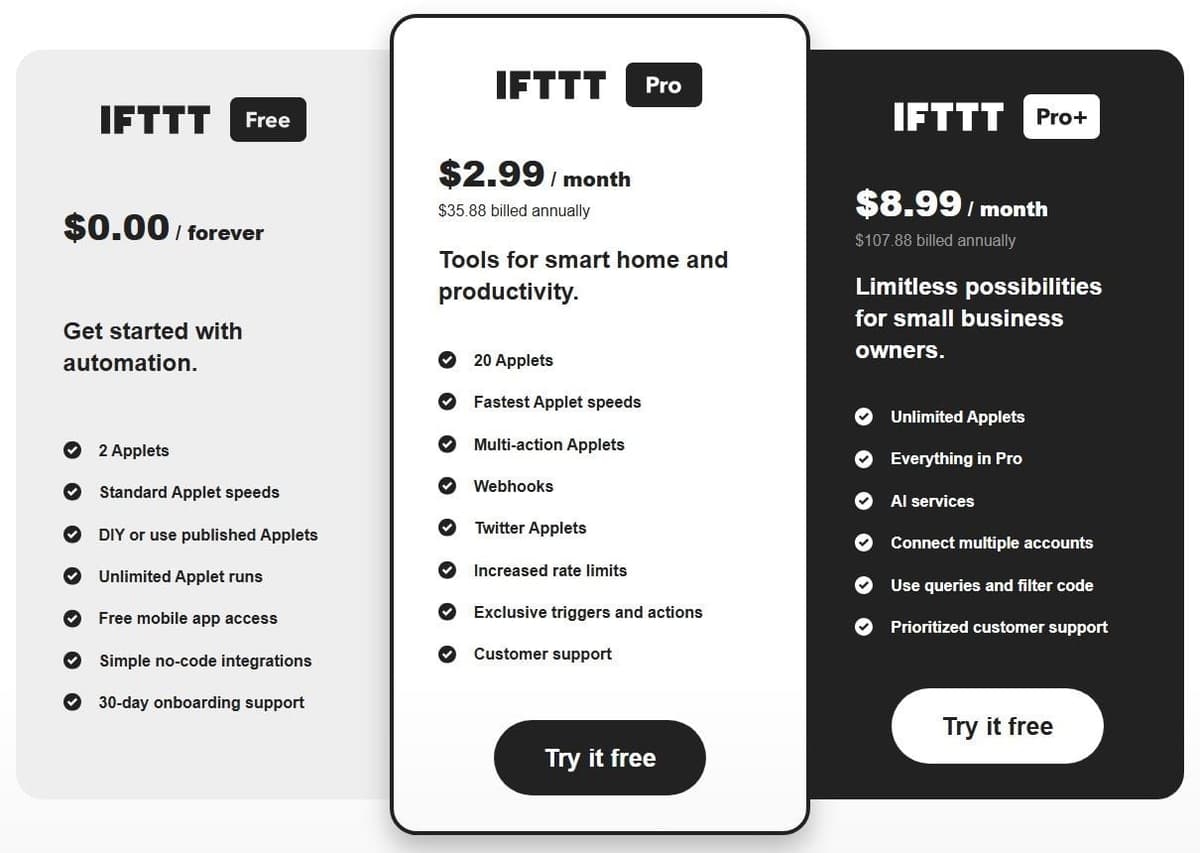
IFTTT plans and prices in 2026
| Plan | Billed monthly | Billed yearly | Applets | What you get |
|---|---|---|---|---|
| Free | $0 forever | $0 forever | 2 | One trigger and one action per Applet, with an optional delay; standard speed with hourly polling checks; unlimited Applet runs; the mobile app |
| Pro | $4.99 a month | $2.99 a month, billed $35.88 a year | 20 | Multi-action Applets, webhooks, Pro services such as Twitter, polling checks every 5 minutes, higher rate limits |
| Pro+ | $14.99 a month | $8.99 a month, billed $107.88 a year | Unlimited | Everything in Pro, plus queries and filter code, AI services and multiple accounts per service |
Yearly billing saves 40% against paying month to month, and Pro and Pro+ both start with a 7-day free trial if you have not had one before. Some services also have plan rate limits: IFTTT's Send me an email action runs 30 times a day on Free, against 750 on Pro and Pro+.
Make.com plans and credits
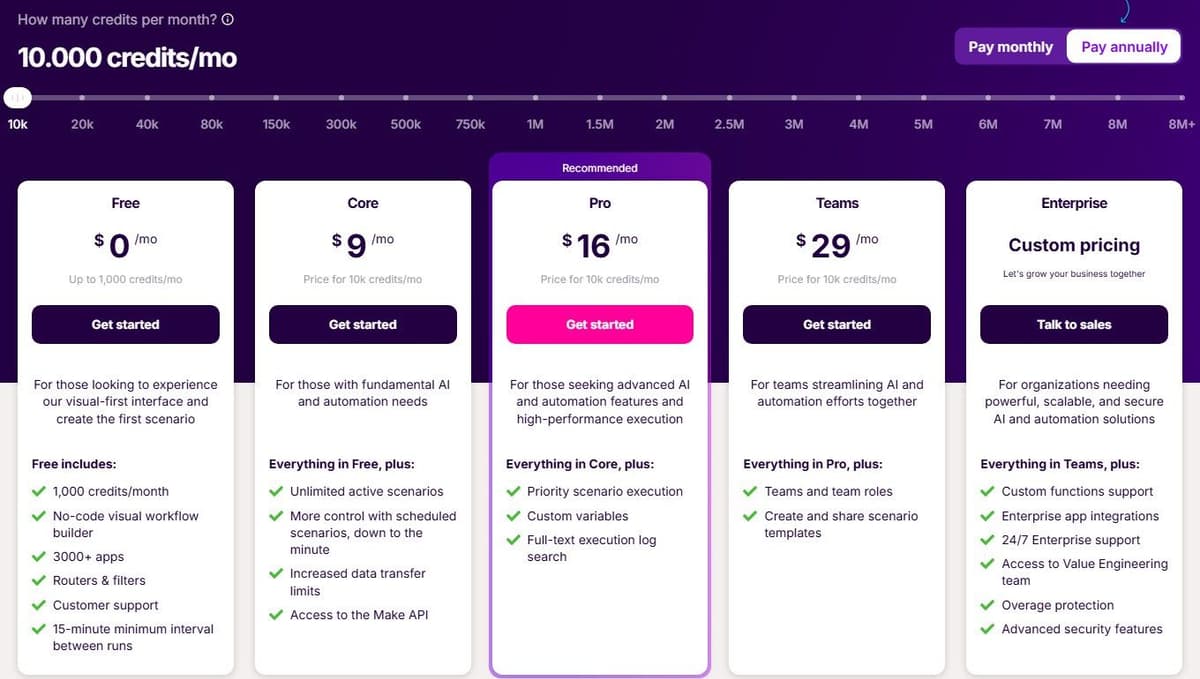
Make.com sells work. Its Free plan is $0 a month with up to 1,000 credits a month and a 15-minute minimum interval between scheduled runs. Free credits expire at the end of the term. Core is $9 a month billed annually for 10,000 credits a month, and it drops the scheduling floor to one minute. Pro is $16 and Teams is $29 a month on the same yearly billing, each for 10,000 credits a month. Core at 20,000 credits a month also costs $16 a month billed annually, or $18.82 month to month, so check the credit tier as well as the plan name. Enterprise is priced by quote and adds overage protection and advanced security features. Plans and credit volumes are broken down in our guide to Make.com pricing.
Ordinary module operations, such as adding a Google Sheets row or fetching Gmail data, consume a credit each, while Router and Filter consume none. The unit used to be called operations. Code execution is billed at 2 credits per second. Run out before the next billing cycle and you buy more in bundles of 1,000 or 10,000 at a fixed price defined in your subscription. Make.com's own comparison page says each module that processes data typically consumes at least one credit, and that AI or multi-bundle features may consume more. So the bill tracks step count and run frequency.
What the same workload costs at three volumes
For one supported simple Applet used within Free's two-Applet limit, IFTTT's subscription can remain $0 regardless of whether it runs 100 or 1,000 times, subject to service limits. A Make scenario with one trigger operation and two ordinary action operations uses three credits per event: 1,000 events require 3,000 credits and fit Core at $9 per month with annual billing. Before you compare prices, check that both platforms support the device or action you need. IFTTT pricing and the Free plan are covered in a separate guide.
Assume every workflow has one trigger and two actions, for example a new form entry that adds a spreadsheet row and sends a message. On IFTTT that is a multi-action Applet, which needs Pro or Pro+. On Make.com, started by an instant trigger, it uses 3 credits a run, as in the example above. Prices are for yearly billing.
| Workload | IFTTT plan | Make.com credits a month | Make.com plan |
|---|---|---|---|
| 2 workflows, 100 runs a month | Pro, $2.99 a month | 300 | Free, $0 a month (up to 2 active scenarios) |
| 15 workflows, 1,000 runs a month | Pro, $2.99 a month (up to 20 Applets) | 3,000 | Core, $9 a month for 10,000 credits |
| 30 workflows, 5,000 runs a month | Pro+, $8.99 a month, since Pro stops at 20 Applets | 15,000 | Core at 20,000 credits a month, $16 a month billed annually ($18.82 month to month) |
IFTTT's price follows the number of Applets you keep switched on and ignores how often they run, apart from per-service rate limits. Make.com's price follows runs and steps, and Core puts no cap on active scenarios. If each workflow had a single action, IFTTT Free would cover the first row. On monthly billing the three rows cost $4.99, $4.99 and $14.99 a month on IFTTT, and $0, $10.59 and $18.82 a month on Make.com.
What you can build: Applets and visual scenarios
IFTTT Free focuses on simple trigger-and-action Applets. Paid plans also support multiple actions, and Pro+ adds queries and filter code. Make exposes modules, routes and data processing on a visual canvas. The difference is the workflow model and available controls, not a claim that IFTTT can never perform more than one action.
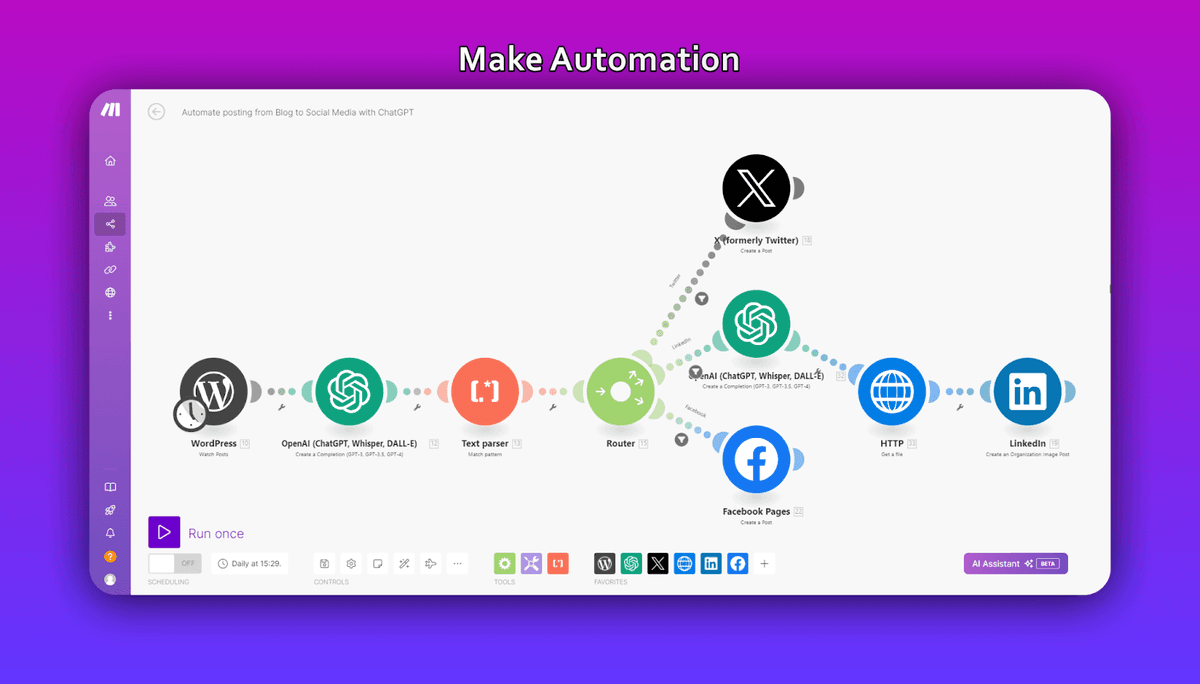
Make.com starts at the other end. You build a scenario on a canvas, and most scenarios can hold an unlimited number of modules. Routers split one run into several branches, iterators break a bundle into single items, and aggregators put the pieces back together. Make.com's standing with power users has always rested on those three, a point Zapier concedes in its own comparison against Make.com. Paid plans add the Code app for custom Python and JavaScript, and Enterprise plans include custom functions applied inline. Scenario Run Replay re-runs a workflow against historical data. As of April 2026, If-else and Merge modules were in open beta.
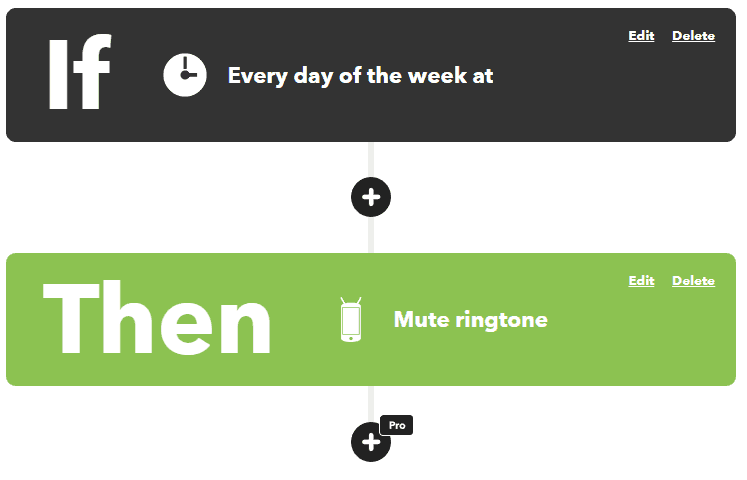
Practical differences show up the first time one event has to produce different outcomes. An Applet that mutes your phone every night at the same time is a good Applet, and nothing about a canvas would improve it. A scenario can take one new record, send it down three branches depending on a field value, loop over the line items inside it, and write one summary row at the end. Both count as automation. Only one of them is a build.
Apps, services and smart home
By its own count, IFTTT connects over 1,000 apps and services. The point is bridging brands that will not talk to each other directly. IFTTT's own smart home hub page gives the example of Philips Hue lights reacting to a Ring doorbell. That is exactly the sort of cross-brand link a single device maker's app will never build for you. IFTTT's iOS and Android apps are included on the Free plan, and social media cross-posting is one of the Applet ideas its home page promotes.
Make.com counts 3,500+ apps, again the vendor's own number. The shape of that catalog is different. To explain its own billing, Make.com reaches for adding a Google Sheets row and fetching Gmail data. That tells you where the platform lives: business software and the APIs behind it, rather than light bulbs and doorbells.
Neither count is audited by anyone outside the company that published it, and neither is a quality score. So the only reliable test is to open both catalogs and look for the five services you actually use before paying for anything. What matters is which side your things sit on. If the things you want to automate plug into a wall socket, IFTTT is more likely to have them. If they log in with a work email address, Make.com is.
Speed and reliability
IFTTT checks most triggers by polling rather than in realtime. It explains that those polling-based checks happen every hour on Free and every 5 minutes on Pro and Pro+. On the free plan an Applet can be up to an hour late by design. Fine for a nightly routine, useless for anything you are standing next to.
Make.com sets its floor by plan as well. On the Free plan, scheduled scenarios run no more often than every 15 minutes. Core brings that down to one minute, the lowest regular scheduling interval its help center lists. Scheduling is only half the picture. All Make.com plans include multi-step workflows and instant webhook execution, and IFTTT adds webhooks from Pro upward, so an event that can push itself never waits in a polling queue.
On infrastructure, Make.com states that it hosts on AWS in the EU and North America, with GDPR, SOC 2 Type II and ISO 27001 compliance and AES-256 encryption at rest. A guaranteed 99.5% uptime SLA appears only on Enterprise plans. IFTTT's plans page lists no comparable uptime commitment, so think twice before you put anything time-critical on it.
AI features
IFTTT keeps its AI services behind its top tier. Its plans page lists AI services as a Pro+ exclusive, alongside queries, filter code and multiple account connections. The AI Content Creator is available only to Pro+ subscribers, and so is the AI Summarizer, which turns long content into summaries and action items. On Free or Pro, none of these services switch on. That makes Pro+ at $8.99 a month, billed as $107.88 annually, the price of IFTTT's AI services.
Building Applets with AI is a separate track from those AI services. IFTTT Chat, promoted on the home page as Chat Create, builds or edits an Applet from a plain-language description on any plan. The IFTTT MCP server connects Claude, ChatGPT and other MCP-compatible assistants to your IFTTT services, and it is available on all plans with limits by tier: on Free an assistant can search services and Applets and create or enable free Applets, running actions starts with Pro, and queries start with Pro+. Multi-action Applets and filters still need Pro or Pro+.
Make.com spreads AI across the whole lineup. AI agents are in beta. For Make's built-in AI features, distinguish Make's provider connection from a custom provider connection. Custom connections require a paid plan and move the provider's token bill to your own account; they do not make all platform usage free. The vendor's AI agents page says they orchestrate processes across 3,500+ apps on all plans. Agents are built, run and debugged inside the Scenario Builder, and you give one context by uploading files rather than assembling a retrieval workflow first. Maia, described as a co-worker for AI and automation that turns plain language into automation and agents, comes with unlimited access on paid plans, drawing on Make credits, and a 30-day trial with 45 messages on Free. Make MCP Server points the other way: it turns scenarios into callable tools for ChatGPT, Claude, Cursor and other MCP-compatible agents, covering 3,000+ apps and 30,000+ actions.
Who should pick IFTTT, and who should pick Make.com
Sort yourself by the shape of the job rather than by which platform sounds more serious.
- Smart home and phone habits: IFTTT. Cross-brand Applets are its home ground, and two of them cost $0.00 forever with unlimited runs.
- Two or three simple automations: IFTTT Free covers two. For a handful more, Pro at $2.99 a month, billed as $35.88 annually, gives you 20 Applets and 5-minute trigger checks.
- A business workflow with branching: Make.com. One event, three destinations, a loop over line items and a filter in the middle is a scenario, not something you assemble out of Applets.
- Teams and shared ownership: Core is the entry paid scenario plan; shared team roles and templates belong to the Teams tier. Core is $9 a month billed annually and Teams is $29 a month on yearly billing. Enterprise is custom pricing with SSO via OAuth2 or SAML2, role-based access controls, audit logs and on-premises agents.
- Tight budget, heavy volume: count runs before you count features. IFTTT sells Applet slots and speed, with unlimited Applet runs on Free, while Make.com meters operations, so the same workflow costs more the more often it fires.
Zapier sits between the two. Its Free plan gives 100 tasks a month on two-step Zaps, close to what a free Applet does, and Professional costs $19.99 a month billed yearly for 750 tasks with multi-step Zaps and webhooks. Like Make.com it meters work rather than Applets, and it lists 9,000+ app integrations against IFTTT's 1,000+ services. Our Zapier vs IFTTT and Make vs Zapier comparisons cover those pairings, and our guide to Make.com alternatives lists ten other options.
A third billing model is worth knowing about before you commit to either. Latenode charges for workflow runtime in CPU seconds, calculated as runs multiplied by average seconds, rather than per operation or per step. Adding steps does not multiply the bill. The first 10,000 CPU seconds each month are free on both of its plans. Its Free plan is $0 a month forever with no credit card, 5 active workflows, a 3-minute limit per run and 10-minute polling, with webhooks instant on every plan. That model is not directly comparable to Applets or to credits, because cost depends on how long a run takes rather than how many steps it contains.





