



Quick answer: the best IFTTT alternative for each job
For multi-step business workflows, Zapier, Make and Latenode replace IFTTT Applets with multi-step logic and conditions. For a free tier that survives daily use, Activepieces gives more room than IFTTT's two Applets, and Make's two free scenarios can each run several steps. For smart home, Home Assistant runs locally. On Android use MacroDroid. On iPhone, Apple Shortcuts.
Two of the ten cost nothing extra, because they ship with a phone or a smart speaker you own.
Editorial note: Latenode publishes this article and is one of the products discussed. The comparison uses public product documentation and pricing pages. Worked examples are calculations under stated assumptions, not results from a hands-on benchmark. Recommendations describe which requirements a product may fit; they are not a measured ranking of performance or reliability.
Why people leave IFTTT in 2026
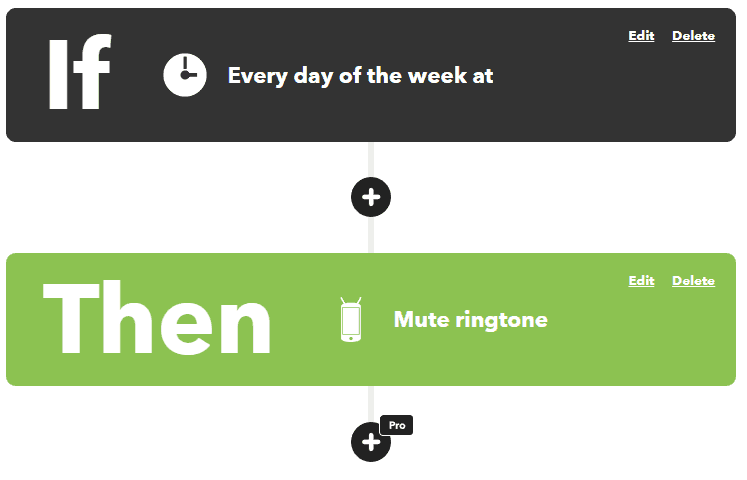
IFTTT's Free plan costs nothing forever and gives you two Applets, standard Applet speeds and unlimited Applet runs. Each Applet is capped at one trigger and one action, so a condition, a second destination or a formatting step is out of reach. Applets did grow past that shape, gaining multiple actions and conditional filters. But that happened on IFTTT's paid tiers. The Free plan is still one trigger and one action. Our Zapier vs IFTTT comparison puts the two side by side.
Speed is the other pinch. Polling-based Applet trigger checks run every hour on Free and every five minutes for Pro and Pro+ users. That is the difference between an automation that feels live and one you stop trusting. As of September 2026, Pro is $2.99 a month, billed as $35.88 annually, and lifts the cap to 20 Applets with faster speeds, multi-action Applets, webhooks and increased rate limits. Pro+ is $8.99 a month, billed as $107.88 annually, for unlimited Applets, queries, filter code and multiple account connections. AI services, including the AI Content Creator and the AI Summarizer, are Pro+ only.
No published IFTTT plan lists team seats or a shared workspace, which is usually where a small business starts shopping. What IFTTT still does well is consumer breadth. More than 1,000 apps and devices, and Applets that bridge brands, such as Philips Hue lights reacting to a Ring doorbell. Unlimited runs on a free plan is rare too. See IFTTT vs Make for a direct comparison.
A newer reason is a service leaving IFTTT, because an Applet runs only while every service in it stays on the platform. IFTTT shut down its Fitbit service after September 30, 2026. Applets that used a Fitbit trigger, query or action stopped running, and Fitbit users have to recreate them with IFTTT's new Google Health service. One user on r/ifttt put it this way: "It seems TPLink stopped supporting IFTTT... What alternatives do I have to do this?" When a device brand leaves, check whether Home Assistant supports that brand locally, with 1,500+ integrations and support for over 1,000 brands, or whether the maker's own app or a Google Home or Alexa routine covers the job.
IFTTT alternatives at a glance
Free tiers and entry prices side by side. Limits and fine print are in the sections below.
| Tool | Best for | Free plan | Paid from |
|---|---|---|---|
| Zapier | Widest app catalog | 100 tasks a month | $19.99/mo billed yearly |
| Make | Visual branching flows | 1,000 credits a month | $9/mo billed yearly |
| Latenode | AI and code-heavy flows | 10,000 CPU sec a month | $0.00012/CPU second |
| Power Automate | Microsoft 365 teams | Free with standard connectors; no sharing; eligibility applies | $15/user/mo paid yearly |
| Pabbly Connect | Tight budgets | 100 tasks a month | $16/mo billed yearly |
| Activepieces | Self-hosted open source | CE, or 1,000 credits/mo | Plus $16/mo billed yearly |
| Home Assistant | Local-first smart home | Free, self-hosted | $6.50/mo Nabu Casa |
| Google Home/Alexa | Simple home routines | Free with assistant | Not applicable |
| MacroDroid | Android, on-device | 5 macros, ads | One-time Pro upgrade |
| Apple Shortcuts | iPhone and iPad | Built in, free | Not applicable |
CE in the table means Activepieces Community Edition, the free self-hosted edition without a credit meter.
Free IFTTT alternatives compared
IFTTT's own free tier is the bar to beat: 2 Applets, one trigger and one action each, with unlimited runs. Here is what each alternative keeps free with no end date, where its free tier stops and where your automations run.
| Tool | What stays free | Main limit | Where it runs |
|---|---|---|---|
| Activepieces | Free cloud plan and the self-hosted Community Edition | Cloud: 1,000 credits a month for up to 5 users. Community Edition: no credit meter, but you pay for hosting | Activepieces' cloud or your own server |
| Latenode | Free plan, $0 a month, no card | 10,000 CPU seconds a month, 5 active workflows, 3 minutes per run | Latenode's cloud |
| Make | Free plan | 1,000 credits a month, 2 active scenarios, scheduled runs at least 15 minutes apart | Make's cloud |
| Pabbly Connect | Free plan, no card | 100 tasks a month, up to 2 workflows with up to 2 steps each | Pabbly's cloud |
| Power Automate | Free license for eligible work or school accounts | Standard connectors only, no sharing | Microsoft's cloud, plus attended desktop flows on your PC |
| Zapier | Free plan | 100 tasks a month, two-step Zaps only, new data checked every 15 minutes | Zapier's cloud |
| Home Assistant | The software itself | Needs your own hardware; remote access through Nabu Casa costs $6.50 a month | Your home network |
| Google Home and Alexa | Routines in the assistant app | Only devices that assistant supports; Google Home routines can depend on working internet | The assistant's app |
| MacroDroid | Free version with ads | 5 macros | Your Android phone |
| Apple Shortcuts | The whole app, built in | Apple devices only | Your iPhone or iPad |
A trial is not a free plan. Zapier gives new accounts a 14-day Professional trial with no card, and IFTTT gives a 7-day Pro or Pro+ trial if you have not had one before. Pick on the permanent tier, then use a trial to test whatever needs the paid plan.
Three more options sit outside the numbered list: two can be used for free, and one is paid. Huginn is an open-source, MIT-licensed system for building agents that watch the web and act for you. Its maintainers pitch it as a hackable IFTTT or Zapier on your own server, and the official Docker image is the quickest way to try it. Tasker is a paid Android app, a one-time $4.49 purchase on the US Google Play store, and its developer offers a 7-day trial as a direct download. Integrately has a free plan with 100 tasks a month on single-step automations that update every 15 minutes, and its Starter plan costs $19.99 a month billed annually for 2,000 tasks.
1. Zapier: best for the widest app catalog
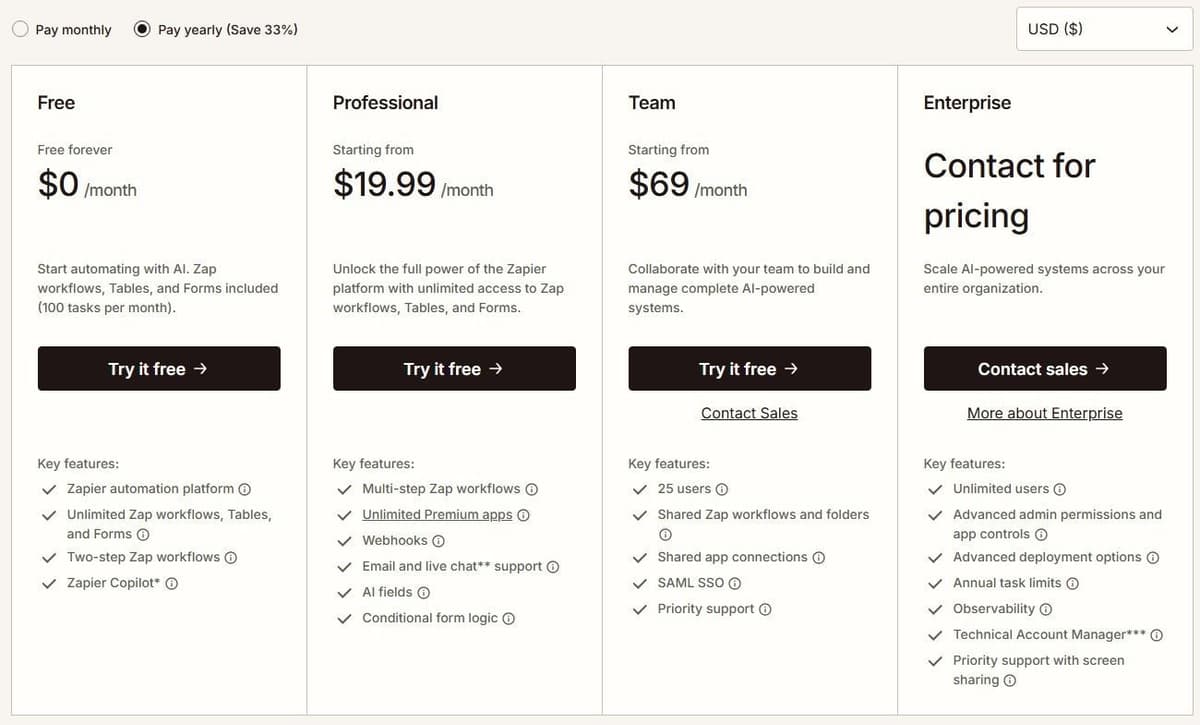
Zapier is the catalog play. It offers more than 9,000 app integrations by its own count, so an obscure tool your team depends on is more likely to be covered here. Check who maintains each integration you need and where failures are reported. Copilot, Zapier's AI building assistant, is on every plan including Free. Zapier Agents Free includes 400 activities per month. An activity is not a complete agent run: one run can consume several activities. Agents Pro includes 1,500 monthly activities. This allowance is separate from Zap task usage.
Free gives you 100 tasks a month, with two-step Zap workflows and Copilot, subject to the Free plan's daily Copilot message limit. An ordinary successful billable action uses one Zapier task; built-in exemptions and product-specific rates still apply. Polling trigger checks do not consume tasks. Only billable completed action steps do. Paid pricing opens with Professional at $19.99 a month when billed annually, covering 750 tasks, multi-step Zap workflows, unlimited premium apps and webhooks. Every new account gets a 14-day Professional trial automatically, no card required.
The catch is the floor. Starter was retired on April 2, 2024, which makes Professional the lowest-cost paid plan. And 750 tasks go quickly, because usage is pooled. Billable Zap actions, AI steps, Code steps and MCP calls use the account's task allowance at their applicable rates. Zapier SDK actions are free during the current beta. Using the SDK inside Code by Zapier does not remove the Code step's own task or runtime charges. Polling speed tracks price too, at 15 minutes on Free, 2 minutes on Professional and 1 minute on Team and Enterprise.
2. Make: best for visual branching workflows
Make gives you a canvas instead of a list. Scenarios split through routers, loop through iterators and merge back, the closest thing here to redrawing an Applet as a flowchart. Zapier's own Make comparison says Make's power-user reputation came from unlimited routers, iterators and aggregators. Our Make vs Zapier comparison goes through pricing and building on each.
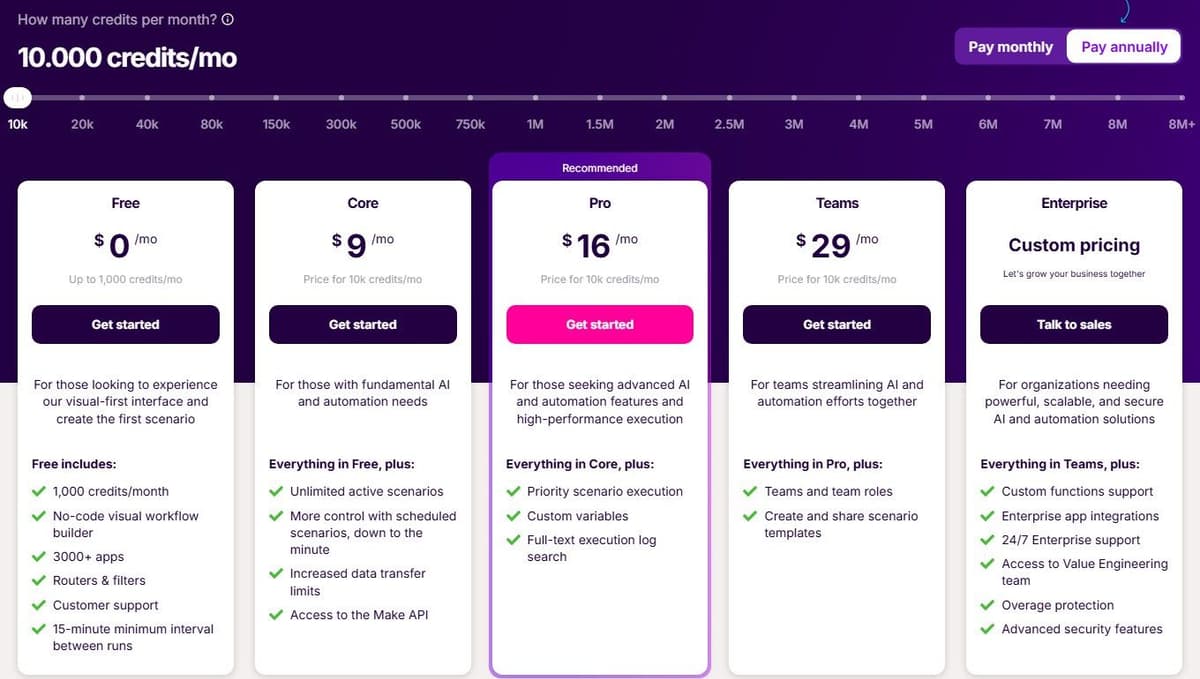
Free includes up to 1,000 credits a month, access to 3,500+ apps and a 15-minute minimum interval between scheduled runs. Ordinary module operations, such as adding a Google Sheets row or fetching Gmail data, spend a credit each, so a ten-module scenario is not one credit. Router and Filter spend none. As of September 2026, Core is $9 a month billed yearly for 10,000 credits, and brings scheduling down to the minute. Make AI Agents are available on all plans with Make's AI Provider. Connecting your own AI provider requires a paid Make plan. With a custom connection, Make charges for operations and the AI provider bills token usage separately. Maia, which turns plain language into automations and agents, comes with unlimited access on paid plans, drawing on Make credits, and a 30-day trial with 45 messages on Free, as of October 2026.
Credits are the thing to watch. Code execution costs 2 credits per second, and a scenario with many modules spends its allowance faster than a task counter suggests. Extra credits come in bundles of 1,000 or 10,000 at a price fixed in your subscription, if you run dry before the next cycle. That softens an overrun without removing it.
3. Latenode: for step-heavy workflows with AI and code
Latenode is a visual builder where the bill follows runtime rather than steps. You pay for execution time in CPU seconds, runs multiplied by average seconds, with no per-operation and no per-step fees. The first 10,000 CPU seconds each month are free on both plans. After that, Pay as you go starts at $0.00012 per CPU second, with lower rates in higher brackets and each bracket billing only the execution time inside it. For the wider category, see our guide to no-code automation tools.
On the Free plan you pay $0 a month forever, with no credit card, and get all apps, AI agents, RAG knowledge storage, a headless browser and a built-in database. The cap is 5 active workflows, one execution worker and three minutes per run. Pay as you go lifts that to unlimited active scenarios, 5 parallel workers, ten minutes per run and 30 days of run history. An AI Copilot sits inside every workflow, alongside an AI agent builder for business processes and 335+ LLM models under one subscription.
The trade is predictability. Cost depends on how long a run takes, so it does not map cleanly onto Zapier tasks or IFTTT Applets. And a canvas with code nodes and agent settings takes longer to learn than an Applet. IFTTT pricing and the Free plan are covered in a separate guide.

4. Microsoft Power Automate: best for Microsoft 365 teams
Power Automate is the obvious move when the work already lives in Microsoft 365. It runs cloud flows that connect services. It also runs desktop flows that drive Windows applications through their interface when no API exists, a job the app-to-app connectors on this list do not attempt. If Power Automate is on your list, our guide to Power Automate alternatives compares cross-platform options. For a direct matchup, see Zapier vs Power Automate.
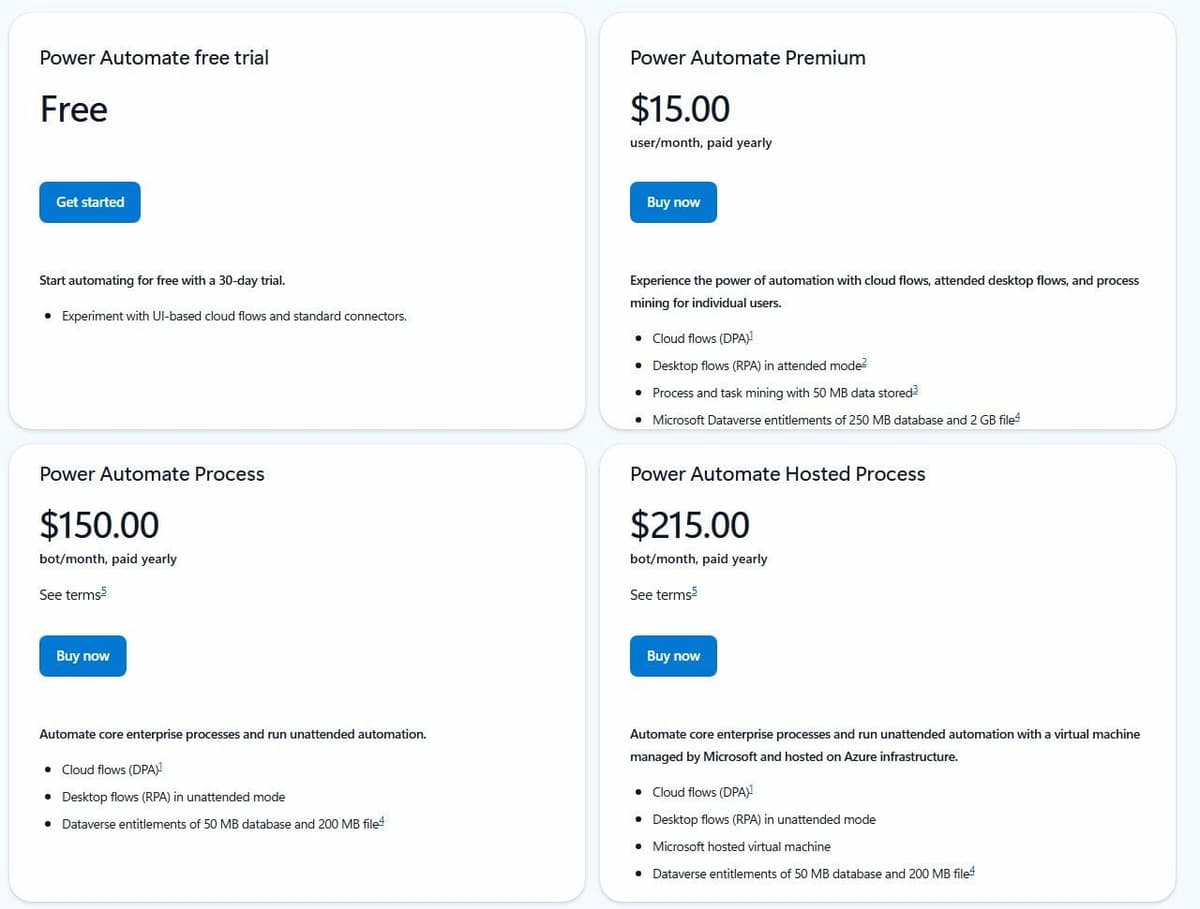
Power Automate has a permanent Free license for eligible work or school accounts in a Microsoft Entra tenant. It covers cloud flows with standard connectors without sharing, plus local attended desktop flows. Premium connectors and broader deployment requirements need additional licensing. Premium is a user license; Process can license a cloud flow for premium and custom connectors regardless of the owner or triggering user's license. Desktop automation has further licensing conditions. Free, a Premium trial and Process are different options.
Premium costs $15.00 per user a month paid yearly. It includes cloud flows, attended desktop flows for robotic process automation and process mining for individual users, with Microsoft Dataverse entitlements of 250 MB database and 2 GB file storage. Unattended work is licensed per bot: Process is $150.00 per bot a month paid yearly, and Hosted Process is $215.00 per bot a month with a Microsoft-hosted virtual machine.
That structure is also the limitation. Per-user and per-bot licensing climbs faster than a task or credit bundle, and most of the value sits inside the Microsoft stack. Someone who just wants a lamp to react to a doorbell is paying for governance they will never open. Licensing changes often, so check Microsoft's pricing page before you budget.
5. Pabbly Connect: best for tight budgets
Pabbly Connect is aimed at people who resent recurring bills. Its free plan needs no credit card. The company claims 2,000+ app integrations available across all plans, rather than locking connectors behind higher tiers.
The interesting part is what does not count. Internal steps, including Filter, Router, Text Formatter, Number Formatter, Schedule, Iterator, Date/Time formatter, Email Parser, JSON Extractor and Array Functions, are not billed as tasks. So routing and formatting steps do not use tasks. Pabbly also sells lifetime deals alongside monthly and yearly subscriptions.
Pabbly Standard includes 10,000 tasks per month at $16 per month with one-year billing ($194 a year at checkout). The monthly plan is $19. Its Free plan includes 100 tasks per month. Those are task allowances, not workflow-run allowances: two billable external actions per event consume two tasks. Longer commitments and lifetime offers have different terms and should be compared separately.
6. Activepieces: best open-source alternative you can self-host
Activepieces is the one you can take home with you. It is open source at the core, offers 760+ integrations, and can be embedded inside another product.
Activepieces Community Edition is a free, self-hosted option built on the MIT-licensed core. It has no credit meter or cap on runs and users. You pay for hosting and operations, and for any external services your flows use. Community Edition excludes features such as SSO, audit logs, projects and Git Sync. Its credit-metered plans cost the same on Activepieces' cloud or your own servers, and their credit allowances do not apply to the free Community Edition.
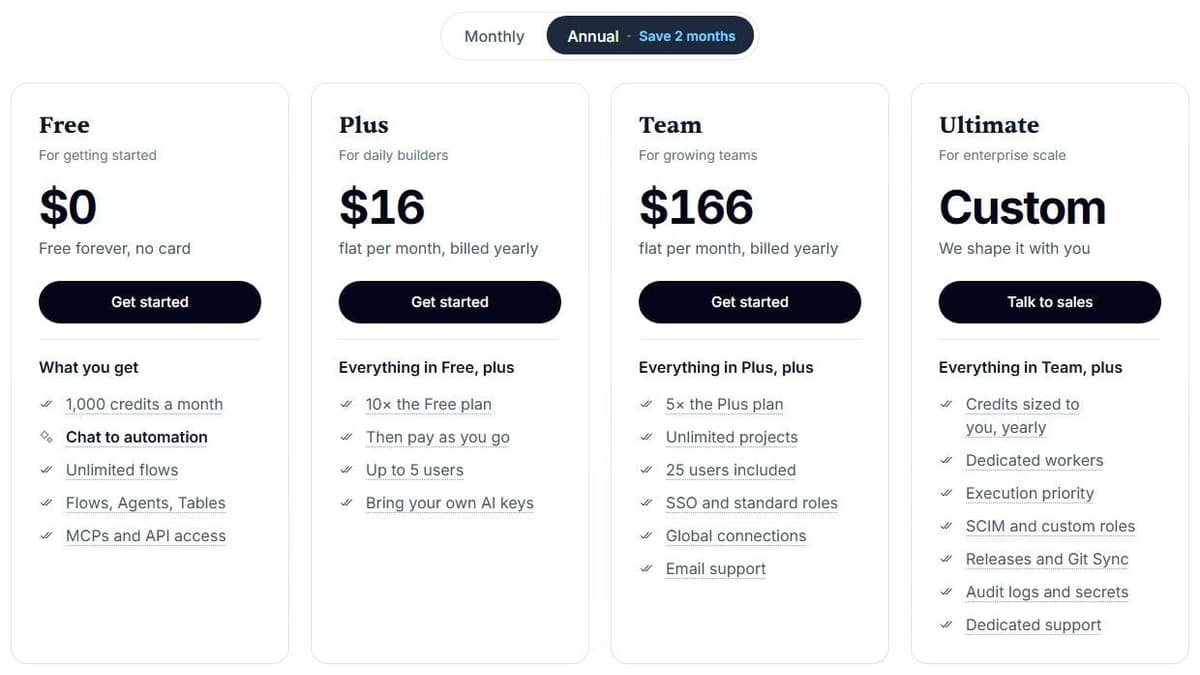
On those plans, billing is per run rather than per step: one credit covers a whole run regardless of how many steps it contains, apart from AI steps, which cost extra credits. With Activepieces-supplied AI models, each AI step adds 2 credits for a fast model, 10 for a smart model or 20 for a frontier model; agentic actions add one credit each. On Plus and higher plans, using your own AI provider keys makes each AI step cost one Activepieces credit, with model usage billed separately by your provider. The Free plan gives 1,000 credits a month for up to 5 users. Plus is $16 a month billed annually, with 10,000 credits a month for up to 5 users. Team is $166 a month with 50,000 credits for 25 users, and Ultimate is custom. Overage on Plus and Team costs $0.007 per credit.
Unlimited automations and every integration on every plan make the cheap tiers genuinely usable. The limitations are operational: a self-hosted install puts updates, backups and uptime on you, and on the Free plan the pricing page describes the reset of the 1,000 monthly credits both as daily and as monthly, so test a heavy afternoon before you rely on it.
7. Home Assistant: best for smart home control that stays local
Home Assistant is the answer for anyone who left IFTTT because a cloud service decided their lights should stop working. It is open source home automation that puts local control and privacy first. It talks to devices on your own network, and falls back to the cloud only when there is no other option.
"Home Assistant keeps your data local, no need for a cloud. Home Assistant communicates with your devices locally, and will fallback to pulling in data from the cloud if there is no other option."
Source: home-assistant.io
Coverage is the surprise. It ships 1,500+ integrations with support for over 1,000 brands, enough to absorb most of what a smart home Applet was doing. And because the logic runs in the house, fewer of your automations depend on a vendor's servers staying up. Remote access and related conveniences come from the optional Nabu Casa cloud subscription, which costs $6.50 a month or $65 a year, excluding local sales tax.
The cost is your time. You run the software yourself on your own hardware, so setup, updates and troubleshooting are your job. It is built for devices in the home, not for connecting business SaaS tools. So it replaces the smart home half of IFTTT and leaves the office half to something else.
8. Google Home and Alexa Routines: best free replacement for simple smart home Applets
If your Applets only turned lights on at sunset or ran a good-morning sequence, the assistant you already own does that for free. Google Home Routines are a series of actions for home devices that automate tasks. A Personal Routine can start from a voice phrase, and a Household Routine can run on a schedule for everyone in the home.
A few gates are worth knowing first. Only people with Admin access, or Members with Settings permission, can create and manage Google Home Routines. Routines are available only in select regions and languages. They also depend on working internet, Wi-Fi and service availability from Google and the device manufacturers, so this is not local-first. According to Amazon's Alexa help pages, you create an Alexa Routine in the Alexa app. Open More, select Routines, add an event that starts the routine and an action that it performs, then save. Routines automate things like controlling smart home devices, playing music and getting weather updates.
The limitation is the walled garden. Each assistant automates the devices it supports, inside its own app. That is the gap IFTTT filled, by linking one brand's doorbell to another brand's lights. If your automation crosses ecosystems, treat this pair as a partial replacement and Home Assistant as the complete one.
9. MacroDroid: best for Android on-device automation
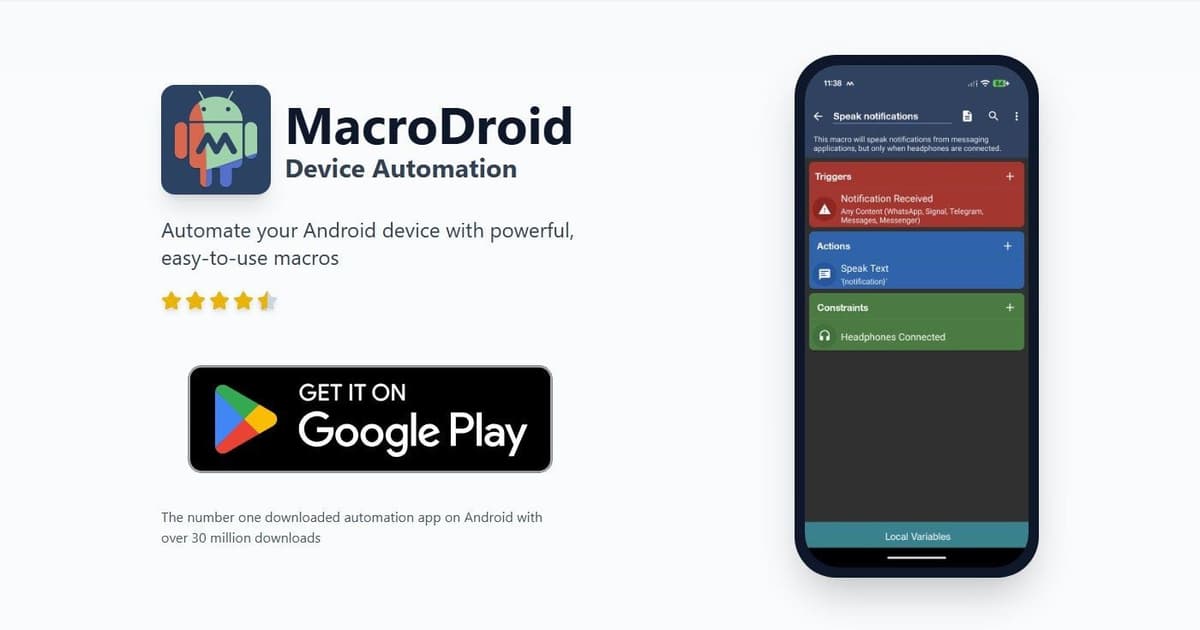
MacroDroid runs automation on an Android phone, with over 350 built-in triggers, actions and constraints. Local device actions can work without a cloud automation service, while actions that call an external API still depend on that service, connectivity and permissions. Macros combine triggers, actions and constraints to control what starts the work, what it does and when it may run.
That third element is what makes it more expressive than an Applet. Location-based actions are part of the set, so a macro can fire when you arrive somewhere. Constraints let a macro run only when your conditions hold, rather than every single time the trigger fires.
The free version is ad-supported and allows up to 5 macros, enough to test the idea and not much more. Pro is a one-time payment that removes the ads and gives you unlimited macros with no subscription. The current amount is on the app's store listing, which is where to check it, since store pricing varies by region. It is Android only and on-device. Nothing happens while the phone is off.
10. Apple Shortcuts: best for iPhone and iPad
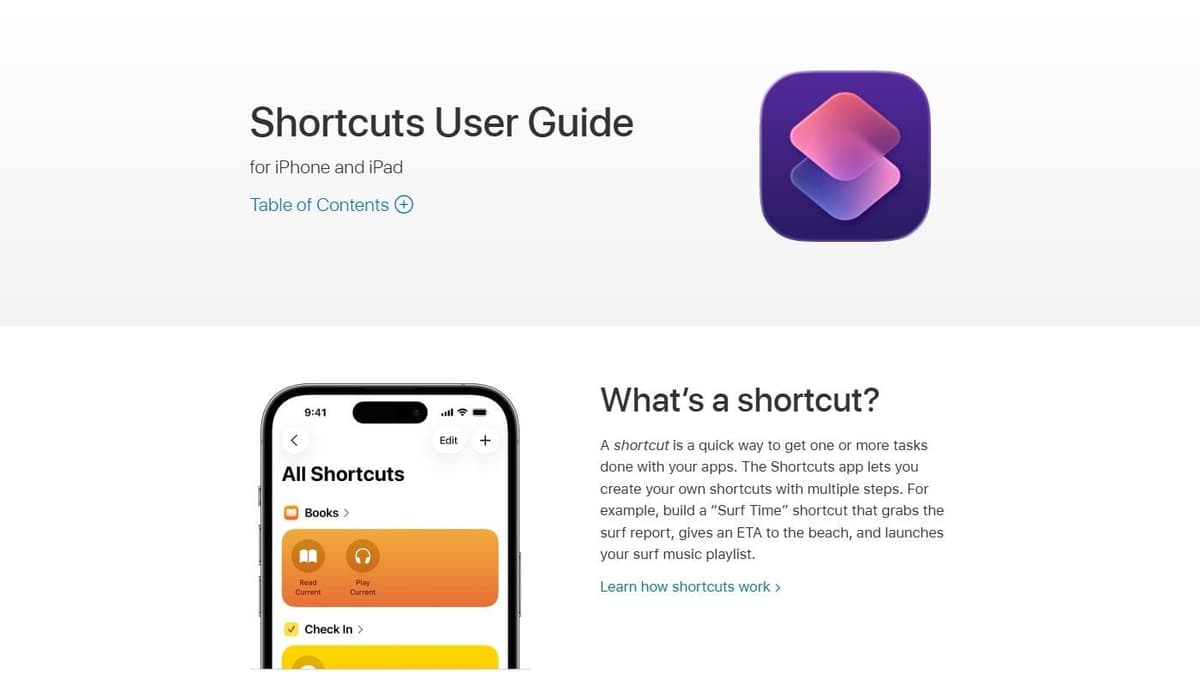
Apple Shortcuts is already installed on the iPhone or iPad in your hand, and it costs nothing. Apple defines a shortcut as a quick way to get one or more tasks done with your apps. The Shortcuts app lets you build your own multi-step shortcuts, instead of only running the ones Apple suggests.
"A shortcut is a quick way to get one or more tasks done with your apps. The Shortcuts app lets you create your own shortcuts with multiple steps."
Source: support.apple.com
An action is a single step in a task. Combine actions and you reach apps and content on Apple devices, plus services on the internet. That covers a large share of what a consumer IFTTT Applet was doing. There is no plan to choose, no task counter to watch and no quota to run out of halfway through the month.
The boundary is obvious. Shortcuts stops at the edge of Apple's ecosystem. An Android phone in the same house, a Windows desktop or a workflow that must run whether or not a device is awake needs one of the platforms above. Many people pair the two: a shortcut as the trigger, a webhook into a cloud workflow for the heavy part.
How to choose: business, free, smart home or phone
Start from the job, not the tool. If the automation touches more than two business apps, needs a condition, or has to cope when an API fails, you are choosing between Zapier, Make, Latenode, Activepieces and Pabbly Connect. The real decider is how each one counts usage: tasks per billable action, credits per operation, credits per whole run, or seconds of runtime. If it touches lights, locks, sensors or speakers, Home Assistant is the substantial answer and the routines in Google Home and Alexa are the free, shallow one. If it touches the phone in your pocket, MacroDroid on Android and Apple Shortcuts on iPhone can see device state that no cloud service ever will.
Free IFTTT alternatives differ most in what the free tier permanently includes, so read the free plan, not the trial. For phone-only routines, start with the automation available on your device. For local home control, check whether Home Assistant supports the exact devices and operations you need. For business workflows, compare the permanent free allowances and connector restrictions separately from trials. A free self-hosted edition removes the subscription meter, but still needs hosting, updates and someone responsible for failures.
Pairing usually beats picking. A common setup is a phone automation as the trigger, a cloud platform for the multi-step middle, and Home Assistant for anything that must keep running at home. Build the same workflow on two platforms and compare what each actually charged after a month, before committing to an annual plan.
Typical Applets and where they go
Five common Applets, the tool that can take each one over, and the plan it needs.
| Applet | Move it to | Plan needed | What changes |
|---|---|---|---|
| Lights on at sunset | Google Home routine | Free in the Google Home app | A routine can start around sunrise or sunset on the days you choose; it only reaches devices Google Home supports |
| Doorbell press turns on another brand's lights | Home Assistant | Free software on your own hardware | The link runs on your home network instead of a cloud service; check that both brands are among its 1,500+ integrations |
| Text someone when you arrive somewhere | MacroDroid on Android, Shortcuts on iPhone | MacroDroid free version (5 macros); Shortcuts is built in | The phone does the work. MacroDroid can fire when you arrive at or leave a place and can send SMS; Shortcuts has an Arrive trigger for a location you choose |
| New email posted to a Slack channel | Zapier | Free, 100 tasks a month | It is a two-step Zap, which the Free plan allows; each email passed on uses one task, and Free checks for new mail every 15 minutes |
| One post shared to two social networks | Make | Free, 1,000 credits a month | Two actions needed a Pro multi-action Applet on IFTTT and go past Zapier Free's two steps, but fit one Make scenario; each ordinary module run spends a credit, so confirm each network's app can publish posts |
Moving your Applets: a short checklist
- List every enabled Applet with its trigger, its action and how often it genuinely fires.
- Delete the ones you never noticed running; most accounts carry several of those.
- Sort what remains into business, smart home and phone piles; they go to different tools.
- Test the replacement against sample data in a sandbox or separate destination. If both versions run during comparison, allow only one to write to production. Use a stable event ID to prevent duplicate records, then switch the trigger after comparing outputs, errors and usage.
- Reconnect accounts deliberately, checking each platform's limit on connected authorizations.
- Cancel or downgrade IFTTT only after a full billing cycle on the replacement.




