



Quick answer: the best invoice processing automation software for each need
The best invoice processing software depends on the step you are missing. For accounts payable (AP) automation, where supplier bills are approved and paid in one system, shortlist BILL for AP approvals and payments, Ramp for free AP software with cards, and Melio for small-business bill pay. If you only need the data pulled out of invoices, look at Rossum for enterprise document AI, Nanonets for usage-based workflows, Docsumo for finance document processing and Docparser for parsing into spreadsheets. For APIs, look at Veryfi for a free OCR API tier and Mindee for page-based API processing. QuickBooks Online handles ledger-based bill pay, Zoho Books accounting, and Latenode custom connecting workflows.
Prices are in US dollars as listed in September and October 2026, with the vendor's payment period and billing unit, and quote-based products are marked as such. The list separates capture from approvals and payments, and the numbering is a reading order rather than a ranking. Latenode is our own platform and is held to the same criteria as the rest: here it is the workflow layer, not an AP system with its own payments and audit trail.
What invoice processing automation software does in 2026
An invoice workflow begins with a document and ends with an approved accounting outcome. Design it around capture from email, a PDF, a supplier portal or a scan, then extraction of header and line-item fields. Validation against your records comes next, then approval, then payment with an update to the ledger. Different products cover different portions of that route. See business process automation tools for workflow and BPM platforms.
Finance teams call this process accounts payable (AP) automation. Invoice capture is the intake step, where a bill arrives by email, upload or scan and its fields are extracted. Matching checks the invoice against your records: two-way matching compares it with the purchase order, and three-way matching adds the goods receipt, so you pay only for what was ordered and received. The aim is less manual data entry, fewer duplicate payments and approvals that finish before an early payment discount runs out.
AP platforms combine bill handling with approvals and payments. Spend-management products bring cards into the same buying decision. Document AI and OCR APIs focus on extracting data. Parsers can feed a spreadsheet or another system, while an accounting platform may already provide the bill-pay destination. A workflow layer connects the stages when they live in separate tools.
Before comparing prices, identify the unit. A page, a document, a block run, a credit, a user and a payment do not measure the same thing. Budget the subscription, the required commitment and the transaction fees for the process you actually intend to run.
Invoice processing software at a glance
The entry column distinguishes recurring free access from starter credits and trials. Read the relevant section. It covers commitments, payment charges and allowance conditions.
| Tool | Best for | Meter | Entry price |
|---|---|---|---|
| BILL | AP and payments | User plus payments | From $49/user/month |
| Ramp | AP with cards | User and platform | Free plan |
| Melio | Small-business bill pay | Plan plus payments | Free plan, no bill pay |
| Rossum | Enterprise document AI | Quoted volume | See annual quote |
| Nanonets | Document workflows | Block runs | Free starting credits |
| Docsumo | Finance document AI | Pages and plan | Quote only; trial |
| Docparser | Spreadsheet extraction | Parsing credits | $39/month monthly |
| Veryfi | Document OCR API | Documents | Free plan |
| Mindee | Page-based OCR API | Credits per page | See annual terms |
| QuickBooks Online | Bill pay in the ledger | Plan plus payments | Free plan, no bill pay |
| Zoho Books | Accounting workflows | Organization | Free plan |
| Latenode | Custom workflows | CPU seconds | Free plan |
1. BILL: best for AP approvals and payments in small and mid-size businesses
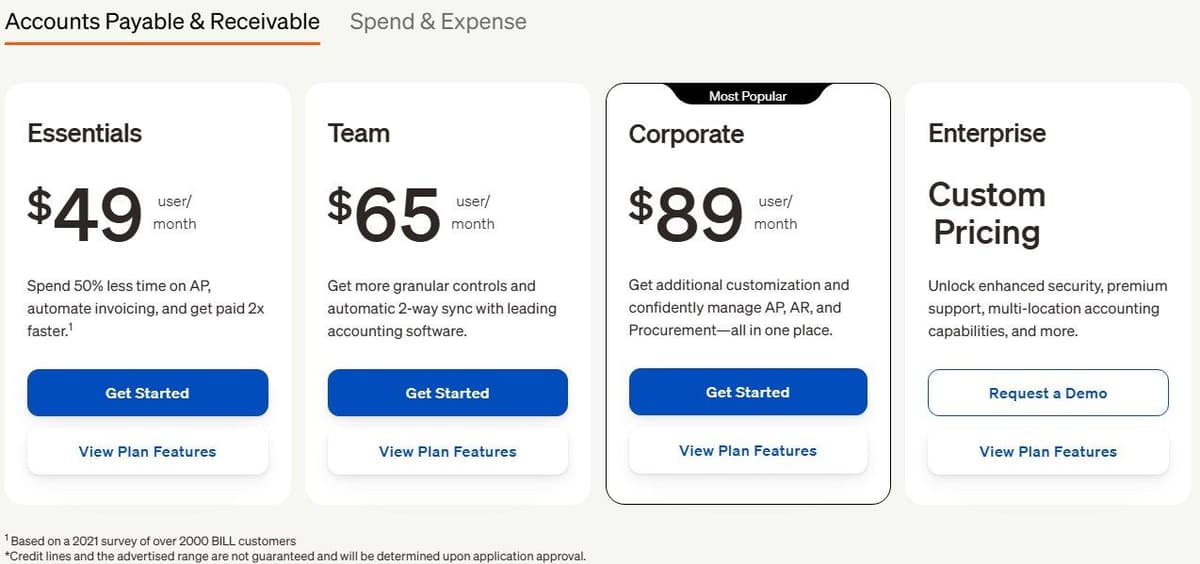
BILL Essentials, Team and Corporate list $49, $65 and $89 per user per month respectively, with commitment and purchase minimums to confirm. Essentials uses CSV import and export. Team adds automatic accounting sync, while Corporate includes custom approval policies and procurement. BILL says its paid AP and AR subscriptions come with a free trial in most cases, and does not publish its length.
"Manually integrate with accounting software via CSV file import/export ... Automatic 2-way sync with QuickBooks Online, QuickBooks Pro, QuickBooks Premier, and Xero ... Set custom approval policies ... Create and send purchase orders"
Source: bill.com
Bank- or BILL-balance-funded payments cost $0.59 per ACH payment or $1.99 per mailed check. International USD wires cost $19.99 USD per payment. International FX wires or local transfers have no transfer fee, though exchange rates apply. Card-funded payments carry a 2.9% fee.
Bank-funded instant payments cost 1.0% per payment, with a $9.99 minimum and $100 maximum fee. Expedited ACH costs $11.99 per payment subject to cutoff times. Expedited checks cost $24.99 overnight, $19.99 for two-day or $14.99 for three-day delivery, excluding weekends and bank holidays. So map the payment methods you expect to use before you weigh the subscription alone. Faster delivery and a different funding method can change the total even when the plan stays the same.

2. Ramp: best free AP automation with corporate cards
Ramp Free lists $0 per user per month. It includes corporate cards, automated invoice extraction, configurable approval workflows and basic QuickBooks Online and Xero integrations. That combination is worth a look when you need to cover company spending and supplier bills. Weigh the free software against the terms of the payment methods and card products you would use.
"$0/mo/user ... Corporate Card ... Automated invoice extraction (OCR) ... Configurable approval workflows ... QuickBooks Online and Xero integrations"
Source: ramp.com
Plus lists $15 per user per month plus the platform fee based on team size. The page advertises a 20% saving with annual billing. It does not give the platform-fee amount, so the seat rate alone will not budget the purchase.
Plus adds automated batch payments, payment release approvals and auto-coded line items. Procurement is an add-on. When you test it, keep invoice extraction apart from the controls that approve and release a payment. Ask for a quote that names the platform fee and any required procurement scope, then compare it with what Free already includes.
3. Melio: best free bill pay for very small businesses
Melio Go is free forever for one user and includes 5 free ACH payments each month. Additional ACH payments cost $0.50 per payment. Free bill-pay software does not make every transaction free.
Core normally costs $25 per month plus $10 per additional user per month, or $20 per month billed annually plus $8 per additional user per month. It includes 20 free ACH payments monthly, accounting sync, batch payments and custom approval workflows. Boost normally costs $55 per month plus $10 per additional user per month, or $44 per month billed annually plus $8 per additional user per month. It comes with 50 free ACH payments monthly.
After those allowances, the additional ACH fee stays $0.50 per payment. Standard bank-funded checks cost $1.5 per check, and standard card-funded payments carry a 2.9% fee. Melio's cards show Core and Boost at $0 for the first 90 days and the regular monthly price after that, and an account that has not subscribed by the end of the period moves to the free Go plan. Price the regular subscription and your transaction mix rather than the introductory period. For a small team, required users and approval duties may matter as much as payment volume.
4. Rossum: best enterprise AP document AI
Rossum Starter starts at $18,000 per year on a minimum one-year contract, and the quote defines volume and scope. Pricing depends on the pages or documents processed and workflow complexity. Ask what volume the quote includes, and do not read the starting annual amount as a per-invoice price.
Starter includes email, API and manual document ingestion with a validation screen for exceptions and human review. Business adds master data matching. Enterprise adds a sandbox, while Ultimate adds multi-document transactions. Those differences mean the purchase covers the surrounding process as well as the extraction step.
The 14-day trial covers documents such as invoices, sales orders, certificates of analysis and packing lists. Test it with representative documents and deliberate exceptions. Ask how the quoted setup routes a failed match, preserves the original document and returns corrected data to the destination you intend to keep.
5. Nanonets: best pay-as-you-go document workflows
Nanonets starts accounts with $50 in free credits without requiring a card, then offers $100 per month for 100 credits. It describes a credit as prepaid usage spent across workflow blocks, so that $100 buys $100 of the block runs priced below rather than 100 documents. It says there are no platform fees or seat licenses. That describes the charging model rather than unlimited access. Starter includes up to 3 users alongside data extraction, API access, email integration and cloud storage connectors.
The execution meter is a block run. Simple operations cost $0.02 per run, standard AI costs $0.10 per run and complex AI costs $0.30 per run. So routing a document and extracting its data each add to usage. Count the blocks your own workflow runs, including the path a document takes when it needs another pass.
A typical invoice workflow uses 4-6 blocks per document according to the vendor example. Read that as an illustration rather than a fixed price for every invoice. The selected block types determine the bill. Nanonets says prepaid credits never expire, so credit validity is a different question from how often you buy them.
6. Docsumo: best document AI for finance teams
Pin down the trial before you plan an evaluation batch. The plan card advertises 14 days, up to 1,000 pages and 10 user licences. Another FAQ answer says 14 days, 100 pages and one user at a time. The plan card and FAQ disagree; confirm the trial allowance.
Business adds classification, validation, database mapping, custom document pipelines and unlimited user licences. Enterprise adds AI workflows and cross-document validation. Paid plans are quote-based. Docsumo advertises up to a 10% annual-subscription discount, with setup fees charged separately.
The billing FAQ says unused monthly credits do not roll over, while annual subscribers receive credits upfront for the subscription term. Bring your expected document pattern to the quote discussion. A steady workload and an irregular batch workload hit allowance timing differently, and the trial figures themselves still need confirming.
7. Docparser: best rule-based parsing into spreadsheets
Docparser is a candidate when the immediate destination is structured data rather than a payment platform. It lists downloads to Excel, CSV, JSON and XML, with Smart Tables on Professional and higher plans. Use the evaluation to find out whether your documents suit a parsing configuration you can maintain.
With monthly billing, Starter costs $39.00 per month for 100 parsing credits, Professional $74.00 per month for 250 credits, and Business $159.00 per month for 1,000 credits. With yearly billing, the displayed monthly rates are $32.50, $61.50 and $133.00 respectively, with 1,200, 3,000 and 12,000 parsing credits per year.
A parsing credit covers a document of up to 5 pages. The monthly Starter selector shows an equivalent $0.3900 per credit within the $39 monthly plan. That is not a separate usage-only offer. Docparser offers a 14-day trial without a credit card. Keep the annual credit allocation apart from the monthly allowance when you compare billing options. Test variations in document layout before a parser becomes responsible for production data.
8. Veryfi: best OCR API with a free tier
Veryfi Free covers up to 100 documents per month on a free-forever tier. That gives you a small recurring allowance for trying a document API. Do not read it as unlimited production processing.
Starter lists $0.16 per invoice and $0.08 per receipt, subject to a $500 monthly minimum commitment. The card describes that $500 monthly minimum as buying fewer than 5,000 documents. The default receipt calculator displays 6,250 receipts for the same $500 monthly minimum. The card and receipt calculator show different volumes; confirm the document mix.
Veryfi defines an API transaction as extraction from a document spanning no more than 15 pages. Longer documents require custom account configuration. So the meter counts documents within that stated boundary rather than charging for every page. Compare the document categories and lengths you expect to send, and keep the monthly minimum in any estimate. Do not reuse a receipt-only calculator state as an invoice-processing allowance.
9. Mindee: best developer OCR API priced per page
Mindee offers a 14-day trial. With annual billing, Starter lists $53 per month and $636 per year. Pro lists $134 per month and $1,608 per year. Both come with 6,000 credits selected, and with the selected credit period to confirm.
The default rate is 1 credit per processed page, or 1.5 credits with a confidence score. Utilities cost 0.25 credits per page, with the utility charge waived for pages linked to an extraction template. So pair any page count with the processing mode.
According to Mindee, there are no complexity upcharges or hidden processing fees, subject to its credit and overage rules. Those rules include a 20% surcharge for extra credits, and unused credits expire at the end of the subscription period. Confirm the selected allowance period and total annual price before budgeting from the rounded monthly display.
10. QuickBooks Online: best bill pay inside the ledger
QuickBooks Online keeps the bill-pay decision close to the accounting destination. Advanced includes bill payments with approval workflows and Bill Pay Elite. Simple Start advertises free ACH bill payments, with $0.50 per additional standard ACH transaction above the included amount. Monthly allotments may vary.
Simple Start, Essentials, Plus and Advanced show regular prices of $38, $85, $140 and $340 per month respectively. The advertised promotion cuts those to $19, $42.50, $70 and $170 per month for the first 3 months, subject to eligibility. The page offers a 30-day free trial as an alternative to the discount. Price the regular subscription after the promotion before you pick a route.
QuickBooks Online Free allows 2 invoices per month, or unlimited invoicing if the business qualifies for and enables QuickBooks Payments. That condition covers outgoing invoices. It is not an allowance for extracting supplier invoices. If you are buying for AP, ask which bill capture, approval and payment features your subscription includes, and pin down the free ACH allotment for that purchase.
11. Zoho Books: best for lower-entry-price accounting with AP workflows
Zoho Books Free includes 1 user and 1 accountant while financial-year revenue does not exceed $50K. On the US page, Standard, Professional, Premium, Elite and Ultimate cost $20, $50, $70, $150 and $275 per organization per month with monthly billing. Billed annually, the same plans cost $15, $40, $60, $120 and $240 per organization per month, excluding local taxes.
Annual sales-invoice caps are 1,000 on Free, 5,000 on Standard, 10,000 on Professional, 25,000 on Premium and 100,000 on Elite and Ultimate. Paid plans include 3, 5, 10, 10 and 15 users respectively. Extra users on a paid base plan cost $3 per user per month, or $2.50 per user per month billed annually.
Professional adds purchase approvals and workflows. The BillPay add-on for paid base plans costs $69 per month, or $59 per month billed annually. It lists 100 ACH vendor payments, with allowance reset and extra payment fees to confirm. Keep sales-invoice caps separate from incoming bills when sizing the purchase.
12. Latenode: best for custom capture-to-ERP pipelines with LLM and code steps
Latenode gives you workflow building blocks: a visual builder, AI Copilot, an AI Agent builder and 335+ LLM models under one subscription. You can wire webhook triggers, a built-in database and custom JavaScript into a document-routing design. Its headless browser handles website automation when there is no API. See no-code automation tools for a broader comparison of visual builders.
Consider it for connecting capture, extraction and review to an existing destination. Work out how to reach your own mailbox and ledger before you commit to a design. None of that adds up to a ready-made AP platform, and none of it guarantees invoice-field accuracy.
Free costs $0 per month without a credit card, with 10,000 CPU seconds monthly and 5 active workflows. Pay as you go has no base fee and the same monthly CPU allowance, then charges $0.00012 per CPU second within the 10,001-100,000 bracket, with lower rates higher up. Steps do not multiply the bill. Runtime use follows the run duration. Paid external-provider nodes can add usage charges at $1 per PnP token. Keep those provider charges separate from the workflow-runtime estimate.
How to automate invoice processing
Start with capture. Decide how invoices will enter the process and how the original document stays available to reviewers. Include the awkward cases your team already receives, such as supplier portals and scanned documents, rather than designing only around a clean sample PDF.
Next, extract the fields the destination needs. A configurable parser may be enough for predictable documents. Look at document AI when the layouts and content vary. Treat either choice as a hypothesis to test on your suppliers' invoices. Record corrections and failed cases before making an accuracy claim.
Plan for suppliers who change their layout without warning. Rules written for one layout may not match the next, so send any document that misses a required field or fails a total check to a review queue and fix the rule from there; Rossum's Starter includes a validation screen for exception handling and human review. Check duplicates on supplier name and invoice number rather than on the email, because the same invoice can arrive again inside a forwarded or quoted message. One user on r/rpa, receiving documents from 200+ suppliers, noted: "Some of them change their layout without telling anyone."
Then validate and match. Check supplier identity, invoice references, currencies, line items and the relationship to purchase orders or receipts. Define how suspected duplicates and missing information reach a person. An extracted value is not the same thing as an approved business record.
Decide in advance what happens when a purchase order, goods receipt and invoice do not match: set a tolerance for small price or quantity differences, name who resolves each kind of mismatch, and record why an invoice is on hold where approvers can see it rather than in email threads. Matching sits at different tiers: Rossum adds master data matching on Business, and Zoho Books adds purchase orders and purchase approvals on Professional. One user on r/Accounting asked: "Do you still have to check Excel, emails, ERP, etc. to figure out why an invoice is stuck?"
Route the result for approval under your team's authority rules. After approval, pay through the chosen payment system and sync the outcome to the ledger. Build the audit trail into the design, and name who handles a rejected payment or failed update. A useful evaluation follows one document all the way through, correction and resubmission included.
How to choose invoice processing software
Begin with monthly invoice volume and the shape of those documents. Count pages as well if you are looking at a page-based API, and separate receipts from invoices where document types have different rates. Identify the reviewers, the person who releases payments and the ledger you intend to retain.
Count approvers as users when you price the approval step. Zoho Books charges $3 per extra user a month beyond the plan's included users, or $2.50 billed annually, BILL lists $49 per user per month on Essentials, with minimums to confirm, and Melio Core adds $10 per additional user, while Ramp Free lists configurable approval workflows at $0 per user. Ask each vendor whether someone who only approves needs a paid seat before you add every manager. One user on r/Zoho laid out the chain behind that count: "Property Manager logs into Zoho Books to upload a bill. L1 Manager logs into Zoho Books to approve it. Finance Manager logs into Zoho Books to finalize it."
Match the product to the missing step. If your approval and accounting process already works, an OCR API is the narrower purchase. Look at AP platforms when approvals and payments themselves need a home. A spreadsheet parser can suit a structured-data destination without adding up to a complete payable workflow.
Compare recurring free plans with trials and starting credits carefully. Then add the payment fees, required minimums, extra users and allowance rules to the subscription. Ask about API ownership and maintenance if a developer must build the connection.
A workflow layer may cost less to add when the gap is a handoff. That depends on your real usage and what the build takes. A small advertised unit price does not settle it.
If invoices already arrive in Outlook, Teams or SharePoint, test Power Automate before adding another platform. Its SharePoint and Teams connectors are standard, a scheduled cloud flow can sweep a folder every day, and Microsoft's AI Builder adds prebuilt and custom AI models, with document processing as Microsoft's own example. Check AI Builder's licensing before you budget, since the Free license for work or school accounts covers cloud flows with standard connectors only. One user on r/PowerAutomate described the job: "Have a folder of hundreds of variously formatted invoices and receipts in Sharepoint."
What 500 invoices a month cost
Take 500 supplier invoices a month, each of up to 5 pages and each paid by one standard ACH payment, with 3 people who approve or pay and the monthly price where a vendor offers a choice. The totals use the list prices in the sections above and leave out taxes, purchase minimums, card-funded payments and faster delivery.
| Tool and plan | How the bill is built | Monthly total |
|---|---|---|
| BILL Essentials | 3 users x $49 + 500 ACH x $0.59 | $442 |
| Melio Core | $25 + 2 extra users x $10 + 480 ACH x $0.50 after 20 free | $285 |
| Melio Boost | $55 + 2 extra users x $10 + 450 ACH x $0.50 after 50 free | $300 |
| Ramp Free | $0 per user; payment-method terms apply | $0 for the software |
| Veryfi Starter | 500 x $0.16 = $80, raised to the monthly minimum | $500 |
| Docparser Business | 1,000 credits cover 500 documents | $159 |
| Nanonets | 2,000 to 3,000 block runs at $0.02 to $0.30 | $40 to $900 of usage |
BILL, Melio and Ramp are AP platforms. Veryfi, Docparser and Nanonets extract data, so their totals sit on top of whatever system approves and pays the bills. At this volume the payment fees outweigh the seats: 500 ACH payments add $295 a month at BILL's rate, against $147 for three Essentials users.
Which tools work together and which replace each other
Give every stage an owner. BILL, Ramp, Melio and QuickBooks Online bill pay compete for the same job, the home for bill approvals and payments, so pick one of them rather than two. Rossum, Docsumo, Nanonets, Veryfi and Mindee sit in front of that destination when extraction is the gap, and Docparser feeds structured rows to a spreadsheet without becoming the accounting system. Zoho Books is an alternative ledger rather than an addition to QuickBooks Online.
When combining products, specify what moves between them: the original document, extracted fields, reviewer corrections, approval status and payment outcome. Decide which system owns each record before you pay twice for the same function. Confirm the particular integration action rather than relying on a product name in a catalog.
Latenode can act as the workflow layer, with its visual builder, webhook triggers, database and custom JavaScript support. Its CPU-second billing measures runtime, and paid external-provider usage is charged separately. Test those building blocks against the connection you need, and say plainly who owns the ledger and the payments.
AP suites for larger teams
Teams with several legal entities, purchase orders or suppliers abroad can look at AP suites instead. Tipalti lists accounts payable plans from $99 a month with unlimited users, plus transaction fees per invoice and payment, and covers invoice capture, two- and three-way PO matching and payments in 200+ countries and territories. Coupa and Stampli also match invoices against purchase orders, and both price by quote: Coupa says its pricing is customized, and Stampli's pricing page offers only Request a Quote. SAP Concur Invoice combines invoice capture, approval workflows and purchase order matching under subscription pricing set in a quote. Tipalti, Coupa, Stampli and Concur Invoice compete with BILL, Ramp and Melio for the approval and payment job. Sage Intacct competes with QuickBooks Online and Zoho Books as the ledger: its AP Automation agent drafts bills, matches them to purchase orders and routes approvals, and Sage prices each plan by quote.




