

Quick answer: the best project management automation tool for each need
Asana is best for rules across team projects, monday.com for boards with automation templates, ClickUp for an all-in-one workspace, Jira for software teams, Airtable for database-driven projects, Zapier or Latenode for steps in other apps. Project management automation tools are trackers that run rules on their own (move a task, assign the next owner, send a reminder), plus integration tools for the steps outside the tracker. Together they make up what project management automation covers. Limits differ by plan, and each vendor counts them in its own unit.
- Rules across team projects: Asana
- Boards with automation templates: monday.com
- An all-in-one workspace: ClickUp
- Software teams: Jira
- Simple Kanban boards: Trello
- WHEN-IF-THEN rules in structured projects: Wrike
- Docs and databases in one workspace: Notion; database-driven projects: Airtable
- Spreadsheet-style plans with approvals: Smartsheet
- Enforced task processes: Zoho Projects
- Steps in other apps: Zapier, or Latenode for cross-app workflows with AI steps
Prices and limits come from each vendor's own pricing and help pages in November 2026, given as US prices with the billing period.
Project management automation tools at a glance
The table lines up all 12 project management automation tools by the rule engine they ship, what the free plan allows and where paid plans start.
| Tool | Best for | Automation engine | Automation on the free plan | First paid plan | AI |
|---|---|---|---|---|---|
| Asana | Rules across team projects | Asana automations | No | $10.99/user/mo, billed yr | AI Studio credits |
| monday.com | Boards, automation templates | monday automations | No | $9/seat/mo, billed yr, min 3 | AI credits from Basic |
| ClickUp | All-in-one workspace | ClickUp Automations | 100 actions/mo | $9/user/mo, billed yr | Brain credits, pooled |
| Jira | Software teams | Jira automation | 150 steps/mo | $9.70/user/mo, billed mo | Rovo credits, paid plans |
| Trello | Simple Kanban boards | Rules, buttons, schedules | 250 command runs/mo | $5/user/mo, billed yr | AI from Standard |
| Wrike | WHEN-IF-THEN rules | Wrike Automation | No | $10/user/mo, billed yr, min 2 | AI Essentials from Team |
| Notion | Docs and databases | Database automations, buttons | Basic buttons only | $10/member/mo, billed yr | Custom Agents from Business |
| Smartsheet | Spreadsheet plans, approvals | Automated workflows | No free plan | $9/member/mo, billed yr | Smart Assist from Pro |
| Airtable | Database-driven projects | Airtable automations | 100 runs/mo | $20/seat/mo, billed yr | AI credits on every plan |
| Zoho Projects | Enforced task processes | Blueprint, workflow rules | 50 executions/mo | $4/user/mo, billed yr | Zia AI from Premium |
| Zapier | Tracker to other apps | Zaps | 100 tasks/mo | From $19.99/mo, billed yr | AI fields from Professional |
| Latenode | Cross-app workflows, AI | Visual workflow builder | 10,000 CPU seconds/mo | Pay as you go, no base fee | 335+ AI models |
Prices as of November 2026.
Automation limits by plan, and what counts as one run
Each tracker meters automation in its own unit, so compare the unit first and the number second.
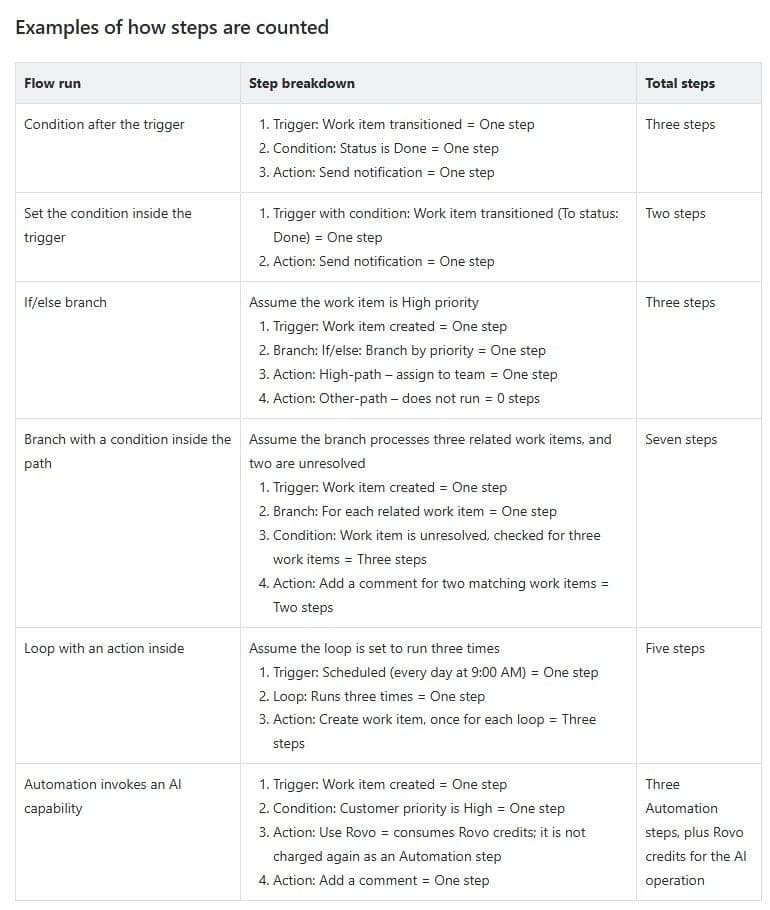
"Every trigger, condition, action, branch, and loop that runs in a flow counts as a step toward your usage."
Source: support.atlassian.com
| Tool | Unit | Free plan | First paid plan | Higher plans | Resets |
|---|---|---|---|---|---|
| Asana | No published monthly cap | No automation builder | 50 automations per project | 50 automations per project | No published cap |
| monday.com | Automation and integration | None | Basic none; Standard 250 each | Pro 25,000 actions each | Monthly, billing cycle |
| ClickUp | Actions per Workspace | 100, 5 active rules | Core 1,000 | Business 10,000 | 1st of month, PST |
| Jira | Automation steps, pooled | 150 per subscription | Standard 400 per user | Premium 750 per user | Monthly |
| Trello | Runs, operations per Workspace | 250 runs, 2,500 operations | 1,000 runs, 20,000 operations | Premium unlimited runs | 1st of month, GMT |
| Wrike | Actions per paid seat | No automation | Team 50 per seat | Business 200, Pinnacle 1,500 | Monthly, date not stated |
| Notion | No published cap | Basic buttons only | No published cap | No published cap | Not published |
| Smartsheet | Automations | Closed to new signups | Pro 250 a month | Business unlimited | Not defined |
| Airtable | Automation runs per workspace | 100 per month | Team 25,000 | Business 100,000 | 1st of each month |
| Zoho Projects | Workflow action executions | 50 per month | Premium 5,000 | Enterprise 50,000 | Monthly |
| Zapier | Tasks | 100 per month | Varies by task tier | Varies by task tier | Monthly |
| Latenode | CPU seconds | 10,000 per month | 10,000 free, then per second | Lower rates in higher brackets | Monthly |
Atlassian counts every trigger, condition, action, branch and loop that runs in a Jira flow as one step. System steps and aborted or throttled runs do not count, and from November 5, 2026, neither do runs with no actions. According to ClickUp's help center, a dispatched action counts whether it succeeds or fails, and one skipped by an unmet condition counts zero. Airtable counts every trigger invocation, failures included. Zapier counts only successful actions as tasks and skips triggers, filters and built-in apps such as Formatter. Latenode bills runtime in CPU seconds, so extra steps in a workflow do not multiply the bill.
What happens at the cap differs too. monday.com allows a 72-hour grace period and then pauses automations, and only Enterprise customers can buy more actions. Wrike disables all rules automatically, and ClickUp, according to its help center, pauses Workspace automations for the rest of the month. Atlassian starts usage-based billing on December 3, 2026. From then, pay as you go bills extra Jira steps at $0.50 per 1,000; with pay as you go off, flows stop at 100% of the allowance until usage resets. Airtable holds a workspace at its plan's limit.
For what a 10-person team pays across plans, see workflow management software pricing.
1. Asana: best for rules across team projects
Asana is a work management tool for teams that plan shared projects as tasks. Personal includes list, board and calendar views, and Starter adds timeline and Gantt views plus forms.
The engine is Asana automations, which the pricing page calls Unlimited rules from Starter up. A rule pairs a trigger with an action, such as assigning a task once someone sets its due date. Custom rules can combine several triggers, conditional logic and multiple actions. Asana publishes no monthly cap on runs. It limits automations per project instead (see the limits table) and allows 20 triggers and 20 actions per custom rule.
AI Studio, Asana's no-code AI workflow builder, includes 50K credits per billing account per month on Starter. AI Teammates and Asana Dash draw on a separate pool of AI requests, and extra requests cost $0.50 each in prepaid packs or $0.60 on pay-as-you-go billing, billed monthly.
As of November 2026, Personal is free forever for up to 2 users but has no automation builder, and Starter costs $10.99 per user per month billed annually or $13.49 billed monthly. Starter seats are added one at a time from 2 to 5 users, then five at a time up to 30.
The plus: rules come with every paid plan, Starter included. The minus: Script Actions, which run Node.js code in a rule, need Enterprise, and the Jira Cloud two-way sync needs Advanced.
2. monday.com: best for boards with automation templates
monday.com is a work management tool for teams that run projects as items on boards. Standard adds timeline and Gantt views and integrations, and Pro has a 14-day free trial.
Rules run on monday automations. Each one is a trigger, a condition and one or more actions, built from a pre-made automation template or from scratch. They start on Standard, not on Free or Basic, and draw on two monthly pools: automation actions and integration actions (see the limits table). One triggered rule usually uses one action. Mapping Status, Tag, People or Dropdown columns into a new item, or notifying several people, uses one action each.
AI features are listed from Basic. For 10 seats, monday.com's plan card lists 1,000 AI credits a month, offset by a special discount it does not call permanent, while its help center describes a one-time trial of 6,000 AI credits and then a paid add-on; confirm before purchase.
As of November 2026, Free covers up to 2 seats with no rules, and Basic costs $9 per seat per month billed annually or $12 billed monthly. Automations start on Standard. Paid plans start at three seats.
The plus: a new rule can start from a ready automation template instead of a blank screen. The minus: only Enterprise customers can buy extra actions, so on Standard and Pro the monthly pool is a hard ceiling.
3. ClickUp: best for an all-in-one workspace
ClickUp is an all-in-one work management tool for teams that want every project in one Workspace. Free Forever has Kanban boards and calendar view, and Core adds unlimited Gantt charts.
ClickUp Automations apply where they are built. In a List, an automation touches only that List's tasks; in a Folder, it covers every List in it and its Subfolders. One automation holds 1 trigger, 15 conditions and 6 actions, but conditions need Business, which also adds webhooks and automation integrations. Usage is counted in actions per Workspace (see the limits table). ClickUp's pricing page lists 1M actions a month on Enterprise, while its help center lists 250,000 on existing Enterprise plans and 1,000,000 on new ones. The help center also caps active automations on Core, while the pricing page shows unlimited active rules. Confirm before purchase.
ClickUp Brain is the AI layer. Extra AI credits cost $10 per 10K as a one-time pack on any paid plan.
As of November 2026, Free Forever costs $0 with unlimited members, while Core costs $9 per user per month billed yearly or $12 billed monthly. Core comes with 1K Brain credits per user per month, pooled, and an upgrade covers the whole Workspace.
The plus: Free Forever already has a monthly action allowance. The minus: conditions wait for Business. For work that starts in GitHub, see how to bring GitHub issues as ClickUp tasks and into Slack.
4. Jira: best for software teams
Jira is a work tracking tool for software teams that plan and ship work as issues. Even Free has backlog, list, board, timeline, calendar and summary views, and Premium adds customizable approval processes.
Jira automation is the engine, and Atlassian meters it in automation steps: every trigger, condition, action, branch and loop that runs in a flow counts as one. Paid plans give each user a monthly allowance, pooled at the organization level across Atlassian apps (see the limits table). A failed flow is charged for the steps that ran before the failure.
Rovo, Atlassian's AI, comes with every paid plan but not Free. Standard includes 25 credits per user, pooled across the organization, and once Rovo is enabled any rule can call an AI agent as a step.
Free costs $0 forever for up to 10 users. Per Atlassian's published price list, Standard costs $9.70 per user per month for teams of up to 100 users on monthly billing, as of November 2026. Confirm the price for your team size on Jira's pricing page.
The plus: Free includes timeline view and a step allowance for up to 10 users. The minus: on Free, Jira sends at most 100 emails per day across the site, notifications and automation combined, and space permissions cannot be customized. On a site that was always Free, everyone is an admin for all spaces. Teams that outgrow rules can script against the Jira REST API.
5. Trello: best for simple Kanban boards
Trello is a Kanban board tool for teams that move work as cards across lists. Free allows up to 10 boards per Workspace, Standard makes boards unlimited, and Premium adds calendar, timeline, table, dashboard and map views.
Trello's pricing page says no-code automation is built into every board. It comes as rules, card buttons, board buttons, scheduled automations and due date automations. A rule reacts to a change on the board, while a button waits for someone to press it. Usage draws on a Workspace quota of runs, one per trigger or button press, and of operations, at least one per action (see the limits table). The pricing page calls this quota command runs and the help center calls it automation runs, but it is the same quota.
Trello includes AI from the Standard plan.
Free costs $0 for up to 10 collaborators per Workspace, and Standard costs $5 per user per month billed annually or $6 billed monthly, as of November 2026.
The plus: every plan, Free included, gets rules and buttons without an upgrade. The minus: Trello's quota page does not say what happens when a Workspace runs out, and a single run stops at 20 actions and operations on every plan.
6. Wrike: best for WHEN-IF-THEN rules in structured projects
Wrike is a project management tool for teams that run structured, multi-stage projects. Free includes board view and table view, and Team adds interactive Gantt charts.
"When you reach the limit, all rules will be disabled automatically."
Source: help.wrike.com
Wrike Automation builds WHEN-IF-THEN rules at the account or space level. Each rule has one trigger, up to 10 actions and no limit on conditions. It runs on Team, Business, Pinnacle and Apex, and Free has no automation. Usage is metered in actions per paid seat each month (see the limits table). When the account reaches the limit, all rules are disabled automatically.
Team adds AI Essentials, and plans from Business up include AI Elite actions. Going over the AI action limit does not trigger an automatic invoice.
As of November 2026, Free costs $0 per user per month with no credit card, and Team costs $10 per user per month billed annually for 2 to 15 users, a 2-user minimum. Wrike sells seats in groups of five on accounts of up to 30 seats, and a two-week trial of the paid plans also needs no card.
The plus: one rule takes unlimited conditions. The minus: rules do not trigger for items created or changed through the API, created by Excel import or changed by automatic rescheduling.
7. Notion: best for docs and databases in one workspace
Notion is a docs and database tool for teams that keep plans, notes and task databases in one workspace. Plus includes basic connections to tools like Slack and Google Drive, and Business adds premium connections to GitHub, Asana and more.
Notion runs rules through database automations and buttons. A database automation fires when a page is added, when a property is edited or on a recurring schedule. Its actions include editing properties, sending notifications, sending a webhook and sending Gmail email. One automation cannot trigger another, though a button action can. Notion publishes no monthly limit on runs on any plan (see the limits table).
Custom Agents start on Business and run on the owner's included Select credits by default. Add-on Notion credits cost from $10 per 1,000 monthly credits.
As of November 2026, Free costs $0 per member per month and Plus costs $10 per member per month billed yearly or $12 billed monthly. Notion's plan comparison lists basic buttons only on Free, while its help center says Free users can create Slack notification automations; confirm before relying on Free-plan automations. Custom database automations start on Plus.
The plus: a database rule can send a webhook, so a property change can reach another app. The minus: rules cannot start one another, so a chain has to begin with a button.
8. Smartsheet: best for spreadsheet-style plans with approvals
Smartsheet is a spreadsheet-style work management tool for teams that plan projects in sheets. Pro includes Gantt, table, board and calendar views, and Business adds timeline view and unlimited free guests.
Smartsheet automated workflows cover alerts about sheet changes, reminders, update requests, approval requests and moving or copying a row to another sheet when conditions are met. They can also manage multi-step approval processes, edit cell values and archive rows. Usage is metered as automations per month (see the limits table). Smartsheet does not define what counts as one automation, when the monthly count resets or what happens at the cap.
Pro includes conversational AI features such as Smart Assist, Smart Columns and AI-powered dashboards. Business can connect Smartsheet to AI assistants and agents through MCP-enabled integrations.
The Free plan has been closed to new signups since August 28, 2024, so new users get a 30-day trial with no credit card instead. Existing Free plans keep 100 automations per month. As of November 2026, Pro costs $9 per member per month billed yearly or $12 billed monthly for 1 to 10 members, while Business requires at least 3 members.
The plus: approvals live inside the same workflow engine. The minus: lifting Pro's monthly cap means moving to Business.
9. Airtable: best for database-driven projects
Airtable is a database tool for teams that run projects as records in bases. Team adds Gantt and timeline view plus standard sync integrations, and Business adds two-way sync.
Airtable automations start a run when a record is created, updated or enters a view, when a form is submitted, at a scheduled time or when a webhook is received. Usage is counted in automation runs per workspace (see the limits table). Every trigger invocation counts, failed or successful, and the workspace stops at its plan's limit until the monthly reset.
Every plan includes monthly AI credits, from 500 per editor on Free to 15,000 per paid user on Team.
Free costs $0 for up to 5 editors and 1,000 records per base, and Team costs $20 per seat per month billed annually or $24 billed monthly, as of November 2026. Every collaborator with Commenter access or higher counts as a paid seat.
The plus: forms, schedules and incoming webhooks can all start a run, so intake requests and outside apps feed the base without anyone retyping them. The minus: the Run a script action is unavailable on Free, and failed attempts use up the monthly allowance, so a broken rule keeps spending runs.
10. Zoho Projects: best for enforced task processes
Zoho Projects is a project management tool for teams that want every task to follow a fixed process from start to finish. Free covers 3 projects, while Premium adds unlimited projects and Task Blueprint.
Zoho Projects has two engines. Blueprint defines a task workflow through statuses and transitions and is available on the Premium, Enterprise and Ultimate plans. Workflow rules can auto-assign tasks, update fields, send notifications and use webhooks to call rules in third-party applications. That way one rule can notify the next owner and update another tool. Usage is metered in workflow action executions per month (see the limits table). Zoho does not say what counts as one execution or what happens when the monthly cap is reached.
Premium adds Zia AI capabilities on top of Blueprint.
As of November 2026, Free costs $0 for up to 5 users, and Premium costs $4 per user per month billed annually or $5 billed monthly. Check Zoho's pricing page for any seat minimum before you buy. A 15-day free trial needs no credit card.
The plus: Blueprint fixes the statuses and transitions a task must pass through, which suits approvals and handoffs. The minus: Blueprint starts on Premium, and Free stops at 3 projects.
11. Zapier: best for connecting a tracker to other apps
Zapier is an integration platform, not a tracker. It connects your tracker to other apps through Zaps, so a change on the board can reach a CRM, a chat channel or a spreadsheet. Free includes two-step Zaps, while Professional adds multi-step Zaps, webhooks and AI fields.
It works next to any tracker in this list. The tracker's own rules move work on the board, and a Zap carries the result to the next app when the step leaves the tracker.
Zapier bills by tasks, and only successful actions count toward task usage, so a failed action does not use the allowance (see the limits table).
Free costs $0 a month, and Professional starts from $19.99 a month billed yearly, rising with the task tier you pick, as of November 2026. Free and Professional are for one user, and shared Zaps and folders start on Team. New accounts get a free 14-day trial of Professional with no credit card.
The plus: you pay for actions that worked, not for every attempt. The minus: a team that shares Zaps outgrows Free and Professional fast, since both are single-user plans.
12. Latenode: for cross-app project workflows with AI steps
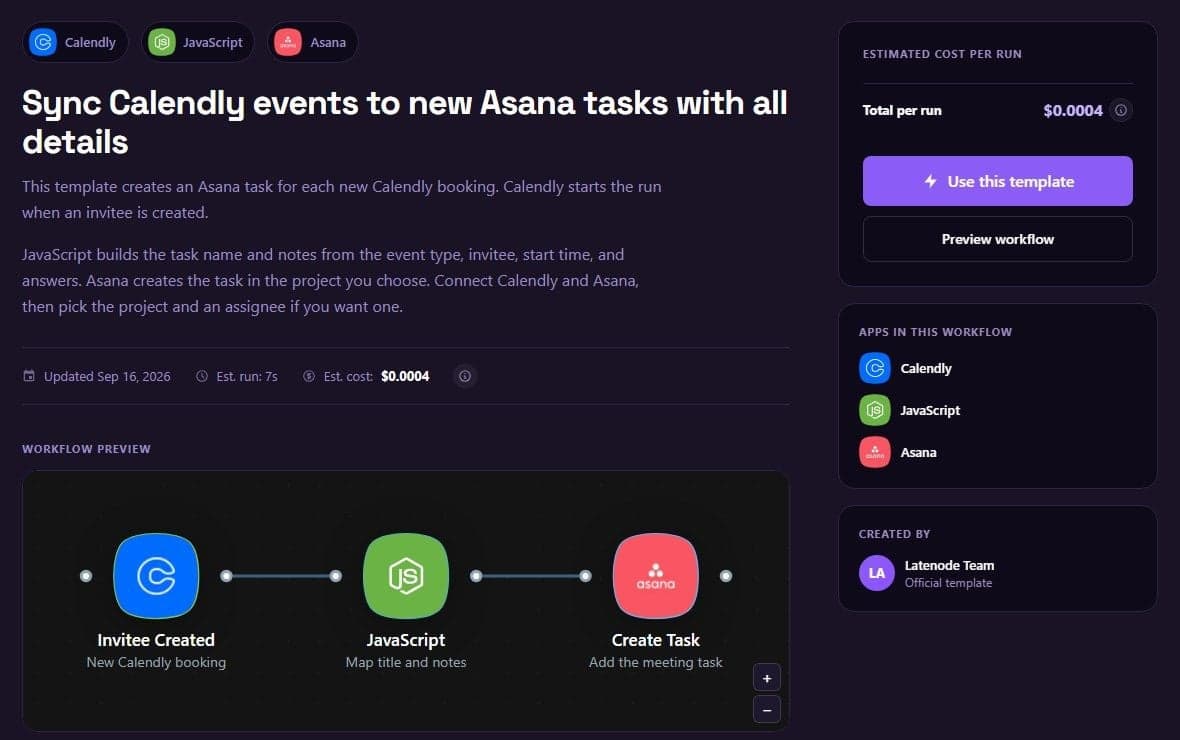
Latenode is not a project tracker: it moves tasks, requests and status updates between your tracker and other apps and adds AI steps such as summaries. It has integration pages for Asana, Jira, ClickUp, monday.com, Wrike, Airtable, Notion and Slack, and a ready template creates an Asana task for each new Calendly booking.
Webhook triggers are instant on every plan, while polling triggers check every 10 minutes by default. For an app or logic without a ready-made integration, the HTTP Request node and JavaScript code nodes fill the gap. Workflows can call 335+ AI models under one subscription, and a built-in database is included. AI Copilot, the AI assistant built into every workflow, helps you while you build.
As of November 2026, Free costs $0 a month with 10,000 CPU seconds every month, 5 active workflows and 3 minutes per run. Pay as you go has no base fee. After the free allowance it charges $0.00012 per CPU second up to 100,000 seconds, with lower rates in higher brackets, and it allows unlimited active workflows.
Billing is by runtime, not per step, so a multi-step workflow does not multiply the bill. That is the contrast with the per-action units in the limits table. The limitation: you still need a tracker, because Latenode does not replace boards, Gantt charts or time tracking.
When built-in automation is not enough
Built-in rules handle steps inside one tracker; once a step lives in another app, such as a CRM, email, chat, an intake form or a spreadsheet, you need an integration tool or the vendor's own connector. A native integration syncs one pair of apps, sometimes as a two-way sync. An integration platform chains several apps and conditions in one multi-step workflow.
- Email to task: a message in a shared inbox becomes a task, with the sender and a snippet in the description.
- Contract to project: a deal marked signed in the CRM fires a webhook that creates the project from a template and assigns the handoff tasks.
- Overdue task to chat: a daily check finds tasks past their due date and sends each owner a Slack message.
- Issue to board: a new GitHub issue becomes a task, and closing the task can close the issue through the API.
- Weekly status report: completed and blocked tasks are pulled from the tracker, and an AI step turns them into a summary for stakeholders.
Microsoft's own option is Power Automate, which it describes as a tool for automating repetitive tasks and business processes with connectors and drag-and-drop workflows. Two limits push work out of the tracker early: Wrike rules ignore changes made through the API, and Notion automations cannot trigger each other.
How to choose a project management automation tool
Pick the tracker your team will use every day, then check whether its automation limits cover your volume on the plan you can afford. These six checks separate project management automation tools once real work runs through them.
- The unit and the cap: find the unit your plan is metered in, its monthly number and what happens when you reach it.
- Automation on the free plan: ClickUp, Jira, Trello, Airtable and Zoho Projects include a monthly allowance on Free, while Asana Personal, monday.com Free and Wrike Free include none.
- Multi-step rules and conditions: check which plan adds them, for example conditions on ClickUp Business, multi-step Zaps on paid Zapier plans and custom rules on Asana Starter.
- Failures and run history: ask who hears about a failed rule and where its history lives. Asana emails the rule owner the first time a rule fails to fire, while ClickUp and Airtable count failed attempts against the allowance.
- Integrations: list the apps each process touches, then check whether the tracker connects to them natively or needs an integration platform.
- AI pricing: some plans include monthly AI credits and others sell packs, so price the AI your team will use as well as the seat.
For choosing a tracker for a small team, see project management software for small businesses.