



Quick answer: what MCP is
The Model Context Protocol (MCP) is an open-source standard for connecting AI applications to external systems: data sources, tools and workflows. Its own documentation calls it a USB-C port for AI applications. Anthropic open-sourced MCP on November 25, 2024. As of September 2026 the MCP docs name Claude, ChatGPT, Visual Studio Code and Cursor among the apps that connect to MCP servers.
What MCP stands for and what problem it solves
MCP stands for Model Context Protocol. Anthropic presented it as a fix for one specific annoyance. Every new data source needed its own custom integration, so the same plumbing got rebuilt for each assistant and each system. One protocol replaces that pile of one-off connectors. The documentation names three groups that benefit. Developers write an integration once instead of once per assistant. AI applications and agents get a consistent way to reach context and take action. End users get assistants that touch their actual systems rather than talk about them. See MCP servers for automation for servers you can connect today.
The documentation's examples are deliberately ordinary: an agent reads a user's Google Calendar and Notion, Claude Code generates a web app from a Figma design, and enterprise chatbots query multiple databases. In theory none of that needs a new protocol. In practice each case used to need its own glue code. MCP gave that glue a standard shape. How tool calls are billed is covered in our guide to Zapier MCP pricing.
How MCP works: hosts, clients and servers
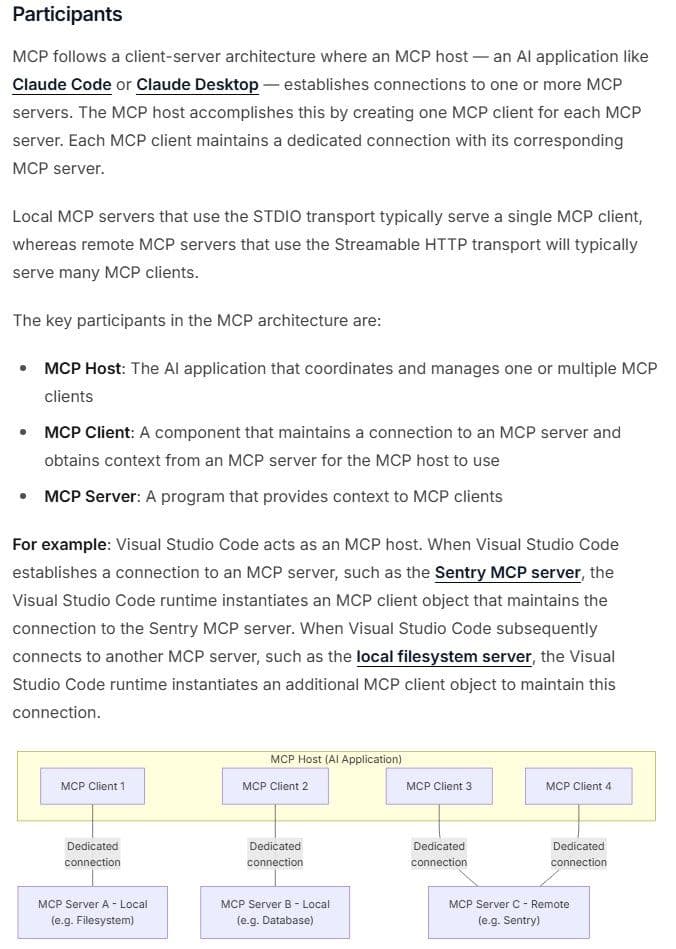
The architecture page defines three roles. The host is the AI application that coordinates one or more clients. Each client holds a connection to exactly one server. A server is a program that provides context to clients. Hosts create one client per server, so three servers mean three clients with three dedicated connections.
"Stdio transport : Uses standard input/output streams for direct process communication between local processes on the same machine ... Streamable HTTP transport : Uses HTTP POST for client-to-server messages with optional Server-Sent Events ... This transport enables remote server communication"
Source: modelcontextprotocol.io
Underneath, MCP uses JSON-RPC 2.0, with notifications for messages that need no response. It defines two transports. The stdio transport covers local processes on the same machine as the host. Streamable HTTP covers remote servers, using HTTP POST with optional Server-Sent Events. That transport supports standard HTTP authentication methods, and MCP recommends OAuth for obtaining tokens.
Specification version 2026-07-28 makes the base protocol JSON-RPC with stateless, self-contained requests and per-request capability negotiation. Specification version 2025-06-18 describes stateful connections with server and client capability negotiation. Both versions are published, and the 2025-11-25 revision sits between them. The differences are changes across those revisions, not one being wrong.
A single tool call runs like this.
- You ask the assistant for something that needs an outside system.
- The client lists what its server offers, tools first for example.
- The model picks a tool and emits the call.
- The host intercepts it and routes it to the right MCP server.
- The server executes it and returns a result. The host passes that result to the model as part of the conversation.
What MCP is used for
Most uses follow that same loop: a request in the assistant, a server that reaches one system, a tool that does one job and a result back in the conversation.
| Use | Server | What the model does |
|---|---|---|
| Coding agent | GitHub | Reads code, manages issues and pull requests |
| Payments and support | Stripe | Calls the Stripe API, with a person confirming refunds |
| Browser tasks | Playwright | Drives a browser through accessibility snapshots |
| App automation | Zapier, IFTTT or Latenode | Runs actions across the apps you connected |
In agentic AI, where an agent plans several steps and carries them out, MCP is the connection layer: the agent decides what to do next, and MCP servers give it the tools and the data to do it. Our guide to AI agents and agentic AI explains how the two terms differ.
The building blocks: tools, resources and prompts
| Primitive | Who controls it | What it is for | Example |
|---|---|---|---|
| Tools | Host invokes, user consents first | Executable functions the model calls | Query a database, create an issue |
| Resources | Server provides, client reads | Data that adds context | Calendar entries, Notion pages |
| Prompts | Server offers, client lists them | Reusable interaction templates | Template that shapes a request |
| Sampling (deprecated 2026-07-28) | Server asks the client's AI app | Request a model completion | Ask the client's model to draft text |
| Elicitation | Server asks, user answers | Get extra input or confirmation | Ask for a missing detail |
Tools are executable functions the AI application can invoke. Resources are the data sources that provide contextual information. Prompts are reusable templates that structure interactions with language models. A client lists what a server offers, then calls what it needs.
That listing has a cost. According to OpenAI's platform documentation, as of September 2026, developers using its MCP tool pay for the tokens used to import tool definitions along with those used to make tool calls, so the tools a connected server lists can add to the token count before any work starts. One user on r/mcp, describing a server with too many granular tools, wrote: "The model gets indecisive and hallucinates tool calls or picks the wrong one." Connect the servers a task needs rather than every server you have, and where the client allows it, expose only the tools you use.
Two features sit at the client end. Elicitation lets an MCP server request extra information or confirmation from the user, so it can ask for a missing detail instead of failing. Sampling let servers request language model completions from the client's AI application. As of protocol version 2026-07-28 it is deprecated, and new implementations are told to integrate directly with LLM provider APIs. In specification version 2025-06-18 clients could still offer sampling and roots to servers, which is why older material lists both.
Who created MCP and who runs it now
David Soria Parra and Justin Spahr-Summers created MCP at Anthropic, and Anthropic open-sourced it on November 25, 2024. The launch shipped three things: the specification and SDKs, local MCP server support in the Claude Desktop apps, and an open-source repository of MCP servers. As named in Anthropic's launch announcement of November 25, 2024, Block and Apollo were early adopters, and Zed, Replit, Codeium and Sourcegraph were development tools companies working with it. Names, ownership and branding have moved since.
Stewardship has since moved: the modelcontextprotocol.io footer states that the Model Context Protocol is a Series of LF Projects, LLC. Specifications are versioned by date. The 2025-06-18 specification page is marked as an older version and points to 2026-07-28 as the latest.
| Revision | Main changes |
|---|---|
| 2024-11-05 | JSON-RPC 2.0 messages over stdio or HTTP with Server-Sent Events, with stateful connections |
| 2025-03-26 | OAuth 2.1 authorization; Streamable HTTP replaces HTTP with Server-Sent Events; tool annotations such as read-only or destructive |
| 2025-06-18 | Elicitation; structured tool output; JSON-RPC batching removed |
| 2025-11-25 | URL mode elicitation; tool calling inside sampling; experimental tasks for durable requests |
| 2026-07-28, current | Stateless requests with no initialize handshake or protocol sessions; Roots, Sampling and Logging deprecated |
MCP servers and clients you can use today
The documentation lists seven current reference servers: Everything, Fetch, Filesystem, Git, Memory, Sequential Thinking and Time. Early ones including GitHub, Google Drive and Puppeteer are now archived. The official repository holds only the steering group's reference servers. It warns they are educational examples rather than production-ready solutions, and points to the MCP Registry at registry.modelcontextprotocol.io.
"Each MCP client requires its own MCP server. ... but only one server per named MCP client. ... There is no limit on the number of tools you can add to a server, or the number of tool calls you can make per session. The only usage limit is the task allowance included with your Zapier plan ."
Source: docs.zapier.com
Vendor servers do the day-to-day work, and Cloudflare documents building and deploying your own on its platform.
- GitHub: repositories, code files, issues, pull requests and workflow automation, plus a GitHub-hosted remote version, per its README as of September 2026.
- Notion: a Notion-hosted remote server where, after an OAuth authorization, clients such as Claude Code or Cursor search, read and update content, as of September 2026.
- Stripe: labeled public preview as of September 2026, with tools for the Stripe API and its knowledge base, authorized by OAuth rather than a shared API key.
- Atlassian: search and summaries across Jira, Jira Service Management, Confluence, Bitbucket, Projects and Goals under permission-respecting OAuth 2.1. Per its support docs as of September 2026, calls draw Rovo credits from a shared organization pool at no stated rate.
- HubSpot: a remote server for CRM data that needs the new HubSpot Developer Platform and a user-level app with read scopes. As of October 2026 one answer on its developer page lists read and write access to contacts, deals and tickets, while another says the server has read-only access to standard records, so confirm write access with HubSpot first.
- Supabase: tool groups with everything except Storage on by default, a read-only Postgres mode, and experimental branching tools needing a paid plan the page does not name, as of September 2026.
- Playwright: browser automation through structured accessibility snapshots instead of screenshots, needing Node.js 18 or newer, as of September 2026.
Automation platforms wrap their catalogs too. Zapier's documentation states that each successful Zapier MCP tool call uses two tasks from your Zapier plan, and that failed calls do not count. Its own page at zapier.com/mcp says Zapier MCP is included in every Zapier plan. According to IFTTT's MCP page, as of September 2026, its MCP server lets AI tools search, build and run automations across more than 1,000 services and more than 50 million applets. The paid plan in its setup steps is the AI tool's own, linked as Claude paid plans. Latenode, whose blog this is, publishes an MCP server as well. As of September 2026 its MCP page connects agents such as Cursor, Claude Desktop, Claude Code and Codex to 800+ apps through one endpoint with managed OAuth and no app API keys, free to start, with premium apps billed pay as you go from Latenode credits; a second server, the Latenode MCP Server, lets an agent build scenarios, trigger runs and manage workflows in a Latenode workspace. Its pricing page bills workflow runtime in CPU seconds, with the first 10,000 CPU seconds free every month on the Free and Pay as you go plans, and neither page publishes a per-call MCP price.
MCP versus function calling, plugins and APIs
Function calling is a model feature inside one application: that application defines the functions, the model asks for one and the application runs it. Nothing travels. MCP is a protocol, so a server written once answers any client that speaks it. A plugin belongs to the product that hosts it. That ownership is what MCP moves: the integration no longer belongs to the assistant.
APIs do not go away. An API still sits behind an MCP server. The server standardizes how a model discovers that API and calls it, listing capabilities before invoking one. According to OpenAI's platform documentation, as of September 2026, connectors are OpenAI-maintained MCP wrappers for popular services, with Google Workspace and Dropbox as its own examples. Both connectors and remote MCP servers count there as capabilities beyond function calling.
| Approach | Scope | Reuse across apps | Best fit |
|---|---|---|---|
| Function calling | One model in one app | No, the app defines it | Logic inside your own app |
| Product plugin | One host product | No, tied to that product | Features for that product |
| Direct API call | One fixed integration | Not applicable | A single stable integration |
| MCP server | Any client speaking MCP | Yes, one protocol | Many clients, many systems |
One exception: with a single fixed integration, MCP adds a moving part you do not need.
MCP vs RAG
Retrieval-augmented generation (RAG) and MCP both bring outside information to a model, in different ways. In RAG, as AWS describes it, documents are converted into numerical representations and stored in a vector database; when a question comes in, the system retrieves the relevant passages and hands them to the model with the question, so the answer draws on a knowledge base outside its training data. MCP is a protocol for connecting an AI application to outside systems: resources give the model read-only context such as files, database schemas or documents, and tools can write to databases, call APIs or trigger other logic.
So RAG answers from what was indexed, while MCP can also act, and the two work together. An MCP server can expose a search over the same knowledge base a RAG pipeline uses, so one assistant can look up a policy that way and then file the request through a tool on another server.
Security and consent: what the protocol asks of you
Specification 2026-07-28 requires explicit user consent for all data access and operations, and consent before user data is exposed to a server. Clear interfaces for reviewing and authorizing activity sit one level down: the specification says implementors should provide them, not must. It also warns that tools represent arbitrary code execution, so hosts must obtain explicit user consent before invoking any tool. MCP cannot enforce that at the protocol level. Implementors are told to build solid consent and authorization flows into their own applications.
Consent can also go stale. When a client offers to remember an approval, a one-time decision becomes a standing grant. One user on r/mcp put it this way: "I had clicked 'allow always' on it two months ago and forgotten." Keep one-time approval for anything that runs commands or writes data, and review standing approvals on a schedule.
OpenAI's platform documentation, as of September 2026, warns that remote MCP servers have not been verified by OpenAI. It flags prompt injection as a particular risk when a model can reach servers holding sensitive data or taking action. Its advice: official servers hosted by the service providers themselves, plus the require_approval and allowed_tools parameters so sensitive actions go through an approval flow. The same page says OpenAI requests the developer's approval by default before data reaches a connector or remote MCP server. That default require_approval can change, so it is no guarantee. Stripe's documentation, as of September 2026, requires human confirmation before certain write actions, naming refunds and outbound payments as examples. Cloudflare recommends several focused servers with narrowly scoped permissions to reduce over-privileged access. In practice: least-privilege tokens, approve anything that writes or sends, prefer official servers.
Also check whose identity a server acts with. One user on r/mcp put it this way: "the auth story is still basically a shared API key with a long lifetime." A shared key gives every agent the same reach and records every action under one account. Prefer servers that sign each person in with OAuth, which MCP recommends for remote servers; according to Atlassian's support documentation, as of September 2026, its server uses OAuth 2.1 so actions respect each user's existing permissions.
How to try MCP in ten minutes
- Pick a client that supports MCP. As of September 2026 the MCP docs name Claude, ChatGPT, Visual Studio Code, Cursor and MCPJam among them.
- Choose a server: a reference server such as Fetch, Filesystem or Memory, an official vendor server, or something from the registry at registry.modelcontextprotocol.io.
- Add it to your client's configuration. A local server goes in by the command that launches it, for example the documentation's memory server started with npx -y @modelcontextprotocol/server-memory. A remote server goes in by its URL plus authentication.
- Check that your host handles remote servers. GitHub's README, as of September 2026, names VS Code 1.101 or newer, Claude Desktop, Cursor and Windsurf. Host support moves quickly, so check the host's current docs.
- Approve the connection, then expect a second prompt on first use: with Zapier MCP the client asks you to approve the first tool run.
- Ask the assistant to do one small thing that needs the server, then check the result against the source system.




