



Quick answer: what Zapier MCP costs in 2026
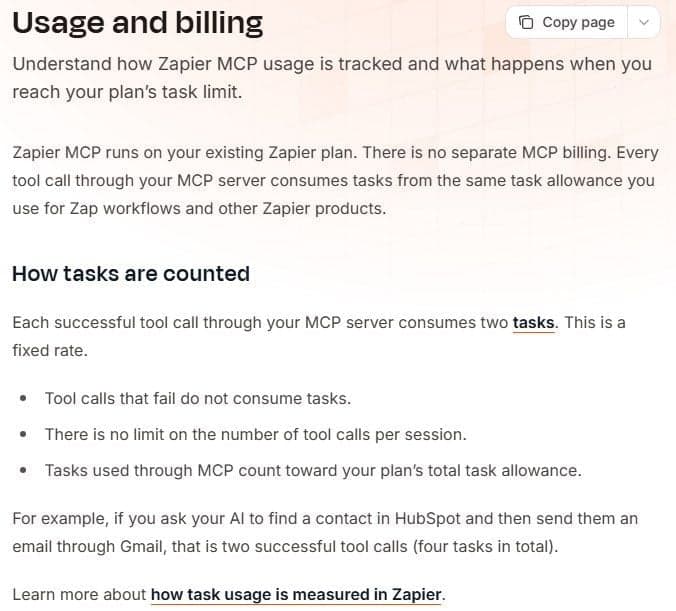
Zapier MCP has no separate price. It comes with every Zapier plan, and each successful tool call spends two tasks from the plan's allowance. Failed calls spend none. The Free plan's 100 tasks a month are shared with Zap workflows, so 100 divided by two is 50 tool calls only if MCP takes it all. Professional starts from $19.99 a month billed yearly, or $29.99 billed monthly, and the tier table on the pricing page pins that price to 750 tasks a month.
What Zapier MCP is
Zapier MCP is a server that exposes Zapier's app actions to an MCP client. You ask the client for something. The client calls a tool, Zapier runs that action in the connected app and returns the result. Zapier describes it as a way for AI tools such as Claude, ChatGPT and Cursor to take actions in everyday apps, on one connection that reaches more than 9,000 apps. If the protocol is new to you, start with what MCP is and how it works.
A Zap draws on the same catalog of app actions, but it fires on a trigger, with no chat involved. Zapier states the difference as trigger-driven automation versus on-demand AI actions, and says most people use both. The quickstart names Claude, Claude Code, ChatGPT, Cursor and Codex as the popular clients, each with its own connection page. Every tier and billing option is broken down in our guide to Zapier pricing.
Zapier's pricing FAQ calls Zapier MCP available to all accounts. Our guide to MCP servers for automation compares official servers and platforms.
How Zapier MCP is billed
| Item | Rule |
|---|---|
| Separate MCP price | None, it runs on your Zapier plan |
| Tasks per successful tool call | 2 tasks, a fixed rate |
| Failed tool calls | 0 tasks |
| Where the tasks come from | The plan's shared monthly allowance |
| When tasks reset | Monthly, date shown in your account |
| How to add tasks | Any time, from zapier.com/pricing |
"In Zap workflows, the following do not count as tasks: All trigger steps. Any Filter or Paths step. All action steps that error or halt. All steps that do not run, either because of a previous filter or path condition, or because the Zap errored. ... Steps for Zapier Tables and Zapier Forms. Steps for the following Zapier apps: Formatter Delay Looping Sub-Zap app Digest Zapier Manager Storage Zapier Agents usage does not count as tasks. Agents use a separate activity quota. ... In Zapier MCP, each successful tool call counts as 2 tasks. ... AI by Zapier Depends on the model tier you select Code by Zapier 1 task per run with standard runtime"
Source: help.zapier.com
Any MCP operation that touches an external app costs two tasks when it succeeds. Zapier's examples are sending a Slack message, creating a Google Sheets row, searching Gmail and creating an Asana task. Asking what tools are available, authentication and setup, viewing action history and failed calls are not charged.
Each repeated action is its own tool call, which makes batch work expensive. Zapier's own examples are 5 spreadsheet rows as 5 tool calls (10 tasks), emails to 3 people as 3 tool calls (6 tasks), and searching and updating 10 records as 11 tool calls (22 tasks).
Zapier's pricing page states that tasks are shared across the account. Zap workflows, AI steps, code, MCP and SDK all draw on one allocation, with no separate budgets per product. The MCP page lists MCP as already included in your Zapier plan, with no separate contract or procurement.
One cost sits outside Zapier's meter. The quickstart asks for two things, a Zapier account and a client that speaks the Model Context Protocol over Streamable HTTP, and says nothing about what that client costs, so whatever you pay for Claude, ChatGPT, Cursor or another client is billed by that vendor and does not come out of your task allowance.
What Zapier MCP costs on each plan
| Plan | Price | Tasks a month | MCP calls at two tasks each |
|---|---|---|---|
| Free | $0 a month, free forever | 100 | 50 calls (100 divided by two) |
| Professional | $19.99/mo yearly, $29.99/mo monthly | 750 at that tier | 375 calls (750 divided by two) |
| Team | $69/mo yearly, $103.50/mo monthly | 2,000 at that tier | 1,000 calls (2,000 divided by two) |
| Enterprise | Contact for pricing | Annual task limits, no figures | Not calculable, no task figure |
Prices are in US dollars, and the tier table on the pricing page fills in what the plan cards leave out: Professional's $19.99 a month billed yearly, or $29.99 billed monthly, buys 750 tasks a month, and the 1,500-task tier costs $39.00 yearly or $58.50 monthly. Team starts from $69 a month billed yearly, or $103.50 billed monthly, at the 2,000-task tier with 25 users included; the 750 and 1,500 tiers exist only on Professional. Enterprise shows contact for pricing and annual task limits, no figures.
Zapier sells paid plans by task tier. The selector runs from 100 tasks a month through 750, 1.5K, 2K, 5K, 10K and up to 2M, plus a custom limit. Budget from your call volume: tasks needed are tool calls times two. New accounts get a free 14-day Professional trial, a year paid up front costs less than monthly billing, and non-profits get 15% off any paid plan, excluding pay-per-task charges.
Seats come with the plan. Zapier's comparison table lists 1 seat on Free, 1 on Professional, 25 on Team and unlimited on Enterprise, and the help center calls Free a one-user plan, so a second person running their own tool calls needs their own seat or their own account.
Limits and what happens when tasks run out
Zapier sets no limit on tools per MCP server and no limit on tool calls per session, and states that the task allowance is the only usage limit. You can run multiple servers, but only one per named MCP client.
No cap on tools does not make extra tools free. After you authenticate, Zapier pre-enables actions for the apps already connected to your account; the default agentic mode shows your AI client a fixed set of meta-tools, but in managed mode every enabled action becomes its own tool. Asking what tools are available costs no tasks, yet each tool description your AI client feeds the model draws on that client's context and usage rather than your Zapier tasks. One user on r/mcp put it this way: "Peak was 9 servers, about 41k tokens of tool definitions before the first user message." In managed mode, keep enabled only the actions the agent needs.
When the account reaches its task limit, the MCP documentation applies the same billing rules as for Zaps. With pay-per-task billing on, tool calls keep working up to a usage cap and Zapier charges for the extra tasks. With it off, or on a plan without it, tool calls stop until the billing cycle resets, you upgrade or you turn pay-per-task on, while the server configuration and connected apps remain in place. Tasks reset monthly, the next reset date shows in the logged-in account, and you can add more tasks any time at zapier.com/pricing.
The pricing page FAQ says pay-per-task billing keeps work running past the limit at a higher per-task rate, on the plans that offer it. It describes that for Zap workflows, and the MCP documentation applies the same rule to tool calls, up to a usage cap. Pay-per-task is unavailable on Free, so there the stop rule applies: at 100 tasks, MCP calls stop until the reset or an upgrade. Confirm before purchase.
This matters most when an agent runs on its own. With no cap on tool calls per session, an agent that keeps repeating a call that succeeds spends two tasks each time from the allowance your Zaps share; one user on r/mcp, reading their own server's log, "found a retry loop with no brakes on it." On Free, a loop like that can use up the 100 tasks and stop your Zaps along with MCP until the reset or an upgrade. On a paid plan with pay-per-task billing on, the Zaps and the MCP calls keep running up to a usage cap at a higher per-task rate instead, and Zapier's help center says you can turn the feature off so they stop at the limit.
What counts as a task in Zapier and what does not
Zapier's rates page defines a task as a unit of work it successfully completes, in automation and in programmatic access, and warns that some actions cost more than one task. In a Zap that means each successful action step.
The help center lists what does not count in Zap workflows:
- all trigger steps, steps that do not run, action steps that error or halt
- Filter and Paths steps
- Zapier Tables and Forms steps
- Formatter, Delay, Looping, Sub-Zap, Digest, Zapier Manager and Storage steps
The rates page holds those built-in tools at 0 tasks, while a Lead Router step costs 5 tasks and Code by Zapier 1 task per run with standard runtime.
Zapier's rates page prices a standard step, described as trigger and action steps that connect your apps, at 1 task per step, but its pricing FAQ says triggers do not count toward the task limit, and the help center list above excludes all trigger steps. MCP has a shorter list of its own: failed calls, asking what tools are available, authentication and setup and viewing action history are free, and every other successful call is two tasks.
How to set up Zapier MCP
- Check the requirements: a Zapier account and an MCP client that supports the Model Context Protocol over Streamable HTTP. A managed client may need an admin or owner to approve the Zapier connector first.
- Pick the client. The quickstart gives Claude, Claude Code, ChatGPT, Cursor and Codex their own connection pages, and lists 28 more supported clients, including Amazon Quick Suite, Gemini CLI, Microsoft Copilot Studio, Replit, VS Code, Warp and Zed.
- Connect that client to Zapier and authenticate. Zapier then auto-provisions the MCP server and pre-enables actions for the apps already connected to your account.
- Run the quickstart's onboarding prompt, which asks the client to run the list-skills tool and follow the onboarding skill.
- Ask the agent to do something with a connected app. The quickstart's final step repeats that each successful tool call uses two tasks from your plan while failed calls do not count.
- If your client is not on the list, connect through the connection token path, which the quickstart's building in code section gives as the way Python and TypeScript integrations authenticate too.
"Each MCP client requires its own MCP server. ... but only one server per named MCP client. ... There is no limit on the number of tools you can add to a server, or the number of tool calls you can make per session. The only usage limit is the task allowance included with your Zapier plan ."
Source: docs.zapier.com
Zapier MCP versus Zap workflows: when each is cheaper
The comparison is two tasks per successful MCP tool call against one task per successful action step in a Zap. Plan with that second figure, given the trigger wording clash described above. Confirm it with Zapier before purchase.
Work that repeats on a trigger or a schedule is usually cheaper as a Zap. The trigger is free by the pricing FAQ, each successful action step is a single task, and built-in steps such as Filters, Paths, Formatter and Delay add nothing to the bill. MCP charges its flat two tasks for every interaction with an external app, and in batch work each repeated action is a separate call.
MCP suits one-off, chat-driven jobs you would not build a Zap for, and work you cannot predict in advance. The allowance is the same either way, so the choice comes down to volume and effort.
A newer route sits between the two. In September 2026 Zapier opened early access to Next Gen Zaps, which an MCP-enabled AI tool such as Claude, ChatGPT or Cursor builds and deploys for you, so a recurring job can be set up once instead of repeated as tool calls. Zapier's help center says building, testing and running Next Gen Zaps uses no tasks during early access; check the same article for which plans and account roles can join and how those Zaps will be billed afterward.
Alternatives with their own MCP server: IFTTT and Latenode
IFTTT publishes its own MCP server. Its page says the server lets AI tools search, build and run automations across more than 1,000 services and more than 50 million applets. IFTTT MCP works on every IFTTT plan, but the tier sets what the assistant can do: Free covers searching and creating or enabling free Applets, running actions starts at Pro, at $2.99 a month billed annually or $4.99 month to month, and running queries at Pro+, at $8.99 a month billed annually or $14.99 month to month. The paid plan named in the setup steps on IFTTT's MCP page is the AI tool's own.
Latenode, which publishes this blog, has an MCP server of its own. As of September 2026 Latenode's MCP page connects agents such as Cursor, Claude Desktop, Claude Code, VS Code and Codex to 800+ apps through one endpoint with managed OAuth and no app API keys. It is free to start. Premium apps, 23 apps with 69 actions, are billed pay as you go from Latenode credits, and 324 data providers sit behind the same server on one pay-as-you-go bill. The page publishes no per-call price. Workflow runtime is billed separately in CPU seconds, with the first 10,000 CPU seconds free every month on both the Free and Pay as you go plans, so CPU seconds and Zapier tasks are not convertible.
For any other vendor, read its own documentation and pricing page.





