



Quick answer: what Workato costs in 2026
Workato offers both self-service and enterprise purchasing paths. Its self-service documentation lists Free with a one-time grant of 50,000 credits, and Pro from $75 per month for 2,500 recurring monthly credits. These are not monthly Free credits or an enterprise price quote. Enterprise editions and existing contracts must be evaluated separately, including their platform fees, usage metrics and negotiated terms.
The rest of this article covers the enterprise contract in detail. That bill combines a platform edition fee, across four editions from Standard to Workato ONE, with a usage fee measured in Workato credits. Extra on-premise agents (OPAs) and concurrency can be bought as additional capabilities, and the enterprise per-unit rate appears only inside a quote.
One caveat before you read further. Customers who joined Workato before February 2024 are on a separate, older pricing model. A renewal conversation with a long-standing account can look nothing like the model described here.
Editorial note: Latenode publishes this article and is one of the products discussed. The comparison uses public product documentation and pricing pages. Worked examples are calculations under stated assumptions, not results from a hands-on benchmark. Recommendations describe which requirements a product may fit; they are not a measured ranking of performance or reliability.
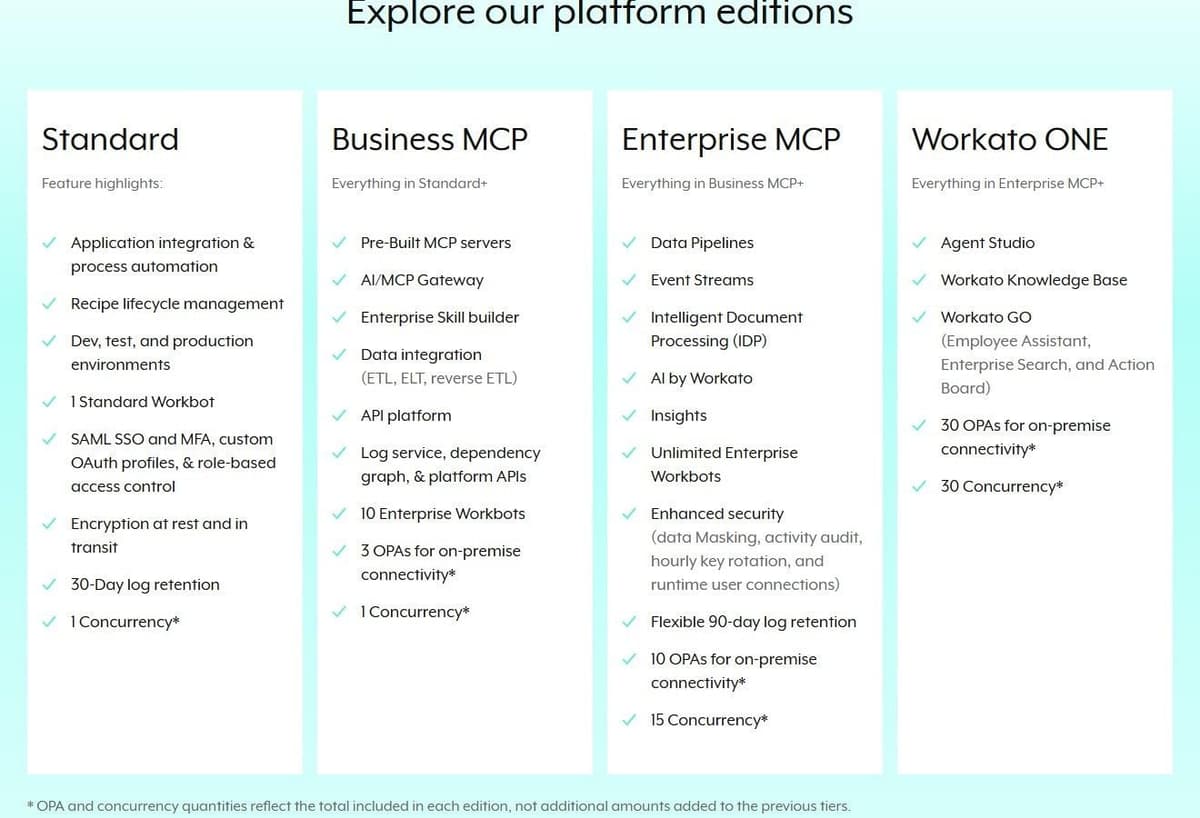
Workato editions at a glance
The edition matrix below describes the enterprise buying path. It should not be read as the entire public Workato offer. Keep self-service credit plans, enterprise editions and legacy contract terms separate when building a budget. For other platforms in this class, see Workato alternatives.
| Edition | Workbots | OPAs | Concurrency | Adds |
|---|---|---|---|---|
| Standard | 1 Standard Workbot | None listed | 1 | Core integration |
| Business MCP | 10 Enterprise | 3 | 1 | MCP servers, API tools |
| Enterprise MCP | Unlimited | 10 | 15 | Pipelines, AI, Insights |
| Workato ONE | Unlimited | 30 | 30 | Agent Studio, GO |
Those on-premise agent and concurrency counts are totals for the edition, not amounts added on top of the previous tier. An Enterprise MCP contract includes 10 on-premise agents in all, not 10 on top of the 3 in Business MCP. Features work the other way. Each higher edition includes everything in the one below it, which is why the Adds column lists only what is new.
How Workato's pricing model works
For direct customers on the current model, the documentation describes two components. One is a platform edition fee, which determines access to capabilities. The other is a usage fee that scales with usage volume, so what you pay tracks what you actually run. On top of an edition, customers can also buy additional capabilities such as extra on-premise agents and extra concurrency.
"Workato offers a usage-based pricing model for direct customers. This model includes: A platform edition fee, which determines access to platform capabilities. A usage fee, which scales based on your usage volume. You only pay for what you use."
Source: docs.workato.com
Two qualifiers matter for budgeting. Pricing and plan structures may vary based on contract terms and when the customer joined. That is why two companies on the same edition can sit on different structures. And the usage-based structure applies only to direct customers on the usage-based model. Anyone who joined before February 2024 sits on a separate, older one.
Workato describes the usage component of its pricing as flexible, predictable and scalable. Consumption is weighted, estimated and tracked by capability such as Workflows, APIM and Event Streams. The company says its team helps customers forecast and optimize usage to prevent overconsumption. That is Workato's own characterization of the model, not a measured outcome. See Zapier vs Workato for a direct comparison.
What a buyer can verify directly is the Usage Dashboard. There, customers track task consumption, on-premise agents and concurrency usage, see plan details and configure notifications. For a finance lead, that dashboard is the one place where contracted volume meets real volume.
What the four editions include
Standard is the introductory edition with core integration capabilities. It highlights application integration and process automation, recipe lifecycle management, and dev, test and production environments. The rest of the list: 1 Standard Workbot, SAML SSO and MFA with custom OAuth profiles and role-based access control, encryption at rest and in transit, 30-day log retention and 1 concurrency. If the requirement is a contained set of integrations under basic governance, that is the shape of it.
Business MCP is aimed at broader integration and orchestration needs. It adds pre-built MCP servers, an AI/MCP Gateway, the Enterprise Skill builder, and data integration covering ETL, ELT and reverse ETL. It also brings the API platform, log service, dependency graph and platform APIs, along with 10 Enterprise Workbots, 3 on-premise agents and 1 concurrency.
Enterprise MCP targets large organizations with complex requirements. It adds Data Pipelines, Event Streams, Intelligent Document Processing (IDP), AI by Workato and Insights, plus unlimited Enterprise Workbots. Security deepens here as well: data masking, activity audit, hourly key rotation and runtime user connections. Log retention becomes a flexible 90 days, with 10 on-premise agents and 15 concurrency.
Workato ONE sits at the top of the range. It is the edition that adds agentic capabilities: Agent Studio, Workato Knowledge Base and Workato GO, which covers Employee Assistant, Enterprise Search and Action Board. It carries 30 on-premise agents and 30 concurrency.
Across editions, Workato's own figures, as of September 2026, list 1,200 or more pre-built connectors for every user plus unlimited workspaces and users. Operational details stay plan-dependent.
How usage is counted: Tasks, business actions and other metrics
Workato bills every capability through one common billing unit, and the counting rules stay consistent across them. Only successful operations count. Steps skipped by conditional logic are excluded. Rerun-eligible operations count. A failed or canceled job is charged only for the operations completed before the failure.
"Transparency and observability For full visibility and control, Workato provides a Usage Dashboard. Here you can track task consumption, access plan details, and configure notifications. ... How can I monitor and track my usage on Workato? Track consumption, on-premise agents, and concurrency usage directly in Workato with the built-in Usage Dashboard."
Source: workato.com
For workflow recipes, Workato's documentation uses Tasks: every successful action step counts as one, utility connectors included, while triggers and control steps such as IF conditions and loops do not. AI by Workato steps are the exception: each counts as more than one Task, at a rate set in your contract.
Contracts metered in business actions count only successful triggers and app actions in eligible apps. Eligible apps include all third-party and community connectors, AI by Workato, HTTP, JDBC, SFTP and code snippets in JavaScript, Python and Ruby. The CSV, JSON and XML tools are on that list as well. Utilities sit outside the meter: Logger, Lookup Tables, Mapper, Message Template, Scheduler, Variables and Data Tables are not counted. Recipe functions and callable recipes inherit the calling recipe's metric.
Every other capability carries its own meter, one metric per capability.
| Capability | Usage metric |
|---|---|
| Workflows (recipes) | Tasks (business actions on some contracts) |
| Managed API and API Proxy | API calls and API Proxy calls |
| IDP | Pages processed |
| Event Streams | Events processed |
| MCP | Metric of the asset it invokes (MCP calls on some contracts) |
| Agent Studio | Genie actions |
| Workato GO | GO seats |
The qualifiers matter as much as the metric names. A Managed API counts successful requests, not the steps inside its recipe, and a slow response can count as more than one call; an API Proxy counts each request once. In Event Streams, published messages count and consumed messages are free. In Agent Studio, one input prompt equals one Genie action, and skill execution and reasoning steps add no usage.
The base Genie action does not make every connected capability free. When a skill invokes a separately metered capability, include that usage under its own rules. Keep the prompt count and downstream capability usage separate in a cost model.
Some of this is additive: IDP pages and Event Streams events are counted on top of the recipe's primary metric, while Workflow apps are billed by seat. Usage already counted in one category is never counted again in another.
Add-ons and on-premise connectivity
An edition is not the whole order form. Workato sells optional add-ons on top of it. The list runs: Pre-Packaged Genies, an Advanced Security and Governance add-on, OpenLegacy for on-premise connectivity, RobotiQ RPA, Private Link, on-premises agents, Workflow Apps, Workato Data Hub powered by Reltio, extra concurrencies, Workato EDI powered by Orderful and Virtual Private Workato. None of them carry a public price. The figure comes only in a quote.
On-premise connectivity is worth planning early. Workato supports on-premises applications, databases and custom REST or SOAP applications. Connecting to on-premises systems requires an on-premises gateway. That is a deployment task and a licensing line at the same time, since agents are both an edition allowance and a purchasable add-on.
Two operational settings also live in the contract. Customers can define and configure a data retention policy. Job history, job reports and the ability to re-run jobs depend on the selected plan. Onboarding and training packages are sold separately on request.
What 'Workato cost per task' really means
Workato meters recipes in Tasks, one per successful action step, but publishes neither a price per Task or business action nor the credit ratios that different capabilities convert at. Task consumption is the label the Usage Dashboard uses, showing what has been used against the volume in the contract.
For a quote request, count successful steps under the applicable agreement. In Tasks, a trigger and three app actions use three Tasks per job, whatever the trigger, and a Logger step adds one. In business actions, a third-party-app trigger makes it four, a utility trigger three, and Logger adds nothing. IF conditions never count, but counted actions inside an executed branch do.
An enterprise rate arrives only inside that quote, and any per-task figure on a third-party site is not confirmed by Workato. Since plan structures may vary based on contract terms and join date, someone else's number would not predict yours anyway. Our guide to iPaaS vendors compares pricing models and deployment.
What to include in a Workato quote request
Send the vendor a short workload brief that covers:
- The systems to connect, required operations and any private-network access.
- Normal and peak monthly event volumes, estimated usage by capability, and required job concurrency.
- The number of workspaces and environments, connection ownership and access-control requirements.
- Required add-ons, implementation help, log retention and support coverage.
- Expected growth over the contract term and the budget owner.
Ask the written response to separate the platform charge, committed usage, excess-usage rates, optional capabilities, implementation, support and renewal terms. Request examples for both a normal month and the peak case. Specify whether unused commitments expire or roll over and what happens if usage exceeds the purchased allowance.
Your first-year budget should include implementation and migration. The recurring operating budget should include the platform, usage, add-ons, support and internal ownership. A quote that combines these into one unexplained number is difficult to compare with another platform or the following year's renewal.
How Workato compares with Zapier, Make, Tray.ai, Boomi and Latenode
| Platform | Billing unit | Published price |
|---|---|---|
| Workato | Capability-specific usage; self-service credits and enterprise terms differ | Self-service and enterprise paths; see the separate pricing sections |
| Zapier | Tasks | From $19.99/mo, yearly |
| Make | Credits | Core $9 a month, yearly |
| Tray.ai | Tasks | Quote only |
| Boomi | Subscription or usage | $99 a month plus usage |
| Power Automate | User and process-capacity licensing, depending on the automation | $15 per user, yearly |
| Latenode | CPU seconds | $0.00012 per CPU second |
Zapier Professional starts at $19.99 per month with annual billing for 750 tasks; Team starts at $69 per month with annual billing for 2,000 tasks and 25 users. Enterprise is quoted. Ordinary successful billable actions consume tasks, while triggers and documented built-in exemptions do not. Enabled pay-per-task billing can keep Zaps running beyond the included allowance at the account's applicable rate.
Zapier's Team seat information is inconsistent: its plan card and comparison table list 25 users, while its FAQ says Team and Enterprise allow unlimited users. Confirm the Team allowance before purchase. Every Zapier task tier, yearly and monthly, is listed in our Zapier pricing guide.
Make publishes credit prices, starting with a free plan of up to 1,000 credits a month. With yearly billing, that is Core at $9 a month, Pro at $16 and Teams at $29, each for 10,000 credits a month. Ordinary module operations use one credit each. Router and Filter consume none, while AI features and Make Code have separate charging rules. Our Make.com pricing guide covers the full credit ladder.
Tray.ai quotes Pro, Team and Enterprise, and measures usage in Tasks that cover integration, automation, MCP and agents. Boomi sells subscription tiers through sales, plus Pay-As-You-Go at $99 per month plus usage. Celigo, SnapLogic and Jitterbit price through sales as well, and MuleSoft, as of September 2026, publishes only a starting price of $2,000 per month billed annually, with usage metered in Mule Credits. Power Automate is the enterprise-adjacent exception that does publish: $15.00 per user per month for Premium and $150.00 per bot per month for Process, both paid yearly.
Boomi's Pay-As-You-Go FAQ adds two conditions: usage is billed at a flat $0.05 per Boomi Message on top of the $99 base fee, and the plan is currently open only to active trial users.
Latenode bills workflow runtime in CPU seconds rather than per operation or per step. The first 10,000 CPU seconds are free every month, then it is $0.00012 per CPU second from 10,001 to 100,000 on Pay as you go. Because the unit is duration, that bill is not directly comparable to tasks, credits or business actions.
So Workato's enterprise editions and Tray.ai price through contracts, MuleSoft publishes a starting price but not its credit allocation, while Zapier, Make and Latenode publish self-serve rates. The only fair comparison is total annual cost. Convert one real month of your volume into each unit, then set the quoted platforms against the published ones. Our comparison shows how Workato compares with MuleSoft beyond price, from recipes to API-led builds.

Who Workato's pricing suits and who should look elsewhere
The enterprise model fits organizations that already run procurement and staff an integration team. Say you want editions with defined governance, on-premise agents, negotiated annual terms and a vendor that will help forecast usage. In that case, a quoted contract reads as a feature rather than an obstacle.
The watch points are concrete. The enterprise pricing page offers a demo and a quote rather than a listed price, and the self-service plans sit on a separate credit model with their own limits. The enterprise total depends on three moving parts: the edition fee, usage and add-ons. Concurrency and on-premise agents are capped per edition, so a workload that needs more parallelism pushes you up a tier or into a paid add-on. And pre-February 2024 customers sit on a different model. That makes peer benchmarks unreliable even when a peer shares real numbers.
Teams that want a published rate and a workflow live this afternoon should compare the self-service credit plans against the self-serve platforms, since both publish their rates. Treat a Workato enterprise contract as the option you evaluate when governance and scale justify the sales cycle.




