




Quick verdict: Zapier vs Workato
Choose Zapier when a self-service workflow platform covers your app actions and the task-based budget is acceptable. Evaluate Workato when integration depth, controlled operations and enterprise requirements drive the decision. Workato also has a documented self-service path, so "company card versus sales contract" is no longer a complete description of the choice.
The important questions are what the workflow must do, which controls it needs, and how the selected plan counts usage. A larger app catalog does not prove deeper support for your ERP, and an enterprise label does not prove that a smaller team needs the enterprise edition.
Editorial note: Latenode publishes this article and is one of the products discussed. The comparison uses public product documentation and pricing pages. Worked examples are calculations under stated assumptions, not results from a hands-on benchmark. Recommendations describe which requirements a product may fit; they are not a measured ranking of performance or reliability.
Workato offers both self-service and enterprise purchasing paths. Its self-service documentation lists Free with a one-time grant of 50,000 credits, and Pro from $75 per month for 2,500 recurring monthly credits. These are not monthly Free credits or an enterprise price quote. Enterprise editions and existing contracts must be evaluated separately, including their platform fees, usage metrics and negotiated terms.
What is Zapier?
Zapier is a self-serve automation platform. Its workflows, called Zaps, pair a trigger with one or more actions across more than 9,000 apps by Zapier's own count. Every plan includes Zaps, Tables and Forms, and Zapier MCP, open to all accounts, lets AI assistants act in connected apps.
What is Workato?
Workato sells itself as an enterprise iPaaS. Its workflows, called recipes, run a trigger followed by action steps, with 1,200+ prebuilt connectors by Workato's own count and a Connector SDK for custom ones. Around recipes it adds API management, an on-prem agent for systems behind a firewall and Agent Studio for AI agents it calls Genies.
Zapier vs Workato at a glance
| Decision point | Zapier | Workato |
|---|---|---|
| Buying path | Self-service; Enterprise by quote | Self-service Free/Pro, or contract |
| Workflow billing | Billable actions, with exclusions | Published rules; credits or contract |
| AI accounting | Zap AI rates, Agents activities | Agent Studio uses Genie actions |
| Integration check | Exact app trigger and action | Connector operation, deployment |
| Governance check | Required controls in that plan | Controls in edition and contract |
| Evaluation starting point | A representative cloud workflow | A representative business process |
Neither platform should be selected from a plan name alone. Test the actual workflow and compare a complete operating budget.
What each vendor's comparison page claims
Zapier and Workato each publish a page comparing themselves with the other. Several claims there do not match the rival's own pricing and documentation.
| Topic | Claim on the rival's comparison page | What the vendor's own pages say |
|---|---|---|
| Workato pricing | Zapier: no published pricing; contracts typically start above $1,000 a month | Workato: Pro from $75 a month for 2,500 credits; Free with a one-time 50,000 credits |
| Getting started on Workato | Zapier: weeks to months, with sales-led onboarding and contract negotiation | Workato: sign up online for Free, or for Pro with a credit card |
| Workato catalog | Zapier: 1,000+ apps | Workato: 1,200+ prebuilt connectors, though its Zapier comparison says over 2,000 applications |
| Zapier catalog | Workato: a small list of applications and actions | Zapier: more than 9,000 apps |
| Zapier support | Workato: documentation and email, with replies that can take 3 to 4 days | Zapier: live chat from the Professional 2,000-task tier, priority support on Team and Enterprise |
Both pages are sales pages for their own product. Budget from each vendor's pricing page and documentation, and confirm enterprise terms in the quote.
Pricing: published tiers and enterprise quotes
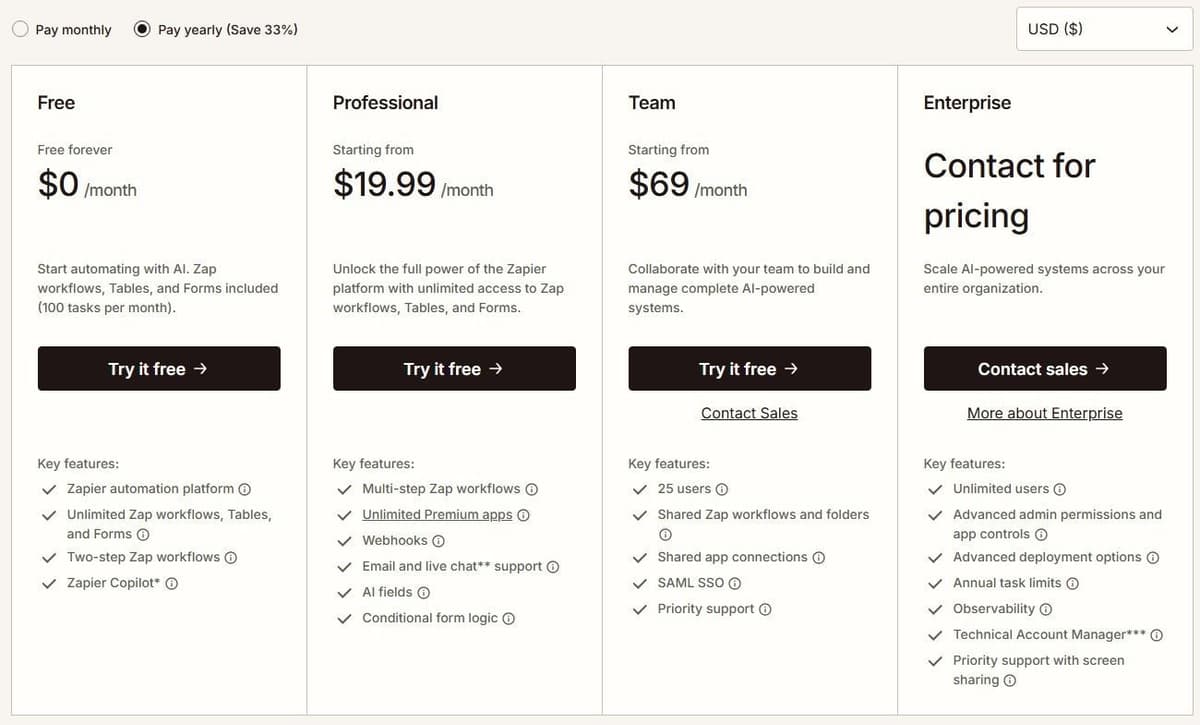
Zapier's public ladder is short. The Free plan costs $0 per month and includes 100 tasks a month, two-step Zap workflows, Tables and Forms. Every plan, Free included, allows unlimited Zap workflows. Professional starts at $19.99 per month billed annually for 750 tasks, or $29.99 per month billed monthly for the same 750 tasks. It adds multi-step workflows, unlimited premium apps and webhooks. Zapier advertises a 33% discount for paying yearly instead of monthly, which is where that gap comes from. The Starter plan was retired on April 2, 2024, so Professional is now the entry-level paid plan. Our guide to Zapier pricing covers plans, tasks and overage in detail.
"Workato's pricing and plan structures may vary based on your contract terms and when you joined."
Source: workato.com
Team starts at $69 per month with annual billing, or $103.50 with monthly billing, for 2,000 tasks and 25 users. It adds shared workflows, folders and SAML SSO. Enterprise has custom pricing and unlimited users. New accounts receive a 14-day Professional trial without a credit card.
Zapier's Team seat information is inconsistent: its plan card and comparison table list 25 users, while its FAQ says Team and Enterprise allow unlimited users. Confirm the Team allowance before purchase. See Zapier alternatives for free, cheaper and open-source options.
Zapier charges tasks for successful billable actions, not every step in a Zap. Triggers, Filter, Paths, Formatter, Delay and Looping do not consume tasks. Actions inside a loop can still be billable. AI, extended Code runtime and MCP use their own rates. Zapier Agents has a separate activity allowance, so its usage should not be added to a Zap's task count.
Pay-per-task pricing depends on the plan and billing cycle. Use the rate shown in the account's Billing settings rather than applying one multiplier to every customer. With pay-per-task turned on, total usage can reach three times the included task allowance before Zaps stop. For an upgrade decision, compare the larger plan's price with the current plan plus the expected excess tasks at that account-specific rate.
For enterprise Workato budgeting, separate the platform edition from purchased usage and optional capabilities. Existing customer agreements may follow different terms. The public documentation explains how workflows are metered, so "no published billing unit" is inaccurate. What requires a quote is the price and scope of the specific enterprise agreement, not the existence of a usage model. See Workato pricing for editions and what goes into a quote.
One workflow priced on both meters
Take one workflow with a trigger and three actions that runs 1,000 times a month, with no loops, retries or AI steps.
- Zapier: the trigger is free and each action is one task, so 3 tasks a run and 3,000 a month. That is above the 2,000-task Professional tier, so without overage the plan is Professional at 5,000 tasks: $89 a month billed annually ($1,068 a year), or $133.50 billed monthly.
- Workato: on the Tasks meter the trigger does not count and each action is 1 Task, so also 3,000 Tasks a month. Contracts metered in Business actions count a trigger from a third-party app as well, which makes 4,000.
Workato then converts those Tasks into credits. Pro runs from $75 a month for 2,500 credits to $100 for 3,500 and $275 for 10,000, billed monthly by card, and unused credits expire at the end of each month. Run the recipe on Workato Free's one-time 50,000-credit grant and read the credits it used in the Billing and Usage dashboard before you pick a tier. A loop changes both bills: Zapier bills actions inside a loop, and Workato counts one Task per iteration, though a Workato bulk or batch action is one Task however many records it moves.
Scale, users and governance
List the permissions and operating controls the workflow needs before comparing seats. For example, a finance integration may need separate development and production connections, restricted access to payment data, a change history and a named person responsible for failed runs. Those requirements are more useful than a generic "enterprise-ready" label.
Ask each vendor to demonstrate the controls in the actual plan under consideration. A feature available somewhere in the product is not necessarily included in your subscription. Likewise, unlimited users do not imply unlimited workflow capacity or unrestricted access to every connection. Compare contract commitments, support coverage and recovery procedures separately from marketing descriptions.
Enterprise controls side by side
Here is what each vendor documents for six common enterprise requirements, and which plan carries it.
| Requirement | Zapier | Workato |
|---|---|---|
| Systems behind a firewall | Static IP from Professional; VPC Peering to internal data sources on Enterprise | On-prem agent with outbound-only connections, on specific plans; more agents sold as add-ons |
| Custom connectors | Private integrations on Zapier's developer platform | Connector SDK, available by default, with custom connectors written in Ruby |
| Environments and versions | Drafts on every plan, version history from Professional | Development, test and production environments with deployment history and rollback, on specific plans |
| Audit logs | Team and Enterprise | Activity audit log kept for one year, on specific plans |
| Error handling and replay | Autoreplay and custom error settings from Professional | Handle errors step with up to 3 retries; any job can be rerun |
| SSO and provisioning | SAML SSO on Team; SCIM on Enterprise | SAML SSO in all editions; SCIM 2.0 in the Advanced Security and Compliance capability |
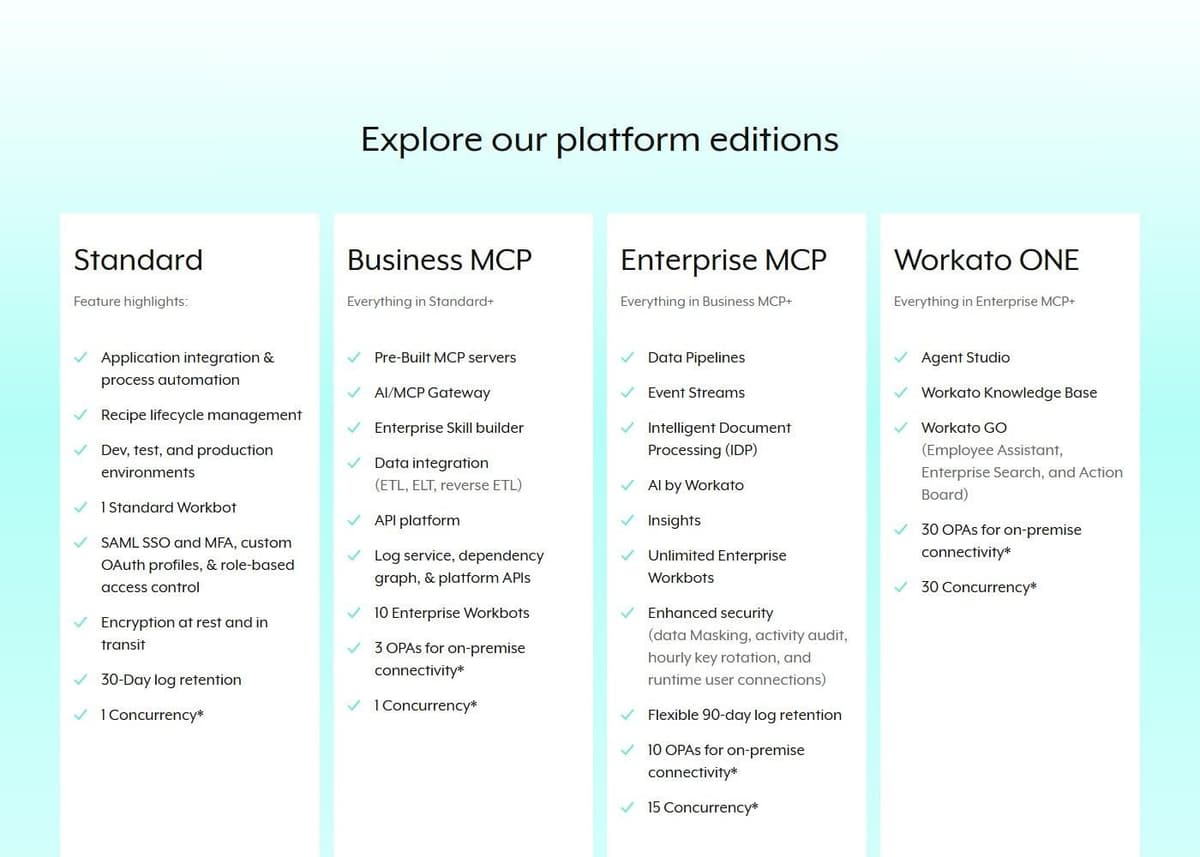
Workato puts on-prem connectivity, environments and audit logs on specific pricing plans, so ask which edition and add-ons carry each one before you sign. Reruns count toward Workato usage like the original job, so a recovery plan has a cost too.
Connectors and integrations
As of October 2026, Zapier reports more than 9,000 app integrations and Workato reports 1,200+ prebuilt connectors on their own sites. Both totals are self-reported. If Workato is more than you need, see our guide to Workato alternatives.
Catalog size is a starting point, not proof that an integration supports your workflow. Check the exact trigger, action, fields and authentication method you need. Also check who maintains the integration and where to report failures; do not assume every listed connector is maintained directly by the platform vendor.
A catalog number answers one question: is my app on the list at all. It says nothing about how deep any single connector goes, which objects it exposes, whether it supports bulk operations, or how it handles custom fields. So do the boring thing. List the eight or ten systems that actually carry your revenue, then open both connector directories for those names and read the trigger and action lists side by side. If the shortlist grows beyond these two, our overview of iPaaS vendors compares the wider field.
AI agents and MCP
Copilot, Zapier's building assistant, is available on every plan, with a daily cap on Free: Free-plan users get a daily message limit that resets at 12:00 AM UTC. Agents are metered separately. Zapier Agents Free includes 400 activities per month. An activity is not a complete agent run: one run can consume several activities. This allowance is separate from Zap task usage. Agents Pro costs $400 billed annually, equivalent to $33.33 a month, for up to 1,500 activities a month.
Inside a Zap, AI steps changed on June 15, 2026, when Zapier began pricing AI by Zapier by model tier instead of a flat per-step rate. That model-tier pricing is available on Professional, Team and Enterprise, though tool calls are not available on Enterprise accounts. There is a safety valve: if a single AI step reaches 75 tasks in one run, the Zap pauses for manual approval. MCP has its own accounting. One Zapier MCP tool call consumes two tasks, so heavy MCP use by external AI agents drains the task pool faster than a linear read of the tier suggests. Our Zapier MCP pricing guide explains how tool calls are billed. Code steps let you drop Python or JavaScript into a workflow when no connector fits.
Workato documents Agent Studio usage through Genie actions. Its base unit is an input prompt; ordinary reasoning and skill activity do not simply become separately billed prompts. Calls into additional capabilities, such as workflows or document processing, can still generate their own usage. Compare this with the specific Zapier AI product you intend to use: Zap tasks, Agents activities and MCP calls are different meters.
For either vendor, an AI comparison should include the allowed tools, source permissions, approval before writes and recovery from a failed call. A pricing page alone does not establish which agent produces the better result.
Speed and operations
Trigger speed is a plan feature on Zapier. Polling runs every 15 minutes on Free, every 2 minutes on Professional, and every 1 minute on Team and Enterprise. Paid plans let you customize that interval per Zap. Polling checks are free: they do not consume tasks. An ordinary successful billable action uses one task. Triggers, filters and failed steps cost nothing. For the full list of built-in steps that do not count, check Zapier's own documentation.
"Zapier's polling triggers can check for new data as often as every minute, but those checks aren't tasks. A task only happens when an action step actually runs."
Source: zapier.com
Two structural limits matter too. A Zap workflow tops out at 100 steps, and branching allows up to three nested Path steps with as many as 10 branches in a path group.
Workato publishes edition-dependent capacity in its pricing matrix, including job concurrency. Those limits should be read with the selected edition and agreement. They are not equivalent to Zapier's polling interval: polling describes when an event is checked, concurrency describes how much work can run at once, and neither tells you end-to-end latency. Compare them as separate rows.
Compare the requirements your current recipes depend on
For the plan that carries each control, see the enterprise controls table above; this one lists the proof to ask each vendor for.
| Requirement | What to compare | Evidence to request |
|---|---|---|
| Private systems | Network path, outbound access, credentials | Architecture diagram for your CRM or ERP |
| Access control | SSO, provisioning, permissions, ownership | Edition control list and a role walkthrough |
| Change management | Environment separation, versioning, rollback | A change promoted through all environments |
| Recovery | Retries, replay, duplicate prevention | A failed record recovered without repeat writes |
| Connector depth | Objects, custom fields, bulk actions, API limits | Trigger and action docs for your endpoints |
| Operational ownership | Logs, alerts, retention, support levels | A named responder and a recovery procedure |
A cheaper subscription is not a complete migration budget. Include the work needed to rebuild connections, replace unsupported actions, validate permissions and operate the new workflows. Keep a requirement as "unverified" until the relevant edition and deployment have been demonstrated.
Who should choose each platform?
Start with Zapier when the required cloud-app actions are supported, the team can operate the workflows, and the relevant task tier fits the budget. Start with a Workato evaluation when the process depends on deeper business-system integration, deployment constraints or controls that need to be demonstrated together.
Small teams can also examine Workato's self-service option. Large teams should not reject Zapier solely because it offers a free plan. The decision is whether the chosen edition meets the specific requirements at an acceptable operating cost.
Price one normal month and one peak month. Include platform fees, metered usage, add-ons, implementation and ongoing ownership. If Latenode is also shortlisted, estimate actual runtime and compare the full result against the other bills; CPU seconds, Zapier tasks and Workato Tasks or credits do not have a universal conversion ratio.





