



Quick answer: the best iPaaS vendor for each need
Boomi for a broad enterprise iPaaS with a published entry price, MuleSoft for Salesforce estates and API-led integration, Workato for business-team automation with governance, SnapLogic for pipelines across data and applications, Informatica for data-heavy estates on consumption units, Azure Logic Apps for Azure estates, Oracle Integration for Oracle estates, SAP Integration Suite for SAP estates, Celigo for NetSuite and ecommerce, Jitterbit for mid-market estates, Tray.ai for enterprise automation by quote, Latenode for low-code AI workflows next to an iPaaS.
Prices carry their unit and billing period and are as listed in September 2026 unless an entry gives another date. Latenode appears as the workflow layer that sits next to an iPaaS rather than as an enterprise iPaaS.
What an iPaaS is and what it is not
An iPaaS is a cloud service for building, running and governing integrations between applications, data and APIs. Four parts make it up: connectors to the systems you run, a runtime that executes them, monitoring, and API management for what you publish. For the wider category, see our guide to API integration platforms, and for the basics underneath it, our explainer on what API integration is.
PaaS is different: it gives you somewhere to deploy your own code and leaves the integration work to you. An iPaaS ships that machinery instead, so the work is configuration, mapping and flow design. A no-code automation tool for one team is different again. It wires up a department's apps with no API gateway and no procurement-grade audit trail. Our guide to embedded iPaaS platforms compares native integration platforms for SaaS.
Boomi, MuleSoft, Workato, SnapLogic, Informatica, Azure Logic Apps, Oracle Integration, SAP Integration Suite, Celigo, Jitterbit and Tray.ai are the examples compared here. They meter differently: per consumption unit, action or call, message, endpoint or connection, task or credit, or compute time, and several publish no rate at all and sell by quote. So every entry names the unit before the price. If Workato is more than you need, see our guide to Workato alternatives.
iPaaS vendors at a glance
| Vendor | Best for | Meter | Published price |
|---|---|---|---|
| Boomi | Broad enterprise iPaaS | Subscription or PAYG | $99 a month plus usage |
| MuleSoft | Salesforce estates | Mule Credits | From $2,000 a month |
| Workato | Business teams | Tasks or credits | Quote; Pro from $75/mo |
| SnapLogic | Data and app pipelines | Package plus endpoints | Quote only |
| Informatica | Data-heavy estates | IPU consumption | Quote only |
| Azure Logic Apps | Azure estates | Actions and connectors | $0.000025 per action |
| Oracle Integration | Oracle estates | 5,000 messages an hour | From $0.6452 per unit |
| SAP Integration Suite | SAP estates | Messages per month | From $1,727 a month |
| Celigo | NetSuite and ecommerce | Endpoints and flows | Quote only |
| Jitterbit | Mid-market estates | Connections, agents | Quote only |
| Tray.ai | Enterprise automation | Tasks | Quote only |
| Latenode | Low-code AI workflows | CPU seconds | Free; $0.00012/CPU sec |
Prices are entry figures with their unit, not a total cost. MuleSoft's $2,000 is billed annually and SAP's $1,727 is per tenant. Azure's are West US 2 in US dollars and vary by region. Workato's $75 buys self-service credits, not tasks. Editions and usage-based billing are covered in our guide to Workato pricing.
1. Boomi: best broad enterprise iPaaS with published starting prices
Boomi splits its platform into four separately sold products: Integration, API Management, Data Hub and Data Integration. Integration and API Management both run Professional, Professional Plus, Enterprise and Enterprise Plus editions. Every subscription edition shows a Talk to sales button instead of a price. Subscriptions bill annually, pay-as-you-go monthly. Enterprise adds clustered runtime and parallel processing, Enterprise Plus adds message queuing, and enterprise connectors cost extra. Integration's standard features cover the connector library, mapping and transformation. Support is email and community only, and deployment is production, with no test or dev environments.
"Boomi Free Trial ... $0 ... for 30 days ... Get access to the Boomi Enterprise Platform ... Full platform access ... No credit card required"
Source: boomi.com
The published entry point is Pay-As-You-Go at $99 per month plus usage, billed monthly, with community support and basic monitoring. The same card also lists unlimited usage, but the page never defines the usage unit or the rate. Its button says Talk to sales, while the card promises self-service credit-card signup with no contract, so confirm both before purchase. The Base pay-as-you-go edition includes one environment, two users, unlimited connections, workflow orchestration and version control. Boomi's trial costs $0 for 30 days with no credit card.
Boomi's Pay-As-You-Go documentation fills in the usage rate: a flat $0.05 per Boomi Message on top of the $99 base fee, which is charged even in a month with no Messages. A Message is each inbound or outbound document, including responses to request/response calls; internal component-to-component messages do not count. The FAQ, updated July 16, 2026, also says the plan is currently open only to active trial users, who opt in with a credit card. The same documentation lists unlimited users and environments and Standard support for Pay-As-You-Go, which differs from the pricing card and Base edition terms above, so confirm which terms apply to your account. Teams weighing a move can start with our guide to Boomi alternatives or our Boomi vs MuleSoft comparison.
2. MuleSoft: best for Salesforce estates and API-led integration
As of September 2026, MuleSoft's own pricing page publishes a starting price. Packages start at $2,000 per month, billed annually, and each one includes core platform capabilities plus an allocation of Mule Credits. The page does not give the number of credits in a package or any credit rate, so you cannot turn credits into runs, API calls or documents from the page. Packages are organized by capability rather than edition, each with a Contact sales button.
Mule Credits are one shared unit spent across integrations, API management, automation and agents. Each usage type has its own rate, and the rate falls as usage rises. Three buying models sit behind them: Pre-Purchase with no minimum credit purchase, Pre-Commit with a $50K minimum annual commitment drawn down monthly from one pool, and Unlimited at a custom fixed price for uncapped credits. All three bill annually. Go over the allocation and you buy more credits at a price that varies by buying model and usage, though a threshold alert can warn you first. The 30-day free trial covers the full portfolio, with no credit card and no installation. If Mule Credits are the reason you are looking elsewhere, see our guide to MuleSoft alternatives, and our Workato vs MuleSoft comparison sets the two cost models side by side.
3. Workato: best business-team automation with governance
Workato's pricing page publishes no prices. As of September 2026, that page lists four editions behind demo and quote buttons: Standard, Business MCP, Enterprise MCP and Workato ONE. The page says pricing may vary with contract terms and when a customer joined, and it omits the self-service plans.
According to Workato's pricing page, which calls the meter task consumption, the charge is consumption tracked by capability: workflows, API management and event streams, watched in a Usage Dashboard alongside on-premise agents and concurrency. The page publishes no rate, no included volume and no overage rate. The self-service path uses a different unit. According to Workato's documentation, as of September 2026, Workato Free grants 50,000 credits once. Workato Pro sells recurring monthly credits at $75, $100, $275, $780 and $1,275 a month for 2,500, 3,500, 10,000, 30,000 and 50,000 credits, and unused Pro credits expire at the end of the billing month. Those prices cover the self-service plans only. A credit is not a task.
On the sales-sold editions, on-premise agents and concurrency are capped: 3 and 1 on Business MCP, 10 and 15 on Enterprise MCP, and 30 of each on Workato ONE. Those are edition totals, not additions to the tier below. If the real choice is between Workato and a team automation tool, our Zapier vs Workato comparison covers it.
4. SnapLogic: best for data and application integration with pipelines
SnapLogic sells three packages: Essential, Professional and Enterprise One. The price follows the data and application endpoints a customer chooses to connect, and sales customizes it. Running on GroundPlex or CloudPlex costs the same. Inside a package, pipelines, data movement, integrations and data ingestion are unlimited, and you can create as many connections to an endpoint as you need. That unlimited covers volume and connections, not capability. Core Snap Packs come with base packages, premium Snap Packs are sold a la carte, and AgentCreator, API Management, AI Gateway, AutoSync, ELT and Advanced Security are paid upgrades. Online training, a customer success manager and support come with every package. You can also buy SnapLogic through the AWS, Azure and Google marketplaces. If the job is only moving data into a warehouse, our guide to ETL and data pipeline tools covers lighter, metered options.
5. Informatica: best for data-heavy estates on consumption units
Informatica publishes no price for its Intelligent Data Management Cloud. The pricing page describes a consumption model and sends buyers to a quote form for a sample price range, so there is no unit price to quote. The unit is the Informatica Processing Unit, or IPU. It gives access to all eligible cloud services listed in the Cloud and Product Description Schedule, and master data management counts separately on a per-domain records basis.
"Informatica Processing Units (IPUs) give customers access to all eligible cloud services listed in the Cloud and Product Description Schedule . They can also access all Informatica master data management on a per-domain records basis."
Source: informatica.com
Consumption is calculated per scaler, from that scaler's usage: Secure Agent, CDI-e and Data Mass Ingestion volume. A separate Informatica Measurement Guide holds the rules. Informatica says it expects eligible new services to be included and activated automatically once released, and that Schedule defines eligibility. The product tracks usage with a real-time dashboard, threshold alerts and administrator control over who reaches each service.
6. Azure Logic Apps: best for Azure estates
As of September 2026, for Azure's default region West US 2 in US dollars: Azure says its Logic Apps prices are estimates that vary by region, agreement type, purchase date and exchange rate.
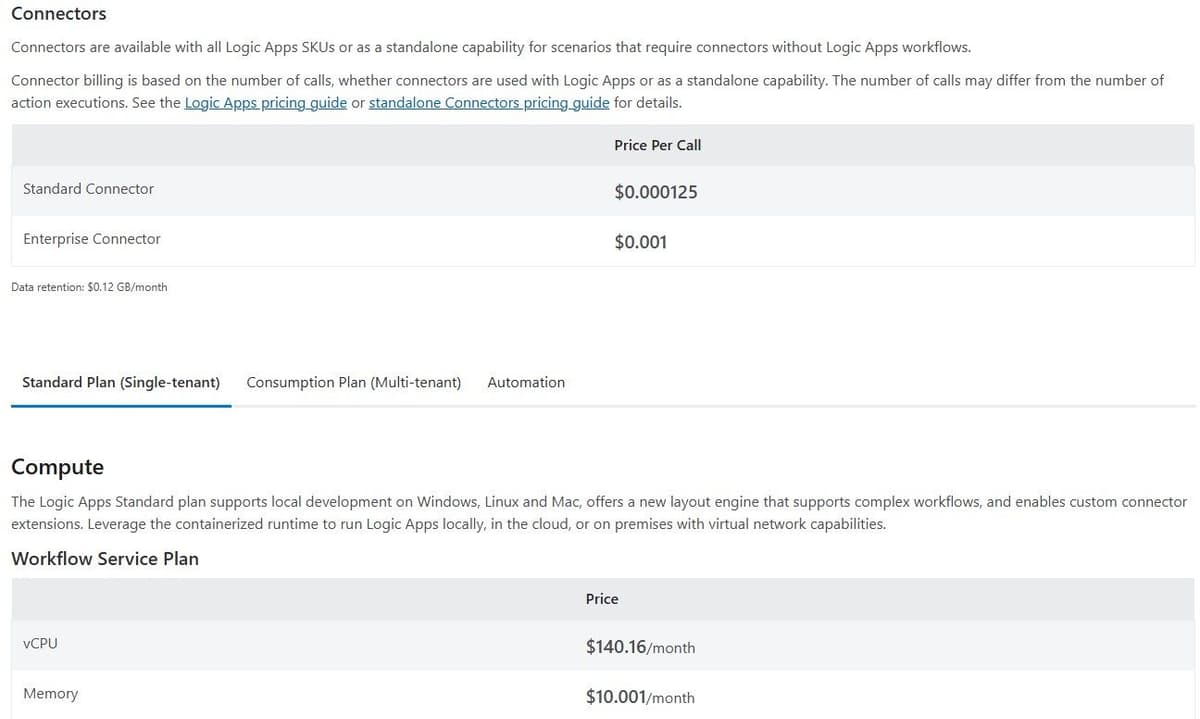
The Consumption plan is pay-as-you-go and multi-tenant: it meters every trigger, action and connector execution of a run. Your first 4,000 actions are free and further actions cost $0.000025 per execution. The page does not say whether that allowance resets each month. Connector calls bill separately, at $0.000125 per standard call and $0.001 per enterprise call in the same region and currency. Billing counts calls, not actions, so one action can bill more than one call. Those rates come from the connector table above the plan tabs and cover the Consumption and Standard plans. The newer Automation tab carries its own connector table, pricing a standard call at $0 and an enterprise call at $0.01, so the page disagrees with itself. Those $0 lines carry no end date, so read them as introductory rather than as a price you can plan on. The Standard plan bills compute, not actions: $140.16 per vCPU per month plus $10.001 a month for memory, same region and currency. You cannot work out a monthly Standard bill, because the page never names the memory unit. Data retention costs $0.12 per GB per month.
7. Oracle Integration: best for Oracle estates
Oracle sells from a published price list rather than by quote. The page carries a currency selector and a note that vCPU prices are for comparison, because billing uses OCPU units. On Oracle's published cloud price list in US dollars, as of September 2026, Oracle Integration Standard costs $0.6452 per unit of 5,000 messages per hour, Enterprise $1.2903 and Healthcare $1.9355 for the same unit. Bring-your-own-license lines cost $0.3226 per unit of 20,000 messages per hour and need an Oracle license the list does not name. Note the unit. It buys throughput of 5,000 messages an hour, not a monthly allowance, and the price list neither states how often that unit is billed nor defines what counts as a message, so confirm both with Oracle before you build a budget. Oracle PaaS is consumed under Universal Credits. API Gateway is a separate line at $3.00 per one million API calls per month, and the list names no message packs, ramp-ups or minimums.
8. SAP Integration Suite: best for SAP estates
SAP publishes US list prices on a 3 to 36 month auto-renewing contract, as of October 2026: starter USD 1,727.00 a month per tenant, standard USD 5,336.00 and enhanced USD 7,685.00. A request-a-quote path sits beside them.
Message allowances do not line up. The starter card says 50,000 messages a month, while the comparison table lists 50K, 10K and 500K for starter, standard and enhanced, which puts the standard edition below the cheaper starter one. The standard card shows no figure, so confirm the allowance with SAP before purchase. A message is one electronic communication, and every 250 KB above the first counts as another. Additional messages cost USD 7.00 a month per block of 10,000 transactions a month. SAP's enhanced edition card lists the Integration Suite AI features, such as building integration flows from a plain-language description, under a fair use waiver until September 2026. That date has passed, and the card points to SAP's AI Units policy for what applies next. AI Units are SAP's single currency for its premium AI features, sold in packages priced in blocks of 100 units, so ask SAP whether your use of these features now draws them down.
9. Celigo: best for NetSuite and ecommerce integration
Celigo prices by the endpoints and flows a customer subscribes to, at a flat rate rather than per task or transaction. Volume-based pricing and overage fees do not apply. You add more endpoints or flows through an Account Manager. The three editions, Standard, Professional and Enterprise, differ by capability rather than by price, because Celigo does not publish list prices on its pricing page (as of September 2026). Standard has MFA and role-based access with SSO as an option, Professional adds API Builder, Lookup Cache and a sandbox, and Enterprise includes unlimited endpoints. Built-in API management covers RESTful, SOAP, GraphQL and WebSocket APIs. You can drive the platform by CLI, Platform MCP or API, and the AI capabilities, an Agent Builder and an MCP Server, are on every edition. There is a 30-day free trial. For the store-side apps Celigo connects, see our guide to ecommerce automation tools.
10. Jitterbit: best mid-market iPaaS with published edition limits
Jitterbit publishes no prices. Its pricing page is an edition-by-edition feature table with a Request a Quote button, and its products require an annual contract with custom pricing. The page notes discounts for nonprofits and educational institutions.
The iPaaS comes in Standard, Professional and Enterprise. Their table lists 2-3, 5 and 8 or more connections, 2, 2 and 4 private agents and 2, 99 and 99 environments, so connections and private agents are the practical meter. Support targets are 48 hours on Standard, 24 on Professional and 6 on Enterprise, with phone hours of 8a-6p and unlimited cases a year on every edition. AI is partly a paid extra: the APIM assistant is marked as an add-on while AskJB is checked on all three editions, and App Builder's AI Assistant is footnoted as a paid add-on. Check Jitterbit's page for trial terms.
11. Tray.ai: best enterprise automation by quote
Tray.ai prices Pro, Team and Enterprise by custom quote based on usage and features. The meter is Tasks, which cover integration, automation, MCP and agents. As of September 2026 it publishes no prices for these plans. The cards lead to a demo or a sales call, and although the page header carries a Start free trial button, Tray's own FAQ says the trial is arranged with its sales team. Pro covers 3 workspaces, Team 20 with log masking, Enterprise unlimited workspaces with advanced on-premise connectivity. The Enterprise card also lists SSO, HIPAA, regional hosting, log streaming and data engineering, yet the same page repeats all five in its Additional add-ons block, so ask Tray which of them the plan includes and which are billed on top. Every plan includes process automation, data integration, API management, 700+ connectors, AI tooling, observability and audit trails, while Agent Development and longer log retention are sold as add-ons. All plans include business-hours support. Team and Enterprise add 24/7/365 support with enhanced SLAs and dedicated Slack channels. If you are leaving Tray, our guide to Tray.io alternatives covers both internal automation and embedded options.
12. Latenode: low-code workflows with AI models next to an iPaaS
Latenode's pricing page lists a visual drag-and-drop builder, an AI Copilot in every workflow, an AI agent builder, more than 335 LLM models under one subscription, a headless browser, webhook triggers and a built-in database, with no per-operation fees, and its homepage lists custom JavaScript nodes.
Billing runs on workflow runtime in CPU seconds: runs multiplied by average seconds, not per operation or step. Adding steps does not multiply the bill. Both plans get the first 10,000 CPU seconds a month free, and the Free plan costs $0 a month with no credit card: 5 active workflows, 1 execution worker, 3 minutes per run. Pay as you go has no base fee. It charges $0.00012 per CPU second from 10,001 to 100,000, then $0.00011 and $0.00010 in the brackets up to 300,000, and each bracket bills only the time inside it. Nodes that call paid external providers cost PnP tokens at $1 each, billed by actual provider usage.
This is a workflow platform for teams, not an enterprise iPaaS. Its pricing page lists no API management, no on-premise agents and no procurement-grade governance, which is where an enterprise buyer's checklist starts.

How iPaaS vendors charge
Six meters cover this list, and they are not interchangeable.
- Consumption units: Informatica draws down IPUs, MuleSoft spends Mule Credits, neither publishes a rate.
- Actions and calls: Azure meters every trigger, action and connector execution, and bills connectors by calls, which can exceed the actions.
- Messages: SAP counts each communication plus every further 250 KB; Oracle sells throughput in 5,000-message-per-hour units, so peak rate drives the bill.
- Endpoints and connections: Celigo and SnapLogic price by what you connect, not what runs through it; Jitterbit caps connections and agents per edition.
- Tasks and credits: Tray.ai quotes on Tasks; Workato's page calls its meter task consumption while its self-service plans run on credits.
- Compute time: Azure's Standard plan bills vCPU and memory, Latenode bills CPU seconds.
MuleSoft at $2,000 a month billed annually comes with an unpublished credit allocation. Boomi at $99 a month adds an undefined usage charge. The two are not comparable until you add a volume. In the quote, ask what runtime and environments are included, which connectors cost extra, whether API calls bill separately, what the support response target is, and what term and minimum apply.
How to choose an iPaaS vendor
Start from the estate you run. Salesforce shops gravitate to MuleSoft, SAP shops to SAP Integration Suite, Microsoft to Azure Logic Apps, Oracle to Oracle Integration, NetSuite or ecommerce to Celigo. The estate decides which prebuilt content you inherit and which integrations you build twice.
Then count what you connect. Celigo and SnapLogic price by endpoints and flows, so a system inventory gives you a number early. Jitterbit's editions cap connections and private agents. Batch or event-driven matters too: Oracle's 5,000 messages an hour prices the peak, action counts the total.
Ask who builds. Integration engineers accept mapping, environments and code. Business teams need recipe-style building with governance attached: role-based access, SSO, MFA and audit-grade log retention. Check deployment and residency next. SnapLogic charges the same on GroundPlex or CloudPlex, Azure's Standard plan runs single-tenant or on premises, and Workato and Jitterbit count on-premise agents.
If the data sits on premises, expect to install the vendor's agent or runtime inside your network, and get IT's sign-off before you shortlist. Boomi runtimes can run on your own server, and MuleSoft manages a runtime on your own server once its Runtime Manager agent is registered. Ask each vendor what the install needs from your firewall, and whether the source system's own API can replace a direct database connection. A user on r/PowerBI described a project held up because "the new IT Manager seems reluctant to approve the installation of the PowerBI gateway."
Weigh a published price against a quote. One is easier to budget, the other easier to negotiate, and neither tells you the bill without volume. Prove it on a trial before a multi-year term: Boomi, MuleSoft and Celigo offer 30 days, and Tray.ai arranges its through sales.
Plan for ownership after launch as well as the build. Run production integrations under a service account rather than one person's login, send failure alerts to a shared inbox with a named owner, and keep a test record whose expected result you check after every change. Then compare what each platform keeps for whoever inherits the work: Boomi's Process Reporting keeps logs for 30 days by default and can rerun documents, Workato keeps logs 30 days on Standard and 90 days on Enterprise MCP, and Tray.ai 7 days on Pro. One user on r/automation put it this way: "the recurring pain is not connecting the first API; it is ownership after launch."
Moving off BizTalk Server
BizTalk Server 2020 is the final release of BizTalk Server, and Microsoft names Azure Logic Apps as its successor. Microsoft expects sales of BizTalk Server 2020 to end on March 31, 2027, and mainstream support continues through April 12, 2028. After that, Microsoft plans an optional, paid extended-mainstream support offer for eligible customers from April 13, 2028 through April 10, 2030. It is meant as temporary migration cover and is expected to exclude some capabilities, including Business Activity Monitoring (BAM), the ESB Toolkit, industry accelerators and legacy enterprise adapters.
Microsoft's documented path is Azure Logic Apps Standard, hosted in Azure or on your own Kubernetes infrastructure through the Hybrid option; Consumption workflows are not supported for BizTalk migration. Microsoft says many BizTalk schemas, maps, rules and custom .NET components can be reused or adapted, while MessageBox routing moves to a message broker such as Azure Service Bus. Its Logic Apps Migration Agent inventories BizTalk applications and converts supported artifacts. If you are weighing another vendor instead, ask whether it can reuse your XSLT maps and schemas or needs them rebuilt, which connector replaces each BizTalk adapter you rely on, and how it moves your EDI trading partners, agreements and certificates.
Which vendors overlap and which sit next to each other
Boomi, MuleSoft, SnapLogic, Informatica, Workato, Jitterbit, Celigo and Tray.ai compete for the same slot. You buy one, not two, and the choice turns on the meter and who does the building.
Azure Logic Apps, Oracle Integration and SAP Integration Suite are estate-native. They live inside their vendor's cloud and bill through its price list. In a mixed shop they sit alongside a general iPaaS rather than replacing one.
A team workflow layer is a third thing, for departmental automations and AI steps that never justify a governed integration project. Latenode fits there. Its pricing page describes a visual builder with an AI Copilot and more than 335 LLM models under one subscription, and its homepage lists custom JavaScript nodes. Billing is CPU seconds, with no per-operation fees and the first 10,000 CPU seconds a month free. It is not an enterprise iPaaS and does not replace one.
IBM App Connect and webMethods
IBM and TIBCO sit outside the numbered list, but both sell enterprise integration platforms that compete for the same slot as Boomi and MuleSoft. IBM has two lines. App Connect, which IBM calls an iPaaS, is sold as App Connect Enterprise as a Service through AWS Marketplace, on one of two meters. As of October 2026, IBM's pricing page lists the flow-run plan from $2,544 for 100,000 flow runs per annum and the compute plan from $8,484 for 10,000 VPC hours per annum. IBM's page also labels these prices per month in places, so confirm the billing period with IBM. A flow run counts each time an event triggers a flow, runs of a deployed flow count even when they are tests, and you prepay in multiples of 100,000 for the runs you expect over the next 12 months. Premium connector packs cost extra on both plans, and the App Connect Enterprise software edition has no published price.
The second line came from Software AG: IBM completed its acquisition of webMethods on July 1, 2024. It is now sold as IBM Integration SaaS, formerly IBM webMethods Hybrid Integration, and its Standard Tier starts at $2,565 per month. The price includes credits that you can spend on API calls, app integration flows, B2B integrations, managed file transfers and events, while connectors, API definitions and on-premises runtimes are unlimited. IBM calls the prices on both pricing pages indicative and says they may vary by country.
TIBCO Cloud Integration
TIBCO describes TIBCO Cloud Integration as its enterprise iPaaS and publishes no price: the purchase page sends you to the TIBCO sales team. The meter is app instances. TIBCO's subscription documentation lists Basic with up to 5 iPaaS app instances, Premium with up to 15, and a Hybrid Plan with up to 25 per pack and two packs per environment, which you can deploy on premises, in a private cloud or in TIBCO Cloud. All three sell extra instances on top, so ask for that rate along with the base price. TIBCO's integration components include BusinessWorks and Flogo, and its integration page lists more than 300 prebuilt connectors.




