



Quick answer: the best Workato alternative for each need
Need an enterprise iPaaS on a contract? Look at Boomi, MuleSoft Anypoint, Celigo or SnapLogic. Want enterprise orchestration with agents? Tray.ai. Want self-serve pricing you can model in a spreadsheet? Make, Zapier or Latenode. Microsoft shops should start with Power Automate. Engineers who want open source and self-hosting should start with Activepieces.
Your billing unit and your governance requirements decide the right pick far more than a headline number does.
Editorial note: Latenode publishes this article and is one of the products discussed. The comparison uses public product documentation and pricing pages. Worked examples are calculations under stated assumptions, not results from a hands-on benchmark. Recommendations describe which requirements a product may fit; they are not a measured ranking of performance or reliability.
Why teams look for Workato alternatives in 2026
Workato is an enterprise integration platform (iPaaS) whose workflows, called recipes, run a trigger followed by action steps across its connectors. It offers both self-service and enterprise purchasing paths. Its self-service documentation lists Free with a one-time grant of 50,000 credits, and Pro from $75 per month for 2,500 recurring monthly credits. These are not monthly Free credits or an enterprise price quote. Enterprise editions and existing contracts must be evaluated separately, including their platform fees, usage metrics and negotiated terms. Editions and usage-based billing are covered in our guide to Workato pricing.
"Workato's pricing and plan structures may vary based on your contract terms and when you joined."
Source: workato.com
Timing is one reason teams start looking. An enterprise quote means a sales cycle, a security review and a procurement queue. That is reasonable for a planned platform decision, and painful when a team needs three integrations live this quarter. Scope is another: when capabilities arrive per contract, the answer to a feature question depends on paperwork rather than on a public plan page. For enterprise integration platforms, see our guide to iPaaS vendors.
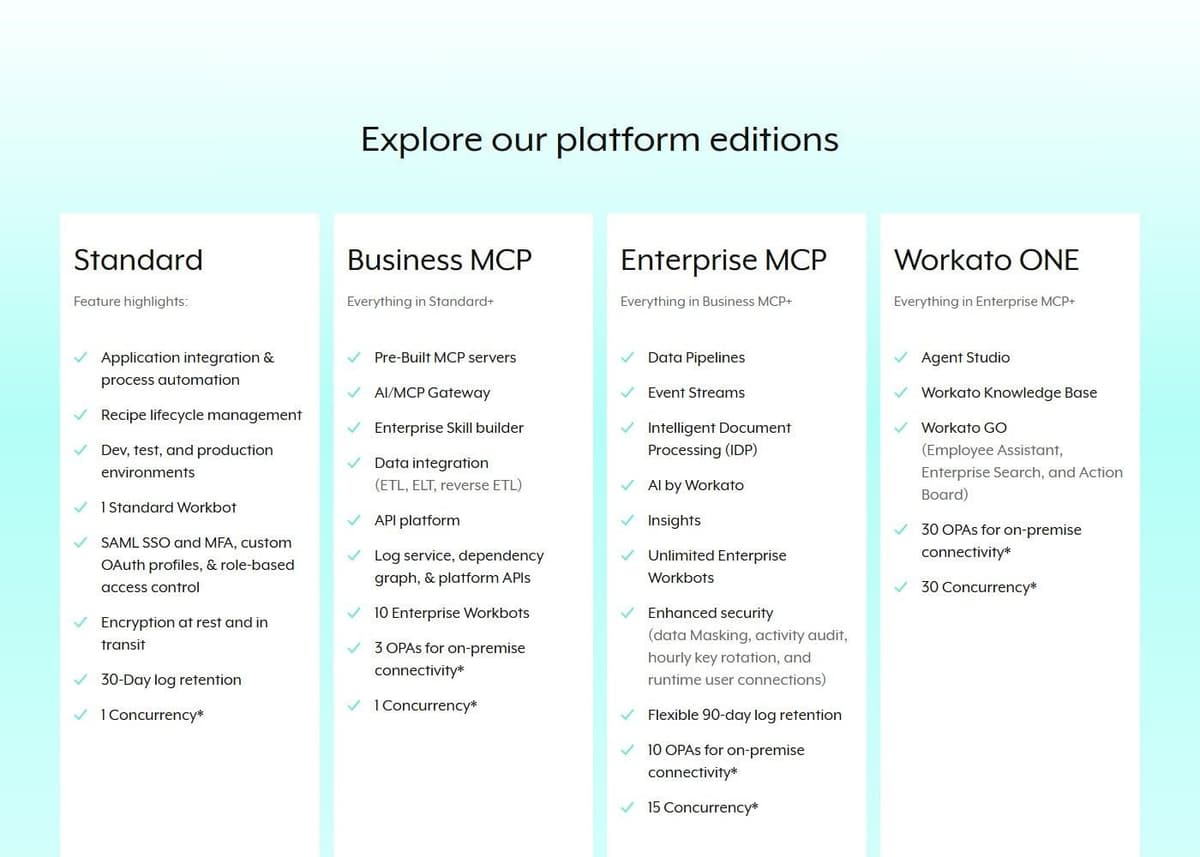
None of this makes Workato weak. Its pricing page lists Business MCP and Enterprise MCP tiers, with the enterprise tier adding unlimited Enterprise Workbots plus data masking, activity audit, hourly key rotation and runtime user connections. Workato's own figures, as of September 2026, put the library at 1,200 or more pre-built connectors for every user, with unlimited workspaces and users. Governance depth and connector breadth are genuine strengths. The real question is whether your workload needs the enterprise edition and its terms, or whether a platform with published rates covers the work you actually run. Our Zapier vs Workato comparison covers the self-service and enterprise sides.
Workato alternatives at a glance
Ten options in the order they appear below. The pricing model column says how a vendor charges, not how much, and Quote means the vendor publishes no list price. The free trial column separates a permanent free plan from a fixed trial window or no published trial.
| Tool | Best for | Pricing model | Free trial |
|---|---|---|---|
| Tray.ai | Enterprise agents | Quote, tasks | Trial via sales |
| Boomi | Enterprise iPaaS | $99/mo PAYG or Quote | 30 days |
| MuleSoft Anypoint | API-led integration | From $2,000/mo, annual | 30 days |
| Celigo | Endpoints and flows | Quote, flat rate | 30 days |
| SnapLogic | Unlimited pipelines | Quote, packages | Not published |
| Power Automate | Microsoft 365 and RPA | Free, per user or bot | Free license, 30 days |
| Make | Visual scenario builder | Credits | Free plan |
| Zapier | Widest app catalog | Tasks | Free plan, 14 days |
| Latenode | Runtime billing, AI | CPU seconds | Free plan |
| Activepieces | Open source, self-host | Credits; CE unmetered | CE, or 1,000 credits/mo |
CE in the table means Activepieces Community Edition, the free self-hosted edition without a credit meter.
Separate an enterprise integration replacement from a simpler workflow replacement. If the existing deployment depends on private ERP access, controlled releases and auditability, carry those requirements into every vendor evaluation. If only a handful of cloud-to-cloud workflows are moving, a smaller automation platform may be sufficient. A lower subscription price does not establish feature parity with the Workato deployment you are replacing.
Outside the list: Jitterbit and embedded iPaaS
Jitterbit is another enterprise iPaaS sold on contract. Its pricing page sizes the Standard, Professional and Enterprise editions by connections, from 2 or 3 up to 8 or more, publishes no prices and requires an annual contract for every product.
If you use Workato Embedded to ship integrations inside your own product, you need white-label and multi-tenant features instead. Our guide to embedded iPaaS platforms covers that market, Jitterbit's embedded edition included.
1. Tray.ai: best for enterprise orchestration with agents
Tray.ai sits at the enterprise end of this list and now sells itself around agents as much as integration. It provides a no-code Agent Builder for conversational or autonomous agents, plus an Agent Gateway for building and deploying MCP services. It also markets Tray Helix as a governed runtime for AI-built apps.
Pricing is quote-based. The Pro, Team and Enterprise plans are priced by custom quote based on usage and features, and usage is measured in tasks that cover integration, automation, MCP and agents alike. That single unit is the useful part of the model: agent activity and classic integration work draw on the same meter, so one forecast covers both. A free trial exists, but it is arranged through the sales team rather than started from the website. All plans include business-hours support, while Team and Enterprise add 24/7/365 support with enhanced SLAs and dedicated Slack channels.
Task consumption varies with how chatty your agents are, so ask for the task definition in writing before you model a budget. Our Tray.ai alternatives guide lists its competitors.
2. Boomi: best enterprise iPaaS with a pay-as-you-go entry
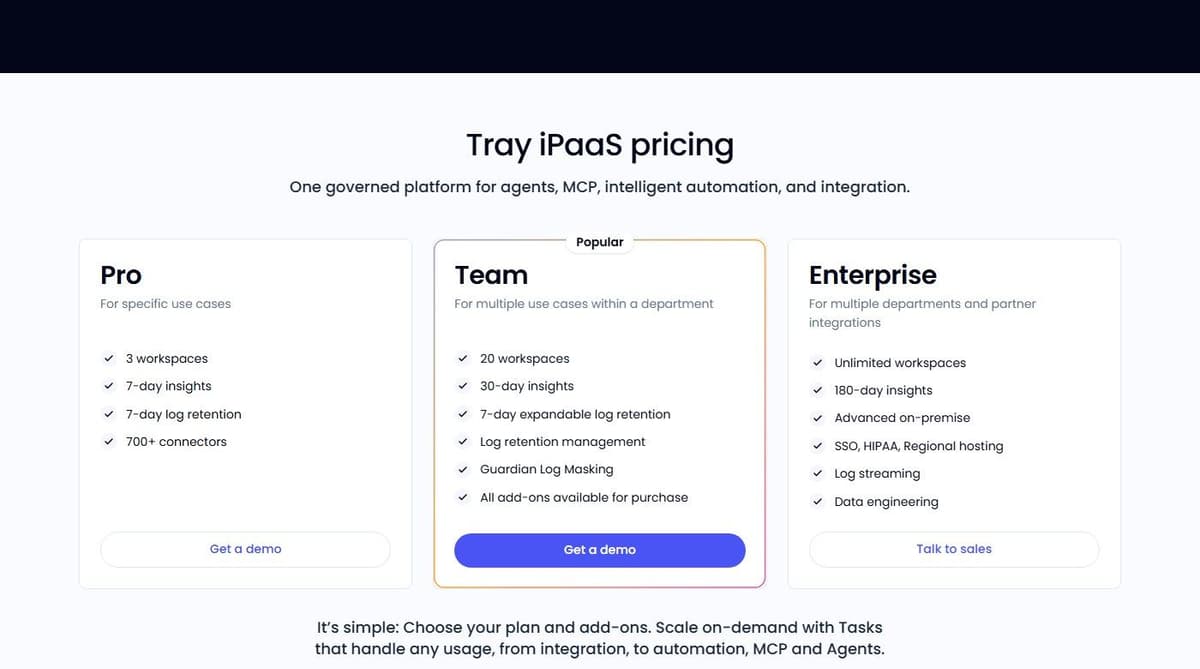
Boomi publishes an entry price. Among enterprise platforms, that is rare. Pay-As-You-Go costs $99 per month plus usage, billed monthly, and includes full access to the Boomi Enterprise Platform with community support, documentation and basic monitoring. The Base pay-as-you-go edition covers one environment, two users, unlimited connections, workflow orchestration and built-in version control. A 30-day free trial gives access to the full platform.
Boomi's Pay-As-You-Go documentation fills in the usage rate: a flat $0.05 per Boomi Message on top of the $99 base fee, which is charged even in a month with no Messages. A Message is each inbound or outbound document, including responses to request/response calls; internal component-to-component messages do not count. The FAQ also says the plan is currently open only to active trial users, who opt in with a credit card. The same documentation lists unlimited users and environments and Standard support for Pay-As-You-Go, which differs from the pricing card and Base edition terms above, so confirm which terms apply to your account.
Above that, the Integration subscription tiers are Professional, Professional Plus, Enterprise and Enterprise Plus, all priced through sales. Enterprise connectors are eligible at extra cost, Enterprise adds custom roles, clustered runtime and parallel processing, and Enterprise Plus adds message queuing. Boomi positions the platform around AI agents, with an Agent Control Plane and Agentstudio for building agents and governed MCP tools. By its own count, Boomi puts enterprise applications available for AI at 1,000 or more.
One catch: the $99 entry is a floor, not a forecast, since usage is billed on top, and the tiers most enterprises need are quoted. For the platforms buyers set against Boomi, see Boomi alternatives.
3. MuleSoft Anypoint Platform: best for API-led integration in the Salesforce stack
MuleSoft Anypoint Platform is the choice when integration work is really API work: designing, publishing, securing and reusing APIs across a large estate, with Salesforce as the center of gravity. MuleSoft Automation combines MuleSoft RPA, MuleSoft Composer and Anypoint Platform into one automation offering, so process automation and API management arrive from the same vendor. The line about the world's number one integration and API platform is MuleSoft's own marketing claim. Treat it as positioning.
As of September 2026, MuleSoft's own pricing page starts its packages at $2,000 per month, billed annually, with usage metered in Mule Credits, but it does not publish the credit allocation per package or the credit rates, so the real bill still comes from a quote. What you can do without a sales call is try it. Anypoint Platform offers a 30-day free trial with no credit card and no installation, enough to build something real before procurement starts.
Fit is the limitation here, not quality. This is a platform for teams with integration engineers and an API strategy, and its budget starts with a quote cycle. If your roadmap is mostly point-to-point app connections, a lighter self-serve platform gets there sooner. Our guide to MuleSoft alternatives covers what competes with it.
4. Celigo: best for flat-rate pricing by endpoints and flows
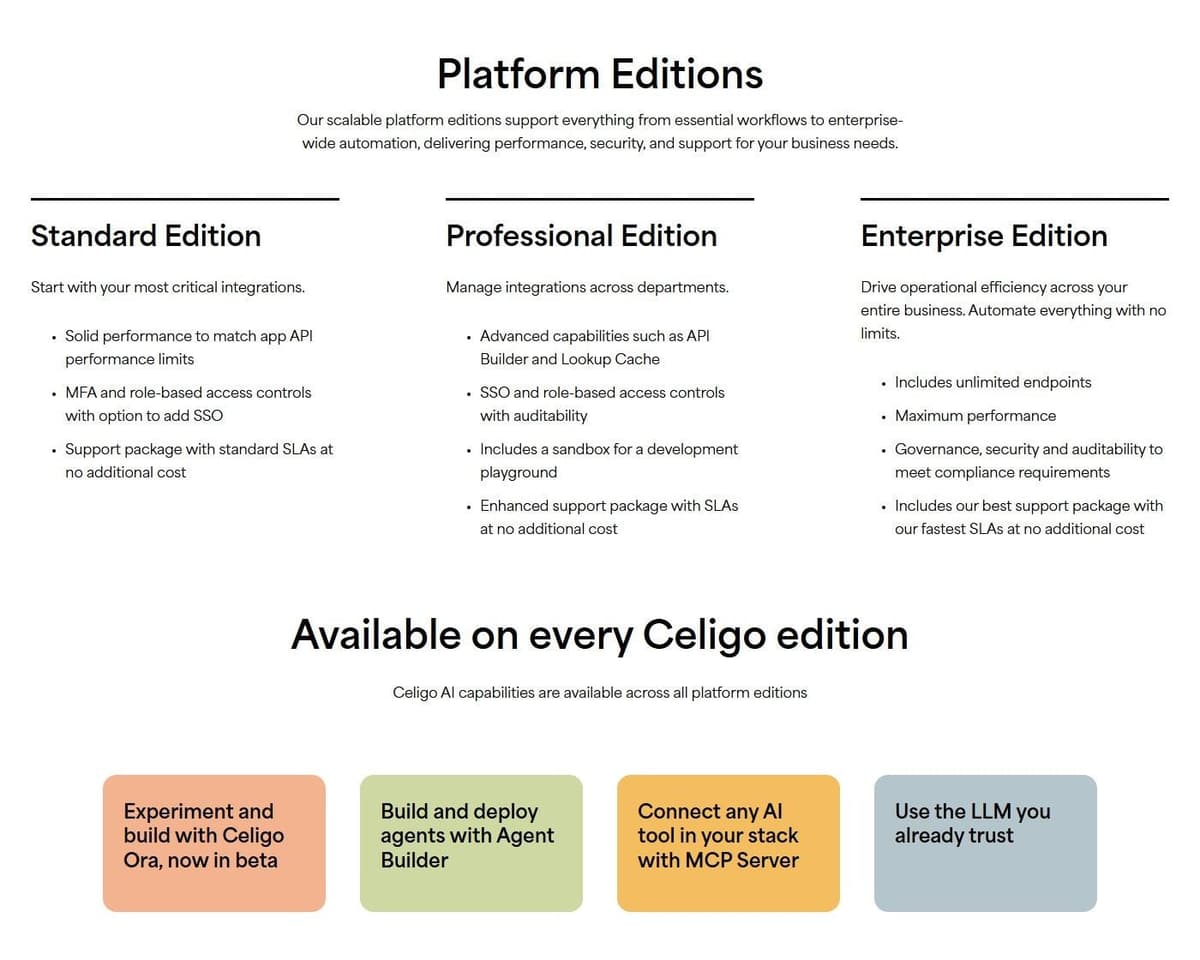
Celigo prices by endpoints and flows at a flat rate rather than per task or per transaction, and states there are no volume-based charges. For a team whose volumes swing hard month to month, that is a different risk profile from every credit and task model on this list. You size the platform by how many systems you connect and how many flows you run, not by how busy those flows get. In practice the bill moves when your architecture moves, not when a promotion doubles order volume for a month.
"Pay for endpoints and flows, not per task or transaction, so you can scale without hidden costs."
Source: celigo.com
Editions are Standard, Professional and Enterprise, all priced through sales, with a 30-day free trial as of September 2026. AI capabilities, including an Agent Builder and an MCP Server, come on every edition rather than only the top tier. You can also drive the platform programmatically through a CLI, Platform MCP or API. The number one rated iPaaS line on its site is Celigo's own marketing claim.
One limitation: endpoint and flow counts have to be estimated up front, and adding systems later moves the price. Map your integration inventory before the trial ends.
5. SnapLogic: best for unlimited pipelines at a fixed package price
SnapLogic sells Essential, Professional and Enterprise One packages at a predictable price with unlimited pipelines, data movement and integrations inside the package. If your team's instinct is to build one more pipeline whenever a question comes up, a model that does not bill per pipeline removes an awkward internal conversation. Pricing is customized through sales. Budgeting is simpler that way: a team that adds pipelines during a busy quarter does not create a surprise line item.
Core Snap Packs, the prebuilt connectors, are included in the base packages, while premium Snap Packs are sold a la carte. AgentCreator for building AI agents is an add-on to any package. SnapLogic describes itself as an agentic integration and applied AI platform with Enterprise MCP that turns pipelines into tools AI agents can call. That is the vendor's own positioning of the product.
Two limitations are worth planning around. The a la carte items, premium Snap Packs and AgentCreator, sit outside the predictable base price. And SnapLogic publishes no trial terms, so ask sales what evaluation access looks like.
6. Microsoft Power Automate: best for Microsoft 365 and desktop RPA
Power Automate is the default answer when the estate is already Microsoft. It covers cloud flows across Microsoft services and third-party connectors, plus desktop automation for the legacy applications that never grew an API. It is also one of the few options here that treats attended and unattended RPA as first-class. For teams already standardized on Microsoft 365, the real question is which unit to buy. See Power Automate alternatives for cross-platform options.
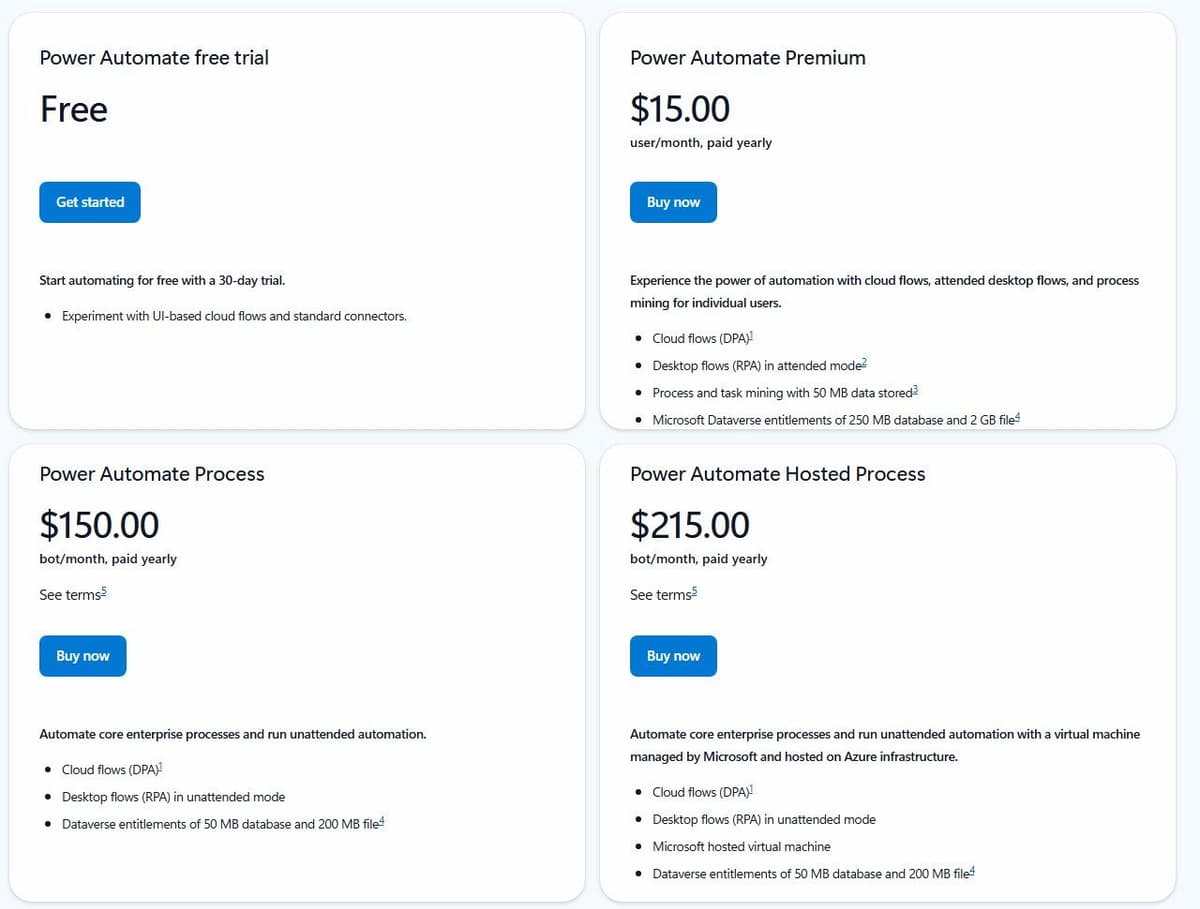
Power Automate has a permanent Free license for eligible work or school accounts in a Microsoft Entra tenant. It covers cloud flows with standard connectors without sharing, plus local attended desktop flows. Premium connectors and broader deployment requirements need additional licensing. Premium is a user license; Process can license a cloud flow for premium and custom connectors regardless of the owner or triggering user's license. Desktop automation has further licensing conditions. Free, a Premium trial and Process are different options.
Premium costs $15.00 per user per month paid yearly and includes cloud flows, attended desktop flows and process mining for individual users. Process costs $150.00 per bot per month paid yearly and runs unattended desktop flows. Hosted Process costs $215.00 per bot per month and adds a Microsoft-hosted virtual machine, which removes the job of maintaining your own RPA machines. Premium includes Microsoft Dataverse entitlements of 250 MB database and 2 GB file storage. A 30-day free trial covers UI-based cloud flows and standard connectors.
Arithmetic is the limitation. Premium licensing scales with headcount rather than with automation volume, and unattended work is priced per bot, so a handful of always-on processes gets expensive quickly.
7. Make: best self-serve visual builder for mid-market teams
Make is the visual builder most mid-market teams land on when linear automation stops being enough. Routers, iterators and aggregators are the pieces Zapier's own comparison credits for Make's appeal to power users. The canvas keeps branching logic legible. The Free plan includes access to 3,500+ apps, which is Make's own count.
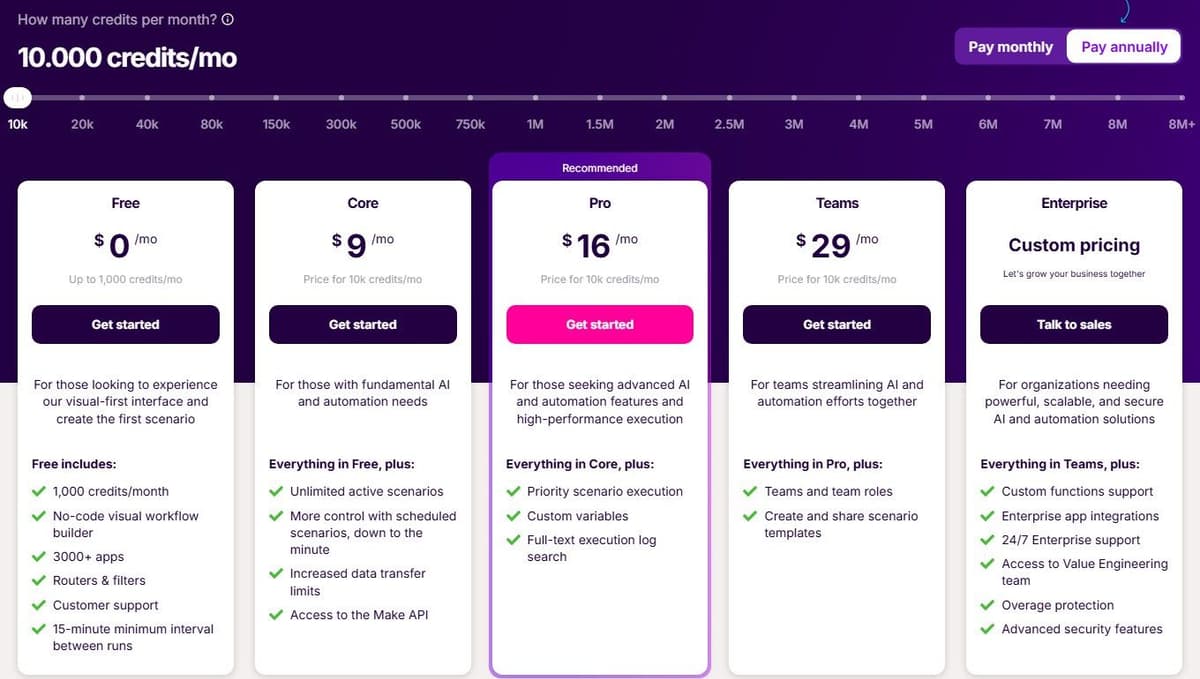
Billing is credit-based: ordinary module operations, such as adding a Google Sheet row, consume a credit each, while Router and Filter consume none. Free is $0 a month with up to 1,000 credits a month, and Core is $9 a month billed annually for 10,000 credits. Make AI Agents are available on all plans with Make's AI Provider. Connecting your own AI provider requires a paid Make plan. With a custom connection, Make charges for operations and the AI provider bills token usage separately. Maia, its plain-language assistant, is included in all plans, and the pricing page lists a Make MCP Server. Enterprise adds 24/7 priority support with 2-hour response SLAs, SSO, role-based access controls and audit logs.
Watch the credit math. Code execution costs 2 credits per second, and on Free the minimum interval between scheduled runs is 15 minutes, which is Make's published Free-plan limit as of September 2026. To compare Make with its own rivals, see Make.com alternatives.
8. Zapier: best for the widest app catalog with a published price list
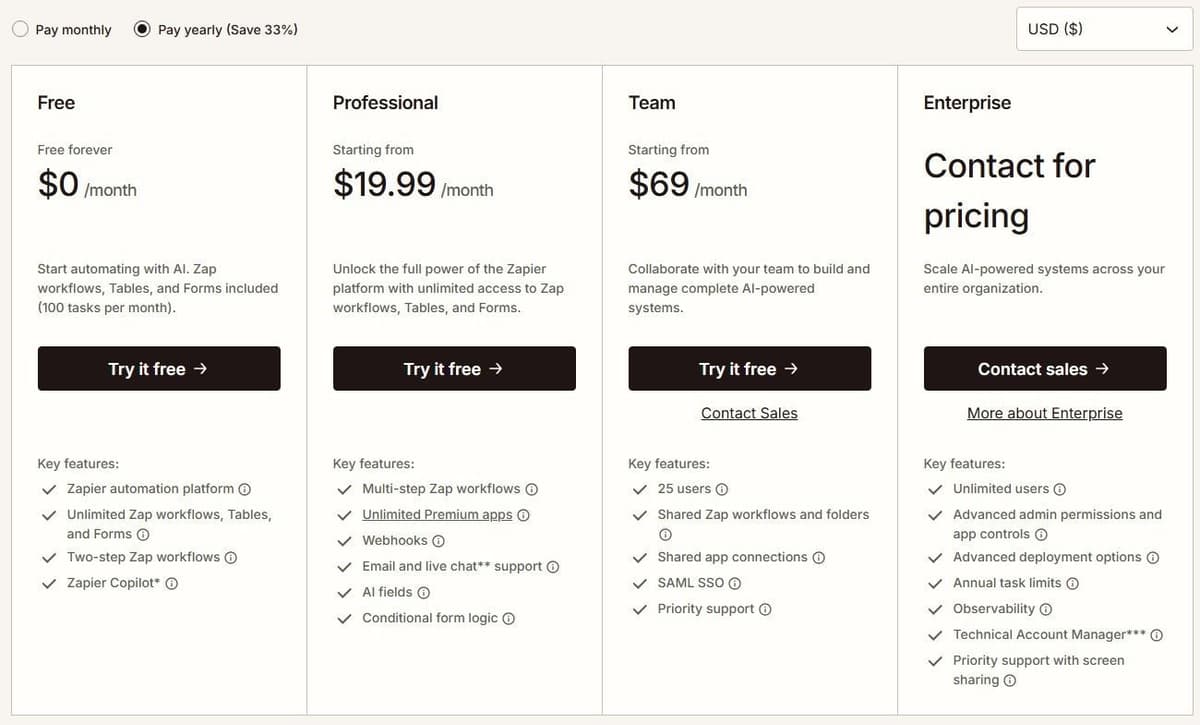
Zapier wins on catalog size, and you can price it without sending an email. According to Zapier, more than 9,000 app integrations are available, which is the vendor's own figure. Check who maintains each integration you need and where failures are reported. Free is $0 a month with 100 tasks, two-step Zaps, Tables and Forms, and Copilot is on every plan. Professional starts at $19.99 a month billed annually for 750 tasks. Enterprise pricing is not published and requires contacting sales. The Team card lists 25 users, and the Enterprise card lists unlimited users.
Zapier's Team seat information is inconsistent: its plan card and comparison table list 25 users, while its FAQ says Team and Enterprise allow unlimited users. Confirm the Team allowance before purchase.
An ordinary successful billable action uses one Zapier task; built-in exemptions and product-specific rates still apply. Polling trigger checks do not consume tasks. Polling runs at 15 minutes on Free, 2 minutes on Professional and 1 minute on Team and Enterprise. Zapier Agents Free includes 400 activities per month. An activity is not a complete agent run: one run can consume several activities. Agents Pro includes 1,500 monthly activities. This allowance is separate from Zap task usage, and one Zapier MCP tool call consumes two tasks.
Everything else shares one task meter. Billable Zap actions, AI steps, Code steps and MCP calls use the account's task allowance at their applicable rates. Zapier SDK actions are free during the current beta. Using the SDK inside Code by Zapier does not remove the Code step's own task or runtime charges. Our Zapier alternatives guide compares the platforms that compete with it.
9. Latenode: for runtime billing with AI and code
Latenode is a self-serve automation platform that bills workflow runtime in CPU seconds, not per operation or per step. Add steps to a scenario and the bill does not multiply. The first 10,000 CPU seconds each month are free on both plans.
Free is $0 a month with no credit card, 5 active workflows, one execution worker, a 3-minute run limit and 3 days of run history. Pay as you go has no base fee and keeps the same 10,000 free CPU seconds. Above that it charges $0.00012 per CPU second from 10,001 to 100,000, with lower rates in higher brackets. Only the time inside a bracket is billed at that bracket's rate. Caps rise too: unlimited active scenarios, 5 parallel workers, 10-minute runs and 30-day history. Custom JavaScript nodes, an AI Copilot, an AI agent builder, a headless browser and 335+ LLM models are included.
Cost tracks how long runs take, so it is not directly comparable to tasks, credits or transactions. That is the trade-off. This is a self-serve platform, not an enterprise iPaaS sold on a contract.

10. Activepieces: best open-source alternative you can self-host
Activepieces is the entry here for engineers who want the source code and a deployment choice. It is open source at the core and can be embedded inside another product, and it offers 760+ integrations, which is the vendor's own count as of September 2026.
Activepieces Community Edition is a free, self-hosted option built on the MIT-licensed core. It has no credit meter or cap on runs and users. You pay for hosting and operations, and for any external services your flows use. Community Edition excludes features such as SSO, audit logs, projects and Git Sync. Its credit-metered plans cost the same on Activepieces' cloud or your own servers, and their credit allowances do not apply to the free Community Edition.
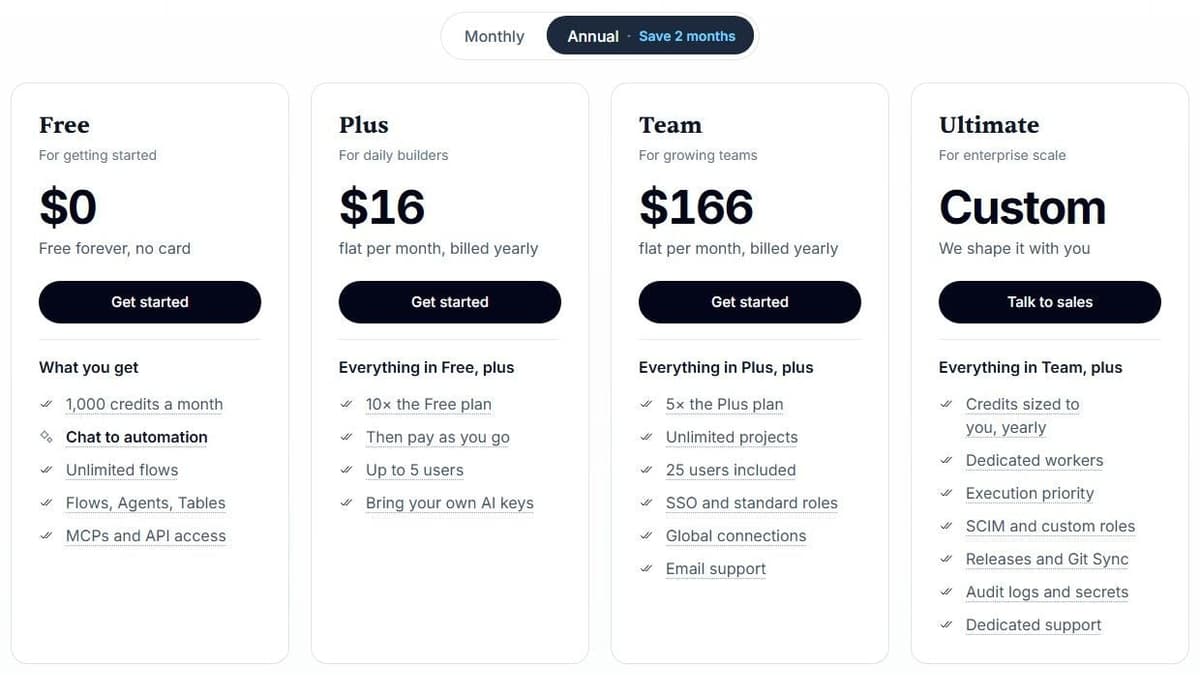
Those plans are credit-based and cheap to start. Free gives 1,000 credits a month for up to 5 users, Plus is $16 a month billed annually with 10,000 credits a month for up to 5 users, Team is $166 a month with 50,000 credits for 25 users, and Ultimate is custom. Overage on Plus and Team costs $0.007 per credit. One credit covers a whole run regardless of how many steps it contains, with AI charged separately. With Activepieces-supplied AI models, each AI step adds 2 credits for a fast model, 10 for a smart model or 20 for a frontier model; agentic actions add one credit each. On Plus and higher plans, using your own AI provider keys makes each AI step cost one Activepieces credit, with model usage billed separately by your provider.
Catalog depth is the trade-off, along with the operational work that self-hosting brings.
How to choose a Workato alternative
Start with the contract question. Boomi's subscription tiers, Celigo, SnapLogic, Tray.ai and Workato's enterprise editions all price through sales, and MuleSoft publishes only a starting price of $2,000 per month billed annually, which means a quote, a procurement cycle and terms you can negotiate. Power Automate, Make, Zapier, Latenode and Activepieces publish rates you can put in a spreadsheet today. Neither route is better; they fail differently.
Then pick your unit. Celigo counts endpoints and flows. Tray.ai and Zapier count tasks. Make and Activepieces count credits, Latenode counts CPU seconds, Power Automate counts users and bots, and SnapLogic sells packages with unlimited pipelines inside them. Convert one real month of Workato volume into each unit before comparing headline prices. The same workload looks cheap in one unit and expensive in another.
Here is that conversion for one recipe: a trigger and three actions, run 1,000 times a month with no loops or AI steps, on the cheapest covering tier, billed annually where offered.
| Platform | Per month | Plan and price |
|---|---|---|
| Workato | 3,000 Tasks | Credits per Task not published; Pro from $75 |
| Zapier | 3,000 tasks | Professional 5,000 tasks, $89 a month |
| Make | 4,000 credits | Core, $9 a month |
| Activepieces | 1,000 credits | Free covers it |
| Latenode | 1,000 runs x run time | 10,000 CPU seconds free, then $0.00012 each |
Make also bills the trigger. Latenode's bill depends on run length and model usage: here, runs of 10 seconds or less stay free, and 20-second runs cost $1.20.
Compare the requirements your current recipes depend on
| Requirement | What to compare | Evidence to request |
|---|---|---|
| Private systems | Network path and credentials | Diagram for your CRM or ERP |
| Access control | SSO, provisioning, permissions | Control list for the edition |
| Change management | Test and production split | A change promoted end to end |
| Recovery | Retries, replay, no duplicates | A failed record recovered |
| Connector depth | Objects, fields and API limits | Docs for your endpoints |
| Operational ownership | Logs, alerts, support levels | A named responder and steps |
A cheaper subscription is not a complete migration budget. Include the work needed to rebuild connections, replace unsupported actions, validate permissions and operate the new workflows. Keep a requirement as "unverified" until the relevant edition and deployment have been demonstrated.
Move one workflow without creating duplicate records
Start with a workflow whose inputs, outputs and owner are known. Map every trigger, action and field, then test the replacement against sample data in a sandbox or a separate destination. During parallel comparison, let only one platform write to production. Use the source event ID as an idempotency key and check how the destination handles repeated requests. Compare outputs, failures, latency and usage before switching the trigger. Keep the original workflow disabled but recoverable until the replacement has completed a normal business cycle.




