



Quick answer: the best ecommerce automation tool for each need
Automation inside Shopify: Shopify Flow; email and SMS on contact pricing: Klaviyo; email and SMS with a free plan: Omnisend; ecommerce email at a flat entry price: Drip; live chat and AI support free: Tidio; Shopify helpdesk with an AI agent: Gorgias; shipping labels: ShipStation; multichannel orders and inventory: Linnworks; subscriptions: Recharge; widest app catalog: Zapier; visual multi-step scenarios: Make; custom workflows with AI steps and a database: Latenode.
Each figure names its billing period and its meter, and prices are in US dollars as listed in September and October 2026.
What ecommerce automation tools do in 2026
Ecommerce automation means letting software handle routine store work the moment something happens. Each tool below automates one slice of that work, and most stores run several side by side.
These tools take over the repetitive, rule-shaped work: abandoned-cart and post-purchase flows, order tagging and routing, fraud holds, shipping label creation, inventory sync across channels, subscription renewals, ticket triage and live chat, review requests, and back-office sync into accounting.
The market has seven families. Platform-native automation lives in the store admin, and marketing automation sends email and SMS. Support automation runs the inbox, chat and AI replies. Shipping tools buy labels and pick carriers, and subscription apps handle recurring orders and failed payments. Order management keeps stock and orders straight across marketplaces. General workflow platforms glue the rest together. Our guide to business process automation tools compares workflow, iPaaS and BPM platforms.
Families meter differently: per contact, per email or SMS, per conversation, per ticket, per shipment, per order, per task or credit, or per CPU second. That is why every price below names its unit.
Which tool runs which store task, and what you pay for
| Store task | Tools in this guide | What the bill counts |
|---|---|---|
| Cart recovery | Shopify (built in), Klaviyo, Omnisend, Drip | Shopify plan; list size |
| Post-purchase and review emails | Klaviyo, Omnisend, Drip | List size; Klaviyo Reviews counts orders |
| Order flags, holds and tags | Shopify Flow | Shopify plan, no separate Flow price |
| Low-stock reorders | Shopify Flow; Linnworks | Shopify plan; orders a month, by quote |
| Shipping labels | ShipStation | Shipments, plus postage |
| Subscriptions | Recharge | Monthly fee plus a cut of each transaction |
| Support triage, AI replies | Tidio, Gorgias | Conversations; tickets |
| AI product copy, accounting sync | Zapier, Make, Latenode | Tasks; credits; CPU seconds |
Ecommerce automation tools at a glance
| Tool | Best for | Meter | Entry price |
|---|---|---|---|
| Shopify Flow | Automation in Shopify | Per store, per month | In Shopify plans |
| Klaviyo | Email and SMS flows | Active profiles | Free plan; est. $45/mo |
| Omnisend | Free email, SMS tier | Contacts and emails | Free; $11.20/mo upfront |
| Drip | Flat entry email plan | People and emails | $39/mo, 1-2,500 people |
| Tidio | Live chat, AI support | Conversations | Free plan; $24.17/mo yearly |
| Gorgias | Support helpdesk, AI | Tickets a month | $10/mo, 50 tickets ($40 with AI Agent) |
| ShipStation | Labels and carriers | Shipments a month | From $14.99 a month |
| Linnworks | Multichannel orders | Orders a month | Quote only, no price |
| Recharge | Shopify subscriptions | Transactions | $99/mo plus fees |
| Zapier | Widest app catalog | Tasks a month | Free plan; from $19.99 |
| Make | Visual scenarios | Credits a month | Free; $9/mo yearly |
| Latenode | Custom AI workflows | CPU seconds | Free plan, then usage |
1. Shopify Flow: best automation inside Shopify
As of September 2026, Shopify's US pricing page, with the Pay yearly toggle selected, lists Basic at $29 a month, Grow $79 and Advanced $299. Plus shows "from $2,300 a month" on its card under that same toggle, and the comparison table prints the same $2,300 in its Pay monthly row, so the page publishes no yearly saving for Plus. The comparison table sets Pay monthly prices of $39, $105 and $399 a month against those yearly figures for Basic, Grow and Advanced, and prints no Pay yearly figure for Plus. Shopify localizes prices by country, so confirm current local prices before you buy.
A 3-day free trial needs no credit card. Most plans then run at $1 a month for the first 3 months before standard pricing starts, an introductory offer the page never states for Plus.
The page never names Shopify Flow. It lists 'Create marketing automations' and 'Abandoned checkout recovery' on all four plans, and 'Workflow Automation' appears only as a product link in the site navigation, so the pricing page does not show which plans include Flow. Shopify's own Flow product page answers it: "Shopify Flow is available to businesses in all countries on the Basic, Grow, Advanced, and Shopify Plus plans." That page publishes no separate price for Flow, so budget the Shopify plan itself.
2. Klaviyo: best email and SMS flows on contact-based pricing
Klaviyo prices by active profiles, and one slider sets Email, Personalization, Social marketing and Customer Hub at once. Reviews is metered on orders per month instead. As of September 2026, Klaviyo's pricing page lists a free plan that covers up to 250 profiles with 500 emails a month. It also carries $5 of mobile messages a month, $5 of Composer usage a month, built-in reporting and email support for the first 60 days.
With the Marketing slider at its default 1,500 active profiles, the page estimates about $45 a month for Email, including 15,000 emails a month. That figure sits at the default slider position, not a fixed plan price, and it moves with the profile count. In September 2026 the page listed Composer as an add-on at $20 a month, with extra usage sold in $10 increments. Treat that as a promotional rate: the page carries a 30% off badge over its AI agents and dated introductory pricing on neighboring add-ons, and as of September 17, 2026, the Composer card was discounted. Check Composer's current price and its unit before you add it.
Klaviyo's pricing FAQ says an account over the free limits cannot send more emails or texts until the next billing cycle or until it moves to a paid plan. It does not say what happens above a paid profile band.
3. Omnisend: best email and SMS marketing with a free plan
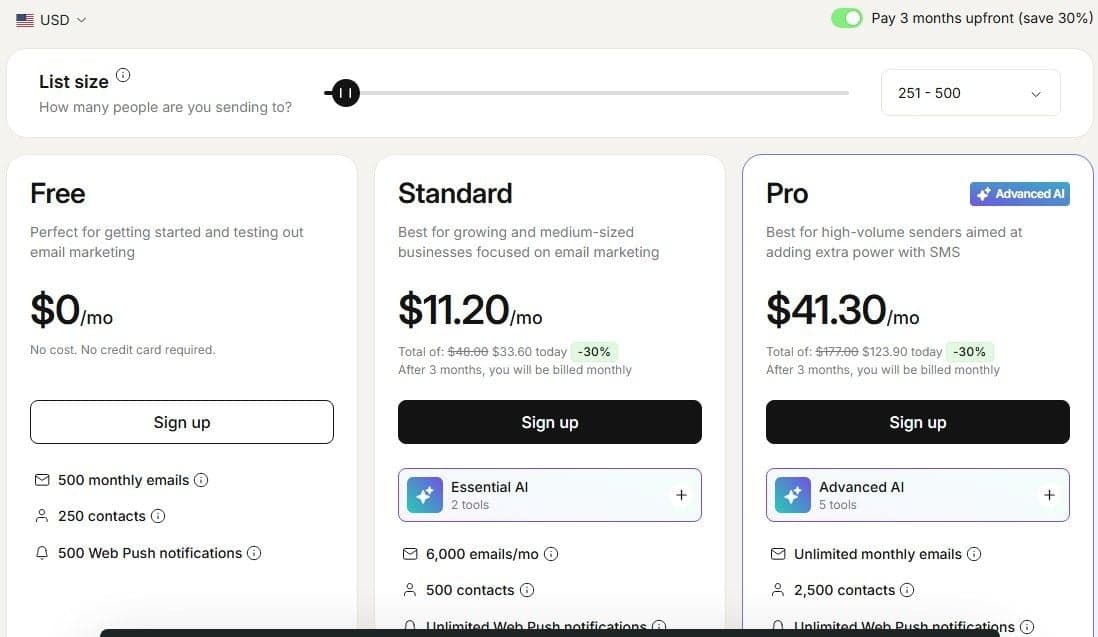
Omnisend's Free plan costs $0 a month with no credit card and allows 500 emails a month to up to 250 contacts, plus 500 web push notifications. It bills by list size, counting subscribers and non-subscribers who received automated messages. It never bills unsubscribed contacts, and charges in USD whatever the page displays.
"Free ... Perfect for getting started and testing out email marketing ... $0 /mo ... No cost. No credit card required. ... 500 monthly emails ... 250 contacts ... 500 Web Push notifications"
Source: omnisend.com
As of September 2026, at the default 251-500 contact band, Standard shows $11.20 a month with 6,000 emails a month for 500 contacts. That is the discounted rate for paying three months upfront ($33.60 instead of $48.00, a 30% discount), and the plain monthly rate is not on the page. Pro shows $41.30 a month with unlimited monthly emails and SMS from $0.007, again a three-months-upfront rate ($123.90 instead of $177.00). The Pro card reads 2,500 contacts even with the list-size selector at 251-500, so check which contact count the Pro price covers.
United States SMS runs from $0.009 per message on $10 to $49.99 of prepaid credits down to $0.007 per message from $10,000 of credits.
4. Drip: best ecommerce email marketing with a flat entry price
Drip's calculator shows $39 a month for a list of 1 to 2,500 people, after a 14-day free trial that needs no credit card. Two statements on that page clash: as of September 2026 the calculator lists unlimited email sends inside the $39 price, while the same page says cost depends on the number of active people in the account and the volume of emails sent during the month. Confirm which applies to your send volume before you buy.
Drip withholds unlimited email sends during the trial and asks for an upgrade and card details when the 14 days end. Inclusions are the same at every list size: up to 50 workflows, unlimited sub-accounts, open API access, free migration and the Drip MCP connection. The calculator publishes no band above 2,500 people, though a support answer lower on the same page refers to customers on "the $99/mo + plans", so ask Drip for the band that fits your list.
5. Tidio: best live chat and AI support with a free plan
Tidio's pricing page opens on Annually, which gives two months free, so the figures below are monthly rates on annual billing. Switch the toggle to Monthly for month-to-month prices before you budget.
The Free plan costs $0 with 50 billable conversations and the first 50 Lyro AI conversations free for the life of the account. Starter is $24.17 for 100 billable conversations, with a one-off allowance of 50 Lyro AI Agent conversations. Growth starts at $49.17 from 250 billable conversations, and Plus at $300 plus monthly usage on a custom quota. Tidio sells Lyro as an add-on or on its own, from $32.50 from 50 Lyro AI conversations.
According to Tidio's pricing page, a billable conversation is any live chat, ticket, email or social conversation carrying a message from a human agent. A Lyro conversation is an interaction with at least one AI reply. The 7-day trial opens every plan and feature without a credit card, then the account drops to Free.
6. Gorgias: best support helpdesk with an AI agent for Shopify stores
Gorgias prices the helpdesk by tickets a month, and its plan cards show the price with the AI Agent added: Starter is $10 a month for 50 tickets on its own, or $40 with the AI Agent. Each card splits into a Helpdesk charge and an AI Agent charge. With annual billing, Basic's $77 a month is $50 of Helpdesk plus $27 of AI Agent.
With annual billing, Basic is $77 a month ($924 billed annually) for 300 tickets, Pro $471 a month ($5,652) for 2,000 tickets and Advanced $1,227 a month ($14,724) for 5,000 tickets a month, each on a 12-month term. With monthly billing, Starter is $40, Basic $90, Pro $550 and Advanced $1,430 a month, cancelable at any time. Starter is monthly only, at $40 a month for 50 tickets and 30 automated interactions.
Past the included volume, tickets cost $0.40 each on Starter and Basic and $0.36 on Pro and Advanced. The page then contradicts itself on automated interactions. The plan cards say $1.50 each past the limit, while the compare-plans table on the same page lists $1.00, $0.90, $0.90 and $0.85 by plan, so confirm the rate before you buy. Gorgias advertises a free trial with no credit card but never publishes its length.
Use that trial, or Tidio's 7-day trial, on real past tickets rather than a demo script: angry customers, long threads where a policy matters, and requests that only a person should handle. Write down where the agent must hand the conversation to your team before you switch it on. One user on r/AgentsOfAI wrote that "the bigger lesson was how fast real customer conversations expose stuff you never see in a demo."
7. ShipStation: best shipping labels and carrier automation
ShipStation sells shipment tiers. As of September 17, 2026, that page opens on Monthly, so the figures below are the monthly-billing rates at whichever shipment tier you pick, and the Annual toggle beside them is marked 20% savings. Confirm the toggle on the page before you commit. Starter runs from $14.99 a month at 50 shipments a month up to $174.99 at 5,000, with 3 users and basic automations. Standard runs from $29.99 a month at 50 shipments to $3,599.99 at 100,000 a month, and adds 10 users, unlimited automations and the Shipping API. Premium starts at $349.99 a month for 50 shipments, includes 15 users, and adds advanced inventory and warehouse management with auto-routing.
ShipStation bills postage and insurance on top. The cards show no free plan, although a support FAQ on the same page still mentions one. Plan on the 30-day free trial instead: it needs no credit card and bills the chosen plan at the end of the trial, for the following month of service.
8. Linnworks: best multichannel order and inventory management
Linnworks publishes no prices at all. Its pricing page asks visitors to speak to a specialist for a quote and says plans are priced on order volume rather than revenue, with no percentage fees.
The structure it describes: tiers on monthly orders with overages beyond the tier, each add-on module an extra monthly charge, and the Forecasting module charged as a flat fee instead. It publishes no thresholds and no overage rate, and onboarding is a one-off fee on top. The page lists two packages, Linnworks for end-to-end ecommerce management and SkuVault Core, which is sold only in North America. Its own claims include a Rules Engine with unlimited routing rules, automatic shipping service allocation and inventory sync across 100+ channels.
Whichever tool runs the sync, decide first which system holds the true stock count, map every channel's SKUs and variants to it once, and let changes flow out from there. Merging channel reports by hand once a week leaves days in which the same unit can sell twice. A user on r/ecommerce described a seller's old routine: "they used to download all reports once a week and combine them manually, which is painful."
9. Recharge: best subscriptions on Shopify
Recharge charges a monthly fee plus a cut of each transaction, on top of your ecommerce platform and payment processor fees. Starter is $99 a month plus processing fees of 1.49% and 19 cents per transaction, with a 60-day free trial that starts the day the app is installed. Plus is $499 a month plus 1.34% and 19 cents per transaction, on a 12-month term, with rates that scale as volume grows. Custom is quoted on volume-based rates. Recharge describes that monthly bill as a fixed fee plus variable usage fees from the most recent billing cycle, and publishes no figure.
"Starter ... For emerging brands launching their subscription program ... $99 /mo ... Processing fees at: ... 1.49% + 19¢ per transaction"
Source: rechargepayments.com
Concierge SMS sits on the Plus and Custom plans rather than on Starter, and costs 3 cents per message segment in the US and Canada and 6 cents per message segment internationally, charged separately from the plan fee. Recharge lists workflow automations that set up subscriptions and product transitions. It also covers looping or fixed product journeys with scheduled recurring shipments, plus trial-to-subscription and welcome offers.
10. Zapier: best app catalog for store workflows
Zapier's Free plan is free forever at $0 a month. It has Zap workflows, Tables and Forms with 100 tasks a month, unlimited Zap workflows, two-step Zap workflows and Zapier Copilot under a daily limit, and a new account needs no credit card. According to Zapier's pricing page, which lists two-step Zap workflows on the Free plan, a free Zap has one trigger and one action connecting two apps.
According to Zapier's pricing page, a task counts when a Zap successfully moves data or completes an action, and each successful action counts as a separate task. Professional starts from $19.99 a month billed annually. Zapier's own blog supplies the billing basis and the 750-task allowance the pricing card leaves out, and the card says Starting from, so do not read $19.99 as the flat cost of the plan. It adds multi-step Zap workflows, unlimited premium apps and webhooks. Zapier puts every new account into a free 14-day trial of Professional automatically, with no credit card required.
11. Make: best visual multi-step scenarios for stores
Make's Free plan costs $0 a month with up to 1,000 credits a month. It includes the visual workflow builder, 3,500+ apps, routers and filters, customer support and a 15-minute minimum interval between scheduled runs. Make's help center adds that credits expire at the end of the term.
Credits are Make's renamed billing unit. One operation equals one credit for non-AI apps and for third-party AI apps such as OpenAI, Anthropic Claude and Gemini, while modules using Make's own AI Provider also draw token usage. With yearly billing, Core is $9 a month for 10,000 credits a month, or $10.59 a month with monthly billing. Core adds unlimited active scenarios, scheduling down to the minute and access to the Make API. Every paid tier comes off a credit slider, so the figure you see depends on the volume you pick.
12. Latenode: for custom store workflows with AI steps and a database
Latenode is a workflow layer rather than a store platform or a marketing suite. It connects a store, a marketing tool, a helpdesk, a shipping tool and a sheet or ERP.
The pricing page claims a visual drag-and-drop builder, an AI Copilot in every workflow, an AI Agent builder, 335+ LLM models under one subscription for classifying orders, drafting replies and extracting data, webhook triggers, a headless browser for supplier sites without an API, a built-in database, custom JavaScript nodes and no per-operation fees. For the wider category, see our guide to no-code automation tools.
Runtime is billed in CPU seconds rather than per operation or per step, so adding steps does not multiply the bill. What does move the bill is how long each run takes: the cost is runs multiplied by average seconds per run, so a CPU second is not directly comparable to a Zapier task or a Make credit. The Free plan is $0 a month with no credit card: 10,000 CPU seconds a month, 5 active workflows, one execution worker, a 3-minute limit per run and 3 days of run history. Pay as you go has no base fee and the same 10,000 free CPU seconds a month. Then CPU seconds cost $0.00012 from 10,001 to 100,000, $0.00011 from 100,001 to 200,000 and $0.00010 from 200,001 to 300,000. Nodes calling paid external providers draw PnP tokens at 1 token per dollar.

Ecommerce automation examples
Abandoned cart to email and SMS: a cart sits untouched, the marketing tool sends a reminder, then an SMS if nobody opens it. New order to fulfillment runs the other way, with the store passing the order to the shipping tool, which buys a label and tags the order. Stock that drops under a threshold sends a draft purchase order to the supplier. A refund request opens a helpdesk ticket, and the refund reaches accounting. After delivery, the carrier marks a parcel delivered and a review invitation goes out. Dunning starts on a failed subscription payment: the renewal declines, the customer gets a card-update sequence and the next shipment is held. A supplier feed lands, prices and stock are matched against the catalog, and changed lines are updated. New products can also become posts: our guide to social media automation tools covers the schedulers that publish them.
If an abandoned-cart flow starts to fade, look at the checkout before adding another recovery channel, starting with surprise shipping costs, a missing delivery estimate and a clumsy mobile checkout. Then split the flow by cart value instead of sending every shopper the same sequence. One user on r/ecommerce put the order plainly: "Honestly I'd fix the checkout before adding another recovery tool."
How to choose an ecommerce automation tool
Start with the store platform you already pay for and check what its native automation covers. Then count the three numbers that drive every bill: contacts, orders a month, and conversations or tickets a month. Hold them against each vendor's meter: the same store looks cheap on one meter and expensive on another.
Check whether the entry price is a plan price or a slider position: Klaviyo, Make, ShipStation and Gorgias all move with volume, and Omnisend's headline rate needs three months upfront.
Free plans and trials do different jobs. Free plans from Zapier, Make, Omnisend, Klaviyo, Tidio and Latenode keep a small workflow running at no cost. Trials from Shopify, Drip, Recharge, ShipStation and Gorgias open the full product for a fixed window.
Last, count subscriptions. If two apps already do the job and only need to talk to each other, a workflow platform is cheaper than a third suite. If you need deliverability, carrier rates or a real helpdesk inbox, buy the specialist tool.
Which tools work together and which replace each other
Klaviyo, Omnisend and Drip do the same marketing job, and running two means paying twice for the same contacts. Tidio and Gorgias overlap the same way, both owning the inbox and the AI replies. Shipping, subscriptions and order management sit next to the store rather than against each other, so ShipStation, Recharge and Linnworks can be live at once. Shopify Flow works inside the store admin.
Mailchimp and ActiveCampaign, which sit outside this list, do the same marketing job. Mailchimp prices by contact count: as listed in October 2026, its Free plan covers up to 250 contacts and 500 sends a month, and Standard starts at $20 a month after a 14-day trial. ActiveCampaign also prices by contacts, with Starter, Plus, Pro and Enterprise plans billed yearly; At the default 1,000 contacts, Starter includes 10,000 email sends a month.
General workflow platforms connect the rest: Zapier and Make link apps with no native integration. Latenode plays the same role, with runtime billed in CPU seconds instead of per task or per credit. AI steps, a built-in database and a headless browser sit on one canvas, so a store, a helpdesk, a shipping tool and a sheet or ERP can join one workflow.




